qualcomm/GenieX
GitHub: qualcomm/GenieX
GenieX 是高通推出的端侧 Gen AI 推理运行时,让开发者仅需几行代码即可在 Snapdragon 设备的 NPU、GPU 和 CPU 上本地运行前沿 LLM 与 VLM。
Stars: 8211 | Forks: 1022

### 在 Qualcomm 设备上本地运行前沿 LLM 和 VLM 的最简单方法
[](#)
[](https://geniex.aihub.qualcomm.com)
[](https://github.com/qualcomm/GenieX/releases)
[](LICENSE)
[](https://aihub.qualcomm.com/community/slack)
[**文档**](https://geniex.aihub.qualcomm.com) · [**快速入门**](#quickstart) · [**模型**](#models) · [**社区**](#-community--contact)
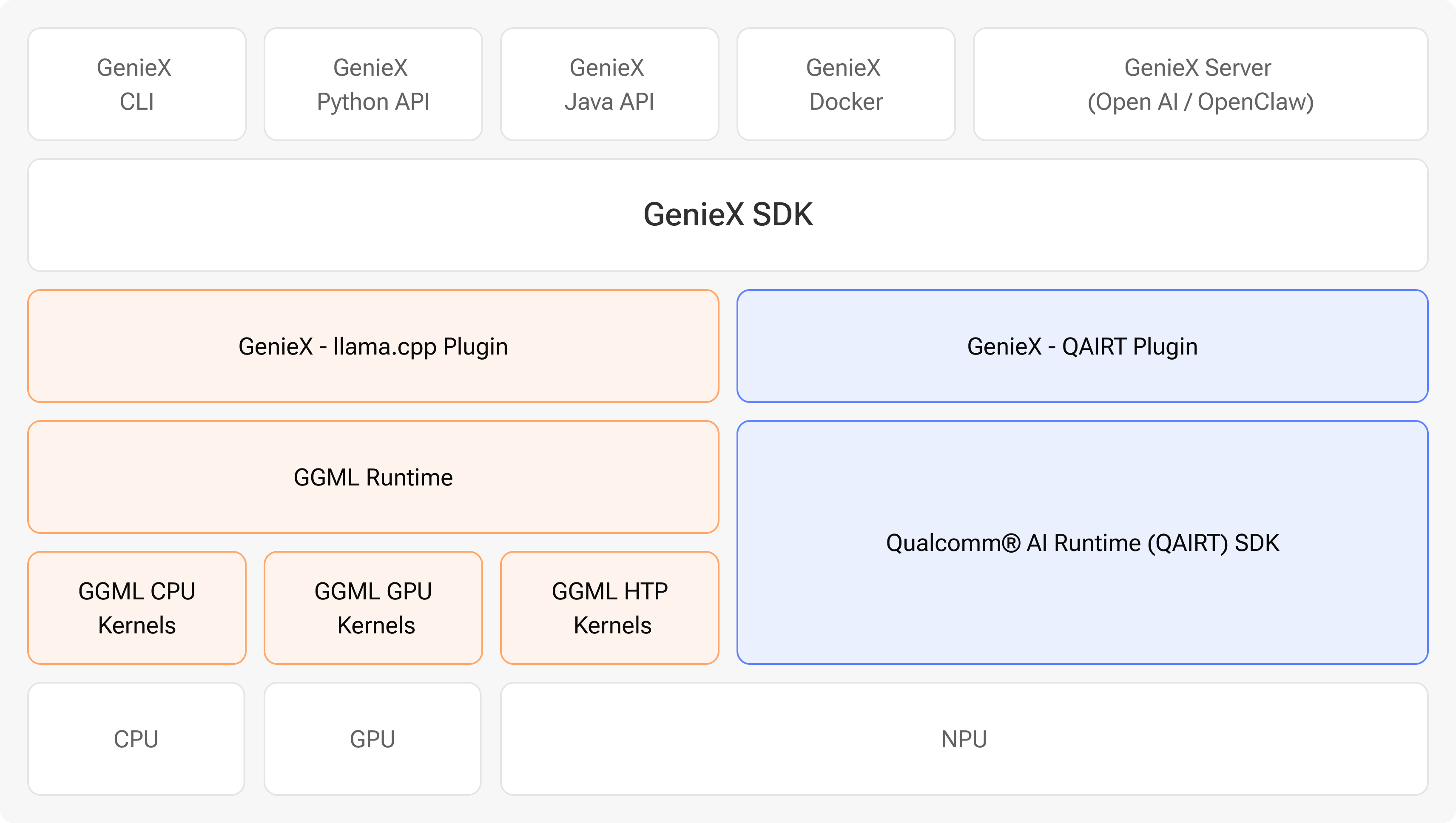
GenieX 是一款**专为 Qualcomm 设备设计的端侧 Gen AI 推理 runtime**。从 Hugging Face 导入几乎任何 GGUF 模型——或者使用来自 [Qualcomm AI Hub](https://aihub.qualcomm.com/models/) 的预编译 bundle——只需几行代码即可在 **Hexagon NPU、Adreno GPU 或 CPU** 上本地运行。底层使用统一的 C SDK,并通过 CLI、Python、Kotlin/Java、Docker 以及兼容 OpenAI 的 server 暴露出来。它是 Qualcomm GENIE 的社区版本。
## 支持的平台
GenieX **仅在 Qualcomm Snapdragon 上运行**。找到您的平台,然后直接跳转到您想使用的接口。
| 平台 | 示例设备 | 跳转到快速入门 |
| --- | --- | --- |
| 🪟 **Windows ARM64** *(Compute)* | Snapdragon X · X Elite | [CLI](#cli) · [Python](#python) · [本地 server](#openai-compatible-server) |
| 🤖 **Android** *(移动端)* | Snapdragon 8 Elite · 8 Elite Gen 5 | [Android SDK](#android-kotlin--java) |
| 🐧 **Linux ARM64** *(IoT)* | Dragonwing QCS9075 | [CLI](#cli) · [Docker](#docker) · [Python](#python) |
## 快速入门
在下面选择您的接口。每个接口都遵循相同的三个步骤——**安装**、**运行**和**文档**——并展示了两种 runtime:来自 Hugging Face 的 **GGUF** 模型(`llama_cpp`)和来自 Qualcomm AI Hub 的**预编译 bundle**(`qairt`,NPU)。
### CLI
 
**安装**
- **Windows ARM64** — [下载安装程序](https://github.com/qualcomm/GenieX/releases),运行它,然后打开一个新的终端。
- **Linux ARM64** — 一行命令,无需 `sudo`:
curl -fsSL https://qaihub-public-assets.s3.us-west-2.amazonaws.com/qai-hub-geniex/install.sh | sh
**运行** — 一行命令与任何模型聊天(对于 VLM,可以拖入图像):
```
# GGUF from Hugging Face → llama.cpp (NPU / GPU / CPU)
geniex infer google/gemma-4-E4B-it-qat-q4_0-gguf
# 来自 Qualcomm AI Hub 的预编译 bundle → Qualcomm AI Engine Direct (NPU)
geniex infer ai-hub-models/Qwen2.5-VL-7B-Instruct
```
📖 **文档** — [安装](https://geniex.aihub.qualcomm.com/en/run/cli/install) · [快速入门](https://geniex.aihub.qualcomm.com/en/run/cli/quickstart) · [命令参考](https://geniex.aihub.qualcomm.com/en/run/cli/reference)
### Python
 
**安装**
```
pip install geniex
```
**运行** — 仿照 Hugging Face `transformers` 的用法(`from_pretrained()` → `.generate()`):
```
# GGUF from Hugging Face → llama.cpp
from geniex import AutoModelForCausalLM
model = AutoModelForCausalLM.from_pretrained("unsloth/Qwen3.5-2B-GGUF", precision="Q4_0")
messages = [{"role": "user", "content": "What is 2+2?"}]
prompt = model.tokenizer.apply_chat_template(messages, add_generation_prompt=True)
for chunk in model.generate(prompt, max_new_tokens=256, stream=True):
print(chunk, end="", flush=True)
model.close()
```
```
# 来自 Qualcomm AI Hub 的预编译 bundle → Qualcomm AI Engine Direct (NPU)
from geniex import AutoModelForCausalLM
model = AutoModelForCausalLM.from_pretrained("ai-hub-models/Qwen3-4B")
messages = [{"role": "user", "content": "What is 2+2?"}]
prompt = model.tokenizer.apply_chat_template(messages, add_generation_prompt=True)
for chunk in model.generate(prompt, max_new_tokens=256, stream=True):
print(chunk, end="", flush=True)
model.close()
```
📖 **文档** — [安装](https://geniex.aihub.qualcomm.com/en/run/python/install) · [快速入门](https://geniex.aihub.qualcomm.com/en/run/python/quickstart) · [API 参考](https://geniex.aihub.qualcomm.com/en/run/python/api-reference)
### 兼容 OpenAI 的 server
 
**安装** — 随 CLI 一起提供([见上文安装](#cli))。
**运行** — 拉取任何模型(GGUF 或 Qualcomm AI Hub bundle),然后提供一个兼容 OpenAI 的 API:
```
geniex pull ai-hub-models/Qwen3-4B-Instruct-2507
geniex serve # serves http://127.0.0.1:18181/v1
```
```
curl http://127.0.0.1:18181/v1/chat/completions \
-H "Content-Type: application/json" \
-d '{
"model": "ai-hub-models/Qwen3-4B-Instruct-2507",
"messages": [{"role": "user", "content": "Hello!"}]
}'
```
将任何 OpenAI 客户端指向 `http://127.0.0.1:18181/v1` —— 无需更改代码。
📖 **文档** — [本地 server 指南](https://geniex.aihub.qualcomm.com/en/run/cli/local-server)
### Android (Kotlin / Java)

**安装** — 将 SDK 添加到您应用模块的 `build.gradle.kts` 中:
```
dependencies {
implementation("com.qualcomm.qti:geniex-android:0.3.1")
}
```
**运行** — 最快的方式是使用示例应用(聊天 UI,支持 GGUF + Qualcomm AI Hub bundle 的模型选择器,支持 VLM):
Android 示例应用位于 [`qualcomm/ai-hub-apps`](https://github.com/qualcomm/ai-hub-apps/blob/release/geniex_chat_android/README.md)。克隆它,在 Android Studio 中打开示例应用,然后点击 **Run**。
📖 **文档** — [安装](https://geniex.aihub.qualcomm.com/en/run/android/install) · [快速入门](https://geniex.aihub.qualcomm.com/en/run/android/quickstart) · [API 参考](https://geniex.aihub.qualcomm.com/en/run/android/api-reference)
### Docker

**安装**
```
docker pull docker.io/qualcomm/geniex:latest
```
**运行** — 该容器封装了 CLI,因此 `geniex infer …` 的功能与上述完全一致。
📖 **文档** — [Docker 指南](https://geniex.aihub.qualcomm.com/en/run/linux/install)
### C / C++ SDK
  
**安装** — 链接单个 C 头文件 [`sdk/include/geniex.h`](sdk/include/geniex.h);所有其他接口都是它的轻量 wrapper。
📖 **文档** — [sdk/README.md](sdk/README.md) · [notes/build.md](notes/build.md)
## 模型
GenieX 具有两种 runtime,让您在一个技术栈中同时获得**广泛的模型覆盖**和**极致的 Snapdragon 性能**。同时支持 LLM 和 VLM。
| | **llama.cpp** (`llama_cpp`) | **Qualcomm AI Engine Direct** (`qairt`) |
| --- | --- | --- |
| **获取模型途径** | [Hugging Face](https://huggingface.co/models?library=gguf) (任何 GGUF) | [Qualcomm AI Hub](https://aihub.qualcomm.com/models/) (预编译) |
| **格式** | GGUF | 按芯片组区分的 bundle |
| **计算单元** | NPU · GPU · CPU | 仅限 NPU |
| **适用场景** | 导入您自己的 GGUF | 最高的 NPU 性能 |
## 📄 许可证
BSD 3-Clause — 详见 [LICENSE](LICENSE) 和 [NOTICE](NOTICE)。
本项目的使用还受 Qualcomm [使用条款](https://www.qualcomm.com/site/terms-of-use) 的约束。
标签:AI运行时, DLL 劫持, JS文件枚举, NPU, Qualcomm, UML, 人工智能, 大语言模型, 用户模式Hook绕过, 端侧推理, 请求拦截, 逆向工具, 通知系统
