landhb/HideProcess
GitHub: landhb/HideProcess
一个基于 DKOM 技术的 Windows 内核 rootkit 演示项目,通过操作 EPROCESS 链表实现进程隐藏。
Stars: 700 | Forks: 120
# HideProcess
#### 更新:现在同时支持 64 位和 32 位架构!已在以下系统测试通过:
* Windows 10 企业版 x64 Build 15063.rs2_release.170317-1834
* Windows 7 SP1 x86
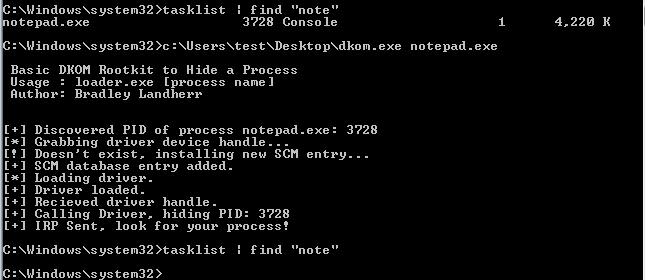
### 文章
有关此处所用概念的更多信息,请查阅我的[文章](http://www.landhb.me/posts/v9eRa/a-basic-windows-dkom-rootkit-pt-1/)。
### 限制
无法绕过 PatchGuard 或驱动程序签名要求。
请在虚拟机中运行此程序。目前在 Windows 10 上的测试观察显示,在取消进程链接后大约 30 分钟会引发蓝屏死机 (BSOD)。
### 编译驱动程序
该驱动程序有许多依赖项,您需要使用 msbuild 或 Visual Studio 进行编译。我在开发过程中使用了 Visual Studio。您需要:
1. [Windows 10 SDK](https://developer.microsoft.com/en-us/windows/downloads/windows-10-sdk)
2. [WDK 10](https://msdn.microsoft.com/en-us/library/windows/hardware/ff557573(v=vs.85).aspx)
设置好这些并将其与 Visual Studio 集成后,启动一个新的空 KMDF(内核模式驱动程序框架)项目,并导入 /driver 文件夹中的文件。
在 Debug -> [ProjectName] Properties -> Driver Settings -> General 下,确保您的 Target OS Version 为 Windows 7,Target Platform 为 Desktop。
然后在 Build -> Configuration Manager 下,确保 Platform 为 Win32,并在 "Active solution platform" 下选择 x86。
现在您应该可以使用 Build -> Build [ProjectName] 来构建项目。如果一切顺利,这将生成一个 .sys 文件。然后将该 .sys 文件放入 c:\Windows\System32\drivers\[ProjectName].sys,或者修改 loader.c 中的以下定义语句为您指定的路径:
#define DRIVER "c:\\\\Windows\\System32\\drivers\\Rootkit.sys"
#### 编译加载程序
对于加载程序,您可以简单地使用 makefile 和 mingw 进行交叉编译。
```
sudo apt-get install mingw-w64
```
然后您可以使用 makefile 通过以下命令创建一个 32 位 Windows 可执行文件:
```
make 32bit
```
并通过以下命令创建一个 64 位 Windows 可执行文件:
```
make 64bit
```
标签:0day挖掘, DKOM, EPROCESS, KMDF, pdftotext, Rootkit, WDK, Windows内核, Windows驱动开发, x86/x64, Zeek, 内核安全, 内核对象操作, 反取证, 安全测试, 安全评估, 客户端加密, 客户端加密, 恶意软件研究, 提权, 攻击性安全, 数据展示, 白帽子, 红队, 网络可见性, 网络安全, 进程隐藏, 隐私保护, 驱动编程