
线速搜索您的 NTFS 驱动器。无需索引。无需等待。
由 Sky, LLC 打造的 Rust 原生引擎 — 开源,MPL-2.0。







```
winget install SkyLLC.UFFS # Windows · then open a new terminal · full install options ↓
```
UFFS 专为**精确的文件名、路径和元数据搜索**而构建,适用于目录遍历、shell 搜索和某些自动化操作成为瓶颈的大规模场景。它是开源的,使用 Rust 编写,并首先为确定性的本地搜索而设计;CLI、TUI、API 和 MCP 都是同一引擎之上的接口。
📖 **[完整用户手册](docs/user-manual/index.md)** — 安装、教程、过滤器、daemon、TUI、MCP 集成等。
## 为什么选择 UFFS?
- ⚡ **1亿条记录验证的规模** — 从跨越 7 个驱动器的 2590 万条记录到跨越 16 个驱动器的 1.004 亿条记录
- 🚀 **冷 / 温 / 热架构** — 从原始 MFT 构建一次,从缓存快速重启,从内存响应热查询
- 🔍 **40+ 过滤器** — 大小、日期、扩展名、类型、属性、路径长度、树大小、正则表达式
- 🧩 **一个引擎,多个接口** — CLI、TUI、daemon、API 和 MCP 共享同一个索引
- 🧭 **确定性的本地范围** — 专为精确的 NTFS 文件名/路径/元数据搜索而设计,而非模糊排序
- 🔒 **无遥测,完全本地化** — UFFS 不会进行任何外部网络调用;您的索引和查询永远不会离开您的机器(可选的 MCP 网关仅绑定您明确启用的本地端口)
- 🖥️ **跨平台离线分析** — Windows 上实时 NTFS;macOS 和 Linux 上离线 MFT 分析
## 实际运行效果
每个片段都使用**真实的二进制文件**针对真实的 NTFS 数据运行,具有未经编辑的耗时和结果计数 — 使用可复现的 [demo kit](scripts/dev/demo/README.md) 捕获。
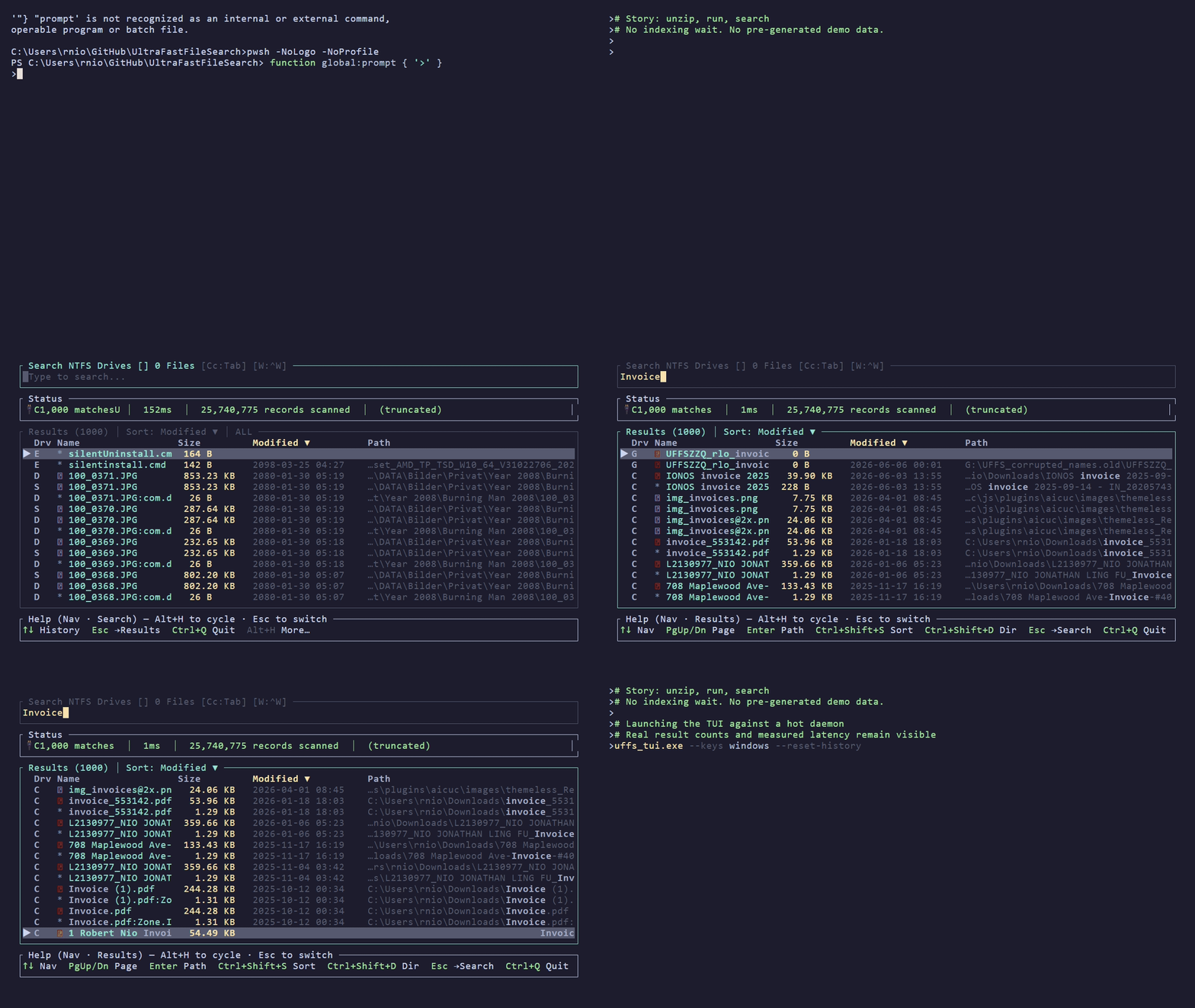
TUI — unzip, run uffs-tui, and browse your own drives in seconds. Full reel.
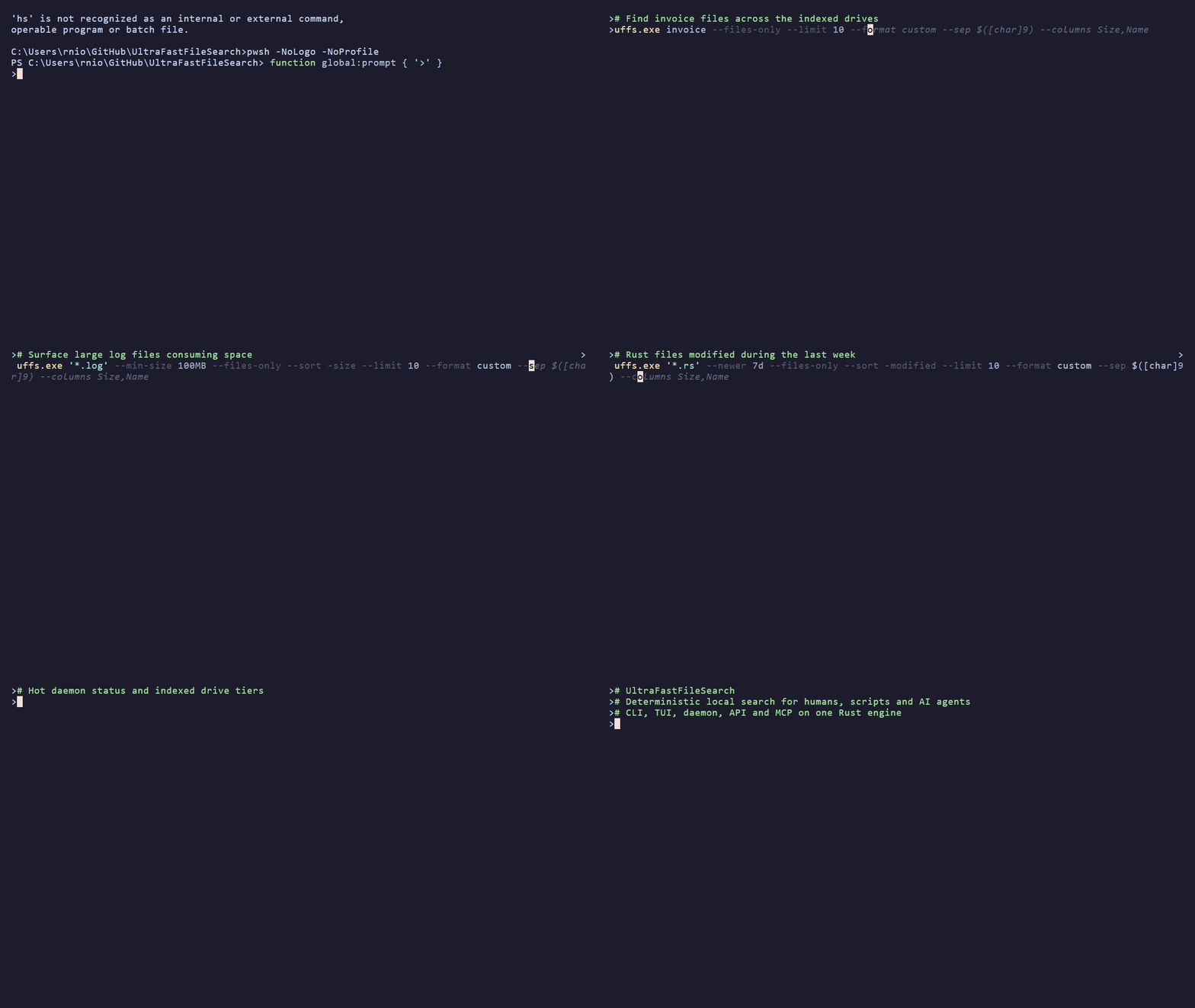
CLI — real commands, real result counts, real measured latency on a hot daemon. Full 9-step reel.
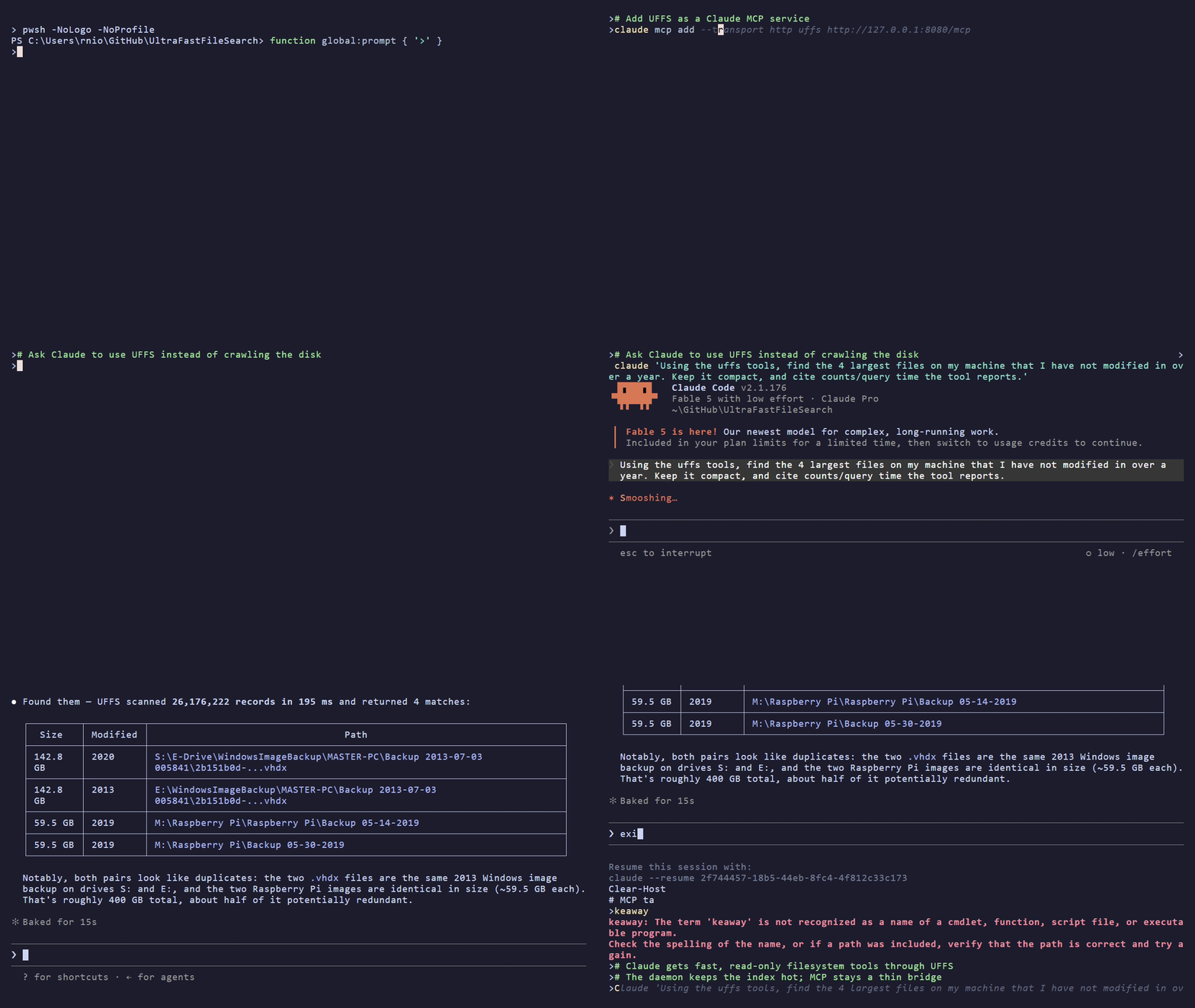
MCP — one question to Claude, one UFFS tool call: 26M+ records scanned in under 200 ms (hot daemon), and the reply cites the measured query time. Deterministic search underneath, MCP on top.
## 基准测试快照 (v0.5.120 · 2026年6月)
📖 **这些数字背后的故事:** [*我拿我的 Rust 文件搜索引擎与 Everything 进行了基准测试,直到我找不到借口*](https://uffs.io/blog/benchmarking-against-everything/) — 我必须首先修正的方法论,Everything 的 CLI 无法运行的大批量导出工作负载,以及无论如何都发布的两次性能衰退。
测量时间 2026-06-11,基于 AMD Ryzen 9 3900XT,64 GB 内存,Windows 11 Pro 24H2 — 在四个 NTFS 卷(C/D/F/G,1280 万条记录,Everything 的内存预算协商集)上进行跨工具测试,在全部七个卷上进行全盘扫描(2590 万条记录;该工作负载仅限 UFFS,因此协商不受限制)。原始数据:[`cross-tool-summary.csv`](docs/benchmarks/raw/2026-06-v0.5.120_cross-tool-summary.csv) · [`full-scan-all-drives.csv`](docs/benchmarks/raw/2026-06-v0.5.120_full-scan-all-drives.csv)。专业级发布报告:[**docs/benchmarks/**](docs/benchmarks/)。
**与竞品对比**(每个单元格测试 10 轮,p50,文件输出):
- **30/30 个直接对比单元比 Everything 更快** — 在 C/D/F/G 及组合索引中,中位数比值为 **0.36×(约快 2.8×)**;四月份快照中的每个单元都有所提升(中位数 −33%)
- **跨越所有 7 个驱动器的全盘扫描导出:2330 万行 → CSV 耗时 12.0 秒 ≈ 195 万条记录/秒**(与四月份相同规模下吞吐量提升 13%)— 这是 Everything 的 CLI 导出无法运行的工作负载(约 2 GB IPC 上限)
- 在目标查询上 **比 UFFS C++ 参考版本快 180×–3400×**(daemon HOT 对比每次调用重新读取 MFT);在组合全盘扫描上快 6.6×
**延迟分布** (v0.5.120):
- 目标查询(精确、前缀、扩展名、子字符串、组合查询)**daemon 端 0–3 毫秒** — 自 v0.5.4 以来保持不变
- 单驱动器 **CLI 端到端 17–39 毫秒**(Windows 进程生成下限 + 查询);跨越组合的四驱动器索引为 21–108 毫秒
**阶段耗时** — 来自早期的捕获记录,已标记版本,未在 v0.5.120 上重新测量:
| 阶段 | 内容 | 全部 7 个驱动器 (v0.5.71) | 单个 NVMe (v0.5.4) |
|-------|--------------|-----------------------:|---------------------:|
| **COLD** | 读取原始 MFT、解析、构建紧凑索引、写入缓存 | 68.5 s | 7.7 s |
| **WARM CACHE** | daemon 重启 + 加载序列化缓存 | **5.7 s** | 6.4 s |
| **HOT (`*` top-100)** | 带有 `--limit 100` 的跨所有驱动器全盘扫描 | **1 112 ms** e2e¹ | 27 ms |
| **HOT (targeted)** | `notepad.exe` / `win*` / `*.dll` / `config` 等 | **29–32 ms** CLI e2e | 9–10 ms |
¹ `*` top-100 路径在第二阶段排序重写后从 v0.5.4 的 163 毫秒数据出现衰退([原始日志](docs/benchmarks/raw/2026-04-v0.5.66_full-benchmark-suite.txt),n=30,标准差 21 毫秒);daemon 端耗时 1081 毫秒 — 这里 CLI 的额外开销可以忽略不计。在[已归档的四月份报告](docs/benchmarks/archive/2026-04-v0.5.66-vs-everything-and-cpp.md#known-regressions)中持续追踪。
**规模上限:** 使用离线 MFT 克隆测试了 **1.004 亿条记录**(v0.5.4 捕获,此后未重新验证)— 目标查询保持在端到端 11–13 毫秒。
## 下载与安装
每个版本都提供预构建的二进制文件、一个 `CHECKSUMS.txt` (SHA256)、每个 crate 的 SBOM (CycloneDX) 以及 SLSA 构建来源证明 — 无需构建工具链。
| 平台 | 下载 | 备注 |
|---|---|---|
| **Windows x64** | [`uffs-windows-x64.zip`](https://github.com/skyllc-ai/UltraFastFileSearch/releases/latest) | CLI + daemon + Access Broker + MCP + MFT 工具 + `uffs-tui` demo。推荐。 |
| **macOS Apple Silicon** | [`uffs-macos-arm64.zip`](https://github.com/skyllc-ai/UltraFastFileSearch/releases/latest) | 仅支持离线 MFT 分析。包含 `UFFS.app` 包 + `uffs-tui` demo。 |
| **Linux x64** | [`uffs-linux-x64.zip`](https://github.com/skyllc-ai/UltraFastFileSearch/releases/latest) | 仅支持离线 MFT 分析。包含 `install.sh` + `uffs-tui` demo。 |
**Windows 快速安装(单条命令) — 通过 [WinGet](https://learn.microsoft.com/windows/package-manager/):**
```
winget install SkyLLC.UFFS
# 如果 msstore source 在你的机器上报错,请固定 source:
# winget install -e --id SkyLLC.UFFS --source winget
```
或者下载上方的 ZIP 文件,将其解压到任意位置,将该文件夹添加到 PATH,然后(在新的终端中):
```
uffs --version
```
**验证下载:**
```
# SHA256 checksum
sha256sum -c CHECKSUMS.txt
# SLSA build-provenance attestation (证明 binary 来自此 exact workflow run)
gh attestation verify uffs-windows-x64.exe --owner skyllc-ai
```
```
# 需要 Rust nightly — channel 固定在 rust-toolchain.toml 中
cargo build --release
```
## 更新
UFFS 会自动更新 — 一条命令即可保持整个安装处于最新状态:
```
uffs --update # update to the latest release if needed (no-op if current)
uffs --update check # is a new release available? (non-mutating)
```
```
uffs --update doctor # health-check the install
uffs --update repair # diagnose + self-heal
uffs --update apply --version v0.6.5 # pin / roll back to a specific release
```
## 快速入门
```
# 一次性(提权):安装 Access Broker → 在此后的任何搜索中不再需要 UAC
uffs-broker --install
# 搜索所有驱动器(安装了 broker 后,这将以非提权方式运行;
# 否则 daemon 将在 elevated shell 中的首次查询时自动启动)
uffs "*.rs"
# 搜索特定驱动器
uffs "*.txt" --drive C
# 按大小、日期、类型过滤
uffs "*.log" --min-size 100MB --newer 7d --files-only
# macOS/Linux:搜索离线 MFT 捕获
uffs "*.txt" --data-dir ~/uffs_data
# Daemon 管理( `--
` = 管理;纯文本词为搜索)
uffs --daemon status
uffs --daemon restart
# Memory tiering — operator-driven 控制 (Phase 8)
uffs --daemon status_drives # per-drive tier + telemetry table
uffs --daemon hibernate # demote every drive to Cold (free RAM)
uffs --daemon preload C --pin-minutes 60 # pin a hot drive in RAM
uffs --daemon forget C --force # evict + delete on-disk caches
```
### 内存分层一览
daemon 将每个驱动器的紧凑索引保持在四个层级之一,通过空闲 TTL 阶梯 + 内存压力级联自动降级,并在首次搜索时提升:
| 层级 | 内存开销 | 数据源 | 时机 |
|---|---|---|---|
| **Hot** | 完整主体 + bloom + trie | 驻留在内存中 | 主动锁定(`preload` 之后)或最近被查询过 |
| **Warm** | 完整主体 + bloom + trie | 驻留在内存中 | 加载后的默认状态;随时准备进行任何搜索 |
| **Parked** | 仅包含 bloom + trie | 驻留在内存中 | 超过 warm TTL 后空闲;无需重新提升即可回答“绝对不在此驱动器上” |
| **Cold** | (内存中无数据) | 磁盘上的加密紧凑缓存 | 超过 parked TTL 后空闲或由操作员休眠;在下次搜索时重新提升 |
操作员命令允许您针对已知的工作负载形态手动进行调整 — `preload` 将搜索繁重的驱动器锁定以防降级,`hibernate` 在长时间空闲期间释放内存,`forget` 永久驱逐驱动器及其磁盘上的缓存,而 `status_drives` 显示实时的层级 + 锁定 + 查询速率快照。
## 工作原理
## 架构
| Crate | 角色 |
|-------|------|
| `uffs-mft` | 直接读取 MFT → 紧凑的内存索引 ([📖](crates/uffs-mft/README.md)) |
| `uffs-core` | 查询引擎 (Polars lazy API) |
| `uffs-daemon` | 后台索引服务器 ([📖](docs/user-manual/daemon.md)) |
| `uffs-cli` | 命令行界面 ([📖](docs/user-manual/cli-overview.md)) |
| `uffs-mcp` | 用于 AI agents 的 MCP 服务器 ([📖](docs/user-manual/mcp.md)) |
| `uffs-polars` | Polars 编译隔离 facade |
| `uffs-client` | IPC 客户端库 |
## 替代方案与生态
UFFS 是在作者编写了[早期的 C++ MFT 搜索工具](https://github.com/githubrobbi/Ultra-Fast-File-Search)之后诞生的,后来为了安全性、性能和可维护性,用 Rust 从头开始重建。
### 比较范围
UFFS 首先在**本地 NTFS 文件名/路径/元数据**赛道竞争:在大型 Windows 文件系统中进行具有确定性范围和可重用内存中 daemon 的精确搜索。
我们**不会**将所有搜索产品折叠成一个“最快搜索工具”的声明。以下是不同的基准测试类别,应分开进行比较:
1. **就绪状态** — 冷构建、温重启和热查询
2. **交互式搜索** — 端到端的 top-N 查询延迟
3. **批量检索** — 流式传输或导出大型结果集的时间
4. **规模上限** — 在不超时、崩溃或产生错误结果的情况下完成的最大语料库
### UFFS 与其他文件搜索工具的对比
| 类别 | 工具 | UFFS 的不同之处 |
|----------|-------|-----------------|
| **即时 NTFS 文件名搜索** | [Everything (voidtools)](https://www.voidtools.com/), [WizFile](https://antibody-software.com/wizfile/), [WizTree](https://www.diskanalyzer.com/), [UltraSearch (JAM Software)](https://www.jam-software.com/ultrasearch), [SwiftSearch](https://sourceforge.net/projects/swiftsearch/), [Locate32](https://locate32.cogit.net/) | 开源 Rust 引擎;1亿条记录验证的规模;紧凑索引 + daemon + CLI + TUI + MCP;40+ 过滤器;取证模式;跨平台离线分析 |
| **内容 / 正则表达式搜索** | [FileLocator Pro / Agent Ransack](https://www.mythicsoft.com/filelocatorpro/), [grepWin](https://tools.stefankueng.com/grepWin.html), [AstroGrep](http://astrogrep.sourceforge.net/), [dnGrep](https://dngrep.github.io/), [SearchMyFiles (NirSoft)](https://www.nirsoft.net/utils/search_my_files.html) | UFFS 专注于 MFT 级别的元数据速度;与 `ripgrep` 完美搭配用于内容搜索 |
| **企业 / 电子取证** | [X1 Search](https://www.x1.com/), [dtSearch](https://www.dtsearch.com/), [Copernic](https://copernic.com/) | UFFS 是专业的本地 NTFS 工具,而非多仓库治理平台 |
| **开发者 CLI** | [fd](https://github.com/sharkdp/fd), [ripgrep](https://github.com/BurntSushi/ripgrep), [fzf](https://github.com/junegunn/fzf), [GNU find](https://www.gnu.org/software/findutils/) | UFFS 读取 MFT 而不是遍历目录 — 在全盘搜索方面快了几个数量级 |
| **取证 MFT 工具** | [MFTECmd (Eric Zimmerman)](https://ericzimmerman.github.io/), [analyzeMFT](https://github.com/dkovar/analyzeMFT) | UFFS 是一个交互式搜索引擎,而不是一次性解析器;包含 daemon、TUI 和实时查询 |
| **Linux / macOS** | [FSearchhttps://github.com/cboxdoerfer/fsearch), [Recoll](https://www.recoll.org/), [DocFetcher](https://docfetcher.sourceforge.net/), [Catfish](https://docs.xfce.org/apps/catfish/start), [Find Any File](https://findanyfile.app/), [HoudahSpot](https://www.houdah.com/houdahSpot/) | UFFS 支持通过缓存的索引文件在 macOS/Linux 上进行离线 MFT 分析 |
## 系统要求
- **Windows** 用于实时读取 NTFS MFT。读取 MFT 需要管理员权限 — 但只需**一次**:安装 Access Broker (`uffs-broker --install`),之后的每次搜索都将以**非提权状态运行,且无 UAC**。如果没有 broker,请从提权的 shell 中运行(或接受每次会话的 UAC 提示)。
- **macOS / Linux** 用于离线 MFT 分析(无需管理员权限)
- **Rust nightly** (Edition 2024) 用于从源码构建 — 频道固定在 `rust-toolchain.toml` 中;该工作区没有稳定的 MSRV(参见 CONTRIBUTING.md → “工具链策略”)
## 文档
| 主题 | 链接 |
|-------|------|
| 安装 | [docs/user-manual/installation.md](docs/user-manual/installation.md) |
| 更新 (self-update) | [docs/user-manual/updating.md](docs/user-manual/updating.md) |
| 入门 (5 分钟) | [docs/user-manual/getting-started.md](docs/user-manual/getting-started.md) |
| CLI 概述与示例 | [docs/user-manual/cli-overview.md](docs/user-manual/cli-overview.md) |
| 40+ 搜索过滤器 | [docs/user-manual/filters.md](docs/user-manual/filters.md) |
| daemon 管理 | [docs/user-manual/daemon.md](docs/user-manual/daemon.md) |
| TUI 交互式搜索 | [docs/user-manual/tui-search-box.md](docs/user-manual/tui-search-box.md) |
| MCP 服务器 (AI agents) | [docs/user-manual/mcp.md](docs/user-manual/mcp.md) |
| 性能与基准测试 | [docs/user-manual/performance.md](docs/user-manual/performance.md) |
| 缓存与数据源 | [docs/user-manual/cache-and-data.md](docs/user-manual/cache-and-data.md) |
| 架构 (11 篇文档) | [docs/architecture/engine/](docs/architecture/engine/) |
| 常见问题解答 | [docs/user-manual/faq.md](docs/user-manual/faq.md) |
| 故障排除 | [docs/user-manual/troubleshooting.md](docs/user-manual/troubleshooting.md) |
## 许可证与商标
**代码。** UFFS 采用 [Mozilla Public License 2.0 (MPL-2.0)](LICENSE) 许可。
您可以自由使用、修改和分发 UFFS。如果您修改了 MPL 涵盖的源文件并分发结果,这些文件级别的更改必须保留在 MPL-2.0 下。在 UFFS 之上构建专有应用程序不需要开放您的应用程序。
有关完整的许可证文本,请参见 [LICENSES/MPL-2.0.txt](LICENSES/MPL-2.0.txt);有关通俗易懂的指南,请参见 [Mozilla 的 MPL FAQ](https://www.mozilla.org/en-US/MPL/2.0/FAQ/)。
**品牌。** UFFS 名称、UltraFastFileSearch 字标以及 UFFS 徽标是 [Sky, LLC](https://github.com/skyllc-ai) 拥有的项目商标。使用受 [TRADEMARK.md](TRADEMARK.md) 约束 — 而非 MPL。链接、评论、教程和未经修改的再分发无需询问即可进行;分支、商品化以及徽标的商业使用需要事先获得许可。
## 维护与商业化
UFFS 由 **[Sky, LLC](https://github.com/skyllc-ai)** 开发和维护 — 这是一家专注于高性能 Rust 工具的系统工程商店。
- **商业 UFFS 前端**(精美的 GUI / 高级 TUI)正在基于此开源引擎开发中。如需加入候补名单或咨询合作事宜:[`partnerships@uffs.io`](mailto:partnerships@uffs.io) 或发起一个带有 `commercial-interest` 标签的[讨论](https://github.com/skyllc-ai/UltraFastFileSearch/discussions)。
- **招聘 / 合作。** 该存储库也是其维护者的公开工程作品集;完整的推介和联系方式请参见 [Sky, LLC 组织页面](https://github.com/skyllc-ai)。
- **赞助。** UFFS 将永远免费并采用 MPL-2.0 协议;赞助资金将用于 Windows 代码签名、基准测试硬件和发布工程 — 请参见 [**支持 UFFS**](#support-uffs) 了解相关渠道及其资助项目。
## 致谢
UFFS 受益于更广泛的 NTFS 工具生态系统,包括 wfunction 开发的 [SwiftSearch](https://sourceforge.net/projects/swiftsearch/)。有关深度的竞品生态分析,请参见 [docs/mft_competitor_landscape_deep_research.md](docs/mft_competitor_landscape_deep_research.md)。
维护者: Robert Nio ·
组织: Sky, LLC ·
仓库: skyllc-ai/UltraFastFileSearch

