UCYBERS/setupkali
GitHub: UCYBERS/setupkali
Stars: 43 | Forks: 2
# setupkali.sh

# Fixes and Enhancements for Kali Linux
- **Author**: UCYBERS
- **GitHub Repository**: [setupkali](https://github.com/UCYBERS/setupkali)
- **Usage**: `sudo ./setupkali.sh` (defaults to the menu system)
- **Command Line Arguments**: Valid arguments can be used; only one argument is supported
# 👤🔑 Enabled root login.
- **Username**: root
- **Password**: ucybers
# Github index updated added +x permission:
- Script is now be executable upon clone (perms: 755 rwxr-xr-x added to github)
- There is no need to chmod +x setupkali.sh upon git clone
# 🛠️ Installation
# Remove existing setupkali folder
rm -rf setupkali/
# Clone setupkali repository & enter the folder
sudo git clone https://github.com/UCYBERS/setupkali
cd setupkali
# (The script must be run with root privileges)
sudo ./setupkali.sh
# ✨ Fixes and Features for Kali Linux Setup
- Author assumes zero liability for any data loss or misuse of setupkali
- Menu breakdown added below revision history
# 🪶 Revision History
- 📦 Version 1.1.5 (Latest Release)
**"The Wayland-Ready Update"**
***This release focuses on absolute compatibility with **Kali Linux 2026.1** and the transition to the **Wayland** display protocol, ensuring a seamless experience for cybersecurity professionals and students in the **UCYBERS Academy**.***
- 🌟 Key Enhancements
- **Kali Linux 2026.1 Compatibility**: Fully optimized to support the new **VM Guest Utils for Wayland**, ensuring stable clipboard sharing and window scaling in VMware environments.
- **Nemo File Manager Integration**: Seamlessly replaces the restricted Nautilus as the default file manager for the **Root** user, bypassing the "Root-Not-Supported" limitations in GNOME.
- **Idempotent GDM Configuration**: Refactored the `enable_root_login` module to ensure no duplicate entries are created in `/etc/gdm3/daemon.conf`, maintaining a clean system configuration.
- **Smart Cleanup Strategy**: Implemented "Clean-First" logic that identifies and purges legacy, commented-out, or malformed configuration lines before applying new settings.
- **Wayland Optimization**: Explicitly forces `WaylandEnable=true` to leverage modern display performance and enhanced security in virtualized environments.
- **Enhanced Verification Phase**: Added a post-configuration audit layer using `grep -c` to verify that all system flags are correctly set, ensuring exactly one source of truth for GDM settings.
- 🛠️ New Tools Support
his update ensures full compatibility and provides deployment logic for the latest tools introduced in the Kali repositories:
- **evil-winrm-py**: Python-based tool for remote Windows command execution.
- **hexstrike-ai**: MCP server for autonomous AI-driven security tools.
- **bpf-linker**: Simple BPF static linker for kernel-level monitoring.
- Version 1.1.4
- **Improved Command Line Argument Handling:**
- Added short and long argument options for ease of use (e.g., `-g`/`--gnome`, `-a`/`--all`, `-h`/`--help`).
- Simplified argument parsing for faster script execution.
- **Enhanced Help Message:**
- Detailed, clear help output listing all supported CLI arguments with shortcuts.
- Helps users quickly understand available options.
- **Menu Confirmation (`confirm_menu_choice`):**
- Validates user input on menu selection.
- Provides colored feedback for selection confirmation or cancellation.
- Allows exiting cleanly on option `0` with farewell message and ASCII art.
- Reprompts user on invalid input to improve UX.
- Command Line Arguments
- | Argument | Shortcut(s) | Description |
| -------------- | ----------- | ---------------------------------------------------- |
| `--gnome` | `-g` | Install and switch to GNOME desktop environment |
| `--root` | `-r` | Enable root login and prompt for password |
| `--tools` | `-t` | Install hacking tools for root user |
| `--hacking` | `-H` | Install additional hacking tools |
| `--upgrade` | `-u` | Update and upgrade the system |
| `--all` | `-a`, `-A` | Run full system setup (all steps) |
| `--fixsources` | `-f` | Fix and update APT sources list |
| `--nmap` | `-n` | Fix nmap configuration/issues |
| `--style` | `-s` | Configure dock, dash, and icons for root user |
| `--wifi` | `-w` | Install linux-wifi-hotspot tool |
| `--firefox` | `-F` | Set custom Firefox homepage for root |
| `--help` | `-h`, `-?` | Show help message |
- Usage Examples
- sudo ./setupkali.sh --all
sudo ./setupkali.sh -g
sudo ./setupkali.sh --fixsources
sudo ./setupkali.sh -w
sudo ./setupkali.sh --help
- Revision 1.1.0 - Feature Enhancements and Improvements
- New Functions Added:
- Introduced the `fix_hushlogin` function to manage `.hushlogin` for root user sessions.
- Added the `fix_sources` function to update and validate APT sources, including enabling `deb-src` and ensuring `non-free-firmware` inclusion.
- Implemented the `apt_autoremove` function for system cleanup post-upgrade.
- Customization Updates:
- Added support for setting a custom Firefox homepage for the root user.
- Improved menu layout and descriptions for better usability.
- Wi-Fi Hotspot Installation:
- Streamlined the installation process for `linux-wifi-hotspot`, ensuring proper package verification and minimal dependencies.
- Kernel Update Integration:
- Included commands for installing kernel headers alongside kernel updates.
- Power Management Tweaks:
- Added `disable_power_gnome` function to optimize GNOME power settings for better performance.
- General Enhancements:
- Optimized the script to ensure functions run under the correct user contexts (e.g., root or kali user as needed).
- Various bug fixes and performance improvements.
- Revision 1.0.0 - Initial Release
- Added features for Kali Linux setup
- Included options for package installation and configuration
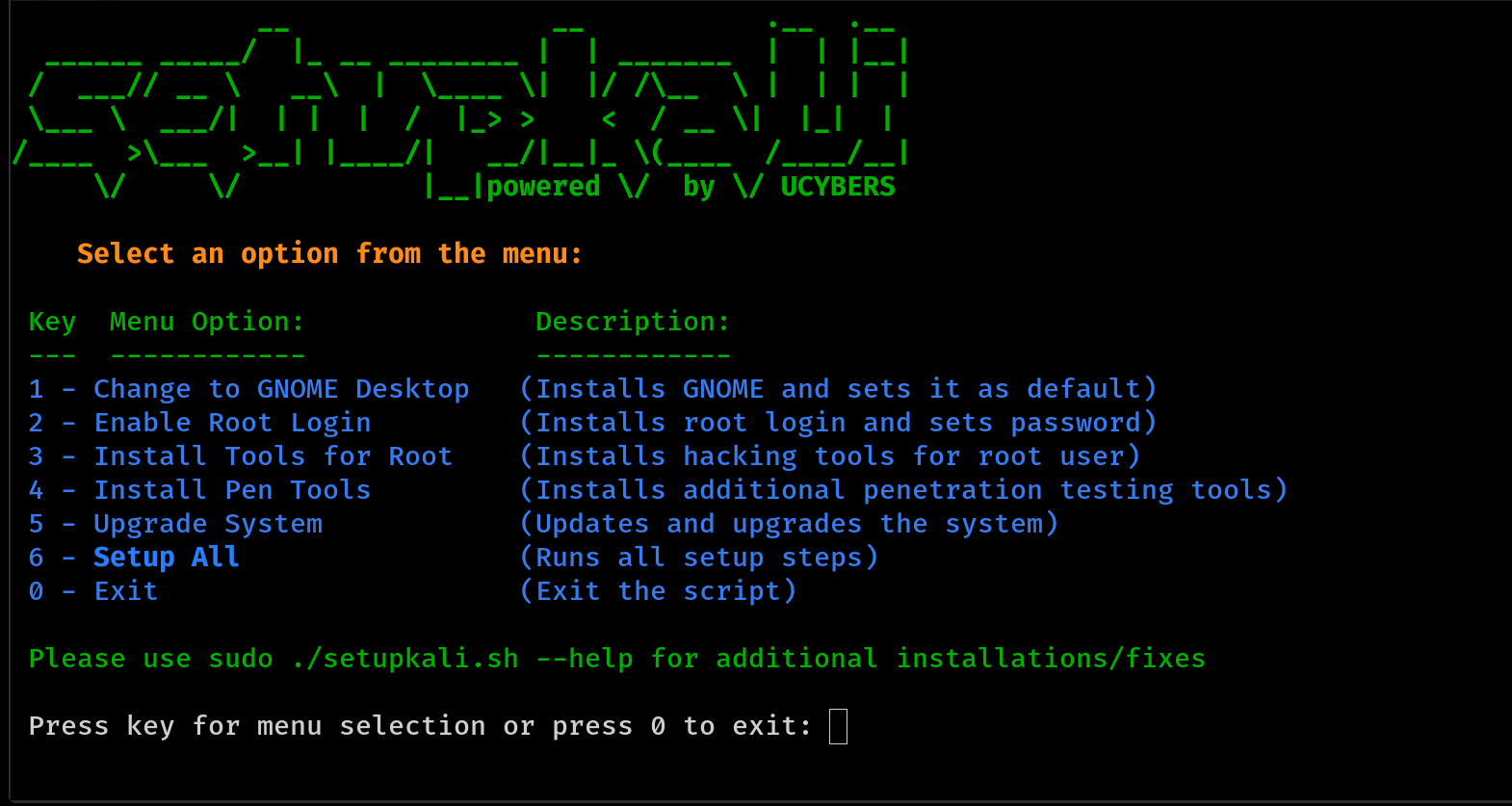
# ☰ Menu Breakdown of setupkali
- **Menu Option 1** - Change to GNOME Desktop
- Installs the GNOME Desktop Environment and sets it as the default session.
- Removes XFCE and performs **Wayland Optimization** to leverage modern display performance and security.
- **Menu Option 2** - Enable Root Login
- Installs root login and sets the password
- Sets the root password to 'ucybers'
- **Critical Fix**: Automatically applies the **Nemo/Nautilus patch** to ensure the File Manager works perfectly under Root in GNOME/Wayland environments.
- **Menu Option 3** - Install Tools for Root
- Installs a comprehensive list of tools and utilities including:
- Terminator
- Leafpad
- Mousepad
- Firefox ESR
- Metasploit Framework
- Burpsuite
- Maltego
- Beef-xss
- Additional tools like ark, dolphin, gwenview, mdk3, kate, partitionmanager, okular, unix-privesc-check, vlc, zaproxy
- **Menu Option 4** - Install Pen Tools
- Improved wireless compatibility
- Atheros AR9271 drivers.
- Correct RTL8812AU drivers.
- Realtek RT5370 drivers.
- Improved Monitor mode, packet injection and AP mode support.
- Bug fixes:
- Fixed `netdiscover` range issue.
- Fixed `zenmap` discovery bugs.
- Fixed `wash` and `reaver` issues with RTL8812AU chipset.
- Fixed bettercap `hstshijack` caplet issues.
- Added modified `hstshijack` caplet that works properly with HSTS websites.
- Patched XZ Utils package.
- Additional software:
- Install WiFi Hotspot
- Install system monitoring tool
- Setup Firefox Custom Homepage
- Add Firefox Bookmarks
- Install Zenmap
- Install Network Driver
- Install MDK4
- Install Python2 Pip
- **Menu Option 5** - Upgrade System
- System Upgrade
- Update package list
- Upgrade installed packages
- Perform a full distribution upgrade
- Clean up unnecessary packages
- Clean up package cache
- **Menu Option 6** - Setup All
- Executes a series of setup tasks including:
- Changing to GNOME
- Enabling root login + File Manager fixes
- Installing tools for root
- Installing and configuring icons
- Changing the root user's desktop background
- Fixing APT sources and updating system
- Installing and configuring WiFi hotspot utilities
- Configuring GNOME dock and Dash applications
- Running Python package installations
- Updating and upgrading system packages
- Fixing broken packages
- Fix Nmap
- Remove Kali Undercover
- Improved performance
- Darker theme
- Darker icons
- **Menu Option 0** - Exit
- Exits the script
# TODO
- Improve error handling
- Add more customization options