microsoft/BitNet
GitHub: microsoft/BitNet
微软官方的 1-bit LLM 推理框架,通过优化的 CPU/GPU 内核实现高效、无损的三元权重模型推理。
Stars: 39320 | Forks: 3596
# bitnet.cpp
[](https://opensource.org/licenses/MIT)

[ ](https://huggingface.co/microsoft/BitNet-b1.58-2B-4T)
通过此[演示](https://demo-bitnet-h0h8hcfqeqhrf5gf.canadacentral-01.azurewebsites.net/)进行体验,或者在您自己的 [CPU](https://github.com/microsoft/BitNet?tab=readme-ov-file#build-from-source) 或 [GPU](https://github.com/microsoft/BitNet/blob/main/gpu/README.md) 上构建并运行它。
bitnet.cpp 是 1-bit LLM(例如 BitNet b1.58)的官方推理框架。它提供了一套优化内核,支持在 CPU 和 GPU 上对 1.58-bit 模型进行**快速**且**无损**的推理(NPU 支持即将推出)。
bitnet.cpp 的首个版本支持在 CPU 上进行推理。bitnet.cpp 在 ARM CPU 上实现了 **1.37x** 到 **5.07x** 的加速,模型越大性能提升越明显。此外,它还降低了 **55.4%** 到 **70.0%** 的能耗,进一步提高了整体效率。在 x86 CPU 上,加速范围从 **2.37x** 到 **6.17x**,能耗降低 **71.9%** 到 **82.2%**。此外,bitnet.cpp 可以在单个 CPU 上运行 100B BitNet b1.58 模型,达到接近人类阅读速度(每秒 5-7 个 token),显著提升了在本地设备上运行 LLM 的潜力。更多详情请参阅[技术报告](https://arxiv.org/abs/2410.16144)。
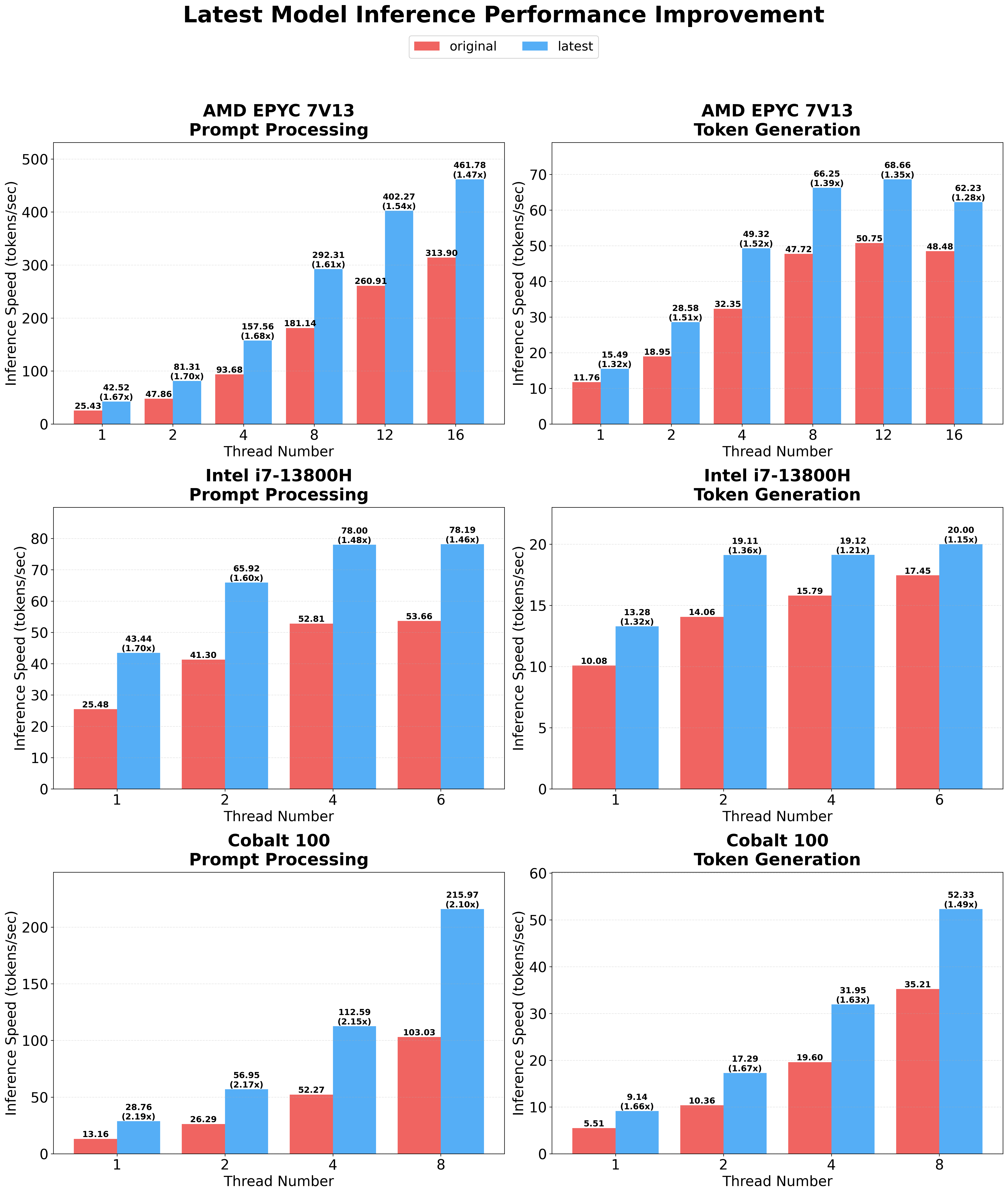
**最新优化**引入了具有可配置分块(tiling)和嵌入量化支持的并行内核实现,在不同的硬件平台和工作负载上,比原始实现实现了 **1.15x 到 2.1x** 的额外加速。有关详细的技术信息,请参阅[优化指南](src/README.md)。
](https://huggingface.co/microsoft/BitNet-b1.58-2B-4T)
通过此[演示](https://demo-bitnet-h0h8hcfqeqhrf5gf.canadacentral-01.azurewebsites.net/)进行体验,或者在您自己的 [CPU](https://github.com/microsoft/BitNet?tab=readme-ov-file#build-from-source) 或 [GPU](https://github.com/microsoft/BitNet/blob/main/gpu/README.md) 上构建并运行它。
bitnet.cpp 是 1-bit LLM(例如 BitNet b1.58)的官方推理框架。它提供了一套优化内核,支持在 CPU 和 GPU 上对 1.58-bit 模型进行**快速**且**无损**的推理(NPU 支持即将推出)。
bitnet.cpp 的首个版本支持在 CPU 上进行推理。bitnet.cpp 在 ARM CPU 上实现了 **1.37x** 到 **5.07x** 的加速,模型越大性能提升越明显。此外,它还降低了 **55.4%** 到 **70.0%** 的能耗,进一步提高了整体效率。在 x86 CPU 上,加速范围从 **2.37x** 到 **6.17x**,能耗降低 **71.9%** 到 **82.2%**。此外,bitnet.cpp 可以在单个 CPU 上运行 100B BitNet b1.58 模型,达到接近人类阅读速度(每秒 5-7 个 token),显著提升了在本地设备上运行 LLM 的潜力。更多详情请参阅[技术报告](https://arxiv.org/abs/2410.16144)。
**最新优化**引入了具有可配置分块(tiling)和嵌入量化支持的并行内核实现,在不同的硬件平台和工作负载上,比原始实现实现了 **1.15x 到 2.1x** 的额外加速。有关详细的技术信息,请参阅[优化指南](src/README.md)。
 ## 演示
bitnet.cpp 在 Apple M2 上运行 BitNet b1.58 3B 模型的演示:
https://github.com/user-attachments/assets/7f46b736-edec-4828-b809-4be780a3e5b1
## 新动态:
- 01/15/2026 [BitNet CPU 推理优化](https://github.com/microsoft/BitNet/blob/main/src/README.md) 
- 05/20/2025 [BitNet 官方 GPU 推理内核](https://github.com/microsoft/BitNet/blob/main/gpu/README.md)
- 04/14/2025 [Hugging Face 上的 BitNet 官方 2B 参数模型](https://huggingface.co/microsoft/BitNet-b1.58-2B-4T)
- 02/18/2025 [Bitnet.cpp:三元 LLM 的高效边缘推理](https://arxiv.org/abs/2502.11880)
- 11/08/2024 [BitNet a4.8:1-bit LLM 的 4-bit 激活](https://arxiv.org/abs/2411.04965)
- 10/21/2024 [1-bit AI Infra:第 1.1 部分,CPU 上快速且无损的 BitNet b1.58 推理](https://arxiv.org/abs/2410.16144)
- 10/17/2024 bitnet.cpp 1.0 发布。
- 03/21/2024 [The-Era-of-1-bit-LLMs__Training_Tips_Code_FAQ](https://github.com/microsoft/unilm/blob/master/bitnet/The-Era-of-1-bit-LLMs__Training_Tips_Code_FAQ.pdf)
- 02/27/2024 [1-bit LLM 时代:所有大型语言模型都在 1.58 Bits 中](https://arxiv.org/abs/2402.17764)
- 10/17/2023 [BitNet:用于大型语言模型的缩放 1-bit Transformers](https://arxiv.org/abs/2310.11453)
## 致谢
本项目基于 [llama.cpp](https://github.com/ggerganov/llama.cpp) 框架。我们要感谢所有作者对开源社区的贡献。此外,bitnet.cpp 的内核建立在 [T-MAC](https://github.com/microsoft/T-MAC/) 中首创的查找表(Lookup Table)方法论之上。对于三元模型之外的一般低 bit LLM 的推理,我们推荐使用 T-MAC。
## 官方模型
## 演示
bitnet.cpp 在 Apple M2 上运行 BitNet b1.58 3B 模型的演示:
https://github.com/user-attachments/assets/7f46b736-edec-4828-b809-4be780a3e5b1
## 新动态:
- 01/15/2026 [BitNet CPU 推理优化](https://github.com/microsoft/BitNet/blob/main/src/README.md) 
- 05/20/2025 [BitNet 官方 GPU 推理内核](https://github.com/microsoft/BitNet/blob/main/gpu/README.md)
- 04/14/2025 [Hugging Face 上的 BitNet 官方 2B 参数模型](https://huggingface.co/microsoft/BitNet-b1.58-2B-4T)
- 02/18/2025 [Bitnet.cpp:三元 LLM 的高效边缘推理](https://arxiv.org/abs/2502.11880)
- 11/08/2024 [BitNet a4.8:1-bit LLM 的 4-bit 激活](https://arxiv.org/abs/2411.04965)
- 10/21/2024 [1-bit AI Infra:第 1.1 部分,CPU 上快速且无损的 BitNet b1.58 推理](https://arxiv.org/abs/2410.16144)
- 10/17/2024 bitnet.cpp 1.0 发布。
- 03/21/2024 [The-Era-of-1-bit-LLMs__Training_Tips_Code_FAQ](https://github.com/microsoft/unilm/blob/master/bitnet/The-Era-of-1-bit-LLMs__Training_Tips_Code_FAQ.pdf)
- 02/27/2024 [1-bit LLM 时代:所有大型语言模型都在 1.58 Bits 中](https://arxiv.org/abs/2402.17764)
- 10/17/2023 [BitNet:用于大型语言模型的缩放 1-bit Transformers](https://arxiv.org/abs/2310.11453)
## 致谢
本项目基于 [llama.cpp](https://github.com/ggerganov/llama.cpp) 框架。我们要感谢所有作者对开源社区的贡献。此外,bitnet.cpp 的内核建立在 [T-MAC](https://github.com/microsoft/T-MAC/) 中首创的查找表(Lookup Table)方法论之上。对于三元模型之外的一般低 bit LLM 的推理,我们推荐使用 T-MAC。
## 官方模型
## 支持的模型
❗️**我们使用 [Hugging Face](https://huggingface.co/) 上现有的 1-bit LLM 来展示 bitnet.cpp 的推理能力。我们希望 bitnet.cpp 的发布能够激励在模型大小和训练 token 方面大规模开发 1-bit LLM。**
## 安装
### 环境要求
- python>=3.9
- cmake>=3.22
- clang>=18
- 对于 Windows 用户,请安装 [Visual Studio 2022](https://visualstudio.microsoft.com/downloads/)。在安装程序中,至少开启以下选项(这也会自动安装所需的额外工具,如 CMake):
- 使用 C++ 的桌面开发
- 适用于 Windows 的 C++-CMake 工具
- 适用于 Windows 的 Git
- 适用于 Windows 的 C++-Clang 编译器
- LLVM-Toolset (clang) 的 MS-Build 支持
- 对于 Debian/Ubuntu 用户,可以使用[自动安装脚本](https://apt.llvm.org/)下载
`bash -c "$(wget -O - https://apt.llvm.org/llvm.sh)"`
- conda(强烈推荐)
### 从源码构建
1. 克隆仓库
```
git clone --recursive https://github.com/microsoft/BitNet.git
cd BitNet
```
2. 安装依赖
```
# (推荐) 创建新的 conda environment
conda create -n bitnet-cpp python=3.9
conda activate bitnet-cpp
pip install -r requirements.txt
```
3. 构建项目
```
# 手动下载模型并使用本地路径运行
huggingface-cli download microsoft/BitNet-b1.58-2B-4T-gguf --local-dir models/BitNet-b1.58-2B-4T
python setup_env.py -md models/BitNet-b1.58-2B-4T -q i2_s
```
](https://huggingface.co/microsoft/BitNet-b1.58-2B-4T)
通过此[演示](https://demo-bitnet-h0h8hcfqeqhrf5gf.canadacentral-01.azurewebsites.net/)进行体验,或者在您自己的 [CPU](https://github.com/microsoft/BitNet?tab=readme-ov-file#build-from-source) 或 [GPU](https://github.com/microsoft/BitNet/blob/main/gpu/README.md) 上构建并运行它。
bitnet.cpp 是 1-bit LLM(例如 BitNet b1.58)的官方推理框架。它提供了一套优化内核,支持在 CPU 和 GPU 上对 1.58-bit 模型进行**快速**且**无损**的推理(NPU 支持即将推出)。
bitnet.cpp 的首个版本支持在 CPU 上进行推理。bitnet.cpp 在 ARM CPU 上实现了 **1.37x** 到 **5.07x** 的加速,模型越大性能提升越明显。此外,它还降低了 **55.4%** 到 **70.0%** 的能耗,进一步提高了整体效率。在 x86 CPU 上,加速范围从 **2.37x** 到 **6.17x**,能耗降低 **71.9%** 到 **82.2%**。此外,bitnet.cpp 可以在单个 CPU 上运行 100B BitNet b1.58 模型,达到接近人类阅读速度(每秒 5-7 个 token),显著提升了在本地设备上运行 LLM 的潜力。更多详情请参阅[技术报告](https://arxiv.org/abs/2410.16144)。
**最新优化**引入了具有可配置分块(tiling)和嵌入量化支持的并行内核实现,在不同的硬件平台和工作负载上,比原始实现实现了 **1.15x 到 2.1x** 的额外加速。有关详细的技术信息,请参阅[优化指南](src/README.md)。
## 演示
bitnet.cpp 在 Apple M2 上运行 BitNet b1.58 3B 模型的演示:
https://github.com/user-attachments/assets/7f46b736-edec-4828-b809-4be780a3e5b1
## 新动态:
- 01/15/2026 [BitNet CPU 推理优化](https://github.com/microsoft/BitNet/blob/main/src/README.md) 
- 05/20/2025 [BitNet 官方 GPU 推理内核](https://github.com/microsoft/BitNet/blob/main/gpu/README.md)
- 04/14/2025 [Hugging Face 上的 BitNet 官方 2B 参数模型](https://huggingface.co/microsoft/BitNet-b1.58-2B-4T)
- 02/18/2025 [Bitnet.cpp:三元 LLM 的高效边缘推理](https://arxiv.org/abs/2502.11880)
- 11/08/2024 [BitNet a4.8:1-bit LLM 的 4-bit 激活](https://arxiv.org/abs/2411.04965)
- 10/21/2024 [1-bit AI Infra:第 1.1 部分,CPU 上快速且无损的 BitNet b1.58 推理](https://arxiv.org/abs/2410.16144)
- 10/17/2024 bitnet.cpp 1.0 发布。
- 03/21/2024 [The-Era-of-1-bit-LLMs__Training_Tips_Code_FAQ](https://github.com/microsoft/unilm/blob/master/bitnet/The-Era-of-1-bit-LLMs__Training_Tips_Code_FAQ.pdf)
- 02/27/2024 [1-bit LLM 时代:所有大型语言模型都在 1.58 Bits 中](https://arxiv.org/abs/2402.17764)
- 10/17/2023 [BitNet:用于大型语言模型的缩放 1-bit Transformers](https://arxiv.org/abs/2310.11453)
## 致谢
本项目基于 [llama.cpp](https://github.com/ggerganov/llama.cpp) 框架。我们要感谢所有作者对开源社区的贡献。此外,bitnet.cpp 的内核建立在 [T-MAC](https://github.com/microsoft/T-MAC/) 中首创的查找表(Lookup Table)方法论之上。对于三元模型之外的一般低 bit LLM 的推理,我们推荐使用 T-MAC。
## 官方模型
| 模型 | 参数 | CPU | Kernel | ||
|---|---|---|---|---|---|
| I2_S | TL1 | TL2 | |||
| BitNet-b1.58-2B-4T | 2.4B | x86 | ✅ | ❌ | ✅ |
| ARM | ✅ | ✅ | ❌ | ||
| 模型 | 参数 | CPU | Kernel | ||
|---|---|---|---|---|---|
| I2_S | TL1 | TL2 | |||
| bitnet_b1_58-large | 0.7B | x86 | ✅ | ❌ | ✅ |
| ARM | ✅ | ✅ | ❌ | ||
| bitnet_b1_58-3B | 3.3B | x86 | ❌ | ❌ | ✅ |
| ARM | ❌ | ✅ | ❌ | ||
| Llama3-8B-1.58-100B-tokens | 8.0B | x86 | ✅ | ❌ | ✅ |
| ARM | ✅ | ✅ | ❌ | ||
| Falcon3 Family | 1B-10B | x86 | ✅ | ❌ | ✅ |
| ARM | ✅ | ✅ | ❌ | ||
| Falcon-E Family | 1B-3B | x86 | ✅ | ❌ | ✅ |
| ARM | ✅ | ✅ | ❌ | ||
usage: setup_env.py [-h] [--hf-repo {1bitLLM/bitnet_b1_58-large,1bitLLM/bitnet_b1_58-3B,HF1BitLLM/Llama3-8B-1.58-100B-tokens,tiiuae/Falcon3-1B-Instruct-1.58bit,tiiuae/Falcon3-3B-Instruct-1.58bit,tiiuae/Falcon3-7B-Instruct-1.58bit,tiiuae/Falcon3-10B-Instruct-1.58bit}] [--model-dir MODEL_DIR] [--log-dir LOG_DIR] [--quant-type {i2_s,tl1}] [--quant-embd]

                    [--use-pretuned]


Setup the environment for running inference


optional arguments:

  -h, --help            show this help message and exit

  --hf-repo {1bitLLM/bitnet_b1_58-large,1bitLLM/bitnet_b1_58-3B,HF1BitLLM/Llama3-8B-1.58-100B-tokens,tiiuae/Falcon3-1B-Instruct-1.58bit,tiiuae/Falcon3-3B-Instruct-1.58bit,tiiuae/Falcon3-7B-Instruct-1.58bit,tiiuae/Falcon3-10B-Instruct-1.58bit}, -hr {1bitLLM/bitnet_b1_58-large,1bitLLM/bitnet_b1_58-3B,HF1BitLLM/Llama3-8B-1.58-100B-tokens,tiiuae/Falcon3-1B-Instruct-1.58bit,tiiuae/Falcon3-3B-Instruct-1.58bit,tiiuae/Falcon3-7B-Instruct-1.58bit,tiiuae/Falcon3-10B-Instruct-1.58bit}

                        Model used for inference

  --model-dir MODEL_DIR, -md MODEL_DIR

                        Directory to save/load the model

  --log-dir LOG_DIR, -ld LOG_DIR

                        Directory to save the logging info

  --quant-type {i2_s,tl1}, -q {i2_s,tl1}

                        Quantization type

  --quant-embd          Quantize the embeddings to f16

  --use-pretuned, -p    Use the pretuned kernel parameters

## 使用方法

### 基本用法


```
# 使用 quantized model 运行 inference

python run_inference.py -m models/BitNet-b1.58-2B-4T/ggml-model-i2_s.gguf -p "You are a helpful assistant" -cnv
```


usage: run_inference.py [-h] [-m MODEL] [-n N_PREDICT] -p PROMPT [-t THREADS] [-c CTX_SIZE] [-temp TEMPERATURE] [-cnv]


Run inference


optional arguments:

  -h, --help            show this help message and exit

  -m MODEL, --model MODEL

                        Path to model file

  -n N_PREDICT, --n-predict N_PREDICT

                        Number of tokens to predict when generating text

  -p PROMPT, -- PROMPT

                        Prompt to generate text from

  -t THREADS, --threads THREADS

                        Number of threads to use

  -c CTX_SIZE, --ctx-size CTX_SIZE

                        Size of the prompt context

  -temp TEMPERATURE, --temperature TEMPERATURE

                        Temperature, a hyperparameter that controls the randomness of the generated text

  -cnv, --conversation  Whether to enable chat mode or not (for instruct models.)

                        (When this option is turned on, the prompt specified by -p will be used as the system prompt.)

### 基准测试

我们提供了脚本来运行针对特定模型的推理基准测试。


```
usage: e2e_benchmark.py -m MODEL [-n N_TOKEN] [-p N_PROMPT] [-t THREADS]


Setup the environment for running the inference


required arguments:

  -m MODEL, --model MODEL

                        Path to the model file.


optional arguments:

  -h, --help

                        Show this help message and exit.

  -n N_TOKEN, --n-token N_TOKEN

                        Number of generated tokens.

  -p N_PROMPT, --n-prompt N_PROMPT

                        Prompt to generate text from.

  -t THREADS, --threads THREADS

                        Number of threads to use.
```


以下是每个参数的简要说明:

- `-m`, `--model`:模型文件的路径。这是运行脚本时必须提供的必需参数。
- `-n`, `--n-token`:推理期间生成的 token 数量。这是一个可选参数,默认值为 128。
- `-p`, `--n-prompt`:用于生成文本的提示 token 数量。这是一个可选参数,默认值为 512。
- `-t`, `--threads`:用于运行推理的线程数。这是一个可选参数,默认值为 2。
- `-h`, `--help`:显示帮助信息并退出。使用此参数可显示用法信息。

例如:


```
python utils/e2e_benchmark.py -m /path/to/model -n 200 -p 256 -t 4
```


此命令将使用位于 `/path/to/model` 的模型运行推理基准测试,从 256 个 token 的提示中生成 200 个 token,利用 4 个线程。

对于没有任何公开模型支持的模型布局,我们提供了脚本来生成具有给定模型布局的虚拟模型,并在您的机器上运行基准测试:


```
python utils/generate-dummy-bitnet-model.py models/bitnet_b1_58-large --outfile models/dummy-bitnet-125m.tl1.gguf --outtype tl1 --model-size 125M


# 使用生成的模型运行 benchmark,使用 -m 指定 model path,-p 指定处理的 prompt,-n 指定要生成的 token 数量

python utils/e2e_benchmark.py -m models/dummy-bitnet-125m.tl1.gguf -p 512 -n 128
```


### 从 `.safetensors` 检查点转换


```
# 准备 .safetensors 模型文件

huggingface-cli download microsoft/bitnet-b1.58-2B-4T-bf16 --local-dir ./models/bitnet-b1.58-2B-4T-bf16


# 转换为 gguf 模型

python ./utils/convert-helper-bitnet.py ./models/bitnet-b1.58-2B-4T-bf16
```


### 常见问题解答 (FAQ) 📌

#### Q1:由于 log.cpp 中的 std::chrono 问题,构建 llama.cpp 时失败?

**A:**

这是 llama.cpp 近期版本中引入的一个问题。请参考[讨论](https://github.com/abetlen/llama-cpp-python/issues/1942)中的此[提交](https://github.com/tinglou/llama.cpp/commit/4e3db1e3d78cc1bcd22bcb3af54bd2a4628dd323)来解决此问题。

#### Q2:如何在 Windows 上的 conda 环境中使用 clang 进行构建?

**A:**

在构建项目之前,请通过运行以下命令验证您的 clang 安装以及对 Visual Studio 工具的访问权限:


```
clang -v
```


此命令检查您是否使用了正确版本的 clang 以及 Visual Studio 工具是否可用。如果您看到如下错误消息:


```
'clang' is not recognized as an internal or external command, operable program or batch file.
```


这表明您的命令行窗口未针对 Visual Studio 工具正确初始化。

• 如果您使用的是命令提示符,请运行:


```
"C:\Program Files\Microsoft Visual Studio\2022\Professional\Common7\Tools\VsDevCmd.bat" -startdir=none -arch=x64 -host_arch=x64
```


• 如果您使用的是 Windows PowerShell,请运行以下命令:


```
Import-Module "C:\Program Files\Microsoft Visual Studio\2022\Professional\Common7\Tools\Microsoft.VisualStudio.DevShell.dll" Enter-VsDevShell 3f0e31ad -SkipAutomaticLocation -DevCmdArguments "-arch=x64 -host_arch=x64"
```


这些步骤将初始化您的环境,并允许您使用正确的 Visual Studio 工具。标签:1.58-bit, 1-bit LLM, ARM架构, Bash脚本, BitNet, C++, CPU推理, DLL 劫持, DNS解析, GPU推理, LLM, Microsoft, NPU, Unmanaged PE, Vectored Exception Handling, x86架构, 低比特量化, 内核优化, 大语言模型, 实时告警, 开源项目, 推理框架, 数据擦除, 本地部署, 模型压缩, 模型量化, 深度学习, 生成式AI, 端侧推理, 索引, 节能计算, 逆向工具, 高性能计算