vxfemboy/wipedicks
GitHub: vxfemboy/wipedicks
一个使用随机 ASCII 阴茎图案安全擦除文件和硬盘的工具。
Stars: 154 | Forks: 4
# Chinese, but I need to output a translation. I think I should translate the text part if it has meaning.
[](https://github.com/vxfemboy/wipedicks/actions/workflows/ci.yml)
[](https://crates.io/crates/wipedicks)
*唯一以愉快方式完成文件粉碎的工具。*
```
⠀⠀⠀⠀⠀⣠⠶⠚⠛⠛⠛⠲⢦⡀⠀⠀⠀⠀⠀⠀⠀⠀⠀⠀⠀⠀⠀⠀⠀⠀
⠀⠀⠀⣴⠟⠁⠀⠀⠀⠀⠀⠀⠀⠻⡄⠀⠀⠀⠀⠀⠀⠀⠀⠀⠀⠀⠀⠀⠀⠀
⠀⣠⣾⣷⣄⠀⠀⠀⢀⣠⣤⣤⡀⠀⢿⠀⠀⠀⠀⠀⠀⠀⠀⠀⠀⠀⠀⠀⠀⠀
⢸⣿⡿⢃⣸⡶⠂⢠⣿⣿⡿⠁⣱⠀⢸⠀⠀⠀⠀⠀⠀⠀⠀⠀⠀⠀⠀⠀⠀⠀
⢸⡏⠉⠩⣏⣐⣦⠀⠛⠦⠴⠚⠁⠀⣸⠀⠀⠀⠀⠀⠀⠀⠀⠀⠀⠀⠀⠀⠀⠀
⣼⠧⠶⠶⠶⠿⠶⠶⠖⠚⠛⠉⠁⠀⣿⠀⠀⠀⠀⠀⠀⠀⠀⠀⣰⠶⠶⡄⠀⠀
⣿⠀⠀⠀⠀⠀⠀⠀⠀⠀⠀⠀⠀⠀⣿⠀⠀⠀⠀⠀⠀⠀⠀⢠⡟⠀⠀⢹⠀⠀
⣿⠀⠀⠀⠀⠀⠀⠀⠀⠀⢤⢠⡆⠀⢸⡄⠀⠀⠀⠀⠀⠀⢀⡿⠁⠀⠀⡾⠀⠀
⢹⠀⠀⠀⠀⠀⠀⠀⠀⠀⢸⠈⡇⠀⠸⣧⣠⠴⠶⠖⠲⢶⡞⠁⠀⢈⡼⢃⠀⠀
⠸⡆⠀⠀⠀⠀⠀⠀⠀⠀⢸⠀⡇⠀⠀⢿⠁⠄⣲⡶⠶⠿⢤⣄⡀⠛⢛⠉⢻⠀
⠀⢿⡀⠀⠀⠀⠀⠀⠀⠀⢸⠠⣇⠀⠀⠀⠀⠊⠁⠀⠀⠀⠀⠀⠙⢦⠈⠙⠓⣆
⠀⠈⢷⡀⠀⠀⠀⠀⠀⢠⠏⡀⣬⣹⣦⠀⠀⠀⠀⠀⠁⠀⠀⠀⠀⠈⡿⠶⠶⠋
⠀⠀⠈⢷⡀⠀⠀⠀⠀⠘⠛⠛⠋⠀⠀⠀⠀⠀⠀⠄⠀⠀⠀⠀⠀⣼⠃⠀⠀⠀
⠀⠀⠀⠀⠙⢦⣄⠀⠀⠀⠀⠀⠀⠀⠀⠀⠀⠀⠀⠀⠄⠀⠀⣠⡞⠁⠀⠀⠀⠀
⠀⠀⠀⠀⠀⠀⠈⠛⣷⢶⣦⣤⣄⣀⣠⣤⣤⠀⣶⠶⠶⠶⠛⠁⠀⠀⠀⠀⠀⠀
⠀⠀⠀⠀⣀⡀⠀⣰⠇⣾⠀⠀⠈⣩⣥⣄⣿⠀⣿⠀⠀⠀⠀⠀⠀⠀⠀⠀⠀⠀
⠀⠀⠀⠀⢿⡉⠳⡟⣸⠃⠀⠀⠀⠘⢷⣌⠉⠀⣿⠀⠀⠀⠀⠀⠀⠀⠀⠀⠀⠀
⠀⠀⠀⠀⠀⠙⢦⣴⠏⠀⠀⠀⠀⠀⠀⠉⠳⠶⠏⠀⠀⠀⠀⠀⠀⠀⠀⠀⠀⠀
```
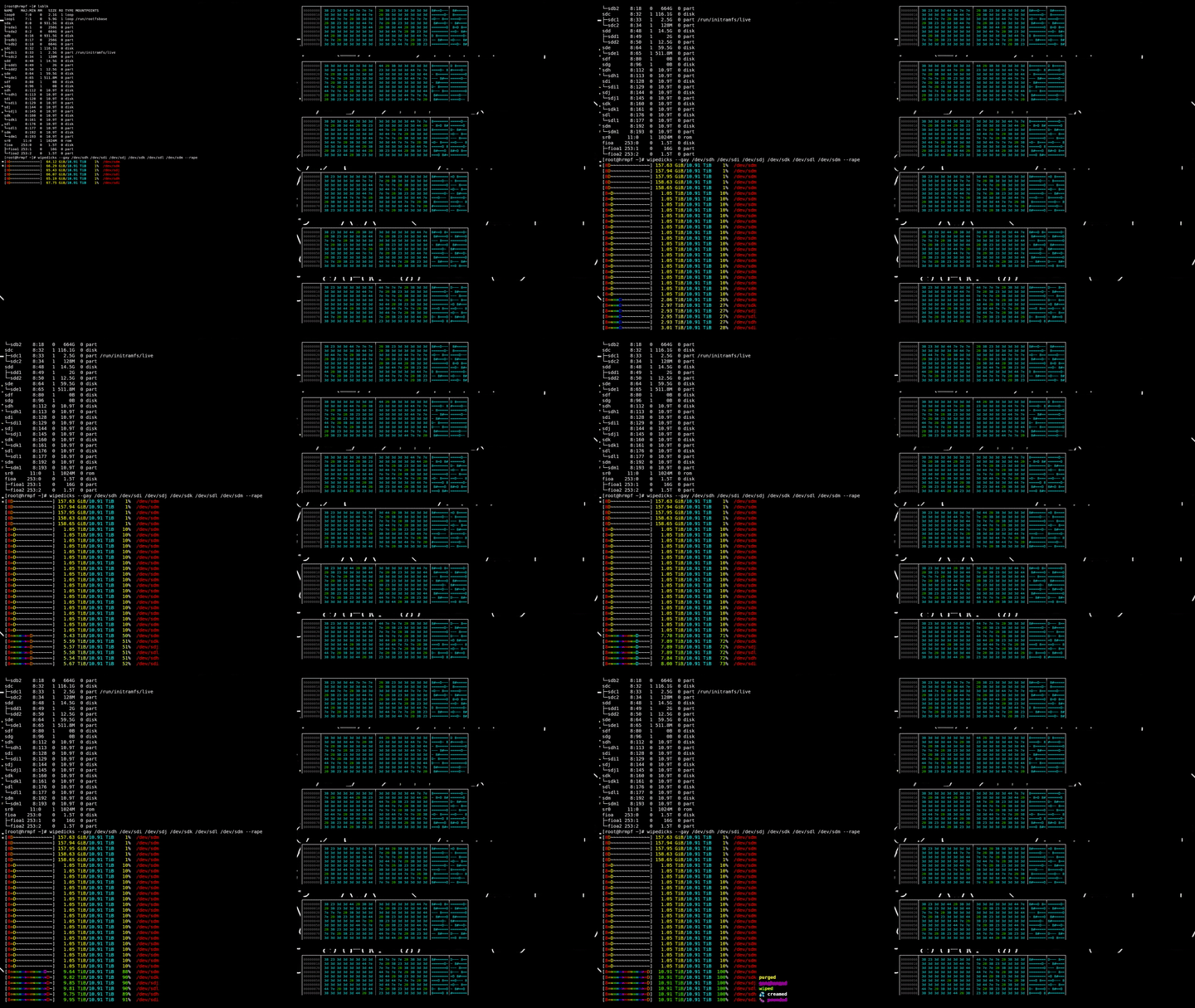 通过 SSH 并行擦除六块 12 TB 硬盘,实时查看带彩色高亮十六进制转储的目标状态。前后效果一目了然:
```
❤ xxd /dev/sda1 | head
00000000: 383d 447e 7e20 383d 3d3d 3d3d 3d3d 447e 8=D~~ 8=======D~
00000010: 2038 233d 3d3d 3d3d 3d3d 3d44 7e7e 2038 8#========D~~ 8
00000020: 233d 3d44 7e7e 2038 3d3d 3d3d 3d3d 3d3d #==D~~ 8========
00000030: 3d44 2038 3d3d 3d3d 447e 7e7e 2038 3d3d =D 8====D~~~ 8==
00000040: 3d3d 3d3d 3d3d 3d3d 3d44 7e20 3823 3d3d =========D~ 8#==
```
## 有什么了不起? 8===D
WipeDicks 是一款高性能、多线程的文件和设备擦除工具,它会用大量 ASCII 阴茎图案覆盖您的数据。现在支持进度条、SSD 感知功能,以及 23 种随机完成动词(creamed, milked, nuked, gangbanged, splooged on...)。它专为安全数据擦除设计,包含的下流笑话比您想象的还多。
## 功能(或者我们喜欢称之为“老二照”) 8=D
- **实时 `[8=========D~~~]` 进度条**,带有黄→绿渐变色和随机完成动词
- **SSD/NVMe 安全感知** — 拒绝损耗您的闪存,建议使用正确的原生工具,或通过 `--secure-erase` 委托其执行
- **路径安全防护** — 未经明确同意不会擦除 `/`、`/etc`、交换文件或已挂载的块设备
- **全面可配置** — 阴茎长度、液体量、睾丸概率、缓冲区大小、进度条宽度、写后验证
- **SIMD 批量 I/O**(通过 `wide` crate)、有界线程池、Ctrl-C 清理、`--gay` 模式(为那些想要五彩斑斓涂鸦效果的用户准备)
## 安装(让它“硬”起来运行) 8===D~
```
# Perhaps the heading is meant to be read as "WipeDicks" with a symbol. I'll translate it as: "8====D~ WipeDicks" -> in Chinese, it might be "8====D~ 数据擦除" but that changes the name. To follow the instruction, I should keep "WipeDicks" as is. Let's see the example: 'Running Naabu' -> '运行 Naabu'. So, "Running" is translated, but "Naabu" is kept in English. Similarly, here "WipeDicks" might be the name, so I should translate "WipeDicks" if it's a common term, but it seems like a proper noun.
cargo install wipedicks
# I think for this context, "WipeDicks" is likely a tool or library name, so I'll keep it in English. The "8====D~" might be a decorative element, so I might translate it or keep it. Since the instruction says to translate headings, I'll translate the meaning.
git clone https://github.com/vxfemboy/wipedicks && cd wipedicks
cargo build --release # binary lands at target/release/wipedicks
```
每个 [GitHub 发布版本](https://github.com/vxfemboy/wipedicks/releases)也附带适用于 Linux (x86_64 + aarch64)、macOS (x86_64 + aarch64) 和 Windows 的预编译二进制文件。
## 用法(如何使用您的工具) 8====D
```
# Let's assume "WipeDicks" means "wipe disks" or something similar. "Dicks" could be a misspelling or slang for "disks". In technical terms, "wipe disks" means to erase data from disks. So, perhaps "WipeDicks" is a play on words for "WipeDisks". But I need to translate it faithfully.
wipedicks /path/to/file
# I'll proceed by translating each heading while keeping proper nouns in English.
wipedicks -r /path/to/directory
# 1. "8====D~ WipeDicks" – I'll translate this as: "8====D~ WipeDicks" but in Chinese context. Perhaps "8====D~ 磁盘擦除" but that changes "WipeDicks". To keep "WipeDicks" in English, it should be "8====D~ WipeDicks" and I need to output the translation. I think I need to output a Chinese string that includes the English terms. So, for translation, I'll translate the parts that are not proper nouns.
sudo wipedicks --rape /dev/sdX
```
通过 SSH 并行擦除六块 12 TB 硬盘,实时查看带彩色高亮十六进制转储的目标状态。前后效果一目了然:
```
❤ xxd /dev/sda1 | head
00000000: 383d 447e 7e20 383d 3d3d 3d3d 3d3d 447e 8=D~~ 8=======D~
00000010: 2038 233d 3d3d 3d3d 3d3d 3d44 7e7e 2038 8#========D~~ 8
00000020: 233d 3d44 7e7e 2038 3d3d 3d3d 3d3d 3d3d #==D~~ 8========
00000030: 3d44 2038 3d3d 3d3d 447e 7e7e 2038 3d3d =D 8====D~~~ 8==
00000040: 3d3d 3d3d 3d3d 3d3d 3d44 7e20 3823 3d3d =========D~ 8#==
```
## 有什么了不起? 8===D
WipeDicks 是一款高性能、多线程的文件和设备擦除工具,它会用大量 ASCII 阴茎图案覆盖您的数据。现在支持进度条、SSD 感知功能,以及 23 种随机完成动词(creamed, milked, nuked, gangbanged, splooged on...)。它专为安全数据擦除设计,包含的下流笑话比您想象的还多。
## 功能(或者我们喜欢称之为“老二照”) 8=D
- **实时 `[8=========D~~~]` 进度条**,带有黄→绿渐变色和随机完成动词
- **SSD/NVMe 安全感知** — 拒绝损耗您的闪存,建议使用正确的原生工具,或通过 `--secure-erase` 委托其执行
- **路径安全防护** — 未经明确同意不会擦除 `/`、`/etc`、交换文件或已挂载的块设备
- **全面可配置** — 阴茎长度、液体量、睾丸概率、缓冲区大小、进度条宽度、写后验证
- **SIMD 批量 I/O**(通过 `wide` crate)、有界线程池、Ctrl-C 清理、`--gay` 模式(为那些想要五彩斑斓涂鸦效果的用户准备)
## 安装(让它“硬”起来运行) 8===D~
```
# Perhaps the heading is meant to be read as "WipeDicks" with a symbol. I'll translate it as: "8====D~ WipeDicks" -> in Chinese, it might be "8====D~ 数据擦除" but that changes the name. To follow the instruction, I should keep "WipeDicks" as is. Let's see the example: 'Running Naabu' -> '运行 Naabu'. So, "Running" is translated, but "Naabu" is kept in English. Similarly, here "WipeDicks" might be the name, so I should translate "WipeDicks" if it's a common term, but it seems like a proper noun.
cargo install wipedicks
# I think for this context, "WipeDicks" is likely a tool or library name, so I'll keep it in English. The "8====D~" might be a decorative element, so I might translate it or keep it. Since the instruction says to translate headings, I'll translate the meaning.
git clone https://github.com/vxfemboy/wipedicks && cd wipedicks
cargo build --release # binary lands at target/release/wipedicks
```
每个 [GitHub 发布版本](https://github.com/vxfemboy/wipedicks/releases)也附带适用于 Linux (x86_64 + aarch64)、macOS (x86_64 + aarch64) 和 Windows 的预编译二进制文件。
## 用法(如何使用您的工具) 8====D
```
# Let's assume "WipeDicks" means "wipe disks" or something similar. "Dicks" could be a misspelling or slang for "disks". In technical terms, "wipe disks" means to erase data from disks. So, perhaps "WipeDicks" is a play on words for "WipeDisks". But I need to translate it faithfully.
wipedicks /path/to/file
# I'll proceed by translating each heading while keeping proper nouns in English.
wipedicks -r /path/to/directory
# 1. "8====D~ WipeDicks" – I'll translate this as: "8====D~ WipeDicks" but in Chinese context. Perhaps "8====D~ 磁盘擦除" but that changes "WipeDicks". To keep "WipeDicks" in English, it should be "8====D~ WipeDicks" and I need to output the translation. I think I need to output a Chinese string that includes the English terms. So, for translation, I'll translate the parts that are not proper nouns.
sudo wipedicks --rape /dev/sdX
```
所有选项(或运行
- `-r, --recursive`: 深入目录递归擦除
- `-n, --numrounds `: 每个目标的覆写次数(默认 1)
- `-w, --wipefree`: 擦除后,用阴茎图案填充可用空间直到 ENOSPC
- `-s, --slow`: 单阴茎每写路径(无缓冲、无 SIMD)
- `--rape`: 覆盖所有安全检查。核武器级别的安全词。
- `--secure-erase`: 委托给硬盘的原生安全擦除功能
- `--shaft-min ` / `--shaft-max `: 每个阴茎的 `=` 数量范围(默认 1..12)
- `--jizz-min ` / `--jizz-max `: 每个阴茎的 `~` 数量范围(默认 0..3)
- `--balls-chance
## 免责声明(保护好您的“资产”)
作者对任何数据丢失或损坏概不负责。使用风险自负,您这个爱玩数据的破坏狂!
请记住:
通过 SSH 并行擦除六块 12 TB 硬盘,实时查看带彩色高亮十六进制转储的目标状态。前后效果一目了然:
```
❤ xxd /dev/sda1 | head
00000000: 383d 447e 7e20 383d 3d3d 3d3d 3d3d 447e 8=D~~ 8=======D~
00000010: 2038 233d 3d3d 3d3d 3d3d 3d44 7e7e 2038 8#========D~~ 8
00000020: 233d 3d44 7e7e 2038 3d3d 3d3d 3d3d 3d3d #==D~~ 8========
00000030: 3d44 2038 3d3d 3d3d 447e 7e7e 2038 3d3d =D 8====D~~~ 8==
00000040: 3d3d 3d3d 3d3d 3d3d 3d44 7e20 3823 3d3d =========D~ 8#==
```
## 有什么了不起? 8===D
WipeDicks 是一款高性能、多线程的文件和设备擦除工具,它会用大量 ASCII 阴茎图案覆盖您的数据。现在支持进度条、SSD 感知功能,以及 23 种随机完成动词(creamed, milked, nuked, gangbanged, splooged on...)。它专为安全数据擦除设计,包含的下流笑话比您想象的还多。
## 功能(或者我们喜欢称之为“老二照”) 8=D
- **实时 `[8=========D~~~]` 进度条**,带有黄→绿渐变色和随机完成动词
- **SSD/NVMe 安全感知** — 拒绝损耗您的闪存,建议使用正确的原生工具,或通过 `--secure-erase` 委托其执行
- **路径安全防护** — 未经明确同意不会擦除 `/`、`/etc`、交换文件或已挂载的块设备
- **全面可配置** — 阴茎长度、液体量、睾丸概率、缓冲区大小、进度条宽度、写后验证
- **SIMD 批量 I/O**(通过 `wide` crate)、有界线程池、Ctrl-C 清理、`--gay` 模式(为那些想要五彩斑斓涂鸦效果的用户准备)
## 安装(让它“硬”起来运行) 8===D~
```
# Perhaps the heading is meant to be read as "WipeDicks" with a symbol. I'll translate it as: "8====D~ WipeDicks" -> in Chinese, it might be "8====D~ 数据擦除" but that changes the name. To follow the instruction, I should keep "WipeDicks" as is. Let's see the example: 'Running Naabu' -> '运行 Naabu'. So, "Running" is translated, but "Naabu" is kept in English. Similarly, here "WipeDicks" might be the name, so I should translate "WipeDicks" if it's a common term, but it seems like a proper noun.
cargo install wipedicks
# I think for this context, "WipeDicks" is likely a tool or library name, so I'll keep it in English. The "8====D~" might be a decorative element, so I might translate it or keep it. Since the instruction says to translate headings, I'll translate the meaning.
git clone https://github.com/vxfemboy/wipedicks && cd wipedicks
cargo build --release # binary lands at target/release/wipedicks
```
每个 [GitHub 发布版本](https://github.com/vxfemboy/wipedicks/releases)也附带适用于 Linux (x86_64 + aarch64)、macOS (x86_64 + aarch64) 和 Windows 的预编译二进制文件。
## 用法(如何使用您的工具) 8====D
```
# Let's assume "WipeDicks" means "wipe disks" or something similar. "Dicks" could be a misspelling or slang for "disks". In technical terms, "wipe disks" means to erase data from disks. So, perhaps "WipeDicks" is a play on words for "WipeDisks". But I need to translate it faithfully.
wipedicks /path/to/file
# I'll proceed by translating each heading while keeping proper nouns in English.
wipedicks -r /path/to/directory
# 1. "8====D~ WipeDicks" – I'll translate this as: "8====D~ WipeDicks" but in Chinese context. Perhaps "8====D~ 磁盘擦除" but that changes "WipeDicks". To keep "WipeDicks" in English, it should be "8====D~ WipeDicks" and I need to output the translation. I think I need to output a Chinese string that includes the English terms. So, for translation, I'll translate the parts that are not proper nouns.
sudo wipedicks --rape /dev/sdX
```
所有选项(或运行 wipedicks --help)
- `-r, --recursive`: 深入目录递归擦除
- `-n, --numrounds `: 出现 `#` 底部圆环的概率,0.0..1.0(默认 0.5)
- `--buffer-size
标签:ASCII艺术, DNS解析, Rust编程语言, 可视化界面, 安全删除, 开源项目, 数据销毁, 文件擦除, 文件粉碎, 磁盘管理, 系统工具, 网络安全, 通知系统, 隐私保护, 驱动器擦除