foiovituh/hash-watcher
GitHub: foiovituh/hash-watcher
一款基于 SHA-256 哈希比对的文件完整性监控工具,能在检测到文件变更时通过 Slack 发送告警通知。
Stars: 1 | Forks: 0
# 🔍 HashWatcher


## 📦 安装说明
构建项目:
```
go build -o hash-watcher cmd/main.go
```
该二进制文件将在项目的根目录下生成。
## 💡 工作原理
HashWatcher 通过计算文件的 SHA-256 哈希值来监控文件。
每当受监控的文件发生更改(哪怕只有一个字节),生成的哈希值也会随之改变。通过将当前哈希值与之前受信任的哈希值进行比较,HashWatcher 能够检测到修改,并可以选择发送 Slack 通知。
## ⚙️ 配置说明
为你想要监控的每个目录创建一个 JSON 配置文件。
示例:
```
{
"directoryPath": "/full/path/to/directory/",
"fileNames": [],
"checkFrequencyInSeconds": 60
}
```
仅监控特定文件:
```
{
"directoryPath": "/full/path/to/directory/",
"fileNames": [
"file-1.txt",
"file-2.txt"
],
"checkFrequencyInSeconds": 60
}
```
启用 Slack 通知:
```
{
"directoryPath": "/full/path/to/directory/",
"fileNames": [
"file-1.txt",
"file-2.txt"
],
"checkFrequencyInSeconds": 60,
"notification": {
"endpoint": "CXXXXXXXXXX",
"token": "xoxb-xxxxxxxxxxxxxxxxxxxxxxxx"
}
}
```
## 🚀 使用说明
通过传递配置文件来运行 HashWatcher:
```
./hash-watcher /full/path/to/configuration/settings.json
```
示例输出:
```
2024/07/09 11:44:43 => Watching...
2024/07/09 11:45:43 => file-1.txt was modified!
- Before: e6de32585e70330a8de848b7b7859911e1e108e00dd6527391533853dd7c9409
- Now: ea6fcfe57703205da4d1b74ec99a8c67f721b2ab2e9c31d2222da066606d5d44
```
## 💬 Slack 集成
HashWatcher 可以使用 Slack App 向 Slack 发送通知。
有关 Slack 清单的更多信息,请访问:
https://api.slack.com/reference/manifests
### 创建 Slack App
1. 前往 https://api.slack.com/apps 并点击 **Create New App**。

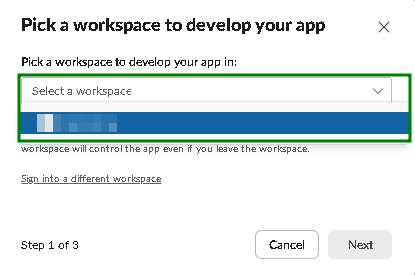
2. 选择 **From an app manifest**,然后选择你的工作区。
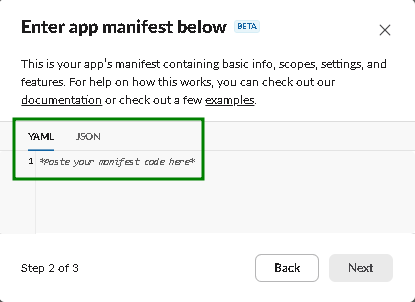
3. 复制位于以下位置的清单:
```
doc/slack/slack_app_manifest.yml
```
将其粘贴到 Slack 中。
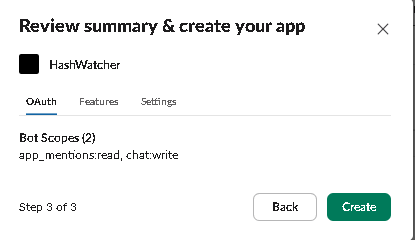
4. 检查配置并创建应用。
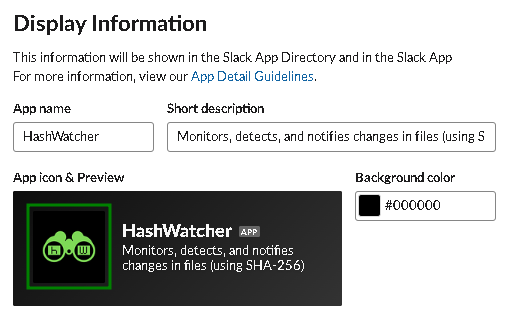
5. 打开 **Settings → Basic Information**,并选择性地将项目徽标 (`doc/slack/logo.png`) 设置为应用图标。
6. 前往 **Features → OAuth & Permissions**,并复制生成的 **Bot User OAuth Token**。
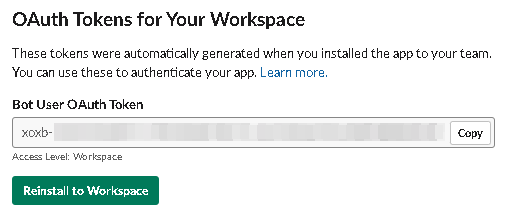
7. 最后,将应用添加到所需的 Slack 频道中,并在你的 HashWatcher 配置中使用频道 ID (`endpoint`) 以及 OAuth token。
## 🗺️ 路线图
- [ ] 监控子目录
- [ ] 自定义监控计划
- [ ] 单元测试
- [ ] 功能测试
## ⭐ 支持本项目
如果你喜欢这个项目或觉得它有用,请给它点个 Star!这有助于提高它的知名度并支持未来的开发。
## 📄 许可证
基于 MIT 许可证分发。查看 [`LICENSE`](LICENSE) 了解更多信息。
标签:EVTX分析, Go, Homebrew安装, Ruby工具, Slack通知, x64dbg, 哈希校验, 日志审计, 系统运维