yym68686/uni-api
GitHub: yym68686/uni-api
uni-api 是一个轻量级 LLM API 网关,通过统一的 OpenAI 兼容接口聚合多个模型服务商,支持负载均衡、故障转移和权限控制,简化多提供商的管理复杂度。
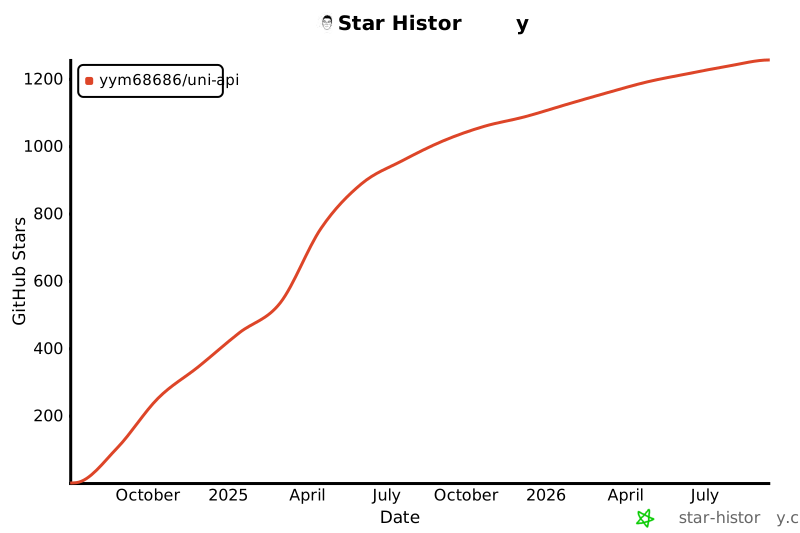
Stars: 1244 | Forks: 152
# uni-api
# By adding angle brackets on both sides of the model name, it will not search for the claude-sonnet-4-5 model under the channel named anthropic, but will take the entire anthropic/claude-sonnet-4-5 as the model name. This syntax can match the model named anthropic/claude-sonnet-4-5 provided by other-provider. But it will not match the claude-sonnet-4-5 model under anthropic.
- openai-test/omni-moderation-latest # When message moderation is enabled, the omni-moderation-latest model under the channel named openai-test can be used for moderation.
- sk-KjjI60Yd0JFWtxxxxxxxxxxxxxxwmRWpWpQRo/* # Support using other API keys as channels
preferences:
SCHEDULING_ALGORITHM: fixed_priority # When SCHEDULING_ALGORITHM is fixed_priority, use fixed priority scheduling, always execute the channel of the first model with a request. Default is enabled, SCHEDULING_ALGORITHM default value is fixed_priority. SCHEDULING_ALGORITHM optional values are: fixed_priority, round_robin, weighted_round_robin, lottery, random.
# When SCHEDULING_ALGORITHM is random, use random polling load balancing, randomly request the channel of the model with a request.
# When SCHEDULING_ALGORITHM is round_robin, use polling load balancing, request the channel of the model used by the user in order.
AUTO_RETRY: true # Whether to automatically retry, automatically retry the next provider, true for automatic retry, false for no automatic retry, default is true. Also supports setting a number, indicating the number of retries.
rate_limit: 15/min # Supports rate limiting, each API Key can request up to 15 times per minute, optional. The default is 999999/min. Supports multiple frequency constraints: 15/min,10/day
# rate_limit: # You can set different frequency limits for each model
# gemini-2.5-flash: 10/min,500/day
# gemini-2.5-pro: 5/min,25/day
# default: 4/min # If the model does not set the frequency limit, use the frequency limit of default
ENABLE_MODERATION: true # Whether to enable message moderation, true for enable, false for disable, default is false, when enabled, it will moderate the user's message, if inappropriate messages are found, an error message will be returned.
# Channel-level weighted load balancing configuration example
- api: sk-KjjI60Yd0JFWtxxxxxxxxxxxxxxwmRWpWpQRo
model:
- gcp1/*: 5 # The number after the colon is the weight, weight only supports positive integers.
- gcp2/*: 3 # The size of the number represents the weight, the larger the number, the greater the probability of the request.
- gcp3/*: 2 # In this example, there are a total of 10 weights for all channels, and 10 requests will have 5 requests for the gcp1/* model, 2 requests for the gcp2/* model, and 3 requests for the gcp3/* model.
preferences:
SCHEDULING_ALGORITHM: weighted_round_robin # Only when SCHEDULING_ALGORITHM is weighted_round_robin and the above channel has weights, it will request according to the weighted order. Use weighted polling load balancing, request the channel of the model with a request according to the weight order. When SCHEDULING_ALGORITHM is lottery, use lottery polling load balancing, request the channel of the model with a request according to the weight randomly. Channels without weights automatically fall back to round_robin polling load balancing.
AUTO_RETRY: true
credits: 10 # Supports setting balance, the number set here represents that the API Key can use 10 dollars, optional. The default is unlimited balance, when set to 0, the key cannot be used. When the user has used up the balance, subsequent requests will be blocked.
created_at: 2024-01-01T00:00:00+08:00 # When the balance is set, created_at must be set, indicating that the usage cost starts from the time set in created_at. Optional. The default is 30 days before the current time.
preferences: # Global configuration
model_timeout: # Model timeout, in seconds, default 100 seconds, optional
gpt-5.2: 10 # Model gpt-5.2 timeout is 10 seconds, gpt-5.2 is the model name, when requesting models like gpt-5.2-2025-12-11, the timeout is also 10 seconds
claude-sonnet-4-5: 10 # Model claude-sonnet-4-5 timeout is 10 seconds, when requesting models like claude-sonnet-4-5-20250929, the timeout is also 10 seconds
default: 10 # Model does not have a timeout set, use the default timeout of 10 seconds, when requesting a model not in model_timeout, the default timeout is 10 seconds, if default is not set, uni-api will use the default timeout set by the environment variable TIMEOUT, the default timeout is 100 seconds
gemini-3-pro: 30 # Model gemini-3-pro timeout is 30 seconds, when requesting models starting with gemini-3-pro, the timeout is 30 seconds
gemini-3-pro-image: 100 # Model gemini-3-pro-image timeout is 100 seconds, when requesting models starting with gemini-3-pro-image, the timeout is 100 seconds
cooldown_period: 300 # Channel cooldown time, in seconds, default 300 seconds, optional. When a model request fails, the channel will be automatically excluded and cooled down for a period of time, and will not request the channel again. After the cooldown time ends, the model will be automatically restored until the request fails again, and it will be cooled down again. When cooldown_period is set to 0, the cooling mechanism is not enabled.
rate_limit: 999999/min # uni-api global rate limit, in times/minute, supports multiple frequency constraints, such as: 15/min,10/day. Default 999999/min, optional.
keepalive_interval: # Heartbeat interval, in seconds, default 99999 seconds, optional. Suitable for when uni-api is hosted on cloudflare and uses inference models.
gemini-2.5-pro: 50 # Model gemini-2.5-pro heartbeat interval is 50 seconds, this value must be less than the model_timeout set timeout, otherwise it will be ignored.
error_triggers: # Error triggers, when the message returned by the model contains any of the strings in the error_triggers, the channel will return an error. Optional
- The bot's usage is covered by the developer
- process this request due to overload or policy
proxy: socks5://[username]:[password]@[ip]:[port] # Proxy address, optional.
model_price: # Model price, in dollars/M tokens, optional. Default price is 1,2, which means input 1 dollar/1M tokens, output 2 dollars/1M tokens.
gpt-5.2: 1,2
claude-sonnet-4-5: 0.12,0.48
default: 1,2
```
挂载配置文件并启动 uni-api docker 容器:
```
docker run --user root -p 8001:8000 --name uni-api -dit \
-v ./api.yaml:/home/api.yaml \
yym68686/uni-api:latest
```
### 方法二:使用 `CONFIG_URL` 环境变量启动 uni-api
按照方法一编写好配置文件后,上传到云盘,获取文件的直链,然后使用 `CONFIG_URL` 环境变量启动 uni-api docker 容器:
```
docker run --user root -p 8001:8000 --name uni-api -dit \
-e CONFIG_URL=http://file_url/api.yaml \
yym68686/uni-api:latest
```
### Codex (`/v1/responses` + `engine: codex`)
如果你想直接使用 Codex CLI / OpenAI Responses API 客户端连接 uni-api:
1. 将客户端 `base_url` 指向 uni-api,并使用一个 uni-api 的 `api_keys[].api`。
2. 添加一个 `engine: codex` 的提供商,并通过 `api`(支持列表;使用逗号格式 `account_id,refresh_token`;uni-api 会自动铸造/刷新 `access_token`)配置多个账户凭据。
3. 当一个账户配额用尽时,uni-api 会冷却该令牌并自动切换到下一个(默认冷却时间为 6 小时;可通过 `api_key_quota_cooldown_period` 覆盖)。
示例:
```
providers:
- provider: codex
engine: codex
# Supports https://chatgpt.com/backend-api/codex or https://chatgpt.com/backend-api/codex/responses
base_url: https://chatgpt.com/backend-api/codex
api:
# Each entry is "account_id,refresh_token" (sets Chatgpt-Account-Id and mints an access_token for Bearer)
- ,
- ,
model:
- gpt-5.2-codex
- gpt-5.2-codex-mini
preferences:
api_key_schedule_algorithm: round_robin
api_key_quota_cooldown_period: 21600 # seconds (optional)
api_keys:
- api: sk-xxx
model:
- codex/*
```
提示:如果你的客户端只支持 `/v1/chat/completions`,你仍然可以使用相同的 Codex 模型名称调用 `/v1/chat/completions`;uni-api 会在需要时转换上游的 Responses 流。
### 搜索提供商 (`/v1/search`)
要启用 `/v1/search` 端点,请配置包含 `search` 模型的提供商,然后在 `api_keys[].model` 中明确允许 `provider/search`。
示例 (Jina + Tavily):
```
providers:
- provider: jina
base_url: https://api.jina.ai/v1/chat/completions
api:
- jina_xxx1
- jina_xxx2
model:
- jina-embeddings-v3
- search
preferences:
api_key_rate_limit:
search: 100/min
- provider: tavily
base_url: https://api.tavily.com/search
api:
- tvly-dev-xxx
model:
- search
preferences:
api_key_rate_limit:
search: 100/min
api_keys:
- api: sk-xxx
model:
- jina/search
- tavily/search
```
请求示例:
```
curl -X GET 'https://xxx.xxx/v1/search?q=Jina%2BAI' \
--header 'Authorization: Bearer sk-xxx'
```
## 环境变量
- CONFIG_URL:配置文件的下载地址,可以是本地文件或远程文件,可选
- DEBUG:是否启用调试模式,默认为 false,可选。启用后将打印更多日志,可在提交 issue 时使用。
- TIMEOUT:请求超时时间,默认为 100 秒。超时时间可以控制一个通道无响应时切换到下一个通道所需的时间。可选
- DISABLE_DATABASE:是否禁用数据库,默认为 false,可选
- DB_TYPE:数据库类型,默认为 sqlite,可选。支持 sqlite 和 postgres。
当 DB_TYPE 为 postgres 时,需要设置以下环境变量:
- DB_USER:数据库用户名,默认为 postgres,可选
- DB_PASSWORD:数据库密码,默认为 mysecretpassword,可选
- DB_HOST:数据库主机,默认为 localhost,可选
- DB_PORT:数据库端口,默认为 5432,可选
- DB_NAME:数据库名称,默认为 postgres,可选
## Koyeb 远程部署
点击下方按钮,自动使用构建好的 uni-api docker 镜像进行部署:
[](https://app.koyeb.com/deploy?name=uni-api&type=docker&image=docker.io%2Fyym68686%2Funi-api%3Alatest&instance_type=free®ions=was&instances_min=0&env%5BCONFIG_URL%5D=)
有两种方式让 Koyeb 读取配置文件,选择其一:
1. 在环境变量 `CONFIG_URL` 中填入配置文件的直链
2. 粘贴 api.yaml 文件内容,如果你直接将 api.yaml 文件内容粘贴到 Koyeb 环境变量设置文件中,在文本框中粘贴文本后,在路径字段中输入 api.yaml 路径为 `/home/api.yaml`。
然后点击部署按钮。
## Ubuntu 部署
在仓库的 Releases 中,找到最新版本对应的二进制文件,例如名为 uni-api-linux-x86_64-0.0.99.pex 的文件。在服务器上下载该二进制文件并运行:
```
wget https://github.com/yym68686/uni-api/releases/download/v0.0.99/uni-api-linux-x86_64-0.0.99.pex
chmod +x uni-api-linux-x86_64-0.0.99.pex
./uni-api-linux-x86_64-0.0.99.pex
```
## Serv00 远程部署 (FreeBSD 14.0)
首先,登录面板,在 Additional services 中点击 Run your own applications 选项卡以启用运行你自己的程序的选项,然后进入面板 Port reservation 随机开放一个端口。
如果你没有自己的域名,进入面板 WWW websites 删除默认提供的域名。然后创建一个新域名,Domain 选择你刚才删除的那个。点击 Advanced settings 后,将 Website type 设置为 Proxy domain,Proxy port 指向你刚才开放的端口。不要勾选 Use HTTPS。
ssh 登录到 serv00 服务器,执行以下命令:
```
git clone --depth 1 -b main --quiet https://github.com/yym68686/uni-api.git
cd uni-api
python -m venv uni-api
source uni-api/bin/activate
pip install --upgrade pip
cpuset -l 0 pip install -vv -r requirements.txt
```
从开始安装到完成安装,大约需要 10 分钟。安装完成后,执行以下命令:
```
tmux new -A -s uni-api
source uni-api/bin/activate
export CONFIG_URL=http://file_url/api.yaml
export DISABLE_DATABASE=true
# 修改端口,xxx 为端口,请自行修改,对应面板中开放的端口端口保留
sed -i '' 's/port=8000/port=xxx/' main.py
sed -i '' 's/reload=True/reload=False/' main.py
python main.py
```
使用 ctrl+b d 退出 tmux,让程序在后台运行。此时,你可以在其他聊天客户端中使用 uni-api。curl 测试脚本:
```
curl -X POST https://xxx.serv00.net/v1/chat/completions \
-H 'Content-Type: application/json' \
-H 'Authorization: Bearer sk-xxx' \
-d '{"model": "gpt-5.2","messages": [{"role": "user","content": "Hello"}]}'
```
参考文档:
https://docs.serv00.com/Python/
https://linux.do/t/topic/201181
https://linux.do/t/topic/218738
## Docker 本地部署
启动容器
```
docker run --user root -p 8001:8000 --name uni-api -dit \
-e CONFIG_URL=http://file_url/api.yaml \ # If the local configuration file has already been mounted, there is no need to set CONFIG_URL
-v ./api.yaml:/home/api.yaml \ # If CONFIG_URL is already set, there is no need to mount the configuration file
-v ./uniapi_db:/home/data \ # If you do not want to save statistical data, there is no need to mount this folder
yym68686/uni-api:latest
```
或者,如果你想使用 Docker Compose,这里有一个 docker-compose.yml 示例:
```
services:
uni-api:
container_name: uni-api
image: yym68686/uni-api:latest
environment:
- CONFIG_URL=http://file_url/api.yaml # If a local configuration file is already mounted, there is no need to set CONFIG_URL
ports:
- 8001:8000
volumes:
- ./api.yaml:/home/api.yaml # If CONFIG_URL is already set, there is no need to mount the configuration file
- ./uniapi_db:/home/data # If you do not want to save statistical data, there is no need to mount this folder
```
CONFIG_URL 是可以自动下载的远程配置文件的 URL。例如,如果你不方便在某个平台上修改配置文件,可以将配置文件上传到托管服务并提供直链给 uni-api 下载,这就是 CONFIG_URL。如果你使用的是本地挂载的配置文件,则不需要设置 CONFIG_URL。CONFIG_URL 用于不方便挂载配置文件的情况。
### api.yaml 热重载(最小更改)+ 前端同步
`uni-api` 在启动时读取 `api.yaml`。如果你希望“在前端编辑 `api.yaml` 并让 uni-api 立即生效”,最小更改的方法是:
- 将相同的 `api.yaml` 同时挂载到后端 `uni-api` 和前端(`uni-api-status`)
- 添加一个 `config-watcher` 服务来监视 `api.yaml`,并在更改时执行 `docker restart uni-api`
这是一个开箱即用的 `docker-compose.yml` 示例(将 `./api.yaml` 放在同一目录下):
```
services:
uni-api:
image: yym68686/uni-api:latest
container_name: uni-api
restart: unless-stopped
ports:
- "8001:8000"
environment:
- WATCHFILES_FORCE_POLLING=true
volumes:
- ./api.yaml:/home/api.yaml
- ./uniapi_db:/home/data
uniapi-frontend:
image: ghcr.io/melosbot/uni-api-status:latest
container_name: uni-api-frontend
restart: unless-stopped
ports:
- "3700:3000"
environment:
- NODE_ENV=production
- PORT=3000
- API_YAML_PATH=/app/config/api.yaml
- STATS_DB_PATH=/app/data/stats.db
volumes:
- ./api.yaml:/app/config/api.yaml
- ./uniapi_db:/app/data:ro
depends_on:
- uni-api
config-watcher:
image: alpine:latest
container_name: uni-api-config-watcher
restart: unless-stopped
volumes:
- ./api.yaml:/watch/api.yaml:ro
- /var/run/docker.sock:/var/run/docker.sock
command: >
sh -c "
apk add --no-cache inotify-tools docker-cli &&
while true; do
inotifywait -e modify,close_write /watch/api.yaml &&
echo 'api.yaml changed, restarting uni-api...' &&
docker restart uni-api
done
"
```
注意:`config-watcher` 挂载了 `/var/run/docker.sock` 以重启容器;请仅在受信任的主机/环境中使用。
如果你想为前端和 API 使用单个域名,这里是一个 Caddy 反向代理示例(`Caddyfile`):
```
yourdomain.com {
encode gzip
tls a@bc.com
route /v1* {
reverse_proxy localhost:8001 {
header_up Host {host}
header_up X-Real-IP {remote}
}
}
route * {
reverse_proxy localhost:3700 {
header_up Host {host}
header_up X-Real-IP {remote}
}
}
}
```
现在你可以通过 `yourdomain.com`(前端)编辑 `api.yaml`。保存后,`uni-api` 将被重启并读取最新的 `api.yaml`。
在后台运行 Docker Compose 容器
```
docker-compose pull
docker-compose up -d
```
Docker 构建
```
docker buildx build --platform linux/amd64,linux/arm64 -t yym68686/uni-api:latest --push .
docker pull yym68686/uni-api:latest
# 测试镜像
docker buildx build --platform linux/amd64,linux/arm64 -t yym68686/uni-api:test -f Dockerfile.debug --push .
docker pull yym68686/uni-api:test
```
一键重启 Docker 镜像
```
set -eu
docker pull yym68686/uni-api:latest
docker rm -f uni-api
docker run --user root -p 8001:8000 -dit --name uni-api \
-e CONFIG_URL=http://file_url/api.yaml \
-v ./api.yaml:/home/api.yaml \
-v ./uniapi_db:/home/data \
yym68686/uni-api:latest
docker logs -f uni-api
```
RESTful curl 测试
```
curl -X POST http://127.0.0.1:8000/v1/chat/completions \
-H "Content-Type: application/json" \
-H "Authorization: Bearer ${API}" \
-d '{"model": "gpt-5.2","messages": [{"role": "user", "content": "Hello"}],"stream": true}'
```
音频输入示例 (/v1/chat/completions):
```
curl -X POST 'https://xxx.xxx/v1/chat/completions' \
--header 'Content-Type: application/json' \
--header "Authorization: Bearer ${API}" \
--data '{
"model": "gemini-2.5-flash",
"messages": [
{
"role": "user",
"content": [
{
"type": "text",
"text": "Generate a transcript of the speech."
},
{
"type": "input_audio",
"input_audio": {
"data": "",
"format": "wav"
}
}
]
}
]
}'
```
使用 URL 进行音频输入:
```
curl -X POST 'https://xxx.xxx/v1/chat/completions' \
--header 'Content-Type: application/json' \
--header "Authorization: Bearer ${API}" \
--data '{
"model": "gemini-2.5-flash",
"messages": [
{
"role": "user",
"content": [
{
"type": "text",
"text": "Generate a transcript of the speech."
},
{
"type": "input_audio",
"input_audio": {
"data": "https://www.youtube.com/watch?v=ku-N-eS1lgM",
"format": "mp4"
}
}
]
}
]
}'
```
pex linux 打包:
```
VERSION=$(cat VERSION)
pex -D . -r requirements.txt \
-c uvicorn \
--inject-args 'main:app --host 0.0.0.0 --port 8000' \
--platform linux_x86_64-cp-3.10.12-cp310 \
--interpreter-constraint '==3.10.*' \
--no-strip-pex-env \
-o uni-api-linux-x86_64-${VERSION}.pex
```
macOS 打包:
```
VERSION=$(cat VERSION)
pex -r requirements.txt \
-c uvicorn \
--inject-args 'main:app --host 0.0.0.0 --port 8000' \
-o uni-api-macos-arm64-${VERSION}.pex
```
## HuggingFace Space 远程部署
警告:请注意远程部署的密钥泄露风险。请勿滥用服务以避免账户被暂停。
Space 仓库需要三个文件:`Dockerfile`、`README.md` 和 `entrypoint.sh`。
要运行程序,你还需要 api.yaml(我将以将其完全存储在 secrets 中为例,但你也可以通过 HTTP 下载实现)。访问匹配、模型和通道配置都在配置文件中。
操作步骤:
1. 访问 https://huggingface.co/new-space 创建一个新的 space。它应该是一个公共仓库;开源许可证/名称/描述可以按需填写。
2. 访问你 space 的文件页面 https://huggingface.co/spaces/your-name/your-space-name/tree/main 并上传这三个文件(`Dockerfile`、`README.md`、`entrypoint.sh`)。
3. 访问你 space 的设置页面 https://huggingface.co/spaces/your-name/your-space-name/settings,找到 Secrets 部分并创建一个名为 `API_YAML_CONTENT`(注意大写)的新 secret。在本地编写你的 api.yaml,然后直接使用 UTF-8 编码将其复制到 secret 字段中。
4. 仍在设置中,找到 Factory rebuild 并让它重建。如果你修改了 secrets 或文件,或者手动重启了 Space,它可能会卡住且没有日志。使用此方法解决此类问题。
5. 在设置页面的右上角,找到三点按钮并选择“Embed this Space”以获取你 Space 的公开链接。格式为 https://(your-name)-(your-space-name).hf.space(去掉括号)。
相关文件代码:
```
# Dockerfile,删除此行
# 使用 uni-api 官方镜像
FROM yym68686/uni-api:latest
# 创建数据目录并设置权限
RUN mkdir -p /data && chown -R 1000:1000 /data
# 设置用户和工作目录
RUN useradd -m -u 1000 user
USER user
ENV HOME=/home/user \
PATH=/home/user/.local/bin:$PATH \
DISABLE_DATABASE=true
# 复制 entrypoint 脚本
COPY --chown=user entrypoint.sh /home/user/entrypoint.sh
RUN chmod +x /home/user/entrypoint.sh
# 确保 /home 目录可写(这很重要!)
USER root
RUN chmod 777 /home
USER user
# 设置工作目录
WORKDIR /home/user
# 入口点
ENTRYPOINT ["/home/user/entrypoint.sh"]
```
```
---
title: Uni API
emoji: 🌍
colorFrom: gray
colorTo: yellow
sdk: docker
app_port: 8000
pinned: false
license: gpl-3.0
---
```
```
# entrypoint.sh,删除此行
#!/bin/sh
set -e
CONFIG_FILE_PATH="/home/api.yaml" # Note this is changed to /home/api.yaml
echo "DEBUG: Entrypoint script started."
# 检查 Secret 是否存在
if [ -z "$API_YAML_CONTENT" ]; then
echo "ERROR: Secret 'API_YAML_CONTENT' does not exist or is empty. Exiting."
exit 1
else
echo "DEBUG: API_YAML_CONTENT secret found. Preparing to write..."
printf '%s\n' "$API_YAML_CONTENT" > "$CONFIG_FILE_PATH"
echo "DEBUG: Attempted to write to $CONFIG_FILE_PATH."
if [ -f "$CONFIG_FILE_PATH" ]; then
echo "DEBUG: File $CONFIG_FILE_PATH created successfully. Size: $(wc -c < "$CONFIG_FILE_PATH") bytes."
# Display the first few lines for debugging (be careful not to display sensitive information)
echo "DEBUG: First few lines (without sensitive info):"
head -n 3 "$CONFIG_FILE_PATH" | grep -v "api:" | grep -v "password"
else
echo "ERROR: File $CONFIG_FILE_PATH was NOT created."
exit 1
fi
fi
echo "DEBUG: About to execute python main.py..."
# 无需使用 --config 参数,因为程序有默认路径
cd /home
exec python main.py "$@"
```
## uni-api 前端部署
uni-api 的前端可以自行部署,地址:https://github.com/yym68686/uni-api-web
你也可以使用我部署的前端,地址:https://uni-api-web.pages.dev/
注意:`uni-api-web` 是一个同时包含前端和后端的独立项目,而 `uni-api` 目前仅提供后端能力。`uni-api-web` 不处理自动重试/故障转移;这些功能仍在 `uni-api` 中。你只需要在 `uni-api-web` 中配置 `uni-api` 的基础 URL(`uni-api-web` 也可以连接到其他兼容的 API)。`uni-api-web` 主要提供用户管理、计费、日志和权限控制;`uni-api` 将继续保持“仅后端”的设计。
有关前端环境变量的说明,请参阅 `uni-api-web` README:https://github.com/yym68686/uni-api-web
这是一个 `docker-compose.yml` 示例(移除了 `mybot/publicbot/servicebot/addetect`;环境变量使用 `${VAR:-}` 占位符):
```
services:
web:
image: yym68686/uni-api-frontend:main
container_name: uni-api-frontend
restart: unless-stopped
depends_on:
- api
environment:
# Inside Docker, use service-to-service networking (NOT localhost).
API_BASE_URL: ${API_BASE_URL:-http://api:8000/v1}
NEXT_TELEMETRY_DISABLED: ${NEXT_TELEMETRY_DISABLED:-1}
NODE_ENV: ${NODE_ENV:-production}
APP_NAME: ${APP_NAME:-UniAPI}
GOOGLE_CLIENT_ID: ${GOOGLE_CLIENT_ID:-}
GOOGLE_REDIRECT_URI: ${GOOGLE_REDIRECT_URI:-}
ports:
- "8003:3000"
db:
image: postgres:17.6-alpine
container_name: uni-api-db
restart: unless-stopped
environment:
POSTGRES_USER: ${DB_POSTGRES_USER:-uniapi}
POSTGRES_PASSWORD: ${DB_POSTGRES_PASSWORD:-}
POSTGRES_DB: ${DB_POSTGRES_DB:-uniapi}
ports:
- "5433:5432"
volumes:
- uniapi_pg_data:/var/lib/postgresql/data
api:
image: yym68686/uni-api-backend:main
container_name: uni-api-backend
restart: unless-stopped
depends_on:
- db
environment:
DATABASE_URL: ${DATABASE_URL:-}
APP_ENV: ${APP_ENV:-dev}
APP_NAME: ${BACKEND_APP_NAME:-Uni API Backend}
API_PREFIX: ${API_PREFIX:-/v1}
SESSION_TTL_DAYS: ${SESSION_TTL_DAYS:-7}
GOOGLE_CLIENT_ID: ${GOOGLE_CLIENT_ID:-}
GOOGLE_CLIENT_SECRET: ${GOOGLE_CLIENT_SECRET:-}
GOOGLE_REDIRECT_URI: ${GOOGLE_REDIRECT_URI:-}
ADMIN_BOOTSTRAP_TOKEN: ${ADMIN_BOOTSTRAP_TOKEN:-}
RESEND_API_KEY: ${RESEND_API_KEY:-}
RESEND_FROM_EMAIL: ${RESEND_FROM_EMAIL:-}
EMAIL_VERIFICATION_REQUIRED: ${EMAIL_VERIFICATION_REQUIRED:-true}
ports:
- "8002:8000"
postgres:
container_name: postgres
image: postgres:17.6
restart: always
environment:
POSTGRES_USER: ${UNIAPI_POSTGRES_USER:-root}
POSTGRES_PASSWORD: ${UNIAPI_POSTGRES_PASSWORD:-}
POSTGRES_DB: ${UNIAPI_POSTGRES_DB:-uniapi}
ports:
- "5432:5432"
volumes:
- ./postgres_data:/var/lib/postgresql/data
healthcheck:
test: ["CMD-SHELL", "pg_isready -U ${UNIAPI_POSTGRES_USER:-root} -d ${UNIAPI_POSTGRES_DB:-uniapi}"]
interval: 5s
timeout: 5s
retries: 5
uni-api:
container_name: uni-api
image: yym68686/uni-api:latest
environment:
# CONFIG_URL: ${CONFIG_URL:-}
TIMEOUT: ${TIMEOUT:-200}
DB_TYPE: ${DB_TYPE:-postgres}
DB_HOST: ${DB_HOST:-postgres}
DB_PORT: ${DB_PORT:-5432}
DB_USER: ${DB_USER:-root}
DB_PASSWORD: ${DB_PASSWORD:-}
DB_NAME: ${DB_NAME:-uniapi}
depends_on:
postgres:
condition: service_healthy
ports:
- "8001:8000"
volumes:
- ./api-copy.yaml:/home/api.yaml
- ./uniapi_db:/home/data
- /etc/localtime:/etc/localtime:ro
restart: unless-stopped
volumes:
uniapi_pg_data:
```
## 赞助商
我们感谢以下赞助商的支持:
- @PowerHunter: ¥2000
- @IM4O4: ¥100
- @ioi:¥50
## 如何赞助我们
如果你想支持我们的项目,可以通过以下方式赞助我们:
1. [PayPal](https://www.paypal.me/yym68686)
2. [USDT-TRC20](https://pb.yym68686.top/~USDT-TRC20),USDT-TRC20 钱包地址:`TLFbqSv5pDu5he43mVmK1dNx7yBMFeN7d8`
3. [微信](https://pb.yym68686.top/~wechat)
4. [支付宝](https://pb.yym68686.top/~alipay)
感谢你的支持!
## 常见问题
- 为什么总是出现错误 `Error processing request or performing moral check: 404: No matching model found`?
将 ENABLE_MODERATION 设置为 false 可以解决此问题。当 ENABLE_MODERATION 为 true 时,API 必须能够使用 omni-moderation-latest 模型,如果你没有在提供商模型设置中提供 omni-moderation-latest,就会出现找不到模型的错误。
- 如何优先请求特定通道,如何设置通道的优先级?
直接在 api_keys 中设置通道顺序即可。无需其他设置。示例配置文件:
```
providers:
- provider: ai1
base_url: https://xxx/v1/chat/completions
api: sk-xxx
- provider: ai2
base_url: https://xxx/v1/chat/completions
api: sk-xxx
api_keys:
- api: sk-1234
model:
- ai2/*
- ai1/*
```
这样,会先请求 ai1,如果失败再请求 ai2。
- 各种调度算法背后的行为是什么?例如 fixed_priority、weighted_round_robin、lottery、random、round_robin、smart_round_robin?
所有调度算法都需要在配置文件中设置 api_keys.(api).preferences.SCHEDULING_ALGORITHM 为以下任一值来启用:fixed_priority、weighted_round_robin、lottery、random、round_robin、smart_round_robin。
1. fixed_priority:固定优先级调度。所有请求始终由第一个拥有用户请求的模型的通道执行。发生错误时,将切换到下一个通道。这是默认的调度算法。
2. weighted_round_robin:加权轮询负载均衡,根据配置文件 api_keys.(api).model 中设置的权重顺序,依次请求拥有用户请求模型的通道。
3. lottery:抽签轮询负载均衡,根据配置文件 api_keys.(api).model 中设置的权重,随机请求拥有用户请求模型的通道。
4. round_robin:轮询负载均衡,根据配置文件 api_keys.(api).model 中的配置顺序,请求拥有用户请求模型的通道。可以查看上一个问题了解如何设置通道优先级。
5. smart_round_robin:智能成功率调度。这是一种为拥有大量 API Key(成百上千甚至上万)的通道设计的高级调度算法。其核心机制是:
- **基于历史成功率排序**:算法根据 API Key 在过去 72 小时内的实际请求成功率动态排序。
- **智能分组与负载均衡**:为防止流量总是集中在少数“最优”键上,算法将所有 Key(包括未使用的)智能地分成若干组。它将成功率最高的 Key 分配到每组的第一位,次高的分配到第二位,依此类推。这确保了负载在不同等级的 Key 之间均匀分布,同时也保证了新的或历史表现不佳的 Key 有机会被尝试(探索)。
- **周期性自动更新**:当一个通道的所有 Key 都被轮询一次后,系统会自动触发一次重新排序,从数据库中拉取最新的成功率数据,生成一个新的、更优的 Key 序列。更新频率是自适应的:Key 池越大,请求量越低,更新周期就越长;反之亦然。
- **适用场景**:强烈建议拥有大量 API Key 的用户启用此算法,以最大化 Key 池的利用率和请求成功率。
- base_url 应该如何正确填写?
除了高级配置中显示的一些特殊通道外,所有 OpenAI 格式的提供商都需要完整填写 base_url,这意味着 base_url 必须以 /v1/chat/completions 或 /v1/responses 结尾。如果你使用的是 GitHub 模型,base_url 应填写为 https://models.inference.ai.azure.com/chat/completions,而不是 Azure 的 URL。
对于 Azure 通道,base_url 兼容以下格式:https://your-endpoint.services.ai.azure.com/models/chat/completions?api-version=2024-05-01-preview 和 https://your-endpoint.services.ai.azure.com/models/chat/completions,https://your-endpoint.openai.azure.com,建议使用第一种格式。如果没有显式指定 api-version,则默认为 2024-10-21。
- 模型超时时间是如何工作的?通道级超时设置和全局模型超时设置的优先级是怎样的?
通道级超时设置的优先级高于全局模型超时设置。优先级顺序为:通道级模型超时设置 > 通道级默认超时设置 > 全局模型超时设置 > 全局默认超时设置 > 环境变量 TIMEOUT。
更具体地说,`model_timeout` 和 `keepalive_interval` 共享相同的匹配和回退规则(它们应用于全局 `preferences.model_timeout` / `preferences.keepalive_interval` 以及每个提供商的 `preferences.model_timeout` / `preferences.keepalive_interval` 的方式相同):
1. 定义两个名称:
- **请求模型名称**:你在请求体 `model` 字段中发送的值,例如 `gpt-5.2`、`claude-sonnet-4-5`。
- **上游模型名称**:提供商端的原始模型 ID,即你在 `providers.(provider).model` 中映射的*左侧*。例如:
providers:
- provider: openai
model:
- gpt-5.2-2025-12-11: gpt-5.2 # 左侧 = 上游模型名称,右侧 = 请求模型别名
在这种情况下,请求模型名称是 `gpt-5.2`,上游模型名称是 `gpt-5.2-2025-12-11`。
2. 当解析*特定提供商*的超时/保活时间(其自身的 `preferences.model_timeout` 或 `preferences.keepalive_interval`)时,uni-api 会按顺序尝试以下 6 个步骤(在第一个匹配处停止):
1. 使用**请求模型名称**在该提供商的 `model_timeout` / `keepalive_interval` 中查找精确键匹配。
2. 如果没有精确命中,则尝试使用请求模型名称进行**模糊匹配**:检查 `model_timeout` / `keepalive_interval` 中是否有任何键是请求模型名称的子字符串。
例如,如果你只配置了:
model_timeout:
gpt-5.2: 20
那么像 `gpt-5.2-2025-12-11` 或 `gpt-5-mini` 这样的模型也会匹配 20 秒。
3. 如果请求模型名称在此提供商处未匹配到任何内容,则切换到**上游模型名称**,并在相同的 `model_timeout` / `keepalive_interval` 中查找精确键匹配。
4. 如果上游模型名称仍然没有精确匹配,则尝试使用上游模型名称进行**模糊匹配**:检查 `model_timeout` / `keepalive_interval` 中是否有任何键是上游模型名称的子字符串。
5. 如果以上均未匹配,但提供商级别的 `model_timeout` / `keepalive_interval` 定义了 `default`,则使用此提供商级别的 `default`。
6. 如果此提供商完全没有匹配(包括没有提供商级别的 `default`),uni-api 将回退到**全局** `preferences.model_timeout` / `preferences.keepalive_interval`:
- 它使用**请求模型名称**对全局配置重新尝试相同的序列:精确匹配 → 模糊匹配 → 全局 `default`。
- 如果未找到,则使用**上游模型名称**对全局配置重新尝试相同的序列:精确匹配 → 模糊匹配 → 全局 `default`。
- 如果全局配置也没有匹配,最终的回退是环境变量 `TIMEOUT`(默认 100 秒)。
在实践中,这意味着 `model_timeout` / `keepalive_interval` 下的键可以是:
- 你实际使用的请求别名(例如 `gpt-5.2`、`claude-sonnet-4-5`);
- 上游模型 ID(例如 `gpt-5.2-2025-12-11`);
- 或者一个被一系列模型共享的稳定前缀/子字符串(例如仅用 `gpt-5.2` 来覆盖 `gpt-5.2-2025-12-11`、`gpt-5-mini` 等)。
通过基于这种匹配行为调整 `model_timeout` 和 `keepalive_interval`,你可以避免不必要的超时,并更好地控制 uni-api 在每个提供商上等待的时间。如果你遇到错误 `{'error': '500', 'details': 'fetch_response_stream Read Response Timeout'}`,请尝试增加对应模型(或其前缀)的超时时间,而不是只更改全局 TIMEOUT。
- api_key_rate_limit 是如何工作的?如何为多个模型设置相同的速率限制?
如果你想同时为 gemini-1.5-pro-latest、gemini-1.5-pro、gemini-1.5-pro-001、gemini-1.5-pro-002 这四个模型设置相同的频率限制,可以这样设置:
```
api_key_rate_limit:
gemini-1.5-pro: 1000/min
```
这将匹配所有包含 gemini-1.5-pro 字符串的模型。这四个模型 gemini-1.5-pro-latest、gemini-1.5-pro、gemini-1.5-pro-001、gemini-1.5-pro-002 的频率限制都将设置为 1000/min。配置 api_key_rate_limit 字段的逻辑如下,这里有一个示例配置文件:
```
api_key_rate_limit:
gemini-1.5-pro: 1000/min
gemini-1.5-pro-002: 500/min
```
此时,如果有一个使用模型 gemini-1.5-pro-002 的请求。
首先,uni-api 会尝试在 api_key_rate_limit 中精确匹配该模型。如果设置了 gemini-1.5-pro-002 的速率限制,那么 gemini-1.5-pro-002 的速率限制就是 500/min。如果此时请求的模型不是 gemini-1.5-pro-002,而是 gemini-1.5-pro-latest,由于 api_key_rate_limit 中没有为 gemini-1.5-pro-latest 设置速率限制,它会查找是否有任何与 gemini-1.5-pro-latest 前缀相同的模型已被设置,因此 gemini-1.5-pro-latest 的速率限制将被设置为 1000/min。
- 我想让通道 1 和通道 2 随机轮询,并且 uni-api 会在通道 1 和通道 2 失败后请求通道 3。该如何设置?
uni-api 支持将 api key 作为一个通道,并且可以利用此功能通过分组来管理通道。
```
api_keys:
- api: sk-xxx1
model:
- sk-xxx2/* # channel 1 2 use random round-robin, request channel 3 after failure
- aws/* # channel 3
preferences:
SCHEDULING_ALGORITHM: fixed_priority # always request api key: sk-xxx2 first, then request channel 3 after failure
- api: sk-xxx2
model:
- anthropic/claude-sonnet-4-5 # channel 1
- openrouter/claude-sonnet-4-5 # channel 2
preferences:
SCHEDULING_ALGORITHM: random # channel 1 2 use random round-robin
```
- 我想使用 Cloudflare AI Gateway,base_url 应该如何填写?
对于 gemini 通道,Cloudflare AI Gateway 的 base_url 应填写为 https://gateway.ai.cloudflare.com/v1/{account_id}/{gateway_name}/google-ai-studio/v1beta/openai/chat/completions,其中 {account_id} 和 {gateway_name} 需要替换为你的 Cloudflare 账户 ID 和 Gateway 名称。
对于 Vertex 通道,Cloudflare AI Gateway 的 base_url 应填写为 https://gateway.ai.cloudflare.com/v1/{account_id}/{gateway_name}/google-vertex-ai,其中 {account_id} 和 {gateway_name} 需要替换为你的 Cloudflare 账户 ID 和 Gateway 名称。
- 何时 api key 拥有管理权限?
1. 当只有一个 key 时,表示自用,该唯一 key 拥有管理权限,可以通过前端查看所有通道敏感信息。
2. 当有两个或更多 key 时,必须指定一个或多个 key 具有 admin 角色,只有具有 admin 角色的 key 才有权访问敏感信息。这样设计是为了防止另一个 key 用户也访问到敏感信息。因此,添加了强制 key 设置角色为 admin 的设计。
- 使用 koyeb 部署 uni-api 时,如果配置文件通道没有写 model 字段,启动会报错。如何解决?
在 koyeb 上部署 uni-api 时,如果配置文件通道未包含 model 字段,启动时会报错。这是因为 koyeb 上 api.yaml 的默认权限是 0644,uni-api 没有写权限。当 uni-api 尝试获取 model 字段时,它会尝试修改配置文件,从而导致错误。你可以在控制台中输入 `chmod 0777 api.yaml` 来授予 uni-api 写权限,从而解决此问题。
- 为什么使用 nginx 作为代理后无法获取用户的真实 IP?
在
```
proxy_set_header X-Forwarded-For $proxy_add_x_forwarded_for;
proxy_set_header X-Real-IP $remote_addr;
```
中添加
## 负载测试
负载测试工具:[locust](https://locust.io/)
负载测试脚本:[test/locustfile.py](test/locustfile.py)
mock_server: [test/mock_server.go](test/mock_server.go)
启动负载测试:
```
go run test/mock_server.go
# 100 10 120秒
locust -f test/locustfile.py
python main.py
```
负载测试结果:
| 类型 | 名称 | 50% | 66% | 75% | 80% | 90% | 95% | 98% | | 99.9% | 99.99% | 100% | 请求数 |
|------|------|-----|-----|-----|-----|-----|-----|-----|-----|--------|---------|------|--------|
| POST | /v1/chat/completions (stream) | 18 | 23 | 29 | 35 | 83 | 120 | 140 | 160 | 220 | 270 | 270 | 6948 |
| | 聚合 | 18 | 23 | 29 | 35 | 83 | 120 | 140 | 160 | 220 | 270 | 270 | 6948 |
## 安全
我们高度重视安全。如果你发现任何安全问题,请通过 [yym68686@outlook.com](mailto:yym68686@outlook.com) 联系我们。
**致谢:**
我们要感谢 **@ryougishiki214** 报告了一个安全问题,该问题已在 [v1.5.1](https://github.com/yym68686/uni-api/releases/tag/v1.5.1) 中解决。
## 许可证
根据 Apache License, Version 2.0 授权。详见 `LICENSE`。
## ⭐ Star 历史


标签:AI服务集成, API管理, API网关, DLL 劫持, Docker容器化, LLM API聚合, OpenAI兼容, 云服务集成, 人工智能, 原生工具调用, 图像识别API, 多后端支持, 大语言模型, 格式转换, 模型服务, 测试用例, 用户模式Hook绕过, 统一接口, 请求拦截, 负载均衡, 逆向工具, 配置文件驱动