vllm-project/llm-compressor
GitHub: vllm-project/llm-compressor
一个与 Transformers 兼容的 LLM 压缩与量化库,提供多种量化算法以优化模型在 vLLM 中的推理部署。
Stars: 3603 | Forks: 593
 LLM Compressor
[](https://docs.vllm.ai/projects/llm-compressor/en/latest/) [](https://pypi.org/project/llmcompressor/)
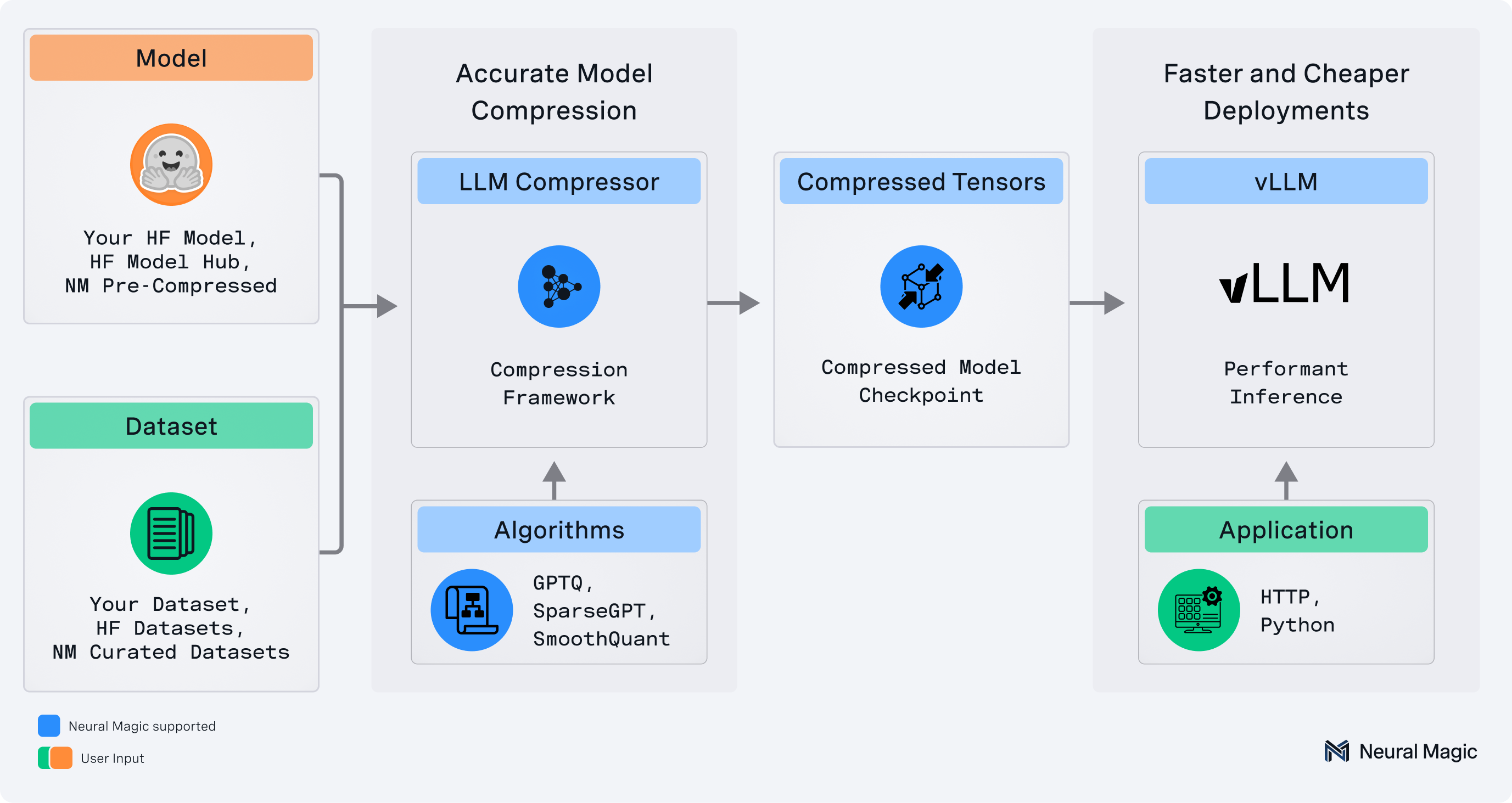
`llmcompressor` 是一个易于使用的库,用于优化模型以便通过 vLLM 进行部署,包括:
* 用于权重、激活、KV Cache 和注意力量化的综合量化和变换算法集
* 与 Hugging Face 模型和仓库的无缝集成
* 保存为 `compressed-tensors` 格式的模型,兼容 vLLM
* 支持 DDP 和磁盘 offloading,用于压缩超大模型
**✨ 请在[此处](https://neuralmagic.com/blog/llm-compressor-is-here-faster-inference-with-vllm/)阅读发布公告! ✨**
## 🚀 最新动态!
LLM Compressor 迎来了重大更新!如需深入了解,请查看 [LLM Compressor 概述](https://docs.google.com/presentation/d/1WNkYBKv_CsrYs69lb7bJKjh2dWt8U1HXUw7Gr4Wn3gE/edit?usp=sharing)。
部分令人兴奋的新功能包括:
* **Nemotron 3 Ultra 量化 Checkpoint**:Red Hat 团队使用 [model_free_ptq 示例](examples/model_free_ptq/nemotron_3_ultra.py) 创建了 Nemotron 3 Ultra 的 FP8 和 Int4 量化 checkpoint,并已发布到 HF Hub。建议使用:
- [Nemotron-3-Ultra-550B-A55B-FP8-Dynamic](https://huggingface.co/RedHatAI/NVIDIA-Nemotron-3-Ultra-550B-A55B-FP8-Dynamic)
- [Nemotron-3-Ultra-550B-A55B-BF16-FP8-BLOCK](https://huggingface.co/RedHatAI/NVIDIA-Nemotron-3-Ultra-550B-A55B-BF16-FP8-BLOCK)
- [Nemotron-3-Ultra-550B-A55B-BF16-W4A16-G128](https://huggingface.co/RedHatAI/NVIDIA-Nemotron-3-Ultra-550B-A55B-BF16-W4A16-G128)
* **DeepSeek-V4-Flash 和 Kimi-K2.6 量化 Checkpoint**:Red Hat 团队已生成 DeepSeek-V4-Flash 和 Kimi-K2.6 的量化 checkpoint 并发布到 HF Hub。建议使用:
- [DeepSeek-V4-Flash-NVFP4-FP8](https://huggingface.co/RedHatAI/DeepSeek-V4-Flash-NVFP4-FP8) — 163B DeepSeek-V4-Flash 量化为 NVFP4 权重并带有 FP8 KV cache
- [Kimi-K2.6-NVFP4](https://huggingface.co/RedHatAI/Kimi-K2.6-NVFP4) — Kimi-K2.6 量化为 NVFP4(权重和激活),专为 NVIDIA Blackwell GPU 设计
- [Kimi-K2.6-FP8-BLOCK](https://huggingface.co/RedHatAI/Kimi-K2.6-FP8-BLOCK) — 1T 参数的 Kimi-K2.6 量化为 FP8 block 格式(权重和激活),兼容 DeepGEMM FP8 kernel
* **Qwen3.6 NVFP4 生成的 Checkpoint**:RedHat 团队已生成 [NVFP4 量化 checkpoint](https://huggingface.co/RedHatAI/Qwen3.6-35B-A3B-NVFP4) 并发布到 HF Hub。Qwen3.6 遵循与 Qwen3.5 相同的架构,因此只需替换目标模型字符串,即可将现有的 LLM Compressor 示例用于此模型。
* **Gemma4 支持**:现在可以使用 LLM Compressor 对 Gemma 4 进行量化。该支持已在 main 分支中提供,并且需要更新至 transformers 5.5 (`uv pip install transformers>=5.5`)。对于由 RedHat 团队量化并发布的模型,建议使用:
- [gemma-4-31B-it-NVFP4](https://huggingface.co/RedHatAI/gemma-4-31B-it-NVFP4)
- [gemma-4-31B-it-FP8-block](https://huggingface.co/RedHatAI/gemma-4-31B-it-FP8-block)
- [gemma-4-31B-it-FP8-Dynamic](https://huggingface.co/RedHatAI/gemma-4-31B-it-FP8-Dynamic)
- [gemma-4-26B-A4B-it-FP8-Dynamic](https://huggingface.co/RedHatAI/gemma-4-26B-A4B-it-FP8-Dynamic)
- [gemma-4-26B-A4B-it-NVFP4](https://huggingface.co/RedHatAI/gemma-4-26B-A4B-it-NVFP4)
### 支持的精度和类型
* 激活量化:W8A8 (int8 和 fp8)、W4AFP8、Microscale (NVFP4、MXFP4、MXFP8)
* 混合精度:W4A16、W8A16、MXFP8A16、MXFP4A16、NVFP4A16
* 注意力和 KV Cache 量化:FP8、NVFP4
### 支持的算法
* Simple PTQ
* GPTQ
* AWQ
* SmoothQuant
* AutoRound
* 基于旋转 (SpinQuant、QuIP)
### 量化您的模型,分步指南
有关选择量化方案、算法及其用例的详细信息,请参阅我们的[分步压缩指南](https://docs.vllm.ai/projects/llm-compressor/en/latest/steps/choosing-model/)。
我们的[用户指南](https://docs.vllm.ai/projects/llm-compressor/en/latest/guides/entrypoints/)中也提供了有关 LLM Compressor 功能的更多信息。
## 安装
```
pip install llmcompressor
```
## 快速入门
### 端到端示例
使用 `llmcompressor` 应用量化:
### 权重和激活量化
* [激活量化为 `int8`](examples/quantization_w8a8_int8/README.md)
* [激活量化为 `fp8`](examples/quantization_w8a8_fp8/README.md)
* [激活量化为 MXFP8](examples/quantization_w8a8_mxfp8)
* [激活量化为 `fp4` (NVFP4)](examples/quantization_w4a4_fp4)
* [激活量化为 `fp4` (MXFP4)](examples/quantization_w4a4_mxfp4)
* [使用 AutoRound 将激活量化为 `fp4`](examples/autoround/quantization_w4a4_fp4/README.md)
* [激活量化为 `fp8` 且权重量化为 `int4`](examples/quantization_w4a8_fp8)
### 仅权重量化
* [仅权重量化为 `fp4` (NVFP4 格式)](examples/quantization_w4a16_fp4/nvfp4)
* [仅权重量化为 `fp4` (MXFP4 格式)](examples/quantization_w4a16_fp4/mxfp4)
* [使用 GPTQ 将仅权重量化为 `int4`](examples/quantization_w4a16/README.md)
* [使用 AWQ 将仅权重量化为 `int4`](examples/awq/README.md)
* [使用 AutoRound 将仅权重量化为 `int4`](examples/autoround/quantization_w4a16/README.md)
### 注意力和 KV Cache 量化
* [KV Cache 量化为 `fp8`](examples/quantization_kv_cache/README.md)
* [使用按 head 方式将 KV Cache 量化为 `fp8`](examples/quantization_kv_cache/llama3_fp8_head_kv_example.py)
* [注意力量化为 `fp8`](examples/quantization_attention/README.md)
* [使用 SpinQuant 将注意力量化为 `NVFP4` (实验性)](experimental/attention/README.md)
### 特定架构的量化
* [量化 MoE LLM](examples/quantizing_moe/README.md)
* [量化视觉语言模型 (Vision-Language Models)](examples/multimodal_vision/README.md)
* [量化音频语言模型 (Audio-Language Models)](examples/multimodal_audio/README.md)
### 非均匀量化
* [非均匀量化模型](examples/quantization_non_uniform/README.md)
### 大型模型量化支持
* [使用顺序加载 (Sequential Onloading) 量化大型模型](examples/big_models_with_sequential_onloading/README.md)
* [使用磁盘 offloading 量化大型模型](examples/disk_offloading/README.md)
### 无模型定义量化
* [在没有 Hugging Face 模型定义的情况下量化模型](examples/model_free_ptq/README.md)
### DDP 量化
* [使用 GPTQ 进行分布式数据并行 (DDP) 量化](examples/quantization_w4a16/llama3_ddp_example.py)
## 快速浏览
让我们使用 `Round-to-Nearest` 算法将 `Qwen3-30B-A3B` 量化为 FP8 权重和激活。
请注意,该模型可以替换为本地或远程兼容 HF 的 checkpoint,并且可以更改 `recipe` 以针对不同的量化算法或格式。
### 应用量化
通过选择算法并调用 `oneshot` API 来应用量化。
```
from compressed_tensors.offload import dispatch_model
from transformers import AutoModelForCausalLM, AutoTokenizer
from llmcompressor import oneshot
from llmcompressor.modifiers.quantization import QuantizationModifier
MODEL_ID = "Qwen/Qwen3-30B-A3B"
# 加载 model。
model = AutoModelForCausalLM.from_pretrained(MODEL_ID)
tokenizer = AutoTokenizer.from_pretrained(MODEL_ID)
# 配置 quantization 算法和 scheme。
# 在本例中,我们:
# * 使用 block_size 为 128 的 RTN 将 weights quantize 为 FP8
# * 在推理期间将 activations 动态 quantize 为 FP8
recipe = QuantizationModifier(
targets="Linear",
scheme="FP8_BLOCK",
ignore=["lm_head", "re:.*mlp.gate$"],
)
# 应用 quantization。
oneshot(model=model, recipe=recipe)
# 确认 quantized model 的生成内容看起来正常。
print("========== SAMPLE GENERATION ==============")
dispatch_model(model)
input_ids = tokenizer("Hello my name is", return_tensors="pt").input_ids.to(
model.device
)
output = model.generate(input_ids, max_new_tokens=20)
print(tokenizer.decode(output[0]))
print("==========================================")
# 以 compressed-tensors 格式保存到磁盘。
SAVE_DIR = MODEL_ID.split("/")[1] + "-FP8-BLOCK"
model.save_pretrained(SAVE_DIR)
tokenizer.save_pretrained(SAVE_DIR)
```
### 使用 vLLM 进行推理
`llmcompressor` 创建的 checkpoint 可以加载并在 `vllm` 中运行:
安装:
```
pip install vllm
```
运行:
```
from vllm import LLM
model = LLM("Qwen/Qwen3-30B-A3B-FP8-BLOCK")
output = model.generate("My name is")
```
## 提问 / 贡献
- 如果您有任何问题或请求,请提交一个 [issue](https://github.com/vllm-project/llm-compressor/issues),我们将添加相应的示例或文档。
- 我们非常感谢您对代码、示例、集成和文档的贡献,以及 bug 报告和功能请求。
## 引用
如果您在研究或项目中发现 LLM Compressor 很有用,请考虑引用它:
```
@software{llmcompressor2024,
title={{LLM Compressor}},
author={Red Hat AI and vLLM Project},
year={2024},
month={8},
url={https://github.com/vllm-project/llm-compressor},
}
```
!!! warning
由于缺乏硬件支持和使用率,LLM Compressor 不再支持稀疏压缩 (24 稀疏度)
标签:DLL 劫持, Hugging Face, Python, vLLM, 凭据扫描, 大语言模型, 推理优化, 无后门, 模型压缩, 模型量化, 逆向工具