rfonod/geo-trax
GitHub: rfonod/geo-trax
从无人机鸟瞰视频中自动提取地理参考车辆轨迹的深度学习流水线,服务于城市交通分析与仿真。
Stars: 32 | Forks: 7
# Geo-trax
[](https://github.com/rfonod/geo-trax/releases) [](https://pypi.org/project/geo-trax/) [](https://pepy.tech/project/geo-trax) [](https://pypi.org/project/geo-trax/) [](https://github.com/rfonod/geo-trax/actions/workflows/ci.yml) [](https://www.python.org/) [](https://github.com/rfonod/geo-trax/blob/main/LICENSE) [](https://github.com/rfonod/geo-trax/issues) [](https://doi.org/10.1016/j.trc.2025.105205) [](https://arxiv.org/abs/2411.02136) [](https://zenodo.org/doi/10.5281/zenodo.12119542) [](https://huggingface.co/rfonod/geo-trax) [](https://huggingface.co/spaces/rfonod/geo-trax) [](https://www.real-lab.ch/geo-trax) [](https://youtu.be/gOGivL9FFLk)
**Geo-trax**(地理参考轨迹提取)是一个综合性的 pipeline,可以从高空无人机影像中提取高精度、带有地理参考的车辆轨迹。它专为城市交通的准静止空中监测而构建,能将原始的鸟瞰图 (BEV) 无人机画面转化为精确的真实世界车辆轨迹。该框架结合了 YOLO 检测、多目标跟踪和视频防抖技术,并辅以稳健的基于正射影像的地理参考阶段,从而生成带有 GNSS 标签、达到车道级别分辨率的轨迹,这些轨迹在空间和时间上保持一致,可直接用于大规模交通分析和仿真。它针对城市交叉口和主干道走廊进行了优化,在这些场景中,高保真、车辆级别的洞察力正在推动智能交通系统和数字孪生应用的发展。

🎬 Geo-trax 功能的加速预览。在 [YouTube](https://youtu.be/gOGivL9FFLk) 上观看完整的约 4 分钟 4K 演示。
### 为什么选择 Geo-trax
- 🛰️ **真实世界的输出**:直接从原始 BEV 无人机视频中,提取带有地理参考、达到车道分辨率的轨迹(WGS84 + 本地 CRS),并包含每辆车的速度、加速度和估计尺寸。
- 🎯 **精准的检测**:[YOLOv8s 车辆检测器](#detection-model) 达到了 **0.951 mAP@50**,在超过 19,000 张带标注的航拍图像上进行了训练。
- 🚗 **灵活的跟踪**:支持四种车辆类别和[六种可选的多目标跟踪器](#tracking)(BoT-SORT、ByteTrack、OC-SORT 等)。
- 🌀 **抗无人机运动干扰**:基于 homography 的防抖([Stabilo](https://github.com/rfonod/stabilo))加上正射影像配准,确保跨飞行架次坐标的一致性。
- 📊 **经规模验证**:支持生成 [Songdo Traffic](https://doi.org/10.5281/zenodo.13828383) 数据集(涵盖 **20 个交叉口**的约 **700,000 条轨迹**,由 **10 架无人机**组成的机群采集;详情请见 [真实世界部署](#real-world-deployment-the-songdo-experiment))。
- ⚙️ **一条命令,一份配置**:`geotrax batch` 运行整个 pipeline;一个 YAML 文件驱动所有阶段,并内置 [四种调优预设](#configuration)。
## Pipeline

🔍 核心 pipeline(实线框)生成稳定的、像素坐标的车辆轨迹。可选扩展通过正射影像配准添加地理参考,通过用于自定义检测器微调的帧(预)标注创建视觉数据集,并提供可视化、分析和探测车辆验证工具,所有这些均适用于像素坐标和地理参考输出。
## 安装说明
```
python3.11 -m venv .venv && source .venv/bin/activate # Windows: .venv\Scripts\activate
python -m pip install geo-trax
```
兼容 Python 3.9 至 3.13。同时也支持 [uv](https://docs.astral.sh/uv/) (`uv pip install geo-trax`) 和 [conda](https://www.anaconda.com/docs/getting-started/miniconda/install)。如需开发环境:
```
git clone --depth 1 https://github.com/rfonod/geo-trax.git
cd geo-trax && python -m pip install -e '.[dev]'
```
## 快速开始
`data/U_video_cut.mp4` 是一段用于即时测试的 5 秒样片。匹配的正射影像请见 [data/README.md](data/README.md)。
```
# Pixel-coordinate trajectories (无需 orthophoto)
geotrax batch data/U_video_cut.mp4 --no-geo
# Full pipeline:提取、georeference 和分析(需要 orthophotos;参见 data/README.md)
geotrax batch data/U_video_cut.mp4 -orf data/orthophotos -mf data/master_frames --show-lanes
# Scale up:处理整个项目树,然后将多无人机结果合并为一个 dataset
geotrax batch path/to/PROCESSED/
geotrax aggregate path/to/PROCESSED/
```
运行 `geotrax -h` 或 `geotrax batch -h` 查看所有选项。上述扩展命令在[推荐的项目结构](#real-world-deployment-the-songdo-experiment)下可直接无参数运行;其他任何目录布局需使用显式的路径标志。
## 配置
整个 pipeline 由**单一、独立的 YAML 配置文件**驱动:一个文件即可控制检测、跟踪、防抖、地理参考、可视化和绘图。软件包内置了四种预设:
| 预设 | 侧重点 |
|--------|-------|
| [`default`](geotrax/cfg/default.yaml) | 均衡的基线 |
| [`confident`](geotrax/cfg/confident.yaml) | 精确度(较少误报) |
| [`lenient`](geotrax/cfg/lenient.yaml) | 召回率(捕获更多车辆) |
| [`stable`](geotrax/cfg/stable.yaml) | 防抖质量 |
```
geotrax batch video.mp4 -c confident # use a bundled preset by name
geotrax batch video.mp4 -c ./my.yaml # use a custom config file
```
_copy.yaml
geotrax config copy -o ~/myproj # copy into a specific directory
```
复制预设,进行编辑,然后通过 `-c` 传递:
```
geotrax config copy
# 编辑 default_copy.yaml ...
geotrax extract video.mp4 -c default_copy.yaml
```
要切换跟踪算法,请在配置中设置 `tracker.active`(参见[跟踪](#tracking))。
## 检测模型
默认检测器是 **YOLOv8s**(HBB,1920 × 1920 像素,约 1100 万参数),在超过 19,000 张带标注的航拍图像(约 67.9 万个标记的车辆实例)上进行训练,并在经过精心挑选的高质量子集上进行了微调。它托管在 [🤗 Hugging Face](https://huggingface.co/rfonod/geo-trax) 上,并在**首次使用时自动下载**。在 Songdo Vision 测试集(1,084 张图像;完整结果见[表 3](https://doi.org/10.1016/j.trc.2025.105205))上的表现:
| ID | 标签 | 精确度 | 召回率 | mAP@50 | mAP@50-95 |
|---|---|---|---|---|---|
| 0 | 汽车(含厢式货车) | 0.979 | 0.981 | 0.992 | 0.835 |
| 1 | 公交车 | 0.952 | 0.977 | 0.988 | 0.826 |
| 2 | 卡车 | 0.887 | 0.916 | 0.935 | 0.722 |
| 3 | 摩托车 | 0.827 | 0.866 | 0.888 | 0.463 |
| **所有** | | **0.911** | **0.935** | **0.951** | **0.711** |
要使用不同的模型,请将 `--model` (CLI) 或 `extraction.model` (配置文件) 指向本地 `.pt` 路径或 `hf:////.pt`;任何兼容 [Ultralytics](https://github.com/ultralytics/ultralytics) 的模型均可使用。
### 自定义模型训练
用于自定义 YOLO 检测器的训练和导出脚本位于 `train/` 中,并带有用于 HPC 集群的 SLURM 包装器。详见 [train/README.md](train/README.md)。
## 跟踪
[Ultralytics](https://github.com/ultralytics/ultralytics) `>=8.4.63` 版本随附了六种多目标跟踪器。通过配置即可选择:只需设置 `tracker.active`,无需更改代码。默认:**BoT-SORT**。
| 跟踪器 | `tracker.active` | ReID | GMC¹ | 优点 | 缺点 |
|---------|------------------|:----:|:----:|------|------|
| **BoT-SORT** (默认) | `botsort` | 可选 | ✅ | 精度高;支持运动 + 可选的外观特征 | 速度较慢;ReID 增加计算量 |
| **ByteTrack** | `bytetrack` | ❌ | ❌ | 速度最快;两阶段关联 | 遮挡下更容易 ID 切换 |
| **OC-SORT** | `ocsort` | ❌ | ❌ | 对非线性运动具有鲁棒性;轻量级 | 处理长时间遮挡能力较弱 |
| **Deep OC-SORT** | `deepocsort` | 可选 | 可选 | OC-SORT + 外观特征;适合密集场景 | 使用 ReID 时计算量最大的变体 |
| **FastTracker** | `fasttrack` | ❌ | ❌ | 具备遮挡感知的 ByteTrack 变体 | 较新;需要调整的旋钮较多 |
| **TrackTrack** | `tracktrack` | 可选 | ✅ | 多线索代价;ID 保留效果最好 | 参数最多;计算量最高 |
¹ GMC(跟踪器内置的相机运动补偿)在跟踪期间运行,独立于 Stabilo 的事后轨迹防抖阶段。
## 用法
`geotrax` CLI 为每个阶段提供了一个子命令:`batch`(主要入口点)、`extract`、`georeference`、`visualize`、`plot`、`aggregate` 和 `config`。运行 `geotrax -h` 或 `geotrax <子命令> -h` 获取完整的参考手册(`python -m geotrax` 作用相同)。
```
# 递归处理目录(或单个视频)而不进行 georeferencing
geotrax batch path/to/videos/ --no-geo
# 独立运行单个 stage
geotrax extract video.mp4 # detect, track, and stabilize
geotrax visualize video.mp4 --save # render an annotated video from existing results
geotrax plot video.mp4 # trajectory and distribution plots
```
.txt`): 包含提取的车辆轨迹,格式如下:
frame_id, vehicle_id, x_c(unstab), y_c(unstab), w(unstab), h(unstab), x_c(stab), y_c(stab), w(stab), h(stab), class_id, confidence, vehicle_length, vehicle_width
其中:
- `frame_id`: 帧编号 (0, 1, ...)。
- `vehicle_id`: 唯一的车辆标识符 (1, 2, ...)。
- `x_c(unstab)`, `y_c(unstab)`: 未防抖的车辆质心坐标。
- `w(unstab)`, `h(unstab)`: 未防抖的车辆边界框宽度和高度。
- `x_c(stab)`, `y_c(stab)`: 防抖后的车辆质心坐标。
- `w(stab)`, `h(stab)`: 防抖后的车辆边界框宽度和高度。
- `class_id`: 车辆类别标识符 (0: 汽车(含厢式货车), 1: 公交车, 2: 卡车, 3: 摩托车)
- `confidence`: 检测置信度得分 (0-1)。
- `vehicle_length`, `vehicle_width`: 估算的车辆尺寸(以像素为单位)。
- `is_interpolated` *(可选,第 15 列)*: 仅在启用 `extraction.interpolate: true` (CLI: `--interpolate`) 时存在。`0` = 真实检测,`1` = 通过线性插值填补帧间隙。大于当前跟踪器 `track_buffer` 的间隙将不予填补(跟踪器不会在较长的遮挡期间保留丢失轨迹的 ID)。
- **video_file_vid_transf.txt** (`.txt`): 包含每一帧的变换矩阵,格式如下:
frame_id, h11, h12, h13, h21, h22, h23, h31, h32, h33
其中:
- `frame_id`: 防抖后帧的编号(由于参考帧本身没有变换,因此从 `cut_frame_left + 1` 开始)。
- `hij`: 将每一帧 (`frame_id`) 映射到参考帧的 3x3 homography 矩阵的元素。
- **video_file.yaml**: 视频元数据及用于处理 `video_file.mp4` 的配置设置。(此文件与输入视频保存在同一目录下,而非输出文件夹中。)
- **video_file_mode_X.mp4** (`_mode_.mp4`): 包含五种渲染模式 (X = 0 / 1 / 2 / 3 / 4) 的带标注视频:
- **模式 0**: 叠加在原始(未防抖)视频上
- **模式 1**: 叠加在防抖后的视频上
- **模式 2**: 绘制在静态参考帧上
- **模式 3**: 在原始视频上使用旋转边界框,其中每个框根据车辆估算的物理尺寸设定大小,并旋转至其每帧的航向(根据去除相机运动的稳定轨迹得出并反投影至原始帧)。要求已运行防抖。
- **模式 4**: 与模式 3 相同的旋转边界框,但直接绘制在防抖后的视频上(无反投影)。要求已运行防抖。
每个版本都可以显示车辆边界框、ID、类别标签、置信度得分,以及会褪色和改变粗细以指示运动新旧程度的短轨迹拖尾。如果在输入视频同一目录下存在输入文件 `video_file.csv`(即转换后的飞行日志),则还可以显示车辆速度和车道信息。
- **video_file.csv** (`.csv`): 以表格格式包含经过地理参考的车辆轨迹。此文件包含地理坐标和本地坐标、估算的真实世界尺寸、运动学数据、路段以及车道信息。各列分别为:
Vehicle_ID, [Timestamp,] Frame_Number, Ortho_X, Ortho_Y, Local_X, Local_Y, Latitude, Longitude, Vehicle_Length, Vehicle_Width, Vehicle_Class, Vehicle_Speed, Vehicle_Acceleration, Road_Section, Lane_Number, Visibility[, Is_Interpolated]
其中:
- `Vehicle_ID`: 唯一的车辆标识符。
- `Timestamp`: 帧的时间戳 (YYYY-MM-DD HH:MM:SS.ms)。仅在视频旁边存在带有时间戳的飞行日志 CSV 文件时出现。
- `Frame_Number`: 对应于此检测的视频帧索引。
- `Ortho_X`, `Ortho_Y`: 正射影像像素坐标系中车辆质心的 X 和 Y 坐标。
- `Local_X`, `Local_Y`: 本地投影坐标系中车辆质心的 X 和 Y 坐标(例如 Songdo 实验中使用的 EPSG:5186 / KGD2002 / Central Belt 2010)。
- `Latitude`, `Longitude`: 车辆质心的地理坐标 (WGS84)。
- `Vehicle_Length`, `Vehicle_Width`: 估算的车辆尺寸(以米为单位)。
- `Vehicle_Class`: 车辆类别标识符 (0: 汽车(含厢式货车), 1: 公交车, 2: 卡车, 3: 摩托车)。
- `Vehicle_Speed`: 估算的车辆速度(单位:km/h)。
- `Vehicle_Acceleration`: 估算的车辆加速度(单位:m/s$^2$)。
- `Road_Section`: 车辆所在路段的标识符。
- `Lane_Number`: 车辆所在车道的标识符。
- `Visibility`: 布尔值,指示车辆的边界框是否完全位于画面内可见。
- `Is_Interpolated` *(可选)*: 仅在提取阶段使用 `--interpolate` 运行时存在 (`extraction.interpolate: true`)。`0` = 真实检测,`1` = 在提取阶段为填补帧间隙而通过线性插值合成的行;从 `.txt` 轨迹文件传播而来。
- **video_file_geo_transf.txt** (`.txt`): 包含将视频参考帧的点映射到正射影像图的 3x3 地理参考变换矩阵 (homography)。格式为 9 个矩阵元素的逗号分隔列表:
h11, h12, h13, h21, h22, h23, h31, h32, h33
**注意:** *所有输出文件(`video_file.yaml` 除外)均保存在已配置的输出文件夹中(默认:输入视频旁的 `results/` 子文件夹)。轨迹和分布图始终写入输出文件夹内的 `plots/` 子文件夹中。*
备选环境与高级开发者安装
**创建并激活虚拟环境**(以下任意一种方式): ``` # venv (standard library) python3.11 -m venv .venv source .venv/bin/activate # Windows: .venv\Scripts\activate # uv (venv + pip 的最快替代方案) uv venv --python 3.11 source .venv/bin/activate # Windows: .venv\Scripts\activate # Miniconda conda create -n geo-trax python=3.11 -y conda activate geo-trax ``` **从 PyPI 安装**(用于运行时)。这将安装 `geotrax` 命令行界面以及内置的配置文件树 (`geotrax/cfg/`): ``` python -m pip install geo-trax # pip uv pip install geo-trax # uv (faster) ``` **从本地源码安装**(推荐用于开发或模型训练)。克隆(或复刻)仓库,然后以可编辑模式 (`-e`) 安装,这样可以在不重新安装的情况下反映代码更改: ``` git clone https://github.com/rfonod/geo-trax.git # add --depth 1 for the latest snapshot only cd geo-trax python -m pip install -e . # pip # uv pip install -e . # uv (更快;需要上面的 uv venv) # poetry install # Poetry (自动管理其自身的 virtualenv;跳过 venv 步骤) ``` **可选依赖组**(开发/测试工具,ONNX 导出): ``` python -m pip install -e '.[dev]' # development + test tooling python -m pip install -e '.[export]' # ONNX export dependencies # uv pip install -e '.[dev]' # uv 等效命令 # poetry install --extras dev # Poetry 等效命令 # poetry install --extras export ```📋 完整功能概览
- **检测**:YOLOv8s 应用于航拍 BEV 图像;检测汽车(含厢式货车)、公交车、卡车和摩托车。 - **跟踪**:六种多目标跟踪器(默认为 BoT-SORT);对比请见[跟踪](#tracking);支持可选的逐轨帧间隙插值。 - **防抖**:通过 [Stabilo](https://github.com/rfonod/stabilo) 🌀 进行基于 homography 的轨迹校正,并由 [Stabilo-Optimize](https://github.com/rfonod/stabilo-optimize) 🎯 进行调优。 - **地理参考**:帧到正射影像配准;输出每辆车的纬度/经度、本地 CRS、速度、加速度和车道分配。 - **可视化**:在原始、稳定或静态参考视频上进行轨迹叠加,提供五种渲染模式(包含定向边界框)。 - **分析**:生成轨迹图、运动学分布以及类别/尺寸图表,可按单个视频或跨无人机及场次进行汇总。 - **扩展与工具**:支持批量处理目录树并汇总多无人机数据;包含用于端到端数据准备、训练、评估和验证的独立实用工具。🚀 计划中的增强功能
- 在专门的 `docs/` 文件夹中提供全面的文档。现有的 [`tools/README.md`](tools/README.md) 索引已涵盖辅助脚本。 - 模块化、基于面向对象编程 (OOP) 的 pipeline,支持自定义参考帧,并利用 Stabilo 的图像匹配后端进行地理参考。 - 按类别设置置信度阈值。 - 基于 SAHI 的小目标检测。 - 批量推理、GPU 加速的图像配准以及多线程处理。 - 真实世界地图可视化(例如 MovingPandas、contextily)和交互式 Web 应用。🔗 相关项目
Geo-trax 整合并补充了多个专用工具: - **[Stabilo](https://github.com/rfonod/stabilo) 🌀**:使用稳健的 homography 变换进行视频和轨迹稳定的 Python 库。支持各种特征检测器、RANSAC 算法和用户自定义的掩码。用作 Geo-trax 的核心稳定引擎。 - **[Stabilo-Optimize](https://github.com/rfonod/stabilo-optimize) 🎯**:用于 Stabilo 的基准测试和超参数优化框架。通过使用随机扰动的无真实值评估来衡量防抖性能。用于微调 Geo-trax 的防抖参数。 - **[HBB2OBB](https://github.com/rfonod/hbb2obb) 📦**:使用 SAM 分割模型将水平边界框转换为定向边界框。当后续分析需要物体方向时,可用于增强 Geo-trax 的输出。⚙️ 检查、复制和自定义配置
使用 `geotrax config` 命令管理内置配置: ``` geotrax config show # list bundled presets and their location geotrax config show default # print a preset's full contents geotrax config copy # copy presets into the current directory as💡 更多示例与高级用法
``` # 使用自定义 config(按名称捆绑的 preset,或您自己文件的路径) geotrax batch video.mp4 -c confident geotrax batch video.mp4 -c path/to/custom_config.yaml # 使用线性插值填补 per-track detection gaps(在 .txt 输出中添加 is_interpolated 列) geotrax batch video.mp4 --no-geo --interpolate # 在不重新运行 extraction 的情况下重新生成 visualization geotrax batch video.mp4 --viz-only --save # 显示 lane ID,隐藏 speed overlay(需要 georeferencing) geotrax batch video.mp4 --viz-only --save --show-lanes --hide-speed # 针对 orthophotos 对已提取的视频进行 georeference geotrax georeference video.mp4 -orf path/to/orthophotos -mf path/to/master_frames # Aggregated trajectory plots,不包括公交车和卡车 geotrax batch path/to/PROCESSED/ --plot-only --plot-aggregate --plot-class-filter 1 2 # 将相同 location 的多无人机结果合并为一个统一的 dataset geotrax aggregate path/to/PROCESSED/ # Rotated box modes (3/4):boxes 朝向车辆 heading,位于原始 (3) 或 stabilized (4) 帧 geotrax visualize video.mp4 --save --viz-mode 3 4 ```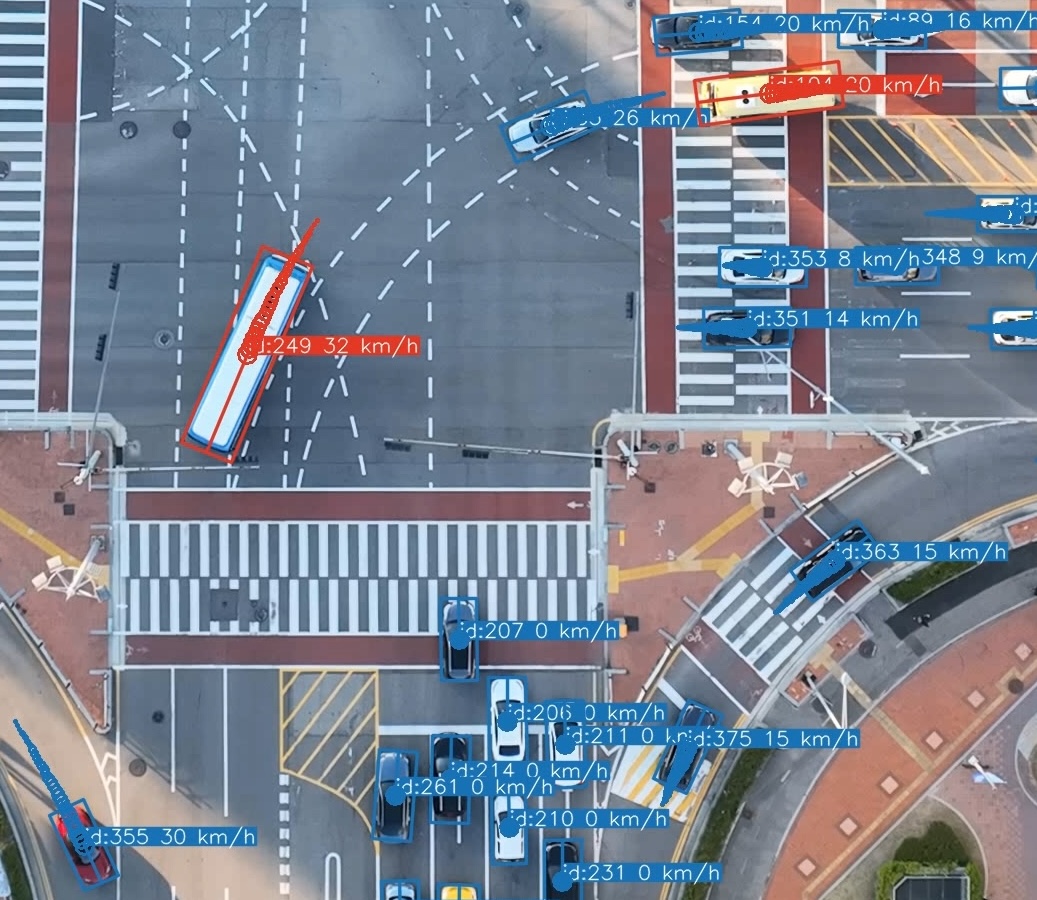
Mode 3 rotated bounding boxes, zoomed detail from the same scene as the animation above.
⚠️ 旋转框模式(3 和 4):已知限制
模式 3 和 4 使用**旋转边界框**替代标准的轴对齐 YOLO 检测:每个框的大小根据车辆估算的物理长度和宽度设定,并旋转以与其行驶方向(航向)对齐。航向是根据去除了相机运动的稳定轨迹得出的;模式 3 将结果反投影回原始帧,而模式 4 直接在稳定后的帧上绘制。它们是信息量最大的渲染模式,但也对数据质量最敏感: - **尺寸估算可能失败。** 尺寸估算是在车辆以近乎直线的路径移动且有足够位移的帧上计算的。较短的轨迹、近乎静止的车辆,或者靠近帧边缘的检测,可能无法产生可用的估算值。在这些情况下,框的尺寸会回退到原始 YOLO 边界框范围的每辆车 Q25 聚合值(并旋转至航向方向),由于轴对齐的检测框在车辆转弯时会扩大,这往往会导致框偏大。回退框使用**虚线轮廓**渲染,因此很容易识别。 - **航向可能不可靠。** 对于非常缓慢或静止的车辆,无法确定运动方向;此时框将改为与原始边界框较长的轴对齐。 - **反投影畸变(仅限模式 3)。** 定向框是在稳定空间中计算的,并通过逆向防抖 homography 投影回原始帧。在强烈的相机运动下,这可能会产生明显倾斜的框。 - **边缘裁剪是近似的。** 当车辆正在进入或离开画面时,检测仅覆盖其可见部分,因此定向框会被裁剪到该覆盖范围,而不是以完整尺寸绘制(一旦检测达到距离边界 `edge_clip_margin` 像素范围内即触发裁剪,因为 YOLO 框可能会在距离真实边缘几个像素处停止)。然而,该覆盖范围仅作为轴对齐 (HBB) 检测框已知,而渲染的框已旋转至航向方向——因此裁剪边界只能近似反映旋转车辆实际离开画面的位置。裁剪矩形经过了时间维度平滑处理 (`edge_clip_smoothing`),使得框在车辆离开时能够平稳缩小,而不是随着每帧的检测噪声发生跳跃。 - 两种模式都要求在进行提取阶段时启用了防抖(配置文件中的 `stabilize: true`)。📁 输出文件格式
假设输入视频为 `video_file.mp4`。默认情况下,输出将写入输入文件旁边的 `results/` 子文件夹中;文件夹及所有文件名后缀均可通过 pipeline 配置的 `output:` 部分(或使用 `--output-folder` / `-of` 指定文件夹)进行配置。 - **video_file.txt** (`📂 推荐的项目文件夹结构
以下布局反映了 Songdo 实验的设计,并与 pipeline 的自动检测默认值相匹配,让 `geotrax batch` 无需使用路径标志即可运行。有两个约定承担了核心作用: - **`PROCESSED/` 文件夹是自动检测的锚点。** 当进行地理参考或绘图需要正射影像、主帧或分割图且未给出明确路径时,Geo-trax 会从视频文件位置向*上*查找,直到找到 `PROCESSED`,然后寻找同级的 `ORTHOPHOTOS/` 文件夹。 - **位置 ID 将每个视频与其资产关联起来。** 位置 ID 是视频文件名中的前导字母(`A1.mp4` → `A`),因此 `A1.mp4` 会自动解析为 `ORTHOPHOTOS/A.png`、`ORTHOPHOTOS/master_frames/A.png` 和 `ORTHOPHOTOS/segmentations/A.csv`。 ### 目录树🏷️ 视频片段命名约定
代码仅需要视频文件名中的**前导位置字母**(由 `determine_location_id` 解析)。上下文元数据(日期、无人机、场次)通常位于**文件夹路径**中,因此每个视频片段可以紧凑地命名为位置 ID + 序号: ``` 2022-10-07/D10/PM5/U1.mp4 │ │ │ └── clip: location ID 'U' + sequence number '1' │ │ └────── flight session: AM1-AM5 (morning) / PM1-PM5 (afternoon) │ └────────── drone ID (D1, D2, ...) └───────────────────── capture date (ISO 8601, YYYY-MM-DD) ``` 这些紧凑的名称由剪切步骤自动分配,无需手动键入:在给定位置映射(一个将每个标签与其 `[lat, lon]` 中心配对的 JSON 文件)的情况下,[`tools/cut_merged_videos_and_logs.py`](tools/cut_merged_videos_and_logs.py) 会使用最接近其 GPS 质心的位置来标记每个视频片段,并附加按位置的序号(`U1`、`U2`,...)。 因为只有前导字母起作用,所以当视频片段脱离此目录树时,相同的上下文可以打包成一个独立的文件名。Zenodo 上发布的示例视频就是采用这种方式命名的,例如 `U_D10_2022-10-07_PM5_60s.mp4`(位置 `U`,无人机 `D10`,日期 `2022-10-07`,场次 `PM5`)。在这里,按位置的序号被替换为一个时间标记,显示该片段在场次中的位置:`60s` 表示该场次在此位置的前 60 秒。无论哪种方式,代码仍然会提取位置 `U`。 | 片段文件名 | 位置 ID | 解析为 | |---|---|---| | `U1.mp4` | `U` | `ORTHOPHOTOS/U.png`, `master_frames/U.png`, `segmentations/U.csv` | | `U2.mp4` | `U` | `ORTHOPHOTOS/U.png`, … | | `U_D10_2022-10-07_PM5_60s.mp4` | `U` | `ORTHOPHOTOS/U.png`, … | `geotrax aggregate` 按位置(以及日期/场次)对结果进行分组,将来自覆盖同一地点的不同无人机的片段合并为一个统一的数据集。🛠️ 从原始录像到轨迹
`tools/` 目录提供了处理脚本,可引导您从原始录像过渡到适用于 pipeline 的片段(完整索引请参见 [`tools/README.md`](tools/README.md)): 1. **合并**录制的视频片段及其日志,将每个飞行场次合并为一个视频 + 日志 → [`tools/merge_videos_and_logs.py`](tools/merge_videos_and_logs.py) 2. **剪切**将每次合并的飞行视频按位置切分为片段:在 `0_merged.txt` 中列出每次稳定悬停的起止帧,然后进行分割(将 DJI SRT 日志转换为每个片段的 CSV) → [`tools/cut_merged_videos_and_logs.py`](tools/cut_merged_videos_and_logs.py) 3. **质量保证 / 修复**剪切后的日志 → [`tools/find_cut_video_issues.py`](tools/find_cut_video_issues.py), [`tools/fix_timestamp_anomalies.py`](tools/fix_timestamp_anomalies.py), [`tools/interpolate_missing_timestamps.py`](tools/interpolate_missing_timestamps.py) 4. **构建地理参考资产**:按位置裁剪正射影像 → [`tools/subset_orthophoto.py`](tools/subset_orthophoto.py);生成主帧 → [`tools/find_master_frames.py`](tools/find_master_frames.py);车道分割图需手动绘制,并可通过 [`tools/viz_segmentations.py`](tools/viz_segmentations.py) 渲染叠加层 5. **运行 pipeline**:`geotrax batch PROCESSED/ ...`;系统会自动从同级的 `ORTHOPHOTOS/` 文件夹中检测正射影像、主帧和分割图。 6. **(可选) 聚合**同一位置跨无人机和飞行的结果 → `geotrax aggregate PROCESSED/`,这会将统一的数据集写入同级的 `DATASET/` 文件夹中。 ### 来自 Songdo 实验的经验 - 将 `RAW/` 视为只读的归档存储,并在 `PROCESSED/` 下派生所有内容;这些处理步骤可以通过原始录像重现。 - **主帧**是每个位置的中间坐标系:将每次飞行对齐到一个共享的参考帧,可以使得来自不同无人机、高度和视角的轨迹保持在单一且一致的坐标系中。 - 坐标与 WGS84 经纬度一起被投影到了本地 CRS(EPSG:5186,KGD2002 / Central Belt 2010)中;请在 `georef:` 配置部分设置您自己的 CRS。 - 影像是在约 140–150 米的高度以 4K 画质拍摄的,地面采样距离 ≈ 0.027 m/px(默认的 `extraction.gsd`)。如果使用不同的飞行高度或相机,请重新调整 GSD。标签:CNCF毕业项目, IaC 扫描, 交通分析, 凭据扫描, 地理空间分析, 无人机视觉, 深度学习, 目标追踪, 计算机视觉, 轨迹提取, 逆向工具