longbridge/gpui-component
GitHub: longbridge/gpui-component
基于 GPUI 的 Rust 跨平台桌面 GUI 组件库,提供 60+ 现代化 UI 组件,支持 Dock 布局、代码编辑器、图表、Markdown 渲染等功能。
Stars: 11774 | Forks: 660
# GPUI 组件
[](https://github.com/longbridge/gpui-component/actions/workflows/ci.yml) [](https://docs.rs/gpui-component/) [](https://crates.io/crates/gpui-component)
使用 [GPUI](https://gpui.rs) 构建出色桌面应用程序的 UI 组件。
## 功能特性
- **丰富性**:60+ 跨平台桌面 UI 组件。
- **原生性**:灵感源自 macOS 和 Windows 控件,结合 shadcn/ui 设计,提供现代化体验。
- **易用性**:无状态 `RenderOnce` 组件,简单且用户友好。
- **可定制**:内置 `Theme` 和 `ThemeColor`,支持多主题和基于变量的配置。
- **通用性**:支持 `xs`、`sm`、`md` 和 `lg` 等尺寸。
- **灵活布局**:支持 Dock 布局,用于面板排列、调整大小和自由形式 (Tiles) 布局。
- **高性能**:虚拟化 Table 和 List 组件,流畅渲染大数据。
- **内容渲染**:原生支持 Markdown 和简单 HTML。
- **图表**:内置图表用于数据可视化。
- **编辑器**:高性能代码编辑器(支持高达 20 万行),集成 LSP(诊断、补全、悬停提示等)。
- **语法高亮**:使用 Tree Sitter 为编辑器和 Markdown 组件提供语法高亮。
## 展示
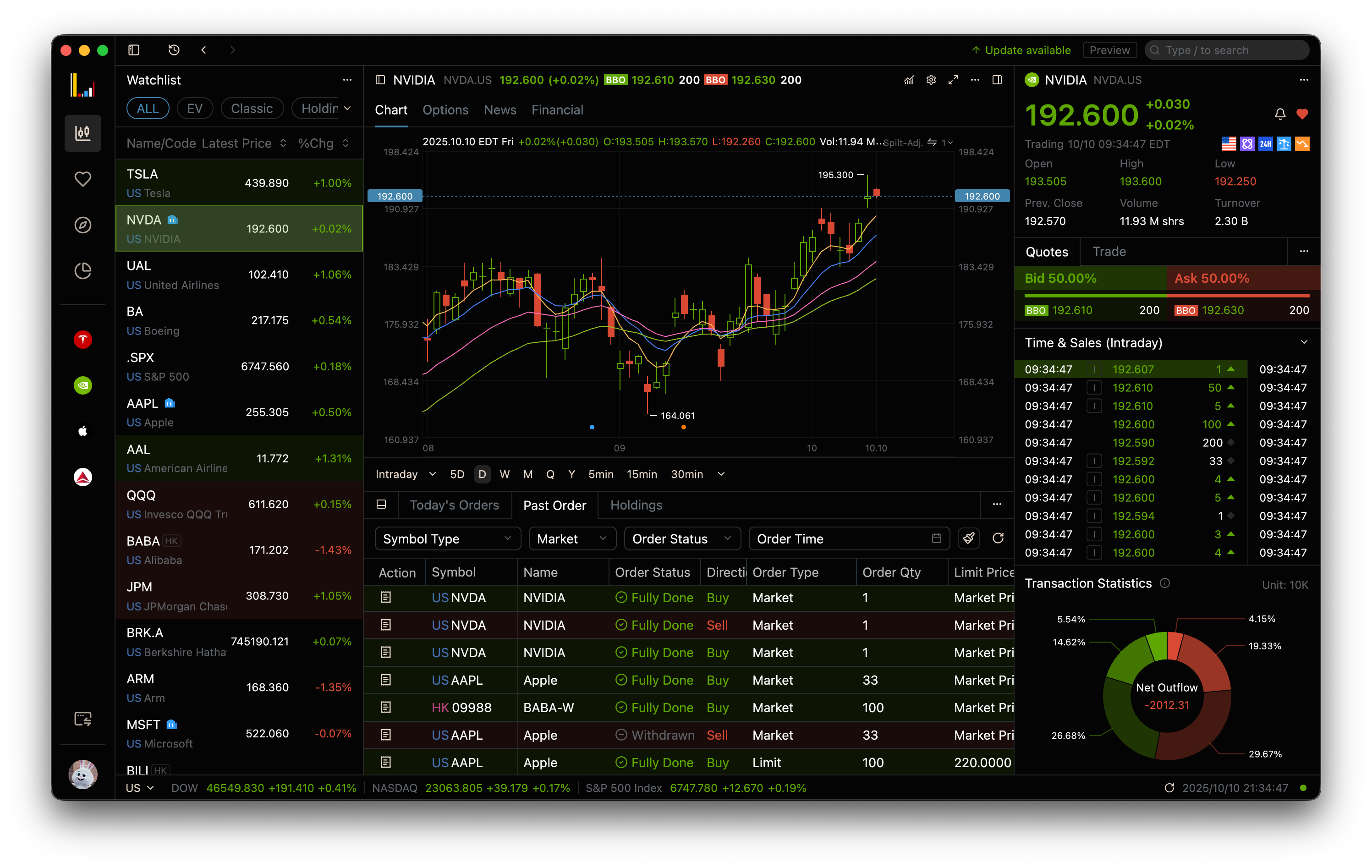
这是第一个应用程序:[Longbridge Pro](https://longbridge.com/desktop),使用 GPUI Component 构建。
 ## 使用方法
```
gpui = "0.2.2"
gpui-component = "0.5.1"
```
### 基本示例
```
use gpui::*;
use gpui_component::{button::*, *};
pub struct HelloWorld;
impl Render for HelloWorld {
fn render(&mut self, _: &mut Window, _: &mut Context
## 使用方法
```
gpui = "0.2.2"
gpui-component = "0.5.1"
```
### 基本示例
```
use gpui::*;
use gpui_component::{button::*, *};
pub struct HelloWorld;
impl Render for HelloWorld {
fn render(&mut self, _: &mut Window, _: &mut Context) -> impl IntoElement {
div()
.v_flex()
.gap_2()
.size_full()
.items_center()
.justify_center()
.child("Hello, World!")
.child(
Button::new("ok")
.primary()
.label("Let's Go!")
.on_click(|_, _, _| println!("Clicked!")),
)
}
}
fn main() {
let app = Application::new();
app.run(move |cx| {
// This must be called before using any GPUI Component features.
gpui_component::init(cx);
cx.spawn(async move |cx| {
cx.open_window(WindowOptions::default(), |window, cx| {
let view = cx.new(|_| HelloWorld);
// This first level on the window, should be a Root.
cx.new(|cx| Root::new(view, window, cx))
})?;
Ok::<_, anyhow::Error>(())
})
.detach();
});
}
```
### 图标
GPUI Component 有一个 `Icon` 元素,但默认情况下不包含 SVG 文件。
该示例使用 [Lucide](https://lucide.dev) 图标,但你可以使用任何你喜欢的图标。只需按照 [IconName](https://github.com/longbridge/gpui-component/blob/main/crates/ui/src/icon.rs#L86) 中的定义命名 SVG 文件即可。你可以将所需的任何图标添加到你的项目中。
## 开发
我们有一个使用 GPUI Component 构建的应用程序画廊。
```
cargo run
```
更多示例可以在 `examples` 目录中找到。你可以使用 `cargo run --example ` 运行它们。
查看 [CONTRIBUTING.md](CONTRIBUTING.md) 了解更多详情。
## 与其他框架对比
| 功能特性 | GPUI Component | [Iced] | [egui] | [Qt 6] |
| --------------------- | ------------------------------ | ------------------ | --------------------- | ------------------------------------------------- |
| 语言 | Rust | Rust | Rust | C++/QML |
| 核心渲染 | GPUI | wgpu | wgpu | QT |
| 许可证 | Apache 2.0 | MIT | MIT/Apache 2.0 | [商业/LGPL](https://www.qt.io/qt-licensing) |
| 最小二进制大小 [^1] | 12MB | 11MB | 5M | 20MB [^2] |
| 跨平台 | 是 | 是 | 是 | 是 |
| 文档 | 简单 | 简单 | 简单 | 良好 |
| Web | 否 | 是 | 是 | 是 |
| UI 风格 | 现代 | 基础 | 基础 | 基础 |
| CJK 支持 | 是 | 是 | 差 | 是 |
| 图表 | 是 | 否 | 否 | 是 |
| 表格(大数据集) | 是
(虚拟行, 列) | 否 | 是
(虚拟行) | 是
(虚拟行, 列) | | 表格列调整大小 | 是 | 否 | 是 | 是 | | 文本基准 | Rope | [COSMIC Text] [^3] | trait TextBuffer [^4] | [QTextDocument] | | 代码编辑器 | 简单 | 简单 | 简单 | 基础 API | | Dock 布局 | 是 | 是 | 是 | 是 | | 语法高亮 | [Tree Sitter] | [Syntect] | [Syntect] | [QSyntaxHighlighter] | | Markdown 渲染 | 是 | 是 | 基础 | 否 | | Markdown 混合 HTML | 是 | 否 | 否 | 否 | | HTML 渲染 | 基础 | 否 | 否 | 基础 | | 文本选择 | TextView | 否 | 任意 Label | 是 | | 自定义主题 | 是 | 是 | 是 | 是 | | 内置主题 | 是 | 否 | 否 | 否 | | 国际化 | 是 | 是 | 是 | 是 | [^1]: 使用简单 hello world 示例的 Release 构建。 [^2]: [减小 Qt 应用程序二进制大小](https://www.qt.io/blog/reducing-binary-size-of-qt-applications-part-3-more-platforms) [^3]: Iced Editor:
[^4]: egui TextBuffer:
## 许可证
Apache-2.0
- UI 设计基于 [shadcn/ui](https://ui.shadcn.com)。
- 图标来自 [Lucide](https://lucide.dev)。
## 使用方法
```
gpui = "0.2.2"
gpui-component = "0.5.1"
```
### 基本示例
```
use gpui::*;
use gpui_component::{button::*, *};
pub struct HelloWorld;
impl Render for HelloWorld {
fn render(&mut self, _: &mut Window, _: &mut Context(虚拟行, 列) | 否 | 是
(虚拟行) | 是
(虚拟行, 列) | | 表格列调整大小 | 是 | 否 | 是 | 是 | | 文本基准 | Rope | [COSMIC Text] [^3] | trait TextBuffer [^4] | [QTextDocument] | | 代码编辑器 | 简单 | 简单 | 简单 | 基础 API | | Dock 布局 | 是 | 是 | 是 | 是 | | 语法高亮 | [Tree Sitter] | [Syntect] | [Syntect] | [QSyntaxHighlighter] | | Markdown 渲染 | 是 | 是 | 基础 | 否 | | Markdown 混合 HTML | 是 | 否 | 否 | 否 | | HTML 渲染 | 基础 | 否 | 否 | 基础 | | 文本选择 | TextView | 否 | 任意 Label | 是 | | 自定义主题 | 是 | 是 | 是 | 是 | | 内置主题 | 是 | 否 | 否 | 否 | | 国际化 | 是 | 是 | 是 | 是 | [^1]: 使用简单 hello world 示例的 Release 构建。 [^2]: [减小 Qt 应用程序二进制大小](https://www.qt.io/blog/reducing-binary-size-of-qt-applications-part-3-more-platforms) [^3]: Iced Editor:
标签:Crates.io, Dock布局, GPUI, GUI组件库, LSP, Markdown渲染, Rust, shadcn/ui, Tree-sitter, UI框架, 主题定制, 代码高亮, 信息收集, 可视化界面, 图表, 开源库, 搜索引擎爬虫, 桌面GUI, 桌面应用开发, 用户体验, 界面设计, 组件化开发, 编辑器, 网络流量审计, 虚拟列表, 通知系统, 通知系统, 通知系统