HippoRAG 2: From RAG to Memory
[

](https://colab.research.google.com/drive/1nuelysWsXL8F5xH6q4JYJI8mvtlmeM9O#scrollTo=TjHdNe2KC81K)
[

](https://arxiv.org/abs/2502.14802)
[

](https://huggingface.co/datasets/osunlp/HippoRAG_2/tree/main)
[

](https://arxiv.org/abs/2405.14831)
[

](https://github.com/OSU-NLP-Group/HippoRAG/tree/legacy)
### HippoRAG 2 是一个用于 LLM 的强大记忆框架,它增强了 LLM 识别和利用新知识关联的能力——这反映了人类长期记忆的一项关键功能。
我们的实验表明,即使是最先进的 RAG 系统,HippoRAG 2 也能在不牺牲其在简单任务上的性能的前提下,提升其联想能力(多跳检索)和意义建构(整合庞大且复杂上下文的过程)。
与其前身一样,HippoRAG 2 在在线过程中依然保持高效的成本和延迟,同时与 GraphRAG、RAPTOR 和 LightRAG 等其他基于图的解决方案相比,其离线索引所需的资源显著更少。
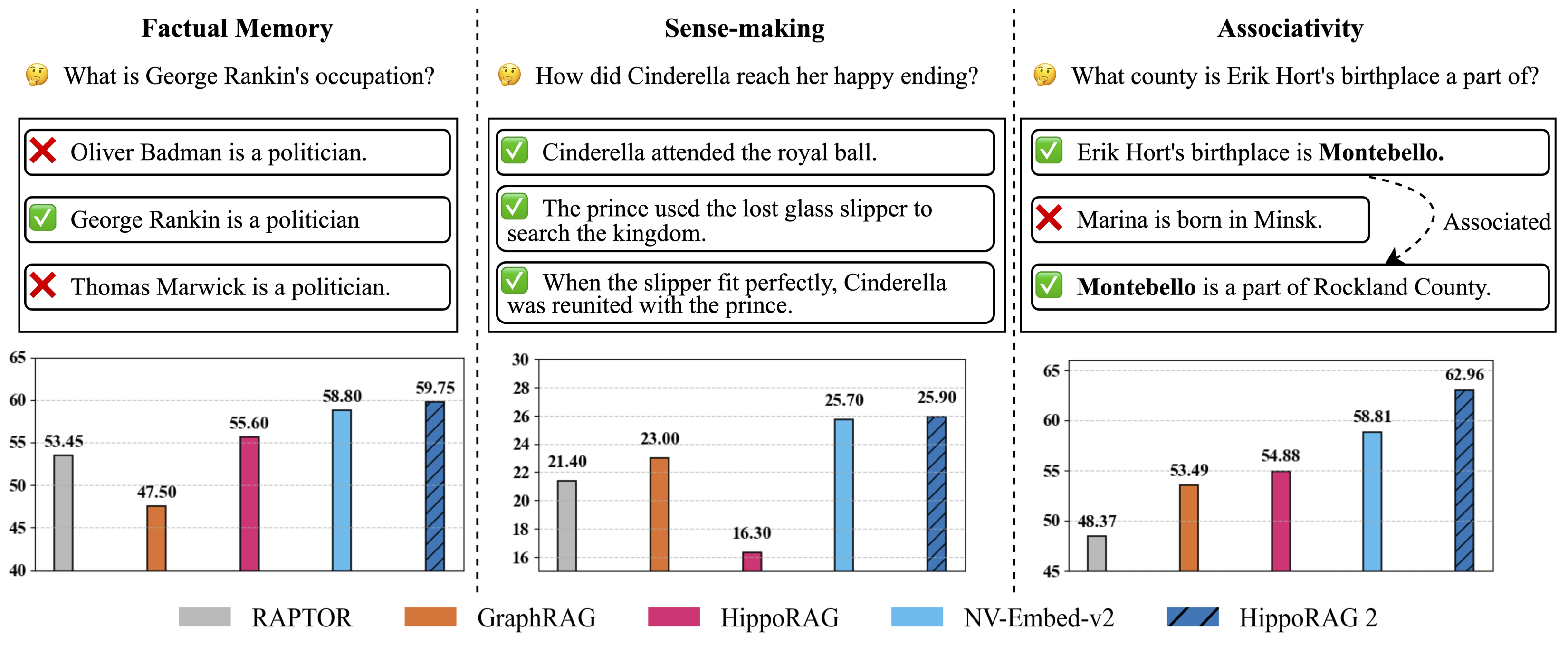
Figure 1: Evaluation of continual learning capabilities across three key dimensions: factual memory (NaturalQuestions, PopQA), sense-making (NarrativeQA), and associativity (MuSiQue, 2Wiki, HotpotQA, and LV-Eval). HippoRAG 2 surpasses other methods across all
categories, bringing it one step closer to true long-term memory.
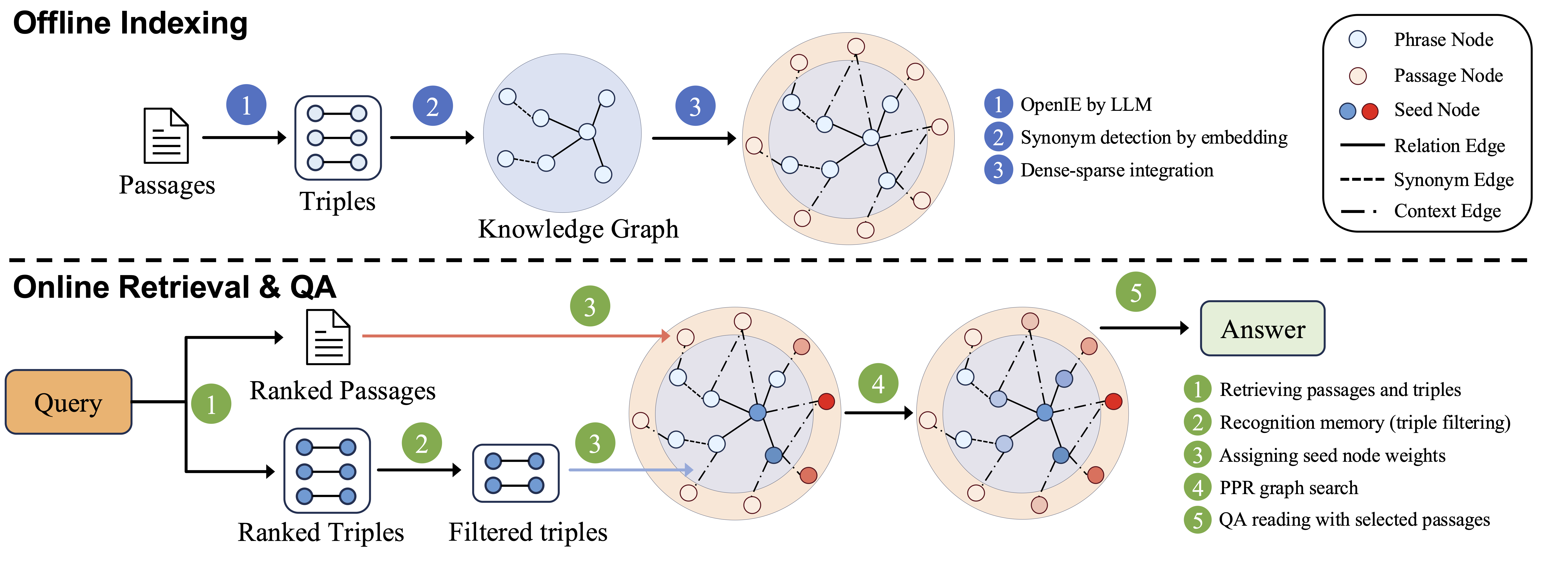
Figure 2: HippoRAG 2 methodology.
#### 查看我们的论文以了解更多信息:
* [**HippoRAG: Neurobiologically Inspired Long-Term Memory for Large Language Models**](https://arxiv.org/abs/2405.14831) [NeurIPS '24].
* [**From RAG to Memory: Non-Parametric Continual Learning for Large Language Models**](https://arxiv.org/abs/2502.14802) [ICML '25].
## 安装
```
conda create -n hipporag python=3.10
conda activate hipporag
pip install hipporag
```
初始化环境变量并激活环境:
```
export CUDA_VISIBLE_DEVICES=0,1,2,3
export HF_HOME=
export OPENAI_API_KEY= # if you want to use OpenAI model
conda activate hipporag
```
## 快速开始
### OpenAI 模型
这个简单的示例将说明如何将 `hipporag` 与任何 OpenAI 模型一起使用:
```
from hipporag import HippoRAG
# 准备数据集和评估
docs = [
"Oliver Badman is a politician.",
"George Rankin is a politician.",
"Thomas Marwick is a politician.",
"Cinderella attended the royal ball.",
"The prince used the lost glass slipper to search the kingdom.",
"When the slipper fit perfectly, Cinderella was reunited with the prince.",
"Erik Hort's birthplace is Montebello.",
"Marina is bom in Minsk.",
"Montebello is a part of Rockland County."
]
save_dir = 'outputs'# Define save directory for HippoRAG objects (each LLM/Embedding model combination will create a new subdirectory)
llm_model_name = 'gpt-4o-mini' # Any OpenAI model name
embedding_model_name = 'nvidia/NV-Embed-v2'# Embedding model name (NV-Embed, GritLM or Contriever for now)
#Startup a HippoRAG instance
hipporag = HippoRAG(save_dir=save_dir,
llm_model_name=llm_model_name,
embedding_model_name=embedding_model_name)
#Run indexing
hipporag.index(docs=docs)
#Separate Retrieval & QA
queries = [
"What is George Rankin's occupation?",
"How did Cinderella reach her happy ending?",
"What county is Erik Hort's birthplace a part of?"
]
retrieval_results = hipporag.retrieve(queries=queries, num_to_retrieve=2)
qa_results = hipporag.rag_qa(retrieval_results)
#Combined Retrieval & QA
rag_results = hipporag.rag_qa(queries=queries)
#For Evaluation
answers = [
["Politician"],
["By going to the ball."],
["Rockland County"]
]
gold_docs = [
["George Rankin is a politician."],
["Cinderella attended the royal ball.",
"The prince used the lost glass slipper to search the kingdom.",
"When the slipper fit perfectly, Cinderella was reunited with the prince."],
["Erik Hort's birthplace is Montebello.",
"Montebello is a part of Rockland County."]
]
rag_results = hipporag.rag_qa(queries=queries,
gold_docs=gold_docs,
gold_answers=answers)
```
#### 示例(兼容 OpenAI 的 Embeddings)
如果您想使用兼容 OpenAI 的 LLM 和 Embeddings,请使用以下方法。
```
hipporag = HippoRAG(save_dir=save_dir,
llm_model_name='Your LLM Model name',
llm_base_url='Your LLM Model url',
embedding_model_name='Your Embedding model name',
embedding_base_url='Your Embedding model url')
```
### 本地部署(vLLM)
这个简单的示例将说明如何将 `hipporag` 与任何兼容 vLLM 的本地部署 LLM 一起使用。
1. 使用指定的 GPU 运行本地[兼容 OpenAI 的 vLLM 服务器](https://docs.vllm.ai/en/latest/getting_started/quickstart.html#quickstart-online)(请确保为您的 embedding 模型留出足够的内存)。
```
export CUDA_VISIBLE_DEVICES=0,1
export VLLM_WORKER_MULTIPROC_METHOD=spawn
export HF_HOME=
conda activate hipporag # vllm should be in this environment
# 如果发生 OOM,请调整 gpu-memory-utilization 或 max_model_len 以适应你的 GPU 显存
vllm serve meta-llama/Llama-3.3-70B-Instruct --tensor-parallel-size 2 --max_model_len 4096 --gpu-memory-utilization 0.95
```
2. 现在您可以使用与上面非常相似的代码来使用 `hipporag`:
```
save_dir = 'outputs'# Define save directory for HippoRAG objects (each LLM/Embedding model combination will create a new subdirectory)
llm_model_name = # Any OpenAI model name
embedding_model_name = # Embedding model name (NV-Embed, GritLM or Contriever for now)
llm_base_url= # Base url for your deployed LLM (i.e. http://localhost:8000/v1)
hipporag = HippoRAG(save_dir=save_dir,
llm_model_name=llm_model,
embedding_model_name=embedding_model_name,
llm_base_url=llm_base_url)
# 与上面运行 OpenAI 模型的索引、检索和 QA 相同
```
## 测试
在为 HippoRAG 做贡献时,请运行以下脚本以确保您的更改不会导致我们的核心模块出现意外行为。
这些脚本用于测试 HippoRAG 对象的索引、图加载、文档删除和增量更新。
### OpenAI 测试
要使用 OpenAI LLM 和 embedding 模型测试 HippoRAG,只需运行以下命令。
此测试的成本可以忽略不计。
```
export OPENAI_API_KEY=
conda activate hipporag
python tests_openai.py
```
### 本地测试
要在本地进行测试,您必须部署一个 vLLM 实例。我们选择部署一个较小的 8B 模型 `Llama-3.1-8B-Instruct` 以降低测试成本。
```
export CUDA_VISIBLE_DEVICES=0
export VLLM_WORKER_MULTIPROC_METHOD=spawn
export HF_HOME=
conda activate hipporag # vllm should be in this environment
# 如果发生 OOM,请调整 gpu-memory-utilization 或 max_model_len 以适应你的 GPU 显存
vllm serve meta-llama/Llama-3.1-8B-Instruct --tensor-parallel-size 2 --max_model_len 4096 --gpu-memory-utilization 0.95 --port 6578
```
然后,我们运行以下测试脚本:
```
CUDA_VISIBLE=1 python tests_local.py
```
## 复现我们的实验
为了使用我们的代码运行实验,我们建议您克隆此代码仓库并遵循 `main.py` 脚本的结构。
### 复现数据
我们在论文中评估了几个采样数据集,其中一些已包含在此代码仓库的 `reproduce/dataset` 目录中。要获取完整的数据集,请访问
我们的 [HuggingFace 数据集](https://huggingface.co/datasets/osunlp/HippoRAG_v2) 并将它们放置在 `reproduce/dataset` 下。我们还在 `outputs/musique` 下提供了 `gpt-4o-mini` 和 `Llama-3.3-70B-Instruct` 针对 `musique` 样本的 OpenIE 结果。
要测试您的环境是否已正确设置,您可以使用小数据集 `reproduce/dataset/sample.json` 进行调试,如下所示。
### 运行索引和 QA
初始化环境变量并激活环境:
```
export CUDA_VISIBLE_DEVICES=0,1,2,3
export HF_HOME=
export OPENAI_API_KEY= # if you want to use OpenAI model
conda activate hipporag
```
### 使用 OpenAI 模型运行
```
dataset=sample # or any other dataset under `reproduce/dataset`
# 运行 OpenAI 模型
python main.py --dataset $dataset --llm_base_url https://api.openai.com/v1 --llm_name gpt-4o-mini --embedding_name nvidia/NV-Embed-v2
```
### 使用 vLLM(Llama)运行
1. 如上所述,使用指定的 GPU 运行本地[兼容 OpenAI 的 vLLM 服务器](https://docs.vllm.ai/en/latest/getting_started/quickstart.html#quickstart-online)。
```
export CUDA_VISIBLE_DEVICES=0,1
export VLLM_WORKER_MULTIPROC_METHOD=spawn
export HF_HOME=
conda activate hipporag # vllm should be in this environment
# 如果发生 OOM,请调整 gpu-memory-utilization 或 max_model_len 以适应你的 GPU 显存
vllm serve meta-llama/Llama-3.3-70B-Instruct --tensor-parallel-size 2 --max_model_len 4096 --gpu-memory-utilization 0.95
```
2. 使用其他 GPU 在另一个终端中运行主程序。
```
export CUDA_VISIBLE_DEVICES=2,3 # set another GPUs while vLLM server is running
export HF_HOME=
dataset=sample
python main.py --dataset $dataset --llm_base_url http://localhost:8000/v1 --llm_name meta-llama/Llama-3.3-70B-Instruct --embedding_name nvidia/NV-Embed-v2
```
#### 进阶:使用 vLLM 离线批处理运行
vLLM 提供了[离线批处理模式](https://docs.vllm.ai/en/latest/getting_started/quickstart.html#offline-batched-inference)以实现更快的推理,与 vLLM 在线服务器相比,这可以为我们带来 3 倍以上的索引速度。
1. 使用以下命令以 vLLM 离线批处理模式运行主程序。
```
export CUDA_VISIBLE_DEVICES=0,1,2,3 # use all GPUs for faster offline indexing
export VLLM_WORKER_MULTIPROC_METHOD=spawn
export HF_HOME=
export OPENAI_API_KEY=''
dataset=sample
python main.py --dataset $dataset --llm_name meta-llama/Llama-3.3-70B-Instruct --openie_mode offline --skip_graph
```
2. 第一步完成后,OpenIE 结果将保存到文件中。返回并按照 `使用 vLLM(Llama)运行` 主要部分的说明运行 vLLM 在线服务器和主程序。
## 调试说明
- `/reproduce/dataset/sample.json` 是一个专用于调试的小数据集。
- 调试 vLLM 离线模式时,请在 `hipporag/llm/vllm_offline.py` 中将 `tensor_parallel_size` 设置为 `1`。
- 如果您想重新运行特定实验,请记住清除已保存的文件,包括 OpenIE 结果和知识图谱,例如:
```
rm reproduce/dataset/openie_results/openie_sample_results_ner_meta-llama_Llama-3.3-70B-Instruct_3.json
rm -rf outputs/sample/sample_meta-llama_Llama-3.3-70B-Instruct_nvidia_NV-Embed-v2
```
### 自定义数据集
要设置您自己的自定义数据集进行评估,请遵循 `reproduce/dataset/sample_corpus.json` 中显示的格式和命名约定(您的数据集名称后应加上 `_corpus.json`)。如果在使用预定义问题运行实验,请根据查询文件 `reproduce/dataset/sample.json` 组织您的查询语料库,并确保同样遵循我们的命名约定。
语料库和可选的查询 JSON 文件应具有以下格式:
#### 检索语料库 JSON
```
[
{
"title": "FIRST PASSAGE TITLE",
"text": "FIRST PASSAGE TEXT",
"idx": 0
},
{
"title": "SECOND PASSAGE TITLE",
"text": "SECOND PASSAGE TEXT",
"idx": 1
}
]
```
#### (可选)查询 JSON
```
[
{
"id": "sample/question_1.json",
"question": "QUESTION",
"answer": [
"ANSWER"
],
"answerable": true,
"paragraphs": [
{
"title": "{FIRST SUPPORTING PASSAGE TITLE}",
"text": "{FIRST SUPPORTING PASSAGE TEXT}",
"is_supporting": true,
"idx": 0
},
{
"title": "{SECOND SUPPORTING PASSAGE TITLE}",
"text": "{SECOND SUPPORTING PASSAGE TEXT}",
"is_supporting": true,
"idx": 1
}
]
}
]
```
#### (可选)语料库分块
在准备数据时,您可能需要对每段文章进行分块(chunking),因为过长的文章对于 OpenIE 流程来说可能过于复杂。
## 代码结构
```
📦 .
│-- 📂 src/hipporag
│ ├── 📂 embedding_model # Implementation of all embedding models
│ │ ├── __init__.py # Getter function for get specific embedding model classes
| | ├── base.py # Base embedding model class `BaseEmbeddingModel` to inherit and `EmbeddingConfig`
| | ├── NVEmbedV2.py # Implementation of NV-Embed-v2 model
| | ├── ...
│ ├── 📂 evaluation # Implementation of all evaluation metrics
│ │ ├── __init__.py
| | ├── base.py # Base evaluation metric class `BaseMetric` to inherit
│ │ ├── qa_eval.py # Eval metrics for QA
│ │ ├── retrieval_eval.py # Eval metrics for retrieval
│ ├── 📂 information_extraction # Implementation of all information extraction models
│ │ ├── __init__.py
| | ├── openie_openai_gpt.py # Model for OpenIE with OpenAI GPT
| | ├── openie_vllm_offline.py # Model for OpenIE with LLMs deployed offline with vLLM
│ ├── 📂 llm # Classes for inference with large language models
│ │ ├── __init__.py # Getter function
| | ├── base.py # Config class for LLM inference and base LLM inference class to inherit
| | ├── openai_gpt.py # Class for inference with OpenAI GPT
| | ├── vllm_llama.py # Class for inference using a local vLLM server
| | ├── vllm_offline.py # Class for inference using the vLLM API directly
│ ├── 📂 prompts # Prompt templates and prompt template manager class
| │ ├── 📂 dspy_prompts # Prompts for filtering
| │ │ ├── ...
| │ ├── 📂 templates # All prompt templates for template manager to load
| │ │ ├── README.md # Documentations of usage of prompte template manager and prompt template files
| │ │ ├── __init__.py
| │ │ ├── triple_extraction.py
| │ │ ├── ...
│ │ ├── __init__.py
| | ├── linking.py # Instruction for linking
| | ├── prompt_template_manager.py # Implementation of prompt template manager
│ ├── 📂 utils # All utility functions used across this repo (the file name indicates its relevant usage)
│ │ ├── config_utils.py # We use only one config across all modules and its setup is specified here
| | ├── ...
│ ├── __init__.py
│ ├── HippoRAG.py # Highest level class for initiating retrieval, question answering, and evaluations
│ ├── embedding_store.py # Storage database to load, manage and save embeddings for passages, entities and facts.
│ ├── rerank.py # Reranking and filtering methods
│-- 📂 examples
│ ├── ...
│ ├── ...
│-- 📜 README.md
│-- 📜 requirements.txt # Dependencies list
│-- 📜 .gitignore # Files to exclude from Git
```
## 联系方式
有问题或疑问?请提交 issue 或联系
[Bernal Jiménez Gutiérrez](mailto:jimenezgutierrez.1@osu.edu),
[Yiheng Shu](mailto:shu.251@osu.edu),
[Yu Su](mailto:su.809@osu.edu),
The Ohio State University
## 引用
如果您觉得这项工作有用,请考虑引用我们的论文:
### HippoRAG 2
```
@misc{gutiérrez2025ragmemorynonparametriccontinual,
title={From RAG to Memory: Non-Parametric Continual Learning for Large Language Models},
author={Bernal Jiménez Gutiérrez and Yiheng Shu and Weijian Qi and Sizhe Zhou and Yu Su},
year={2025},
eprint={2502.14802},
archivePrefix={arXiv},
primaryClass={cs.CL},
url={https://arxiv.org/abs/2502.14802},
}
```
### HippoRAG
```
@inproceedings{gutiérrez2024hipporag,
title={HippoRAG: Neurobiologically Inspired Long-Term Memory for Large Language Models},
author={Bernal Jiménez Gutiérrez and Yiheng Shu and Yu Gu and Michihiro Yasunaga and Yu Su},
booktitle={The Thirty-eighth Annual Conference on Neural Information Processing Systems},
year={2024},
url={https://openreview.net/forum?id=hkujvAPVsg}
```
## 待办事项:
- [x] 添加对更多 embedding 模型的支持
- [x] 添加对 embedding 端点的支持
- [ ] 添加对向量数据库集成的支持
如果您有任何问题或建议,请随时提交 issue 或 PR。