ARC-MX/sgcc_electricity_new
GitHub: ARC-MX/sgcc_electricity_new
HomeAssistant插件,自动查询国家电网电费和用电量,实现家庭能源监控。
Stars: 1794 | Forks: 304
**重要说明:**原作者@renhai-lab 已于2023年10将项目归档,原仓库不再更新。这个版本是在原仓库基础上大幅改动,在此向原作者表达谢意和致敬。验证码识别已经从最开始的在线商业API替换成离线神经网络检测版本,请使用本仓库的同学点个小星星,或者打赏鼓励。
添加微信通知后,我想这基本上就是这个插件的最终形态了,docker镜像压缩到300MB,后续可能只会在网站变动或者出问题才会更新,再次感谢大家的Star。
**注意** 有很多新手都在提交验证码不能识别的相关issue,特在此统一说明:国网每天有登录限制,每天只能登录有限的几次,超过限制验证码识别成功也不会登录成功。因此,诸如[issue47](https://github.com/ARC-MX/sgcc_electricity_new/issues/47),[issue50](https://github.com/ARC-MX/sgcc_electricity_new/issues/50),[issue29](https://github.com/ARC-MX/sgcc_electricity_new/issues/29)这些都是这个问题,以后就不做回复了。
### 入群方式
最近issue太多实在是回复不过来了,特此添加QQ交流群
通过为项目点star并微信打赏备注QQ名或QQ号等信息,入群会审核这些信息
[关于创建QQ付费群的说明](https://github.com/ARC-MX/sgcc_electricity_new/issues/78)
### 支付宝&微信 打赏码
 ## 适用范围
1. 适用于除南方电网覆盖省份外的用户。即除广东、广西、云南、贵州、海南等省份的用户外,均可使用本应用获取电力、电费数据。
2. 不管是通过哪种哪种安装的homeassistant,只要可以运行python,有约1G硬盘空间和500M运行内存,都可以采用本仓库部署。
本镜像支持架构:
## 实现流程
通过 Python 的 Selenium 自动化获取国家电网官网的电费电量数据,使用**原生 Selenium + Chrome 反检测标志位**绕过网站的反爬虫检测(全平台兼容,包括 ARMv6/v7)。登录时的**腾讯点击/滑动验证码**通过**大模型(LLM)视觉识别**自动解算,无需依赖传统 OCR 或 ONNX 神经网络模型。获取数据后通过 Home Assistant 的 [REST API](https://developers.home-assistant.io/docs/api/rest/) 将实体状态 POST 更新到 Home Assistant。
# 安装与部署
## 0)获取大模型 API Key(必读)
本项目使用**火山引擎豆包大模型(doubao-seed-2-0-pro-260215)**自动解算国家电网的腾讯验证码(点击型+滑块型),因此需要先获取火山引擎 ARK API Key。
### 注册步骤
1. **注册火山引擎账号**:访问 [火山引擎官网](https://www.volcengine.com/),使用手机号注册并完成**实名认证**(个人或企业均可)。
- 实名认证入口:https://console.volcengine.com/user/authentication/detail/
2. **开通豆包大模型**:登录 [火山方舟控制台](https://console.volcengine.com/ark),在**「在线推理」**页面点击**「创建推理接入点」**:
- 选择模型:**Doubao-Seed-2.0-pro-260215**(或其他多模态视觉模型)
- 记录生成的**接入点 ID**(格式如 `ep-2025xxxxxx-xxxxx`)
3. **获取 API Key**:在方舟控制台左侧菜单选择**「API Key 管理」**→ 点击**「创建 API Key」**→ 复制生成的 Key(格式如 `ark-xxxxxxxx-xxxx-xxxx-xxxx-xxxxxxxxxxxx`)。
4. **配置到 `.env` 文件**:将获取的 API Key 填入环境变量
ARK_API_KEY="ark-xxxxxxxx-xxxx-xxxx-xxxx-xxxxxxxxxxxx"
### 费用说明
豆包系列模型按 token 计费,每次验证码解算消耗极少(约 500 token),注册即赠送免费额度,个人使用基本免费。具体定价见 [火山引擎官方定价页](https://www.volcengine.com/docs/82379/1099320)。
### 我们使用的模型
本项目通过 OpenAI 兼容接口调用 **`doubao-seed-2-0-pro-260215`** 模型,该模型具备强大的多模态视觉识别能力,能够准确识别验证码中的图标位置和滑块缺口。
## 1)注册国家电网账户
首先要注册国家电网账户,绑定电表,并且可以手动查询电量
注册网址:[https://www.95598.cn/osgweb/login](https://www.95598.cn/osgweb/login)
## 2)获取HA token
token获取方法参考[https://blog.csdn.net/qq_25886111/article/details/106282492](https://blog.csdn.net/qq_25886111/article/details/106282492)
## 3)docker镜像部署,速度快
1. 安装docker和homeassistant,[Homeassistant极简安装法](https://github.com/renhaiidea/easy-homeassistant)。
2. 克隆仓库
git clone https://github.com/ARC-MX/sgcc_electricity_new.git
# 如果github网络环境不好的话可以使用国内镜像,完全同步的,个人推荐使用国内镜像
# git clone https://gitee.com/ARC-MX/sgcc_electricity_new.git
cd sgcc_electricity_new
3. 创建环境变量文件
cp example.env .env
vim .env # 参考以下文件编写.env文件
### 以下项都需要修改
## 国网登录信息
# 修改为自己的登录账号
PHONE_NUMBER="xxx"
# 修改为自己的登录密码
PASSWORD="xxxx"
# 排除指定用户ID,如果出现一些不想检测的ID或者有些充电、发电帐号、可以使用这个环境变量,如果有多个就用","分隔,","之间不要有空格
IGNORE_USER_ID=xxxxxxx,xxxxxxx,xxxxxxx
# DB_TYPE 数据储存类型 SQLITE / MYSQL w,默认未NONE 不进行数据储存
DB_TYPE=NONE
# sqlite 数据库名,默认为homeassistant
DB_NAME="homeassistant.db"
# COLLECTION_NAME默认为electricity_daily_usage_{国网用户id},不支持修改。
# mysql 的数据库配置
MYSQL_HOST="mysql.lan"
MYSQL_USER="user"
MYSQL_PASSWORD="password"
MYSQL_DATABASE="sgcc"
MYSQL_PORT=3306
## homeassistant配置
# 改为你的localhost为你的homeassistant地址
HASS_URL="http://localhost:8123/"
# homeassistant的长期令牌
HASS_TOKEN="eyxxxxx"
## selenium运行参数
# 任务开始时间,24小时制,例如"07:00”则为每天早上7点执行,第一次启动程序如果时间晚于早上7点则会立即执行一次,每隔12小时执行一次。
JOB_START_TIME="07:00"
# 每次操作等待时间,推荐设定范围为[2,30],该值表示每次点击网页后所要等待数据加载的时间,如果出现“no such element”诸如此类的错误可适当调大该值,如果硬件性能较好可以适当调小该值
RETRY_WAIT_TIME_OFFSET_UNIT=15
## 记录的天数, 仅支持填写 7 或 30
# 国网原本可以记录 30 天,现在不开通智能缴费只能查询 7 天造成错误
DATA_RETENTION_DAYS=7
## PUSH_TYPE 余额不足提醒方式 PUSHPLUS / URLPUSH ,默认为None不通知
PUSH_TYPE=None
# 余额提现阈值,通知类型PUSHPLUS / URLPUSH 都生效
BALANCE=5.0
# pushplus token 如果有多个就用","分隔,","之间不要有空格,单个就不要有","
PUSHPLUS_TOKEN=xxxxxxx,xxxxxxx,xxxxxxx
# url_push 地址 通知body {"user_id": user_id, "balance": balance}
PUSH_URL="http://push.lan/notify"
# 密码登录失败(登录次数过多等)的备选方案
LOGIN_FALLBACK='qrcode'
# 二维码的提交地址
PUSH_QRCODE_URL="http://push.lan/qrcode"
# 二维码扫描后的最多等待时间 = QR_CODE_LOGIN_WAIT_COUNT x QR_CODE_LOGIN_WAIT_TIME_INTERVAL_UNIT
# 测试发现二维码默认有效期限为60s
#二维码登录等待次数
QR_CODE_LOGIN_WAIT_COUNT=30
#二维码登录等待间隔
QR_CODE_LOGIN_WAIT_TIME_INTERVAL_UNIT=10
## 浏览器反检测参数(可选,默认值即可正常工作)
# 浏览器语言
# BROWSER_LANGUAGE=zh-HK,zh,en-US,en
# 浏览器窗口尺寸
# BROWSER_WINDOW_SIZE=1158,848
# 设备像素比
# BROWSER_DEVICE_SCALE_FACTOR=2
# 自定义 User-Agent(留空使用 Chrome 默认)
# BROWSER_USER_AGENT=
## ONNX Runtime 线程数限制(可选)
# 在 Docker 中限制了 CPU 数量时,设置此项可消除线程亲和度错误
# 建议设置为 Docker 分配的 CPU 核心数
# OP_NUM_THREADS=2
## 大模型验证码识别配置(必填)
# 火山引擎 ARK API Key,用于调用豆包大模型解算腾讯验证码
# 获取地址:https://console.volcengine.com/ark/region:ark+cn-beijing/apiKey
ARK_API_KEY="your-ark-api-key-here"
## 调试模式(可选)
# 设置为 true 启用短信验证码登录模式(需要人工输入短信验证码)
# DEBUG_MODE=false
## 用户名映射(可选)
# 为每个户号指定友好名称,格式:户号:名称,户号:名称
# USER_NAMES="1234567890:家庭用电,0987654321:公司用电"
4. 运行
我已经优化了镜像环境,将镜像的地址配置为阿里云,如果要使用docker hub的源可以将docker-compose.yml中
image: registry.cn-hangzhou.aliyuncs.com/arcw/sgcc_electricity:latest 改为 arcw/sgcc_electricity:latest
运行获取传感器名称
docker-compose up -d
docker-compose logs sgcc_electricity_app
运行成功应该显示如下日志:
2024-06-06 16:00:43 [INFO ] ---- 程序开始,当前仓库版本为1.x.x,仓库地址为https://github.com/ARC-MX/sgcc_electricity_new.git
2024-06-06 16:00:43 [INFO ] ---- enable_database_storage为false,不会储存到数据库
2024-06-06 16:00:43 [INFO ] ---- 当前登录的用户名为: xxxxxx,homeassistant地址为http://192.168.1.xx:8123/,程序将在每天00:00执行
2024-06-06 16:00:43 [INFO ] ---- 此次为首次运行,等待时间(FIRST_SLEEP_TIME)为10秒,可在.env中设置
2024-06-06 16:00:59 [INFO ] ---- Webdriver initialized.
2024-06-06 16:01:20 [INFO ] ---- Click login button.
2024-06-06 16:01:20 [INFO ] ---- Get electricity canvas image successfully.
2024-06-06 16:01:20 [INFO ] ---- Image CaptCHA distance is xxx.
2024-06-06 16:01:25 [INFO ] ---- Login successfully on https://www.95598.cn/osgweb/login
2024-06-06 16:01:33 [INFO ] ---- 将获取1户数据,user_id: ['xxxxxxx']
2024-06-06 16:01:42 [INFO ] ---- Get electricity charge balance for xxxxxxx successfully, balance is xxx CNY.
2024-06-06 16:01:51 [INFO ] ---- Get year power usage for xxxxxxx successfully, usage is xxx kwh
2024-06-06 16:01:51 [INFO ] ---- Get year power charge for xxxxxxx successfully, yealrly charge is xxx CNY
2024-06-06 16:01:55 [INFO ] ---- Get month power charge for xxxxxxx successfully, 01 月 usage is xxx KWh, charge is xxx CNY.
2024-06-06 16:01:55 [INFO ] ---- Get month power charge for xxxxxxx successfully, 02 月 usage is xxx KWh, charge is xxx CNY.
2024-06-06 16:01:55 [INFO ] ---- Get month power charge for xxxxxxx successfully, 2024-03-01-2024-03-31 usage is xxx KWh, charge is xxx CNY.
2024-06-06 16:01:55 [INFO ] ---- Get month power charge for xxxxxxx successfully, 2024-04-01-2024-04-30 usage is xxx KWh, charge is xxx CNY.
2024-06-06 16:01:59 [INFO ] ---- Get daily power consumption for xxxxxxx successfully, , 2024-06-05 usage is xxx kwh.
........
2024-12-25 13:43:25 [INFO ] ---- Check the electricity bill balance. When the balance is less than 100.0 CNY, the notification will be sent = True
2024-12-25 13:43:25 [INFO ] ---- Homeassistant sensor sensor.electricity_charge_balance_xxxx state updated: 102.3 CNY
2024-12-25 13:43:25 [INFO ] ---- Homeassistant sensor sensor.last_electricity_usage_xxxx state updated: 6.56 kWh
2024-12-25 13:43:25 [INFO ] ---- Homeassistant sensor sensor.yearly_electricity_usage_xxxx state updated: 1691 kWh
2024-12-25 13:43:25 [INFO ] ---- Homeassistant sensor sensor.yearly_electricity_charge_xxxx state updated: 758.57 CNY
2024-12-25 13:43:25 [INFO ] ---- Homeassistant sensor sensor.month_electricity_usage_xxxx state updated: 169 kWh
2024-12-25 13:43:25 [INFO ] ---- Homeassistant sensor sensor.month_electricity_charge_xxxx state updated: 75.81 CNY
2024-12-25 13:43:25 [INFO ] ---- User xxxxxxx state-refresh task run successfully!
**sensor.electricity_charge_balance_xxxx 为余额传感器**
5. 配置configuration.yaml文件, 将下面中的_xxxx 替换为自己log中的_xxxx后缀。
6. 由于是API方式传递传感器数据,所以要想重启ha实体ID可用,必须配置如下
template:
- trigger:
- platform: event
event_type: state_changed
event_data:
entity_id: sensor.electricity_charge_balance_xxxx
sensor:
- name: electricity_charge_balance_xxxx
unique_id: electricity_charge_balance_xxxx
state: "{{ states('sensor.electricity_charge_balance_xxxx') }}"
state_class: measurement
unit_of_measurement: "CNY"
device_class: monetary
- trigger:
- platform: event
event_type: state_changed
event_data:
entity_id: sensor.last_electricity_usage_xxxx
sensor:
- name: last_electricity_usage_xxxx
unique_id: last_electricity_usage_xxxx
state: "{{ states('sensor.last_electricity_usage_xxxx') }}"
state_class: measurement
unit_of_measurement: "kWh"
device_class: energy
- trigger:
- platform: event
event_type: state_changed
event_data:
entity_id: sensor.month_electricity_usage_xxxx
sensor:
- name: month_electricity_usage_xxxx
unique_id: month_electricity_usage_xxxx
state: "{{ states('sensor.month_electricity_usage_xxxx') }}"
state_class: measurement
unit_of_measurement: "kWh"
device_class: energy
- trigger:
- platform: event
event_type: state_changed
event_data:
entity_id: sensor.month_electricity_charge_xxxx
sensor:
- name: month_electricity_charge_xxxx
unique_id: month_electricity_charge_xxxx
state: "{{ states('sensor.month_electricity_charge_xxxx') }}"
state_class: measurement
unit_of_measurement: "CNY"
device_class: monetary
- trigger:
- platform: event
event_type: state_changed
event_data:
entity_id: sensor.yearly_electricity_usage_xxxx
sensor:
- name: yearly_electricity_usage_xxxx
unique_id: yearly_electricity_usage_xxxx
state: "{{ states('sensor.yearly_electricity_usage_xxxx') }}"
state_class: total_increasing
unit_of_measurement: "kWh"
device_class: energy
- trigger:
- platform: event
event_type: state_changed
event_data:
entity_id: sensor.yearly_electricity_charge_xxxx
sensor:
- name: yearly_electricity_charge_xxxx
unique_id: yearly_electricity_charge_xxxx
state: "{{ states('sensor.yearly_electricity_charge_xxxx') }}"
state_class: total_increasing
unit_of_measurement: "CNY"
device_class: monetary
- trigger:
- platform: event
event_type: state_changed
event_data:
entity_id: sensor.month_valley_usage_xxxx
sensor:
- name: month_valley_usage_xxxx
unique_id: month_valley_usage_xxxx
state: "{{ states('sensor.month_valley_usage_xxxx') }}"
state_class: measurement
unit_of_measurement: "kWh"
device_class: energy
- trigger:
- platform: event
event_type: state_changed
event_data:
entity_id: sensor.month_flat_usage_xxxx
sensor:
- name: month_flat_usage_xxxx
unique_id: month_flat_usage_xxxx
state: "{{ states('sensor.month_flat_usage_xxxx') }}"
state_class: measurement
unit_of_measurement: "kWh"
device_class: energy
- trigger:
- platform: event
event_type: state_changed
event_data:
entity_id: sensor.month_peak_usage_xxxx
sensor:
- name: month_peak_usage_xxxx
unique_id: month_peak_usage_xxxx
state: "{{ states('sensor.month_peak_usage_xxxx') }}"
state_class: measurement
unit_of_measurement: "kWh"
device_class: energy
- trigger:
- platform: event
event_type: state_changed
event_data:
entity_id: sensor.month_tip_usage_xxxx
sensor:
- name: month_tip_usage_xxxx
unique_id: month_tip_usage_xxxx
state: "{{ states('sensor.month_tip_usage_xxxx') }}"
state_class: measurement
unit_of_measurement: "kWh"
device_class: energy
- trigger:
- platform: event
event_type: state_changed
event_data:
entity_id: sensor.prepay_balance_xxxx
sensor:
- name: prepay_balance_xxxx
unique_id: prepay_balance_xxxx
state: "{{ states('sensor.prepay_balance_xxxx') }}"
state_class: measurement
unit_of_measurement: "CNY"
device_class: monetary
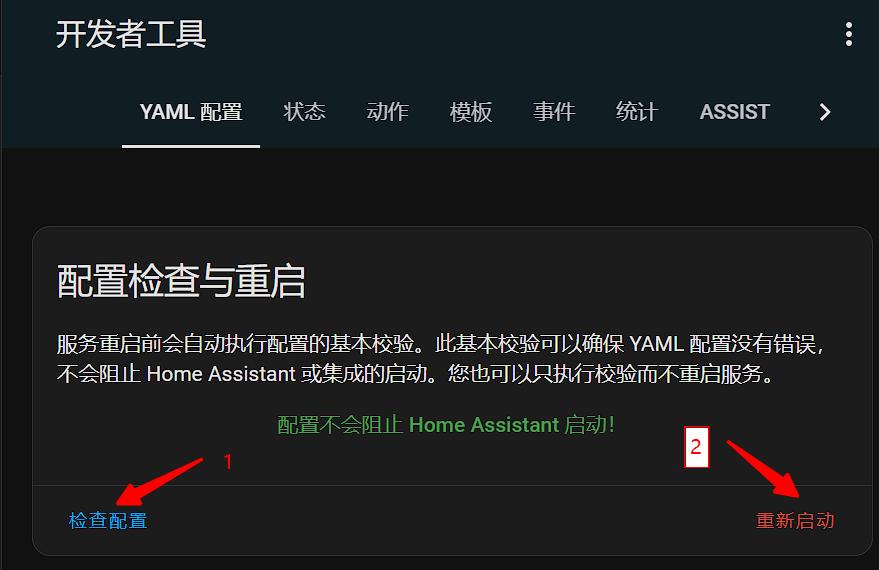
配置完成后重启HA, 刷新一下HA界面
## 适用范围
1. 适用于除南方电网覆盖省份外的用户。即除广东、广西、云南、贵州、海南等省份的用户外,均可使用本应用获取电力、电费数据。
2. 不管是通过哪种哪种安装的homeassistant,只要可以运行python,有约1G硬盘空间和500M运行内存,都可以采用本仓库部署。
本镜像支持架构:
## 实现流程
通过 Python 的 Selenium 自动化获取国家电网官网的电费电量数据,使用**原生 Selenium + Chrome 反检测标志位**绕过网站的反爬虫检测(全平台兼容,包括 ARMv6/v7)。登录时的**腾讯点击/滑动验证码**通过**大模型(LLM)视觉识别**自动解算,无需依赖传统 OCR 或 ONNX 神经网络模型。获取数据后通过 Home Assistant 的 [REST API](https://developers.home-assistant.io/docs/api/rest/) 将实体状态 POST 更新到 Home Assistant。
# 安装与部署
## 0)获取大模型 API Key(必读)
本项目使用**火山引擎豆包大模型(doubao-seed-2-0-pro-260215)**自动解算国家电网的腾讯验证码(点击型+滑块型),因此需要先获取火山引擎 ARK API Key。
### 注册步骤
1. **注册火山引擎账号**:访问 [火山引擎官网](https://www.volcengine.com/),使用手机号注册并完成**实名认证**(个人或企业均可)。
- 实名认证入口:https://console.volcengine.com/user/authentication/detail/
2. **开通豆包大模型**:登录 [火山方舟控制台](https://console.volcengine.com/ark),在**「在线推理」**页面点击**「创建推理接入点」**:
- 选择模型:**Doubao-Seed-2.0-pro-260215**(或其他多模态视觉模型)
- 记录生成的**接入点 ID**(格式如 `ep-2025xxxxxx-xxxxx`)
3. **获取 API Key**:在方舟控制台左侧菜单选择**「API Key 管理」**→ 点击**「创建 API Key」**→ 复制生成的 Key(格式如 `ark-xxxxxxxx-xxxx-xxxx-xxxx-xxxxxxxxxxxx`)。
4. **配置到 `.env` 文件**:将获取的 API Key 填入环境变量
ARK_API_KEY="ark-xxxxxxxx-xxxx-xxxx-xxxx-xxxxxxxxxxxx"
### 费用说明
豆包系列模型按 token 计费,每次验证码解算消耗极少(约 500 token),注册即赠送免费额度,个人使用基本免费。具体定价见 [火山引擎官方定价页](https://www.volcengine.com/docs/82379/1099320)。
### 我们使用的模型
本项目通过 OpenAI 兼容接口调用 **`doubao-seed-2-0-pro-260215`** 模型,该模型具备强大的多模态视觉识别能力,能够准确识别验证码中的图标位置和滑块缺口。
## 1)注册国家电网账户
首先要注册国家电网账户,绑定电表,并且可以手动查询电量
注册网址:[https://www.95598.cn/osgweb/login](https://www.95598.cn/osgweb/login)
## 2)获取HA token
token获取方法参考[https://blog.csdn.net/qq_25886111/article/details/106282492](https://blog.csdn.net/qq_25886111/article/details/106282492)
## 3)docker镜像部署,速度快
1. 安装docker和homeassistant,[Homeassistant极简安装法](https://github.com/renhaiidea/easy-homeassistant)。
2. 克隆仓库
git clone https://github.com/ARC-MX/sgcc_electricity_new.git
# 如果github网络环境不好的话可以使用国内镜像,完全同步的,个人推荐使用国内镜像
# git clone https://gitee.com/ARC-MX/sgcc_electricity_new.git
cd sgcc_electricity_new
3. 创建环境变量文件
cp example.env .env
vim .env # 参考以下文件编写.env文件
### 以下项都需要修改
## 国网登录信息
# 修改为自己的登录账号
PHONE_NUMBER="xxx"
# 修改为自己的登录密码
PASSWORD="xxxx"
# 排除指定用户ID,如果出现一些不想检测的ID或者有些充电、发电帐号、可以使用这个环境变量,如果有多个就用","分隔,","之间不要有空格
IGNORE_USER_ID=xxxxxxx,xxxxxxx,xxxxxxx
# DB_TYPE 数据储存类型 SQLITE / MYSQL w,默认未NONE 不进行数据储存
DB_TYPE=NONE
# sqlite 数据库名,默认为homeassistant
DB_NAME="homeassistant.db"
# COLLECTION_NAME默认为electricity_daily_usage_{国网用户id},不支持修改。
# mysql 的数据库配置
MYSQL_HOST="mysql.lan"
MYSQL_USER="user"
MYSQL_PASSWORD="password"
MYSQL_DATABASE="sgcc"
MYSQL_PORT=3306
## homeassistant配置
# 改为你的localhost为你的homeassistant地址
HASS_URL="http://localhost:8123/"
# homeassistant的长期令牌
HASS_TOKEN="eyxxxxx"
## selenium运行参数
# 任务开始时间,24小时制,例如"07:00”则为每天早上7点执行,第一次启动程序如果时间晚于早上7点则会立即执行一次,每隔12小时执行一次。
JOB_START_TIME="07:00"
# 每次操作等待时间,推荐设定范围为[2,30],该值表示每次点击网页后所要等待数据加载的时间,如果出现“no such element”诸如此类的错误可适当调大该值,如果硬件性能较好可以适当调小该值
RETRY_WAIT_TIME_OFFSET_UNIT=15
## 记录的天数, 仅支持填写 7 或 30
# 国网原本可以记录 30 天,现在不开通智能缴费只能查询 7 天造成错误
DATA_RETENTION_DAYS=7
## PUSH_TYPE 余额不足提醒方式 PUSHPLUS / URLPUSH ,默认为None不通知
PUSH_TYPE=None
# 余额提现阈值,通知类型PUSHPLUS / URLPUSH 都生效
BALANCE=5.0
# pushplus token 如果有多个就用","分隔,","之间不要有空格,单个就不要有","
PUSHPLUS_TOKEN=xxxxxxx,xxxxxxx,xxxxxxx
# url_push 地址 通知body {"user_id": user_id, "balance": balance}
PUSH_URL="http://push.lan/notify"
# 密码登录失败(登录次数过多等)的备选方案
LOGIN_FALLBACK='qrcode'
# 二维码的提交地址
PUSH_QRCODE_URL="http://push.lan/qrcode"
# 二维码扫描后的最多等待时间 = QR_CODE_LOGIN_WAIT_COUNT x QR_CODE_LOGIN_WAIT_TIME_INTERVAL_UNIT
# 测试发现二维码默认有效期限为60s
#二维码登录等待次数
QR_CODE_LOGIN_WAIT_COUNT=30
#二维码登录等待间隔
QR_CODE_LOGIN_WAIT_TIME_INTERVAL_UNIT=10
## 浏览器反检测参数(可选,默认值即可正常工作)
# 浏览器语言
# BROWSER_LANGUAGE=zh-HK,zh,en-US,en
# 浏览器窗口尺寸
# BROWSER_WINDOW_SIZE=1158,848
# 设备像素比
# BROWSER_DEVICE_SCALE_FACTOR=2
# 自定义 User-Agent(留空使用 Chrome 默认)
# BROWSER_USER_AGENT=
## ONNX Runtime 线程数限制(可选)
# 在 Docker 中限制了 CPU 数量时,设置此项可消除线程亲和度错误
# 建议设置为 Docker 分配的 CPU 核心数
# OP_NUM_THREADS=2
## 大模型验证码识别配置(必填)
# 火山引擎 ARK API Key,用于调用豆包大模型解算腾讯验证码
# 获取地址:https://console.volcengine.com/ark/region:ark+cn-beijing/apiKey
ARK_API_KEY="your-ark-api-key-here"
## 调试模式(可选)
# 设置为 true 启用短信验证码登录模式(需要人工输入短信验证码)
# DEBUG_MODE=false
## 用户名映射(可选)
# 为每个户号指定友好名称,格式:户号:名称,户号:名称
# USER_NAMES="1234567890:家庭用电,0987654321:公司用电"
4. 运行
我已经优化了镜像环境,将镜像的地址配置为阿里云,如果要使用docker hub的源可以将docker-compose.yml中
image: registry.cn-hangzhou.aliyuncs.com/arcw/sgcc_electricity:latest 改为 arcw/sgcc_electricity:latest
运行获取传感器名称
docker-compose up -d
docker-compose logs sgcc_electricity_app
运行成功应该显示如下日志:
2024-06-06 16:00:43 [INFO ] ---- 程序开始,当前仓库版本为1.x.x,仓库地址为https://github.com/ARC-MX/sgcc_electricity_new.git
2024-06-06 16:00:43 [INFO ] ---- enable_database_storage为false,不会储存到数据库
2024-06-06 16:00:43 [INFO ] ---- 当前登录的用户名为: xxxxxx,homeassistant地址为http://192.168.1.xx:8123/,程序将在每天00:00执行
2024-06-06 16:00:43 [INFO ] ---- 此次为首次运行,等待时间(FIRST_SLEEP_TIME)为10秒,可在.env中设置
2024-06-06 16:00:59 [INFO ] ---- Webdriver initialized.
2024-06-06 16:01:20 [INFO ] ---- Click login button.
2024-06-06 16:01:20 [INFO ] ---- Get electricity canvas image successfully.
2024-06-06 16:01:20 [INFO ] ---- Image CaptCHA distance is xxx.
2024-06-06 16:01:25 [INFO ] ---- Login successfully on https://www.95598.cn/osgweb/login
2024-06-06 16:01:33 [INFO ] ---- 将获取1户数据,user_id: ['xxxxxxx']
2024-06-06 16:01:42 [INFO ] ---- Get electricity charge balance for xxxxxxx successfully, balance is xxx CNY.
2024-06-06 16:01:51 [INFO ] ---- Get year power usage for xxxxxxx successfully, usage is xxx kwh
2024-06-06 16:01:51 [INFO ] ---- Get year power charge for xxxxxxx successfully, yealrly charge is xxx CNY
2024-06-06 16:01:55 [INFO ] ---- Get month power charge for xxxxxxx successfully, 01 月 usage is xxx KWh, charge is xxx CNY.
2024-06-06 16:01:55 [INFO ] ---- Get month power charge for xxxxxxx successfully, 02 月 usage is xxx KWh, charge is xxx CNY.
2024-06-06 16:01:55 [INFO ] ---- Get month power charge for xxxxxxx successfully, 2024-03-01-2024-03-31 usage is xxx KWh, charge is xxx CNY.
2024-06-06 16:01:55 [INFO ] ---- Get month power charge for xxxxxxx successfully, 2024-04-01-2024-04-30 usage is xxx KWh, charge is xxx CNY.
2024-06-06 16:01:59 [INFO ] ---- Get daily power consumption for xxxxxxx successfully, , 2024-06-05 usage is xxx kwh.
........
2024-12-25 13:43:25 [INFO ] ---- Check the electricity bill balance. When the balance is less than 100.0 CNY, the notification will be sent = True
2024-12-25 13:43:25 [INFO ] ---- Homeassistant sensor sensor.electricity_charge_balance_xxxx state updated: 102.3 CNY
2024-12-25 13:43:25 [INFO ] ---- Homeassistant sensor sensor.last_electricity_usage_xxxx state updated: 6.56 kWh
2024-12-25 13:43:25 [INFO ] ---- Homeassistant sensor sensor.yearly_electricity_usage_xxxx state updated: 1691 kWh
2024-12-25 13:43:25 [INFO ] ---- Homeassistant sensor sensor.yearly_electricity_charge_xxxx state updated: 758.57 CNY
2024-12-25 13:43:25 [INFO ] ---- Homeassistant sensor sensor.month_electricity_usage_xxxx state updated: 169 kWh
2024-12-25 13:43:25 [INFO ] ---- Homeassistant sensor sensor.month_electricity_charge_xxxx state updated: 75.81 CNY
2024-12-25 13:43:25 [INFO ] ---- User xxxxxxx state-refresh task run successfully!
**sensor.electricity_charge_balance_xxxx 为余额传感器**
5. 配置configuration.yaml文件, 将下面中的_xxxx 替换为自己log中的_xxxx后缀。
6. 由于是API方式传递传感器数据,所以要想重启ha实体ID可用,必须配置如下
template:
- trigger:
- platform: event
event_type: state_changed
event_data:
entity_id: sensor.electricity_charge_balance_xxxx
sensor:
- name: electricity_charge_balance_xxxx
unique_id: electricity_charge_balance_xxxx
state: "{{ states('sensor.electricity_charge_balance_xxxx') }}"
state_class: measurement
unit_of_measurement: "CNY"
device_class: monetary
- trigger:
- platform: event
event_type: state_changed
event_data:
entity_id: sensor.last_electricity_usage_xxxx
sensor:
- name: last_electricity_usage_xxxx
unique_id: last_electricity_usage_xxxx
state: "{{ states('sensor.last_electricity_usage_xxxx') }}"
state_class: measurement
unit_of_measurement: "kWh"
device_class: energy
- trigger:
- platform: event
event_type: state_changed
event_data:
entity_id: sensor.month_electricity_usage_xxxx
sensor:
- name: month_electricity_usage_xxxx
unique_id: month_electricity_usage_xxxx
state: "{{ states('sensor.month_electricity_usage_xxxx') }}"
state_class: measurement
unit_of_measurement: "kWh"
device_class: energy
- trigger:
- platform: event
event_type: state_changed
event_data:
entity_id: sensor.month_electricity_charge_xxxx
sensor:
- name: month_electricity_charge_xxxx
unique_id: month_electricity_charge_xxxx
state: "{{ states('sensor.month_electricity_charge_xxxx') }}"
state_class: measurement
unit_of_measurement: "CNY"
device_class: monetary
- trigger:
- platform: event
event_type: state_changed
event_data:
entity_id: sensor.yearly_electricity_usage_xxxx
sensor:
- name: yearly_electricity_usage_xxxx
unique_id: yearly_electricity_usage_xxxx
state: "{{ states('sensor.yearly_electricity_usage_xxxx') }}"
state_class: total_increasing
unit_of_measurement: "kWh"
device_class: energy
- trigger:
- platform: event
event_type: state_changed
event_data:
entity_id: sensor.yearly_electricity_charge_xxxx
sensor:
- name: yearly_electricity_charge_xxxx
unique_id: yearly_electricity_charge_xxxx
state: "{{ states('sensor.yearly_electricity_charge_xxxx') }}"
state_class: total_increasing
unit_of_measurement: "CNY"
device_class: monetary
- trigger:
- platform: event
event_type: state_changed
event_data:
entity_id: sensor.month_valley_usage_xxxx
sensor:
- name: month_valley_usage_xxxx
unique_id: month_valley_usage_xxxx
state: "{{ states('sensor.month_valley_usage_xxxx') }}"
state_class: measurement
unit_of_measurement: "kWh"
device_class: energy
- trigger:
- platform: event
event_type: state_changed
event_data:
entity_id: sensor.month_flat_usage_xxxx
sensor:
- name: month_flat_usage_xxxx
unique_id: month_flat_usage_xxxx
state: "{{ states('sensor.month_flat_usage_xxxx') }}"
state_class: measurement
unit_of_measurement: "kWh"
device_class: energy
- trigger:
- platform: event
event_type: state_changed
event_data:
entity_id: sensor.month_peak_usage_xxxx
sensor:
- name: month_peak_usage_xxxx
unique_id: month_peak_usage_xxxx
state: "{{ states('sensor.month_peak_usage_xxxx') }}"
state_class: measurement
unit_of_measurement: "kWh"
device_class: energy
- trigger:
- platform: event
event_type: state_changed
event_data:
entity_id: sensor.month_tip_usage_xxxx
sensor:
- name: month_tip_usage_xxxx
unique_id: month_tip_usage_xxxx
state: "{{ states('sensor.month_tip_usage_xxxx') }}"
state_class: measurement
unit_of_measurement: "kWh"
device_class: energy
- trigger:
- platform: event
event_type: state_changed
event_data:
entity_id: sensor.prepay_balance_xxxx
sensor:
- name: prepay_balance_xxxx
unique_id: prepay_balance_xxxx
state: "{{ states('sensor.prepay_balance_xxxx') }}"
state_class: measurement
unit_of_measurement: "CNY"
device_class: monetary
配置完成后重启HA, 刷新一下HA界面
 6. 更新容器及其代码(需要更新才需要)
docker-compose down # 删除容器
docker-compose pull # 更新镜像
git pull --tags origin master:master #更新代码,代码不在容器中,所以要手动更新
docker-compose up -d # 重新运行
#如果git 拉取失败可以执行如下命令,重新拉取
git fetch --all
git reset --hard origin/master
git pull
## 4)ha内数据展示
6. 更新容器及其代码(需要更新才需要)
docker-compose down # 删除容器
docker-compose pull # 更新镜像
git pull --tags origin master:master #更新代码,代码不在容器中,所以要手动更新
docker-compose up -d # 重新运行
#如果git 拉取失败可以执行如下命令,重新拉取
git fetch --all
git reset --hard origin/master
git pull
## 4)ha内数据展示
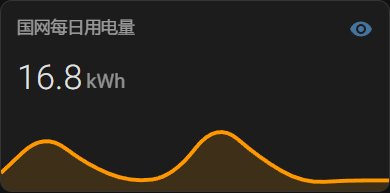
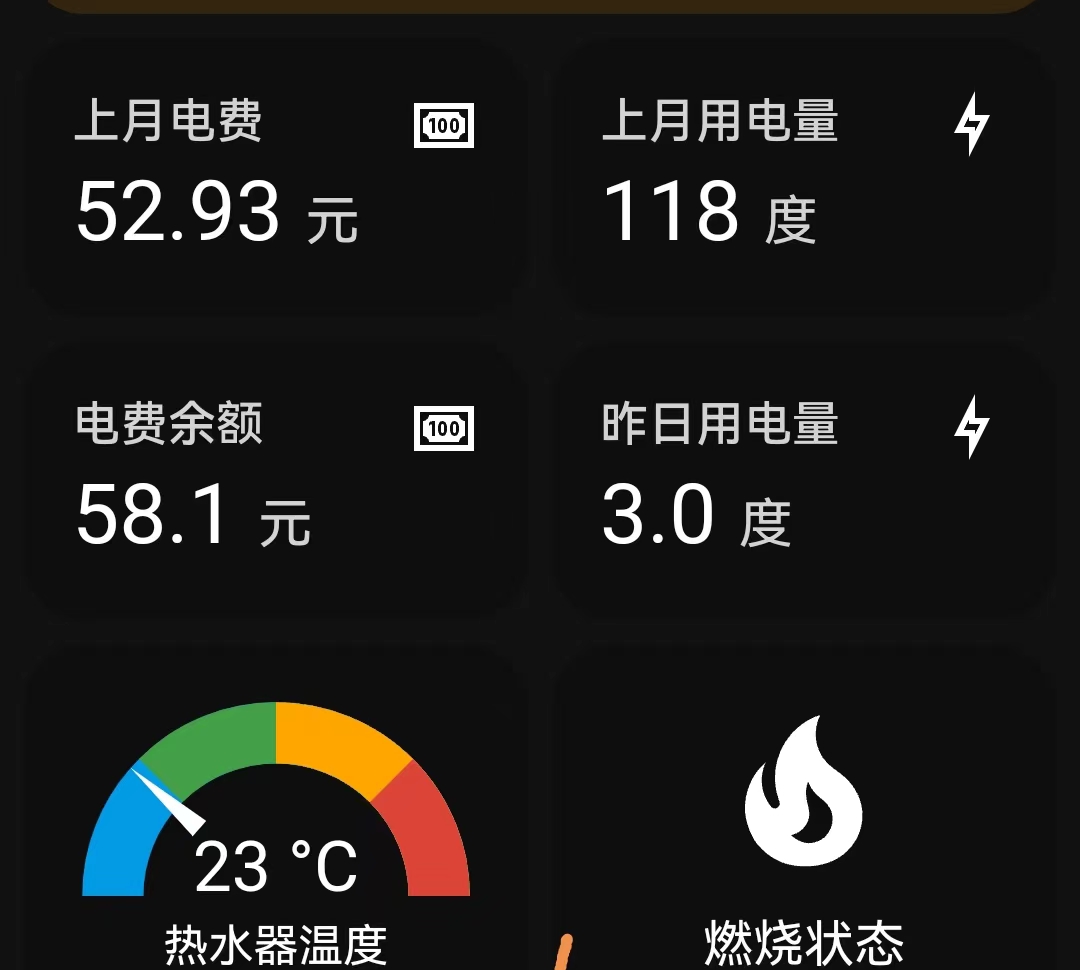
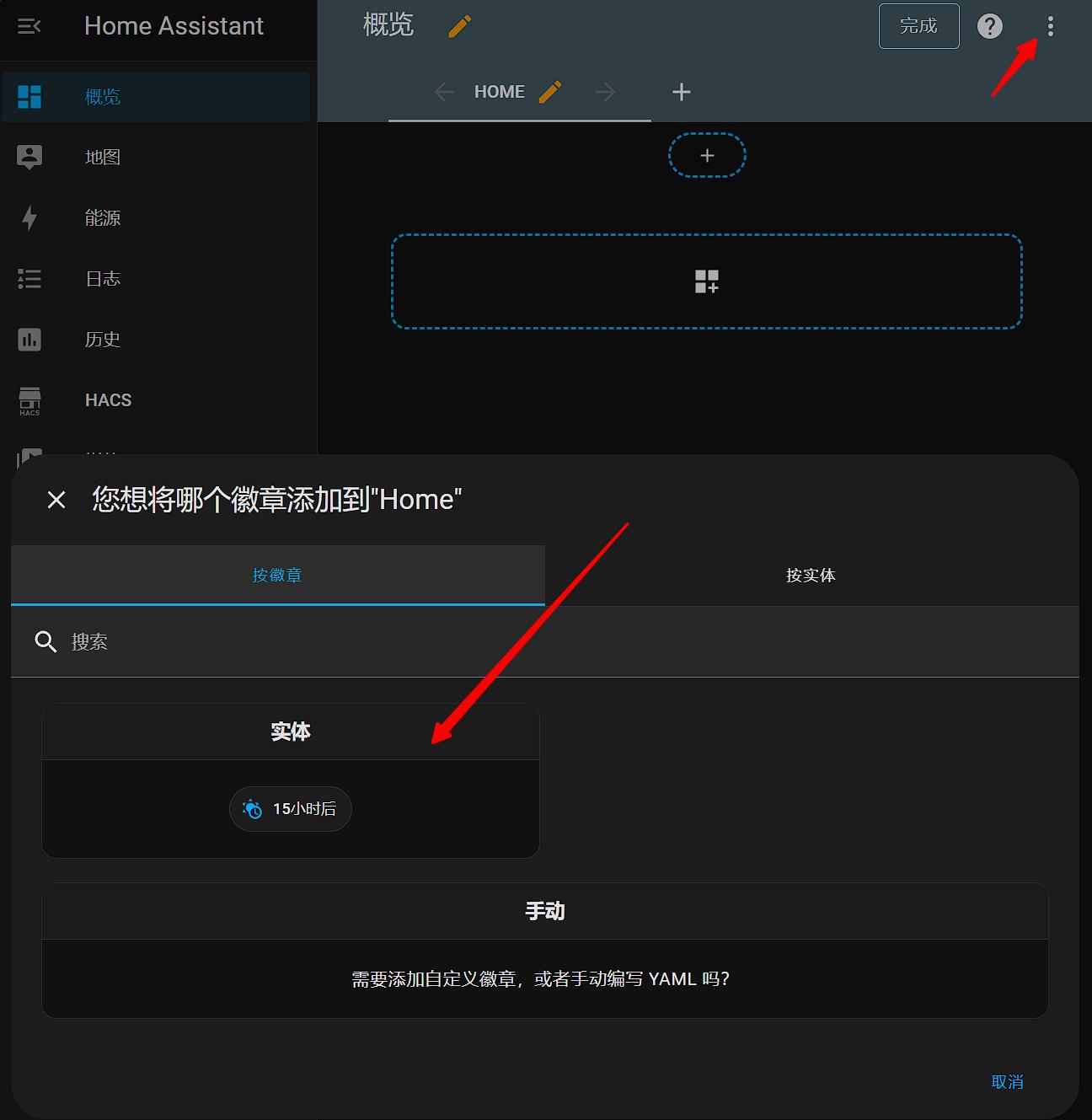 结合[mini-graph-card](https://github.com/kalkih/mini-graph-card) 和[mushroom](https://github.com/piitaya/lovelace-mushroom)实现美化效果:
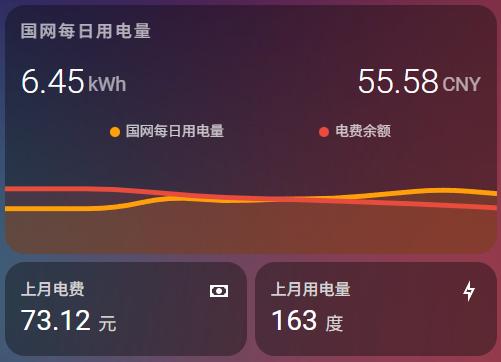 将下面中的_xxxx 替换为自己log中的_xxxx后缀。
type: vertical-stack
cards:
- type: custom:mini-graph-card
entities:
- entity: sensor.last_electricity_usage_xxxx
name: 国网每日用电量
aggregate_func: first
show_state: true
show_points: true
icon: mdi:lightning-bolt-outline
- entity: sensor.electricity_charge_balance_xxxx
name: 电费余额
aggregate_func: first
show_state: true
show_points: true
color: "#e74c3c"
icon: mdi:cash
y_axis: secondary
group_by: date
hour24: true
hours_to_show: 240
lower_bound: 0
upper_bound: 10
lower_bound_secondary: 0
upper_bound_secondary: 120
show:
icon: false
- type: horizontal-stack
cards:
- graph: none
type: sensor
entity: sensor.month_electricity_charge_xxxx
detail: 1
name: 上月电费
icon: ""
unit: 元
- graph: none
type: sensor
entity: sensor.month_electricity_usage_xxxx
detail: 1
name: 上月用电量
unit: 度
icon: mdi:lightning-bolt-outline
- type: horizontal-stack
cards:
- animate: true
entities:
- entity: sensor.yearly_electricity_usage_xxxx
name: 今年总用电量
aggregate_func: first
show_state: true
show_points: true
group_by: date
hour24: true
hours_to_show: 240
type: custom:mini-graph-card
- animate: true
entities:
- entity: sensor.yearly_electricity_charge_xxxx
name: 今年总用电费用
aggregate_func: first
show_state: true
show_points: true
group_by: date
hour24: true
hours_to_show: 240
type: custom:mini-graph-card
## 5)电量通知
更新电费余额不足提醒,在.env里设置提醒余额。目前我是用[pushplus](https://www.pushplus.plus/)的方案,注册pushplus然后,获取token,通知给谁就让谁注册并将token填到.env中
token获取方法参考[https://cloud.tencent.com/developer/article/2139538](https://cloud.tencent.com/developer/article/2139538)
# 其他
## 我的自定义部分包括:
增加的部分:
- 增加近30天每日电量写入数据库(默认mongodb),其他数据库请自行配置。
- 添加配置默认增加近 7 天每日电量写入数据, 可修改为 30 天, 因为国网目前[「要签约智能交费才能看到30天的数据,不然就只能看到7天的」](https://github.com/ARC-MX/sgcc_electricity_new/issues/11#issuecomment-2158973048)。【注意:开通智能缴费后电费可能从「后付费」变为「预付费」,也就是「欠费即停电」,习惯了每月定时按账单缴费的需要注意,谨防停电风险】
- 将间歇执行设置为定时执行: JOB_START_TIME,24小时制,例如"07:00”则为每天早上7点执行,第一次启动程序立即执行一次, 每12小时执行一次
- 给last_daily_usage增加present_date,用来确定更新的是哪一天的电量。一般查询的日期会晚一到两天。
- 对configuration.yaml中自定义实体部分修改。
## 重要修改通知
* 2024-06-13:SQLite替换MongoDB,原因是python自带SQLite3,不需要额外安装,也不再需要MongoDB镜像。
* 2024-07-03:新增每天定时执行两次,添加配置默认增加近 7 天每日电量写入数据, 可修改为 30 天。
* 2024-07-05:新增余额不足提醒功能。
* 2024-12-10:新增忽略指定用户ID的功能:针对一些用户拥有充电或者发电账户,可以使用 IGNORE_USER_ID 环境变量忽略特定的ID。
* 2025-01-05:新增Homeassistant Add-on部署方式。
* 2025-05-01:**重大更新**:验证码识别从 ONNX 神经网络升级为**大模型(LLM)视觉识别方案**,使用火山引擎豆包模型解算腾讯点击/滑块验证码。浏览器反检测从 undetected-chromedriver 升级为 **CloakBrowser**(Chromium C++ 源码级反检测)。
* 2025-05-20:**平台兼容性更新**:弃用 CloakBrowser,改用原生 Selenium + Chrome 反检测标志位方案(参考 ha-95598),全面支持 ARMv6/v7 平台(树莓派2、玩客云等)。
2025-05-15:新增**分时电量传感器**(谷/平/峰/尖)、**预付费余额传感器**、**应交金额传感器**;支持 Vue 状态直接注入提取数据。
### TO-DO
- [X] 增加离线滑动验证码识别方案 → 已升级为 LLM 视觉方案
- [X] 添加默认推送服务,电费余额不足提醒
- [X] 添加Homeassistant Add-on安装方式,在此感谢[Ami8834671](https://github.com/Ami8834671), [DuanXDong](https://github.com/DuanXDong)等小伙伴的idea和贡献
- [X] 添加大模型(LLM)验证码识别方案(火山引擎豆包模型)
- [X] 添加 CloakBrowser 反检测浏览器支持
- [X] 添加分时电量传感器(谷/平/峰/尖)在此感谢[renxiaoyaoo](https://github.com/renxiaoyaoo)的实现思路
- [X] 添加预付费余额/应交金额传感器
- [ ] 添加置Homeassistant integration
## **技术交流群**
由于现在用户越来越多,稍有问题大家就在github上发issue,我有点回复不过来了,故创建一个付费加入的QQ群。该群只是方便大家讨论,不承诺技术协助,我想大多数用户参考历史issue和文档都能解决自己的问题
### 再次说明,希望大家通过认真看文档和浏览历史issue解决问题,毕竟收费群不是开源项目的本意。
将下面中的_xxxx 替换为自己log中的_xxxx后缀。
type: vertical-stack
cards:
- type: custom:mini-graph-card
entities:
- entity: sensor.last_electricity_usage_xxxx
name: 国网每日用电量
aggregate_func: first
show_state: true
show_points: true
icon: mdi:lightning-bolt-outline
- entity: sensor.electricity_charge_balance_xxxx
name: 电费余额
aggregate_func: first
show_state: true
show_points: true
color: "#e74c3c"
icon: mdi:cash
y_axis: secondary
group_by: date
hour24: true
hours_to_show: 240
lower_bound: 0
upper_bound: 10
lower_bound_secondary: 0
upper_bound_secondary: 120
show:
icon: false
- type: horizontal-stack
cards:
- graph: none
type: sensor
entity: sensor.month_electricity_charge_xxxx
detail: 1
name: 上月电费
icon: ""
unit: 元
- graph: none
type: sensor
entity: sensor.month_electricity_usage_xxxx
detail: 1
name: 上月用电量
unit: 度
icon: mdi:lightning-bolt-outline
- type: horizontal-stack
cards:
- animate: true
entities:
- entity: sensor.yearly_electricity_usage_xxxx
name: 今年总用电量
aggregate_func: first
show_state: true
show_points: true
group_by: date
hour24: true
hours_to_show: 240
type: custom:mini-graph-card
- animate: true
entities:
- entity: sensor.yearly_electricity_charge_xxxx
name: 今年总用电费用
aggregate_func: first
show_state: true
show_points: true
group_by: date
hour24: true
hours_to_show: 240
type: custom:mini-graph-card
## 5)电量通知
更新电费余额不足提醒,在.env里设置提醒余额。目前我是用[pushplus](https://www.pushplus.plus/)的方案,注册pushplus然后,获取token,通知给谁就让谁注册并将token填到.env中
token获取方法参考[https://cloud.tencent.com/developer/article/2139538](https://cloud.tencent.com/developer/article/2139538)
# 其他
## 我的自定义部分包括:
增加的部分:
- 增加近30天每日电量写入数据库(默认mongodb),其他数据库请自行配置。
- 添加配置默认增加近 7 天每日电量写入数据, 可修改为 30 天, 因为国网目前[「要签约智能交费才能看到30天的数据,不然就只能看到7天的」](https://github.com/ARC-MX/sgcc_electricity_new/issues/11#issuecomment-2158973048)。【注意:开通智能缴费后电费可能从「后付费」变为「预付费」,也就是「欠费即停电」,习惯了每月定时按账单缴费的需要注意,谨防停电风险】
- 将间歇执行设置为定时执行: JOB_START_TIME,24小时制,例如"07:00”则为每天早上7点执行,第一次启动程序立即执行一次, 每12小时执行一次
- 给last_daily_usage增加present_date,用来确定更新的是哪一天的电量。一般查询的日期会晚一到两天。
- 对configuration.yaml中自定义实体部分修改。
## 重要修改通知
* 2024-06-13:SQLite替换MongoDB,原因是python自带SQLite3,不需要额外安装,也不再需要MongoDB镜像。
* 2024-07-03:新增每天定时执行两次,添加配置默认增加近 7 天每日电量写入数据, 可修改为 30 天。
* 2024-07-05:新增余额不足提醒功能。
* 2024-12-10:新增忽略指定用户ID的功能:针对一些用户拥有充电或者发电账户,可以使用 IGNORE_USER_ID 环境变量忽略特定的ID。
* 2025-01-05:新增Homeassistant Add-on部署方式。
* 2025-05-01:**重大更新**:验证码识别从 ONNX 神经网络升级为**大模型(LLM)视觉识别方案**,使用火山引擎豆包模型解算腾讯点击/滑块验证码。浏览器反检测从 undetected-chromedriver 升级为 **CloakBrowser**(Chromium C++ 源码级反检测)。
* 2025-05-20:**平台兼容性更新**:弃用 CloakBrowser,改用原生 Selenium + Chrome 反检测标志位方案(参考 ha-95598),全面支持 ARMv6/v7 平台(树莓派2、玩客云等)。
2025-05-15:新增**分时电量传感器**(谷/平/峰/尖)、**预付费余额传感器**、**应交金额传感器**;支持 Vue 状态直接注入提取数据。
### TO-DO
- [X] 增加离线滑动验证码识别方案 → 已升级为 LLM 视觉方案
- [X] 添加默认推送服务,电费余额不足提醒
- [X] 添加Homeassistant Add-on安装方式,在此感谢[Ami8834671](https://github.com/Ami8834671), [DuanXDong](https://github.com/DuanXDong)等小伙伴的idea和贡献
- [X] 添加大模型(LLM)验证码识别方案(火山引擎豆包模型)
- [X] 添加 CloakBrowser 反检测浏览器支持
- [X] 添加分时电量传感器(谷/平/峰/尖)在此感谢[renxiaoyaoo](https://github.com/renxiaoyaoo)的实现思路
- [X] 添加预付费余额/应交金额传感器
- [ ] 添加置Homeassistant integration
## **技术交流群**
由于现在用户越来越多,稍有问题大家就在github上发issue,我有点回复不过来了,故创建一个付费加入的QQ群。该群只是方便大家讨论,不承诺技术协助,我想大多数用户参考历史issue和文档都能解决自己的问题
### 再次说明,希望大家通过认真看文档和浏览历史issue解决问题,毕竟收费群不是开源项目的本意。


## 适用范围
1. 适用于除南方电网覆盖省份外的用户。即除广东、广西、云南、贵州、海南等省份的用户外,均可使用本应用获取电力、电费数据。
2. 不管是通过哪种哪种安装的homeassistant,只要可以运行python,有约1G硬盘空间和500M运行内存,都可以采用本仓库部署。
本镜像支持架构:
## 实现流程
通过 Python 的 Selenium 自动化获取国家电网官网的电费电量数据,使用**原生 Selenium + Chrome 反检测标志位**绕过网站的反爬虫检测(全平台兼容,包括 ARMv6/v7)。登录时的**腾讯点击/滑动验证码**通过**大模型(LLM)视觉识别**自动解算,无需依赖传统 OCR 或 ONNX 神经网络模型。获取数据后通过 Home Assistant 的 [REST API](https://developers.home-assistant.io/docs/api/rest/) 将实体状态 POST 更新到 Home Assistant。
# 安装与部署
## 0)获取大模型 API Key(必读)
本项目使用**火山引擎豆包大模型(doubao-seed-2-0-pro-260215)**自动解算国家电网的腾讯验证码(点击型+滑块型),因此需要先获取火山引擎 ARK API Key。
### 注册步骤
1. **注册火山引擎账号**:访问 [火山引擎官网](https://www.volcengine.com/),使用手机号注册并完成**实名认证**(个人或企业均可)。
- 实名认证入口:https://console.volcengine.com/user/authentication/detail/
2. **开通豆包大模型**:登录 [火山方舟控制台](https://console.volcengine.com/ark),在**「在线推理」**页面点击**「创建推理接入点」**:
- 选择模型:**Doubao-Seed-2.0-pro-260215**(或其他多模态视觉模型)
- 记录生成的**接入点 ID**(格式如 `ep-2025xxxxxx-xxxxx`)
3. **获取 API Key**:在方舟控制台左侧菜单选择**「API Key 管理」**→ 点击**「创建 API Key」**→ 复制生成的 Key(格式如 `ark-xxxxxxxx-xxxx-xxxx-xxxx-xxxxxxxxxxxx`)。
4. **配置到 `.env` 文件**:将获取的 API Key 填入环境变量
ARK_API_KEY="ark-xxxxxxxx-xxxx-xxxx-xxxx-xxxxxxxxxxxx"
### 费用说明
豆包系列模型按 token 计费,每次验证码解算消耗极少(约 500 token),注册即赠送免费额度,个人使用基本免费。具体定价见 [火山引擎官方定价页](https://www.volcengine.com/docs/82379/1099320)。
### 我们使用的模型
本项目通过 OpenAI 兼容接口调用 **`doubao-seed-2-0-pro-260215`** 模型,该模型具备强大的多模态视觉识别能力,能够准确识别验证码中的图标位置和滑块缺口。
## 1)注册国家电网账户
首先要注册国家电网账户,绑定电表,并且可以手动查询电量
注册网址:[https://www.95598.cn/osgweb/login](https://www.95598.cn/osgweb/login)
## 2)获取HA token
token获取方法参考[https://blog.csdn.net/qq_25886111/article/details/106282492](https://blog.csdn.net/qq_25886111/article/details/106282492)
## 3)docker镜像部署,速度快
1. 安装docker和homeassistant,[Homeassistant极简安装法](https://github.com/renhaiidea/easy-homeassistant)。
2. 克隆仓库
git clone https://github.com/ARC-MX/sgcc_electricity_new.git
# 如果github网络环境不好的话可以使用国内镜像,完全同步的,个人推荐使用国内镜像
# git clone https://gitee.com/ARC-MX/sgcc_electricity_new.git
cd sgcc_electricity_new
3. 创建环境变量文件
cp example.env .env
vim .env # 参考以下文件编写.env文件
### 以下项都需要修改
## 国网登录信息
# 修改为自己的登录账号
PHONE_NUMBER="xxx"
# 修改为自己的登录密码
PASSWORD="xxxx"
# 排除指定用户ID,如果出现一些不想检测的ID或者有些充电、发电帐号、可以使用这个环境变量,如果有多个就用","分隔,","之间不要有空格
IGNORE_USER_ID=xxxxxxx,xxxxxxx,xxxxxxx
# DB_TYPE 数据储存类型 SQLITE / MYSQL w,默认未NONE 不进行数据储存
DB_TYPE=NONE
# sqlite 数据库名,默认为homeassistant
DB_NAME="homeassistant.db"
# COLLECTION_NAME默认为electricity_daily_usage_{国网用户id},不支持修改。
# mysql 的数据库配置
MYSQL_HOST="mysql.lan"
MYSQL_USER="user"
MYSQL_PASSWORD="password"
MYSQL_DATABASE="sgcc"
MYSQL_PORT=3306
## homeassistant配置
# 改为你的localhost为你的homeassistant地址
HASS_URL="http://localhost:8123/"
# homeassistant的长期令牌
HASS_TOKEN="eyxxxxx"
## selenium运行参数
# 任务开始时间,24小时制,例如"07:00”则为每天早上7点执行,第一次启动程序如果时间晚于早上7点则会立即执行一次,每隔12小时执行一次。
JOB_START_TIME="07:00"
# 每次操作等待时间,推荐设定范围为[2,30],该值表示每次点击网页后所要等待数据加载的时间,如果出现“no such element”诸如此类的错误可适当调大该值,如果硬件性能较好可以适当调小该值
RETRY_WAIT_TIME_OFFSET_UNIT=15
## 记录的天数, 仅支持填写 7 或 30
# 国网原本可以记录 30 天,现在不开通智能缴费只能查询 7 天造成错误
DATA_RETENTION_DAYS=7
## PUSH_TYPE 余额不足提醒方式 PUSHPLUS / URLPUSH ,默认为None不通知
PUSH_TYPE=None
# 余额提现阈值,通知类型PUSHPLUS / URLPUSH 都生效
BALANCE=5.0
# pushplus token 如果有多个就用","分隔,","之间不要有空格,单个就不要有","
PUSHPLUS_TOKEN=xxxxxxx,xxxxxxx,xxxxxxx
# url_push 地址 通知body {"user_id": user_id, "balance": balance}
PUSH_URL="http://push.lan/notify"
# 密码登录失败(登录次数过多等)的备选方案
LOGIN_FALLBACK='qrcode'
# 二维码的提交地址
PUSH_QRCODE_URL="http://push.lan/qrcode"
# 二维码扫描后的最多等待时间 = QR_CODE_LOGIN_WAIT_COUNT x QR_CODE_LOGIN_WAIT_TIME_INTERVAL_UNIT
# 测试发现二维码默认有效期限为60s
#二维码登录等待次数
QR_CODE_LOGIN_WAIT_COUNT=30
#二维码登录等待间隔
QR_CODE_LOGIN_WAIT_TIME_INTERVAL_UNIT=10
## 浏览器反检测参数(可选,默认值即可正常工作)
# 浏览器语言
# BROWSER_LANGUAGE=zh-HK,zh,en-US,en
# 浏览器窗口尺寸
# BROWSER_WINDOW_SIZE=1158,848
# 设备像素比
# BROWSER_DEVICE_SCALE_FACTOR=2
# 自定义 User-Agent(留空使用 Chrome 默认)
# BROWSER_USER_AGENT=
## ONNX Runtime 线程数限制(可选)
# 在 Docker 中限制了 CPU 数量时,设置此项可消除线程亲和度错误
# 建议设置为 Docker 分配的 CPU 核心数
# OP_NUM_THREADS=2
## 大模型验证码识别配置(必填)
# 火山引擎 ARK API Key,用于调用豆包大模型解算腾讯验证码
# 获取地址:https://console.volcengine.com/ark/region:ark+cn-beijing/apiKey
ARK_API_KEY="your-ark-api-key-here"
## 调试模式(可选)
# 设置为 true 启用短信验证码登录模式(需要人工输入短信验证码)
# DEBUG_MODE=false
## 用户名映射(可选)
# 为每个户号指定友好名称,格式:户号:名称,户号:名称
# USER_NAMES="1234567890:家庭用电,0987654321:公司用电"
4. 运行
我已经优化了镜像环境,将镜像的地址配置为阿里云,如果要使用docker hub的源可以将docker-compose.yml中
image: registry.cn-hangzhou.aliyuncs.com/arcw/sgcc_electricity:latest 改为 arcw/sgcc_electricity:latest
运行获取传感器名称
docker-compose up -d
docker-compose logs sgcc_electricity_app
运行成功应该显示如下日志:
2024-06-06 16:00:43 [INFO ] ---- 程序开始,当前仓库版本为1.x.x,仓库地址为https://github.com/ARC-MX/sgcc_electricity_new.git
2024-06-06 16:00:43 [INFO ] ---- enable_database_storage为false,不会储存到数据库
2024-06-06 16:00:43 [INFO ] ---- 当前登录的用户名为: xxxxxx,homeassistant地址为http://192.168.1.xx:8123/,程序将在每天00:00执行
2024-06-06 16:00:43 [INFO ] ---- 此次为首次运行,等待时间(FIRST_SLEEP_TIME)为10秒,可在.env中设置
2024-06-06 16:00:59 [INFO ] ---- Webdriver initialized.
2024-06-06 16:01:20 [INFO ] ---- Click login button.
2024-06-06 16:01:20 [INFO ] ---- Get electricity canvas image successfully.
2024-06-06 16:01:20 [INFO ] ---- Image CaptCHA distance is xxx.
2024-06-06 16:01:25 [INFO ] ---- Login successfully on https://www.95598.cn/osgweb/login
2024-06-06 16:01:33 [INFO ] ---- 将获取1户数据,user_id: ['xxxxxxx']
2024-06-06 16:01:42 [INFO ] ---- Get electricity charge balance for xxxxxxx successfully, balance is xxx CNY.
2024-06-06 16:01:51 [INFO ] ---- Get year power usage for xxxxxxx successfully, usage is xxx kwh
2024-06-06 16:01:51 [INFO ] ---- Get year power charge for xxxxxxx successfully, yealrly charge is xxx CNY
2024-06-06 16:01:55 [INFO ] ---- Get month power charge for xxxxxxx successfully, 01 月 usage is xxx KWh, charge is xxx CNY.
2024-06-06 16:01:55 [INFO ] ---- Get month power charge for xxxxxxx successfully, 02 月 usage is xxx KWh, charge is xxx CNY.
2024-06-06 16:01:55 [INFO ] ---- Get month power charge for xxxxxxx successfully, 2024-03-01-2024-03-31 usage is xxx KWh, charge is xxx CNY.
2024-06-06 16:01:55 [INFO ] ---- Get month power charge for xxxxxxx successfully, 2024-04-01-2024-04-30 usage is xxx KWh, charge is xxx CNY.
2024-06-06 16:01:59 [INFO ] ---- Get daily power consumption for xxxxxxx successfully, , 2024-06-05 usage is xxx kwh.
........
2024-12-25 13:43:25 [INFO ] ---- Check the electricity bill balance. When the balance is less than 100.0 CNY, the notification will be sent = True
2024-12-25 13:43:25 [INFO ] ---- Homeassistant sensor sensor.electricity_charge_balance_xxxx state updated: 102.3 CNY
2024-12-25 13:43:25 [INFO ] ---- Homeassistant sensor sensor.last_electricity_usage_xxxx state updated: 6.56 kWh
2024-12-25 13:43:25 [INFO ] ---- Homeassistant sensor sensor.yearly_electricity_usage_xxxx state updated: 1691 kWh
2024-12-25 13:43:25 [INFO ] ---- Homeassistant sensor sensor.yearly_electricity_charge_xxxx state updated: 758.57 CNY
2024-12-25 13:43:25 [INFO ] ---- Homeassistant sensor sensor.month_electricity_usage_xxxx state updated: 169 kWh
2024-12-25 13:43:25 [INFO ] ---- Homeassistant sensor sensor.month_electricity_charge_xxxx state updated: 75.81 CNY
2024-12-25 13:43:25 [INFO ] ---- User xxxxxxx state-refresh task run successfully!
**sensor.electricity_charge_balance_xxxx 为余额传感器**
5. 配置configuration.yaml文件, 将下面中的_xxxx 替换为自己log中的_xxxx后缀。
6. 由于是API方式传递传感器数据,所以要想重启ha实体ID可用,必须配置如下
template:
- trigger:
- platform: event
event_type: state_changed
event_data:
entity_id: sensor.electricity_charge_balance_xxxx
sensor:
- name: electricity_charge_balance_xxxx
unique_id: electricity_charge_balance_xxxx
state: "{{ states('sensor.electricity_charge_balance_xxxx') }}"
state_class: measurement
unit_of_measurement: "CNY"
device_class: monetary
- trigger:
- platform: event
event_type: state_changed
event_data:
entity_id: sensor.last_electricity_usage_xxxx
sensor:
- name: last_electricity_usage_xxxx
unique_id: last_electricity_usage_xxxx
state: "{{ states('sensor.last_electricity_usage_xxxx') }}"
state_class: measurement
unit_of_measurement: "kWh"
device_class: energy
- trigger:
- platform: event
event_type: state_changed
event_data:
entity_id: sensor.month_electricity_usage_xxxx
sensor:
- name: month_electricity_usage_xxxx
unique_id: month_electricity_usage_xxxx
state: "{{ states('sensor.month_electricity_usage_xxxx') }}"
state_class: measurement
unit_of_measurement: "kWh"
device_class: energy
- trigger:
- platform: event
event_type: state_changed
event_data:
entity_id: sensor.month_electricity_charge_xxxx
sensor:
- name: month_electricity_charge_xxxx
unique_id: month_electricity_charge_xxxx
state: "{{ states('sensor.month_electricity_charge_xxxx') }}"
state_class: measurement
unit_of_measurement: "CNY"
device_class: monetary
- trigger:
- platform: event
event_type: state_changed
event_data:
entity_id: sensor.yearly_electricity_usage_xxxx
sensor:
- name: yearly_electricity_usage_xxxx
unique_id: yearly_electricity_usage_xxxx
state: "{{ states('sensor.yearly_electricity_usage_xxxx') }}"
state_class: total_increasing
unit_of_measurement: "kWh"
device_class: energy
- trigger:
- platform: event
event_type: state_changed
event_data:
entity_id: sensor.yearly_electricity_charge_xxxx
sensor:
- name: yearly_electricity_charge_xxxx
unique_id: yearly_electricity_charge_xxxx
state: "{{ states('sensor.yearly_electricity_charge_xxxx') }}"
state_class: total_increasing
unit_of_measurement: "CNY"
device_class: monetary
- trigger:
- platform: event
event_type: state_changed
event_data:
entity_id: sensor.month_valley_usage_xxxx
sensor:
- name: month_valley_usage_xxxx
unique_id: month_valley_usage_xxxx
state: "{{ states('sensor.month_valley_usage_xxxx') }}"
state_class: measurement
unit_of_measurement: "kWh"
device_class: energy
- trigger:
- platform: event
event_type: state_changed
event_data:
entity_id: sensor.month_flat_usage_xxxx
sensor:
- name: month_flat_usage_xxxx
unique_id: month_flat_usage_xxxx
state: "{{ states('sensor.month_flat_usage_xxxx') }}"
state_class: measurement
unit_of_measurement: "kWh"
device_class: energy
- trigger:
- platform: event
event_type: state_changed
event_data:
entity_id: sensor.month_peak_usage_xxxx
sensor:
- name: month_peak_usage_xxxx
unique_id: month_peak_usage_xxxx
state: "{{ states('sensor.month_peak_usage_xxxx') }}"
state_class: measurement
unit_of_measurement: "kWh"
device_class: energy
- trigger:
- platform: event
event_type: state_changed
event_data:
entity_id: sensor.month_tip_usage_xxxx
sensor:
- name: month_tip_usage_xxxx
unique_id: month_tip_usage_xxxx
state: "{{ states('sensor.month_tip_usage_xxxx') }}"
state_class: measurement
unit_of_measurement: "kWh"
device_class: energy
- trigger:
- platform: event
event_type: state_changed
event_data:
entity_id: sensor.prepay_balance_xxxx
sensor:
- name: prepay_balance_xxxx
unique_id: prepay_balance_xxxx
state: "{{ states('sensor.prepay_balance_xxxx') }}"
state_class: measurement
unit_of_measurement: "CNY"
device_class: monetary
配置完成后重启HA, 刷新一下HA界面
6. 更新容器及其代码(需要更新才需要)
docker-compose down # 删除容器
docker-compose pull # 更新镜像
git pull --tags origin master:master #更新代码,代码不在容器中,所以要手动更新
docker-compose up -d # 重新运行
#如果git 拉取失败可以执行如下命令,重新拉取
git fetch --all
git reset --hard origin/master
git pull
## 4)ha内数据展示
结合[mini-graph-card](https://github.com/kalkih/mini-graph-card) 和[mushroom](https://github.com/piitaya/lovelace-mushroom)实现美化效果:
将下面中的_xxxx 替换为自己log中的_xxxx后缀。
type: vertical-stack
cards:
- type: custom:mini-graph-card
entities:
- entity: sensor.last_electricity_usage_xxxx
name: 国网每日用电量
aggregate_func: first
show_state: true
show_points: true
icon: mdi:lightning-bolt-outline
- entity: sensor.electricity_charge_balance_xxxx
name: 电费余额
aggregate_func: first
show_state: true
show_points: true
color: "#e74c3c"
icon: mdi:cash
y_axis: secondary
group_by: date
hour24: true
hours_to_show: 240
lower_bound: 0
upper_bound: 10
lower_bound_secondary: 0
upper_bound_secondary: 120
show:
icon: false
- type: horizontal-stack
cards:
- graph: none
type: sensor
entity: sensor.month_electricity_charge_xxxx
detail: 1
name: 上月电费
icon: ""
unit: 元
- graph: none
type: sensor
entity: sensor.month_electricity_usage_xxxx
detail: 1
name: 上月用电量
unit: 度
icon: mdi:lightning-bolt-outline
- type: horizontal-stack
cards:
- animate: true
entities:
- entity: sensor.yearly_electricity_usage_xxxx
name: 今年总用电量
aggregate_func: first
show_state: true
show_points: true
group_by: date
hour24: true
hours_to_show: 240
type: custom:mini-graph-card
- animate: true
entities:
- entity: sensor.yearly_electricity_charge_xxxx
name: 今年总用电费用
aggregate_func: first
show_state: true
show_points: true
group_by: date
hour24: true
hours_to_show: 240
type: custom:mini-graph-card
## 5)电量通知
更新电费余额不足提醒,在.env里设置提醒余额。目前我是用[pushplus](https://www.pushplus.plus/)的方案,注册pushplus然后,获取token,通知给谁就让谁注册并将token填到.env中
token获取方法参考[https://cloud.tencent.com/developer/article/2139538](https://cloud.tencent.com/developer/article/2139538)
# 其他
## 我的自定义部分包括:
增加的部分:
- 增加近30天每日电量写入数据库(默认mongodb),其他数据库请自行配置。
- 添加配置默认增加近 7 天每日电量写入数据, 可修改为 30 天, 因为国网目前[「要签约智能交费才能看到30天的数据,不然就只能看到7天的」](https://github.com/ARC-MX/sgcc_electricity_new/issues/11#issuecomment-2158973048)。【注意:开通智能缴费后电费可能从「后付费」变为「预付费」,也就是「欠费即停电」,习惯了每月定时按账单缴费的需要注意,谨防停电风险】
- 将间歇执行设置为定时执行: JOB_START_TIME,24小时制,例如"07:00”则为每天早上7点执行,第一次启动程序立即执行一次, 每12小时执行一次
- 给last_daily_usage增加present_date,用来确定更新的是哪一天的电量。一般查询的日期会晚一到两天。
- 对configuration.yaml中自定义实体部分修改。
## 重要修改通知
* 2024-06-13:SQLite替换MongoDB,原因是python自带SQLite3,不需要额外安装,也不再需要MongoDB镜像。
* 2024-07-03:新增每天定时执行两次,添加配置默认增加近 7 天每日电量写入数据, 可修改为 30 天。
* 2024-07-05:新增余额不足提醒功能。
* 2024-12-10:新增忽略指定用户ID的功能:针对一些用户拥有充电或者发电账户,可以使用 IGNORE_USER_ID 环境变量忽略特定的ID。
* 2025-01-05:新增Homeassistant Add-on部署方式。
* 2025-05-01:**重大更新**:验证码识别从 ONNX 神经网络升级为**大模型(LLM)视觉识别方案**,使用火山引擎豆包模型解算腾讯点击/滑块验证码。浏览器反检测从 undetected-chromedriver 升级为 **CloakBrowser**(Chromium C++ 源码级反检测)。
* 2025-05-20:**平台兼容性更新**:弃用 CloakBrowser,改用原生 Selenium + Chrome 反检测标志位方案(参考 ha-95598),全面支持 ARMv6/v7 平台(树莓派2、玩客云等)。
2025-05-15:新增**分时电量传感器**(谷/平/峰/尖)、**预付费余额传感器**、**应交金额传感器**;支持 Vue 状态直接注入提取数据。
### TO-DO
- [X] 增加离线滑动验证码识别方案 → 已升级为 LLM 视觉方案
- [X] 添加默认推送服务,电费余额不足提醒
- [X] 添加Homeassistant Add-on安装方式,在此感谢[Ami8834671](https://github.com/Ami8834671), [DuanXDong](https://github.com/DuanXDong)等小伙伴的idea和贡献
- [X] 添加大模型(LLM)验证码识别方案(火山引擎豆包模型)
- [X] 添加 CloakBrowser 反检测浏览器支持
- [X] 添加分时电量传感器(谷/平/峰/尖)在此感谢[renxiaoyaoo](https://github.com/renxiaoyaoo)的实现思路
- [X] 添加预付费余额/应交金额传感器
- [ ] 添加置Homeassistant integration
## **技术交流群**
由于现在用户越来越多,稍有问题大家就在github上发issue,我有点回复不过来了,故创建一个付费加入的QQ群。该群只是方便大家讨论,不承诺技术协助,我想大多数用户参考历史issue和文档都能解决自己的问题
### 再次说明,希望大家通过认真看文档和浏览历史issue解决问题,毕竟收费群不是开源项目的本意。标签:API集成, Docker, HomeAssistant, NIDS, 可观测性, 国家电网, 安全防御评估, 容器化, 微信通知, 数据监控, 智能家居, 电费查询, 神经网络, 离线检测, 网络调试, 能源管理, 自动化, 请求拦截, 逆向工具, 验证码识别