openai/openai-assistants-quickstart
GitHub: openai/openai-assistants-quickstart
OpenAI 官方提供的 Assistants API 与 Next.js 集成的快速入门模板,帮助开发者快速搭建支持流式传输、工具调用和文件搜索的 AI 助手应用。
Stars: 1956 | Forks: 570
# OpenAI Assistants API 快速入门
一个使用 OpenAI [Assistants API](https://platform.openai.com/docs/assistants/overview) 和 [Next.js](https://nextjs.org/docs) 的快速入门模板。
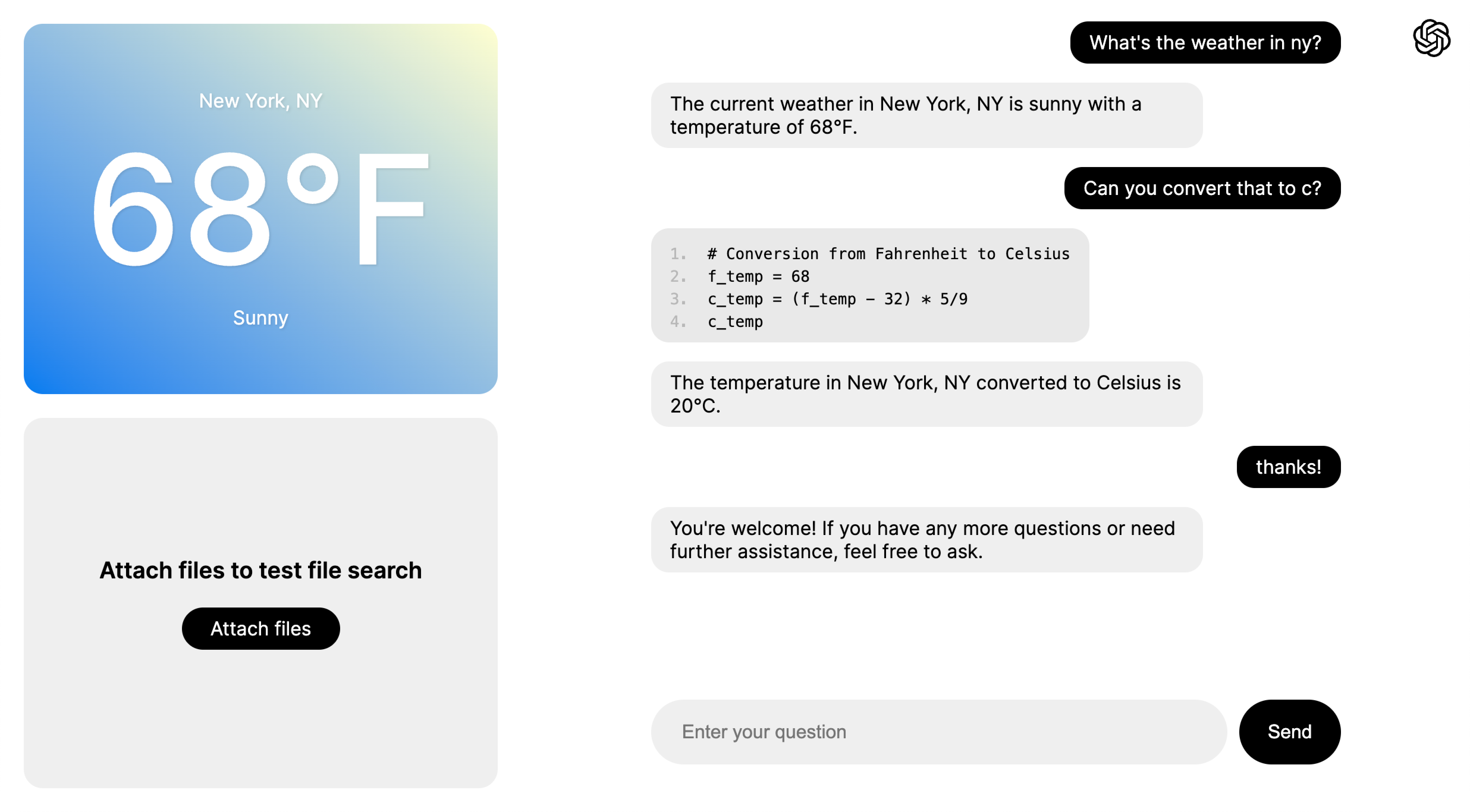 ## 快速开始设置 ### 1. 克隆仓库 ``` git clone https://github.com/openai/openai-assistants-quickstart.git cd openai-assistants-quickstart ``` ### 2. 设置你的 [OpenAI API key](https://platform.openai.com/api-keys) ``` export OPENAI_API_KEY="sk_..." ``` (或者在 `.env.example` 中设置,并将其重命名为 `.env`)。 ### 3. 安装依赖 ``` npm install ``` ### 4. 运行 ``` npm run dev ``` ### 5. 访问 [http://localhost:3000](http://localhost:3000)。 ## 部署 你可以将此项目部署到 Vercel 或任何其他支持 Next.js 的平台。 [](https://vercel.com/new/clone?repository-url=https%3A%2F%2Fgithub.com%2Fopenai%2Fopenai-assistants-quickstart&env=OPENAI_API_KEY,OPENAI_ASSISTANT_ID&envDescription=API%20Keys%20and%20Instructions&envLink=https%3A%2F%2Fgithub.com%2Fopenai%2Fopenai-assistants-quickstart%2Fblob%2Fmain%2F.env.example) ## 概述 本项目旨在作为一个模板,用于在 Next.js 中使用 Assistants API,支持[流式传输](https://platform.openai.com/docs/assistants/overview/step-4-create-a-run)、工具使用([代码解释器](https://platform.openai.com/docs/assistants/tools/code-interpreter)和[文件搜索](https://platform.openai.com/docs/assistants/tools/file-search))以及[函数调用](https://platform.openai.com/docs/assistants/tools/function-calling)。虽然有多个页面来展示这些功能,但它们都使用了同一个启用了所有功能的底层 assistant。 聊天的主要逻辑可以在 `app/components/chat.tsx` 的 `Chat` 组件中找到,以及以 `api/assistants/threads` 开头的处理程序(位于 `api/assistants/threads/...` 中)。欢迎你创建自己的项目并复制其中的一些逻辑!`Chat` 组件本身可以直接复制和使用,前提是你也要从 `app/components/chat.module.css` 中复制样式。 ### 页面 - 基础聊天示例:[http://localhost:3000/examples/basic-chat](http://localhost:3000/examples/basic-chat) - 函数调用示例:[http://localhost:3000/examples/function-calling](http://localhost:3000/examples/function-calling) - 文件搜索示例:[http://localhost:3000/examples/file-search](http://localhost:3000/examples/file-search) - 全功能示例:[http://localhost:3000/examples/all](http://localhost:3000/examples/all) ### 主要组件 - `app/components/chat.tsx` - 处理聊天渲染、[流式传输](https://platform.openai.com/docs/assistants/overview?context=with-streaming)和[函数调用](https://platform.openai.com/docs/assistants/tools/function-calling/quickstart?context=streaming&lang=node.js)转发 - `app/components/file-viewer.tsx` - 处理用于[文件搜索](https://platform.openai.com/docs/assistants/tools/file-search)的文件上传、获取和删除 ### 接口 - `api/assistants` - `POST`:创建 assistant(仅在启动时使用) - `api/assistants/threads` - `POST`:创建新线程 - `api/assistants/threads/[threadId]/messages` - `POST`:向 assistant 发送消息 - `api/assistants/threads/[threadId]/actions` - `POST`:通知 assistant 它决定调用的函数的结果 - `api/assistants/files` - `GET`/`POST`/`DELETE`:获取、上传和删除用于文件搜索的 assistant 文件 ## 反馈 如果你有任何想法、问题或反馈,请通过[此表单](https://docs.google.com/forms/d/e/1FAIpQLScn_RSBryMXCZjCyWV4_ebctksVvQYWkrq90iN21l1HLv3kPg/viewform?usp=sf_link)告诉我们!
 ## 快速开始设置 ### 1. 克隆仓库 ``` git clone https://github.com/openai/openai-assistants-quickstart.git cd openai-assistants-quickstart ``` ### 2. 设置你的 [OpenAI API key](https://platform.openai.com/api-keys) ``` export OPENAI_API_KEY="sk_..." ``` (或者在 `.env.example` 中设置,并将其重命名为 `.env`)。 ### 3. 安装依赖 ``` npm install ``` ### 4. 运行 ``` npm run dev ``` ### 5. 访问 [http://localhost:3000](http://localhost:3000)。 ## 部署 你可以将此项目部署到 Vercel 或任何其他支持 Next.js 的平台。 [](https://vercel.com/new/clone?repository-url=https%3A%2F%2Fgithub.com%2Fopenai%2Fopenai-assistants-quickstart&env=OPENAI_API_KEY,OPENAI_ASSISTANT_ID&envDescription=API%20Keys%20and%20Instructions&envLink=https%3A%2F%2Fgithub.com%2Fopenai%2Fopenai-assistants-quickstart%2Fblob%2Fmain%2F.env.example) ## 概述 本项目旨在作为一个模板,用于在 Next.js 中使用 Assistants API,支持[流式传输](https://platform.openai.com/docs/assistants/overview/step-4-create-a-run)、工具使用([代码解释器](https://platform.openai.com/docs/assistants/tools/code-interpreter)和[文件搜索](https://platform.openai.com/docs/assistants/tools/file-search))以及[函数调用](https://platform.openai.com/docs/assistants/tools/function-calling)。虽然有多个页面来展示这些功能,但它们都使用了同一个启用了所有功能的底层 assistant。 聊天的主要逻辑可以在 `app/components/chat.tsx` 的 `Chat` 组件中找到,以及以 `api/assistants/threads` 开头的处理程序(位于 `api/assistants/threads/...` 中)。欢迎你创建自己的项目并复制其中的一些逻辑!`Chat` 组件本身可以直接复制和使用,前提是你也要从 `app/components/chat.module.css` 中复制样式。 ### 页面 - 基础聊天示例:[http://localhost:3000/examples/basic-chat](http://localhost:3000/examples/basic-chat) - 函数调用示例:[http://localhost:3000/examples/function-calling](http://localhost:3000/examples/function-calling) - 文件搜索示例:[http://localhost:3000/examples/file-search](http://localhost:3000/examples/file-search) - 全功能示例:[http://localhost:3000/examples/all](http://localhost:3000/examples/all) ### 主要组件 - `app/components/chat.tsx` - 处理聊天渲染、[流式传输](https://platform.openai.com/docs/assistants/overview?context=with-streaming)和[函数调用](https://platform.openai.com/docs/assistants/tools/function-calling/quickstart?context=streaming&lang=node.js)转发 - `app/components/file-viewer.tsx` - 处理用于[文件搜索](https://platform.openai.com/docs/assistants/tools/file-search)的文件上传、获取和删除 ### 接口 - `api/assistants` - `POST`:创建 assistant(仅在启动时使用) - `api/assistants/threads` - `POST`:创建新线程 - `api/assistants/threads/[threadId]/messages` - `POST`:向 assistant 发送消息 - `api/assistants/threads/[threadId]/actions` - `POST`:通知 assistant 它决定调用的函数的结果 - `api/assistants/files` - `GET`/`POST`/`DELETE`:获取、上传和删除用于文件搜索的 assistant 文件 ## 反馈 如果你有任何想法、问题或反馈,请通过[此表单](https://docs.google.com/forms/d/e/1FAIpQLScn_RSBryMXCZjCyWV4_ebctksVvQYWkrq90iN21l1HLv3kPg/viewform?usp=sf_link)告诉我们!
标签:AI助手, MITM代理, OpenAI, Petitpotam, 人工智能, 内存规避, 快速启动模板, 用户模式Hook绕过, 自动化攻击