misiektoja/lol_monitor
GitHub: misiektoja/lol_monitor
一个基于 Riot API 的《英雄联盟》玩家活动实时监控与数据记录工具,支持赛事详情查询、CSV 导出和邮件通知。
Stars: 22 | Forks: 2
# lol_monitor
-r "your_riot_api_key"
```
或者,如果您是[手动安装](#manual-installation):
```
python3 lol_monitor.py -r "your_riot_api_key"
```
获取所有支持的命令行参数/标志列表:
```
lol_monitor --help
```
## 配置
### 配置文件
大多数设置都可以通过命令行参数进行配置。
如果您希望将其持久化存储,可以生成一个默认的配置模板并将其保存到名为 `lol_monitor.conf` 的文件中:
```
lol_monitor --generate-config > lol_monitor.conf
```
编辑 `lol_monitor.conf` 文件并更改所需的配置选项(每项均有详细的注释说明)。
### Riot API 密钥
在此处获取有效期为 24 小时的开发版 Riot API 密钥:[https://developer.riotgames.com](https://developer.riotgames.com)
建议在此处申请长期有效的个人或生产级 Riot API 密钥:[https://developer.riotgames.com/app-type](https://developer.riotgames.com/app-type)
获取批准需要几天时间。
请使用以下方法之一提供 `RIOT_API_KEY` 机密信息:
- 运行时使用 `-r` / `--riot-api-key` 传入
- 设置为[环境变量](#storing-secrets)(例如 `export RIOT_API_KEY=...`)
- 添加到 [.env 文件](#storing-secrets)(`RIOT_API_KEY=...`)以便持久化使用
备用方案:
- 在代码或配置文件中硬编码
如果您将 `RIOT_API_KEY` 存储在 dotenv 文件中,您可以更新其值并向进程发送 `SIGHUP` 信号以重新加载包含新 API 密钥的文件,而无需重启工具。更多信息请参阅[存储机密信息](#storing-secrets)和[信号控制 (macOS/Linux/Unix)](#signal-controls-macoslinuxunix)。
### SMTP 设置
如果您想使用邮件通知功能,请在 `lol_monitor.conf` 文件中配置 SMTP 设置。
使用 `--send-test-email` 标志验证您的 SMTP 设置(该工具将尝试发送一封测试邮件通知):
```
lol_monitor --send-test-email
```
### 存储机密信息
建议将 `RIOT_API_KEY` 或 `SMTP_PASSWORD` 等机密信息存储为环境变量或保存在 dotenv 文件中。
在 **Linux/Unix/macOS/WSL** 系统上使用 `export` 设置环境变量:
```
export RIOT_API_KEY="your_riot_api_key"
export SMTP_PASSWORD="your_smtp_password"
```
在 **Windows 命令提示符** 上使用 `set` 代替 `export`,在 **Windows PowerShell** 上使用 `$env`。
或者将它们持久化存储在 dotenv 文件中(推荐):
```
RIOT_API_KEY="your_riot_api_key"
SMTP_PASSWORD="your_smtp_password"
```
默认情况下,该工具会自动在当前目录及其上级目录中查找名为 `.env` 的 dotenv 文件。
您可以使用 `DOTENV_FILE` 或 `--env-file` 标志指定自定义文件:
```
lol_monitor --env-file /path/.env-lol_monitor
```
您也可以使用 `DOTENV_FILE = "none"` 或 `--env-file none` 禁用 `.env` 自动搜索:
```
lol_monitor --env-file none
```
作为备选方案,您也可以将机密信息存储在配置文件或源代码中。
## 使用方法
### 监控模式
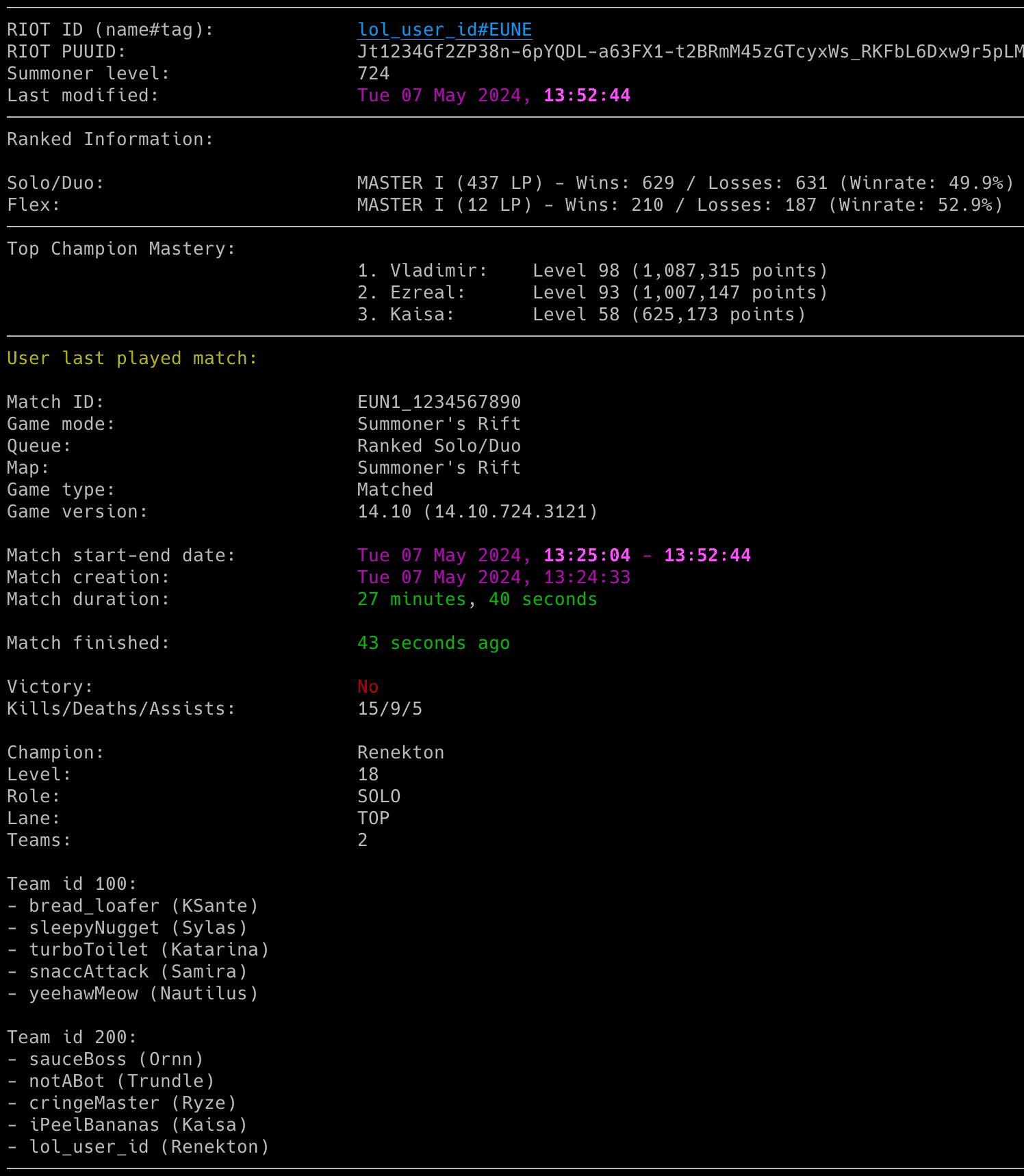
要监控特定用户的活动,只需将玩家的 LoL Riot ID 和大区作为命令行参数输入(例如下方示例中的 `riot_id_name#tag` 和 `region`):
```
lol_monitor
```
如果您尚未设置 `RIOT_API_KEY` 机密信息,可以使用 `-r` 标志:
```
lol_monitor -r "your_riot_api_key"
```
LoL Riot ID 由 Riot ID 游戏名(例如上方示例中的 `riot_id_name`)和标签线(`#tag`)组成。
对于 `region`,您需要使用其缩写形式。您可以在下方找到列表:
| 大区缩写 | 描述 |
| ----------- | ----------- |
| eun1 | 欧洲北欧与东欧 (EUNE) |
| euw1 | 欧洲西部 (EUW) |
| tr1 | 土耳其 (TR1) |
| ru | 俄罗斯 |
| na1 | 北美 (NA) - 目前唯一的 NA endpoint |
| br1 | 巴西 (BR) |
| la1 | 拉丁美洲北部 (LAN) |
| la2 | 拉丁美洲南部 (LAS) |
| jp1 | 日本 (JP) |
| kr | 韩国 (KR) |
| sg2 | 东南亚 (SEA) - 新加坡、马来西亚、印度尼西亚(+ 自 2025 年 1 月 9 日起包括泰国和菲律宾) |
| tw2 | 台湾、香港和澳门 (TW/HK/MO) |
| vn2 | 越南 (VN) |
| oc1 | 大洋洲 (OC) |
默认情况下,该工具会依次在以下位置查找名为 `lol_monitor.conf` 的配置文件:
- 当前目录
- 主目录 (`~`)
- 脚本所在目录
如果您按照[配置](#configuration)生成了配置文件,但将其以其他名称保存或保存在其他目录中,您可以使用 `--config-file` 标志指定其位置:
```
lol_monitor --config-file /path/lol_monitor_new.conf
```
该工具会一直运行直到被中断(`Ctrl+C`)。使用 `tmux` 或 `screen` 可以保持其持久运行。
您可以通过运行多个脚本实例来监控多名 LoL 玩家。
该工具会自动将其输出保存到 `lol_monitor_.log` 文件中。可以通过设置中的 `LOL_LOGFILE` 配置选项进行更改,或者通过 `DISABLE_LOGGING` / `-d` 标志完全禁用。
### 列出模式
该工具还有另一种模式,可以打印和/或保存用户的近期比赛(`-l` 标志)。您还可以添加 `-n` 来定义要显示/保存的近期比赛数量;默认情况下,它会显示最近的 2 场比赛:
```
lol_monitor -l -n 25
```
您还可以通过指定要显示的起始比赛记录(`-m` 标志)来定义要显示/保存的比赛范围。例如,要显示范围在 20-50 内的近期比赛:
```
lol_monitor -l -m 20 -n 50
```
如果您指定 `-b` 标志(带 CSV 文件名)以及 `-l` 标志,它不仅会显示近期比赛,还会将其保存到指定的 CSV 文件中。例如,要显示并保存该用户范围在 5-10 内的近期比赛:
```
lol_monitor -l -m 5 -n 10 -b lol_games_riot_id_name.csv
```
### 邮件通知
要在用户游玩状态发生变化时启用邮件通知:
- 将 `STATUS_NOTIFICATION` 设置为 `True`
- 或使用 `-s` 标志
```
lol_monitor -s
```
要禁用发生错误时发送邮件(默认启用):
- 将 `ERROR_NOTIFICATION` 设置为 `False`
- 或使用 `-e` 标志
```
lol_monitor -e
```
请确保您之前已经定义了 SMTP 设置(参见 [SMTP 设置](#smtp-settings))。
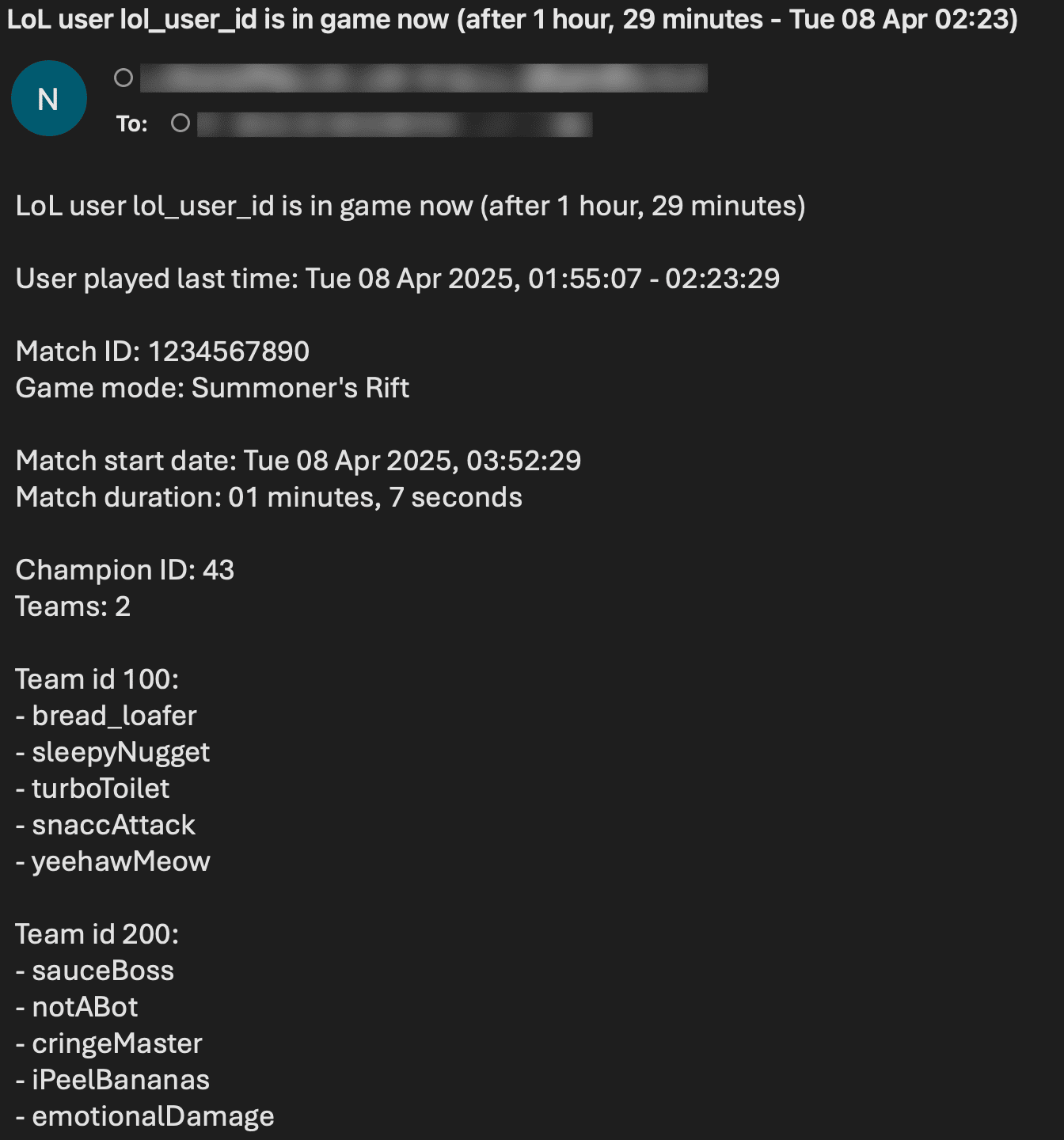
邮件通知同时以纯文本和 HTML 格式发送,以提高可读性。HTML 格式包含增强的排版格式,对重要信息使用粗体文本,并具有结构规范的详细比赛信息。
邮件示例:
-b lol_games_riot_id_name.csv
```
如果文件不存在,将会自动创建。
CSV 文件包含以下列:
- `Match Start`、`Match Stop`、`Duration`
- `Game Mode` - 游戏模式(例如 "CLASSIC"、"ARAM"、"URF")
- `Victory` - 胜利或失败
- `Kills`、`Deaths`、`Assists`
- `Champion` - 英雄名称
- `Level` - 达到的英雄等级
- `Role` - 玩家角色(例如 "DUO_CARRY"、"JUNGLE")
- `Lane` - 游走的分路(例如 "TOP"、"MIDDLE"、"BOTTOM")
- `Team 1`、`Team 2` - 队伍成员列表
如果您拥有使用旧格式的旧版本(v1.7.2 或更早版本)CSV 文件,您可以使用 [CSV 格式转换工具](#utility-tools)进行转换。
### 检查间隔
如果您想自定义轮询间隔,请使用 `-k` 和 `-c` 标志(或相应的配置选项):
```
lol_monitor -k 60 -c 120
```
* `LOL_ACTIVE_CHECK_INTERVAL`、`-k`:用户在游戏中时的检查间隔(秒)
* `LOL_CHECK_INTERVAL`、`-c`:用户不在游戏中时的检查间隔(秒)
### 信号控制 (macOS/Linux/Unix)
该工具实现了多个信号处理程序,允许在不使用新的配置选项/标志重启工具的情况下更改其行为。
支持的信号列表:
| 信号 | 描述 |
| ----------- | ----------- |
| USR1 | 切换用户游玩状态变化时的邮件通知 (-s) |
| TRAP | 当用户在游戏中时增加玩家活动检查计时器(增加 30 秒) |
| ABRT | 当用户在游戏中时减少玩家活动检查计时器(减少 30 秒) |
| HUP | 从 .env 文件重新加载机密信息 |
使用 `kill` 或 `pkill` 发送信号,例如:
```
pkill -USR1 -f "lol_monitor "
```
由于 Windows 支持的信号数量有限,此功能仅在 Linux/Unix/macOS 上可用。
### 使用 GRC 为日志输出着色
您可以使用 [GRC](https://github.com/garabik/grc) 来为日志着色。
添加到您的 GRC 配置文件 (`~/.grc/grc.conf`) 中:
```
# 监控 log file
.*_monitor_.*\.log
conf.monitor_logs
```
现在将 [conf.monitor_logs](https://raw.githubusercontent.com/misiektoja/lol_monitor/refs/heads/main/grc/conf.monitor_logs) 复制到您的 `~/.grc/` 目录中,当使用 `grc` 工具时,日志文件应该会被渲染出漂亮的颜色。
示例:
```
grc tail -F -n 100 lol_monitor_.log
```
### 实用工具
该项目在 `tools/` 目录中包含用于处理 CSV 比赛记录文件的实用脚本:
#### CSV 格式转换器
`lol_convert_csv_format.py` 脚本用于将旧格式(由 lol_monitor <=v1.7.2 使用)的 CSV 文件转换为新格式(由 >=v1.8 使用)。
**旧格式列:**
`Match Start`、`Match Stop`、`Duration`、`Victory`、`Kills`、`Deaths`、`Assists`、`Champion`、`Team 1`、`Team 2`
**新格式列:**
`Match Start`、`Match Stop`、`Duration`、`Game Mode`、`Victory`、`Kills`、`Deaths`、`Assists`、`Champion`、`Level`、`Role`、`Lane`、`Team 1`、`Team 2`
**使用方法:**
```
python3 tools/lol_convert_csv_format.py input.csv [-o output.csv]
```
如果未指定 `-o`,输入文件将被转换后的格式覆盖。缺失的值将用 "N/A" 填充。
#### 比赛记录比对工具
`lol_compare_csvs.py` 脚本用于比对两个 League of Legends 比赛记录 CSV 文件,并判断它们是否可能属于同一名玩家。它分析多个特征,包括:
- 英雄池相似度
- KDA 数据(平均值和标准差)
- 胜率相似度
- 平均比赛时长
- 游戏时段规律
- 队友重合度
- 角色和分路偏好
- 平均英雄等级
- 游戏模式偏好
- 时间重叠检测
**使用方法:**
```
python3 tools/lol_compare_csvs.py file1.csv file2.csv [--limit N] [--json] [--pretty] [--no-overlap-check] [--max-overlaps N|all]
```
**选项:**
- `--limit N`:限制从每个文件顶部开始分析的比赛数量
- `--json`:以 JSON 格式输出结果
- `--pretty`:格式化输出 JSON
- `--no-overlap-check`:跳过时间重叠分析(速度更快,但不够全面)
- `--max-overlaps N|all`:显示的最大时间重叠次数(默认:5,使用 'all' 显示全部)
**要求:** `pandas`(通过 `pip install pandas` 安装)
该脚本输出相似度得分 (0-100),并附带一个判定,指示这两个 CSV 文件代表同一名玩家的可能性。使用 `--json` 进行程序化输出,或使用 `--pretty` 获取格式化的 JSON。
## 更新日志
详情请参阅 [RELEASE_NOTES.md](https://github.com/misiektoja/lol_monitor/blob/main/RELEASE_NOTES.md)。
## 许可证
采用 GPLv3 授权。详见 [LICENSE](https://github.com/misiektoja/lol_monitor/blob/main/LICENSE)。




标签:Python, 数据追踪, 无后门, 游戏辅助, 状态监控, 英雄联盟, 逆向工具, 邮件通知