boostsecurityio/poutine
GitHub: boostsecurityio/poutine
一款专攻 CI/CD 流水线安全的扫描器,用于检测 GitHub Actions、GitLab CI 等平台的配置漏洞和供应链风险。
Stars: 477 | Forks: 39
[](https://www.bestpractices.dev/projects/8787)
[](https://securityscorecards.dev/viewer/?uri=github.com/boostsecurityio/poutine)


[](https://pkg.go.dev/github.com/boostsecurityio/poutine)
[](https://goreportcard.com/report/github.com/boostsecurityio/poutine)
[](https://slsa.dev)
[](https://boostsecurityio.github.io/poutine/)
# poutine
`poutine` 由 [BoostSecurity.io](https://boostsecurity.io) 创建,是一个安全扫描器,用于检测仓库构建流水线中的错误配置和漏洞。它支持解析 GitHub Actions 和 Gitlab CI/CD 的 CI 工作流。如果提供具有读取级别访问权限的访问令牌,`poutine` 可以分析组织的所有仓库,从而快速深入了解组织软件供应链的安全态势。
请参阅 [文档](docs/content/en/rules) 获取 `poutine` 当前支持的规则列表。
## 为什么叫 `poutine`?
在法语中,单词 "poutine" 如果不是指那道 [菜肴](https://en.wikipedia.org/wiki/Poutine),则可以用来表示“混乱”。受现代开源项目复杂性和相互交织依赖关系的启发,`poutine` 既是对我们蒙特利尔根基的致敬,也反映了保护软件供应链安全通常具有的混乱和复杂的本质。
## 支持的平台
- GitHub Actions
- Gitlab Pipelines
- Azure DevOps
- Pipelines As Code Tekton
## 快速入门
### 安装
要安装 `poutine`,请从 [发布页面](https://github.com/boostsecurityio/poutine/releases) 下载最新版本,并将二进制文件添加到您的 $PATH 中。
#### Homebrew
```
brew install poutine
```
#### Docker
```
docker run -e GH_TOKEN ghcr.io/boostsecurityio/poutine:latest
```
#### GitHub Actions
```
...
jobs:
poutine:
runs-on: ubuntu-latest
permissions:
security-events: write
contents: read
steps:
- uses: actions/checkout@b4ffde65f46336ab88eb53be808477a3936bae11 # v4.1.1
#################################################################################################
- name: poutine - GitHub Actions SAST
uses: boostsecurityio/poutine-action@main # We recommend to use a tagged version and pin it
#################################################################################################
- name: Upload poutine SARIF file
uses: github/codeql-action/upload-sarif@4355270be187e1b672a7a1c7c7bae5afdc1ab94a # v3.24.10
with:
sarif_file: results.sarif
```
### 使用方法
```
poutine [command] [arguments] [options]
```
#### 分析本地仓库
```
poutine analyze_local .
```
#### 分析远程 GitHub 仓库
```
poutine analyze_repo org/repo --token "$GH_TOKEN"
```
#### 分析 GitHub 组织中的所有仓库
```
poutine analyze_org org --token "$GH_TOKEN"
```
#### 分析自托管 Gitlab 实例中的所有项目
```
poutine analyze_org my-org/project --token "$GL_TOKEN" --scm gitlab --scm-base-url https://gitlab.example.com
```
### 配置选项
```
--token SCM access token (required for the commands analyze_repo, analyze_org) (env: GH_TOKEN)
--format Output format (default: pretty, json, sarif)
--ignore-forks Ignore forked repositories in the organization (analyze_org)
--scm SCM platform (default: github, gitlab)
--scm-base-url Base URI of the self-hosted SCM instance
--threads Number of threads to use (default: 2)
--config Path to the configuration file (default: .poutine.yml)
--skip Add rules to the skip list for the current run (can be specified multiple times)
--verbose Enable debug logging
--fail-on-violation Exit with a non-zero code (10) when violations are found
```
有关示例配置文件,请参阅 [.poutine.sample.yml](.poutine.sample.yml)。
### 自定义规则
`poutine` 支持自定义 Rego 规则以扩展其安全扫描功能。您可以编写自己的规则并在运行时加载它们。
#### 配置
在当前工作目录中创建一个 `.poutine.yml` 配置文件,或使用 `--config` 标志指定自定义路径:
```
poutine analyze_local . --config my-config.yml
```
在您的配置文件中,使用 `include` 指令指定自定义规则的路径:
```
include:
- path: ./custom_rules
- path: ./github_actions
```
#### 编写自定义规则
自定义 Rego 规则必须:
1. 保存为包含目录中的 `*.rego` 文件
2. 遵循包命名约定:`package rules.`
3. 定义一个包含元数据的 `rule` 变量
4. 定义一个包含检查结果的 `results` 集合
**自定义规则示例:**
```
package rules.custom_injection
import data.poutine
import rego.v1
# METADATA
# title: Custom Injection Detection
# description: Detects potential injection vulnerabilities in workflows
# custom:
# level: warning
rule := poutine.rule(rego.metadata.chain())
# Define pattern to detect (properly escaped for Rego)
patterns.github contains `\\$\\{\\{[^\\}]+\\}\\}`
results contains poutine.finding(rule, pkg.purl, {
"path": workflow.path,
"line": step.lines.run,
"job": job.id,
"step": i,
"details": "Potential injection found in step",
}) if {
pkg := input.packages[_]
workflow := pkg.github_actions_workflows[_]
job := workflow.jobs[_]
step := job.steps[i]
step.run # Ensure step has a run command
regex.match(patterns.github[_], step.run)
}
```
**关键点:**
- 使用 `import data.poutine` 和 `import rego.v1` 以获得现代 Rego 语法和 poutine 实用工具
- 使用 `rule := poutine.rule(rego.metadata.chain())` 从 METADATA 注释中提取元数据
- `package` 名称决定了规则标识符(例如,`package rules.custom_injection` → 规则 ID:`custom_injection`)
- 添加 METADATA 注释,通过 `title`、`description` 和 `level` 描述规则
- 将严重性 `level` 设置为 `note`、`warning` 或 `error`
- 使用 `poutine.finding(rule, pkg.purl, {...})` 创建符合 poutine schema 的发现结果
- `results` 集合应包含具有 `path`、`line`、`job`、`step`、`details` 等字段的发现结果
更多示例请参见:
- [poutine-rules repository](https://github.com/boost-rnd/poutine-rules) - 外部规则示例
- [opa/rego/rules/](./opa/rego/rules/) 目录中的内置规则
- [.poutine.sample.yml](.poutine.sample.yml) - 配置示例
### 确认发现结果
`poutine` 支持跳过(确认)在您的上下文中不相关的特定发现结果。这在以下情况下非常有用:
- 发现结果为误报
- 安全问题已通过其他方式解决(例如,加固的自托管 runner)
- 您已接受特定发现的风险
要确认发现结果,您可以:
1. 在 `.poutine.yml` 配置文件中添加 `skip` 部分
2. 使用 `--skip` 命令行标志(例如 `--skip rule_name`)进行一次性跳过
#### 配置文件
在您的 `.poutine.yml` 配置文件中添加 `skip` 部分。每个跳过规则可以通过以下方式过滤发现结果:
- `job`:按作业名称过滤
- `level`:按严重性级别过滤(note、warning、error)
- `path`:按工作流文件路径过滤
- `rule`:按规则名称过滤
- `purl`:按包 URL 过滤
- `osv_id`:按 OSV ID 过滤
配置示例:
```
skip:
# Skip all note-level findings
- level: note
# Skip findings in a specific workflow
- path: .github/workflows/safe.yml
# Skip a specific rule everywhere
- rule: unpinnable_action
# Skip a rule for specific workflows
- rule: pr_runs_on_self_hosted
path:
- .github/workflows/pr.yml
- .github/workflows/deploy.yml
# Skip findings for specific packages
- rule: github_action_from_unverified_creator_used
purl:
- pkg:githubactions/dorny/paths-filter
```
更多示例请参见 [.poutine.sample.yml](.poutine.sample.yml)。
#### 命令行
您也可以在命令行中使用 `--skip` 标志跳过规则。请注意,命令行标志仅支持按名称全局跳过规则,不支持配置文件中提供的精细过滤选项(job、path、level 等)。
```
# Skip a single rule globally
poutine analyze_repo org/repo --skip unpinnable_action
# Skip multiple rules globally
poutine analyze_repo org/repo --skip unpinnable_action --skip pr_runs_on_self_hosted
```
这对于一次性分析或当您想临时忽略特定规则而不修改配置文件非常有用。如需更精细的控制(例如,仅在特定工作流中跳过规则),请改用配置文件。
## AI 编码助手集成 (MCP)
`poutine` 可以通过 Model Context Protocol (MCP) 与 Claude Code、Gemini 等 AI 编码助手集成。这允许 AI 助手直接从您的开发环境分析仓库并验证 CI/CD 流水线。
有关特定 AI 编码工具的详细设置说明,请参阅 [MCP 集成指南](MCP_INTEGRATION.md)。
## 从源代码构建
构建 `poutine` 需要 Go 1.25+。
```
git clone https://github.com/boostsecurityio/poutine.git
cd poutine
make build
```
## 开发
### 更新构建平台 CVE 数据库
```
go test -tags build_platform_vuln_database ./...
opa fmt -w opa/rego/external/build_platform.rego
```
## 另请参阅
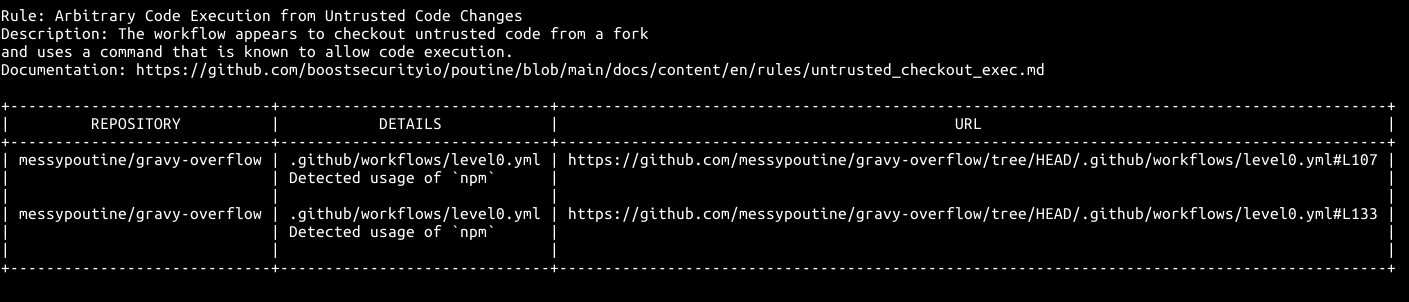
有关 GitHub Actions 工作流中漏洞的示例,您可以浏览 [Messy poutine GitHub organization](https://github.com/messypoutine)。它展示了来自开源项目的真实漏洞,可直接用于教育目的。
为了获得一些入门提示,请尝试使用 `poutine` 分析 `messypoutine` 组织:
```
poutine analyze_org messypoutine --token `gh auth token`
```
您可以通过 [私有漏洞披露](https://github.com/messypoutine/.github/security/advisories/new) 提交您发现的 flags。
## 许可证
本项目基于 Apache License 2.0 授权 - 详情请参阅 LICENSE 文件。
|  |
标签:CI/CD安全, DevSecOps, EVTX分析, GitHub Actions, GitLab CI, Go, Golang, Llama, OpenSSF, Ruby工具, SAST, SLSA, 上游代理, 云安全监控, 安全合规, 安全编程, 文档安全, 日志审计, 构建安全, 盲注攻击, 管道安全, 结构化提示词, 网络代理, 自动笔记, 请求拦截, 软件供应链安全, 软件开发工具包, 远程方法调用, 静态分析