juicebox-systems/juicebox-hsm-realm
GitHub: juicebox-systems/juicebox-hsm-realm
Juicebox HSM Realm 是一个基于可编程 HSM 的分布式机密存储后端,通过认证共识协议在容忍部分硬件故障的同时,确保攻击者无法在有限猜测次数内窃取受 PIN 保护的机密。
Stars: 19 | Forks: 5
# Juicebox HSM Realm
此仓库包含 Juicebox 由 HSM 支持的 realm 的源代码。HSM 支持的 realm 可以通过 [Juicebox SDK] 连同其他 realm 实现(例如 [Juicebox software realms])一起访问。
HSM 支持的 realm 在理解和操作上相对复杂。它专用于可编程的 [Hardware Security Modules]。与普通硬件相比,它们可以提供更好的隐私特性,但也会对 HSM realm 的架构施加一些限制和复杂性。
出于开发和测试目的,您可以在普通硬件上运行 HSM realm。它的操作比使用 [Juicebox software realms] 复杂得多,并且不会提供更好的安全性,因此这仅适用于预生产环境。
## 架构概述
HSM realm 由负载均衡器、代理、HSM、集群管理器组成,并且依赖于 [Google Cloud Bigtable]、[Google Cloud Pub/sub] 和 [Google Cloud Secret Manager]。该架构旨在扩展到单个 realm 中包含数百个 HSM 的规模,并且可以容忍其中部分 HSM 发生故障(通过停止运行)。本节提供了该架构的简要概述。
该架构假设对手可以检查和控制所有组件及网络,但前提是对手无法查看或控制 HSM 的内部结构。这样的对手可以通过多种方式造成永久性的拒绝服务,但我们的目标是:对手无法在用户设定的有限尝试次数内,在不猜测 PIN 码的情况下获取受 PIN 码保护的机密信息。
客户端通过 HTTPS 与负载均衡器进行通信。客户端请求包含一个 auth token,并封装了使用 [Noise protocol] 加密的 HSM 请求。负载均衡器检查 auth token(使用来自 Secret Manager 的密钥),并从其声明中生成一个记录 ID。负载均衡器根据此记录 ID 将请求路由到特定的代理。
代理是与每个 HSM 配对的主机端守护进程。该系统专用于 PCIe 连接的 HSM,其中代理运行在每台具有 HSM 的物理服务器上。代理接收来自负载均衡器的请求,并通常将其转发给 HSM。
HSM 是可编程的,并运行此仓库中的部分代码。根据上下文,我们使用术语“HSM”来指代物理设备或在其上运行的代码。通过初始化过程,realm 中的每个 HSM 都会获得一份加密密钥副本。这允许 HSM 解密客户端的 Noise 消息并处理请求。
realm 中的 HSM 使用共识协议来提供强一致性(线性一致性),同时容忍部分 HSM 发生故障。机密管理应用程序需要强一致性,例如,为了防止对手通过网络分区获取更多的猜测机会。
HSM 使用经过认证的共识协议,而不是传统的[共识协议]。在经过认证的共识协议中,HSM 在运行于普通硬件上的传统共识协议之上,增加了一层验证新鲜度和真实性的机制。这限制了 HSM 需要维护和持久化的状态量,并允许 realm 实现利用现有系统。该实现使用 [Google Cloud Bigtable] 作为提供可扩展性和传统共识的外部存储系统(Bigtable 在单行内提供原子操作)。
HSM 被组织成多个复制组,这些组使用多数派法定人数并且基于领导者。每个复制组应包含少量 HSM,并且可以容忍其中任何少数派发生故障;例如,一个包含 5 个 HSM 的组可以容忍任何 2 个发生故障。整个 realm 的吞吐量随着组的增加而扩展。发往某个组的请求会被路由到领导者 HSM。组中的其他 HSM 被称为见证者。理想情况下,在任何给定时间都应该只有一个领导者。当领导者发生故障时,可以将见证者提升为领导者。
每个组维护一个用于其操作的日志。HSM 创建并处理日志条目,但它们仅持久化存储有关单个近期日志条目的元数据。每个组负责提供最多一个连续的记录 ID 范围。该范围的记录被组织在一个 Merkle tree 中。当领导者 HSM 修改 Merkle tree 时,它会创建一个新的日志条目,其中包含新 Merkle tree 的根哈希。日志和 Merkle tree 都存储在 Bigtable 中。
每个复制组具有固定的成员身份。可以动态创建新的复制组,并且可以通过所有权转移协议将一个记录 ID 范围的所有权从一个组转移到另一个组。复制组本身是它们所服务的记录 ID 范围的真理来源。代理在服务发现表中注册自己(存储在 Bigtable 中),负载均衡器查询代理以了解如何路由请求。
## 代码结构
此仓库依赖于 [Juicebox SDK] 仓库中的一些 crate(作为 Git 子模块包含在 `sdk` 路径下)。
这是当前 crate 的图表,展示了它们之间的本地依赖关系:
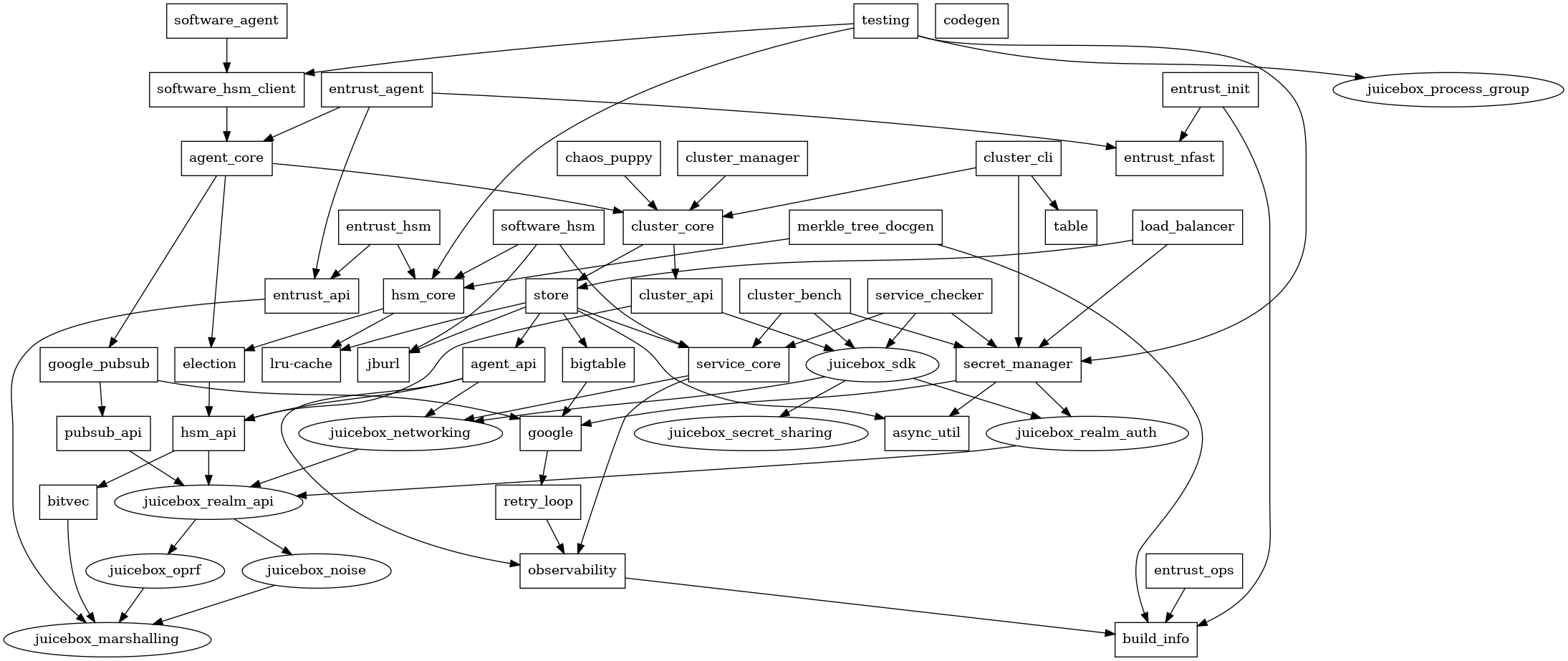
Entrust 是一家 HSM 供应商,Entrust 专用的代码也相应地进行了命名。其中一些代码是根据他们的 C 语言头文件自动生成的。
请注意,HSM 代码及其依赖项不使用 Rust 标准库。标准库对操作系统的假设可能并不适用于所有 HSM。这些 crate 仅依赖于 `core` 和 `alloc` crate,而不依赖 `std`。
此仓库中还有各种工具:
- `cluster_bench` 针对现有 realm 运行客户端基准测试。
- `cluster_cli` 用于从命令行管理 realm,包括初始化 realm 和转移所有权。
- `codegen` 根据 Google 的 Protocol Buffers 定义生成绑定。
- `entrust_init` 用于在 Entrust HSM 加入 realm 之前对其进行设置。
- `entrust_ops` 用于更安全、更便捷地管理 Entrust HSM。
- `src/bin/demo_runner` 在 localhost 上运行一个大型 realm,并默认对其运行演示。
- `src/bin/hsm_bench` 在 localhost 上运行一个小型 realm,并默认对其运行基准测试。
## 构建
系统依赖:
- [Rust](https://rustup.rs/)
- [Protocol Buffers 编译器](https://github.com/protocolbuffers/protobuf#protocol-compiler-installation),由
[prost-build](https://docs.rs/prost-build/latest/prost_build/#sourcing-protoc) 定位并使用。这是 `opentelemetry-otlp` 所需的,也可用于重新生成 Google Cloud API 消息。在 Debian 上,执行 `apt install protobuf-compiler` 即可。
- 请参阅下面关于 Bigtable 模拟器的章节,您也会用到它。
然后:
- `cargo test --all` 运行测试
- 运行客户端 Rust 演示:
```
cd sdk
cargo build -p juicebox_demo_cli
cd ..
cargo run --bin demo_runner -- --demo sdk/target/debug/demo
```
- 运行 Swift 演示:
```
cd sdk/swift
./ffi.sh
cd demo
swift build
cd ../../..
cargo run --bin demo_runner -- --demo sdk/swift/demo/.build/debug/demo
```
### 交叉编译
本节介绍如何将 HSM 代码交叉编译为 PowerPC 架构,以便其在 Entrust HSM 上运行。HSM 中的 PowerPC CPU 不支持 Altivec 功能,但 Rust 为 PowerPC 预编译的库假设这些功能是可用的。我们需要自己构建 Rust 的标准库 crate。这通常[需要 nightly 工具链](https://doc.rust-lang.org/nightly/cargo/reference/unstable.html#build-std),但我们使用了 `RUSTC_BOOTSTRAP=1` 这种技巧来在 stable 工具链上启用不稳定的功能([Linux 内核](https://github.com/torvalds/linux/blob/706a741595047797872e669b3101429ab8d378ef/Makefile#L608) 也使用了这种方法)。
安装前置条件:
```
rustup target add powerpc-unknown-linux-gnu
rustup component add rust-src
sudo apt install qemu-user qemu-user-binfmt gcc-12-powerpc-linux-gnu
```
`build-ppc.sh` 和 `test-ppc.sh` 脚本用于构建和测试 PowerPC 版本。除了脚本中设置的选项外,还使用了 `.cargo/config.toml` 文件来设置链接器和 CPU 目标。
## 本地 Bigtable 模拟器
您需要 Bigtable 模拟器来进行离线运行。您可能还需要 Cloud Bigtable CLI 工具,它与模拟器配合使用,并且安装方法相同。您可以使用庞大的 `gcloud` SDK 或使用 Go 编译器来安装它们。
### 选项 1:使用 `gcloud` SDK 安装:
请遵循 [gcloud CLI 安装说明](https://cloud.google.com/sdk/docs/install)。
运行:
```
gcloud components update beta
gcloud components install cbt
```
并启动模拟器:
```
gcloud beta emulators bigtable start --host-port localhost:9000
```
### 选项 2:使用 Go 安装:
运行:
```
go install cloud.google.com/go/bigtable/cmd/emulator@latest
go install cloud.google.com/go/cbt@latest
```
并启动模拟器:
```
emulator -host localhost -port 9000
```
### 使用 cbt
`cbt` 是一个 Cloud Bigtable CLI 工具。我们将为它与本地模拟器配合使用创建一个别名,然后创建一个表。
```
alias lbt='BIGTABLE_EMULATOR_HOST=localhost:9000 cbt -creds /dev/null -project prj -instance inst'
```
列出表:
```
lbt ls
```
您可以像这样创建表:
```
lbt createtable tab families=fam
```
## 本地 Pub/Sub 模拟器
您需要 Google Pub/Sub 模拟器才能进行离线运行。默认情况下,测试会在 docker 容器中运行此模拟器。您也可以选择安装 Google Cloud SDK 和模拟器,并直接运行它。
对于 docker,请先拉取镜像,然后像往常一样运行测试。
```
docker pull gcr.io/google.com/cloudsdktool/google-cloud-cli:emulators
```
要直接使用 SDK,请安装 pubsub-emulator 组件。
```
gcloud components install pubsub-emulator
```
然后将 `PUBSUB_JAR` 环境变量设置为包含模拟器 jar 包的路径。
通常是 `~/google-cloud-sdk/platform/pubsub-emulator/lib/cloud-pubsub-emulator-0.8.6.jar`
但这可能会因最初安装 Cloud SDK 的方式而异。
如果您需要手动运行模拟器,您可以执行
```
docker run -i --init -p 9091:8085 gcr.io/google.com/cloudsdktool/google-cloud-cli:emulators gcloud beta emulators pubsub start --host-port=0.0.0.0:8085
```
或者
```
gcloud beta emulators pubsub start --project=prj --host-port 0.0.0.0:9091
```
## OpenTelemetry 追踪
代码通过 OTLP (GRPC) 将 OpenTelemetry 追踪发送到 `http://localhost:4317`。例如,您可以运行一个 Jaeger 实例来接收并查看它们:
请遵循[说明](https://www.jaegertracing.io/docs/latest/getting-started/)获取 all-in-one 的 Docker 镜像或可执行二进制文件。
运行:
```
COLLECTOR_OTLP_ENABLED=true ./jaeger-1.42.0-linux-amd64/jaeger-all-in-one --collector.otlp.grpc.host-port=:4317
```
打开
标签:Google Cloud, 分布式系统, 可视化界面, 后端服务, 响应大小分析, 用户代理, 硬件安全模块, 脚本检测, 通知系统