ArduPilot/MethodicConfigurator
GitHub: ArduPilot/MethodicConfigurator
一款面向ArduPilot飞控的半自动化配置工具,通过结构化的分步向导帮助用户完成从硬件组装到PID调参的完整流程,并提供完整的参数变更追溯与文档。
Stars: 142 | Forks: 64
# 首次尝试即为您的载具正确配置 ArduPilot
| Lint | 质量 | 测试 | 安全 | 部署 | 维护性 |
| ---- | ------- | ---- | -------- | ------ | -------- |
| [](https://github.com/ArduPilot/MethodicConfigurator/actions/workflows/pylint.yml) | [](https://app.codacy.com/gh/amilcarlucas/MethodicConfigurator/dashboard?utm_source=gh&utm_medium=referral&utm_content=&utm_campaign=Badge_grade) | [](https://github.com/ArduPilot/MethodicConfigurator/actions/workflows/pytest.yml) | [](https://app.snyk.io/org/amilcarlucas/project/c8fd6e29-715b-4949-b828-64eff84f5fe1) | [](https://github.com/ArduPilot/MethodicConfigurator/actions/workflows/pages/pages-build-deployment) | [](http://isitmaintained.com/project/ArduPilot/MethodicConfigurator) |
| [](https://github.com/ArduPilot/MethodicConfigurator/actions/workflows/ruff.yml) | [](https://www.bestpractices.dev/projects/9101) | [](https://github.com/ArduPilot/MethodicConfigurator/actions/workflows/pytest.yml) | [](https://github.com/ArduPilot/MethodicConfigurator/actions/workflows/github-code-scanning/codeql) | [](https://github.com/ArduPilot/MethodicConfigurator/actions/workflows/python-publish.yml) | [](http://isitmaintained.com/project/ArduPilot/MethodicConfigurator) |
| [](https://github.com/ArduPilot/MethodicConfigurator/actions/workflows/mypy.yml) | [](https://api.reuse.software/info/github.com/ArduPilot/MethodicConfigurator) | [](https://coveralls.io/github/ArduPilot/MethodicConfigurator?branch=master) | [](https://github.com/ArduPilot/MethodicConfigurator/actions/workflows/gitavscan.yml) | [](https://pypi.org/project/ardupilot-methodic-configurator/) | [](https://pypi.python.org/pypi/ardupilot-methodic-configurator) |
| [](https://github.com/ArduPilot/MethodicConfigurator/actions/workflows/pyright.yml) | [](https://github.com/ArduPilot/MethodicConfigurator/actions/workflows/markdown-link-check.yml) | [](https://scan.coverity.com/projects/ardupilot-methodic-configurator) | [](https://scorecard.dev/viewer/?uri=github.com/ArduPilot/MethodicConfigurator) | [](https://pypistats.org/packages/ardupilot-methodic-configurator) | [](https://codeclimate.com/github/amilcarlucas/MethodicConfigurator) |
| [](https://github.com/ArduPilot/MethodicConfigurator/actions/workflows/markdown-lint.yml) | [](https://results.pre-commit.ci/latest/github/ArduPilot/MethodicConfigurator/master) | [](https://discord.com/channels/674039678562861068/1308233496535371856) | | [](https://github.com/ArduPilot/MethodicConfigurator/actions/workflows/windows_build.yml) | [](https://github.com/ArduPilot/MethodicConfigurator/actions/workflows/update_flightcontroller_ids.yml) |
*ArduPilot Methodic Configurator* 是一款由 ArduPilot 开发人员开发的软件,它可以半自动化地执行一套 [清晰、经过验证且安全的 ArduCopter 配置流程](https://ardupilot.github.io/MethodicConfigurator/TUNING_GUIDE_ArduCopter)。
我们正在努力将其扩展到 [ArduPlane](https://ardupilot.github.io/MethodicConfigurator/TUNING_GUIDE_ArduPlane)、[Heli](https://ardupilot.github.io/MethodicConfigurator/TUNING_GUIDE_Heli) 和 [Rover](https://ardupilot.github.io/MethodicConfigurator/TUNING_GUIDE_Rover) 载具。但对于这些类型,目前功能仍不完善。
- **清晰**:半自动化序列是线性的,一次执行一步,没有隐藏的复杂依赖关系
- **经过验证**:该软件已被数百名 ArduPilot 开发者和用户使用。从初学者到高级用户,涵盖大型和小型载具。
- **安全**:该序列遵循既定的最佳实践,减少了试错环节,并减少了配置载具所需的飞行次数
- **参数管理**:上传、下载和编辑参数,并提供完整文档
- **载具模板**:从空白模板或针对常见载具类型的预配置设置开始
- **可追溯性**:记录每个参数变更及其原因
以下是来自 [AMC YouTube 频道](https://www.youtube.com/@AmilcardoCarmoLucas) 的一些 YouTube 视频教程:
[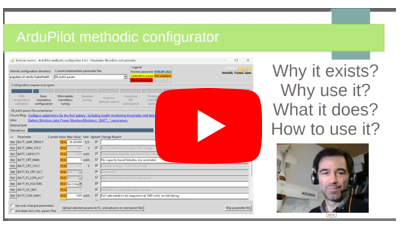](https://www.youtube.com/watch?v=47RjQ_GarvE&list=PL1oa0qoJ9W_89eMcn4x2PB6o3fyPbheA9)
[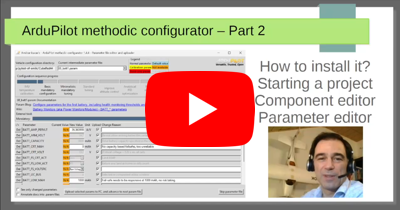](https://www.youtube.com/watch?v=9n4Wh6wBuHQ&list=PL1oa0qoJ9W_89eMcn4x2PB6o3fyPbheA9)
[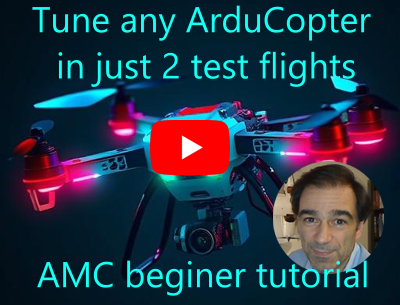](https://www.youtube.com/watch?v=tM8EznlNhgs&list=PL1oa0qoJ9W_89eMcn4x2PB6o3fyPbheA9)
这里有一份解释该软件的演示文稿:
[](https://github.com/ArduPilot/MethodicConfigurator/blob/master/images/ArduPilot_Methodic_Configurator.pdf?raw=true)
与 AMC 出现之前传统用于配置 ArduPilot 的地面站 (GCS) 软件对比:
| Feature | Mission Planner, QGroundControl, ... etc | ArduPilot Methodic Configurator |
| ------- | ---------------------------------------- | ------------------------------- |
| full automatic configuration | No | No |
| configuration type | manual [^1] | semi-automated [^2] |
| explains what to do | No | Yes |
| explains when to do something | No | Yes, explains the path |
| explains why do something | No | Yes |
| configuration method | a different menu for each task, some tasks have no menu, so you need to dig into the 1200 parameters | each task only presents you a relevant subset of parameters |
| parameter documentation | Yes, only on the full-parameter tree view | Yes |
| displays relevant documentation | No | Yes |
| makes sure you do not forget a step | No | Yes |
| checks that parameters get correctly uploaded | No (MP), unsure (QGCS), yes (MAVProxy) | Yes |
| reuse params in other vehicles | No, unless you hand edit files | Yes, out-of-the-box |
| documents why you changed each parameter | No | Yes |
| tutorials and learning resources | No, scattered and not integrated | Yes, context-aware help integrated |
| auto. install lua scripts on the FC | No | Yes |
| auto. backup of parameters before changing them | No | Yes |
[^1]: you need to know what/when/why you are doing
[^2]: it explains what you should do, when you should do it and why
它简洁的图形用户界面 (GUI) 用于管理和可视化 ArduPilot 参数、参数文件和文档。
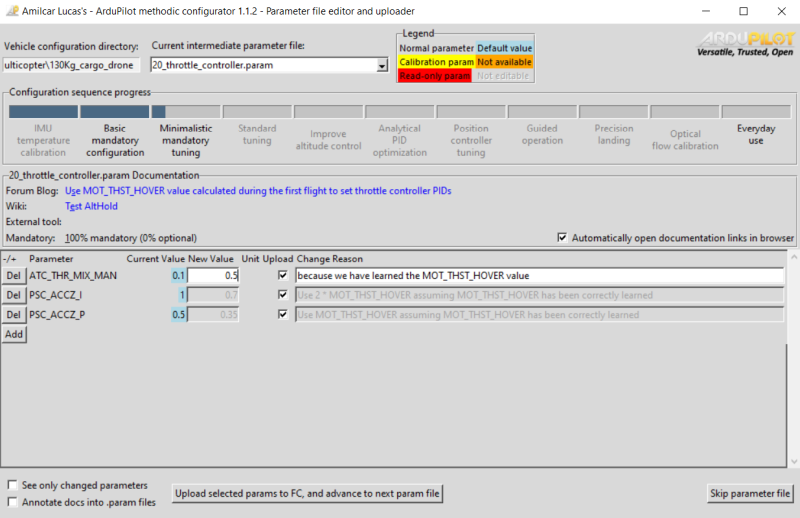
没有可见菜单,没有隐藏菜单,没有复杂选项,所见即所得。
## 目录
- [快速入门](#quick-start)
- [您将完成的任务](#what-youll-accomplish)
- [成功的重要提示](#important-tips-for-success)
- [1. 整个流程的快速概览](#1-quick-overview-of-the-entire-process)
- [1.1 选择载具组件](#11-select-the-vehicle-components)
- [1.2 下载并安装软件](#12-download-and-install-software)
- [1.3 将载具组件和组件连接信息输入到 ArduPilot Methodic Configurator](#13-input-vehicle-components-and-component-connections-into-ardupilot-methodic-configurator)
- [1.4 在将自动驾驶仪组装到载具之前执行 IMU 温度校准(可选)](#14-perform-imu-temperature-calibration-before-assembling-the-autopilot-into-the-vehicle-optional)
- [1.5 组装除螺旋桨以外的所有组件](#15-assemble-all-components-except-the-propellers)
- [1.6 基本强制配置](#16-basic-mandatory-configuration)
- [1.7 组装螺旋桨并执行首飞](#17-assemble-propellers-and-perform-the-first-flight)
- [1.8 最小化强制调优](#18-minimalistic-mandatory-tuning)
- [1.9 标准调优(可选)](#19-standard-tuning-optional)
- [1.10 改善 windy 条件下的高度控制(可选)](#110-improve-altitude-under-windy-conditions-optional)
- [1.11 用于解析式 PID 优化的系统辨识(可选)](#111-system-identification-for-analytical-pid-optimization-optional)
- [1.12 位置控制器调优(可选)](#112-position-controller-tuning-optional)
- [1.13 日常使用](#113-everyday-use)
- [文档与支持](#documentation-and-support)
- [贡献](#contributing)
- [国际化](#internationalization)
- [行为准则](#code-of-conduct)
- [许可证](#license)
- [致谢](#credits)
## 快速入门
### 您将完成的任务
在此过程结束时,您的飞行控制器将完全配置好:
- ✅ 针对您特定载具优化的所有参数
- ✅ 所做每项更改的完整文档记录
- ✅ 易于恢复的备份文件
- ✅ 随时可以飞行的配置
### 成功的重要提示
💡 **专业提示:**
- **耐心操作**:阅读参数描述——它们包含有价值的见解
- **增量测试**:分步方法允许在更改之间进行测试
- **保留备份**:软件会自动在载具项目目录中创建备份
- **记录更改**:始终填写“更改原因”字段——未来的您会感谢您
⚠️ **应避免的常见错误:**
- **匆忙完成步骤**:每个参数都有其目的——更改前请理解它
- **跳过组件验证**:不正确的组件设置可能导致坠机
- **忽略警告**:红色背景和错误消息是为了您的安全而存在
- **忘记校准**:某些参数需要物理校准程序:
- IMU 温度、模拟电压和电流测量、陀螺仪、加速度计
## 1. 整个流程的快速概览
要有条不紊地构建、配置和调优 ArduPilot 载具,请遵循以下步骤序列:
### 1.1 选择载具组件
- 在[选择自动驾驶仪](https://ardupilot.org/copter/docs/common-autopilots.html)和[其他硬件](https://ardupilot.org/copter/docs/common-optional-hardware.html)组件时,[避免使用这些组件](https://discuss.ardupilot.org/t/hardware-to-avoid-when-building-your-first-multirotor/114014/1)
- 使用 [ecalc for multirotor](https://www.ecalc.ch/index.htm) 来选择推进系统。
- 遵循[硬件最佳实践](https://ardupilot.github.io/MethodicConfigurator/TUNING_GUIDE_ArduCopter#11-multicopter-hardware-best-practices)
### 1.2 下载并安装软件
- 在 [MS windows](https://ardupilot.github.io/MethodicConfigurator/INSTALL.html#ms-windows-installation)、[Linux](https://ardupilot.github.io/MethodicConfigurator/INSTALL.html#linux-installation) 或 [macOS](https://ardupilot.github.io/MethodicConfigurator/INSTALL.html#macos-installation) 上安装 ArduPilot Methodic Configurator
- [安装最新版本的 Mission Planner](https://ardupilot.github.io/MethodicConfigurator/INSTALL.html#install-mission-planner-software-on-a-pc-or-mac)
[在您的飞行控制器板上安装最新的 ArduPilot 固件](https://ardupilot.github.io/MethodicConfigurator/INSTALL.html#install-ardupilot-firmware-on-the-flight-controller)
### 1.3 将载具组件和组件连接信息输入到 ArduPilot Methodic Configurator
软件需要此信息以自动预选与您特定载具相关的配置设置
- [启动 ArduPilot Methodic Configurator 并选择一款与您相似的载具](https://ardupilot.github.io/MethodicConfigurator/USECASES.html#use-the-ardupilot-methodic-configurator-software-for-the-first-time),并将载具组件和组件连接信息输入到 ArduPilot Methodic Configurator 的 *组件编辑窗口* 中
### 1.4 在将自动驾驶仪组装到载具之前执行 IMU 温度校准(可选)
IMU 温度校准可降低 *Accel inconsistent* 和 *Gyro inconsistent* 错误的概率,并缩短解锁所需的时间。IMU 温度校准需要将自动驾驶仪(飞行控制器)的温度降低到约 -20°C。这在自动驾驶仪组装到载具内部后更难操作,因此现在进行。
- [启动软件](https://ardupilot.github.io/MethodicConfigurator/USECASES.html#use-the-ardupilot-methodic-configurator-software-for-the-first-time)
- 执行 [IMU 温度校准](https://ardupilot.github.io/MethodicConfigurator/TUNING_GUIDE_ArduCopter#41-setup-imu-temperature-calibration)
校准程序完成后,请遵循[创建新载具后启动软件](https://ardupilot.github.io/MethodicConfigurator/USECASES.html#use-the-ardupilot-methodic-configurator-software-after-having-created-a-vehicle-from-a-template)的说明。
### 1.5 组装除螺旋桨以外的所有组件
组装并连接所有组件。确保您[遵循最佳实践](https://ardupilot.github.io/MethodicConfigurator/TUNING_GUIDE_ArduCopter#11-multicopter-hardware-best-practices)
### 1.6 基本强制配置
再次使用 [*ArduPilot Methodic configurator* 软件 GUI](https://ardupilot.github.io/MethodicConfigurator/USECASES.html#use-the-ardupilot-methodic-configurator-software-after-having-created-a-vehicle-from-a-template) 执行以下步骤:
- [04_board_orientation.param](https://ardupilot.github.io/MethodicConfigurator/TUNING_GUIDE_ArduCopter#61-configure-flight-controller-orientation) 飞行控制器方向
- [05_remote_controller.param](https://ardupilot.github.io/MethodicConfigurator/TUNING_GUIDE_ArduCopter#62-configure-the-rc-receiver) 遥控器连接和协议
- [06_telemetry.param](https://ardupilot.github.io/MethodicConfigurator/TUNING_GUIDE_ArduCopter#63-configure-telemetry) 遥测收发器连接和协议(可选)
- [07_esc.param](https://ardupilot.github.io/MethodicConfigurator/TUNING_GUIDE_ArduCopter#64-configure-the-esc) 电子调速器 (ESC) 连接和协议
- [08_batt1.param](https://ardupilot.github.io/MethodicConfigurator/TUNING_GUIDE_ArduCopter#65-configure-the-primary-battery-monitor) 电池健康和荷电状态监控
- [10_gnss.param](https://ardupilot.github.io/MethodicConfigurator/TUNING_GUIDE_ArduCopter#67-configure-the-gnss-receivers) GNSS 接收器连接和协议
- [11_initial_atc.param](https://ardupilot.github.io/MethodicConfigurator/TUNING_GUIDE_ArduCopter#68-initial-attitude-pid-gains-vehicle-size-dependent) 初始姿态 PID 增益(取决于载具尺寸)
现在使用 [Mission Planner](https://firmware.ardupilot.org/Tools/MissionPlanner/) 执行:
- [12_mp_setup_mandatory_hardware.param](https://ardupilot.github.io/MethodicConfigurator/TUNING_GUIDE_ArduCopter#69-configure-mandatory-hardware-parameters) 校准载具传感器
然后继续使用 [*ArduPilot Methodic configurator* 软件 GUI](https://ardupilot.github.io/MethodicConfigurator/USECASES.html#use-the-ardupilot-methodic-configurator-software-after-having-created-a-vehicle-from-a-template):
- [13_general_configuration.param](https://ardupilot.github.io/MethodicConfigurator/TUNING_GUIDE_ArduCopter#610-general-configuration) 常规杂项配置
- [测试硬件诊断是否正常](https://ardupilot.github.io/MethodicConfigurator/TUNING_GUIDE_ArduCopter#611-ardupilot-hardware-report)
- [14_logging.param](https://ardupilot.github.io/MethodicConfigurator/TUNING_GUIDE_ArduCopter#612-configure-logging) 配置 Dataflash/SDCard 日志记录(黑匣子数据)
- [15_motor.param](https://ardupilot.github.io/MethodicConfigurator/TUNING_GUIDE_ArduCopter#613-motorpropeller-order-and-direction-test) 电机顺序和方向测试。ESC 线性化。
- [16_pid_adjustment.parm](https://ardupilot.github.io/MethodicConfigurator/TUNING_GUIDE_ArduCopter#614-optional-pid-adjustment) 姿态 PID 增益(取决于载具尺寸)
- [17_remote_id.param](https://ardupilot.github.io/MethodicConfigurator/TUNING_GUIDE_ArduCopter#615-remote-id-aka-drone-id) 许多国家法律要求
- [18_notch_filter_setup.param](https://ardupilot.github.io/MethodicConfigurator/TUNING_GUIDE_ArduCopter#616-notch-filters-setup) 用于消除电机噪声,降低功耗并提高飞行稳定性
### 1.7 组装螺旋桨并执行首飞
既然所有强制性配置步骤已完成,您可以[执行首飞](https://ardupilot.github.io/MethodicConfigurator/TUNING_GUIDE_ArduCopter#7-assemble-propellers-and-perform-the-first-flight)
### 1.8 最小化强制调优
这些是实现稳定飞行所需的非常[最小化的调优步骤](https://ardupilot.github.io/MethodicConfigurator/TUNING_GUIDE_ArduCopter#8-minimalistic-mandatory-tuning):
- 将首飞的 `.bin` 日志文件加载到 [Notch filter webtool](https://firmware.ardupilot.org/Tools/WebTools/FilterReview/) 中
- [19_notch_filter_results.param](https://ardupilot.github.io/MethodicConfigurator/TUNING_GUIDE_ArduCopter#81-notch-filter-calibration) 使用 webtool 信息配置陷波滤波器
- [20_throttle_controller.param](https://ardupilot.github.io/MethodicConfigurator/TUNING_GUIDE_ArduCopter#82-configure-the-throttle-controller) 高度控制器取决于首飞中发现的功率与推力比
- [21_ekf_config.param](https://ardupilot.github.io/MethodicConfigurator/TUNING_GUIDE_ArduCopter#83-configure-the-ekf-altitude-source-weights) 有时 EKF3 需要调整以保持高度
- [22_quick_tune_setup.param](https://ardupilot.github.io/MethodicConfigurator/TUNING_GUIDE_ArduCopter#84-second-flight-pid-vtol-quiktune-lua-script-or-manual-pid-tune) 和 [23_quick_tune_results.param](https://ardupilot.github.io/MethodicConfigurator/TUNING_GUIDE_ArduCopter#84-second-flight-pid-vtol-quiktune-lua-script-or-manual-pid-tune),如果不可用,您需要 lua 脚本支持才能执行此操作,若不可用您可以手动调优。
就是这样,如果您不耐烦并且不想要优化载具,可以跳转到[日常使用](#113-everyday-use)。
### 1.9 标准调优(可选)
这些是实现优化飞行所需的[标准调优步骤](https://ardupilot.github.io/MethodicConfigurator/TUNING_GUIDE_ArduCopter#9-standard-tuning-optional):
- [24_inflight_magnetometer_fit_setup.param](https://ardupilot.github.io/MethodicConfigurator/TUNING_GUIDE_ArduCopter#91-third-flight-magfit),使用 lua 脚本飞行路径或手动飞行,使用 [25_inflight_magnetometer_fit_results.param](https://ardupilot.github.io/MethodicConfigurator/TUNING_GUIDE_ArduCopter#912-calculate-inflight-magfit-calibration) 存储结果,使用 [magfit webtool](https://firmware.ardupilot.org/Tools/WebTools/MAGFit/) 计算 ardupilot methodic configurator 可用的文件
- [26_quick_tune_setup.param](https://ardupilot.github.io/MethodicConfigurator/TUNING_GUIDE_ArduCopter#921-setup-quicktune) 和 [27_quick_tune_results.param](https://ardupilot.github.io/MethodicConfigurator/TUNING_GUIDE_ArduCopter#922-store-quicktune-results-to-file) 现在罗盘磁干扰已完全校准,重做 quick-tune
- [28_evaluate_the_aircraft_tune_ff_disable.param](https://ardupilot.github.io/MethodicConfigurator/TUNING_GUIDE_ArduCopter#93-fifth-flight-evaluate-the-aircraft-tune---part-1) 和 [29_evaluate_the_aircraft_tune_ff_enable.param](https://ardupilot.github.io/MethodicConfigurator/TUNING_GUIDE_ArduCopter#94-sixth-flight-evaluate-the-aircraft-tune---part-2)
- [30_autotune_roll_setup.param](https://ardupilot.github.io/MethodicConfigurator/TUNING_GUIDE_ArduCopter#95-autotune-flights) 和 [31_autotune_roll_results.param](https://ardupilot.github.io/MethodicConfigurator/TUNING_GUIDE_ArduCopter#951-roll-axis-autotune) 调优横滚轴速率和角度 PID
- [32_autotune_pitch_setup.param](https://ardupilot.github.io/MethodicConfigurator/TUNING_GUIDE_ArduCopter#952-pitch-axis-autotune) 和 [33_autotune_pitch_results.param](https://ardupilot.github.io/MethodicConfigurator/TUNING_GUIDE_ArduCopter#952-pitch-axis-autotune) 调优俯仰轴速率和角度 PID
- [34_autotune_yaw_setup.param](https://ardupilot.github.io/MethodicConfigurator/TUNING_GUIDE_ArduCopter#953-yaw-axis-autotune) 和 [35_autotune_yaw_results.param](https://ardupilot.github.io/MethodicConfigurator/TUNING_GUIDE_ArduCopter#953-yaw-axis-autotune) 调优偏航轴速率和角度 PID
- [36_autotune_yawd_setup.param](https://ardupilot.github.io/MethodicConfigurator/TUNING_GUIDE_ArduCopter#954-yaw-d-axis-autotune-optional) 和 [37_autotune_yawd_results.param](https://ardupilot.github.io/MethodicConfigurator/TUNING_GUIDE_ArduCopter#954-yaw-d-axis-autotune-optional) 调优 yawd 轴速率和角度 PID
- [38_autotune_roll_pitch_retune_setup.param](https://ardupilot.github.io/MethodicConfigurator/TUNING_GUIDE_ArduCopter#955-roll-and-pitch-axis-re-autotune) 和 [39_autotune_roll_pitch_retune_results.param](https://ardupilot.github.io/MethodicConfigurator/TUNING_GUIDE_ArduCopter#955-roll-and-pitch-axis-re-autotune) 重新调优横滚和俯仰轴速率和角度 PID
现在标准调优已完成,您可以跳转到[日常使用](#113-everyday-use)
### 1.10 改善 windy 条件下的高度控制(可选)
- [40_windspeed_estimation.param](https://ardupilot.github.io/MethodicConfigurator/TUNING_GUIDE_ArduCopter#10-improve-altitude-under-windy-conditions-optional) 估算风速
- [41_barometer_compensation.param](https://ardupilot.github.io/MethodicConfigurator/TUNING_GUIDE_ArduCopter#102-baro-compensation-flights) 使用估算的风速来提高高度稳定性
### 1.11 用于解析式 PID 优化的系统辨识(可选)
- [42_system_id_roll.param, 43_system_id_pitch.param, 44_system_id_yaw.param](https://ardupilot.github.io/MethodicConfigurator/TUNING_GUIDE_ArduCopter#11-system-identification-for-analytical-pid-optimization-optional)
- [46_analytical_pid_optimization.param](https://ardupilot.github.io/MethodicConfigurator/TUNING_GUIDE_ArduCopter#112-analytical-multicopter-flight-controller-pid-optimization)
### 1.12 位置控制器调优(可选)
- [47_position_controller.param, 48_guided_operation.param, 49_precision_land.param](https://ardupilot.github.io/MethodicConfigurator/TUNING_GUIDE_ArduCopter#12-position-controller-tuning-optional)
### 1.13 日常使用
现在调优和配置已完成,可以禁用一些日志记录和测试,并启用更多安全功能:
- [53_everyday_use.param](https://ardupilot.github.io/MethodicConfigurator/TUNING_GUIDE_ArduCopter#13-productive-configuration)
恭喜,您的飞行控制器现已以公认最安全、最快速的方式完成配置。
享受您配置得当的载具。
## 文档与支持
需要[帮助或支持](https://ardupilot.github.io/MethodicConfigurator/SUPPORT.html)
还有[关于其他用例的文档](https://ardupilot.github.io/MethodicConfigurator/USECASES.html)以及一份详细但通用的[用户手册](https://ardupilot.github.io/MethodicConfigurator/USERMANUAL.html)。
## 国际化
该软件提供[多种语言](https://github.com/ArduPilot/MethodicConfigurator/tree/master/ardupilot_methodic_configurator/locale)版本。在 MS Windows 上,语言在安装过程中选择,该选择存储在桌面图标中。您可以手动创建多个桌面图标,每个图标将以不同的语言运行软件。在 Linux 和 macOS 上,可以通过 `--language` 命令行参数选择语言。
如果您想帮助我们翻译软件,请参阅[贡献页面](https://github.com/ArduPilot/MethodicConfigurator/blob/master/CONTRIBUTING.md)。
## 行为准则
要使用和开发此软件,您必须遵守 [ArduPilot Methodic Configurator 行为准则](https://github.com/ArduPilot/MethodicConfigurator/blob/master/CODE_OF_CONDUCT.md)。
## 许可证
本软件免费。本项目根据 [GNU General Public License v3.0](https://github.com/ArduPilot/MethodicConfigurator/blob/master/LICENSE.md) 授权。
## 致谢
它建立在其他[开源软件包](https://ardupilot.github.io/MethodicConfigurator/credits/CREDITS.html)的基础上