Yamato-Security/suzaku
GitHub: Yamato-Security/suzaku
一款基于Sigma规则的云日志威胁狩猎与快速取证时间线生成工具,专注于AWS CloudTrail日志的安全分析。
Stars: 180 | Forks: 9

[
English ] | [
日本語]




# 关于 Suzaku
Suzaku (朱雀) 意为[“朱雀”](https://en.wikipedia.org/wiki/Vermilion_Bird),是在[中国神话](https://en.wikipedia.org/wiki/Four_Holy_Beasts)中飞越云层、统治南方天界的神灵。
Suzaku 是一个针对云日志的威胁狩猎和快速取证时间线生成器。
(可以想象成 [Hayabusa](https://github.com/Yamato-Security/hayabusa),但针对的是云日志而不是 Windows 事件日志。)
目前它正处于活跃开发阶段,原生支持针对 AWS CloudTrail 日志的 [Sigma](https://github.com/SigmaHQ/sigma) 检测。
我们也计划支持 Azure 和 GCP 日志。
在云日志中,有数千种不同的 API 调用和海量事件,人工筛选是不可能的。
Suzaku 的设计初衷不仅是从噪音中发现攻击,还为您提供仅包含执行快速取证调查所需的事件和数据的 DFIR 时间线。
您还可以创建摘要,以便快速从宏观层面了解发生了什么,发现不依赖签名的异常行为,并轻松找到 IP 地址、User Agent、区域、地理位置等关键词,以此进行透视分析,确保不会遗漏攻击者在被发现后执行的任何事件。
# 伴随项目
* [sigma-rust](https://github.com/Yamato-Security/sigma-rust/) - 我们 fork 的 [sigma-rust](https://github.com/jopohl/sigma-rust) crate 仓库,包含诸如关联规则支持等更新。
* [suzaku-rules](https://github.com/Yamato-Security/suzaku-rules) - 我们的 Sigma 规则仓库。新的上游 Sigma 规则会自动添加。我们也在这里托管自己的规则。
* [suzaku-sample-data](https://github.com/Yamato-Security/suzaku-sample-data) - 包含攻击证据的各种云日志仓库,用于测试 Suzaku 以及编写新的检测规则。
# 目录
- [关于 Suzaku](#about-suzaku)
- [伴随项目](#companion-projects)
- [目录](#table-of-contents)
- [截图](#screenshots)
- [启动](#startup)
- [DFIR 时间线终端输出](#dfir-timeline-terminal-output)
- [检测频率时间线](#detection-frequency-timeline)
- [结果摘要](#results-summary)
- [功能特性](#features)
- [下载](#downloads)
- [Git 克隆](#git-cloning)
- [进阶:从源码编译(可选)](#advanced-compiling-from-source-optional)
- [更新 Rust 包](#updating-rust-packages)
- [macOS 编译注意事项](#macos-compiling-notes)
- [Linux 编译注意事项](#linux-compiling-notes)
- [交叉编译 Linux Intel MUSL 二进制文件](#cross-compiling-linux-intel-musl-binaries)
- [运行 Suzaku](#running-suzaku)
- [Windows](#windows)
- [扫描路径中包含空格的文件或目录时出错](#error-when-trying-to-scan-a-file-or-directory-with-a-space-in-the-path)
- [字符无法正确显示](#characters-not-being-displayed-correctly)
- [Linux](#linux)
- [macOS](#macos)
- [命令列表](#command-list)
- [分析命令:](#analysis-commands)
- [摘要命令:](#summary-commands)
- [DFIR 时间线命令:](#dfir-timeline-commands)
- [通用命令:](#general-commands)
- [命令详情](#command-details)
- [分析命令](#analysis-commands-1)
- [`aws-ct-metrics` 命令](#aws-ct-metrics-command)
- [命令用法](#command-usage)
- [`aws-ct-metrics` 命令示例](#aws-ct-metrics-command-examples)
- [DFIR 摘要命令](#dfir-summary-commands)
- [`aws-ct-summary` 命令](#aws-ct-summary-command)
- [`AbusedAPIs-Success` 示例:](#abusedapis-success-example)
- [`AbusedAPIs-Failed` 示例:](#abusedapis-failed-example)
- [`OtherAPIs-Success` 示例:](#otherapis-success-example)
- [`AWS-Regions` 示例:](#aws-regions-example)
- [`SrcIPs` 示例:](#srcips-example)
- [`UserType` 示例:](#usertype-example)
- [`UserAccessKeyIDs` 示例:](#useraccesskeyids-example)
- [`UserAgents` 示例:](#useragents-example)
- [命令用法](#command-usage-1)
- [`aws-ct-metrics` 命令示例](#aws-ct-metrics-command-example)
- [DFIR 时间线命令](#dfir-timeline-commands-1)
- [`aws-ct-timeline` 命令](#aws-ct-timeline-command)
- [命令用法](#command-usage-2)
- [`aws-ct-timeline` 命令示例](#aws-ct-timeline-command-examples)
- [`aws-ct-timeline` 输出配置](#aws-ct-timeline-output-profile)
- [原生 Sigma 支持](#native-sigma-support)
- [事件计数规则](#event-count-rules)
- [事件计数规则示例](#event-count-rule-example)
- [值计数规则](#value-count-rules)
- [值计数规则示例](#value-count-rule-example)
- [时间邻近规则](#temporal-proximity-rules)
- [时间邻近规则示例](#temporal-proximity-rule-example)
- [时序规则](#temporal-ordered-rules)
- [时序规则示例](#temporal-ordered-rule-example)
- [贡献](#contribution)
- [提交 Bug](#bug-submission)
- [许可证](#license)
- [贡献者](#contributors)
- [致谢](#acknowledgements)
- [Twitter](#twitter)
# 截图
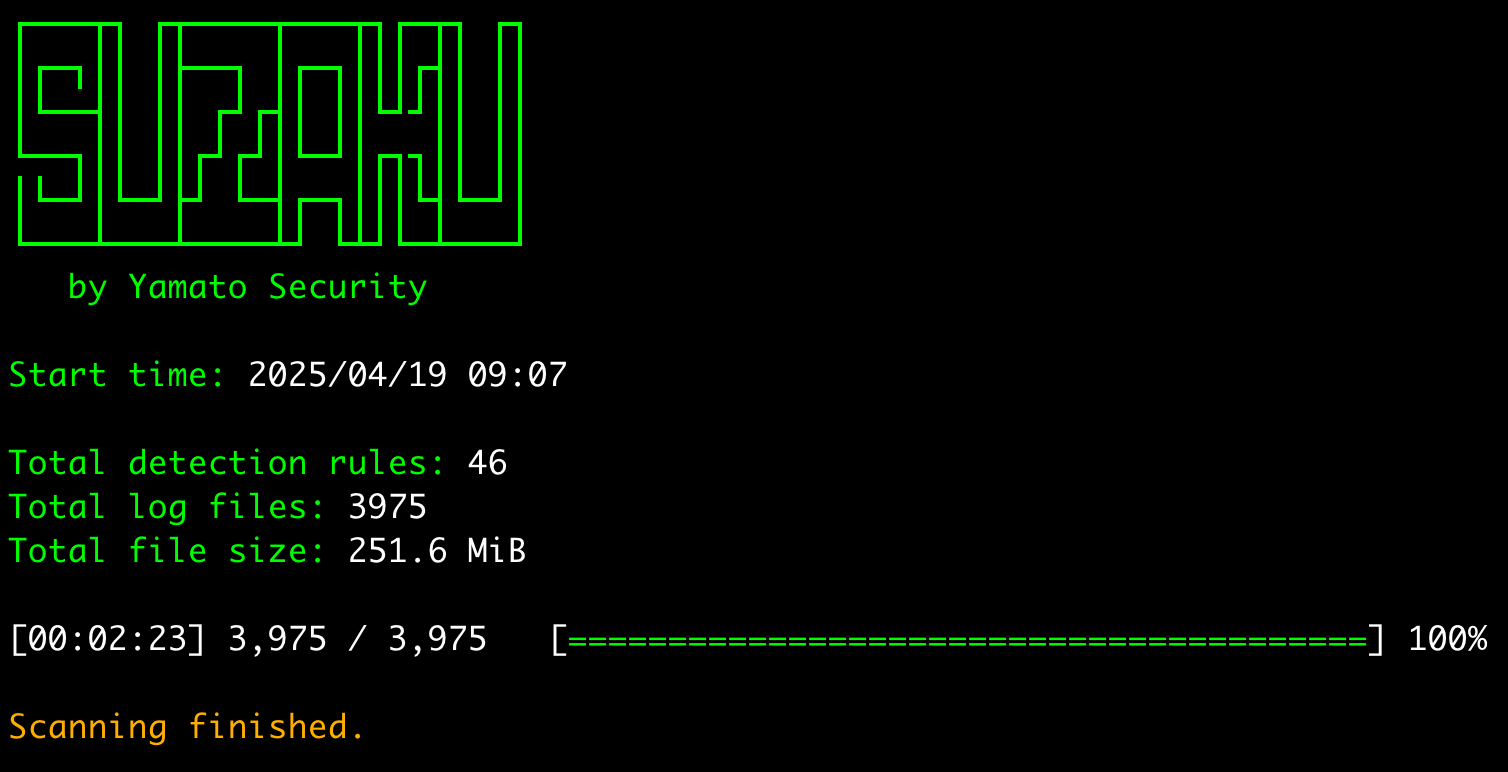
## 启动
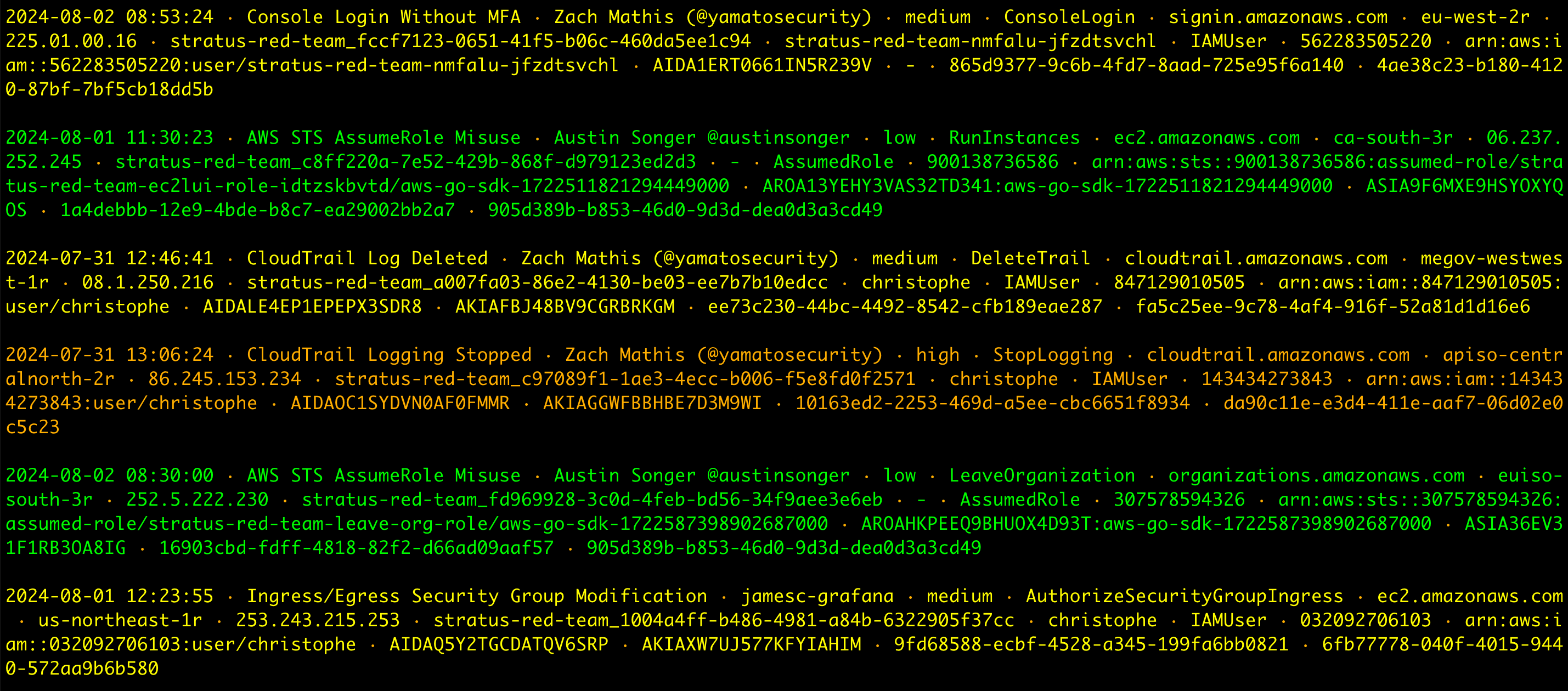
## DFIR 时间线终端输出
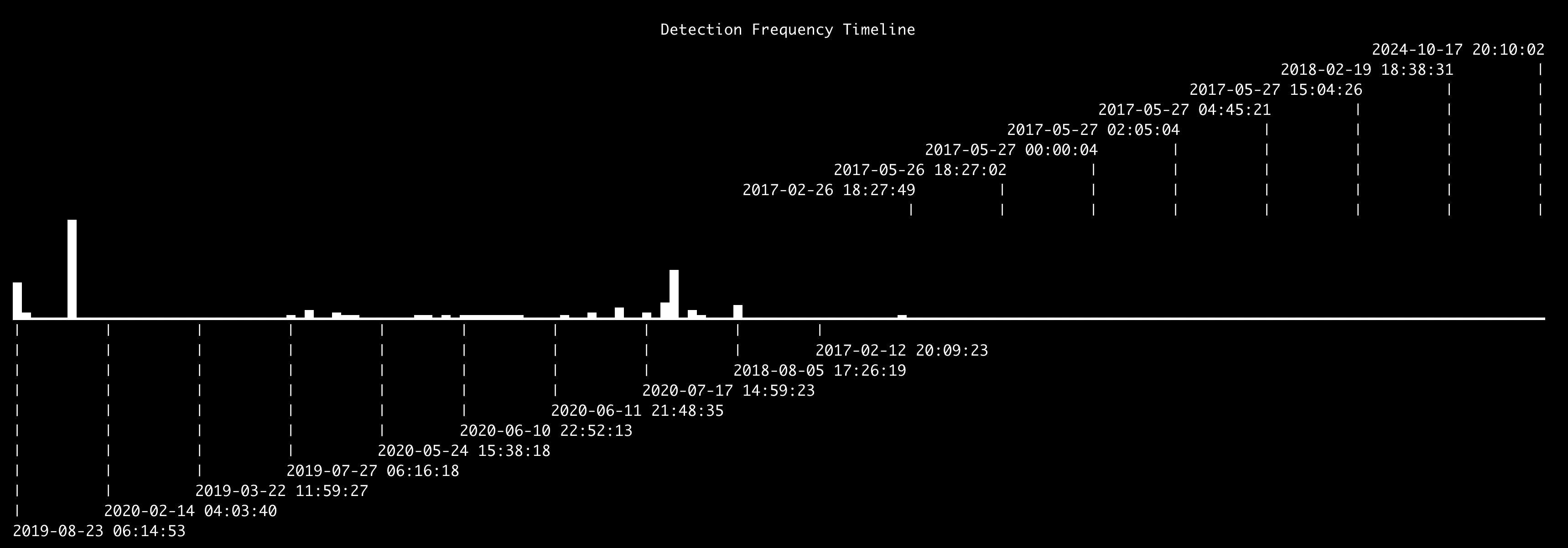
## 检测频率时间线
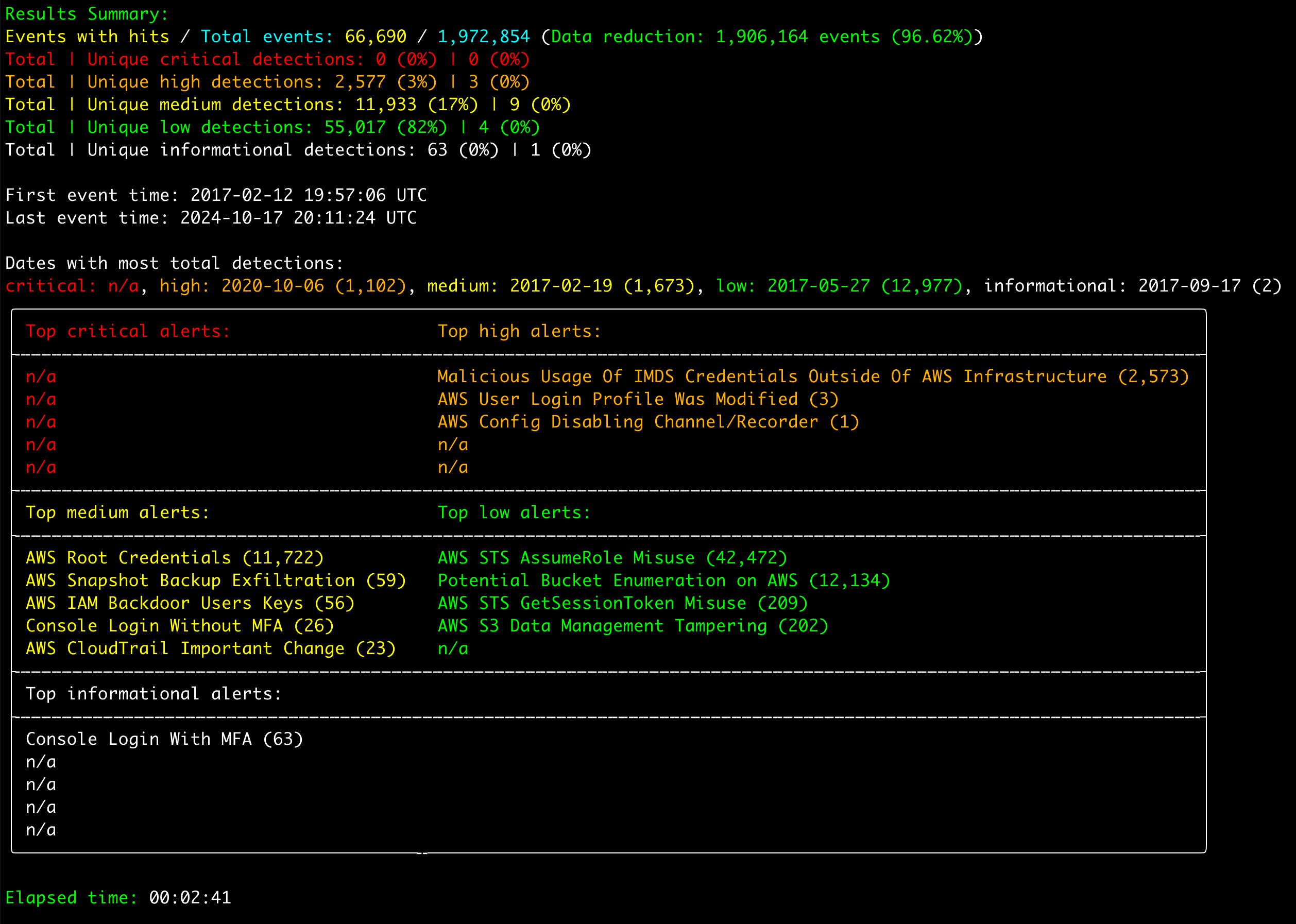
## 结果摘要
# 功能特性
* 跨平台支持:Windows, Linux, macOS。
* 使用 Rust 开发,内存安全、速度快且独立运行。
* 以多线程性能扫描 `.json` 或压缩的 `.json.gz` 文件。
* 为取证调查和事件响应创建单一且易于分析的时间线。
* 优秀的原生支持,适用于以易于阅读/创建/编辑的基于 YAML 的 [Sigma](https://github.com/SigmaHQ/sigma) 规则编写的 IoC 签名。(支持关联规则和除 [expand](https://sigmahq.io/docs/basics/modifiers.html#expand) 之外的所有字段修饰符。)
* 创建所有 API 使用情况的摘要,以及关于攻击者的指标(源 IP 地址、地理位置、使用的区域、User Agent 等),以发现不依赖签名的异常活动。
* 将结果保存为 CSV、JSON 和 JSONL 格式。
# 下载
请从 [Releases](https://github.com/Yamato-Security/suzaku/releases) 页面下载带有编译二进制文件的 Suzaku 最新稳定版本,或从源代码编译。
我们提供以下架构的二进制文件:
- Linux ARM 64-bit GNU (`suzaku-x.x.x-lin-aarch64-gnu`)
- Linux Intel 64-bit GNU (`suzaku-x.x.x-lin-x64-gnu`)
- Linux Intel 64-bit MUSL (`suzaku-x.x.x-lin-x64-musl`)
- macOS ARM 64-bit (`suzaku-x.x.x-mac-aarch64`)
- macOS Intel 64-bit (`suzaku-x.x.x-mac-x64`)
- Windows ARM 64-bit (`suzaku-x.x.x-win-aarch64.exe`)
- Windows Intel 64-bit (`suzaku-x.x.x-win-x64.exe`)
- Windows Intel 32-bit (`suzaku-x.x.x-win-x86.exe`)
# Git 克隆
您可以使用以下命令 `git clone` 仓库并从源代码编译二进制文件:
**警告:** 仓库的主分支用于开发目的,因此您可能能够访问尚未正式发布的新功能,但是,可能存在 Bug,因此请将其视为不稳定版本。
```
git clone https://github.com/Yamato-Security/suzaku.git --recursive
```
您可以使用 `git pull --recurse-submodules` 同步 `rules` 文件夹并获取最新的 Suzaku 规则,或使用以下命令:
```
./suzaku update-rules
```
如果更新失败,您可能需要重命名 `rules` 文件夹并重试。
# 进阶:从源码编译(可选)
[安装 Rust 后](https://www.rust-lang.org/),您可以使用以下命令从源代码编译:
注意:要编译,通常需要最新版本的 Rust。
```
cargo build --release
```
您可以从主分支下载最新的不稳定版本,或从 [Releases](https://github.com/Yamato-Security/suzaku/releases) 页面下载最新的稳定版本。
请务必定期更新 Rust:
```
rustup update stable
```
编译后的二进制文件将输出在 `./target/release` 文件夹中。
## 更新 Rust 包
您可以在编译前更新到最新的 Rust crates:
```
cargo update
```
## macOS 编译注意事项
如果您收到关于 openssl 的编译错误,则需要安装 [Homebrew](https://brew.sh/),然后安装以下包:
```
brew install pkg-config
brew install openssl
```
## Linux 编译注意事项
如果您收到关于 openssl 的编译错误,则需要安装以下包。
基于 Ubuntu 的发行版:
```
sudo apt install libssl-dev
```
基于 Fedora 的发行版:
```
sudo yum install openssl-devel
```
## 交叉编译 Linux Intel MUSL 二进制文件
对于 Linux,我们建议按上述说明编译 GNU 二进制文件,但您可能希望创建 MUSL 二进制文件以获得更好的可移植性。
在这种情况下,首先安装目标:
```
rustup install stable-x86_64-unknown-linux-musl
rustup target add x86_64-unknown-linux-musl
```
编译使用:
```
cargo build --release --target=x86_64-unknown-linux-musl
```
MUSL 二进制文件将在 `./target/x86_64-unknown-linux-musl/release/` 目录中创建。
MUSL 二进制文件比 GNU 二进制文件慢约 15%,但是,它们在不同版本和发行版的 Linux 之间具有更好的可移植性。
# 运行 Suzaku
## Windows
在命令提示符/PowerShell 或 Windows Terminal 中,只需运行相应的 32 位或 64 位 Windows 二进制文件。
### 扫描路径中包含空格的文件或目录时出错
在 Windows 中使用内置的命令提示符或 PowerShell 时,如果文件或目录路径中有空格,您可能会收到 Suzaku 无法加载任何文件的错误。
为了正确加载日志文件,请务必执行以下操作:
1. 用双引号将文件或目录路径括起来。
2. 如果是目录路径,请确保最后一个字符不包含反斜杠。
### 字符无法正确显示
在 Windows 上使用默认字体 `Lucida Console` 时,Logo 和表格中使用的各种字符将无法正确显示。
您应该将字体更改为 `Consolas` 来解决此问题。
## Linux
您首先需要使二进制文件可执行。
```
chmod +x ./suzaku
```
然后从 Suzaku 根目录运行它:
```
./suzaku
```
## macOS
从 Terminal 或 [iTerm2](https://iterm2.com/) 中,您首先需要使二进制文件可执行。
```
chmod +x ./suzaku
```
然后,尝试从 Suzaku 根目录运行它:
```
./suzaku
```
在最新版本的 macOS 上,尝试运行时可能会收到安全错误。
点击“Cancel”,然后从系统偏好设置中打开“Security & Privacy”,在 General 选项卡中点击“Allow Anyway”。
之后,尝试再次运行它。
```
./suzaku
```
将弹出一个警告,只需点击“Open”。
您现在应该可以运行 suzaku 了。
# 命令列表
## 分析命令:
* `aws-ct-metrics`:从 AWS CloudTrail 日志生成指标
## 摘要命令:
* `aws-ct-summary`:根据用户 ARN 生成活动摘要
## DFIR 时间线命令:
* `aws-ct-timeline`:创建 AWS CloudTrail DFIR 时间线
* `update-rules`:更新 Sigma 检测规则
## 通用命令:
* `help`:打印命令帮助菜单
# 命令详情
## 分析命令
### `aws-ct-metrics` 命令
使用此命令创建有关 AWS CloudTrail 日志内部字段的指标。
默认情况下,它将扫描 `eventName` 字段。
我们目前使用此命令来确定哪些 API 调用最常见,以便优先编写检测规则。
### 命令用法
```
Usage: suzaku aws-ct-metrics [OPTIONS] <--directory
|--file >
Input:
-d, --directory Directory of multiple gz/json files
-f, --file File path to one gz/json file
Filtering:
--timeline-start Start time of the events to load (ex: "2022-02-22T23:59:59Z)
--timeline-end End time of the events to load (ex: "2020-02-22T00:00:00Z")
--time-offset Scan recent events based on an offset (ex: 1y, 3M, 30d, 24h, 30m)
Output:
-F, --field-name The field to generate metrics for [default: eventName]
-o, --output Output CSV
Display Settings:
-K, --no-color Disable color output
-q, --quiet Quiet mode: do not display the launch banner
General Options:
-h, --help Show the help menu
```
#### `aws-ct-metrics` 命令示例
* 将 `eventName` API 调用表格输出到屏幕:`./suzaku aws-ct-metrics -d ../suzaku-sample-data`
* 保存为 CSV 文件:`./suzaku aws-ct-metrics -d ../suzaku-sample-data -o sample-metrics.csv`
## DFIR 摘要命令
### `aws-ct-summary` 命令
此命令根据用户 ARN 创建以下信息的摘要:
- 事件(API 调用)总数 (`NumOfEvents`)
- 日志中发现的第一个 API 调用的时间戳 (`FirstTimestamp`)
- 日志中发现的最后一个 API 调用的时间戳 (`LastTimestamp`)
- 成功的常用滥用 API 调用 (`AbusedAPIs-Success`)
- 尝试但失败的常用滥用 API 调用 (`AbusedAPIs-Failed`)
- 不在常用滥用 API 调用列表中的其他成功 API 调用 (`OtherAPIs-Success`)
- 不在常用滥用 API 调用列表中的其他尝试但失败的 API 调用 (`OtherAPIs-F`)
- 进行 API 调用的 AWS 区域 (`AWS-Regions`)
- API 调用的源 IP 地址 (`SrcIPs`)
- 用户类型 (`UserTypes`)
- 用户访问密钥 ID (`UserAccessKeyIDs`)
- 发起 API 调用的源的 User Agent (`UserAgents`)
※ 注意:常用滥用的 API 调用来自托管在 [https://github.com/Yamato-Security/suzaku-rules/blob/main/config/abused_aws_api_calls.csv](https://github.com/Yamato-Security/suzaku-rules/blob/main/config/abused_aws_api_calls.csv) 的配置文件。此文件将随着时间的推移更新,并在您每次运行 `update-rules` 命令时在本地同步。
这些结果旨在为分析人员提供信息,以发现不依赖特定签名的受损账户或攻击。
例如,您可以检查某些用户是否在调用他们不应该调用的可疑 API 调用,使用通常不使用的区域,从可疑源 IP 地址或使用可疑 User Agent 登录等...
在您发现任何被调用的可疑 API 调用、源 IP 地址或 User Agent 后,您可以快速确定在该时间范围内哪些访问密钥可能已被滥用,并在原始 JSON 日志中透视这些关键词以创建攻击者活动的时间线。
#### `AbusedAPIs-Success` 示例:
```
Unique APIs: 11 | Total APIs 477,373
415,552 - RunInstances (ec2.amazonaws.com) - Spin up EC2 instances (crypto mining, tools) (2019-08-23 06:00:07 ~ 2019-08-23 06:00:07)
28,907 - GetBucketAcl (s3.amazonaws.com) - S3 recon (2019-08-21 08:03:03 ~ 2019-10-21 13:59:40)
10,095 - GetCallerIdentity (sts.amazonaws.com) - Current credentials recon (2019-08-23 06:00:07 ~ 2019-08-23 06:04:14)
9,936 - ListBuckets (s3.amazonaws.com) - S3 recon (2019-08-23 06:00:07 ~ 2019-08-23 06:14:53)
9,168 - DescribeInstances (ec2.amazonaws.com) - EC2 and network layout recon (2019-08-23 06:00:07 ~ 2019-08-23 06:04:20)
3,658 - DescribeVpcs (ec2.amazonaws.com) - EC2 and network layout recon (2019-08-21 08:03:03 ~ 2019-09-12 20:00:44)
19 - ListGroups (greengrass.amazonaws.com) - IAM enumeration (2019-08-21 08:03:03 ~ 2019-10-19 23:49:25)
14 - DescribeInstances (opsworks.amazonaws.com) - EC2 and network layout recon (2019-08-21 08:03:03 ~ 2019-10-19 23:49:22)
12 - GetBucketPolicy (s3.amazonaws.com) - S3 recon (2019-01-08 20:30:01 ~ 2020-03-29 09:06:56)
7 - ListGroups (resource-groups.amazonaws.com) - IAM enumeration (2019-01-08 20:30:01 ~ 2020-03-29 09:06:56)
5 - StartInstances (ec2.amazonaws.com) - Spin up EC2 instances (crypto mining, tools) (2019-08-21 08:03:03 ~ 2019-12-12 07:07:31)
```
#### `AbusedAPIs-Failed` 示例:
```
Unique APIs: 23 | Total APIs 20,464
11,603 - AssumeRole (sts.amazonaws.com) - Lateral movement via roles (2019-08-21 08:03:03 ~ 2019-09-18 07:04:12)
7,279 - GetBucketAcl (s3.amazonaws.com) - S3 recon (2019-08-21 08:03:03 ~ 2019-09-09 09:01:26)
515 - GetBucketPolicy (s3.amazonaws.com) - S3 recon (2019-08-21 08:03:03 ~ 2019-10-01 19:11:07)
331 - ListUsers (iam.amazonaws.com) - IAM enumeration (2019-08-21 08:03:03 ~ 2019-08-29 14:53:14)
210 - ListSecrets (secretsmanager.amazonaws.com) - Find credential storage locations (2019-08-21 08:03:03 ~ 2019-10-19 23:49:30)
153 - ListGroups (iam.amazonaws.com) - IAM enumeration (2019-08-21 08:03:03 ~ 2019-09-12 15:24:39)
148 - ListRoles (iam.amazonaws.com) - IAM enumeration (2019-08-21 08:03:03 ~ 2019-09-12 15:20:56)
112 - ListAccessKeys (iam.amazonaws.com) - Enumerates keys on IAM users (2019-08-21 08:03:03 ~ 2019-09-16 14:28:15)
31 - ListGroups (greengrass.amazonaws.com) - IAM enumeration (2019-08-21 08:03:03 ~ 2020-02-25 14:41:24)
...
```
#### `OtherAPIs-Success` 示例:
```
Unique APIs: 289 | Total APIs 143,759
98,689 - DescribeSnapshots (ec2.amazonaws.com) (2019-08-23 06:00:07 ~ 2019-08-23 06:50:59)
10,679 - DescribeSpotPriceHistory (ec2.amazonaws.com) (2019-08-21 08:03:03 ~ 2019-09-12 20:07:32)
3,740 - DescribeReservedInstancesOfferings (ec2.amazonaws.com) (2019-08-21 08:03:03 ~ 2019-09-12 20:07:30)
2,372 - DescribeSnapshotAttribute (ec2.amazonaws.com) (2019-08-21 08:03:03 ~ 2019-08-24 12:38:34)
2,307 - CreateDefaultVpc (ec2.amazonaws.com) (2019-08-23 06:00:07 ~ 2019-08-23 06:04:17)
1,532 - DescribeKeyPairs (ec2.amazonaws.com) (2019-08-23 06:00:07 ~ 2019-08-23 06:04:16)
1,504 - DescribeSecurityGroups (ec2.amazonaws.com) (2019-08-21 08:03:03 ~ 2019-09-12 20:00:40)
1,495 - DescribeImages (ec2.amazonaws.com) (2019-08-21 08:03:03 ~ 2019-09-12 20:07:26)
1,438 - CreateKeyPair (ec2.amazonaws.com) (2019-08-23 06:00:07 ~ 2019-08-23 06:04:16)
1,402 - DescribeVolumes (ec2.amazonaws.com) (2019-08-21 08:03:03 ~ 2019-09-03 12:06:20)
1,217 - DescribeSubnets (ec2.amazonaws.com) (2019-08-21 08:03:03 ~ 2019-09-12 20:00:43)
...
```
#### `AWS-Regions` 示例:
```
Total regions: 16
167,155 - us-west-2 (2019-08-23 06:00:07 ~ 2019-08-23 06:14:53)
113,328 - us-east-1 (2019-08-23 06:00:07 ~ 2019-08-23 06:04:14)
65,718 - ap-northeast-2 (2019-08-23 06:00:07 ~ 2019-08-23 06:22:55)
64,787 - ap-northeast-1 (2019-08-23 06:00:07 ~ 2019-08-23 06:34:57)
...
```
#### `SrcIPs` 示例:
```
Total source IPs: 5,293
634,454 - 5.205.62.253 (2019-08-23 06:00:07 ~ 2019-08-23 06:00:07)
23,498 - 193.29.252.218 (2019-08-21 08:03:00 ~ 2019-10-17 09:11:22)
15,925 - 155.63.17.217 (2018-04-17 10:09:00 ~ 2020-09-21 21:06:22)
9,067 - 253.0.255.253 (2018-04-17 10:09:00 ~ 2020-09-21 21:06:22)
7,078 - 163.21.250.220 (2018-04-17 10:09:00 ~ 2020-09-21 21:06:22)
6,575 - 236.9.245.88 (2018-04-17 10:09:00 ~ 2020-09-21 21:06:22)
5,138 - 84.252.252.117 (2019-01-08 20:30:01 ~ 2020-03-29 09:06:56)
4,946 - 24.251.252.2 (2019-08-21 08:03:00 ~ 2019-09-30 06:36:13)
4,225 - 211.111.151.81 (2019-08-21 08:03:00 ~ 2019-09-12 19:53:35)
...
```
#### `UserType` 示例:
```
IAMUser
```
#### `UserAccessKeyIDs` 示例:
```
Total access key ids: 629
667,476 - AKIA01U43UX3RBRDXF4Q (2019-08-23 06:00:07 ~ 2019-08-23 06:00:07)
218,544 - ASIARF55FBMFZBXLKDFW (2019-08-21 11:31:47 ~ 2019-08-23 13:00:28)
12,677 - AKIA1ZBTOEKWKVHP6GHZ (2017-02-12 21:15:12 ~ 2020-09-21 21:06:22)
8,822 - ASIAGD2JRX0V6RJGWR59 (2018-04-17 10:09:00 ~ 2020-09-21 21:06:22)
4,940 - ASIAUNHV6EHIK5MNPEKF (2019-08-21 08:03:00 ~ 2019-09-30 06:36:17)
...
```
#### `UserAgents` 示例:
```
Total user agents: 7,760
351,022 - Boto3/1.9.201 Python/2.7.12 Linux/4.4.0-159-generic Botocore/1.12.201 (2019-08-23 06:00:07 ~ 2019-08-23 06:00:07)
283,430 - Boto3/1.9.201 Python/2.7.12 Linux/4.4.0-157-generic Botocore/1.12.201 (2019-08-21 11:31:47 ~ 2019-08-23 13:00:28)
23,467 - [Boto3/1.15.13 Python/3.8.5 Darwin/19.6.0 Botocore/1.18.13 Resource] (2017-02-12 21:15:12 ~ 2020-10-07 16:05:52)
15,924 - Boto3/1.7.4 Python/2.7.12 Linux/4.4.0-119-generic Botocore/1.10.4 (2018-04-17 10:09:00 ~ 2020-09-21 21:06:22)
9,400 - aws-sdk-java/1.11.301 Linux/4.9.93-linuxkit-aufs Java_HotSpot(TM)_64-Bit_Server_VM/25.172-b11 java/1.8.0_172 (2018-04-17 10:09:00 ~ 2020-09-21 21:06:22)
6,372 - [Boto3/1.7.65 Python/3.5.2 Linux/4.13.0-37-generic Botocore/1.10.65 Resource] (2018-04-17 10:09:00 ~ 2020-09-21 21:06:22)
5,352 - AWSPowerShell/3.3.365.0 .NET_Runtime/4.0 .NET_Framework/4.0 OS/Microsoft_Windows_NT_10.0.01985.0 WindowsPowerShell/5.0 ClientSync (2019-01-08 20:30:01 ~ 2020-03-29 09:06:56)
4,945 - Boto3/1.9.231 Python/2.7.15+ Linux/4.15.0-64-generic Botocore/1.12.231 (2019-08-21 08:03:00 ~ 2019-09-30 06:36:13)
4,599 - [aws-cli/1.16.301 Python/3.7.6 Linux/5.4.0-kali3-amd64 botocore/1.13.37] (2019-08-21 08:03:00 ~ 2020-02-09 22:00:32)
3,909 - Boto3/1.14.28 Python/3.8.5 Linux/5.7.0-kali1-amd64 Botocore/1.17.28 (2019-01-08 20:30:01 ~ 2020-09-11 17:35:39)
3,450 - Boto3/1.4.2 Python/2.7.13+ Linux/4.9.0-3-amd64 Botocore/1.5.19 (2017-02-12 21:15:12 ~ 2020-09-21 21:06:22)
3,198 - Boto3/1.4.2 Python/2.7.14 Linux/4.13.0-1-amd64 Botocore/1.5.19 (2017-02-12 21:15:12 ~ 2020-09-21 21:06:22)
...
```
### 命令用法
```
Usage:
suzaku aws-ct-summary [OPTIONS]
Input:
-d, --directory Directory of multiple gz/json files
-f, --file File path to one gz/json file
Filtering:
--timeline-start Start time of the events to load (ex: "2022-02-22T23:59:59Z)
--timeline-end End time of the events to load (ex: "2020-02-22T00:00:00Z")
--time-offset Scan recent events based on an offset (ex: 1y, 3M, 30d, 24h, 30m)
-s, --include-sts-keys Include temporary AWS STS access key IDs
Output:
-o, --output Output results to a CSV file
-D, --hide-descriptions Hide description of the commonly abused API calls
-G, --GeoIP Add GeoIP (ASN, city, country) info to IP addresses
Display Settings:
-K, --no-color Disable color output
-q, --quiet Quiet mode: do not display the launch banner
General Options:
-h, --help Show the help menu
```
#### `aws-ct-metrics` 命令示例
* 将结果保存到 CSV 文件:`./suzaku aws-ct-summary -d ../suzaku-sample-data -o sample-summary.csv`
## DFIR 时间线命令
### `aws-ct-timeline` 命令
根据 `rules` 文件夹中的 Sigma 规则创建 AWS CloudTrail DFIR 时间线。
### 命令用法
```
Usage: suzaku aws-ct-timeline [OPTIONS] <--directory |--file >
General Options:
-r, --rules Specify a custom rule directory or file (default: ./rules)
-h, --help Show the help menu
Input:
-d, --directory Directory of multiple gz/json files
-f, --file File path to one gz/json file
Filtering:
--timeline-start Start time of the events to load (ex: "2022-02-22T23:59:59Z)
--timeline-end End time of the events to load (ex: "2020-02-22T00:00:00Z")
--time-offset Scan recent events based on an offset (ex: 1y, 3M, 30d, 24h, 30m)
Output:
-C, --clobber Overwrite files when saving
-G, --geo-ip Add GeoIP (ASN, city, country) info to IP addresses
-m, --min-level Minimum level for rules to load (default: informational)
-o, --output Save the results to a file
-t, --output-type Output type 1: CSV (default), 2: JSON, 3: JSONL, 4: CSV & JSON, 5: CSV & JSONL [default: 1]
-R, --raw-output Output the original JSON logs (only available in JSON formats or stdout)
--threads Number of threads to use (default: same as CPU cores)
Display Settings:
-K, --no-color Disable color output
-N, --no-summary Do not display results summary
-T, --no-frequency-timeline Disable event frequency timeline (terminal needs to support Unicode)
-q, --quiet Quiet mode: do not display the launch banner
```
#### `aws-ct-timeline` 命令示例
* 将警报输出到屏幕:`./suzaku aws-ct-timeline -d ../suzaku-sample-data`
* 将结果保存为 CSV 文件:`./suzaku aws-ct-timeline -d ../suzaku-sample-data -o sample-timeline.csv`
* 将结果保存为 CSV 和 JSONL 文件:`./suzaku aws-ct-timeline -d ../suzaku-sample-data -o sample-timeline -t 5`
#### `aws-ct-timeline` 输出配置
Suzaku 将根据 `config/default_profile.yaml` 文件输出信息:
```
Timestamp: '.eventTime'
RuleTitle: 'sigma.title'
RuleAuthor: 'sigma.author'
Level: 'sigma.level'
EventName: '.eventName'
EventSource: '.eventSource'
AWS-Region: '.awsRegion'
SrcIP: '.sourceIPAddress'
UserAgent: '.userAgent'
UserName: '.userIdentity.userName'
UserType: '.userIdentity.type'
UserAccountID: '.userIdentity.accountId'
UserARN: '.userIdentity.arn'
UserPrincipalID: '.userIdentity.principalId'
UserAccessKeyID: '.userIdentity.accessKeyId'
EventID: '.eventID'
RuleID: 'sigma.id'
```
* 任何以 `.` 开头的字段值(例如:`.eventTime`)将取自 CloudTrail 日志。
* 任何以 `sigma.` 开头的字段值(例如:`sigma.title`)将取自 Sigma 规则。
* 目前我们仅支持字符串,但计划支持其他类型的字段值。
# 原生 Sigma 支持
Suzaku 对 Sigma 规范拥有非常好的原生支持,并支持所有字段修饰符,除了需要一些预配置的 [expand](https://sigmahq.io/docs/basics/modifiers.html#expand)。
从 1.0.0 版本开始,Suzaku 还支持关联规则,这对于检测云日志中的攻击非常重要。
## 事件计数规则
这些规则对某些事件进行计数,如果在一个时间范围内发生太多或太少此类事件,则发出警报。
在特定时间段内检测大量事件的常见示例是检测密码猜测攻击、密码喷洒攻击和拒绝服务攻击。
您还可以使用这些规则来检测日志源可靠性问题,例如当某些事件低于特定阈值时。
### 事件计数规则示例
```
title: Correlation Test
id: 49d15187-4203-4e11-8acd-8736f25b6609
status: test
author: TEST
correlation:
type: event_count
rules:
- Console Login With MFA
group-by:
- sourceIPAddress
timespan: 3d
condition:
gte: 3
field: sourceIPAddress
generate: true
level: high
---
title: Console Login With MFA
logsource:
product: aws
service: cloudtrail
detection:
selection:
eventSource: signin.amazonaws.com
eventName: 'ConsoleLogin'
additionalEventData.MFAUsed: 'Yes'
condition: selection
level: informational
```
## 值计数规则
这些规则计算在一个时间范围内具有**不同**给定字段值的相同事件。
示例:
- 网络扫描,其中单个源 IP 地址尝试连接到许多不同的目标 IP 地址和/或端口。
- 密码喷洒攻击,其中单个源未能通过许多不同用户的身份验证。
- 检测像 BloodHound 这样在短时间内枚举许多高权限 AD 组的工具。
### 值计数规则示例
```
title: Correlation value_count Test
id: 49d15187-4203-4e11-8acd-8736f25b66xx
status: test
author: TEST
correlation:
type: value_count
rules:
- Console Login Without MFA
group-by:
- sourceIPAddress
timespan: 3d
condition:
gte: 2
field: sourceIPAddress
generate: true
level: high
---
title: Console Login Without MFA
logsource:
product: aws
service: cloudtrail
detection:
selection:
eventSource: signin.amazonaws.com
eventName: 'ConsoleLogin'
additionalEventData.MFAUsed: 'No'
condition: selection
level: medium
```
## 时间邻近规则
由 rule 字段引用的规则定义的所有事件必须发生在 timespan 定义的时间范围内。
`group-by` 中定义的字段值必须全部具有相同的值(例如:相同的主机、用户等)。
一个示例是在 5 分钟内从同一源 IP 地址以任意顺序调用的三个 Sigma 规则中定义的侦察 API 调用。
### 时间邻近规则示例
```
title: Correlation temporal Test
id: 49d15187-4203-4e11-8acd-8736f25b66xx
status: test
author: TEST
correlation:
type: temporal
rules:
- CloudTrail Log Settings Modified
- Console Login Without MFA
- Role Enumeration
timespan: 3d
generate: true
level: high
---
title: CloudTrail Log Settings Modified
author: Zach Mathis (@yamatosecurity)
date: 2025-04-23
logsource:
product: aws
service: cloudtrail
detection:
selection:
eventSource: 'cloudtrail.amazonaws.com'
eventName: 'UpdateTrail'
filter:
errorCode: 'AccessDenied'
condition: selection and not filter
level: high
---
title: Console Login Without MFA
author: Zach Mathis (@yamatosecurity)
date: 2025-04-13
logsource:
product: aws
service: cloudtrail
detection:
selection:
eventSource: signin.amazonaws.com
eventName: 'ConsoleLogin'
additionalEventData.MFAUsed: 'No'
condition: selection
level: medium
---
title: Role Enumeration
author: Zach Mathis (@yamatosecurity)
date: 2025-04-24
logsource:
product: aws
service: cloudtrail
detection:
selection:
eventSource: 'iam.amazonaws.com'
eventName: 'ListRoles'
condition: selection
falsepositives:
level: low
```
## 时序规则
`temporal_ordered` 关联类型的行为类似于 `temporal`,并额外要求事件按 `rules` 属性中提供的顺序出现。
一个示例是多次登录失败随后登录成功。
### 时序规则示例
```
title: Correlation temporal_ordered Test
id: 49d15187-4203-4e11-8acd-8736f25b66xx
status: test
author: TEST
correlation:
type: temporal_ordered
rules:
- Console Login Without MFA
- Role Enumeration
- CloudTrail Log Settings Modified
timespan: 1d
generate: true
level: high
---
title: CloudTrail Log Settings Modified
author: Zach Mathis (@yamatosecurity)
date: 2025-04-23
logsource:
product: aws
service: cloudtrail
detection:
selection:
eventSource: 'cloudtrail.amazonaws.com'
eventName: 'UpdateTrail'
filter:
errorCode: 'AccessDenied'
condition: selection and not filter
level: high
---
title: Console Login Without MFA
author: Zach Mathis (@yamatosecurity)
date: 2025-04-13
logsource:
product: aws
service: cloudtrail
detection:
selection:
eventSource: signin.amazonaws.com
eventName: 'ConsoleLogin'
additionalEventData.MFAUsed: 'No'
condition: selection
level: medium
---
title: Role Enumeration
author: Zach Mathis (@yamatosecurity)
date: 2025-04-24
logsource:
product: aws
service: cloudtrail
detection:
selection:
eventSource: 'iam.amazonaws.com'
eventName: 'ListRoles'
condition: selection
falsepositives:
level: low
```
# 贡献
我们欢迎任何形式的贡献。
Pull request、规则创建和示例日志是最好的,但功能请求、通知我们 Bug 等也非常受欢迎。
至少,**如果您喜欢我们的工具和资源,请在 GitHub 上给我们一颗星并表示您的支持!**
# 提交 Bug
* 请在[此处](https://github.com/Yamato-Security/suzaku/issues/new?assignees=&labels=bug&template=bug_report.md&title=%5Bbug%5D)提交您发现的任何 Bug。
* 此项目目前处于积极维护状态,我们很乐意修复报告的任何 Bug。
* 如果您发现 Suzaku 规则存在任何问题(误报、Bug 等),请在此处[报告](https://github.com/Yamato-Security/suzaku-rules/issues/new)到 suzaku-rules GitHub issues 页面。
* 如果您发现 Sigma 规则存在任何问题(误报、Bug 等),请在此处[报告](https://github.com/SigmaHQ/sigma/issues)到上游 SigmaHQ GitHub issues 页面。
# 许可证
* Suzaku 根据 [AGPLv3](https://www.gnu.org/licenses/agpl-3.0.en.html) 发布,所有规则根据 [Detection Rule License (DRL) 1.1](https://github.com/SigmaHQ/sigma/blob/master/LICENSE.Detection.Rules.md) 发布。
* 您可以在内部、SaaS 解决方案、咨询工作等场景中自由使用 Suzaku。
但是,如果您对其进行了改进,我们要求您开源这些改进并回馈给项目。
# 贡献者
* Akira Nishikawa (在 AWS ECS Fargate 上运行 Suzaku 的指南) (@nishikawaakira)
* DustInDark (开发者) (@hitenkoku)
* Fukusuke Takahashi (主要开发者) (@fukusuket)
* James Takai (开发者) (@hach1yon)
* Zach Mathis (项目负责人、工具设计、规则、测试等) (@yamatosecurity)
# 致谢
* [Flaws.cloud](http://flaws.cloud/)
* [Invictus-ir](https://www.invictus-ir.com/)
* [Sigma](https://github.com/SigmaHQ/sigma)
* [sigma-rust](https://github.com/jopohl/sigma-rust)
* [Stratus Red Team](https://stratus-red-team.cloud/)
* [Traildiscover.cloud](https://traildiscover.cloud/)
# Twitter
您可以通过在 Twitter 上关注我们 [@SecurityYamato](https://twitter.com/SecurityYamato) 来获取关于 Suzaku、规则更新、其他 Yamato Security 工具等的最新消息。标签:AWS CloudTrail, Azure日志, BlackHat Arsenal, GCP日志, Homebrew安装, PFX证书, Sigma规则, URL发现, YamatoSecurity, 二进制发布, 云原生存安, 云端取证, 可视化界面, 安全检测, 安全运营, 库, 应急响应, 开源工具, 快速取证, 扫描框架, 攻击检测, 数字取证, 目标导入, 自动化脚本, 通知系统