Next-Flip/Momentum-Firmware
GitHub: Next-Flip/Momentum-Firmware
Momentum 是 Flipper Zero 的功能增强型第三方固件,整合了多种安全研究工具并提供极致的界面自定义能力。
Stars: 8655 | Forks: 537
安装 · 功能 · Discord · 捐赠
此自定义固件基于 [Flipper Zero](https://flipperzero.one/) 的[官方固件](https://github.com/flipperdevices/flipperzero-firmware),并包含了 [Unleashed](https://github.com/DarkFlippers/unleashed-firmware) 的大多数出色功能。它是 Xtreme 固件的直接延续,由开发该项目的同一批(也是唯一的)开发者构建,正是他们让那个项目如此特别。运作模式
该固件的目标是不断突破 Flipper Zero 的能力极限,推动许多开创性新功能的创新,同时保持所有固件中最简单且最具可定制性的用户体验。及时修复错误并确保系统的稳定性与兼容性也是我们要务。 -功能丰富:只要第三方功能和应用程序有用且运行正常,我们就会将其全部收录,同时我们自己也实现了许多令人兴奋的新功能。
-稳定:通过对底层机制的深入理解,以及主动确保所有调整和新增功能的向后兼容性与内部兼容性,我们提供尽可能稳定的体验。
-可定制:您几乎可以调整看到的所有内容:在菜单中添加/删除应用程序、更改动画、替换图标图形、更改 Flipper 的名称、更改主菜单外观、以前所未有的方式设置不同的按键绑定等等。所有操作均在设备上完成,无需复杂的配置。
请注意,下方仅列出了我们对固件的主要新增功能。如需完整列表,请查看[此处](https://github.com/Next-Flip/Momentum-Firmware#List-of-Changes)。
Momentum 设置
我们为我们的固件量身打造了一款功能强大且易于使用的应用程序,让您可以配置您梦寐以求的一切,甚至更多: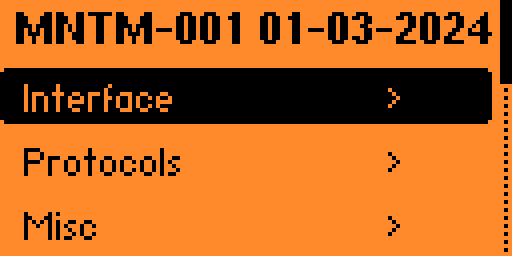
 - 界面: 调整 Flipper 的每一部分,从桌面动画到主菜单、锁屏行为、文件浏览器等。
- 协议: 配置 SubGhz 设置,添加/删除自定义频率,将 SubGhz 频率扩展至 281-361、378-481、749-962 MHz,并设置不同外部模块使用的 GPIO 引脚。
- 杂项: 其他所有不属于上述类别的内容。更改 Flipper 的名称、XP 等级、屏幕选项,并配置 RGB 背光。
- 界面: 调整 Flipper 的每一部分,从桌面动画到主菜单、锁屏行为、文件浏览器等。
- 协议: 配置 SubGhz 设置,添加/删除自定义频率,将 SubGhz 频率扩展至 281-361、378-481、749-962 MHz,并设置不同外部模块使用的 GPIO 引脚。
- 杂项: 其他所有不属于上述类别的内容。更改 Flipper 的名称、XP 等级、屏幕选项,并配置 RGB 背光。
动画 / 资源包
我们创建了自己改进的动画/资源系统,只需按几下按钮,您就可以创建并循环使用自己的 `Asset Packs`(资源包),从而以前所未有的方式轻松加载自定义动画、图标和字体。可以将其视为一个从未如此简单的主题系统。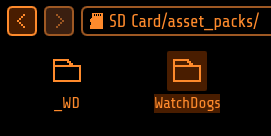 You can easily create your own pack, or find some community-made ones on our website or on Discord. Check here for a tutorial on creating your own. Essentially, each
 Asset Pack can configure its own Anims, Icons & Fonts.
 Once you have some asset packs, upload them to your Flipper in
 SD/asset_packs (if you did this right you should see SD/asset_packs/PackName/Anims and/or SD/asset_packs/PackName/Icons). Alternatively, install directly using the website.
 After installing the packs to Flipper, hit the
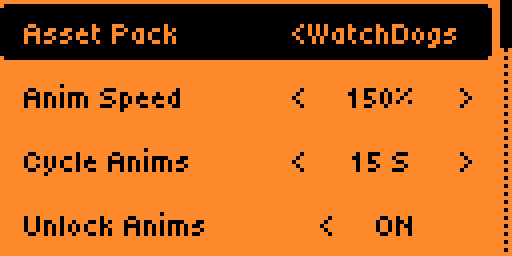
 Arrow Up button on the main menu and go to Momentum Settings > Interface > Graphics. Here choose which asset pack you want and tweak the other settings how you prefer, then exit the app to reboot and enjoy your fully customized Flipper!
Bad Keyboard
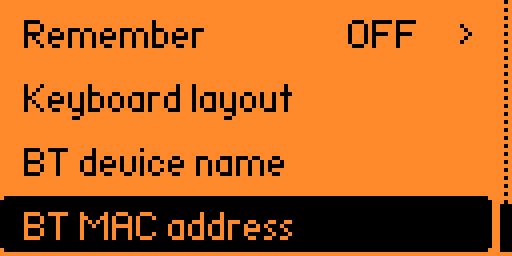 BadUSB is a great app, but it lacks a lot of options. Bad-KB allows you to customize all USB and Bluetooth parameters for your attacks.
在蓝牙模式下,它允许您将设备的显示名称和 MAC 地址伪装成您想要的任何内容。轻松伪装成便携式扬声器或无线键盘,让您无需连接线即可引起目标的注意。
在 USB 模式下,它还启用了附加功能,可以伪装制造商和产品名称,以及供应商和产品 ID (VID/PID)。
BadUSB is a great app, but it lacks a lot of options. Bad-KB allows you to customize all USB and Bluetooth parameters for your attacks.
在蓝牙模式下,它允许您将设备的显示名称和 MAC 地址伪装成您想要的任何内容。轻松伪装成便携式扬声器或无线键盘,让您无需连接线即可引起目标的注意。
在 USB 模式下,它还启用了附加功能,可以伪装制造商和产品名称,以及供应商和产品 ID (VID/PID)。
更改列表
变动太多无法一一列举,这是**从最终用户角度来看最值得注意的**更改的**非详尽**列表。如需更详细的列表,您可以阅读[**更新日志**](https://github.com/Next-Flip/Momentum-Firmware/releases)和提交/代码。此外,您可以在[我们的网站](https://momentum-fw.dev/)上找到与其他固件的**功能对比**。 请注意,此仓库始终包含我们在 [Unleashed](https://github.com/DarkFlippers/unleashed-firmware) 的朋友们出色的最新工作成果以及 [OFW](https://github.com/flipperdevices/flipperzero-firmware) 的最新更改。下面仅提到了我们可以实际归功于**我们自己的**更改,因此请务必查看他们出色的 additions。向这两个团队致以巨大的感谢! ``` [Added] - Momentum App (Easy configuration of features and behavior of the firmware) - Asset Packs (Unparalleled theming and customization) - More UI customization, redesigns and optimizations - Bad-Keyboard App - BLE Spam App - FindMy Flipper App - NFC Maker App - Wardriver App - File Search across SD Card - Additional NFC parsers and protocols - NFC Type 4 protocol and NTAG4xx support - Subdriving (saving GPS coordinates for Sub-GHz) - Easy spoofing (Name, MAC address, Serial number) - Video Game Module color configuration right from Flipper - Enhanced RGB Backlight modes (Full customization & Rainbow mode) - File management on device (Cut, Copy, Paste, Show, New Dir, etc.) - Remember Infrared GPIO settings and add IR Blaster support in apps - Advanced Security measures (Lock on Boot, reset on false pins, etc.) - Disk Image management (Mount and view image contents, open in Mass Storage) - Extended JavaScript API (Support for UsbDisk/Mass Storage, File operations) ``` ``` [Updated] - Enhanced WiFi support for easiest setup ever - Extended keyboard with cursor movement and symbols - File Browser with Sorting, More supported File Types - Advanced and optimized Level System (Up to 30 levels) - Desktop Keybind system for full key and press/hold remapping - Storage backend with instant rename and virtual mounting for disk images - Expanded Sub-GHz App (Duplicate detection & Ignore, Autosave, History improvements) - Improved Error Messages (Showing source file paths) ``` ``` [Removed] - Unused Dummy Mode - Broken or Superfluous apps ```安装
安装 Momentum 有 4 种方法,我们建议您使用 **Web Updater**,但请选择您喜欢的任何一种:自行构建
``` To download the repository: $ git clone --recursive --jobs 8 https://github.com/Next-Flip/Momentum-Firmware.git $ cd Momentum-Firmware/ To flash directly to the Flipper (Needs to be connected via USB, qFlipper closed) $ ./fbt flash_usb_full To compile a TGZ package $ ./fbt updater_package To build and launch a single app: $ ./fbt launch APPSRC=your_appid ``` 如果您喜欢这个固件,请**广而告之!**如果您真的喜欢它,也许可以考虑捐赠给团队?:D **谢谢你们 <3**标签:Badge Emulator, Flipper Zero, GPIO, NFC, RFID, Sub-GHz, Unleashed, Xtreme, 信号分析, 固件定制, 子GHz无线, 客户端加密, 客户端加密, 嵌入式开发, 嵌入式系统, 开源硬件, 数据可视化, 极客工具, 物联网, 硬件研发, 硬件黑客, 自定义固件