idlab-discover/RustiFlow
GitHub: idlab-discover/RustiFlow
基于Rust和eBPF实现的高性能网络流特征提取工具,支持实时和离线两种模式分析网络流量并输出结构化特征数据。
Stars: 27 | Forks: 4

# 网络流量特征提取工具
##  概述
该工具专为 robust 且高效的 feature extraction 而设计,特别适用于网络入侵检测系统等应用。借助 Rust 语言和 eBPF,它能够以惊人的速度和吞吐量处理大量网络流量。(当您的流量已经被捕获时,别担心!它还内置了 pcap 读取器,速度也同样惊人。)RustiFlow 提供各种预定义的 feature sets,并支持创建自定义 feature sets,是网络安全应用的理想解决方案。

 

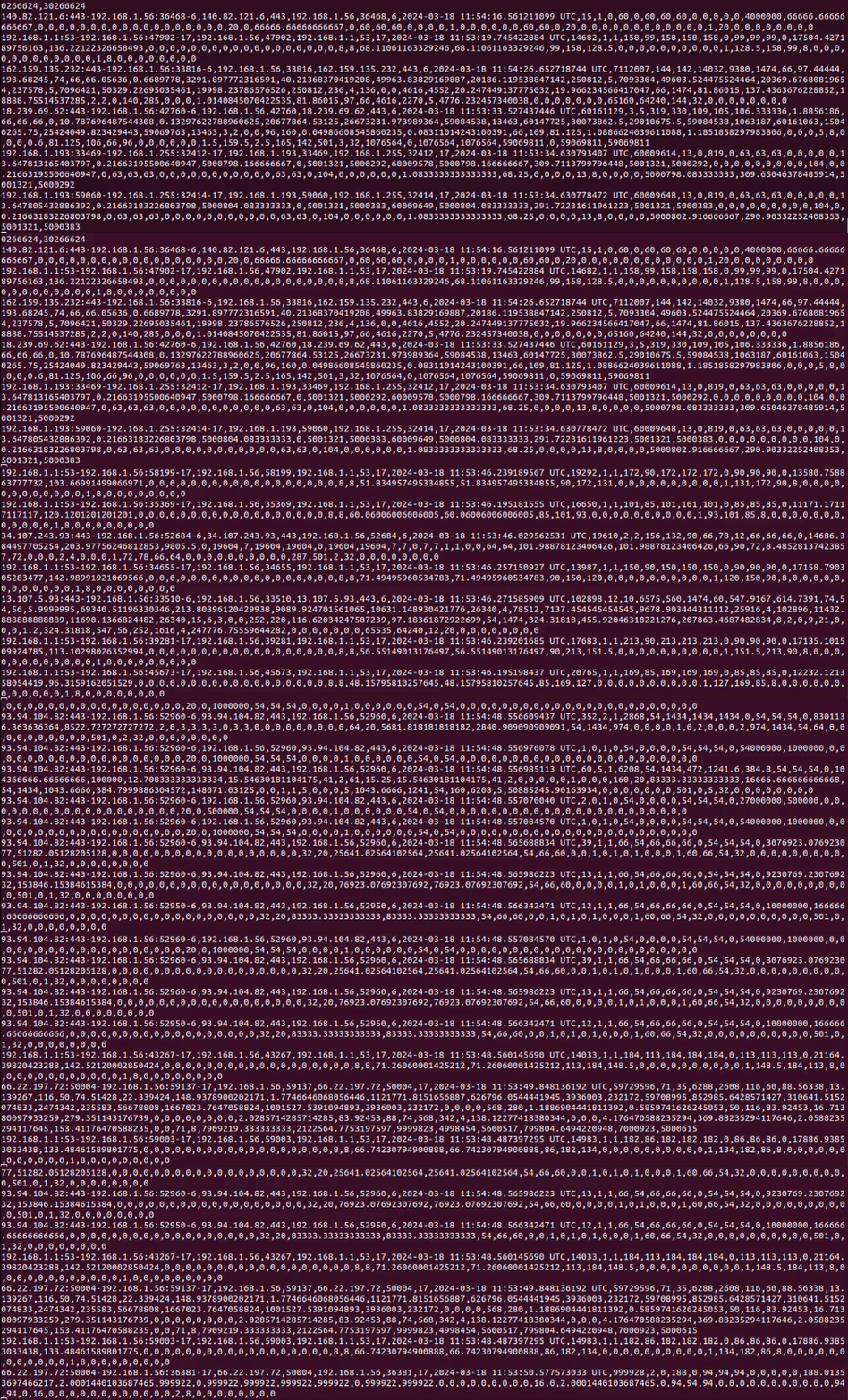
## 主要特性
- **高吞吐量:** 使用 Rust 和 [Aya](https://aya-rs.dev/) 库进行 eBPF 程序的编译和执行,确保卓越的性能和资源效率。
- **多功能 Feature Sets:** 提供多种预定义的 feature sets(flows),并支持创建满足特定需求的自定义 feature sets。自定义 flow 的示例见[此处](https://github.com/idlab-discover/RustiFlow/blob/main/rustiflow/src/flows/custom_flow.rs)。
- **Pcap 文件支持:** 支持从 pcap 文件进行数据包分析,兼容 Linux 和 Windows 生成的文件。
- **多样化的输出选项:** 可以轻松地将 features 输出到控制台、CSV 文件或其他格式。
- **更丰富的 TCP 质量信号:** RustiFlow feature set 除了现有的生命周期和重传字段外,还导出重复 ACK 计数、零窗口观察和 TCP 关闭方式。
- **支持端点的 IP 上下文:** RustiFlow feature set 导出 `ip_version`、端点 IP 范围和粗粒度的 `path_locality`(从规范化地址派生),无需扩展 eBPF 事件 payload。
## 功能集
有关可用的不同 feature sets,请参阅 [wiki](https://github.com/idlab-discover/RustiFlow/wiki)。
## 支持的数据包/Header 覆盖范围
RustiFlow 目前从以下协议/header 组合中提取 flows:
| 层级 | 离线 pcap | 实时 eBPF |
| --- | --- | --- |
| 链路层 | Ethernet、Linux cooked capture、802.1Q VLAN | Ethernet |
| 网络层 | IPv4、IPv6 | IPv4、IPv6 |
| IPv6 扩展 | 在传输层解析之前支持扩展 header | 在传输层解析之前支持扩展 header |
| 传输层 | TCP、UDP、ICMP、ICMPv6 | TCP、UDP、ICMP、ICMPv6 |
注意:
- 实时支持仅限 Linux。
- 离线模式和实时模式旨在暴露相同的 flow 语义,但时间戳和数据包长度来源可能略有不同。
- 实时 VLAN 解析尚未实现。
## 架构
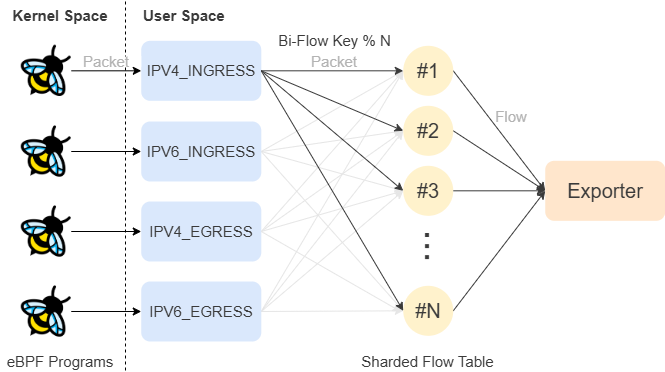
### 实时处理
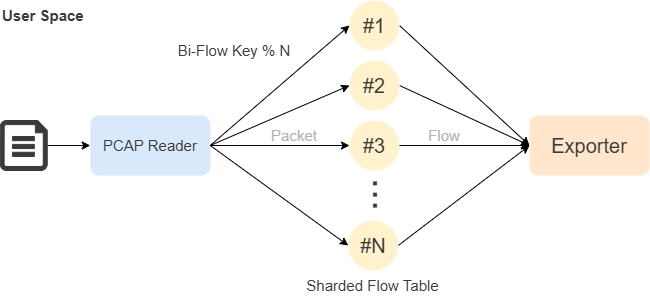
### 离线 PCAP 处理
## 使用发布版二进制文件:
将 releases 中找到的 rustiflow 二进制文件复制到您选择的位置或 `/usr/local/bin` 文件夹。
如果权限不正确,您可以运行以下命令:
```
chmod +x /path/to/rustiflow
```
### 使用命令:
然后您可以使用[帮助菜单](#usage-instructions)上显示的以下命令来运行该二进制文件。
### 使用 TUI 界面:
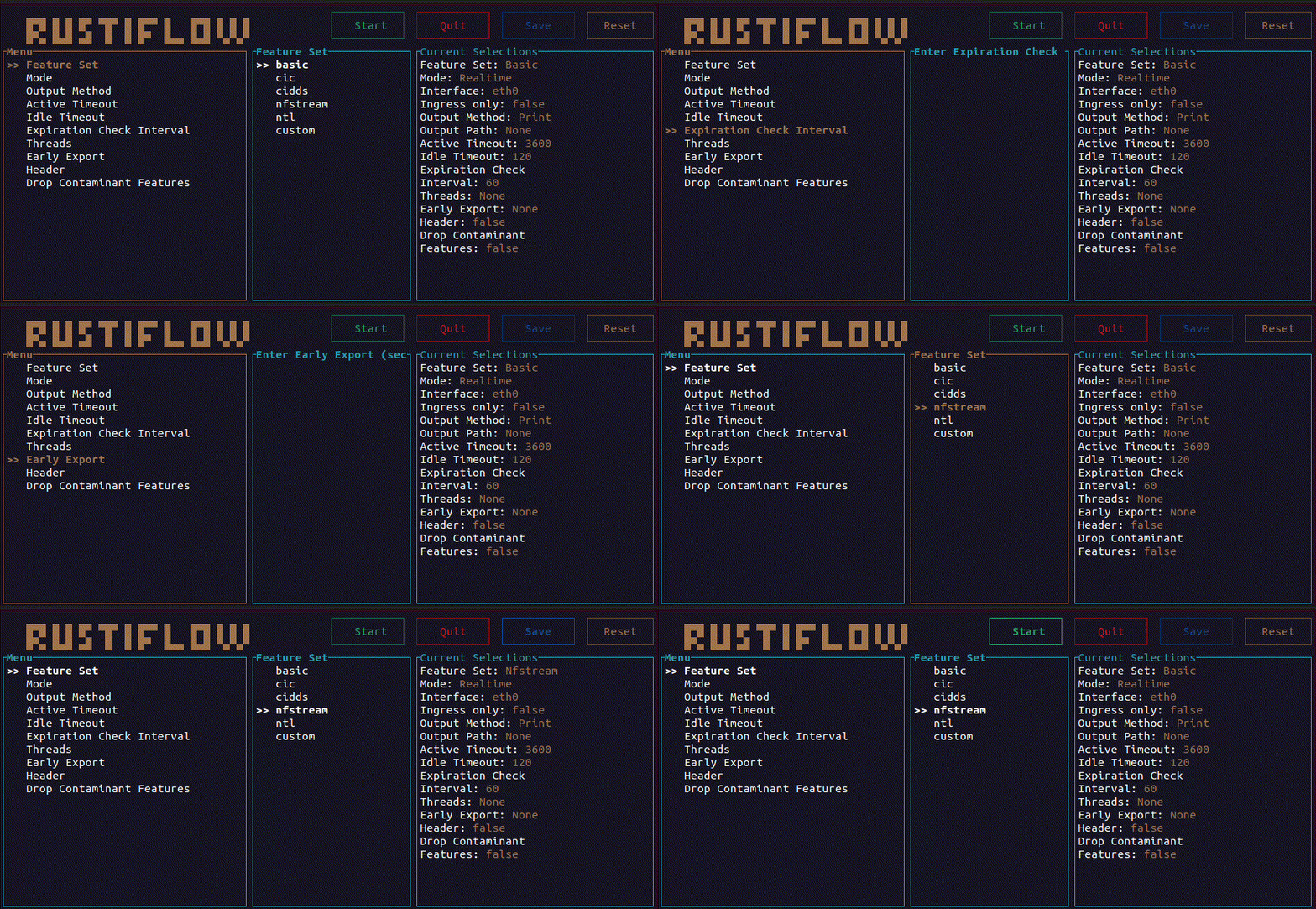
如果您想要更图形化的界面,可以直接运行 `rustiflow` 不带任何参数来使用 TUI 界面。这将打开一个字段,您可以输入想要编辑的配置文件,也可以选择新建。之后,将显示以下界面:
```
rustiflow --config-file
概述
该工具专为 robust 且高效的 feature extraction 而设计,特别适用于网络入侵检测系统等应用。借助 Rust 语言和 eBPF,它能够以惊人的速度和吞吐量处理大量网络流量。(当您的流量已经被捕获时,别担心!它还内置了 pcap 读取器,速度也同样惊人。)RustiFlow 提供各种预定义的 feature sets,并支持创建自定义 feature sets,是网络安全应用的理想解决方案。

 


## 主要特性
- **高吞吐量:** 使用 Rust 和 [Aya](https://aya-rs.dev/) 库进行 eBPF 程序的编译和执行,确保卓越的性能和资源效率。
- **多功能 Feature Sets:** 提供多种预定义的 feature sets(flows),并支持创建满足特定需求的自定义 feature sets。自定义 flow 的示例见[此处](https://github.com/idlab-discover/RustiFlow/blob/main/rustiflow/src/flows/custom_flow.rs)。
- **Pcap 文件支持:** 支持从 pcap 文件进行数据包分析,兼容 Linux 和 Windows 生成的文件。
- **多样化的输出选项:** 可以轻松地将 features 输出到控制台、CSV 文件或其他格式。
- **更丰富的 TCP 质量信号:** RustiFlow feature set 除了现有的生命周期和重传字段外,还导出重复 ACK 计数、零窗口观察和 TCP 关闭方式。
- **支持端点的 IP 上下文:** RustiFlow feature set 导出 `ip_version`、端点 IP 范围和粗粒度的 `path_locality`(从规范化地址派生),无需扩展 eBPF 事件 payload。
## 功能集
有关可用的不同 feature sets,请参阅 [wiki](https://github.com/idlab-discover/RustiFlow/wiki)。
## 支持的数据包/Header 覆盖范围
RustiFlow 目前从以下协议/header 组合中提取 flows:
| 层级 | 离线 pcap | 实时 eBPF |
| --- | --- | --- |
| 链路层 | Ethernet、Linux cooked capture、802.1Q VLAN | Ethernet |
| 网络层 | IPv4、IPv6 | IPv4、IPv6 |
| IPv6 扩展 | 在传输层解析之前支持扩展 header | 在传输层解析之前支持扩展 header |
| 传输层 | TCP、UDP、ICMP、ICMPv6 | TCP、UDP、ICMP、ICMPv6 |
注意:
- 实时支持仅限 Linux。
- 离线模式和实时模式旨在暴露相同的 flow 语义,但时间戳和数据包长度来源可能略有不同。
- 实时 VLAN 解析尚未实现。
## 架构
### 实时处理

### 离线 PCAP 处理

## 使用发布版二进制文件:
将 releases 中找到的 rustiflow 二进制文件复制到您选择的位置或 `/usr/local/bin` 文件夹。
如果权限不正确,您可以运行以下命令:
```
chmod +x /path/to/rustiflow
```
### 使用命令:
然后您可以使用[帮助菜单](#usage-instructions)上显示的以下命令来运行该二进制文件。
### 使用 TUI 界面:
如果您想要更图形化的界面,可以直接运行 `rustiflow` 不带任何参数来使用 TUI 界面。这将打开一个字段,您可以输入想要编辑的配置文件,也可以选择新建。之后,将显示以下界面:

```
rustiflow --config-file realtime [--only-ingress]
```
```
rustiflow -c pcap
```
### 使用配置文件:
以下是一个配置文件的示例,您可以使用 `--config-file` 选项来运行该工具。
```
[config]
features = "CIDDS"
active_timeout = 522
idle_timeout = 885855
early_export = 25
expiration_check_interval = 0
[output]
output = "Csv"
export_path = "path/to/output.csv"
header = false
drop_contaminant_features = true
```
示例 2:
```
[config]
features = "Nfstream"
active_timeout = 3600
idle_timeout = 120
early_export = 10
expiration_check_interval = 60
threads = 8
[output]
output = "Print"
header = true
drop_contaminant_features = false
```
对于实时 CSV 导出,实时数据包图形默认关闭,以便
标准 CLI 路径保持最佳吞吐量导向的行为。仅在您需要图形时启用它:
```
[output]
packet_graph = true
```
或使用:
```
rustiflow ... -o csv --export-path out.csv --packet-graph realtime
```
## 使用容器:
确保您不使用 docker desktop 且未将其安装在您的机器上。如果您进行了此设置,它将无法按预期工作,因为 `--network host` 不会将容器连接到主机网络,而是连接到 docker desktop 使用的 VM 的网络。
- **构建容器**:
docker build -t rustiflow .
- **运行容器**:
docker run --rm --network host -v /path/on/host:/app rustiflow [ARGS]
如果您想实时捕获流量,请使用 `--privileged` 标志运行。
- **示例**:
docker run --rm --network host -v /home/user/pcap:/app rustiflow \
-f basic \
-o print \
pcap /app/pcap.pcap
docker run --rm --privileged --network host -v /home/user/output:/app rustiflow \
-f cic \
-o csv \
--export-path /app/output.csv \
realtime enp5s0
注意:
- 当前 CLI 使用 `-f basic` 和 `-o csv` 等标志;旧的
位置参数示例不再正确。
- 容器中的实时捕获仍然依赖于 Linux 主机对 eBPF
和 `tc` 的支持,因此 `--privileged --network host` 仍然是
本地测试的实用基础。
## 开发安装指南
### 前置条件:
- **libpcap-dev**:
sudo apt install libpcap-dev
- **Rust 安装**:
curl --proto '=https' --tlsv1.2 -sSf https://sh.rustup.rs | sh
- **Nightly Rust 工具链**:
rustup install stable
rustup toolchain install nightly --component rust-src
### bpf Linker 安装:
- **对于 Linux x86_64**:
cargo install bpf-linker
- **对于 MacOS/Linux(其他架构)**:
brew install llvm
cargo install --no-default-features bpf-linker
- **Ubuntu 20.04 LTS 特定**:
sudo apt install linux-tools-5.8.0-63-generic
export PATH=/usr/lib/linux-tools/5.8.0-63-generic:$PATH
## 构建项目
- **eBPF 程序**:
cargo xtask ebpf-ipv4
cargo xtask ebpf-ipv6
- **用户空间程序**:
cargo build
## 以开发模式运行项目
```
cargo xtask run -- [OPTIONS]
```
## 使用说明
### 命令帮助:
```
rustiflow help
```
```
Usage: rustiflow [OPTIONS]
Commands:
realtime Real-time feature extraction
pcap Feature extraction from a pcap file
help Print this message or the help of the given subcommand(s)
Options:
-c, --config-file
Configuration file path
-f, --features
The feature set to use (required if no config file is provided)
Possible values:
- basic: A basic flow that stores the basic features of a flow
- cic: Represents the CIC Flow, giving 90 features
- cidds: Represents the CIDDS Flow, giving 10 features
- nfstream: Represents a nfstream inspired flow, giving 71 features
- rustiflow: Represents the Rusti Flow, giving 203 features
- custom: Represents a flow that you can implement yourself
--active-timeout
The maximum time a flow is allowed to last in seconds (optional)
[default: 3600]
--idle-timeout
The maximum time with no packets for a flow in seconds (optional)
[default: 120]
--early-export
The print interval for open flows in seconds (optional)
--expiration-check-interval
Interval (in seconds) for checking and expiring flows in the flowtable. This represents how often the flowtable should be scanned to remove inactive flows
[default: 60]
--threads
The numbers of threads to use for processing packets (optional) (default: realtime uses 12, capped at the number of logical CPUs; pcap uses 5; maximum number of logical CPUs)
-o, --output
概述
该工具专为 robust 且高效的 feature extraction 而设计,特别适用于网络入侵检测系统等应用。借助 Rust 语言和 eBPF,它能够以惊人的速度和吞吐量处理大量网络流量。(当您的流量已经被捕获时,别担心!它还内置了 pcap 读取器,速度也同样惊人。)RustiFlow 提供各种预定义的 feature sets,并支持创建自定义 feature sets,是网络安全应用的理想解决方案。

 


## 主要特性
- **高吞吐量:** 使用 Rust 和 [Aya](https://aya-rs.dev/) 库进行 eBPF 程序的编译和执行,确保卓越的性能和资源效率。
- **多功能 Feature Sets:** 提供多种预定义的 feature sets(flows),并支持创建满足特定需求的自定义 feature sets。自定义 flow 的示例见[此处](https://github.com/idlab-discover/RustiFlow/blob/main/rustiflow/src/flows/custom_flow.rs)。
- **Pcap 文件支持:** 支持从 pcap 文件进行数据包分析,兼容 Linux 和 Windows 生成的文件。
- **多样化的输出选项:** 可以轻松地将 features 输出到控制台、CSV 文件或其他格式。
- **更丰富的 TCP 质量信号:** RustiFlow feature set 除了现有的生命周期和重传字段外,还导出重复 ACK 计数、零窗口观察和 TCP 关闭方式。
- **支持端点的 IP 上下文:** RustiFlow feature set 导出 `ip_version`、端点 IP 范围和粗粒度的 `path_locality`(从规范化地址派生),无需扩展 eBPF 事件 payload。
## 功能集
有关可用的不同 feature sets,请参阅 [wiki](https://github.com/idlab-discover/RustiFlow/wiki)。
## 支持的数据包/Header 覆盖范围
RustiFlow 目前从以下协议/header 组合中提取 flows:
| 层级 | 离线 pcap | 实时 eBPF |
| --- | --- | --- |
| 链路层 | Ethernet、Linux cooked capture、802.1Q VLAN | Ethernet |
| 网络层 | IPv4、IPv6 | IPv4、IPv6 |
| IPv6 扩展 | 在传输层解析之前支持扩展 header | 在传输层解析之前支持扩展 header |
| 传输层 | TCP、UDP、ICMP、ICMPv6 | TCP、UDP、ICMP、ICMPv6 |
注意:
- 实时支持仅限 Linux。
- 离线模式和实时模式旨在暴露相同的 flow 语义,但时间戳和数据包长度来源可能略有不同。
- 实时 VLAN 解析尚未实现。
## 架构
### 实时处理

### 离线 PCAP 处理

## 使用发布版二进制文件:
将 releases 中找到的 rustiflow 二进制文件复制到您选择的位置或 `/usr/local/bin` 文件夹。
如果权限不正确,您可以运行以下命令:
```
chmod +x /path/to/rustiflow
```
### 使用命令:
然后您可以使用[帮助菜单](#usage-instructions)上显示的以下命令来运行该二进制文件。
### 使用 TUI 界面:
如果您想要更图形化的界面,可以直接运行 `rustiflow` 不带任何参数来使用 TUI 界面。这将打开一个字段,您可以输入想要编辑的配置文件,也可以选择新建。之后,将显示以下界面:

```
rustiflow --config-file 使用容器:
确保您不使用 docker desktop 且未将其安装在您的机器上。如果您进行了此设置,它将无法按预期工作,因为 `--network host` 不会将容器连接到主机网络,而是连接到 docker desktop 使用的 VM 的网络。
- **构建容器**:
docker build -t rustiflow .
- **运行容器**:
docker run --rm --network host -v /path/on/host:/app rustiflow [ARGS]
如果您想实时捕获流量,请使用 `--privileged` 标志运行。
- **示例**:
docker run --rm --network host -v /home/user/pcap:/app rustiflow \
-f basic \
-o print \
pcap /app/pcap.pcap
docker run --rm --privileged --network host -v /home/user/output:/app rustiflow \
-f cic \
-o csv \
--export-path /app/output.csv \
realtime enp5s0
注意:
- 当前 CLI 使用 `-f basic` 和 `-o csv` 等标志;旧的
位置参数示例不再正确。
- 容器中的实时捕获仍然依赖于 Linux 主机对 eBPF
和 `tc` 的支持,因此 `--privileged --network host` 仍然是
本地测试的实用基础。
## 开发安装指南
### 前置条件:
- **libpcap-dev**:
sudo apt install libpcap-dev
- **Rust 安装**:
curl --proto '=https' --tlsv1.2 -sSf https://sh.rustup.rs | sh
- **Nightly Rust 工具链**:
rustup install stable
rustup toolchain install nightly --component rust-src
### bpf Linker 安装:
- **对于 Linux x86_64**:
cargo install bpf-linker
- **对于 MacOS/Linux(其他架构)**:
brew install llvm
cargo install --no-default-features bpf-linker
- **Ubuntu 20.04 LTS 特定**:
sudo apt install linux-tools-5.8.0-63-generic
export PATH=/usr/lib/linux-tools/5.8.0-63-generic:$PATH
## 构建项目
- **eBPF 程序**:
cargo xtask ebpf-ipv4
cargo xtask ebpf-ipv6
- **用户空间程序**:
cargo build
## 以开发模式运行项目
```
cargo xtask run -- [OPTIONS] 使用说明
### 命令帮助:
```
rustiflow help
```
```
Usage: rustiflow [OPTIONS] 标签:Aya, Docker镜像, Linux内核, pcap, Rust, 可视化界面, 流量监控, 特征提取, 网络安全, 网络流量分析, 网络流量审计, 请求拦截, 通知系统, 隐私保护, 高吞吐量