authelia/authelia
GitHub: authelia/authelia
开源轻量的 SSO 认证网关,为反向代理后的 Web 应用提供细粒度访问控制和多因素认证。
Stars: 28064 | Forks: 1419

[](https://buildkite.com/authelia/authelia)
[](https://bestpractices.coreinfrastructure.org/projects/7128)
[](https://scorecard.dev/viewer/?uri=github.com/authelia/authelia)
[](https://slsa.dev)
[](https://goreportcard.com/report/github.com/authelia/authelia/v4)
[](https://github.com/authelia/authelia/releases)
[](https://hub.docker.com/r/authelia/authelia/tags)
[](https://hub.docker.com/r/authelia/authelia/tags)

[](https://aur.archlinux.org/packages/authelia/)
[](https://aur.archlinux.org/packages/authelia-bin/)
[](https://aur.archlinux.org/packages/authelia-git/)
[][Apache 2.0]
[](https://opencollective.com/authelia-sponsors)
[](https://discord.authelia.com)
[](https://matrix.to/#/#support:authelia.com)
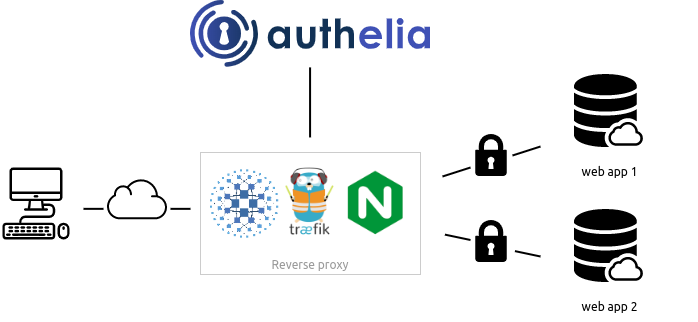
**Authelia** 是一个开源的认证和授权服务器,通过 Web 门户为您的应用程序提供双因素认证和单点登录 (SSO)。它作为[反向代理](#proxy-support)的伴侣,通过允许、拒绝或重定向请求来工作。
文档可在 [https://www.authelia.com/](https://www.authelia.com/) 获取。
以下是架构的简单示意图:
**Authelia** 可以作为独立服务从 [AUR](https://aur.archlinux.org/packages/authelia/)、[APT](https://apt.authelia.com/stable/debian/packages/authelia/)、[FreeBSD Ports](https://svnweb.freebsd.org/ports/head/www/authelia/) 安装,或者使用[静态二进制文件](https://github.com/authelia/authelia/releases/latest)、[.deb 软件包](https://github.com/authelia/authelia/releases/latest),以及作为 [Docker] 或 [Kubernetes] 上的容器进行安装。
可以通过 Helm [Chart](https://charts.authelia.com) (测试版) 利用 ingress controller 和 ingress 配置来编排部署。

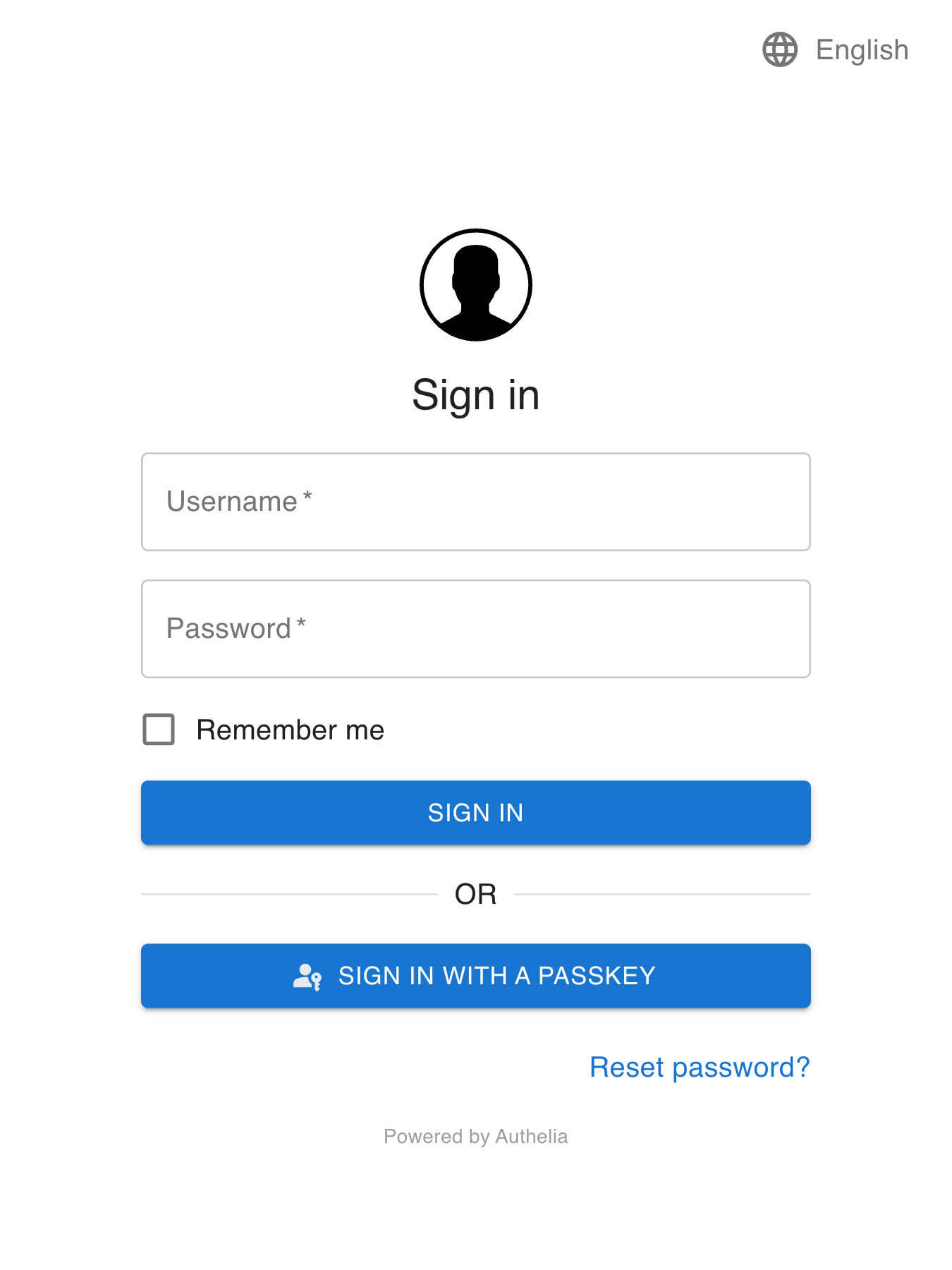
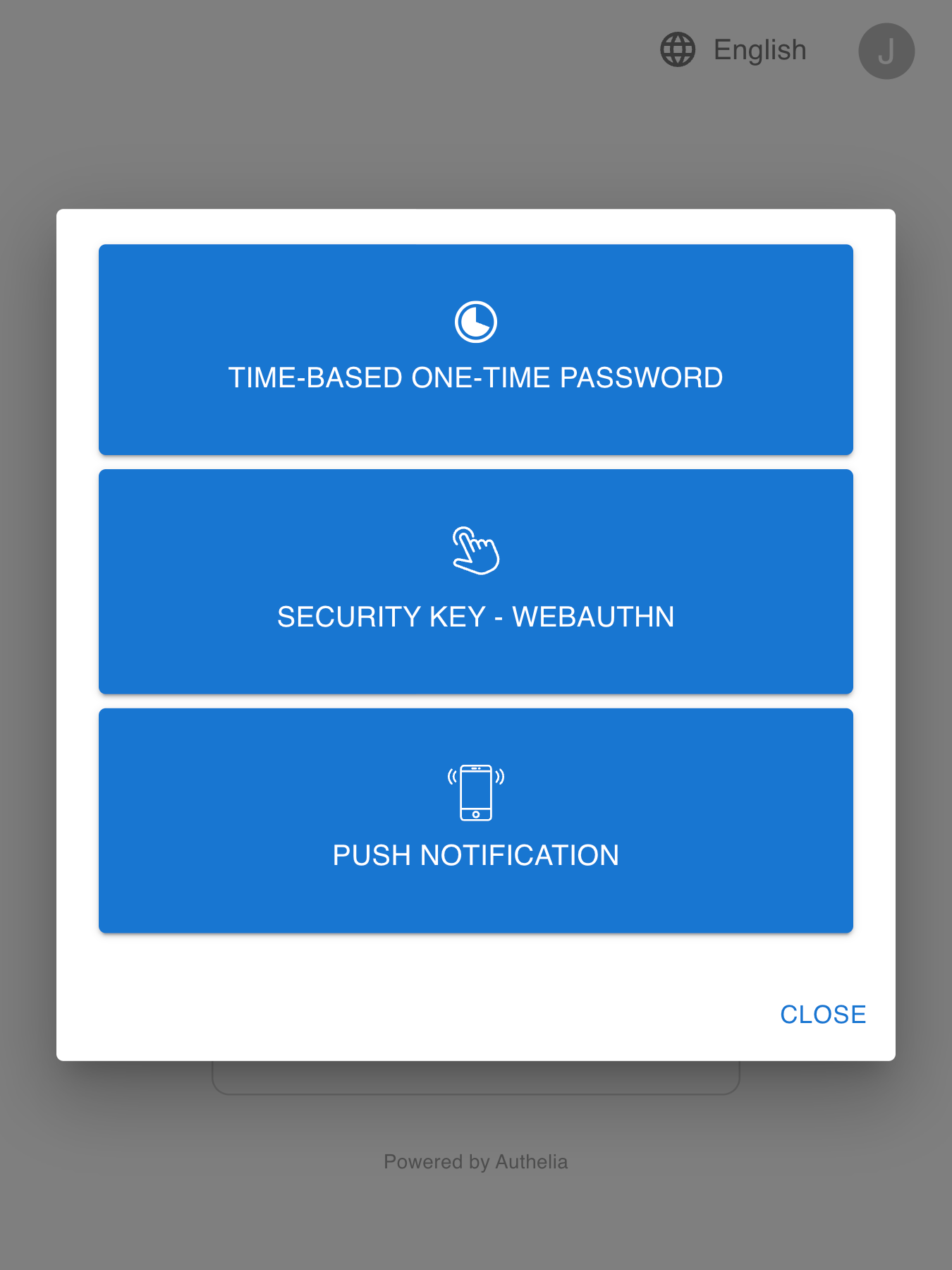
以下是 Authelia 门户的外观:
## 功能摘要
这是 Authelia 的主要功能列表:
* [OpenID Connect 1.0 / OAuth 2.0](#openid-connect-10--oauth-20)
* 多种第二因素方法:
* 支持 [FIDO2] [WebAuthn] 的**[安全密钥](https://www.authelia.com/overview/authentication/security-key/)**,设备如 [YubiKey]。
* **[基于时间的一次性密码](https://www.authelia.com/overview/authentication/one-time-password/)**,兼容验证器应用程序。
* **[移动推送通知](https://www.authelia.com/overview/authentication/push-notification/)**,通过 [Duo](https://duo.com/)。
* 通过 WebAuthn (Passkeys) 进行无密码认证
* 通过电子邮件确认进行身份验证的密码重置。
* 在多次无效认证尝试后限制访问。
* 使用规则进行细粒度的访问控制,匹配标准如子域、用户、用户组成员身份、请求 URI、请求方法和网络。
* 每条规则可在单因素和双因素策略之间选择。
* 支持受单因素策略保护的端点的基本认证。
* 使用远程数据库和 Redis 作为高可用 KV 存储实现高可用性。
* 开箱即用地兼容 [Traefik](https://doc.traefik.io/traefik),使用 [ForwardAuth](https://doc.traefik.io/traefik/middlewares/http/forwardauth/) 中间件。
* 由 [LinuxServer](https://www.linuxserver.io/) 通过其 [SWAG](https://docs.linuxserver.io/general/swag) 容器提供的精选配置,以及一份[指南](https://blog.linuxserver.io/2020/08/26/setting-up-authelia/)。
* 兼容 [Caddy],使用 [forward_auth](https://caddyserver.com/docs/caddyfile/directives/forward_auth) 指令。
* Kubernetes 支持:
* 兼容多个 Kubernetes Ingress Controller 和 Gateway:
* [ingress-nginx](https://www.authelia.com/integration/kubernetes/nginx-ingress/)
* [Traefik Kubernetes CRD](https://www.authelia.com/integration/kubernetes/traefik-ingress/#ingressroute)
* [Traefik Kubernetes Ingress](https://www.authelia.com/integration/kubernetes/traefik-ingress/#ingress)
* [Istio](https://www.authelia.com/integration/kubernetes/envoy/introduction/)
* [Envoy Gateway](https://www.authelia.com/integration/kubernetes/envoy/gateway/)
* 使用我们的 [Charts](https://charts.authelia.com) 通过 Helm 安装的测试版支持。
欲了解更多详情,请查看[概述](https://www.authelia.com/overview/prologue/introduction/)。
如果您想了解更多关于路线图的信息,请访问[路线图](https://www.authelia.com/roadmap)。
### OpenID Connect 1.0 / OAuth 2.0
Authelia 已通过 [OpenID Certified™] 认证,符合 [OpenID Connect™ 协议] 的 Basic OP / Implicit OP / Hybrid OP / Form Post OP / Config OP 配置。虽然此功能目前实际上仍处于[路线图中的测试阶段](https://www.authelia.com/roadmap/active/openid-connect/),但它已经非常全面且实现良好,也使我们获得了全面的认证。请在 [OpenID Connect 1.0 集成指南](https://www.authelia.com/integration/openid-connect/introduction/#openid-certified) 中阅读更多关于 Authelia 的 [OpenID Certified™] 状态。
## 代理支持
Authelia 与 [nginx]、[Traefik]、[Caddy]、[Skipper]、[Envoy] 或 [HAProxy] 结合使用。





## 入门指南
请参阅[入门指南](https://www.authelia.com/integration/prologue/get-started/)或下面的精选示例之一。
### docker compose
`docker compose` 套件充当任何想要看到 Authelia 实际运行的用户的起点。您必须根据需要自定义它们,因为它们附带自签名证书。
#### [本地](https://www.authelia.com/integration/deployment/docker/#local)
本地 compose 套件旨在测试 Authelia,无需担心配置。
它适用于服务器不暴露于互联网的场景。
域名将在本地 hosts 文件中定义,并使用自签名证书。
#### [轻量](https://www.authelia.com/integration/deployment/docker/#lite)
轻量 compose 套件适用于服务器将暴露于互联网的场景,域名和 DNS 需要相应设置,证书将通过 LetsEncrypt 生成。Lite 元素指的是最少的外部依赖;基于文件的用户存储,基于 SQLite 的配置存储。在此配置中,服务扩展性不佳。
## 部署
现在您已经测试了 **Authelia** 并想在您自己的基础设施中试用它,您可以通过[部署](https://www.authelia.com/integration/deployment/introduction/)了解如何部署和使用它。
本指南将向您展示如何在裸机以及 [Kubernetes](https://kubernetes.io/) 上部署它。
## 安全
Authelia 非常重视安全性。如果您在 Authelia 中发现漏洞,请参阅我们的[安全策略](https://github.com/authelia/authelia/security/policy)。
有关[安全](https://www.authelia.com/policies/security/)相关事项的更多信息,请阅读[文档](https://www.authelia.com/policies/security/)。
## 联系方式
我们的社区有多种联系方式,主要方式是 [Matrix](#matrix)。除了 [GitHub issues](https://github.com/authelia/authelia/issues) 用于创建[新问题](https://github.com/authelia/authelia/issues/new/choose)之外,这些是补充渠道。
### Matrix
邀请社区成员加入 [Matrix Space](https://matrix.to/#/#community:authelia.com),其中包含[支持室](https://matrix.to/#/#support:authelia.com)和[贡献室](https://matrix.to/#/#contributing:authelia.com)。
- 核心团队成员在 Space 和各个房间中被标识为管理员。
- 所有频道均链接到 [Discord](#discord)。
### Discord
邀请社区成员加入 [Discord 服务器](https://discord.authelia.com)。
- 核心团队成员在 Discord 中通过
**CORE TEAM** 角色标识。
- [#support] 和 [#contributing] 频道链接到 [Matrix](#matrix)。
### 电子邮件
您可以通过 [team@authelia.com](mailto:team@authelia.com) 通过电子邮件联系核心团队。请注意,[security@authelia.com](mailto:security@authelia.com) 也可用,但严格保留用于[安全]相关事项。
## 重大变更
由于 Authelia 仍处于活跃开发中,因此可能会发生重大变更。建议固定一个版本标签而不是使用 `latest` 标签,并在升级前阅读[发行说明](https://github.com/authelia/authelia/releases)。您将在此处找到有关重大变更的信息以及应对这些变更的方法。
## 为什么开源?
您可能想知道为什么 Authelia 是开源的,而它以零成本为您的基础设施增加了大量安全性和用户体验。它是开源的,因为我们坚信,面对互联网这个战场,所有人都应该受益于安全性,且几乎无需付出任何努力。
此外,保持代码开源是一种让任何愿意贡献的人都可以审计它的方式。这样,您可以确信产品保持安全并且不会恶意行事。
重要的是要记住,Authelia 不会直接暴露在互联网上(您的反向代理是),但是,它仍然是您内部安全的控制平面,所以要小心保护它!
## 许可证
**Authelia** 根据 **[Apache 2.0]** 许可证**获得许可**。许可证的条款在 [LICENSE](LICENSE) 中有详细说明。
[](https://app.fossa.com/projects/git%2Bgithub.com%2Fauthelia%2Fauthelia?ref=badge_large)
标签:2FA, Docker, EVTX分析, Golang, IdP, JSONLines, MFA, NIDS, OIDC, OpenID Connect, Portal, SAML, SSO, Streamlit, TOTP, WebAuthn, Web安全, YubiKey, 二步验证, 单点登录, 双因素认证, 反向代理, 多因素认证, 子域名突变, 安全编程, 安全网关, 安全认证, 安全防御评估, 容器化, 搜索引擎查询, 日志审计, 权限管理, 模型越狱, 测试用例, 生物识别, 登录门户, 硬件密钥, 网关鉴权, 蓝队分析, 访问控制, 请求拦截, 身份提供商, 零信任