koalalab-inc/bolt
GitHub: koalalab-inc/bolt
一行代码为 GitHub Actions 添加出口流量过滤和运行时安全防护,保护 CI/CD 流水线免受供应链攻击威胁。
Stars: 38 | Forks: 3

[](https://api.securityscorecards.dev/projects/github.com/koalalab-inc/bolt)

# BOLT:通过 1 行代码实现安全的 GitHub Actions Runtime
BOLT 是一款针对您的 GitHub Actions 环境的出口流量过滤器(egress-filter)和运行时安全工具。
### 用法
将此步骤添加到您的 GitHub workflow 文件中的作业(jobs)里,以保护您的运行器(runner):
```
- name: Setup Bolt
uses: koalalab-inc/bolt@v1
```
BOLT被打包为一个 GitHub Action,这意味着您可以轻松地将其添加到您的工作流中,并开始控制来自您管道(pipelines)的出口流量(egress traffic)。
## 为什么使用 BOLT?
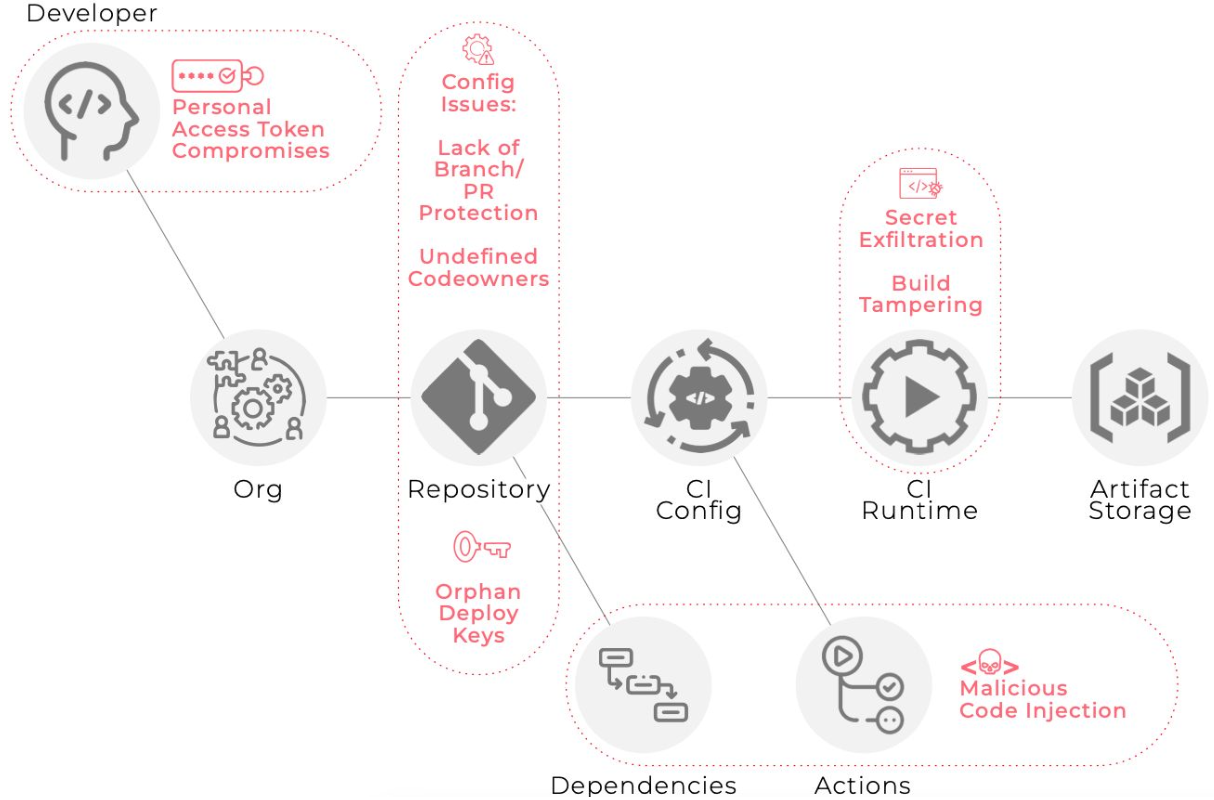
[Solarwinds 漏洞事件](https://en.wikipedia.org/wiki/2020_United_States_federal_government_data_breach) 的余波导致了 [软件供应链攻击的增加](https://linuxfoundation.eu/newsroom/the-rising-threat-of-software-supply-chain-attacks-managing-dependencies-of-open-source-projects)。CI/CD 管道是构建软件的基础设施,它们是通向云端王国的钥匙,也是高杠杆的攻击面。[OWASP top 10 CI/CD](https://owasp.org/www-project-top-10-ci-cd-security-risks/) 和 [CISA+NSA 关于防御 CI/CD 的联合指南](https://www.cisa.gov/news-events/alerts/2023/06/28/cisa-and-nsa-release-joint-guidance-defending-continuous-integrationcontinuous-delivery-cicd) 是了解围绕 CI/CD 的威胁载体的绝佳起点。针对 GitHub 环境的同类改编看起来会有点像这样:
特别关注 CI 运行时威胁载体(及其解决方案):
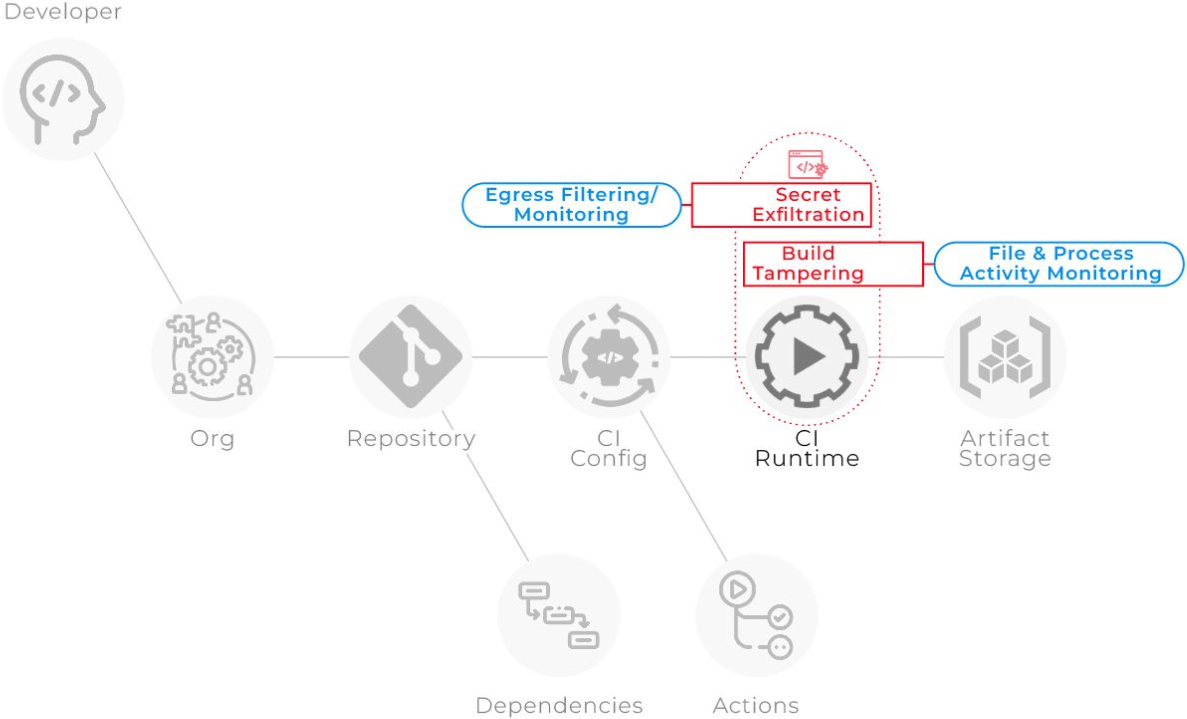
BOLT 通过以下方式覆盖了这两种威胁载体:
1. 透明的出口流量过滤机制,仅允许流量访问受信任的域
2. 检测具有 Sudo 权限的 Actions,以防止在构建期间发生文件篡改。
## 如何使用 Bolt - 视频介绍
https://github.com/koalalab-inc/bolt/assets/2908925/7bf51186-e673-4bed-9b56-ae15c7ab9154
## 使用方法
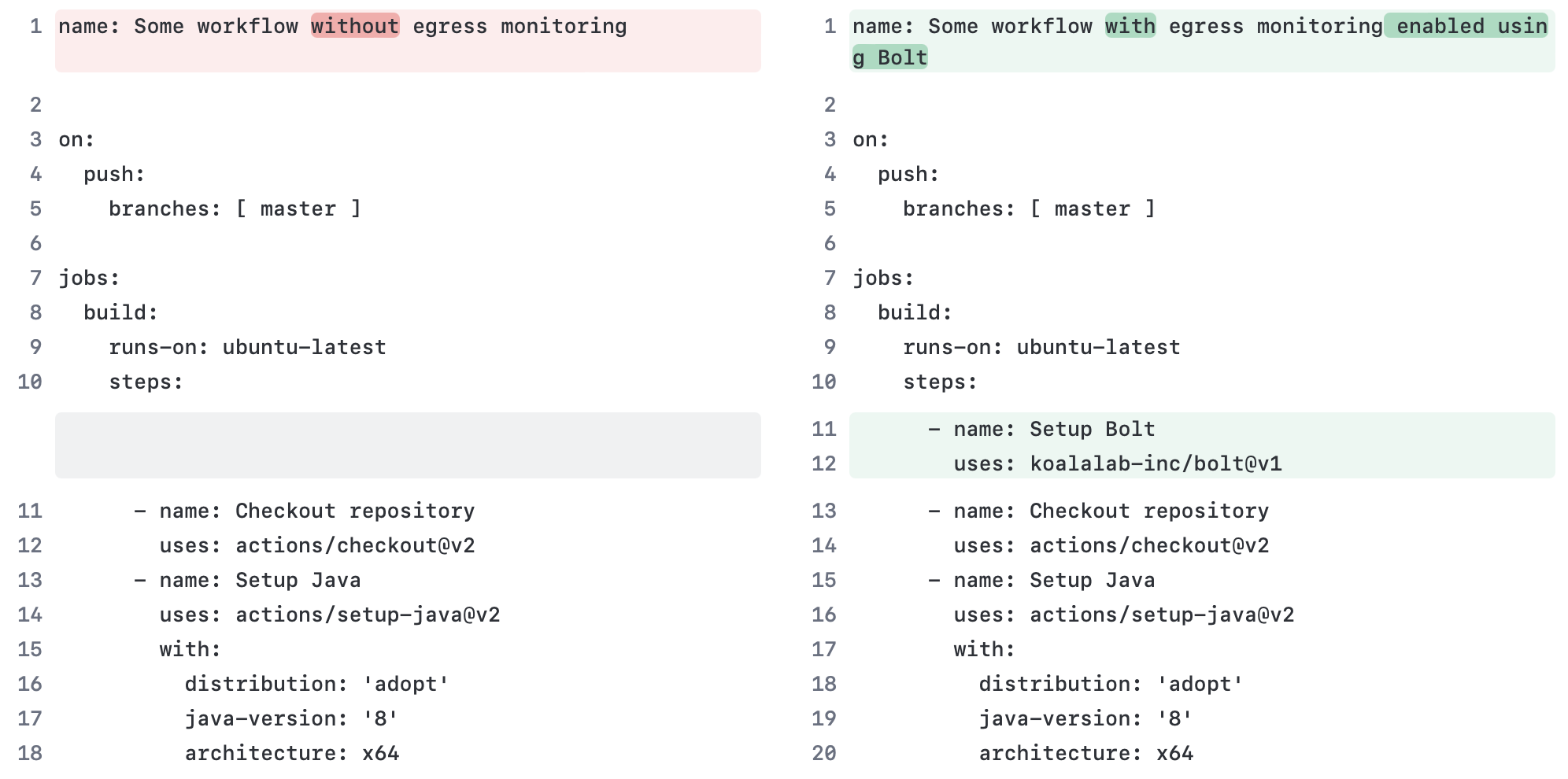
您可以通过将 `koalalab-inc/bolt` action 添加为您想要监控的作业中的第一步来开始使用 Bolt。该 action 将在 runner 上安装并启动 Bolt 服务。在[此处](#Configure)查看配置选项和默认值。
```
- name: Setup Bolt
uses: koalalab-inc/bolt@v1
```
## 配置
您可以使用输入参数配置 Bolt action。以下是如何配置该 action 的示例。
```
- name: Setup Bolt
uses: koalalab-inc/bolt@v1
with:
mode: 'audit'
egress_rules: |
- name: 'Allow GitHub subs'
destination: '*.github.com'
action: 'allow'
disable_passwordless_sudo: 'false'
default_policy: 'block-all'
allow_http: 'false'
graceful: 'true'
```
| 选项 | 描述 |
| --------------------------- | ----------------------------------------------------------------------------------------------------- |
| `mode` | 配置 Bolt 网关的操作模式。可以是 `audit` 或 `active`。默认值:`audit` |
| `egress_rules` | 要应用的自定义出口规则列表。默认值:`[]`。 |
| `disable_passwordless_sudo` | 是否禁用无密码 sudo。默认值:`false` |
| `allow_http` | 是否允许不安全的 HTTP 请求。默认值:`false` |
| `default_policy` | 可以是 `block-all` 或 `allow-all`。默认值:`block-all` |
| `graceful` | 在遇到不支持的平台时是否优雅地失败。默认值:`true` |
## 自定义出口策略(Egress Policy)
您可以定义自定义出口规则来控制来自您管道的出口流量。以下是如何定义自定义出口规则的示例。
在 `audit` 模式下,Bolt 网关将根据定义的规则记录出口流量。在 `active` 模式下,Bolt 网关将强制执行定义的规则。
出口规则选项: | 选项 | 描述 |
---------------------------------|--------------------------------- | `name` | 规则
的名称 | | `destination` | 目标域或 IP 地址。目标支持 `*`
通配符。 | | `action` | 要采取的操作。可以是 `allow` 或 `block` |
这是一个有序的规则列表。第一个与目标匹配的规则将被应用。
```
- name: Setup Bolt
uses: koalalab-inc/bolt@v1
with:
mode: 'audit'
default_policy: 'block-all'
allow_http: 'false'
egress_rules: |
- name: 'Allow GitHub subdomains'
destination: '*.github.com'
action: 'allow'
- name: 'Block api subdomain'
destination: 'api.example.com'
action: 'block'
- name: 'Allow other subdomains'
destination: '*.example.com'
action: 'allow'
```
## 工作流日志中的报告
一旦作业结束,bolt 将向作业摘要中添加一份出口流量报告。该报告将显示出口流量以及应用的规则。下面显示了一个示例报告。
View detailed analysis of this run on Koalalab!
此报告是使用此 workflow 文件生成的: [bolt-sample.yml](examples/bolt.yml)
## 使用与限制 BOLT 可用于 GitHub 托管的 ubuntu runner 上的私有和公共仓库。如果您想在自托管 runner 上使用 BOLT,请联系我们。
⚡ Egress Report - powered by Bolt
🛠️ Bolt Configuration
| Mode | audit |
| Allow HTTP | false |
| Default Policy | block-all |
📝 Egress rules
- destination: google.com
  action: block
  name: Block Google
- destination: ifconfig.me
  action: allow
  name: Allow ifconfig.me
Egress Traffic
NOTE: Running in Audit mode. Unknown/unverified destinations will be blocked in Active mode.
🚨 Unknown Destinations
| Destination | Scheme | Rule | Action |
|---|---|---|---|
| www.google.com | https | Default Policy - block-all | Unknown Destination |
✅ Known Destinations
| Destination | Scheme | Rule | Action |
|---|---|---|---|
| github.com | https | Reqd by Github Action | ✅ |
| pipelinesghubeus6.actions.githubusercontent.com | https | Reqd by Github Action | ✅ |
| results-receiver.actions.githubusercontent.com | https | Reqd by Github Action | ✅ |
| ifconfig.me | https | Allow ifconfig.me | ✅ |
| api.github.com | https | Reqd by Github Action | ✅ |
此报告是使用此 workflow 文件生成的: [bolt-sample.yml](examples/bolt.yml)
## 使用与限制 BOLT 可用于 GitHub 托管的 ubuntu runner 上的私有和公共仓库。如果您想在自托管 runner 上使用 BOLT,请联系我们。
标签:CI/CD 安全, DevSecOps, GitHub Actions, JSONLines, SolarWinds 防护, TLS, 上游代理, 代码仓库安全, 出口流量过滤, 威胁情报, 子域名字典, 开发者工具, 数据投毒防御, 文档安全, 日志审计, 管道安全, 结构化查询, 网络安全, 自动化安全, 自动笔记, 自定义脚本, 自定义脚本, 软件供应链安全, 远程方法调用, 防御工具, 隐私保护, 零信任