alireza0/s-ui
GitHub: alireza0/s-ui
基于 Sing-Box 构建的高级 Web 代理面板,用于管理和监控多协议代理服务、流量和客户端状态。
Stars: 9555 | Forks: 1751
# S-UI
**高级 Web 面板 • 基于 SagerNet/Sing-Box 构建**


[](https://goreportcard.com/report/github.com/alireza0/s-ui)
[](https://img.shields.io/github/downloads/alireza0/s-ui/total.svg)
[](https://www.gnu.org/licenses/gpl-3.0.en.html)
**想要贡献?** 请参阅 [CONTRIBUTING.md](CONTRIBUTING.md) 了解开发设置、编码规范、测试以及 Pull Request 流程。
## 快速概览
| 功能 | 启用? |
| -------------------------------------- | :----------------: |
| 多协议 | :heavy_check_mark: |
| 多语言 | :heavy_check_mark: |
| 多客户端/入站 | :heavy_check_mark: |
| 高级流量路由界面 | :heavy_check_mark: |
| 客户端与流量及系统状态 | :heavy_check_mark: |
| 订阅链接(链接/json/clash + 信息)| :heavy_check_mark: |
| 深色/浅色主题 | :heavy_check_mark: |
| API 接口 | :heavy_check_mark: |
## 支持的平台
| 平台 | 架构 | 状态 |
|----------|--------------|---------|
| Linux | amd64, arm64, armv7, armv6, armv5, 386, s390x | ✅ 支持 |
| Windows | amd64, 386, arm64 | ✅ 支持 |
| macOS | amd64, arm64 | 🚧 实验性 |
## 截图
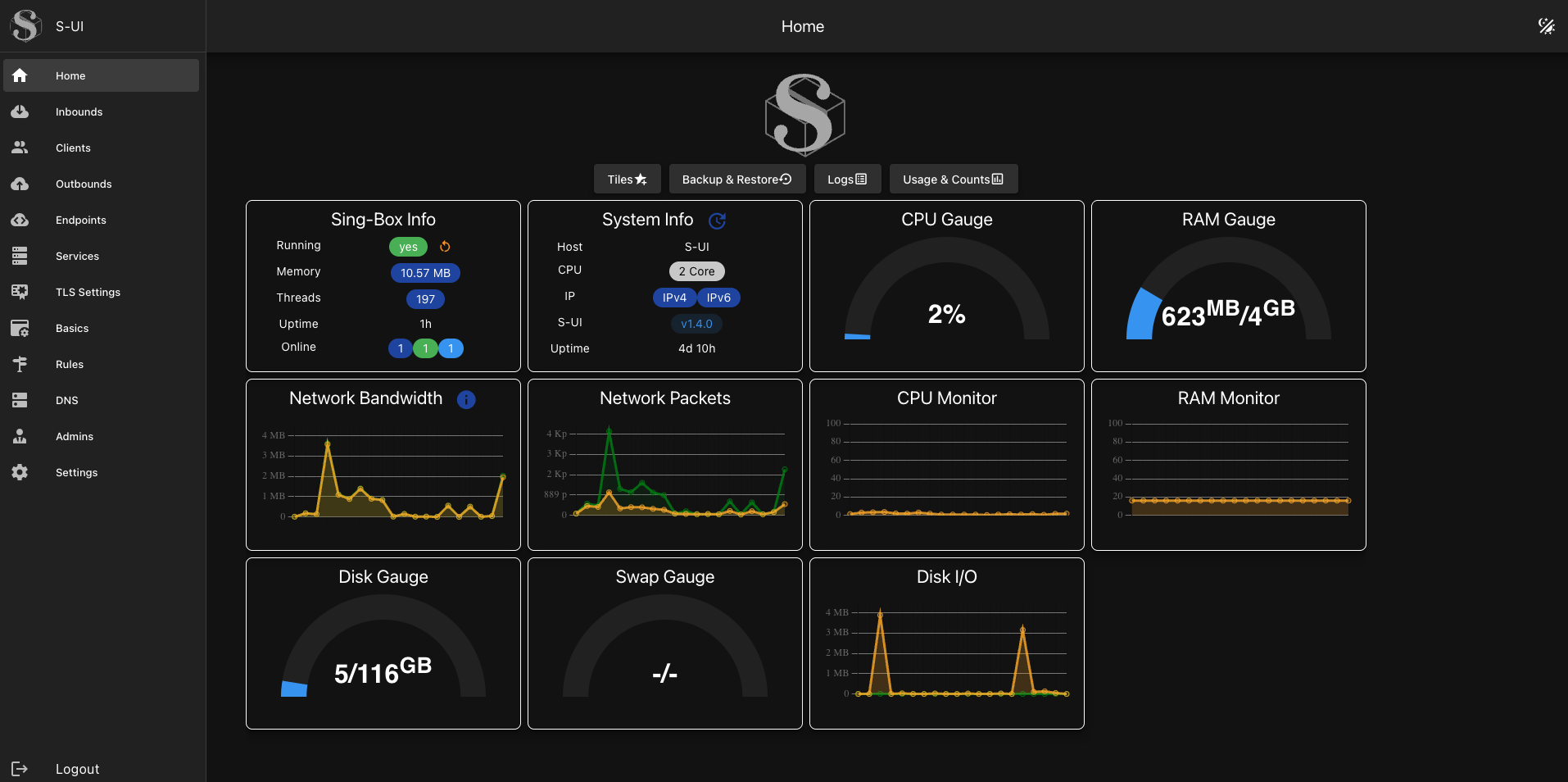
[其他界面截图](https://github.com/alireza0/s-ui-frontend/blob/main/screenshots.md)
## API 文档
[API 文档 Wiki](https://github.com/alireza0/s-ui/wiki/API-Documentation)
## 默认安装信息
- 面板端口:2095
- 面板路径:/app/
- 订阅端口:2096
- 订阅路径:/sub/
- 用户名/密码:admin
## 安装并升级到最新版本
### Linux/macOS
```
bash <(curl -Ls https://raw.githubusercontent.com/alireza0/s-ui/master/install.sh)
```
### Windows
1. 从 [GitHub Releases](https://github.com/alireza0/s-ui/releases/latest) 下载最新的 Windows 版本
2. 解压 ZIP 文件
3. 以管理员身份运行 `install-windows.bat`
4. 按照安装向导操作
## 安装旧版本
**第一步:** 要安装所需的旧版本,请在安装命令末尾添加版本号。例如,版本 `1.0.0`:
```
VERSION=1.0.0 && bash <(curl -Ls https://raw.githubusercontent.com/alireza0/s-ui/$VERSION/install.sh) $VERSION
```
## 手动安装
### Linux/macOS
1. 从 GitHub 获取适合您操作系统/架构的 S-UI 最新版本:[https://github.com/alireza0/s-ui/releases/latest](https://github.com/alireza0/s-ui/releases/latest)
2. **可选** 获取最新版本的 `s-ui.sh` [https://raw.githubusercontent.com/alireza0/s-ui/master/s-ui.sh](https://raw.githubusercontent.com/alireza0/s-ui/master/s-ui.sh)
3. **可选** 将 `s-ui.sh` 复制到 /usr/bin/ 并运行 `chmod +x /usr/bin/s-ui`。
4. 将 s-ui tar.gz 文件解压到您选择的目录,并导航到解压后的目录。
5. 将 *.service 文件复制到 /etc/systemd/system/ 并运行 `systemctl daemon-reload`。
6. 使用 `systemctl enable s-ui --now` 启用自动启动并启动 S-UI 服务
7. 使用 `systemctl enable sing-box --now` 启动 sing-box 服务
### Windows
1. 从 GitHub 获取最新的 Windows 版本:[https://github.com/alireza0/s-ui/releases/latest](https://github.com/alireza0/s-ui/releases/latest)
2. 下载适合的 Windows 包(例如,`s-ui-windows-amd64.zip`)
3. 将 ZIP 文件解压到您选择的目录
4. 以管理员身份运行 `install-windows.bat`
5. 按照安装向导操作
6. 在 http://localhost:2095/app 访问面板
## 卸载 S-UI
```
sudo -i
systemctl disable s-ui --now
rm -f /etc/systemd/system/sing-box.service
systemctl daemon-reload
rm -fr /usr/local/s-ui
rm /usr/bin/s-ui
```
## 使用 Docker 安装
## 手动运行(贡献)
## 语言
- 英语
- 波斯语
- 越南语
- 简体中文
- 繁体中文
- 俄语
## 功能
- 支持的协议:
- 通用:Mixed、SOCKS、HTTP、HTTPS、Direct、Redirect、TProxy
- 基于 V2Ray:VLESS、VMess、Trojan、Shadowsocks
- 其他协议:ShadowTLS、Hysteria、Hysteria2、Naive、TUIC
- 支持 XTLS 协议
- 先进的流量路由界面,包含 PROXY Protocol、External 和 Transparent Proxy、SSL 证书以及端口配置
- 先进的入站和出站配置界面
- 客户端流量限制和到期日期
- 显示在线客户端、入站和出站流量统计以及系统状态监控
- 订阅服务,支持添加外部链接和订阅
- Web 面板和订阅服务的安全 HTTPS 访问(需自备域名和 SSL 证书)
- 深色/浅色主题
## 环境变量
## SSL 证书
```
## 关注者随时间变化
[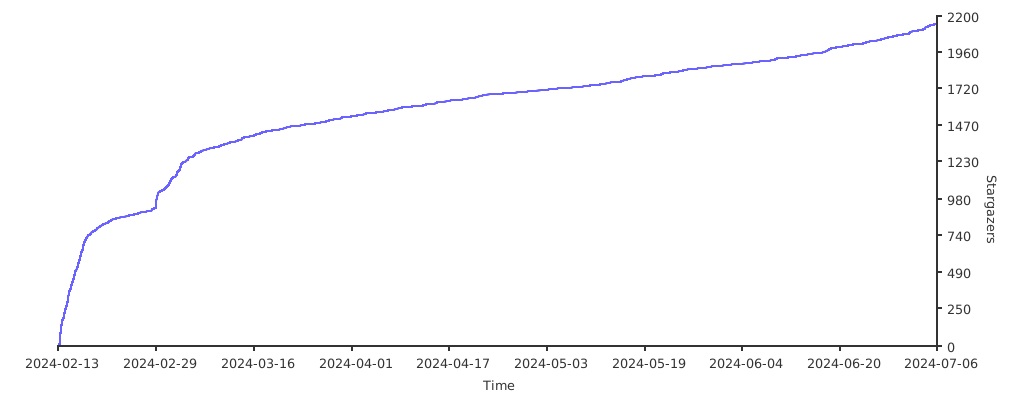](https://starchart.cc/alireza0/s-ui)
点击查看详情
### 使用方法 **第一步:** 安装 Docker ``` curl -fsSL https://get.docker.com | sh ``` **第二步:** 安装 S-UI ``` mkdir s-ui && cd s-ui wget -q https://raw.githubusercontent.com/alireza0/s-ui/master/docker-compose.yml docker compose up -d ``` ``` mkdir s-ui && cd s-ui docker run -itd \ -p 2095:2095 -p 2096:2096 -p 443:443 -p 80:80 \ -v $PWD/db/:/app/db/ \ -v $PWD/cert/:/root/cert/ \ --name s-ui --restart=unless-stopped \ alireza7/s-ui:latest ``` ``` git clone https://github.com/alireza0/s-ui git submodule update --init --recursive docker build -t s-ui . ```点击查看详情
### 构建并运行整个项目 ``` ./runSUI.sh ``` ### 克隆仓库 ``` # 克隆仓库 git clone https://github.com/alireza0/s-ui # 克隆子模块 git submodule update --init --recursive ``` ### - 前端 访问 [s-ui-frontend](https://github.com/alireza0/s-ui-frontend) 查看前端代码 ### - 后端 构建后端: ``` # 删除旧的已编译前端文件 rm -fr web/html/* # 应用新的已编译前端文件 cp -R frontend/dist/ web/html/ # 构建 go build -o sui main.go ``` 运行后端(从仓库根目录): ``` ./sui ```点击查看详情
### 使用方法 | 变量 | 类型 | 默认值 | | -------------- | :--------------------------------------------: | :------------ | | SUI_LOG_LEVEL | `"debug"` \| `"info"` \| `"warn"` \| `"error"` | `"info"` | | SUI_DEBUG | `boolean` | `false` | | SUI_BIN_FOLDER | `string` | `"bin"` | | SUI_DB_FOLDER | `string` | `"db"` | | SINGBOX_API | `string` | - |点击查看详情
### Certbot ``` snap install core; snap refresh core snap install --classic certbot ln -s /snap/bin/certbot /usr/bin/certbot certbot certonly --standalone --register-unsafely-without-email --non-interactive --agree-tos -d标签:Clash配置, DNS解析, EVTX分析, Go语言, SagerNet, Sing-Box, VPN管理, Web管理面板, 代理工具, 代理面板, 多协议代理, 多语言支持, 安全合规, 安全测试框架, 开源项目, 日志审计, 流量监控, 程序破解, 网络代理, 网络工具, 订阅转换, 请求拦截, 跨平台