HanaokaYuzu/Gemini-API
GitHub: HanaokaYuzu/Gemini-API
逆向工程的异步 Python 库,通过浏览器 Cookie 免费调用 Google Gemini Web 应用,支持图像生成、Gems、扩展和多轮对话等功能。
Stars: 3218 | Forks: 503









#

Gemini-API
一个针对 [Google Gemini](https://gemini.google.com) Web 应用(原名 Bard)的逆向工程异步 Python 封装库。
## 功能特性
- **持久化 Cookies** - 在后台自动刷新 cookies。针对常驻服务进行了优化。
- **图像生成** - 原生支持使用自然语言生成和编辑图像。
- **系统提示词** - 支持通过 [Gemini Gems](https://gemini.google.com/gems/view) 自定义模型的系统提示词。
- **扩展支持** - 支持使用 [Gemini 扩展](https://gemini.google.com/extensions)(如 YouTube 和 Gmail)生成内容。
- **分类输出** - 将响应中的文本、思考过程、网络图像和 AI 生成图像进行分类。
- **流式模式** - 支持流式生成,在生成部分输出时即时产出。
- **官方风格** - 提供受 [Google Generative AI](https://ai.google.dev/tutorials/python_quickstart) 官方 API 启发的简洁优雅接口。
- **异步执行** - 利用 `asyncio` 高效运行生成任务并返回结果。
## 目录
- [功能特性](#features)
- [目录](#table-of-contents)
- [安装](#installation)
- [身份验证](#authentication)
- [使用方法](#usage)
- [初始化](#initialization)
- [生成内容](#generate-content)
- [生成带文件的内容](#generate-content-with-files)
- [多轮对话](#conversations-across-multiple-turns)
- [继续之前的对话](#continue-previous-conversations)
- [读取对话历史](#read-conversation-history)
- [从 Gemini 历史记录中删除之前的对话](#delete-previous-conversations-from-gemini-history)
- [临时模式](#temporary-mode)
- [流式模式](#streaming-mode)
- [选择语言模型](#select-language-model)
- [通过 Gemini Gems 应用系统提示词](#apply-system-prompt-with-gemini-gems)
- [管理自定义 Gems](#manage-custom-gems)
- [创建自定义 Gem](#create-a-custom-gem)
- [更新现有 Gem](#update-an-existing-gem)
- [删除自定义 Gem](#delete-a-custom-gem)
- [获取模型的思考过程](#retrieve-models-thought-process)
- [获取响应中的图像](#retrieve-images-in-response)
- [生成和编辑图像](#generate-and-edit-images)
- [使用 Gemini 扩展生成内容](#generate-content-with-gemini-extensions)
- [检查并切换其他回复候选](#check-and-switch-to-other-reply-candidates)
- [日志配置](#logging-configuration)
- [参考](#references)
- [Stargazers](#stargazers)
## 安装
使用 pip 安装或更新该包。
```
pip install -U gemini_webapi
```
可选地,该包提供了一种通过可选依赖项 `browser-cookie3` 从本地浏览器自动导入 cookies 的方法。要启用此功能,请改为安装 `gemini_webapi[browser]`。支持的平台和浏览器可以在[这里](https://github.com/borisbabic/browser_cookie3?tab=readme-ov-file#contribute)找到。
```
pip install -U gemini_webapi[browser]
```
## 身份验证
- 前往
并使用您的 Google 账号登录
- 按 F12 打开网页检查器,转到 `Network`(网络)标签页,并刷新页面
- 点击任意请求并复制 `__Secure-1PSID` 和 `__Secure-1PSIDTS` 的 cookie 值
```
services:
main:
environment:
GEMINI_COOKIE_PATH: /tmp/gemini_webapi
volumes:
- ./gemini_cookies:/tmp/gemini_webapi
```
## 使用方法
### 初始化
导入所需的包,并使用上一步获取的 cookies 初始化客户端。初始化成功后,只要进程处于活动状态,API 将在后台自动刷新 `__Secure-1PSIDTS`。
```
import asyncio
from gemini_webapi import GeminiClient
# 将 "COOKIE VALUE HERE" 替换为您的实际 cookie 值。
# 如果您的账户没有 Secure_1PSIDTS,请将其留空。
Secure_1PSID = "COOKIE VALUE HERE"
Secure_1PSIDTS = "COOKIE VALUE HERE"
async def main():
# If browser-cookie3 is installed, simply use `client = GeminiClient()`
client = GeminiClient(Secure_1PSID, Secure_1PSIDTS, proxy=None)
await client.init(timeout=30, auto_close=False, close_delay=300, auto_refresh=True)
asyncio.run(main())
```
### 生成内容
通过调用 `GeminiClient.generate_content` 提出单轮问题,它将返回一个 `gemini_webapi.ModelOutput` 对象,其中包含生成的文本、图像、思考过程和对话元数据。
```
async def main():
response = await client.generate_content("Hello World!")
print(response.text)
asyncio.run(main())
```
### 生成带文件的内容
Gemini 支持文件输入,包括图像和文档。您可以选择将文件路径列表(以 `str` 或 `pathlib.Path` 形式)连同文本提示词一起传递给 `GeminiClient.generate_content`。
```
async def main():
response = await client.generate_content(
"Introduce the contents of these two files. Is there any connection between them?",
files=["assets/sample.pdf", Path("assets/banner.png")],
)
print(response.text)
asyncio.run(main())
```
### 多轮对话
如果您想保持对话连续性,请使用 `GeminiClient.start_chat` 创建一个 `gemini_webapi.ChatSession` 对象并通过它发送消息。对话历史将被自动处理并在每一轮后更新。
```
async def main():
chat = client.start_chat()
response1 = await chat.send_message(
"Introduce the contents of these two files. Is there any connection between them?",
files=["assets/sample.pdf", Path("assets/banner.png")],
)
print(response1.text)
response2 = await chat.send_message(
"Use image generation tool to modify the banner with another font and design."
)
print(response2.text, response2.images, sep="\n\n----------------------------------\n\n")
asyncio.run(main())
```
### 继续之前的对话
要手动检索之前的对话,您可以在创建新的 `ChatSession` 时将先前 `ChatSession` 的元数据传递给 `GeminiClient.start_chat`。或者,如果您需要在当前 Python 进程退出后访问它,可以将先前的元数据持久化到文件或数据库中。
```
async def main():
# Start a new chat session
chat = client.start_chat()
response = await chat.send_message("Fine weather today")
# Save chat's metadata
previous_session = chat.metadata
# Load the previous conversation
previous_chat = client.start_chat(metadata=previous_session)
response = await previous_chat.send_message("What was my previous message?")
print(response)
asyncio.run(main())
```
### 读取对话历史
您可以通过调用 `GeminiClient.read_chat` 并传入聊天 ID 来读取特定聊天的对话历史。
```
async def main():
chat = client.start_chat()
await chat.send_message("What is the capital of France?")
# Read the chat history
history = await client.read_chat(chat.cid)
for turn in history:
print(
f"Input: {turn.user_prompt}\n"
f"Output: {turn.assistant_response}"
"\n\n----------------------------------\n\n"
)
asyncio.run(main())
```
### 从 Gemini 历史记录中删除之前的对话
您可以通过调用 `GeminiClient.delete_chat` 并传入聊天 ID,从服务器上的 Gemini 历史记录中删除特定的聊天。
```
async def main():
# Start a new chat session
chat = client.start_chat()
await chat.send_message("This is a temporary conversation.")
# Delete the chat
await client.delete_chat(chat.cid)
print(f"Chat deleted: {chat.cid}")
asyncio.run(main())
```
### 临时模式
您可以通过向 `GeminiClient.generate_content` 或 `ChatSession.send_message` 传递 `temporary=True` 来启动临时聊天。临时聊天不会保存在 Gemini 历史记录中。
```
async def main():
response = await client.generate_content("Hello World!", temporary=True)
print(response.text, "\n\n----------------------------------\n\n")
chat = client.start_chat()
await chat.send_message("Fine weather today", temporary=False)
response2 = await chat.send_message("What's my last message?", temporary=True)
print(response2.text)
asyncio.run(main())
```
### 流式模式
对于较长的响应,您可以使用流式模式在生成部分输出时即时接收。这提供了更具响应性的用户体验,特别是对于像聊天机器人这样的实时应用程序。
`generate_content_stream` 方法产出 `ModelOutput` 对象,其中 `text_delta` 属性仅包含自上次产出以来接收到的 **新字符**,便于显示增量更新。
```
async def main():
async for chunk in client.generate_content_stream(
"What's the difference between 'await' and 'async for'?"
):
print(chunk.text_delta, end="", flush=True)
print()
asyncio.run(main())
```
### 选择语言模型
您可以通过向 `GeminiClient.generate_content` 或 `GeminiClient.start_chat` 传递 `model` 参数来指定要使用的语言模型。默认值为 `unspecified`。
当前可用的模型(截至 2025 年 11 月 20 日):
- `unspecified` - 默认模型
- `gemini-3.0-pro` - Gemini 3.0 Pro
- `gemini-3.0-flash` - Gemini 3.0 Flash
- `gemini-3.0-flash-thinking` - Gemini 3.0 Flash Thinking
```
from gemini_webapi.constants import Model
async def main():
response1 = await client.generate_content(
"What's your language model version? Reply with the version number only.",
model=Model.G_3_0_FLASH,
)
print(f"Model version ({Model.G_3_0_FLASH.model_name}): {response1.text}")
chat = client.start_chat(model="gemini-2.5-pro")
response2 = await chat.send_message("What's your language model version? Reply with the version number only.")
print(f"Model version (gemini-2.5-pro): {response2.text}")
asyncio.run(main())
```
您也可以直接传递自定义模型头字符串来访问未在上方列出的模型。
```
# 必须包含 "model_name" 和 "model_header" 键
custom_model = {
"model_name": "xxx",
"model_header": {
"x-goog-ext-525001261-jspb": "[1,null,null,null,'e6fa609c3fa255c0',null,null,null,[4]]"
},
}
response = await client.generate_content(
"What's your model version?",
model=custom_model
)
```
### 通过 Gemini Gems 应用系统提示词
系统提示词可以通过 [Gemini Gems](https://gemini.google.com/gems/view) 应用于对话。要使用 gem,您可以将 `gem` 参数传递给 `GeminiClient.generate_content` 或 `GeminiClient.start_chat`。`gem` 可以是 gem ID 字符串或 `gemini_webapi.Gem` 对象。单个对话只能应用一个 gem。
```
async def main():
# Fetch all gems for the current account, including both predefined and user-created ones
await client.fetch_gems(include_hidden=False, language="en")
# Once fetched, gems will be cached in `GeminiClient.gems`
gems = client.gems
# Get the gem you want to use
system_gems = gems.filter(predefined=True)
coding_partner = system_gems.get(id="coding-partner")
response1 = await client.generate_content(
"What's your system prompt?",
model=Model.G_3_0_FLASH,
gem=coding_partner,
)
print(response1.text)
# Another example with a user-created custom gem
# Gem ids are consistent strings. Store them somewhere to avoid fetching gems every time
your_gem = gems.get(name="Your Gem Name")
your_gem_id = your_gem.id
chat = client.start_chat(gem=your_gem_id)
response2 = await chat.send_message("What's your system prompt?")
print(response2)
```
### 管理自定义 Gems
您可以使用 API 以编程方式创建、更新和删除您的自定义 gems。请注意,预定义的系统 gems 无法被修改或删除。
#### 创建自定义 Gem
使用名称、系统提示词(指令)和可选描述创建一个新的自定义 gem:
```
async def main():
# Create a new custom gem
new_gem = await client.create_gem(
name="Python Tutor",
prompt="You are a helpful Python programming tutor.",
description="A specialized gem for Python programming"
)
print(f"Custom gem created: {new_gem}")
# Use the newly created gem in a conversation
response = await client.generate_content(
"Explain how list comprehensions work in Python",
gem=new_gem
)
print(response.text)
asyncio.run(main())
```
#### 更新现有 Gem
```
async def main():
# Get a custom gem (assuming you have one named "Python Tutor")
await client.fetch_gems()
python_tutor = client.gems.get(name="Python Tutor")
# Update the gem with new instructions
updated_gem = await client.update_gem(
gem=python_tutor, # Can also pass gem ID string
name="Advanced Python Tutor",
prompt="You are an expert Python programming tutor.",
description="An advanced Python programming assistant"
)
print(f"Custom gem updated: {updated_gem}")
asyncio.run(main())
```
#### 删除自定义 Gem
```
async def main():
# Get the gem to delete
await client.fetch_gems()
gem_to_delete = client.gems.get(name="Advanced Python Tutor")
# Delete the gem
await client.delete_gem(gem_to_delete) # Can also pass gem ID string
print(f"Custom gem deleted: {gem_to_delete.name}")
asyncio.run(main())
```
### 获取模型的思考过程
使用具有思考能力的模型时,模型的思考过程将填充在 `ModelOutput.thoughts` 中。
```
async def main():
response = await client.generate_content(
"What's 1+1?", model="gemini-2.5-pro"
)
print(response.thoughts)
print(response.text)
asyncio.run(main())
```
### 获取响应中的图像
API 输出中的图像存储为 `gemini_webapi.Image` 对象列表。您可以通过分别调用 `Image.title`、`Image.url` 和 `Image.alt` 来访问图像标题、URL 和描述。
```
async def main():
response = await client.generate_content("Send me some pictures of cats")
for image in response.images:
print(image, "\n\n----------------------------------\n\n")
asyncio.run(main())
```
### 生成和编辑图像
您可以要求 Gemini 使用 Google 最新的图像模型 Nano Banana,通过自然语言生成和编辑图像。
您可以通过调用 `Image.save()` 将从 Gemini 返回的图像保存在本地。可选地,您可以通过向函数传递 `path` 和 `filename` 参数来指定文件路径和文件名,并通过传递 `skip_invalid_filename=True` 来跳过具有无效文件名的图像。这适用于 `WebImage` 和 `GeneratedImage`。
```
async def main():
response = await client.generate_content("Generate some pictures of cats")
for i, image in enumerate(response.images):
await image.save(path="temp/", filename=f"cat_{i}.png", verbose=True)
print(image, "\n\n----------------------------------\n\n")
asyncio.run(main())
```
### 使用 Gemini 扩展生成内容
为您的账号激活扩展后,您可以在提示词中以自然语言访问它们,或者通过在提示词开头使用 "@" 后跟扩展关键字来访问。
```
async def main():
response1 = await client.generate_content("@Gmail What's the latest message in my mailbox?")
print(response1, "\n\n----------------------------------\n\n")
response2 = await client.generate_content("@Youtube What's the latest activity of Taylor Swift?")
print(response2, "\n\n----------------------------------\n\n")
asyncio.run(main())
```
### 检查并切换其他回复候选
来自 Gemini 的响应有时包含多个具有不同生成内容的回复候选。您可以检查所有候选并选择一个来继续对话。默认情况下,选择第一个候选。
```
async def main():
# Start a conversation and list all reply candidates
chat = client.start_chat()
response = await chat.send_message("Recommend a science fiction book for me.")
for candidate in response.candidates:
print(candidate, "\n\n----------------------------------\n\n")
if len(response.candidates) > 1:
# Control the ongoing conversation flow by choosing candidate manually
new_candidate = chat.choose_candidate(index=1) # Choose the second candidate here
followup_response = await chat.send_message("Tell me more about it.") # Will generate content based on the chosen candidate
print(new_candidate, followup_response, sep="\n\n----------------------------------\n\n")
else:
print("Only one candidate available.")
asyncio.run(main())
```
### 日志配置
该包使用 [loguru](https://loguru.readthedocs.io/en/stable/) 进行日志记录,并公开了一个 `set_log_level` 函数来控制日志级别。您可以将日志级别设置为以下值之一:`DEBUG`、`INFO`、`WARNING`、`ERROR` 和 `CRITICAL`。默认值为 `INFO`。
```
from gemini_webapi import set_log_level
set_log_level("DEBUG")
```
## 参考
[Google AI Studio](https://ai.google.dev/tutorials/ai-studio_quickstart)
[acheong08/Bard](https://github.com/acheong08/Bard)
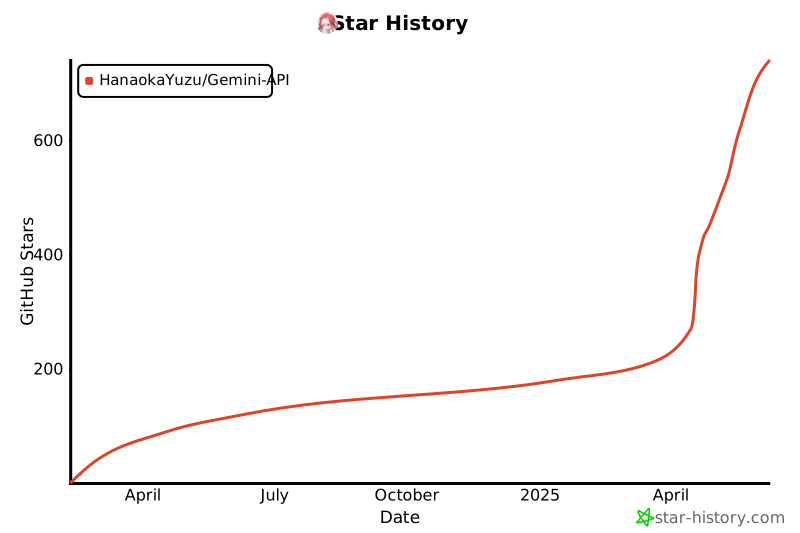
## Stargazers
标签:API 封装, Chatbot, DLL 劫持, PyPI, Python, Spyse API, Web Scraping, 云资产清单, 人工智能, 大语言模型, 开源情报, 异步编程, 无后门, 机器人, 用户模式Hook绕过, 网络调试, 自动化, 计算机取证, 逆向工具, 逆向工程