chainguard-dev/malcontent
GitHub: chainguard-dev/malcontent
一款基于 YARA 规则和差异分析的供应链恶意软件检测工具,专注于发现软件版本更新中的异常风险变化。
Stars: 666 | Forks: 61
# malcontent
[](https://github.com/gojp/goreportcard/blob/master/LICENSE)
[](https://github.com/chainguard-dev/malcontent/releases/latest)
[](https://www.bestpractices.dev/projects/9633)
[](https://scorecard.dev/viewer/?uri=github.com/chainguard-dev/malcontent)
[](https://goreportcard.com/report/chainguard-dev/malcontent)
```
# # 8 o o
# 8 8 8
# ooYoYo. .oPYo. 8 .oPYo. .oPYo. odYo. o8P .oPYo. odYo. o8P
# 8' 8 8 .oooo8 8 8 ' 8 8 8' `8 8 8oooo8 8' `8 8
# 8 8 8 8 8 8 8 . 8 8 8 8 8 8. 8 8 8
# 8 8 8 `YooP8 8 `YooP' `YooP' 8 8 8 `Yooo' 8 8 8
# ..:..:..:.....:..:.....::.....:..::..::..::.....:..::..::..:
# ::::::::::::::::::::::::::::::::::::::::::::::::::::::::::::
# ::::::::::::::::::::::::::::::::::::::::::::::::::::::::::::
# # 潜在恶意软件发现工具
```
malcontent 通过上下文、差异分析和 YARA 的魔力来发现供应链入侵。
malcontent 有 3 种操作模式:
- [analyze](#analyze):对程序能力进行无过滤分析
- [diff](#diff):两个源之间加权风险差异分析
- [scan](#scan):基于阈值的程序能力扫描
malcontent 最擅长分析在 Linux 上运行的程序。不过,它对于为其他 UNIX 平台(如 macOS)设计的程序也表现出色,在较小程度上也支持 Windows。
## 功能
* 14,500+ 条 YARA 规则,包括来自以下第三方的规则:
* Avast
* Elastic
* FireEye
* Mandiant
* Nextron
* ReversingLabs
* 分析大多数常见格式的二进制文件(a.out, ELF, Mach-O, PE)
* 分析大多数常见语言的代码(AppleScript, C, Go, Javascript/Typescript, PHP, Perl, Python, Ruby, Shell, Typescript)
* 透明支持压缩包和容器镜像
* 多种输出格式(JSON, YAML, Markdown, Text, Terminal/TUI)
* 旨在作为 CI/CD pipeline 的一部分工作
* 内嵌规则以支持物理隔离网络(air-gapped networks)
## 配置
```
GLOBAL OPTIONS:
--all Ignore nothing within a provided scan path
--exit-extraction Exit when encountering file extraction errors
--exit-first-miss Exit with error if scan source has no matching capabilities
--exit-first-hit Exit with error if scan source has matching capabilities
--format string Output format (interactive, json, markdown, simple, strings, terminal, yaml) (default: "auto")
--ignore-self Ignore the malcontent binary
--ignore-tags string Rule tags to ignore (default: "false_positive,ignore")
--include-data-files Include files that are detected as non-program (binary or source) files
--jobs int, -j int Concurrently scan files within target scan paths (default: 12)
--max-depth int Maximum depth for archive extraction (0 or -1 for unlimited) (default: 32)
--max-files int Maximum number of files to scan (0 or -1 for unlimited) (default: 2097152)
--max-image-size int Maximum OCI image size in bytes (0 or -1 for unlimited) (default: 17179869184)
--min-file-level int Obsoleted by --min-file-risk (default: -1)
--min-file-risk string Only show results for files which meet the given risk level (any, low, medium, high, critical) (default: "low")
--min-level int Obsoleted by --min-risk (default: -1)
--min-risk string Only show results which meet the given risk level (any, low, medium, high, critical) (default: "low")
--oci-auth Use Docker Keychain authentication to pull images (warning: may leak credentials to malicious registries!)
--output string, -o string Write output to specified file instead of stdout
--profile, -p Generate profile and trace files
--quantity-increases-risk Increase file risk score based on behavior quantity
--stats, -s Show scan statistics
--third-party Include third-party rules which may have licensing restrictions
--verbose Emit verbose logging messages to stderr
--help, -h show help
--version, -v print the version
```
## 模式
### 分析
要枚举程序的功能,请使用 `mal analyze`。
由于缺乏差异上下文,malcontent 在此模式以及 `scan` 模式下都非常“多疑”,因此请预期会有一些误报。
例如:
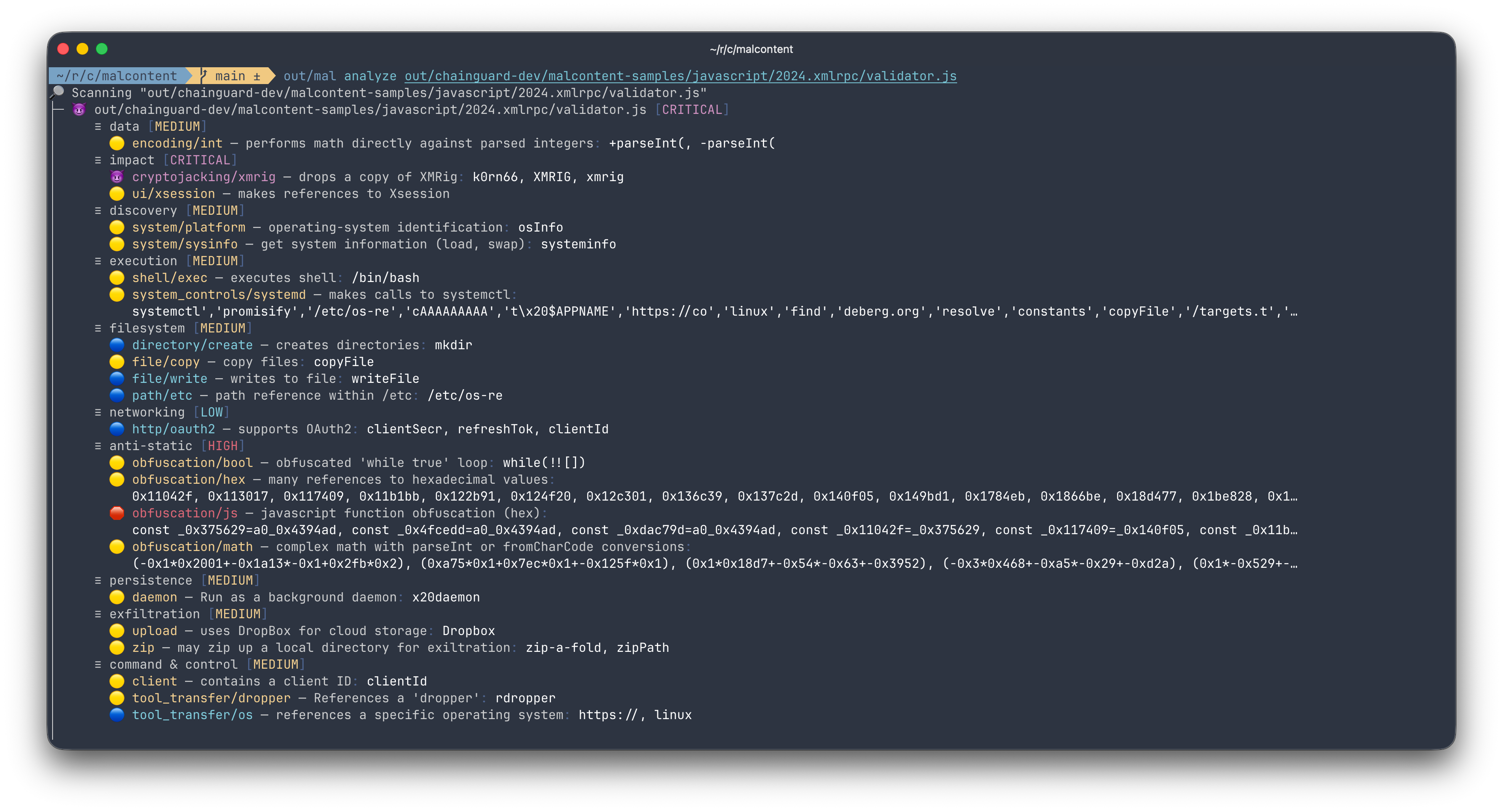
`mal analyze` 会列出常见于恶意软件中的功能,并按风险级别分类。它适用于多种文件格式和脚本语言的程序。
```
NAME:
malcontent analyze - fully interrogate a path
USAGE:
malcontent analyze [options]
OPTIONS:
--image string, -i string [ --image string, -i string ] Scan one or more images
--processes Scan the commands (paths) of running processes
--help, -h show help
```
### Diff
```
________ ________ ________ ________
| | | | | | | |
| v1.0.0 | => | v1.0.1 | => | v1.0.2 | => | v1.0.3 |
|________| |________| |________| |________|
unchanged HIGH-RISK decreased
risk increase risk
```
malcontent 发现恶意软件最强大的方法是对 CI/CD 工件进行差异分析。在构建系统中使用时,与传统的恶意软件扫描器相比,malcontent 具有两个显著的上下文优势:
* 预期行为的基线(以前的、已知良好的版本)
* 描述预期变更大小的语义版本控制
以 [3CX 攻击事件](https://www.fortinet.com/blog/threat-research/3cx-desktop-app-compromised) 为例,malcontent 可以轻松地揭示 libffmpeg 中意外的高风险变更:
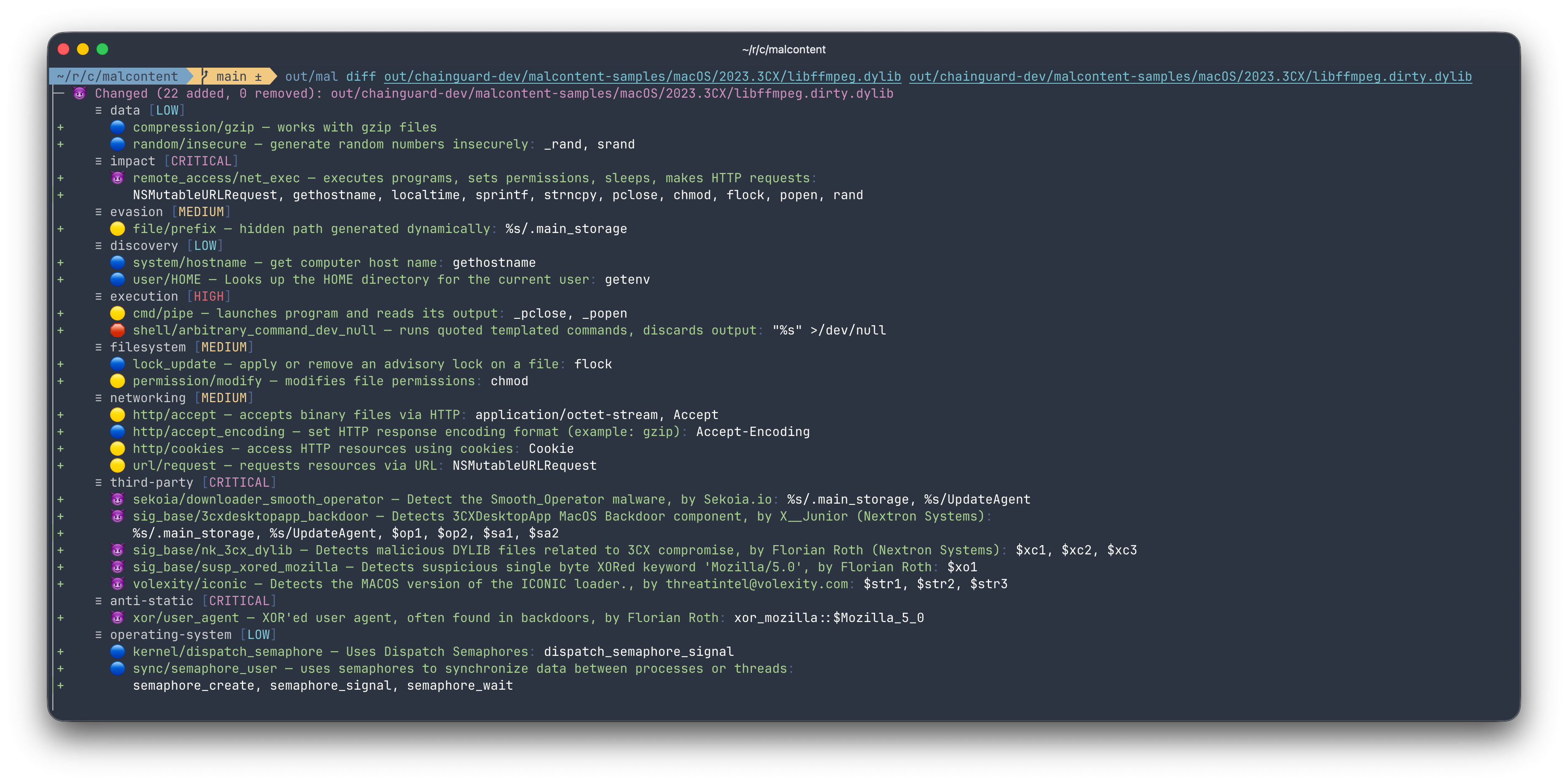
每行以“+”开头的代表一个新行为;每个行为都有一个风险评分,基于该行为在恶意软件中的独特程度。
与其基于的 `diff(1)` 命令一样,malcontent 可以对比两个二进制文件或目录。此外,malcontent 还可以对比两个压缩包文件,甚至 OCI 镜像。
```
NAME:
malcontent diff - scan and diff two paths
USAGE:
malcontent diff [options]
OPTIONS:
--file-risk-change Only show diffs when file risk changes
--file-risk-increase Only show diffs when file risk increases
--image, -i Scan an image
--report, -r Diff existing analyze/scan reports
--sensitivity int, --sens int Control the sensitivity when diffing two files, paths, etc. (default: 5)
--help, -h show help
```
### 扫描
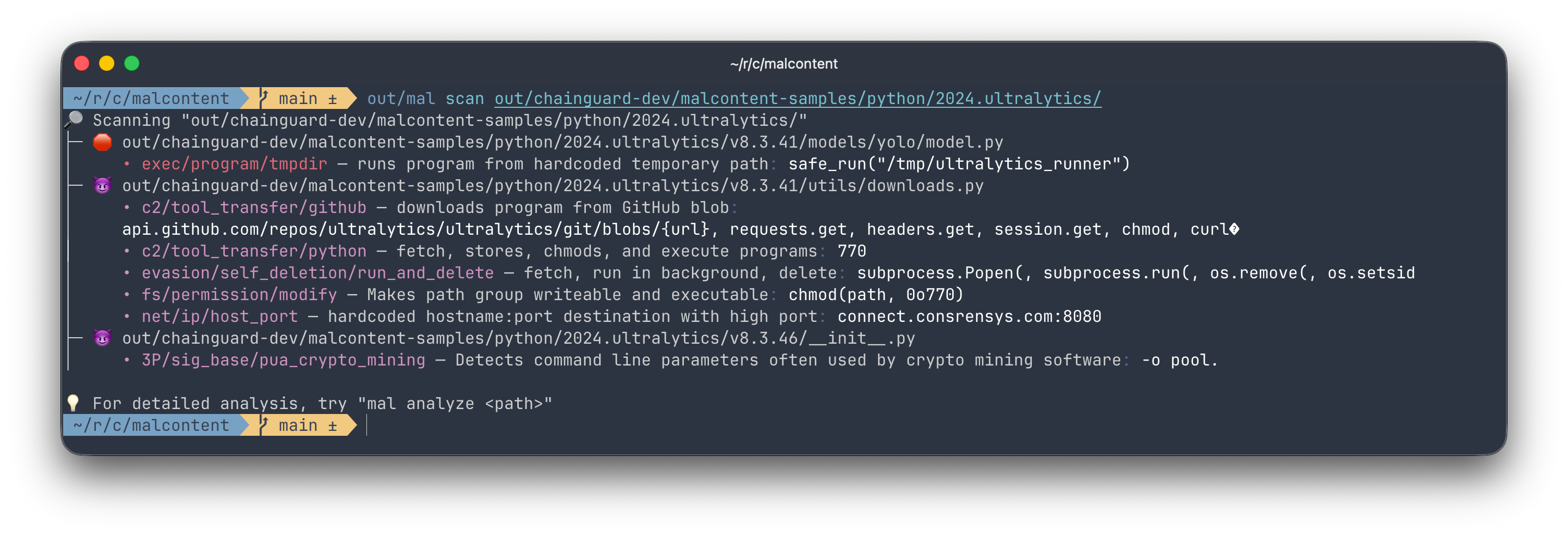
malcontent 最基本的功能是扫描目标中可能的恶意软件,默认风险阈值为 `HIGH`(即无害、低和中等行为或文件会被过滤掉)。
```
NAME:
malcontent scan - tersely scan a path and return findings of the highest severity
USAGE:
malcontent scan [options]
OPTIONS:
--image string, -i string [ --image string, -i string ] Scan one or more images
--processes Scan the commands (paths) of running processes
--help, -h show help
```
## 安装
### 容器
`docker pull cgr.dev/chainguard/malcontent:latest`
### 本地
要求:
* [Go](https://go.dev/dl) - 编程语言
* [Rust](https://rust-lang.org/tools/install/) - YARA-X 依赖项
* [YARA-X](https://virustotal.github.io/yara-x/docs/intro/installation/) - YARA 的 Rust 实现
* [pkgconf](https://github.com/pkgconf/pkgconf) - Go 查找 C 依赖项所需,包含在许多 UNIX 发行版中
* [libssl-dev](https://packages.debian.org/sid/libssl-dev) 包
* [UPX](https://upx.github.io/)* - 刷新样本测试数据所需
要安装 YARA-X,首先安装 Rust,然后运行 `make install-yara-x`,这将克隆 YARA-X 存储库并安装其依赖项和 C API。
### 在 Debian/Ubuntu 中本地构建
1. 安装依赖项。在 Debian/Ubuntu 上你可以运行:
sudo apt-get install -y pkgconf libssl-dev
确保已安装 [Go](https://go.dev/doc/install) 和 [Rust](https://www.rust-lang.org/tools/install)
2. 运行 `make install-yara-x` 以构建 yara-x C API。(
`yara_xcapi.pc` 文件将生成在 `./out/lib/pkgconfig` 下。
有关 yara-x C API 的更多信息,请参阅此处的文档:https://virustotal.github.io/yara-x/docs/api/c/c-/#building-the-c-library。)。
3. 使用以下命令构建 malcontent 二进制文件:
make out/mal
生成的二进制文件是 `out/mal`。
4. 安装二进制文件(可选):
sudo install out/mal /usr/local/bin
## 招募贡献者
malcontent 是开源的!如果你有兴趣做出贡献,请查看[我们的开发指南](DEVELOPMENT.md)。发送 pull request 给我们,我们会帮你完成剩下的工作!
## ⚠️ 恶意软件免责声明 ⚠️
由于 malcontent 的运作方式,其他恶意软件扫描器可能会将 malcontent 检测为恶意程序。
利用 YARA 的程序通常会将其他同样使用 YARA 的程序视为恶意程序,因为它们会查找问题行为的字符串。
例如,Elastic 的 agent 曾因此检测到 malcontent:https://github.com/chainguard-dev/malcontent/issues/78。
标签:AI应用开发, Chainguard, Go语言, YARA, 二进制分析, 云安全监控, 云安全运维, 云资产可视化, 可视化界面, 后门检测, 威胁发现, 安全扫描, 差异分析, 文档安全, 日志审计, 时序注入, 程序破解, 请求拦截, 静态分析