DrewThomasson/ebook2audiobook
GitHub: DrewThomasson/ebook2audiobook
一款支持声音克隆和多语言的开源电子书转有声书工具,集成多种 TTS 引擎并支持 Docker 部署。
Stars: 19618 | Forks: 1652
# 📚 ebook2audiobook (E2A)
支持 CPU/GPU 的电子书转有声书转换器,带有章节和元数据
使用先进的 TTS 引擎及更多功能。
支持声音克隆和 1158 种语言! [](https://discord.gg/63Tv3F65k6) ### 本地运行 [](#instructions) [](https://github.com/DrewThomasson/ebook2audiobook/actions/workflows/Docker-Build.yml) [](https://github.com/DrewThomasson/ebook2audiobook/releases/latest)
 ### 远程运行
[](https://huggingface.co/spaces/drewThomasson/ebook2audiobook)
[](https://colab.research.google.com/github/DrewThomasson/ebook2audiobook/blob/main/Notebooks/colab_ebook2audiobook.ipynb) [](https://github.com/Rihcus/ebook2audiobookXTTS/blob/main/Notebooks/kaggle-ebook2audiobook.ipynb)
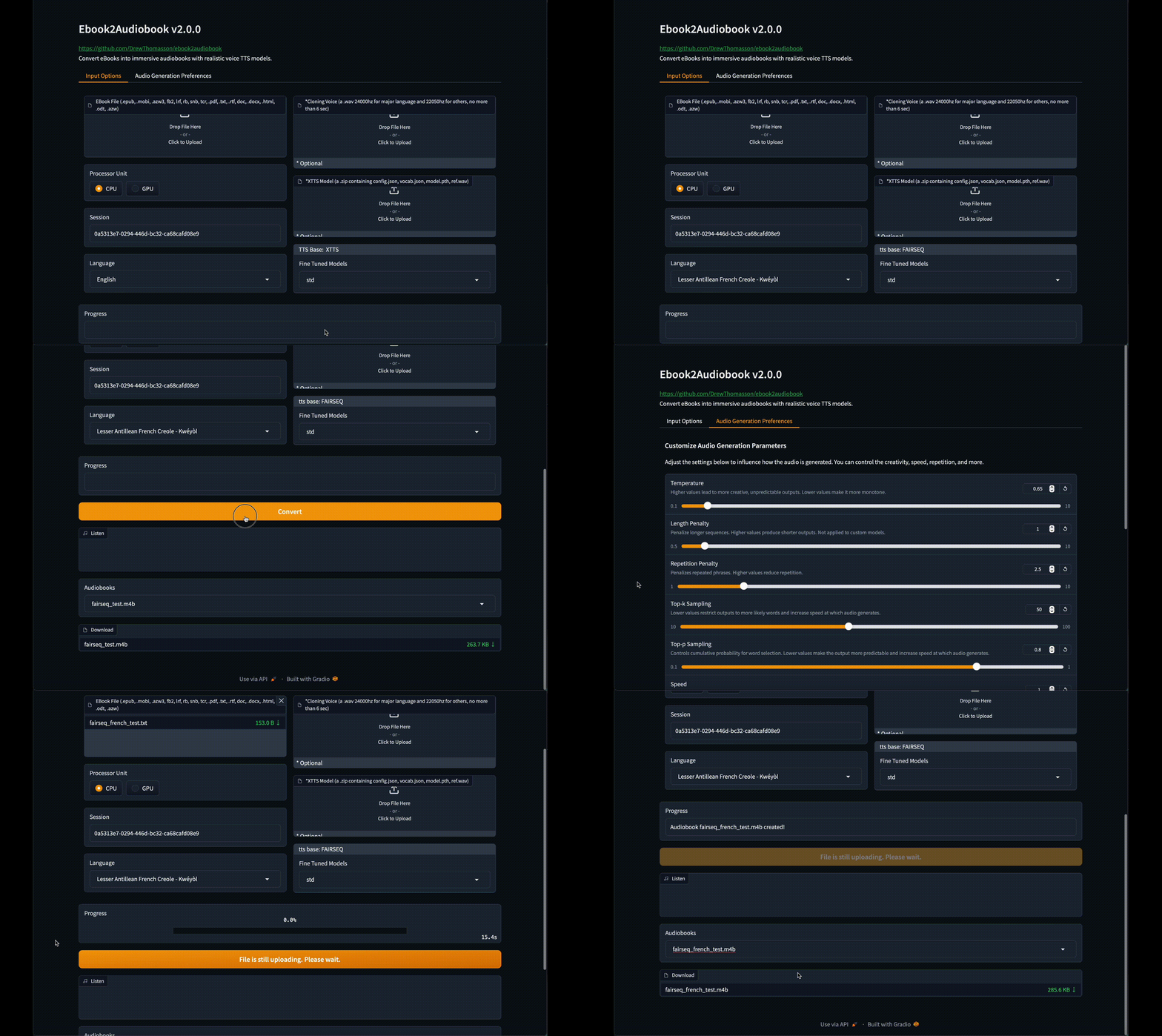
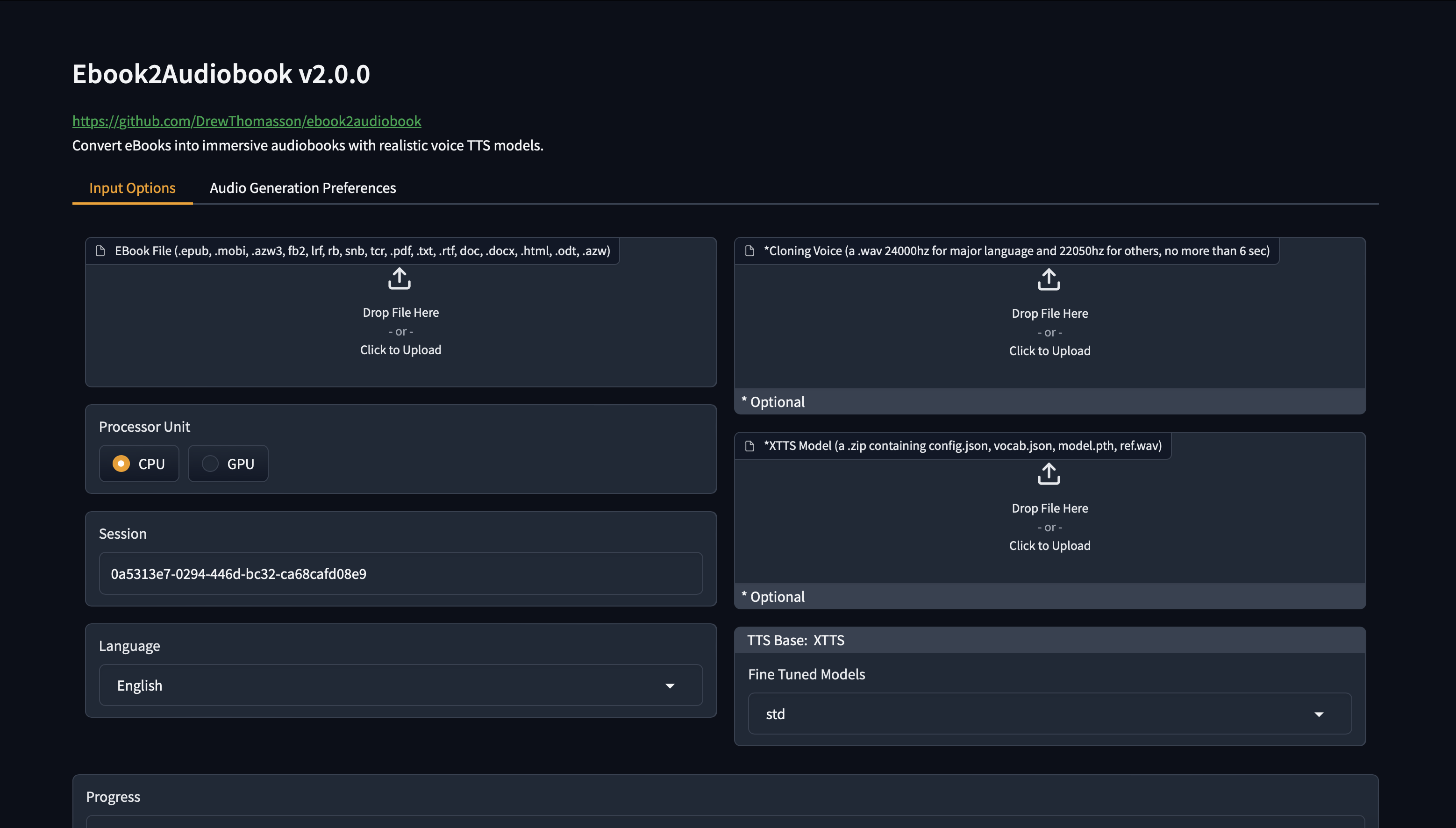
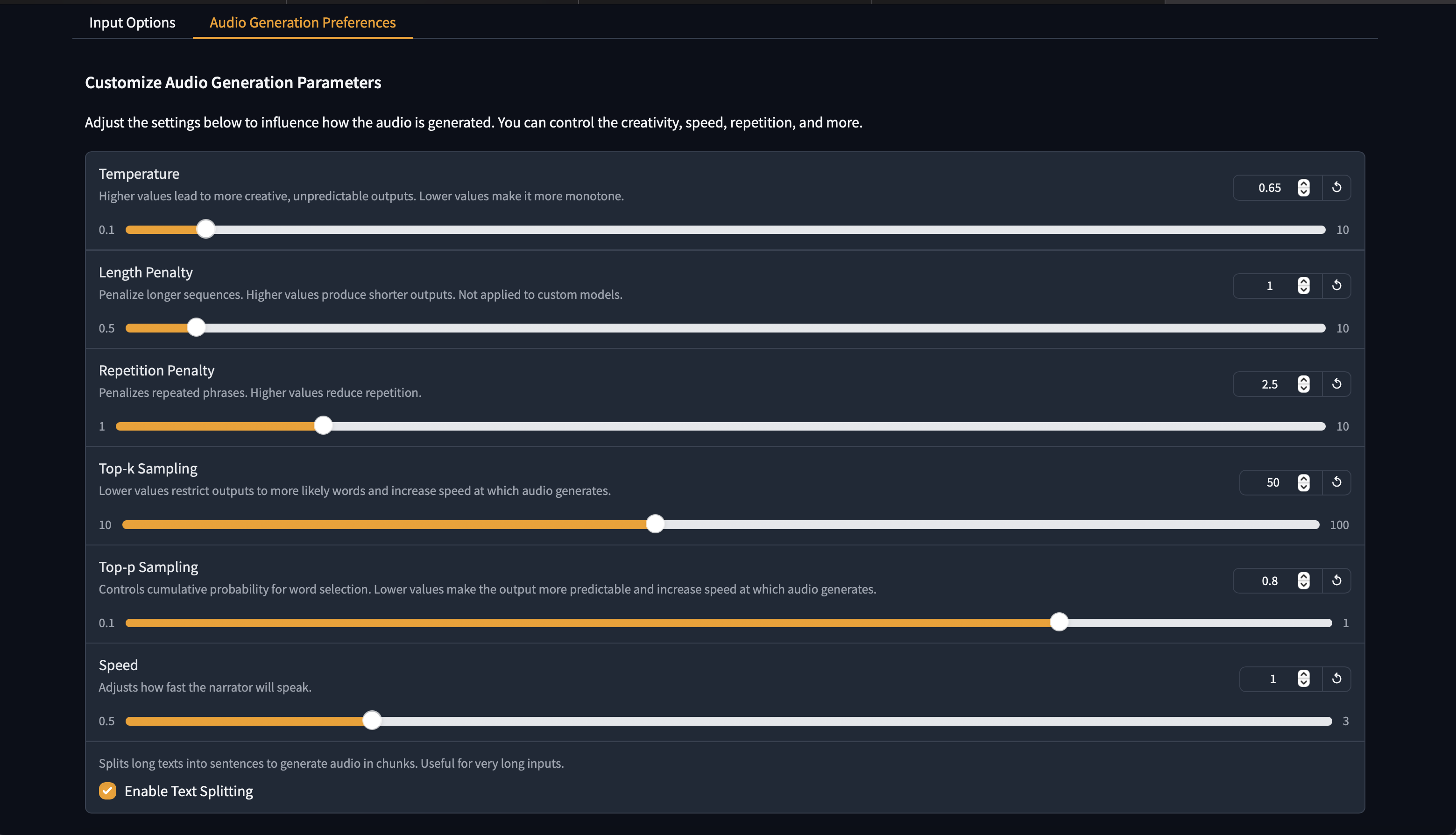
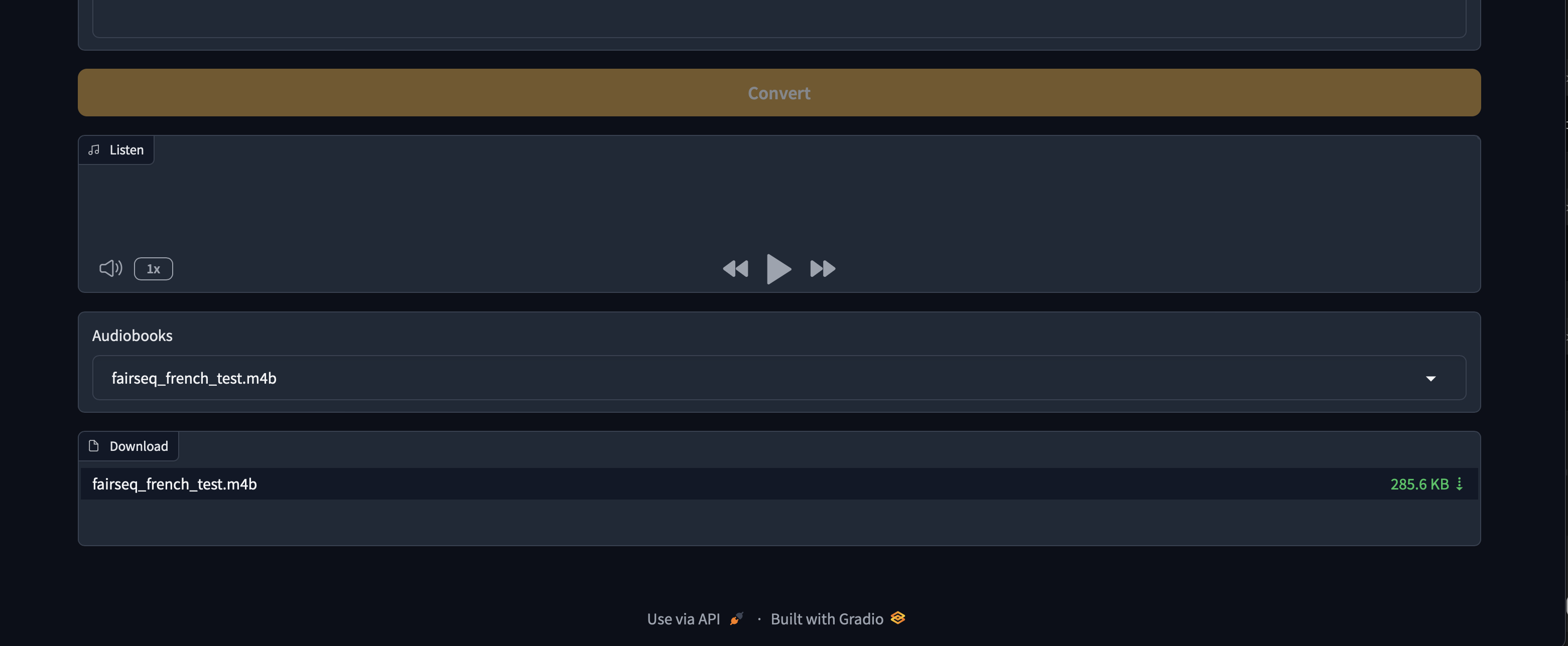
#### GUI 界面
### 远程运行
[](https://huggingface.co/spaces/drewThomasson/ebook2audiobook)
[](https://colab.research.google.com/github/DrewThomasson/ebook2audiobook/blob/main/Notebooks/colab_ebook2audiobook.ipynb) [](https://github.com/Rihcus/ebook2audiobookXTTS/blob/main/Notebooks/kaggle-ebook2audiobook.ipynb)
#### GUI 界面

 ## 演示
**全新默认语音演示**
https://github.com/user-attachments/assets/750035dc-e355-46f1-9286-05c1d9e88cea
## README.md
## 目录
- [ebook2audiobook](#-ebook2audiobook)
- [功能](#features)
- [GUI 界面](#gui-interface)
- [演示](#demos)
- [支持的语言](#supported-languages)
- [最低要求](#hardware-requirements)
- [用法](#instructions)
- [本地运行](#instructions)
- [启动 Gradio Web 界面](#instructions)
- [基础 Headless 用法](#basic-usage)
- [Headless 自定义 XTTS 模型用法](#example-of-custom-model-zip-upload)
- [帮助命令输出](#help-command-output)
- [远程运行](#run-remotely)
- [Docker](#docker)
- [运行步骤](#docker)
- [常见 Docker 问题](#common-docker-issues)
- [微调 TTS 模型](#fine-tuned-tts-models)
- [微调 TTS 模型集合](#fine-tuned-tts-collection)
- [训练 XTTSv2](#fine-tune-your-own-xttsv2-model)
- [支持的电子书格式](#supported-ebook-formats)
- [输出格式](#output-and-process-formats)
- [回退到旧版本](#reverting-to-older-versions)
- [常见问题](#common-issues)
- [特别感谢](#special-thanks)
- [目录](#table-of-contents)
## 功能
- 🔧 **支持的 TTS 引擎**:`XTTSv2`, `Bark`, `Fairseq`, `VITS`, `Tacotron2`, `Tortoise`, `GlowTTS`, `YourTTS`
- 📚 **转换多种文件格式**:`.epub`, `.mobi`, `.azw3`, `.fb2`, `.lrf`, `.rb`, `.snb`, `.tcr`, `.pdf`, `.txt`, `.rtf`, `.doc`, `.docx`, `.html`, `.odt`, `.azw`, `.tiff`, `.tif`, `.png`, `.jpg`, `.jpeg`, `.bmp`, `.zip`
- 💻 **文本区域** 直接将短文本转换为音频
- 🔍 **OCR 扫描** 用于包含文本页面图像的文件
- 🔊 **高质量文本转语音** 从接近实时到接近真实人声
- 🗣️ **可选声音克隆** 使用您自己的声音文件
- 🌐 **支持 1158 种语言** ([支持语言列表](https://dl.fbaipublicfiles.com/mms/tts/all-tts-languages.html))
- 💻 **对低资源环境友好** — 可在 **2 GB RAM / 1 GB VRAM (最低要求)** 上运行
- 🎵 **有声书输出格式**:单声道或立体声 `aac`, `flac`, `mp3`, `m4b`, `m4a`, `mp4`, `mov`, `ogg`, `wav`, `webm`
- 🧠 **支持 SML 标签** — 对停顿、暂停、声音切换等进行细粒度控制 ([见下文](#sml-tags-available))
- 🧩 **可选自定义模型** 使用您自己训练的模型 (XTTSv2, VITS, FAIRSEQ, PIPER,其他模型视需求提供)
- 🎛️ **由 E2A 团队训练的微调预设模型**
## 演示
**全新默认语音演示**
https://github.com/user-attachments/assets/750035dc-e355-46f1-9286-05c1d9e88cea
## README.md
## 目录
- [ebook2audiobook](#-ebook2audiobook)
- [功能](#features)
- [GUI 界面](#gui-interface)
- [演示](#demos)
- [支持的语言](#supported-languages)
- [最低要求](#hardware-requirements)
- [用法](#instructions)
- [本地运行](#instructions)
- [启动 Gradio Web 界面](#instructions)
- [基础 Headless 用法](#basic-usage)
- [Headless 自定义 XTTS 模型用法](#example-of-custom-model-zip-upload)
- [帮助命令输出](#help-command-output)
- [远程运行](#run-remotely)
- [Docker](#docker)
- [运行步骤](#docker)
- [常见 Docker 问题](#common-docker-issues)
- [微调 TTS 模型](#fine-tuned-tts-models)
- [微调 TTS 模型集合](#fine-tuned-tts-collection)
- [训练 XTTSv2](#fine-tune-your-own-xttsv2-model)
- [支持的电子书格式](#supported-ebook-formats)
- [输出格式](#output-and-process-formats)
- [回退到旧版本](#reverting-to-older-versions)
- [常见问题](#common-issues)
- [特别感谢](#special-thanks)
- [目录](#table-of-contents)
## 功能
- 🔧 **支持的 TTS 引擎**:`XTTSv2`, `Bark`, `Fairseq`, `VITS`, `Tacotron2`, `Tortoise`, `GlowTTS`, `YourTTS`
- 📚 **转换多种文件格式**:`.epub`, `.mobi`, `.azw3`, `.fb2`, `.lrf`, `.rb`, `.snb`, `.tcr`, `.pdf`, `.txt`, `.rtf`, `.doc`, `.docx`, `.html`, `.odt`, `.azw`, `.tiff`, `.tif`, `.png`, `.jpg`, `.jpeg`, `.bmp`, `.zip`
- 💻 **文本区域** 直接将短文本转换为音频
- 🔍 **OCR 扫描** 用于包含文本页面图像的文件
- 🔊 **高质量文本转语音** 从接近实时到接近真实人声
- 🗣️ **可选声音克隆** 使用您自己的声音文件
- 🌐 **支持 1158 种语言** ([支持语言列表](https://dl.fbaipublicfiles.com/mms/tts/all-tts-languages.html))
- 💻 **对低资源环境友好** — 可在 **2 GB RAM / 1 GB VRAM (最低要求)** 上运行
- 🎵 **有声书输出格式**:单声道或立体声 `aac`, `flac`, `mp3`, `m4b`, `m4a`, `mp4`, `mov`, `ogg`, `wav`, `webm`
- 🧠 **支持 SML 标签** — 对停顿、暂停、声音切换等进行细粒度控制 ([见下文](#sml-tags-available))
- 🧩 **可选自定义模型** 使用您自己训练的模型 (XTTSv2, VITS, FAIRSEQ, PIPER,其他模型视需求提供)
- 🎛️ **由 E2A 团队训练的微调预设模型**
(如果您需要额外的微调模型,或者希望将您的模型分享到官方预设列表,请联系我们) ## 硬件要求 - 最低 2GB RAM,推荐 8GB。 - 最低 1GB VRAM,推荐 4GB。 - 如果在 Windows 上运行,需启用虚拟化 (仅限 Docker)。 - CPU, XPU (intel, AMD, ARM)*。 - CUDA, ROCm, JETSON - MPS (Apple Silicon CPU) * 现代 TTS 引擎在 CPU 上运行非常慢,因此请使用较低质量的 TTS,例如 YourTTS, Tacotron2 等。 ## 支持的语言 | **阿拉伯语** | **中文** | **英语** | **西班牙语** | |:------------------:|:------------------:|:------------------:|:------------------:| | **法语** | **德语** | **意大利语** | **葡萄牙语** | | **波兰语** | **土耳其语** | **俄语** | **荷兰语** | | **捷克语** | **日语** | **印地语** | **孟加拉语** | | **匈牙利语** | **韩语** | **越南语**| **瑞典语** | | **波斯语** | **约鲁巴语** | **斯瓦希里语** | **印尼语**| | **斯洛伐克语** | **克罗地亚语** | **泰米尔语** | **丹麦语** | - [**在此查看 +1130 种语言和方言**](https://dl.fbaipublicfiles.com/mms/tts/all-tts-languages.html) ## 支持的电子书格式 - `.epub`, `.pdf`, `.mobi`, `.txt`, `.html`, `.rtf`, `.chm`, `.lit`, `.pdb`, `.fb2`, `.odt`, `.cbr`, `.cbz`, `.prc`, `.lrf`, `.pml`, `.snb`, `.cbc`, `.rb`, `.tcr` - **最佳效果**:`.epub` 或 `.mobi`,用于自动章节检测 ## 输出与处理格式 - `.m4b`, `.m4a`, `.mp4`, `.webm`, `.mov`, `.mp3`, `.flac`, `.wav`, `.ogg`, `.aac` - 处理格式可以在 lib/conf.py 中更改 ## 可用的 SML 标签 - `[break]` — 静音 (随机范围 **0.3–0.6 秒**) - `[pause]` — 静音 (随机范围 **1.0–1.6 秒**) - `[pause:N]` — 固定暂停 (**N 秒**) - `[voice:/path/to/voice/file]...[/voice]` — 从默认或通过 GUI/CLI 选择的语音切换声音 **查看我们的另一个仓库,专门用于自动在您的电子书中添加 SML -> [E2A-SML](./tools/E2A-SML)** ### 说明 1. **克隆仓库** git clone https://github.com/DrewThomasson/ebook2audiobook.git cd ebook2audiobook 2. **安装 / 运行 ebook2audiobook**: - **Linux/MacOS** ./ebook2audiobook.command MacOS 用户注意:会安装 homebrew 以安装缺失的程序。 - **Mac 启动器** 双击 `Mac Ebook2Audiobook Launcher.command` - **Windows** ebook2audiobook.cmd 或者 双击 `ebook2audiobook.cmd` Windows 用户注意:会安装 scoop 以在无需管理员权限的情况下安装缺失的程序。 3. **打开 Web 应用**:点击终端中提供的 URL 以访问 Web 应用并转换电子书。 `http://localhost:7860/` 4. **获取公共链接**: `./ebook2audiobook.command --share` (Linux/MacOS) `ebook2audiobook.cmd --share` (Windows) `python app.py --share` (所有操作系统) ### 基础用法 - **Linux/MacOS**: ./ebook2audiobook.command --headless --ebook --voice --language
- **Windows**
ebook2audiobook.cmd --headless --ebook --voice --language
- **[--ebook]**:您的电子书文件路径
- **[--voice]**:声音克隆文件路径 (可选)
- **[--language]**:ISO-639-3 语言代码 (例如:ita 代表意大利语,eng 代表英语,deu 代表德语...)。
默认语言为 eng,对于在 ./lib/lang.py 中设置的默认语言,--language 是可选的。
也支持 ISO-639-1 的 2 字母代码。 ### 自定义模型 Zip 上传示例 (必须是包含必需模型文件的 .zip 文件。例如 XTTSv2 的 config.json, model.pth, vocab.json 和 ref.wav) - **Linux/MacOS** ./ebook2audiobook.command --headless --ebook --language --custom_model
- **Windows**
ebook2audiobook.cmd --headless --ebook --language --custom_model
注意:自定义模型的 ref.wav 始终是转换时选择的声音
- ****:指向 `model_name.zip` 文件的路径,
该文件必须 (根据 tts 引擎) 包含所有必需的文件
(见 ./lib/models.py)。 ### 包含所有可用参数的详细指南 - **Linux/MacOS** ./ebook2audiobook.command --help - **Windows** ebook2audiobook.cmd --help - **或者适用于所有操作系统** ```python app.py --help ``` ``` usage: app.py [-h] [--session SESSION] [--share] [--headless] [--ebook EBOOK] [--ebooks_dir EBOOKS_DIR] [--language LANGUAGE] [--voice VOICE] [--voice_map VOICE_MAP] [--device {CPU,CUDA,MPS,ROCM,XPU,JETSON}] [--tts_engine {XTTS,BARK,VITS,FAIRSEQ,TACOTRON,YOURTTS,xtts,bark,vits,fairseq,tacotron,yourtts}] [--custom_model CUSTOM_MODEL] [--fine_tuned FINE_TUNED] [--output_format OUTPUT_FORMAT] [--output_channel OUTPUT_CHANNEL] [--temperature TEMPERATURE] [--length_penalty LENGTH_PENALTY] [--num_beams NUM_BEAMS] [--repetition_penalty REPETITION_PENALTY] [--top_k TOP_K] [--top_p TOP_P] [--speed SPEED] [--enable_text_splitting] [--text_temp TEXT_TEMP] [--waveform_temp WAVEFORM_TEMP] [--output_dir OUTPUT_DIR] [--version] Convert eBooks to Audiobooks using a Text-to-Speech model. You can either launch the Gradio interface or run the script in headless mode for direct conversion. options: -h, --help show this help message and exit --session SESSION Session to resume the conversion in case of interruption, crash, or reuse of custom models and custom cloning voices. **** The following option is for gradio/gui mode only: --share (Optional) Enable a public shareable Gradio link. **** The following options are for --headless mode only: --headless Run the script in headless mode --ebook EBOOK Path to the ebook file for conversion. Cannot be used when --ebooks_dir is present. --ebooks_dir EBOOKS_DIR Relative or absolute path of the directory containing the files to convert. Cannot be used when --ebook is present. --text TEXT Raw text for conversion. Cannot be used when --ebook or --ebooks_dir is present. --language LANGUAGE Language of the e-book. Default language is set in ./lib/lang.py sed as default if not present. All compatible language codes are in ./lib/lang.py optional parameters: --translate ISO3 (Optional) Translate ebook to a target language (ISO 639-3 code, e.g. eng, fra, deu) before TTS synthesis. Uses argostranslate. The target language becomes the effective TTS language for the run. A copy of the source ebook is made with the _ suffix so translated and non-translated
outputs stay isolated (independent process folder, audio chunks, and final file).
--voice VOICE (Optional) Path to the voice cloning file for TTS engine.
Uses the default voice if not present.
--voice_map VOICE_MAP
(Optional, --ebooks_dir only) Path to a JSON file mapping ebook path -> voice path.
Each entry overrides --voice for that specific ebook. Missing/null entries fall back to --voice.
Keys may be absolute paths or basenames. Example:
{"book1.epub": "/voices/eng/adult/female/alice.wav", "/abs/path/book2.epub": null}
--device {CPU,CUDA,MPS,ROCM,XPU,JETSON}
(Optional) Processor unit type for the conversion.
Default is set in ./lib/conf.py if not present. Fall back to CPU if CUDA or MPS is not available.
--tts_engine {XTTS,BARK,VITS,FAIRSEQ,TACOTRON,YOURTTS,xtts,bark,vits,fairseq,tacotron,yourtts}
(Optional) Preferred TTS engine (available are: ['XTTS', 'BARK', 'VITS', 'FAIRSEQ', 'TACOTRON', 'YOURTTS', 'xtts', 'bark', 'vits', 'fairseq', 'tacotron', 'yourtts'].
Default depends on the selected language. The tts engine should be compatible with the chosen language
--custom_model CUSTOM_MODEL
(Optional) Path to the custom model zip file cntaining mandatory model files.
Please refer to ./lib/models.py
--fine_tuned FINE_TUNED
(Optional) Fine tuned model path. Default is builtin model.
--output_format OUTPUT_FORMAT
(Optional) Output audio format. Default is m4b set in ./lib/conf.py
--output_channel OUTPUT_CHANNEL
(Optional) Output audio channel. Default is mono set in ./lib/conf.py
--temperature TEMPERATURE
(xtts only, optional) Temperature for the model.
Default to config.json model. Higher temperatures lead to more creative outputs.
--length_penalty LENGTH_PENALTY
(xtts only, optional) A length penalty applied to the autoregressive decoder.
Default to config.json model. Not applied to custom models.
--num_beams NUM_BEAMS
(xtts only, optional) Controls how many alternative sequences the model explores. Must be equal or greater than length penalty.
Default to config.json model.
--repetition_penalty REPETITION_PENALTY
(xtts only, optional) A penalty that prevents the autoregressive decoder from repeating itself.
Default to config.json model.
--top_k TOP_K (xtts only, optional) Top-k sampling.
Lower values mean more likely outputs and increased audio generation speed.
Default to config.json model.
--top_p TOP_P (xtts only, optional) Top-p sampling.
Lower values mean more likely outputs and increased audio generation speed. Default to config.json model.
--speed SPEED (xtts only, optional) Speed factor for the speech generation.
Default to config.json model.
--enable_text_splitting
(xtts only, optional) Enable TTS text splitting. This option is known to not be very efficient.
Default to config.json model.
--text_temp TEXT_TEMP
(bark only, optional) Text Temperature for the model.
Default to config.json model.
--waveform_temp WAVEFORM_TEMP
(bark only, optional) Waveform Temperature for the model.
Default to config.json model.
--output_dir OUTPUT_DIR
(Optional) Path to the output directory. Default is set in ./lib/conf.py
--version Show the version of the script and exit
Example usage:
Windows:
Gradio/GUI:
ebook2audiobook.cmd
Headless mode:
ebook2audiobook.cmd --headless --ebook '/path/to/file' --language eng
Linux/Mac:
Gradio/GUI:
./ebook2audiobook.command
Headless mode:
./ebook2audiobook.command --headless --ebook '/path/to/file' --language eng
SML tags available:
[break] — silence (random range **0.3–0.6 sec.**)
[pause] — silence (random range **1.0–1.6 sec.**)
[pause:N] — fixed pause (**N sec.**)
[voice:/path/to/voice/file]...[/voice] — switch voice from default or selected voice from GUI/CLI
```
注意:在 gradio/gui 模式下,要取消正在进行的转换,只需点击电子书上传组件上的 [X]。
提示:如果需要更长的停顿,可以添加 '[pause:3]' 代表 3 秒等。
### Docker
1. **克隆仓库**:
```
git clone https://github.com/DrewThomasson/ebook2audiobook.git
cd ebook2audiobook
```
2. **构建容器**
```
Windows:
Docker:
ebook2audiobook.cmd --script_mode build_docker
Docker Compose:
ebook2audiobook.cmd --script_mode build_docker --docker_mode compose
Podman Compose:
ebook2audiobook.cmd --script_mode build_docker --docker_mode podman
Linux/Mac
Docker:
./ebook2audiobook.command --script_mode build_docker
Docker Compose
./ebook2audiobook.command --script_mode build_docker --docker_mode compose
Podman Compose:
./ebook2audiobook.command --script_mode build_docker --docker_mode podman
```
4. **运行容器:**
```
Docker run image:
Gradio/GUI:
CPU:
docker run -v "./ebooks:/app/ebooks" -v "./audiobooks:/app/audiobooks" -v "./models:/app/models" -v "./voices:/app/voices" -v "./tmp:/app/tmp" --rm -it -p 7860:7860 athomasson2/ebook2audiobook:cpu
CUDA:
docker run -v "./ebooks:/app/ebooks" -v "./audiobooks:/app/audiobooks" -v "./models:/app/models" -v "./voices:/app/voices" -v "./tmp:/app/tmp" --gpus all --rm -it -p 7860:7860 athomasson2/ebook2audiobook:cu[118/122/124/126 etc..]
ROCM:
docker run -v "./ebooks:/app/ebooks" -v "./audiobooks:/app/audiobooks" -v "./models:/app/models" -v "./voices:/app/voices" -v "./tmp:/app/tmp" --device=/dev/kfd --device=/dev/dri --rm -it -p 7860:7860 athomasson2/ebook2audiobook:rocm[6.0/6.1/6.4 etc..]
XPU:
docker run -v "./ebooks:/app/ebooks" -v "./audiobooks:/app/audiobooks" -v "./models:/app/models" -v "./voices:/app/voices" -v "./tmp:/app/tmp" --device=/dev/dri --rm -it -p 7860:7860 athomasson2/ebook2audiobook:xpu
JETSON:
docker run -v "./ebooks:/app/ebooks" -v "./audiobooks:/app/audiobooks" -v "./models:/app/models" -v "./voices:/app/voices" -v "./tmp:/app/tmp" --runtime nvidia --rm -it -p 7860:7860 athomasson2/ebook2audiobook:jetson[51/60/61 etc...]
Headless mode:
CPU:
docker run -v "./ebooks:/app/ebooks" -v "./audiobooks:/app/audiobooks" -v "./models:/app/models" -v "./voices:/app/voices" -v "./tmp:/app/tmp" -v "/my/real/ebooks/folder/absolute/path:/app/another_ebook_folder" --rm -it -p 7860:7860 ebook2audiobook:cpu --headless --ebook "/app/another_ebook_folder/myfile.pdf" [--voice /app/my/voicepath/voice.mp3 etc..]
CUDA:
docker run -v "./ebooks:/app/ebooks" -v "./audiobooks:/app/audiobooks" -v "./models:/app/models" -v "./voices:/app/voices" -v "./tmp:/app/tmp" -v "/my/real/ebooks/folder/absolute/path:/app/another_ebook_folder" --gpus all --rm -it -p 7860:7860 ebook2audiobook:cu[118/122/124/126 etc..] --headless --ebook "/app/another_ebook_folder/myfile.pdf" [--voice /app/my/voicepath/voice.mp3 etc..]
ROCM:
docker run -v "./ebooks:/app/ebooks" -v "./audiobooks:/app/audiobooks" -v "./models:/app/models" -v "./voices:/app/voices" -v "./tmp:/app/tmp" -v "/my/real/ebooks/folder/absolute/path:/app/another_ebook_folder" --device=/dev/kfd --device=/dev/dri --rm -it -p 7860:7860 ebook2audiobook:rocm[6.0/6.1/6.4 etc.] --headless --ebook "/app/another_ebook_folder/myfile.pdf" [--voice /app/my/voicepath/voice.mp3 etc..]
XPU:
docker run -v "./ebooks:/app/ebooks" -v "./audiobooks:/app/audiobooks" -v "./models:/app/models" -v "./voices:/app/voices" -v "./tmp:/app/tmp" -v "/my/real/ebooks/folder/absolute/path:/app/another_ebook_folder" --device=/dev/dri --rm -it -p 7860:7860 ebook2audiobook:xpu --headless --ebook "/app/another_ebook_folder/myfile.pdf" [--voice /app/my/voicepath/voice.mp3 etc..]
JETSON:
docker run -v "./ebooks:/app/ebooks" -v "./audiobooks:/app/audiobooks" -v "./models:/app/models" -v "./voices:/app/voices" -v "./tmp:/app/tmp" -v "/my/real/ebooks/folder/absolute/path:/app/another_ebook_folder" --runtime nvidia --rm -it -p 7860:7860 ebook2audiobook:jetson[51/60/61 etc.] --headless --ebook "/app/another_ebook_folder/myfile.pdf" [--voice /app/my/voicepath/voice.mp3 etc..]
Docker Compose (i.e. cuda 12.8:
Run Gradio GUI:
DEVICE_TAG=cu128 docker compose --profile gpu up --no-log-prefix
Run Headless mode:
DEVICE_TAG=cu128 docker compose --profile gpu run --rm ebook2audiobook --headless --ebook "/app/ebooks/myfile.pdf" --voice /app/voices/eng/adult/female/some_voice.wav etc..
Podman Compose (i.e. cuda 12.8:
Run Gradio GUI:
DEVICE_TAG=cu128 podman-compose -f podman-compose.yml --profile gpu up
Run Headless mode:
DEVICE_TAG=cu128 podman-compose -f podman-compose.yml --profile gpu run --rm ebook2audiobook-gpu --headless --ebook "/app/ebooks/myfile.pdf" --voice /app/voices/eng/adult/female/some_voice.wav etc..
```
- 注意:Docker 中不暴露 MPS,因此必须使用 CPU
### 常见 Docker 问题
- 没有检测到我的 NVIDIA GPU?? -> [GPU 问题 Wiki 页面](https://github.com/DrewThomasson/ebook2audiobook/wiki/GPU-ISSUES)
## 微调 TTS 模型
#### 微调您自己的 XTTSv2 模型
[](https://huggingface.co/spaces/drewThomasson/xtts-finetune-webui-gpu) [](https://github.com/DrewThomasson/ebook2audiobook/blob/v25/Notebooks/finetune/xtts/kaggle-xtts-finetune-webui-gradio-gui.ipynb) [](https://discord.gg/63Tv3F65k6) ### 本地运行 [](#instructions) [](https://github.com/DrewThomasson/ebook2audiobook/actions/workflows/Docker-Build.yml) [](https://github.com/DrewThomasson/ebook2audiobook/releases/latest)
### 远程运行
[](https://huggingface.co/spaces/drewThomasson/ebook2audiobook)
[](https://colab.research.google.com/github/DrewThomasson/ebook2audiobook/blob/main/Notebooks/colab_ebook2audiobook.ipynb) [](https://github.com/Rihcus/ebook2audiobookXTTS/blob/main/Notebooks/kaggle-ebook2audiobook.ipynb)
#### GUI 界面

Click to see images of Web GUI
更多演示
**ASMR 语音** https://github.com/user-attachments/assets/68eee9a1-6f71-4903-aacd-47397e47e422 **雨天语音** https://github.com/user-attachments/assets/d25034d9-c77f-43a9-8f14-0d167172b080 **Scarlett 语音** https://github.com/user-attachments/assets/b12009ee-ec0d-45ce-a1ef-b3a52b9f8693 **David Attenborough 语音** https://github.com/user-attachments/assets/81c4baad-117e-4db5-ac86-efc2b7fea921 **示例** (如果您需要额外的微调模型,或者希望将您的模型分享到官方预设列表,请联系我们) ## 硬件要求 - 最低 2GB RAM,推荐 8GB。 - 最低 1GB VRAM,推荐 4GB。 - 如果在 Windows 上运行,需启用虚拟化 (仅限 Docker)。 - CPU, XPU (intel, AMD, ARM)*。 - CUDA, ROCm, JETSON - MPS (Apple Silicon CPU) * 现代 TTS 引擎在 CPU 上运行非常慢,因此请使用较低质量的 TTS,例如 YourTTS, Tacotron2 等。 ## 支持的语言 | **阿拉伯语** | **中文** | **英语** | **西班牙语** | |:------------------:|:------------------:|:------------------:|:------------------:| | **法语** | **德语** | **意大利语** | **葡萄牙语** | | **波兰语** | **土耳其语** | **俄语** | **荷兰语** | | **捷克语** | **日语** | **印地语** | **孟加拉语** | | **匈牙利语** | **韩语** | **越南语**| **瑞典语** | | **波斯语** | **约鲁巴语** | **斯瓦希里语** | **印尼语**| | **斯洛伐克语** | **克罗地亚语** | **泰米尔语** | **丹麦语** | - [**在此查看 +1130 种语言和方言**](https://dl.fbaipublicfiles.com/mms/tts/all-tts-languages.html) ## 支持的电子书格式 - `.epub`, `.pdf`, `.mobi`, `.txt`, `.html`, `.rtf`, `.chm`, `.lit`, `.pdb`, `.fb2`, `.odt`, `.cbr`, `.cbz`, `.prc`, `.lrf`, `.pml`, `.snb`, `.cbc`, `.rb`, `.tcr` - **最佳效果**:`.epub` 或 `.mobi`,用于自动章节检测 ## 输出与处理格式 - `.m4b`, `.m4a`, `.mp4`, `.webm`, `.mov`, `.mp3`, `.flac`, `.wav`, `.ogg`, `.aac` - 处理格式可以在 lib/conf.py 中更改 ## 可用的 SML 标签 - `[break]` — 静音 (随机范围 **0.3–0.6 秒**) - `[pause]` — 静音 (随机范围 **1.0–1.6 秒**) - `[pause:N]` — 固定暂停 (**N 秒**) - `[voice:/path/to/voice/file]...[/voice]` — 从默认或通过 GUI/CLI 选择的语音切换声音 **查看我们的另一个仓库,专门用于自动在您的电子书中添加 SML -> [E2A-SML](./tools/E2A-SML)** ### 说明 1. **克隆仓库** git clone https://github.com/DrewThomasson/ebook2audiobook.git cd ebook2audiobook 2. **安装 / 运行 ebook2audiobook**: - **Linux/MacOS** ./ebook2audiobook.command MacOS 用户注意:会安装 homebrew 以安装缺失的程序。 - **Mac 启动器** 双击 `Mac Ebook2Audiobook Launcher.command` - **Windows** ebook2audiobook.cmd 或者 双击 `ebook2audiobook.cmd` Windows 用户注意:会安装 scoop 以在无需管理员权限的情况下安装缺失的程序。 3. **打开 Web 应用**:点击终端中提供的 URL 以访问 Web 应用并转换电子书。 `http://localhost:7860/` 4. **获取公共链接**: `./ebook2audiobook.command --share` (Linux/MacOS) `ebook2audiobook.cmd --share` (Windows) `python app.py --share` (所有操作系统) ### 基础用法 - **Linux/MacOS**: ./ebook2audiobook.command --headless --ebook
默认语言为 eng,对于在 ./lib/lang.py 中设置的默认语言,--language 是可选的。
也支持 ISO-639-1 的 2 字母代码。 ### 自定义模型 Zip 上传示例 (必须是包含必需模型文件的 .zip 文件。例如 XTTSv2 的 config.json, model.pth, vocab.json 和 ref.wav) - **Linux/MacOS** ./ebook2audiobook.command --headless --ebook
(见 ./lib/models.py)。 ### 包含所有可用参数的详细指南 - **Linux/MacOS** ./ebook2audiobook.command --help - **Windows** ebook2audiobook.cmd --help - **或者适用于所有操作系统** ```python app.py --help ``` ``` usage: app.py [-h] [--session SESSION] [--share] [--headless] [--ebook EBOOK] [--ebooks_dir EBOOKS_DIR] [--language LANGUAGE] [--voice VOICE] [--voice_map VOICE_MAP] [--device {CPU,CUDA,MPS,ROCM,XPU,JETSON}] [--tts_engine {XTTS,BARK,VITS,FAIRSEQ,TACOTRON,YOURTTS,xtts,bark,vits,fairseq,tacotron,yourtts}] [--custom_model CUSTOM_MODEL] [--fine_tuned FINE_TUNED] [--output_format OUTPUT_FORMAT] [--output_channel OUTPUT_CHANNEL] [--temperature TEMPERATURE] [--length_penalty LENGTH_PENALTY] [--num_beams NUM_BEAMS] [--repetition_penalty REPETITION_PENALTY] [--top_k TOP_K] [--top_p TOP_P] [--speed SPEED] [--enable_text_splitting] [--text_temp TEXT_TEMP] [--waveform_temp WAVEFORM_TEMP] [--output_dir OUTPUT_DIR] [--version] Convert eBooks to Audiobooks using a Text-to-Speech model. You can either launch the Gradio interface or run the script in headless mode for direct conversion. options: -h, --help show this help message and exit --session SESSION Session to resume the conversion in case of interruption, crash, or reuse of custom models and custom cloning voices. **** The following option is for gradio/gui mode only: --share (Optional) Enable a public shareable Gradio link. **** The following options are for --headless mode only: --headless Run the script in headless mode --ebook EBOOK Path to the ebook file for conversion. Cannot be used when --ebooks_dir is present. --ebooks_dir EBOOKS_DIR Relative or absolute path of the directory containing the files to convert. Cannot be used when --ebook is present. --text TEXT Raw text for conversion. Cannot be used when --ebook or --ebooks_dir is present. --language LANGUAGE Language of the e-book. Default language is set in ./lib/lang.py sed as default if not present. All compatible language codes are in ./lib/lang.py optional parameters: --translate ISO3 (Optional) Translate ebook to a target language (ISO 639-3 code, e.g. eng, fra, deu) before TTS synthesis. Uses argostranslate. The target language becomes the effective TTS language for the run. A copy of the source ebook is made with the _