atiilla/GeoIntel
GitHub: atiilla/GeoIntel
一款利用 Google Gemini 大模型分析照片视觉特征来推断拍摄地点的 AI 地理定位工具。
Stars: 1061 | Forks: 151
# GeoIntel

利用 Google 的 Gemini API,通过 AI 驱动的地理定位分析来揭示照片拍摄地点的 Python 工具。
## 安装
```
# 基本安装
pip install geointel
```
## 使用方法
### Web 界面(新功能!)
启动具有现代 UI 的交互式 Web 界面:
```
- Standard:
$ geointel --web
- Custom host and port:
$ geointel --web --host 0.0.0.0 --port 4000
```
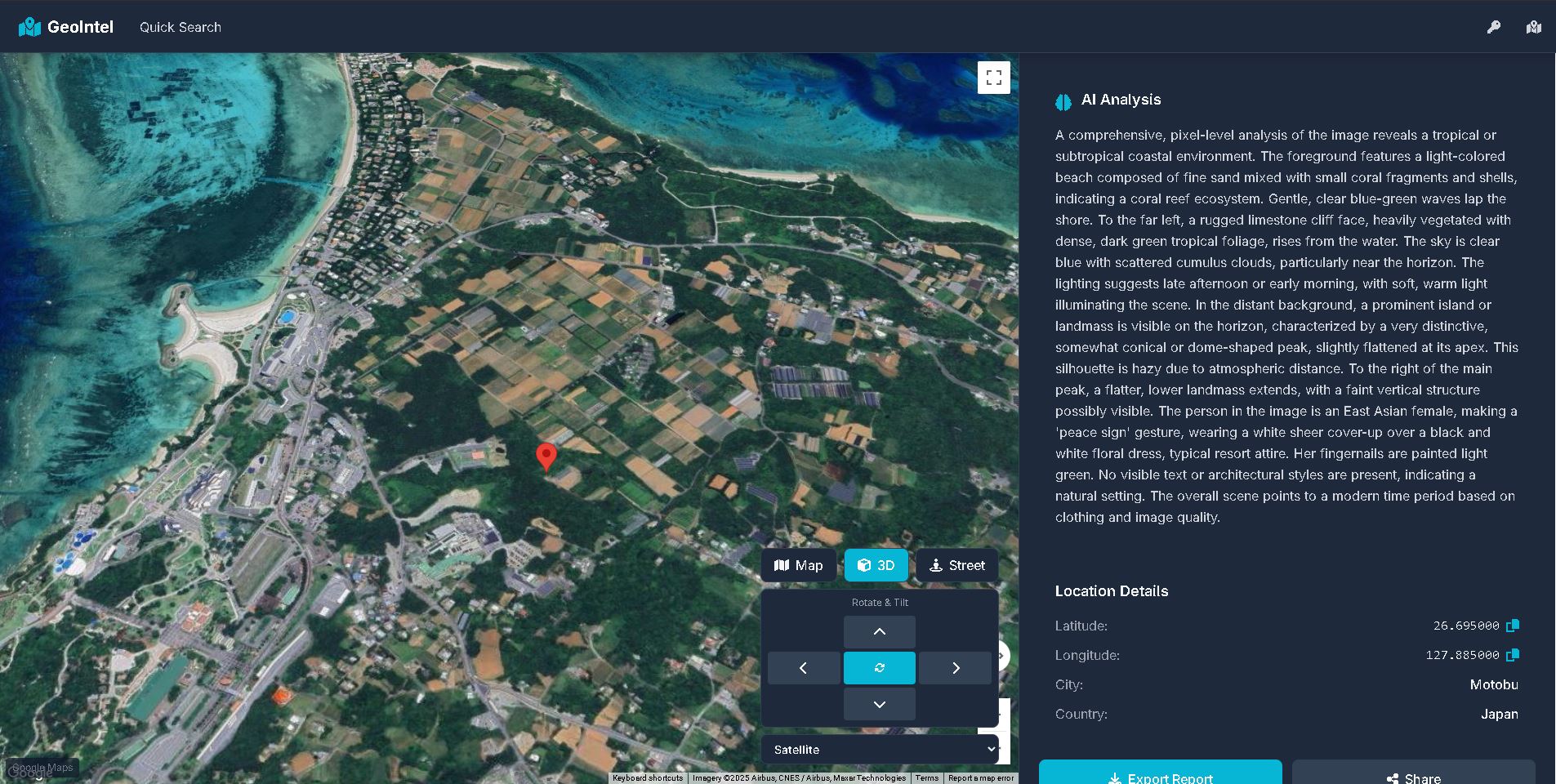 然后在浏览器中打开 `http://127.0.0.1:5000`
功能:
- 拖放图片上传
- 浏览器内 API 密钥配置
- 交互式 3D Google Maps
- 实时 AI 分析及详细解释
### 命令行界面
```
geointel --image path/to/your/image.jpg
```
[](https://asciinema.org/a/I6NqhIr6QkBWaaHNjSlieId5s)
可用参数
参数 描述
```
--web Launch web interface (no --image required)
--host Host address for web interface (default: 127.0.0.1)
--port Port number for web interface (default: 5000)
--image Required for CLI mode. Path to the image file or URL to analyze
--context Additional context information about the image
--guess Your guess of where the image might have been taken
--output Output file path to save the results (JSON format)
--api-key Custom Gemini API key
```
示例
```
Launch web interface:
$ geointel --web
Basic CLI usage:
$ geointel --image vacation_photo.jpg
With additional context:
$ geointel --image vacation_photo.jpg --context "Taken during summer vacation in 2023"
With location guess:
$ geointel --image vacation_photo.jpg --guess "Mediterranean coast"
Saving results to a file:
$ geointel --image vacation_photo.jpg --output results.json
Using a custom API key:
$ geointel --image vacation_photo.jpg --api-key "your-api-key-here"
```
API 密钥设置
GeoIntel 使用 Google 的 Gemini API。您可以:
```
- Set the API key as an environment variable: GEMINI_API_KEY=your_key_here
- Use the --api-key parameter in the command line
```
从 Google AI Studio 获取您的 Gemini API 密钥。
### SDK
```
from geointel import GeoIntel
# 初始化 GeoIntel
geointel = GeoIntel()
# 分析图像并获取 JSON 结果
result = geointel.locate(image_path="image.jpg")
# 处理 JSON 数据
if "error" in result:
print(f"Error: {result['error']}")
else:
# Access the first location
if "locations" in result and result["locations"]:
location = result["locations"][0]
print(f"Location: {location['city']}, {location['country']}")
# Get Google Maps URL
if "coordinates" in location:
lat = location["coordinates"]["latitude"]
lng = location["coordinates"]["longitude"]
maps_url = f"https://www.google.com/maps?q={lat},{lng}"
```
功能
- 使用 Google 的 Gemini API 进行 AI 驱动的图像地理定位
- 根据图像坐标生成 Google Maps 链接
- 提供位置预测的置信度水平
- 支持额外上下文和位置猜测
- 将结果导出为 JSON
- 处理本地图像文件和图像 URL
响应格式
- API 返回结构化的 JSON 响应,包含:
- interpretation:图像的综合分析
- locations:可能位置的数组,包含:
- 国家、州和城市信息
- 置信度水平(高/中/低)
- 坐标(纬度/经度)
- 推理的详细解释
免责声明:
GeoIntel 仅供教育和研究目的使用。虽然它使用 AI 模型来估计图像拍摄的位置,但其预测并不保证准确。请勿将此工具用于监视、跟踪、执法或任何可能侵犯个人隐私、违反法律或造成伤害的活动。
作者和贡献者不对因使用或滥用本软件而造成的任何损害、法律问题或后果负责。请自行承担风险并谨慎使用。
在使用基于 AI 的工具时,请始终遵守当地、国家和国际法律法规。
贡献
1. Fork 本仓库
2. 创建一个新分支 (git checkout -b feature/new-feature)。
3. 提交您的更改 (git commit -am 'Add new feature')。
4. 推送到分支 (git push origin feature/new-feature)。
5. 创建一个 Pull Request。
许可证
本项目根据 MIT 许可证授权 - 有关详细信息,请参阅 LICENSE 文件。
然后在浏览器中打开 `http://127.0.0.1:5000`
功能:
- 拖放图片上传
- 浏览器内 API 密钥配置
- 交互式 3D Google Maps
- 实时 AI 分析及详细解释
### 命令行界面
```
geointel --image path/to/your/image.jpg
```
[](https://asciinema.org/a/I6NqhIr6QkBWaaHNjSlieId5s)
可用参数
参数 描述
```
--web Launch web interface (no --image required)
--host Host address for web interface (default: 127.0.0.1)
--port Port number for web interface (default: 5000)
--image Required for CLI mode. Path to the image file or URL to analyze
--context Additional context information about the image
--guess Your guess of where the image might have been taken
--output Output file path to save the results (JSON format)
--api-key Custom Gemini API key
```
示例
```
Launch web interface:
$ geointel --web
Basic CLI usage:
$ geointel --image vacation_photo.jpg
With additional context:
$ geointel --image vacation_photo.jpg --context "Taken during summer vacation in 2023"
With location guess:
$ geointel --image vacation_photo.jpg --guess "Mediterranean coast"
Saving results to a file:
$ geointel --image vacation_photo.jpg --output results.json
Using a custom API key:
$ geointel --image vacation_photo.jpg --api-key "your-api-key-here"
```
API 密钥设置
GeoIntel 使用 Google 的 Gemini API。您可以:
```
- Set the API key as an environment variable: GEMINI_API_KEY=your_key_here
- Use the --api-key parameter in the command line
```
从 Google AI Studio 获取您的 Gemini API 密钥。
### SDK
```
from geointel import GeoIntel
# 初始化 GeoIntel
geointel = GeoIntel()
# 分析图像并获取 JSON 结果
result = geointel.locate(image_path="image.jpg")
# 处理 JSON 数据
if "error" in result:
print(f"Error: {result['error']}")
else:
# Access the first location
if "locations" in result and result["locations"]:
location = result["locations"][0]
print(f"Location: {location['city']}, {location['country']}")
# Get Google Maps URL
if "coordinates" in location:
lat = location["coordinates"]["latitude"]
lng = location["coordinates"]["longitude"]
maps_url = f"https://www.google.com/maps?q={lat},{lng}"
```
功能
- 使用 Google 的 Gemini API 进行 AI 驱动的图像地理定位
- 根据图像坐标生成 Google Maps 链接
- 提供位置预测的置信度水平
- 支持额外上下文和位置猜测
- 将结果导出为 JSON
- 处理本地图像文件和图像 URL
响应格式
- API 返回结构化的 JSON 响应,包含:
- interpretation:图像的综合分析
- locations:可能位置的数组,包含:
- 国家、州和城市信息
- 置信度水平(高/中/低)
- 坐标(纬度/经度)
- 推理的详细解释
免责声明:
GeoIntel 仅供教育和研究目的使用。虽然它使用 AI 模型来估计图像拍摄的位置,但其预测并不保证准确。请勿将此工具用于监视、跟踪、执法或任何可能侵犯个人隐私、违反法律或造成伤害的活动。
作者和贡献者不对因使用或滥用本软件而造成的任何损害、法律问题或后果负责。请自行承担风险并谨慎使用。
在使用基于 AI 的工具时,请始终遵守当地、国家和国际法律法规。
贡献
1. Fork 本仓库
2. 创建一个新分支 (git checkout -b feature/new-feature)。
3. 提交您的更改 (git commit -am 'Add new feature')。
4. 推送到分支 (git push origin feature/new-feature)。
5. 创建一个 Pull Request。
许可证
本项目根据 MIT 许可证授权 - 有关详细信息,请参阅 LICENSE 文件。

然后在浏览器中打开 `http://127.0.0.1:5000`
功能:
- 拖放图片上传
- 浏览器内 API 密钥配置
- 交互式 3D Google Maps
- 实时 AI 分析及详细解释
### 命令行界面
```
geointel --image path/to/your/image.jpg
```
[](https://asciinema.org/a/I6NqhIr6QkBWaaHNjSlieId5s)
可用参数
参数 描述
```
--web Launch web interface (no --image required)
--host Host address for web interface (default: 127.0.0.1)
--port Port number for web interface (default: 5000)
--image Required for CLI mode. Path to the image file or URL to analyze
--context Additional context information about the image
--guess Your guess of where the image might have been taken
--output Output file path to save the results (JSON format)
--api-key Custom Gemini API key
```
示例
```
Launch web interface:
$ geointel --web
Basic CLI usage:
$ geointel --image vacation_photo.jpg
With additional context:
$ geointel --image vacation_photo.jpg --context "Taken during summer vacation in 2023"
With location guess:
$ geointel --image vacation_photo.jpg --guess "Mediterranean coast"
Saving results to a file:
$ geointel --image vacation_photo.jpg --output results.json
Using a custom API key:
$ geointel --image vacation_photo.jpg --api-key "your-api-key-here"
```
API 密钥设置
GeoIntel 使用 Google 的 Gemini API。您可以:
```
- Set the API key as an environment variable: GEMINI_API_KEY=your_key_here
- Use the --api-key parameter in the command line
```
从 Google AI Studio 获取您的 Gemini API 密钥。
### SDK
```
from geointel import GeoIntel
# 初始化 GeoIntel
geointel = GeoIntel()
# 分析图像并获取 JSON 结果
result = geointel.locate(image_path="image.jpg")
# 处理 JSON 数据
if "error" in result:
print(f"Error: {result['error']}")
else:
# Access the first location
if "locations" in result and result["locations"]:
location = result["locations"][0]
print(f"Location: {location['city']}, {location['country']}")
# Get Google Maps URL
if "coordinates" in location:
lat = location["coordinates"]["latitude"]
lng = location["coordinates"]["longitude"]
maps_url = f"https://www.google.com/maps?q={lat},{lng}"
```
功能
- 使用 Google 的 Gemini API 进行 AI 驱动的图像地理定位
- 根据图像坐标生成 Google Maps 链接
- 提供位置预测的置信度水平
- 支持额外上下文和位置猜测
- 将结果导出为 JSON
- 处理本地图像文件和图像 URL
响应格式
- API 返回结构化的 JSON 响应,包含:
- interpretation:图像的综合分析
- locations:可能位置的数组,包含:
- 国家、州和城市信息
- 置信度水平(高/中/低)
- 坐标(纬度/经度)
- 推理的详细解释
免责声明:
GeoIntel 仅供教育和研究目的使用。虽然它使用 AI 模型来估计图像拍摄的位置,但其预测并不保证准确。请勿将此工具用于监视、跟踪、执法或任何可能侵犯个人隐私、违反法律或造成伤害的活动。
作者和贡献者不对因使用或滥用本软件而造成的任何损害、法律问题或后果负责。请自行承担风险并谨慎使用。
在使用基于 AI 的工具时,请始终遵守当地、国家和国际法律法规。
贡献
1. Fork 本仓库
2. 创建一个新分支 (git checkout -b feature/new-feature)。
3. 提交您的更改 (git commit -am 'Add new feature')。
4. 推送到分支 (git push origin feature/new-feature)。
5. 创建一个 Pull Request。
许可证
本项目根据 MIT 许可证授权 - 有关详细信息,请参阅 LICENSE 文件。
标签:AI地理定位, DLL 劫持, ESC4, ESC8, GEOINT, LSASS转储, OSINT, Python, Web界面, 后端开发, 图像分析, 地理位置推断, 地理空间情报, 大语言模型, 情报收集, 拍照位置识别, 无后门, 漏洞研究, 照片元数据, 社会工程学, 视觉搜索, 逆向工具