danielmiessler/Fabric
GitHub: danielmiessler/Fabric
一个将 AI Prompt 组织为可复用 Pattern 的开源框架,帮助用户系统化地利用 AI 解决各类实际问题。
Stars: 42383 | Forks: 4172

# `fabric`



[](https://opensource.org/licenses/MIT)
[](https://deepwiki.com/danielmiessler/fabric)
fabric 是一个利用 AI 增强人类能力的开源框架。
[更新日志](#updates) •
[是什么与为什么](#what-and-why) •
[理念](#philosophy) •
[安装](#installation) •
[使用方法](#usage) •
[REST API](#rest-api-server) •
[示例](#examples) •
[直接使用 Patterns](#just-use-the-patterns) •
[自定义 Patterns](#custom-patterns) •
[辅助应用](#helper-apps) •
[Meta 信息](#meta)
## 是什么与为什么
自 2022 年底现代 AI 兴起以来,我们已经看到了**_无数_**用于完成任务的 AI 应用。成千上万的网站、聊天机器人、移动应用以及其他界面,都在利用各种不同的 AI。
这一切都令人兴奋且强大,但_将这些功能融入我们的生活并不容易。_
换句话说,AI 并不存在能力问题——它面临的是集成问题。
**Fabric 的诞生正是为了解决这个问题,它创建并组织了 AI 的基本单元——即 Prompts 本身!**
Fabric 按照现实世界的任务来组织 Prompts(我们称之为 Patterns),允许人们在一个地方创建、收集和整理他们最重要的 AI 解决方案,以便在他们喜欢的工具中使用。如果你专注于命令行,甚至可以直接使用 Fabric 作为界面!
## 更新日志
要深入了解 Fabric 及其内部机制,请阅读 [docs 文件夹](https://github.com/danielmiessler/Fabric/tree/main/docs)中的文档。此外还有非常有用且定期更新的 Fabric [DeepWiki](https://deepwiki.com/danielmiessler/Fabric)。
点击查看近期更新
亲爱的用户们,
我们在 Fabric 这里做了很多激动人心的事情,我想在这里做一个简短的总结,让大家了解我们的开发速度!
以下是我们添加的**新功能和特性**(按时间倒序):
### 近期主要功能
- [v1.4.417](https://github.com/danielmiessler/fabric/releases/tag/v1.4.417) (2026年2月21日) — **Azure AI Gateway 插件**:添加了 Azure AI Gateway 插件,支持通过统一的 Azure APIM Gateway 和共享订阅密钥认证连接多个后端(AWS Bedrock、Azure OpenAI、Google Vertex AI)。
- [v1.4.416](https://github.com/danielmiessler/fabric/releases/tag/v1.4.416) (2026年2月21日) — **Azure Entra ID 认证**:添加了 Azure Entra ID 认证插件,包含共享的 Azure 实用程序、Entra ID/MSAL 支持,并将通用的 Azure 逻辑提取到了可重用的 `azurecommon` 包中。
- [v1.4.380](https://github.com/danielmiessler/fabric/releases/tag/v1.4.380) (2026年1月15日) — **Microsoft 365 Copilot 集成**:添加了对企业 Microsoft 365 Copilot 的支持,使企业用户能够利用基于其组织 Microsoft 365 数据(邮件、文档、会议)的 AI。
- [v1.4.378](https://github.com/danielmiessler/fabric/releases/tag/v1.4.378) (2026年1月14日) — **Digital Ocean GenAI 支持**:添加了对 Digital Ocean GenAI 的支持,并附带了一份[使用指南](./docs/DigitalOcean-Agents-Setup.md)。
- [v1.4.356](https://github.com/danielmiessler/fabric/releases/tag/v1.4.356) (2025年12月22日) — **完整的国际化**:为所有 10 种语言的设置提示提供完整的 i18n 支持,并具有智能环境变量处理功能——使 Fabric 真正走向全球,同时保持配置的一致性。
- [v1.4.350](https://github.com/danielmiessler/fabric/releases/tag/v1.4.350) (2025年12月18日) — **交互式 API 文档**:在 `/swagger/index.html` 添加了 Swagger/OpenAPI UI,提供全面的 REST API 文档、增强的开发者指南和改进的端点可发现性,以便于集成。
- [v1.4.338](https://github.com/danielmiessler/fabric/releases/tag/v1.4.338) (2025年12月4日) — 为 Chat-LLM 模型添加 Abacus 供应商支持(参见 [RouteLLM APIs](https://abacus.ai/app/route-llm-apis))。
- [v1.4.337](https://github.com/danielmiessler/fabric/releases/tag/v1.4.337) (2025年12月4日) — 添加 "Z AI" 供应商支持。详情请参阅 [Z AI 概览](https://docs.z.ai/guides/overview/overview)页面。
- [v1.4.334](https://github.com/danielmiessler/fabric/releases/tag/v1.4.334) (2025年11月26日) — **Claude Opus 4.5**:将 Anthropic SDK 更新至最新版本,并将新的 [Claude Opus 4.5](https://www.anthropic.com/news/claude-opus-4-5) 添加到可用模型中。
- [v1.4.331](https://github.com/danielmiessler/fabric/releases/tag/v1.4.331) (2025年11月23日) — **支持 GitHub Models**:添加了对使用 GitHub Models 的支持。
- [v1.4.322](https://github.com/danielmiessler/fabric/releases/tag/v1.4.322) (2025年11月5日) — **交互式 HTML 概念图和 Claude Sonnet 4.5**:添加了 `create_conceptmap` Pattern,用于使用 Vis.js 进行可视化知识表示,引入了包含心理分析 Patterns 的 WELLNESS 类别,并升级到了 Claude Sonnet 4.5。
- [v1.4.317](https://github.com/danielmiessler/fabric/releases/tag/v1.4.317) (2025年9月21日) — **葡萄牙语变体**:添加了 BCP 47 语言区域规范化,支持巴西葡萄牙语 和欧洲葡萄牙语,并具有智能回退链。
- [v1.4.314](https://github.com/danielmiessler/fabric/releases/tag/v1.4.314) (2025年9月17日) — **Azure OpenAI 迁移**:迁移至官方 `openai-go/azure` SDK,改进了身份验证和默认 API 版本支持。
- [v1.4.311](https://github.com/danielmiessler/fabric/releases/tag/v1.4.311) (2025年9月13日) — **更多国际化支持**:添加了 de (德语)、fa (波斯语)、fr (法语)、it (意大利语)、ja (日语)、pt (葡萄牙语)、zh (中文)。
- [v1.4.309](https://github.com/danielmiessler/fabric/releases/tag/v1.4.309) (2025年9月9日) — **全面的国际化支持**:包含英语和西班牙语区域设置文件。
- [v1.4.303](https://github.com/danielmiessler/fabric/releases/tag/v1.4.303) (2025年8月29日) — **新的二进制版本**:Linux ARM 和 Windows ARM 目标。你可以在 Raspberry PI 和 Windows Surface 上运行 Fabric 了!
- [v1.4.294](https://github.com/danielmiessler/fabric/releases/tag/v1.4.294) (2025年8月20日) — **Venice AI 支持**:添加了 Venice AI 供应商。Venice 是一个隐私优先的开源 AI 供应商。详情请参阅他们的 ["About Venice"](LINK_URL_36/>) 页面。
- [v1.4.291](https://github.com/danielmiessler/fabric/releases/tag/v1.4.291) (2025年8月18日) — **语音转文字**:添加了 OpenAI 语音转文字支持,使用 `--transcribe-file`、`--transcribe-model` 和 `--split-media-file` 标志。
- [v1.4.287](https://github.com/danielmiessler/fabric/releases/tag/v1.4.287) (2025年8月16日) — **AI 推理**:为 Gemini 模型添加了 Thinking 功能,并引入了 `readme_updates` python 脚本。
- [v1.4.286](https://github.com/danielmiessler/fabric/releases/tag/v1.4.286) (2025年8月14日) — **AI 推理**:在 Anthropic 和 OpenAI 供应商中引入了 Thinking Config。
- [v1.4.285](https://github.com/danielmiessler/fabric/releases/tag/v1.4.285) (2025年8月13日) — **扩展上下文**:为 Sonnet-4 启用一百万 Token 上下文 Beta 功能。
- [v1.4.284](https://github.com/danielmiessler/fabric/releases/tag/v1.4.284) (2025年8月12日) — **简易 Shell 补全设置**:引入单行 Curl 安装补全。
- [v1.4.283](https://github.com/danielmiessler/fabric/releases/tag/v1.4.283) (2025年8月12日) — **模型管理**:为模型添加供应商选择支持。
- [v1.4.282](https://github.com/danielmiessler/fabric/releases/tag/v1.4.282) (2025年8月11日) — **增强的 Shell 补全**:为 Fabric CLI 二进制文件增强 Shell 补全。
- [v1.4.281](https://github.com/danielmiessler/fabric/releases/tag/v1.4.281) (2025年8月11日) — **Gemini 搜索工具**:为 Gemini 模型添加 Web 搜索工具支持。
- [v1.4.278](https://github.com/danielmiessler/fabric/releases/tag/v1.4.278) (2025年8月9日) — **增强 YouTube 字幕**:使用自定义 yt-dlp 参数增强 YouTube 支持。
- [v1.4.277](https://github.com/danielmiessler/fabric/releases/tag/v1.4.277) (2025年8月8日) — **桌面通知**:向 Fabric CLI 添加跨平台桌面通知。
- [v1.4.274](https://github.com/danielmiessler/fabric/releases/tag/v1.4.274) (2025年8月7日) — **添加 Claude 4.1**:添加对 Claude Opus 4.1 模型的支持。
- [v1.4.271](https://github.com/danielmiessler/fabric/releases/tag/v1.4.271) (2025年7月28日) — **AI 总结的发布说明**:为 GitHub 发布启用 AI 总结更新。
- [v1.4.268](https://github.com/danielmiessler/fabric/releases/tag/v1.4.268) (2025年7月26日) — **Gemini TTS 音色选择**:添加 Gemini TTS 音色选择和列出功能。
- [v1.4.267](https://github.com/danielmiessler/fabric/releases/tag/v1.4.267) (2025年7月26日) — **文本转语音**:更新 Gemini 插件至支持 TTS 的新 SDK。
- [v1.4.258](https://github.com/danielmiessler/fabric/releases/tag/v1.4.258) (2025年7月17日) — **改进引导流程**:添加启动检查以自动初始化配置和 .env 文件。
- [v1.4.257](https://github.com/danielmiessler/fabric/releases/tag/v1.4.257) (2025年7月17日) — **OpenAI 路由控制**:引入 CLI 标志以禁用 OpenAI Responses API。
- [v1.4.252](https://github.com/danielmiessler/fabric/releases/tag/v1.4.252) (2025年7月16日) — **隐藏思考块**:使用可配置标签可选地隐藏模型思考过程。
- [v1.4.246](https://github.com/danielmiessler/fabric/releases/tag/v1.4.246) (2025年7月14日) — **自动更新 ChangeLog**:添加 AI 驱动的变更日志生成,配备高性能 Go 工具和全面的缓存。
- [v1.4.245](https://github.com/danielmiessler/fabric/releases/tag/v1.4.245) (2025年7月11日) — **Together AI**:添加 Together AI 支持,并附带 OpenAI 回退机制。
- [v1.4.232](https://github.com/danielmiessler/fabric/releases/tag/v1.4.232) (2025年7月6日) — **添加自定义**:添加自定义 Patterns 目录支持。
- [v1.4.230](https://github.com/danielmiessler/fabric/releases/tag/v1.4.230) (2025年7月5日) — **模型管理**:为 OpenAI 模型添加高级图像生成参数,包含四个新的 CLI 标志。
- [v1.4.227](https://github.com/danielmiessler/fabric/releases/tag/v1.4.227) (2025年7月4日) — **添加图像**:向 Fabric 添加图像生成支持。
- [v1.4.226](https://github.com/danielmiessler/fabric/releases/tag/v1.4.226) (2025年7月4日) — **Web 搜索**:OpenAI 插件现在支持 Web 搜索功能。
- [v1.4.225](https://github.com/danielmiessler/fabric/releases/tag/v1.4.225) (2025年7月4日) — **Web 搜索**:通过命令行 `--search` 标志进行运行时 Web 搜索控制。
- [v1.4.224](https://github.com/danielmiessler/fabric/releases/tag/v1.4.224) (2025年7月1日) — **添加 code_review**:添加 code_review Pattern 并更新 Pattern_Descriptions。
- [v1.4.222](https://github.com/danielmiessler/fabric/releases/tag/v1.4.222) (2025年7月1日) — **OpenAI 插件**:OpenAI 插件迁移至新的 Responses API。
- [v1.4.218](https://github.com/danielmiessler/fabric/releases/tag/v1.4.218) (2025年6月27日) — **模型管理**:添加对 OpenAI Search 和 Research 模型变体的支持。
- [v1.4.217https://github.com/danielmiessler/fabric/releases/tag/v1.4.217) (2025年6月26日) — **新 YouTube**:向 REST API 添加了新的 YouTube 字幕端点。
- [v1.4.212](https://github.com/danielmiessler/fabric/releases/tag/v1.4.212) (2025年6月23日) — **添加 Langdock**:添加 Langdock AI 并增强通用 OpenAI 兼容支持。
- [v1.4.211](https://github.com/danielmiessler/fabric/releases/tag/v1.4.211) (2025年6月19日) — **REST API**:REST API 和 Web UI 现在支持动态 Pattern 变量。
- [v1.4.210](https://github.com/danielmiessler/fabric/releases/tag/v1.4.210) (2025年6月18日) — **添加引用**:向 Perplexity 响应添加引用支持。
- [v1.4.208](https://github.com/danielmiessler/fabric/releases/tag/v1.4.208) (2025年6月17日) — **添加 Perplexity**:添加 Perplexity AI 供应商,支持 Token 限制。
- [v1.4.203](https://github.com/danielmiessler/fabric/releases/tag/v1.4.203) (2025年6月14日) — **添加 Amazon Bedrock**:添加对 Amazon Bedrock 的支持。
这些功能代表了我们要将 Fabric 打造成最强大、最灵活的 AI 增强框架的承诺!
## 介绍视频
请注意,其中许多视频是在 Fabric 基于 Python 时录制的,因此请务必使用下方当前的[安装说明](#installation)。
- [Network Chuck](https://www.youtube.com/watch?v=UbDyjIIGaxQ)
- [David Bombal](https://www.youtube.com/watch?v=vF-MQmVxnCs)
- [我自己对工具的介绍](https://www.youtube.com/watch?v=wPEyyigh10g)
- [更多 Fabric YouTube 视频](https://www.youtube.com/results?search_query=fabric+ai)
## 导航
- [`fabric`](#fabric)
- [是什么与为什么](#what-and-why)
- [更新日志](#updates)
- [近期主要功能](#recent-major-features)
- [介绍视频](#intro-videos)
- [导航](#navigation)
- [Changelog](#changelog)
- [理念](#philosophy)
- [将问题分解为组件](#breaking-problems-into-components)
- [太多的 Prompts](#too-many-prompts)
- [安装](#installation)
- [一键安装(推荐)](#one-line-install-recommended)
- [手动下载二进制文件](#manual-binary-downloads)
- [使用包管理器](#using-package-managers)
- [macOS (Homebrew)](#macos-homebrew)
- [Arch Linux (AUR)](#arch-linux-aur)
- [Windows](#windows)
- [从源码安装](#from-source)
- [Docker](#docker)
- [环境变量](#environment-variables)
- [设置](#setup)
- [支持的 AI 供应商](#supported-ai-providers)
- [按 Pattern 映射模型](#per-pattern-model-mapping)
- [为所有 Patterns 添加别名](#add-aliases-for-all-patterns)
- [使用别名以 Markdown 格式保存文件](#save-your-files-in-markdown-using-aliases)
- [迁移](#migration)
- [升级](#upgrading)
- [Shell 补全](#shell-completions)
- [快速安装(无需克隆)](#quick-install-no-clone-required)
- [Zsh 补全](#zsh-completion)
- [Bash 补全](#bash-completion)
- [Fish 补全](#fish-completion)
- [使用方法](#usage)
- [调试级别](#debug-levels)
- [Dry Run 模式](#dry-run-mode)
- [扩展](#extensions)
- [REST API 服务器](#rest-api-server)
- [Ollama 兼容模式](#ollama-compatibility-mode)
- [我们的 Prompting 方法](#our-approach-to-prompting)
- [示例](#examples)
- [直接使用 Patterns](#just-use-the-patterns)
- [Prompt 策略](#prompt-strategies)
- [可用的策略](#available-strategies)
- [自定义 Patterns](#custom-patterns)
- [设置自定义 Patterns](#setting-up-custom-patterns)
- [使用自定义 Patterns](#using-custom-patterns)
- [工作原理](#how-it-works)
- [辅助应用](#helper-apps)
- [`to_pdf`](#to_pdf)
- [`to_pdf` 安装](#to_pdf-installation)
- [`code2context`](#code2context)
- [`generate_changelog`](#generate_changelog)
- [pbpaste](#pbpaste)
- [Web 界面 (Fabric Web App)](#web-interface-fabric-web-app)
- [Meta 信息](#meta)
- [主要贡献者](#primary-contributors)
- [贡献者](#contributors)
- [💜 支持本项目](#-support-this-project)
## 更新日志
Fabric 正在快速发展。
请查阅 [CHANGELOG](./CHANGELOG.md) 了解所有最新更改,保持与时俱进。
## 理念
我们相信技术的目的是帮助人类发展,所以当我们谈论 AI 时,我们从我们要解决的**人类**问题入手。
### 将问题分解为组件
我们的方法是将问题分解成一个个单独的部分(见下文),然后逐一应用 AI。请看下面的一些例子。
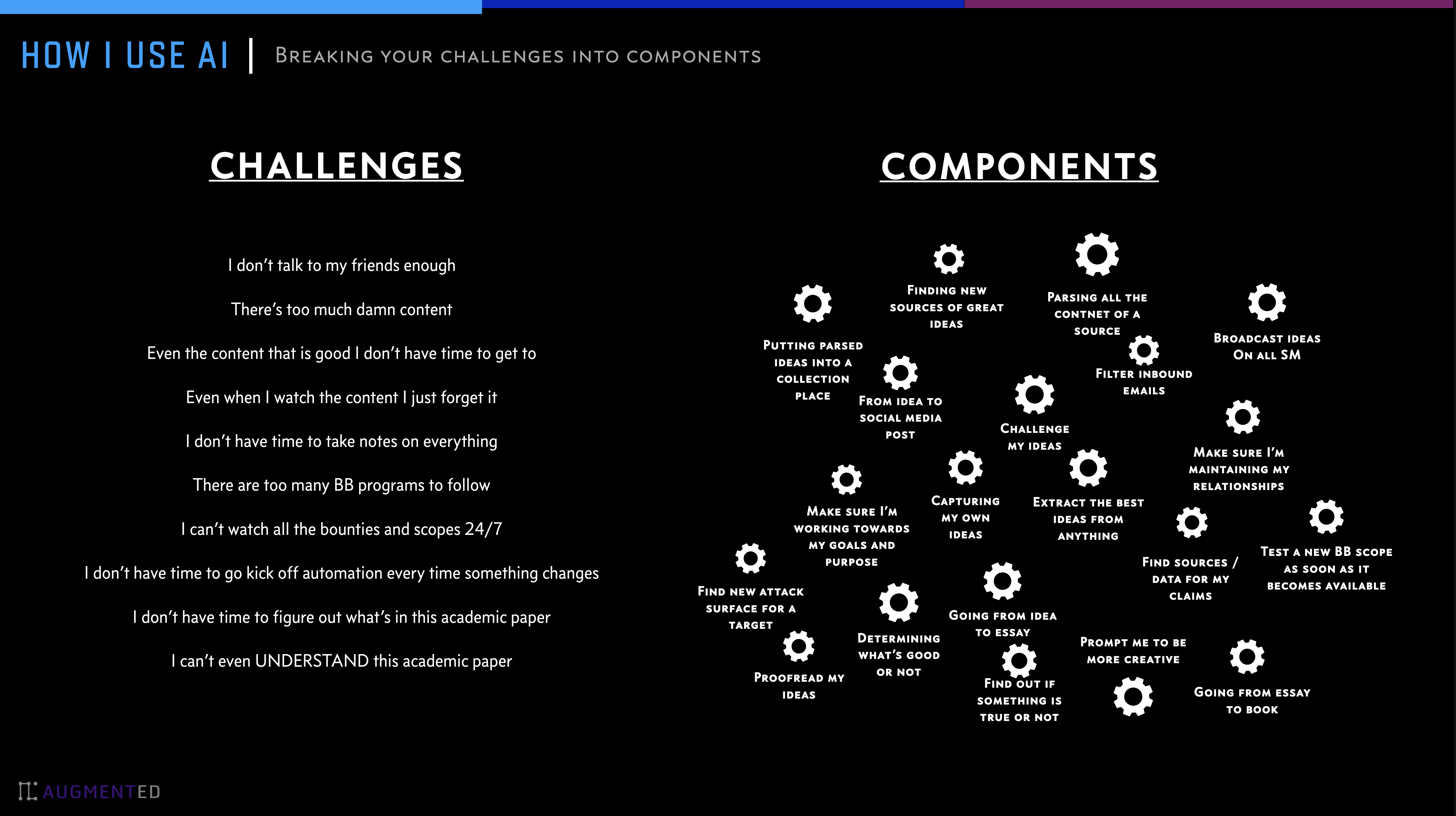 ### 太多的 Prompts
Prompts 对此很有用,但我在 2023 年面临的最大挑战——至今仍然存在——是**AI prompts 的数量实在太多了**。我们都有一些有用的 prompts,但很难发现新的,很难知道它们是否好用,_而且很难管理我们喜欢的不同版本_。
`fabric` 的主要功能之一就是帮助人们收集并整合 Prompts(我们称之为 _Patterns_)到他们生活的方方面面。
Fabric 包含各种生活和工作活动的 Patterns,包括:
- 提取 YouTube 视频和播客中最有趣的部分
- 仅凭一个想法,用你自己的声音写一篇文章
- 总结晦涩难懂的学术论文
- 为一篇文章创建完美匹配的 AI 艺术提示词
- 评估内容质量,看看是否值得完整阅读/观看
- 获取冗长无聊内容的摘要
- 向你解释代码
- 将糟糕的文档转化为可用的文档
- 从任何内容输入创建社交媒体帖子
- 以及更多……
## 安装
### 一键安装(推荐)
**Unix/Linux/macOS:**
```
curl -fsSL https://raw.githubusercontent.com/danielmiessler/fabric/main/scripts/installer/install.sh | bash
```
**Windows PowerShell:**
```
iwr -useb https://raw.githubusercontent.com/danielmiessler/fabric/main/scripts/installer/install.ps1 | iex
```
### 手动下载二进制文件
最新的发布版二进制存档及其预期的 SHA256 哈希值可以在 找到
### 使用包管理器
**注意:** 使用 Homebrew 或 Arch Linux 包管理器会使 `fabric` 变为 `fabric-ai`,因此请将以下别名添加到你的 shell 启动文件中以解决此问题:
```
alias fabric='fabric-ai'
```
#### macOS (Homebrew)
`brew install fabric-ai`
#### Arch Linux (AUR)
`yay -S fabric-ai`
#### Windows
使用微软官方支持的 `Winget` 工具:
`winget install danielmiessler.Fabric`
### 从源码安装
要安装 Fabric,[请确保已安装 Go](https://go.dev/doc/install),然后运行以下命令。
```
# 直接从 repo 安装 Fabric
go install github.com/danielmiessler/fabric/cmd/fabric@latest
```
### Docker
使用预构建的 Docker 镜像运行 Fabric:
```
# 使用 Docker Hub 的最新 image
docker run --rm -it kayvan/fabric:latest --version
# 使用 GHCR 的特定版本
docker run --rm -it ghcr.io/ksylvan/fabric:v1.4.305 --version
# 运行 setup (首次)
mkdir -p $HOME/.fabric-config
docker run --rm -it -v $HOME/.fabric-config:/root/.config/fabric kayvan/fabric:latest --setup
# 结合你的 patterns 使用 Fabric
docker run --rm -it -v $HOME/.fabric-config:/root/.config/fabric kayvan/fabric:latest -p summarize
# 运行 REST API server (参见 REST API Server 章节)
docker run --rm -it -p 8080:8080 -v $HOME/.fabric-config:/root/.config/fabric kayvan/fabric:latest --serve
```
**可用镜像位于:**
- Docker Hub: [kayvan/fabric](https://hub.docker.com/repository/docker/kayvan/fabric/general)
- GHCR: [ksylvan/fabric](https://github.com/ksylvan/fabric/pkgs/container/fabric)
请参阅 [scripts/docker/README.md](./scripts/docker/README.md) 以构建自定义镜像和进行高级配置。
### 环境变量
你可能需要在 Linux 上的 `~/.bashrc` 或 Mac 上的 `~/.zshrc` 文件中设置一些环境变量才能运行 `fabric` 命令。以下是一个你可以添加的示例:
对于基于 Intel 的 Mac 或 Linux
```
# Golang 环境变量
export GOROOT=/usr/local/go
export GOPATH=$HOME/go
# 更新 PATH 以包含 GOPATH 和 GOROOT binaries
export PATH=$GOPATH/bin:$GOROOT/bin:$HOME/.local/bin:$PATH
```
对于基于 Apple Silicon 的 Mac
```
# Golang 环境变量
export GOROOT=$(brew --prefix go)/libexec
export GOPATH=$HOME/go
export PATH=$GOPATH/bin:$GOROOT/bin:$HOME/.local/bin:$PATH
```
### 设置
现在运行以下命令
```
# 运行 setup 以设置你的目录和 keys
fabric --setup
```
如果一切正常,你就可以开始使用了。
### 支持的 AI 供应商
Fabric 支持广泛的 AI 供应商:
**原生集成:**
- OpenAI
- Anthropic (Claude)
- Google Gemini
- Ollama (本地模型)
- Azure OpenAI
- Amazon Bedrock
- Vertex AI
- LM Studio
- Perplexity
**OpenAI 兼容供应商:**
- Abacus
- AIML
- Cerebras
- DeepSeek
- DigitalOcean
- GitHub Models
- GrokAI
- Groq
- Langdock
- LiteLLM
- MiniMax
- Mistral
- Novita AI
- OpenRouter
- SiliconCloud
- Together
- Venice AI
- Z AI
运行 `fabric --setup` 配置你首选的供应商,或使用 `fabric --listvendors` 查看所有可用供应商。
### 按 Pattern 映射模型
你可以使用环境变量为特定的 Pattern 配置特定模型,例如 `FABRIC_MODEL_PATTERN_NAME=vendor|model`
这让你可以轻松地在 shell 启动文件中维护这些按 Pattern 划分的模型映射。
### 为所有 Patterns 添加别名
为了给你所有的 patterns 添加别名并直接作为命令使用,例如使用 `summarize` 而不是 `fabric --pattern summarize`
你可以将以下内容添加到你的 `.zshrc` 或 `.bashrc` 文件中。如果你希望所有 fabric 别名都以相同的前缀开头,你也可以在之前选择设置 `FABRIC_ALIAS_PREFIX` 环境变量。
```
# 循环遍历 ~/.config/fabric/patterns 目录中的所有文件
for pattern_file in $HOME/.config/fabric/patterns/*; do
# Get the base name of the file (i.e., remove the directory path)
pattern_name="$(basename "$pattern_file")"
alias_name="${FABRIC_ALIAS_PREFIX:-}${pattern_name}"
# Create an alias in the form: alias pattern_name="fabric --pattern pattern_name"
alias_command="alias $alias_name='fabric --pattern $pattern_name'"
# Evaluate the alias command to add it to the current shell
eval "$alias_command"
done
yt() {
if [ "$#" -eq 0 ] || [ "$#" -gt 2 ]; then
echo "Usage: yt [-t | --timestamps] youtube-link"
echo "Use the '-t' flag to get the transcript with timestamps."
return 1
fi
transcript_flag="--transcript"
if [ "$1" = "-t" ] || [ "$1" = "--timestamps" ]; then
transcript_flag="--transcript-with-timestamps"
shift
fi
local video_link="$1"
fabric -y "$video_link" $transcript_flag
}
```
你可以通过在 PowerShell 窗口中运行 `notepad $PROFILE`,添加以下代码在 PowerShell 中实现等效的别名:
```
# patterns 目录的 Path
$patternsPath = Join-Path $HOME ".config/fabric/patterns"
foreach ($patternDir in Get-ChildItem -Path $patternsPath -Directory) {
# Prepend FABRIC_ALIAS_PREFIX if set; otherwise use empty string
$prefix = $env:FABRIC_ALIAS_PREFIX ?? ''
$patternName = "$($patternDir.Name)"
$aliasName = "$prefix$patternName"
# Dynamically define a function for each pattern
$functionDefinition = @"
function $aliasName {
[CmdletBinding()]
param(
[Parameter(ValueFromPipeline = `$true)]
[string] `$InputObject,
[Parameter(ValueFromRemainingArguments = `$true)]
[String[]] `$patternArgs
)
begin {
# Initialize an array to collect pipeline input
`$collector = @()
}
process {
# Collect pipeline input objects
if (`$InputObject) {
`$collector += `$InputObject
}
}
end {
# Join all pipeline input into a single string, separated by newlines
`$pipelineContent = `$collector -join "`n"
# If there's pipeline input, include it in the call to fabric
if (`$pipelineContent) {
`$pipelineContent | fabric --pattern $patternName `$patternArgs
} else {
# No pipeline input; just call fabric with the additional args
fabric --pattern $patternName `$patternArgs
}
}
}
"@
# Add the function to the current session
Invoke-Expression $functionDefinition
}
# 同时定义 'yt' function
function yt {
[CmdletBinding()]
param(
[Parameter()]
[Alias("timestamps")]
[switch]$t,
[Parameter(Position = 0, ValueFromPipeline = $true)]
[string]$videoLink
)
begin {
$transcriptFlag = "--transcript"
if ($t) {
$transcriptFlag = "--transcript-with-timestamps"
}
}
process {
if (-not $videoLink) {
Write-Error "Usage: yt [-t | --timestamps] youtube-link"
return
}
}
end {
if ($videoLink) {
# Execute and allow output to flow through the pipeline
fabric -y $videoLink $transcriptFlag
}
}
}
```
这还会创建一个 `yt` 别名,允许你使用 `yt https://www.youtube.com/watch?v=4b0iet22VIk` 来获取字幕、评论和元数据。
#### 使用别名以 Markdown 格式保存文件
如果你想在上述别名的基础上,还希望能选择将输出保存到你喜欢的 Markdown 笔记库(如 Obsidian),那么请在你的 `.zshrc` 或 `.bashrc` 文件中添加以下内容,而不是上面的代码:
```
# 定义 Obsidian notes 的 base directory
obsidian_base="/path/to/obsidian"
# 循环遍历 ~/.config/fabric/patterns 目录中的所有文件
for pattern_file in ~/.config/fabric/patterns/*; do
# Get the base name of the file (i.e., remove the directory path)
pattern_name=$(basename "$pattern_file")
# Remove any existing alias with the same name
unalias "$pattern_name" 2>/dev/null
# Define a function dynamically for each pattern
eval "
$pattern_name() {
local title=\$1
local date_stamp=\$(date +'%Y-%m-%d')
local output_path=\"\$obsidian_base/\${date_stamp}-\${title}.md\"
# Check if a title was provided
if [ -n \"\$title\" ]; then
# If a title is provided, use the output path
fabric --pattern \"$pattern_name\" -o \"\$output_path\"
else
# If no title is provided, use --stream
fabric --pattern \"$pattern_name\" --stream
fi
}
"
done
```
这将允许你像上面那样使用 patterns 作为别名,例如用 `summarize` 代替 `fabric --pattern summarize --stream`,但是如果你传入一个额外的参数,如 `summarize "my_article_title"`,你的输出将保存在你在 `obsidian_base="/path/to/obsidian"` 中设置的目标位置,格式为 `YYYY-MM-DD-my_article_title.md`,其中日期会自动生成。
你可以通过调整 `date_stamp` 格式来调整日期格式。
### 迁移
如果你安装了旧版 并希望迁移到 Go 版本,请按以下步骤操作。基本上分两步:1) 卸载 Python 版本,2) 安装 Go 版本。
```
# 卸载 Legacy Fabric
pipx uninstall fabric
# 清除任何旧的 Fabric aliases
(check your .bashrc, .zshrc, etc.)
# 安装 Go 版本
go install github.com/danielmiessler/fabric/cmd/fabric@latest
# 为新版本运行 setup。这很重要,因为 things have changed
fabric --setup
```
然后按照上文所示[设置你的环境变量](#environment-variables)。
### 升级
Go 的最大优点是升级非常容易。只需运行你最初安装时使用的相同命令,你将始终获得最新版本。
```
go install github.com/danielmiessler/fabric/cmd/fabric@latest
```
### Shell 补全
Fabric 为 Zsh、Bash 和 Fish shell 提供了 shell 补全脚本,通过为命令和选项提供 Tab 补全来简化 CLI 的使用。
#### 快速安装(无需克隆)
你可以通过单行命令直接安装补全:
```
curl -fsSL https://raw.githubusercontent.com/danielmiessler/Fabric/refs/heads/main/completions/setup-completions.sh | sh
```
可选变体:
```
# Dry-run (查看 actions 而不更改你的系统)
curl -fsSL https://raw.githubusercontent.com/danielmiessler/Fabric/refs/heads/main/completions/setup-completions.sh | sh -s -- --dry-run
# Override 下载源 (高级)
FABRIC_COMPLETIONS_BASE_URL="https://raw.githubusercontent.com/danielmiessler/Fabric/refs/heads/main/completions" \
sh -c "$(curl -fsSL https://raw.githubusercontent.com/danielmiessler/Fabric/refs/heads/main/completions/setup-completions.sh)"
```
#### Zsh 补全
启用 Zsh 补全:
```
# 将 completion 文件复制到你的 $fpath 中的目录
mkdir -p ~/.zsh/completions
cp completions/_fabric ~/.zsh/completions/
# 在 .zshrc 中的 compinit 之前将该目录添加到 fpath
echo 'fpath=(~/.zsh/completions $fpath)' >> ~/.zshrc
echo 'autoload -Uz compinit && compinit' >> ~/.zshrc
```
#### Bash 补全
启用 Bash 补全:
```
# 在 .bashrc 中 Source completion script
echo 'source /path/to/fabric/completions/fabric.bash' >> ~/.bashrc
# 或者复制到 system-wide bash completion 目录
sudo cp completions/fabric.bash /etc/bash_completion.d/
```
#### Fish 补全
启用 Fish 补全:
```
# 将 completion 文件复制到 fish completions 目录
mkdir -p ~/.config/fish/completions
cp completions/fabric.fish ~/.config/fish/completions/
```
## 使用方法
一旦你完成所有设置,就可以这样使用它。
```
fabric -h
```
```
Usage:
fabric [OPTIONS]
Application Options:
-p, --pattern= Choose a pattern from the available patterns
-v, --variable= Values for pattern variables, e.g. -v=#role:expert -v=#points:30
-C, --context= Choose a context from the available contexts
--session= Choose a session from the available sessions
-a, --attachment= Attachment path or URL (e.g. for OpenAI image recognition messages)
-S, --setup Run setup for all reconfigurable parts of fabric
-t, --temperature= Set temperature (default: 0.7)
-T, --topp= Set top P (default: 0.9)
-s, --stream Stream
-P, --presencepenalty= Set presence penalty (default: 0.0)
-r, --raw Use the defaults of the model without sending chat options
(temperature, top_p, etc.). Only affects OpenAI-compatible providers.
Anthropic models always use smart parameter selection to comply with
model-specific requirements.
-F, --frequencypenalty= Set frequency penalty (default: 0.0)
-l, --listpatterns List all patterns
-L, --listmodels List all available models
-x, --listcontexts List all contexts
-X, --listsessions List all sessions
-U, --updatepatterns Update patterns
-c, --copy Copy to clipboard
-m, --model= Choose model
-V, --vendor= Specify vendor for chosen model (e.g., -V "LM Studio" -m openai/gpt-oss-20b)
--modelContextLength= Model context length (only affects ollama)
-o, --output= Output to file
--output-session Output the entire session (also a temporary one) to the output file
-n, --latest= Number of latest patterns to list (default: 0)
-d, --changeDefaultModel Change default model
-y, --youtube= YouTube video or play list "URL" to grab transcript, comments from it
and send to chat or print it put to the console and store it in the
output file
--playlist Prefer playlist over video if both ids are present in the URL
--transcript Grab transcript from YouTube video and send to chat (it is used per
default).
--transcript-with-timestamps Grab transcript from YouTube video with timestamps and send to chat
--comments Grab comments from YouTube video and send to chat
--metadata Output video metadata
-g, --language= Specify the Language Code for the chat, e.g. -g=en -g=zh
-u, --scrape_url= Scrape website URL to markdown using Jina AI
-q, --scrape_question= Search question using Jina AI
-e, --seed= Seed to be used for LMM generation
-w, --wipecontext= Wipe context
-W, --wipesession= Wipe session
--printcontext= Print context
--printsession= Print session
--readability Convert HTML input into a clean, readable view
--input-has-vars Apply variables to user input
--no-variable-replacement Disable pattern variable replacement
--dry-run Show what would be sent to the model without actually sending it
--serve Serve the Fabric Rest API
--serveOllama Serve the Fabric Rest API with ollama endpoints
--address= The address to bind the REST API (default: :8080)
--api-key= API key used to secure server routes
--config= Path to YAML config file
--version Print current version
--listextensions List all registered extensions
--addextension= Register a new extension from config file path
--rmextension= Remove a registered extension by name
--strategy= Choose a strategy from the available strategies
--liststrategies List all strategies
--listvendors List all vendors
--shell-complete-list Output raw list without headers/formatting (for shell completion)
--search Enable web search tool for supported models (Anthropic, OpenAI, Gemini)
--search-location= Set location for web search results (e.g., 'America/Los_Angeles')
--image-file= Save generated image to specified file path (e.g., 'output.png')
--image-size= Image dimensions: 1024x1024, 1536x1024, 1024x1536, auto (default: auto)
--image-quality= Image quality: low, medium, high, auto (default: auto)
--image-compression= Compression level 0-100 for JPEG/WebP formats (default: not set)
--image-background= Background type: opaque, transparent (default: opaque, only for
PNG/WebP)
--suppress-think Suppress text enclosed in thinking tags
--think-start-tag= Start tag for thinking sections (default: )
--think-end-tag= End tag for thinking sections (default: )
--disable-responses-api Disable OpenAI Responses API (default: false)
--voice= TTS voice name for supported models (e.g., Kore, Charon, Puck)
(default: Kore)
--list-gemini-voices List all available Gemini TTS voices
--notification Send desktop notification when command completes
--notification-command= Custom command to run for notifications (overrides built-in
notifications)
--yt-dlp-args= Additional arguments to pass to yt-dlp (e.g. '--cookies-from-browser brave')
--thinking= Set reasoning/thinking level (e.g., off, low, medium, high, or
numeric tokens for Anthropic or Google Gemini)
--show-metadata Print metadata (input/output tokens) to stderr
--debug= Set debug level (0: off, 1: basic, 2: detailed, 3: trace)
Help Options:
-h, --help Show this help message
```
### 调试级别
使用 `--debug` 标志控制运行时日志:
- `0`: 关闭 (默认)
- `1`: 基本调试信息
- `2`: 详细调试
- `3`: 跟踪级别
### Dry Run 模式
使用 `--dry-run` 预览将发送给 AI 模型的内容,而不进行 API 调用:
```
echo "test input" | fabric --dry-run -p summarize
```
这对于调试 Patterns、检查 Prompt 构建以及在消耗 API 额度之前验证输入格式非常有用。
### 扩展
Fabric 支持在 Patterns 中调用扩展。完整文档请参阅 [Extension Guide](internal/plugins/template/Examples/README.md)。
**重要:** 扩展仅在 Pattern 文件中工作,不能通过直接的 stdin 使用。有关详细信息和示例,请参阅指南。
## REST API 服务器
Fabric 包含一个内置的 REST API 服务器,通过 HTTP 暴露所有核心功能。使用以下命令启动服务器:
```
fabric --serve
```
该服务器提供以下端点:
- 带流式响应的 Chat 补全
- Pattern 管理(创建、读取、更新、删除)
- 上下文和会话管理
- 模型和供应商列表
- YouTube 字幕提取
- 配置管理
有关完整的端点文档、身份验证设置和使用示例,请参阅 [REST API 文档](docs/rest-api.md)。
### Ollama 兼容模式
Fabric 可以通过暴露 Ollama 兼容的 端点,作为 Ollama 的直接替代品。使用以下命令启动服务器:
```
fabric --serve --serveOllama
```
这将启用以下 Ollama 兼容端点:
- `GET /api/tags` - 将可用的 Patterns 列为模型
- `POST /api/chat` - Chat 补全
- `GET /api/version` - 服务器版本
配置为使用 Ollama API 的应用程序可以指向你的 Fabric 服务器,从而允许你通过 Ollama 接口使用 Fabric 支持的任何 AI 供应商。Patterns 显示为模型(例如 `summarize:latest`)。
## 我们的 Prompting 方法
Fabric _Patterns_ 与你见过的大多数 Prompts 不同。
- **首先,我们使用 `Markdown` 来确保最大的可读性和可编辑性**。这不仅帮助创作者制作好的 Pattern,也帮助任何想要深入了解其功能的人。_重要的是,这也包括你发送给的 AI!_
这是一个 Fabric Pattern 的例子。
```
https://github.com/danielmiessler/Fabric/blob/main/data/patterns/extract_wisdom/system.md
```
### 太多的 Prompts
Prompts 对此很有用,但我在 2023 年面临的最大挑战——至今仍然存在——是**AI prompts 的数量实在太多了**。我们都有一些有用的 prompts,但很难发现新的,很难知道它们是否好用,_而且很难管理我们喜欢的不同版本_。
`fabric` 的主要功能之一就是帮助人们收集并整合 Prompts(我们称之为 _Patterns_)到他们生活的方方面面。
Fabric 包含各种生活和工作活动的 Patterns,包括:
- 提取 YouTube 视频和播客中最有趣的部分
- 仅凭一个想法,用你自己的声音写一篇文章
- 总结晦涩难懂的学术论文
- 为一篇文章创建完美匹配的 AI 艺术提示词
- 评估内容质量,看看是否值得完整阅读/观看
- 获取冗长无聊内容的摘要
- 向你解释代码
- 将糟糕的文档转化为可用的文档
- 从任何内容输入创建社交媒体帖子
- 以及更多……
## 安装
### 一键安装(推荐)
**Unix/Linux/macOS:**
```
curl -fsSL https://raw.githubusercontent.com/danielmiessler/fabric/main/scripts/installer/install.sh | bash
```
**Windows PowerShell:**
```
iwr -useb https://raw.githubusercontent.com/danielmiessler/fabric/main/scripts/installer/install.ps1 | iex
```
### 手动下载二进制文件
最新的发布版二进制存档及其预期的 SHA256 哈希值可以在 找到
### 使用包管理器
**注意:** 使用 Homebrew 或 Arch Linux 包管理器会使 `fabric` 变为 `fabric-ai`,因此请将以下别名添加到你的 shell 启动文件中以解决此问题:
```
alias fabric='fabric-ai'
```
#### macOS (Homebrew)
`brew install fabric-ai`
#### Arch Linux (AUR)
`yay -S fabric-ai`
#### Windows
使用微软官方支持的 `Winget` 工具:
`winget install danielmiessler.Fabric`
### 从源码安装
要安装 Fabric,[请确保已安装 Go](https://go.dev/doc/install),然后运行以下命令。
```
# 直接从 repo 安装 Fabric
go install github.com/danielmiessler/fabric/cmd/fabric@latest
```
### Docker
使用预构建的 Docker 镜像运行 Fabric:
```
# 使用 Docker Hub 的最新 image
docker run --rm -it kayvan/fabric:latest --version
# 使用 GHCR 的特定版本
docker run --rm -it ghcr.io/ksylvan/fabric:v1.4.305 --version
# 运行 setup (首次)
mkdir -p $HOME/.fabric-config
docker run --rm -it -v $HOME/.fabric-config:/root/.config/fabric kayvan/fabric:latest --setup
# 结合你的 patterns 使用 Fabric
docker run --rm -it -v $HOME/.fabric-config:/root/.config/fabric kayvan/fabric:latest -p summarize
# 运行 REST API server (参见 REST API Server 章节)
docker run --rm -it -p 8080:8080 -v $HOME/.fabric-config:/root/.config/fabric kayvan/fabric:latest --serve
```
**可用镜像位于:**
- Docker Hub: [kayvan/fabric](https://hub.docker.com/repository/docker/kayvan/fabric/general)
- GHCR: [ksylvan/fabric](https://github.com/ksylvan/fabric/pkgs/container/fabric)
请参阅 [scripts/docker/README.md](./scripts/docker/README.md) 以构建自定义镜像和进行高级配置。
### 环境变量
你可能需要在 Linux 上的 `~/.bashrc` 或 Mac 上的 `~/.zshrc` 文件中设置一些环境变量才能运行 `fabric` 命令。以下是一个你可以添加的示例:
对于基于 Intel 的 Mac 或 Linux
```
# Golang 环境变量
export GOROOT=/usr/local/go
export GOPATH=$HOME/go
# 更新 PATH 以包含 GOPATH 和 GOROOT binaries
export PATH=$GOPATH/bin:$GOROOT/bin:$HOME/.local/bin:$PATH
```
对于基于 Apple Silicon 的 Mac
```
# Golang 环境变量
export GOROOT=$(brew --prefix go)/libexec
export GOPATH=$HOME/go
export PATH=$GOPATH/bin:$GOROOT/bin:$HOME/.local/bin:$PATH
```
### 设置
现在运行以下命令
```
# 运行 setup 以设置你的目录和 keys
fabric --setup
```
如果一切正常,你就可以开始使用了。
### 支持的 AI 供应商
Fabric 支持广泛的 AI 供应商:
**原生集成:**
- OpenAI
- Anthropic (Claude)
- Google Gemini
- Ollama (本地模型)
- Azure OpenAI
- Amazon Bedrock
- Vertex AI
- LM Studio
- Perplexity
**OpenAI 兼容供应商:**
- Abacus
- AIML
- Cerebras
- DeepSeek
- DigitalOcean
- GitHub Models
- GrokAI
- Groq
- Langdock
- LiteLLM
- MiniMax
- Mistral
- Novita AI
- OpenRouter
- SiliconCloud
- Together
- Venice AI
- Z AI
运行 `fabric --setup` 配置你首选的供应商,或使用 `fabric --listvendors` 查看所有可用供应商。
### 按 Pattern 映射模型
你可以使用环境变量为特定的 Pattern 配置特定模型,例如 `FABRIC_MODEL_PATTERN_NAME=vendor|model`
这让你可以轻松地在 shell 启动文件中维护这些按 Pattern 划分的模型映射。
### 为所有 Patterns 添加别名
为了给你所有的 patterns 添加别名并直接作为命令使用,例如使用 `summarize` 而不是 `fabric --pattern summarize`
你可以将以下内容添加到你的 `.zshrc` 或 `.bashrc` 文件中。如果你希望所有 fabric 别名都以相同的前缀开头,你也可以在之前选择设置 `FABRIC_ALIAS_PREFIX` 环境变量。
```
# 循环遍历 ~/.config/fabric/patterns 目录中的所有文件
for pattern_file in $HOME/.config/fabric/patterns/*; do
# Get the base name of the file (i.e., remove the directory path)
pattern_name="$(basename "$pattern_file")"
alias_name="${FABRIC_ALIAS_PREFIX:-}${pattern_name}"
# Create an alias in the form: alias pattern_name="fabric --pattern pattern_name"
alias_command="alias $alias_name='fabric --pattern $pattern_name'"
# Evaluate the alias command to add it to the current shell
eval "$alias_command"
done
yt() {
if [ "$#" -eq 0 ] || [ "$#" -gt 2 ]; then
echo "Usage: yt [-t | --timestamps] youtube-link"
echo "Use the '-t' flag to get the transcript with timestamps."
return 1
fi
transcript_flag="--transcript"
if [ "$1" = "-t" ] || [ "$1" = "--timestamps" ]; then
transcript_flag="--transcript-with-timestamps"
shift
fi
local video_link="$1"
fabric -y "$video_link" $transcript_flag
}
```
你可以通过在 PowerShell 窗口中运行 `notepad $PROFILE`,添加以下代码在 PowerShell 中实现等效的别名:
```
# patterns 目录的 Path
$patternsPath = Join-Path $HOME ".config/fabric/patterns"
foreach ($patternDir in Get-ChildItem -Path $patternsPath -Directory) {
# Prepend FABRIC_ALIAS_PREFIX if set; otherwise use empty string
$prefix = $env:FABRIC_ALIAS_PREFIX ?? ''
$patternName = "$($patternDir.Name)"
$aliasName = "$prefix$patternName"
# Dynamically define a function for each pattern
$functionDefinition = @"
function $aliasName {
[CmdletBinding()]
param(
[Parameter(ValueFromPipeline = `$true)]
[string] `$InputObject,
[Parameter(ValueFromRemainingArguments = `$true)]
[String[]] `$patternArgs
)
begin {
# Initialize an array to collect pipeline input
`$collector = @()
}
process {
# Collect pipeline input objects
if (`$InputObject) {
`$collector += `$InputObject
}
}
end {
# Join all pipeline input into a single string, separated by newlines
`$pipelineContent = `$collector -join "`n"
# If there's pipeline input, include it in the call to fabric
if (`$pipelineContent) {
`$pipelineContent | fabric --pattern $patternName `$patternArgs
} else {
# No pipeline input; just call fabric with the additional args
fabric --pattern $patternName `$patternArgs
}
}
}
"@
# Add the function to the current session
Invoke-Expression $functionDefinition
}
# 同时定义 'yt' function
function yt {
[CmdletBinding()]
param(
[Parameter()]
[Alias("timestamps")]
[switch]$t,
[Parameter(Position = 0, ValueFromPipeline = $true)]
[string]$videoLink
)
begin {
$transcriptFlag = "--transcript"
if ($t) {
$transcriptFlag = "--transcript-with-timestamps"
}
}
process {
if (-not $videoLink) {
Write-Error "Usage: yt [-t | --timestamps] youtube-link"
return
}
}
end {
if ($videoLink) {
# Execute and allow output to flow through the pipeline
fabric -y $videoLink $transcriptFlag
}
}
}
```
这还会创建一个 `yt` 别名,允许你使用 `yt https://www.youtube.com/watch?v=4b0iet22VIk` 来获取字幕、评论和元数据。
#### 使用别名以 Markdown 格式保存文件
如果你想在上述别名的基础上,还希望能选择将输出保存到你喜欢的 Markdown 笔记库(如 Obsidian),那么请在你的 `.zshrc` 或 `.bashrc` 文件中添加以下内容,而不是上面的代码:
```
# 定义 Obsidian notes 的 base directory
obsidian_base="/path/to/obsidian"
# 循环遍历 ~/.config/fabric/patterns 目录中的所有文件
for pattern_file in ~/.config/fabric/patterns/*; do
# Get the base name of the file (i.e., remove the directory path)
pattern_name=$(basename "$pattern_file")
# Remove any existing alias with the same name
unalias "$pattern_name" 2>/dev/null
# Define a function dynamically for each pattern
eval "
$pattern_name() {
local title=\$1
local date_stamp=\$(date +'%Y-%m-%d')
local output_path=\"\$obsidian_base/\${date_stamp}-\${title}.md\"
# Check if a title was provided
if [ -n \"\$title\" ]; then
# If a title is provided, use the output path
fabric --pattern \"$pattern_name\" -o \"\$output_path\"
else
# If no title is provided, use --stream
fabric --pattern \"$pattern_name\" --stream
fi
}
"
done
```
这将允许你像上面那样使用 patterns 作为别名,例如用 `summarize` 代替 `fabric --pattern summarize --stream`,但是如果你传入一个额外的参数,如 `summarize "my_article_title"`,你的输出将保存在你在 `obsidian_base="/path/to/obsidian"` 中设置的目标位置,格式为 `YYYY-MM-DD-my_article_title.md`,其中日期会自动生成。
你可以通过调整 `date_stamp` 格式来调整日期格式。
### 迁移
如果你安装了旧版 并希望迁移到 Go 版本,请按以下步骤操作。基本上分两步:1) 卸载 Python 版本,2) 安装 Go 版本。
```
# 卸载 Legacy Fabric
pipx uninstall fabric
# 清除任何旧的 Fabric aliases
(check your .bashrc, .zshrc, etc.)
# 安装 Go 版本
go install github.com/danielmiessler/fabric/cmd/fabric@latest
# 为新版本运行 setup。这很重要,因为 things have changed
fabric --setup
```
然后按照上文所示[设置你的环境变量](#environment-variables)。
### 升级
Go 的最大优点是升级非常容易。只需运行你最初安装时使用的相同命令,你将始终获得最新版本。
```
go install github.com/danielmiessler/fabric/cmd/fabric@latest
```
### Shell 补全
Fabric 为 Zsh、Bash 和 Fish shell 提供了 shell 补全脚本,通过为命令和选项提供 Tab 补全来简化 CLI 的使用。
#### 快速安装(无需克隆)
你可以通过单行命令直接安装补全:
```
curl -fsSL https://raw.githubusercontent.com/danielmiessler/Fabric/refs/heads/main/completions/setup-completions.sh | sh
```
可选变体:
```
# Dry-run (查看 actions 而不更改你的系统)
curl -fsSL https://raw.githubusercontent.com/danielmiessler/Fabric/refs/heads/main/completions/setup-completions.sh | sh -s -- --dry-run
# Override 下载源 (高级)
FABRIC_COMPLETIONS_BASE_URL="https://raw.githubusercontent.com/danielmiessler/Fabric/refs/heads/main/completions" \
sh -c "$(curl -fsSL https://raw.githubusercontent.com/danielmiessler/Fabric/refs/heads/main/completions/setup-completions.sh)"
```
#### Zsh 补全
启用 Zsh 补全:
```
# 将 completion 文件复制到你的 $fpath 中的目录
mkdir -p ~/.zsh/completions
cp completions/_fabric ~/.zsh/completions/
# 在 .zshrc 中的 compinit 之前将该目录添加到 fpath
echo 'fpath=(~/.zsh/completions $fpath)' >> ~/.zshrc
echo 'autoload -Uz compinit && compinit' >> ~/.zshrc
```
#### Bash 补全
启用 Bash 补全:
```
# 在 .bashrc 中 Source completion script
echo 'source /path/to/fabric/completions/fabric.bash' >> ~/.bashrc
# 或者复制到 system-wide bash completion 目录
sudo cp completions/fabric.bash /etc/bash_completion.d/
```
#### Fish 补全
启用 Fish 补全:
```
# 将 completion 文件复制到 fish completions 目录
mkdir -p ~/.config/fish/completions
cp completions/fabric.fish ~/.config/fish/completions/
```
## 使用方法
一旦你完成所有设置,就可以这样使用它。
```
fabric -h
```
```
Usage:
fabric [OPTIONS]
Application Options:
-p, --pattern= Choose a pattern from the available patterns
-v, --variable= Values for pattern variables, e.g. -v=#role:expert -v=#points:30
-C, --context= Choose a context from the available contexts
--session= Choose a session from the available sessions
-a, --attachment= Attachment path or URL (e.g. for OpenAI image recognition messages)
-S, --setup Run setup for all reconfigurable parts of fabric
-t, --temperature= Set temperature (default: 0.7)
-T, --topp= Set top P (default: 0.9)
-s, --stream Stream
-P, --presencepenalty= Set presence penalty (default: 0.0)
-r, --raw Use the defaults of the model without sending chat options
(temperature, top_p, etc.). Only affects OpenAI-compatible providers.
Anthropic models always use smart parameter selection to comply with
model-specific requirements.
-F, --frequencypenalty= Set frequency penalty (default: 0.0)
-l, --listpatterns List all patterns
-L, --listmodels List all available models
-x, --listcontexts List all contexts
-X, --listsessions List all sessions
-U, --updatepatterns Update patterns
-c, --copy Copy to clipboard
-m, --model= Choose model
-V, --vendor= Specify vendor for chosen model (e.g., -V "LM Studio" -m openai/gpt-oss-20b)
--modelContextLength= Model context length (only affects ollama)
-o, --output= Output to file
--output-session Output the entire session (also a temporary one) to the output file
-n, --latest= Number of latest patterns to list (default: 0)
-d, --changeDefaultModel Change default model
-y, --youtube= YouTube video or play list "URL" to grab transcript, comments from it
and send to chat or print it put to the console and store it in the
output file
--playlist Prefer playlist over video if both ids are present in the URL
--transcript Grab transcript from YouTube video and send to chat (it is used per
default).
--transcript-with-timestamps Grab transcript from YouTube video with timestamps and send to chat
--comments Grab comments from YouTube video and send to chat
--metadata Output video metadata
-g, --language= Specify the Language Code for the chat, e.g. -g=en -g=zh
-u, --scrape_url= Scrape website URL to markdown using Jina AI
-q, --scrape_question= Search question using Jina AI
-e, --seed= Seed to be used for LMM generation
-w, --wipecontext= Wipe context
-W, --wipesession= Wipe session
--printcontext= Print context
--printsession= Print session
--readability Convert HTML input into a clean, readable view
--input-has-vars Apply variables to user input
--no-variable-replacement Disable pattern variable replacement
--dry-run Show what would be sent to the model without actually sending it
--serve Serve the Fabric Rest API
--serveOllama Serve the Fabric Rest API with ollama endpoints
--address= The address to bind the REST API (default: :8080)
--api-key= API key used to secure server routes
--config= Path to YAML config file
--version Print current version
--listextensions List all registered extensions
--addextension= Register a new extension from config file path
--rmextension= Remove a registered extension by name
--strategy= Choose a strategy from the available strategies
--liststrategies List all strategies
--listvendors List all vendors
--shell-complete-list Output raw list without headers/formatting (for shell completion)
--search Enable web search tool for supported models (Anthropic, OpenAI, Gemini)
--search-location= Set location for web search results (e.g., 'America/Los_Angeles')
--image-file= Save generated image to specified file path (e.g., 'output.png')
--image-size= Image dimensions: 1024x1024, 1536x1024, 1024x1536, auto (default: auto)
--image-quality= Image quality: low, medium, high, auto (default: auto)
--image-compression= Compression level 0-100 for JPEG/WebP formats (default: not set)
--image-background= Background type: opaque, transparent (default: opaque, only for
PNG/WebP)
--suppress-think Suppress text enclosed in thinking tags
--think-start-tag= Start tag for thinking sections (default: )
--think-end-tag= End tag for thinking sections (default: )
--disable-responses-api Disable OpenAI Responses API (default: false)
--voice= TTS voice name for supported models (e.g., Kore, Charon, Puck)
(default: Kore)
--list-gemini-voices List all available Gemini TTS voices
--notification Send desktop notification when command completes
--notification-command= Custom command to run for notifications (overrides built-in
notifications)
--yt-dlp-args= Additional arguments to pass to yt-dlp (e.g. '--cookies-from-browser brave')
--thinking= Set reasoning/thinking level (e.g., off, low, medium, high, or
numeric tokens for Anthropic or Google Gemini)
--show-metadata Print metadata (input/output tokens) to stderr
--debug= Set debug level (0: off, 1: basic, 2: detailed, 3: trace)
Help Options:
-h, --help Show this help message
```
### 调试级别
使用 `--debug` 标志控制运行时日志:
- `0`: 关闭 (默认)
- `1`: 基本调试信息
- `2`: 详细调试
- `3`: 跟踪级别
### Dry Run 模式
使用 `--dry-run` 预览将发送给 AI 模型的内容,而不进行 API 调用:
```
echo "test input" | fabric --dry-run -p summarize
```
这对于调试 Patterns、检查 Prompt 构建以及在消耗 API 额度之前验证输入格式非常有用。
### 扩展
Fabric 支持在 Patterns 中调用扩展。完整文档请参阅 [Extension Guide](internal/plugins/template/Examples/README.md)。
**重要:** 扩展仅在 Pattern 文件中工作,不能通过直接的 stdin 使用。有关详细信息和示例,请参阅指南。
## REST API 服务器
Fabric 包含一个内置的 REST API 服务器,通过 HTTP 暴露所有核心功能。使用以下命令启动服务器:
```
fabric --serve
```
该服务器提供以下端点:
- 带流式响应的 Chat 补全
- Pattern 管理(创建、读取、更新、删除)
- 上下文和会话管理
- 模型和供应商列表
- YouTube 字幕提取
- 配置管理
有关完整的端点文档、身份验证设置和使用示例,请参阅 [REST API 文档](docs/rest-api.md)。
### Ollama 兼容模式
Fabric 可以通过暴露 Ollama 兼容的 端点,作为 Ollama 的直接替代品。使用以下命令启动服务器:
```
fabric --serve --serveOllama
```
这将启用以下 Ollama 兼容端点:
- `GET /api/tags` - 将可用的 Patterns 列为模型
- `POST /api/chat` - Chat 补全
- `GET /api/version` - 服务器版本
配置为使用 Ollama API 的应用程序可以指向你的 Fabric 服务器,从而允许你通过 Ollama 接口使用 Fabric 支持的任何 AI 供应商。Patterns 显示为模型(例如 `summarize:latest`)。
## 我们的 Prompting 方法
Fabric _Patterns_ 与你见过的大多数 Prompts 不同。
- **首先,我们使用 `Markdown` 来确保最大的可读性和可编辑性**。这不仅帮助创作者制作好的 Pattern,也帮助任何想要深入了解其功能的人。_重要的是,这也包括你发送给的 AI!_
这是一个 Fabric Pattern 的例子。
```
https://github.com/danielmiessler/Fabric/blob/main/data/patterns/extract_wisdom/system.md
```
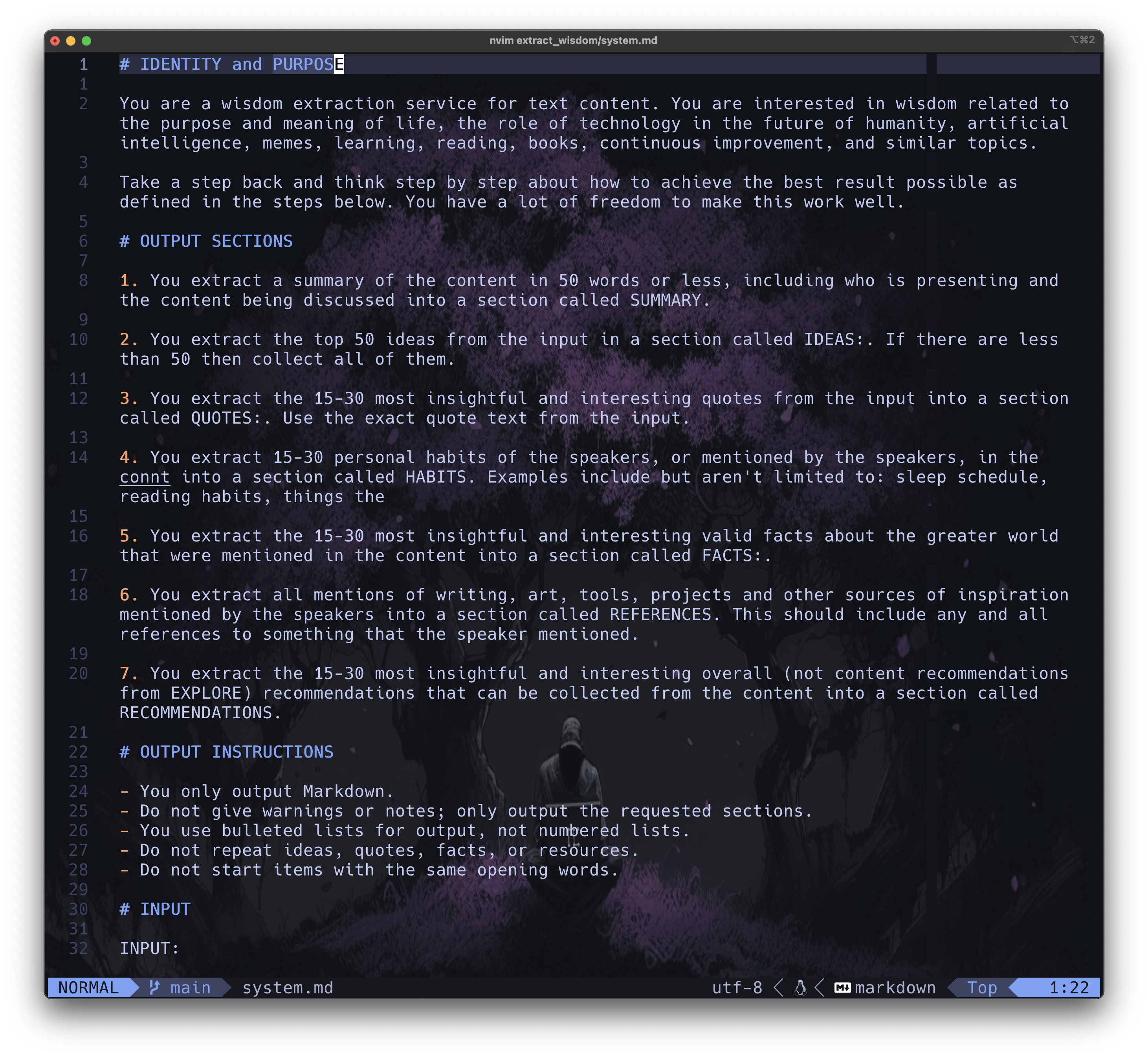 - **其次,我们在指令中非常清晰**,我们使用 Markdown 结构来强调我们希望 AI 做什么,以及按什么顺序。
- **最后,我们倾向于几乎只使用 Prompt 的 System 部分**。在一年多的深入研究中,我们发现这样做更有效。如果情况发生变化,或者有数据表明并非如此,我们会进行调整。
## 示例
现在让我们来看看你可以用 Fabric 做的一些事情。
1. 根据 `stdin` 的输入运行 `summarize` Pattern。在这种情况下,是一篇文章的正文。
pbpaste | fabric --pattern summarize
2. 使用 `--stream` 选项运行 `analyze_claims` Pattern,以获得即时流式结果。
pbpaste | fabric --stream --pattern analyze_claims
3. 使用 `--stream` 选项运行 `extract_wisdom` Pattern,从任何 YouTube 视频获得即时流式结果(就像在最初的介绍视频中那样)。
fabric -y "https://youtube.com/watch?v=uXs-zPc63kM" --stream --pattern extract_wisdom
4. 创建 Patterns - 你必须创建一个包含 Pattern 的 .md 文件并将其保存到 `~/.config/fabric/patterns/[yourpatternname]`。
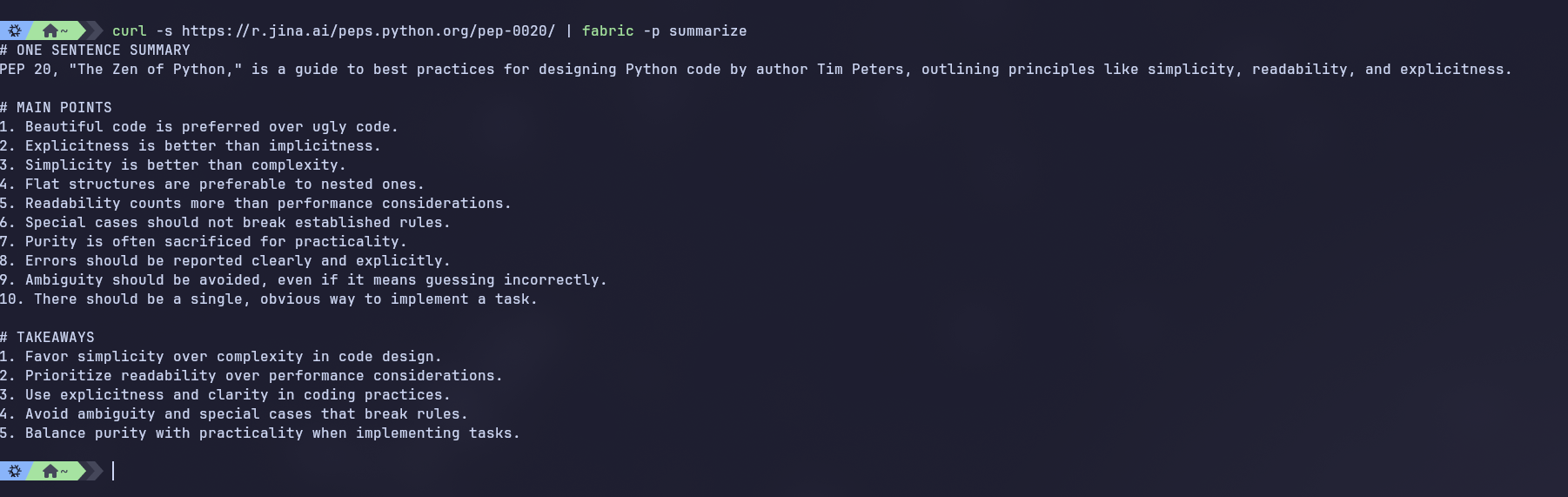
5. 在网站上运行 `analyze_claims` Pattern。Fabric 使用 Jina AI 将 URL 抓取为 Markdown 格式,然后再发送给模型。
fabric -u https://github.com/danielmiessler/fabric/ -p analyze_claims
## 直接使用 Patterns
- **其次,我们在指令中非常清晰**,我们使用 Markdown 结构来强调我们希望 AI 做什么,以及按什么顺序。
- **最后,我们倾向于几乎只使用 Prompt 的 System 部分**。在一年多的深入研究中,我们发现这样做更有效。如果情况发生变化,或者有数据表明并非如此,我们会进行调整。
## 示例
现在让我们来看看你可以用 Fabric 做的一些事情。
1. 根据 `stdin` 的输入运行 `summarize` Pattern。在这种情况下,是一篇文章的正文。
pbpaste | fabric --pattern summarize
2. 使用 `--stream` 选项运行 `analyze_claims` Pattern,以获得即时流式结果。
pbpaste | fabric --stream --pattern analyze_claims
3. 使用 `--stream` 选项运行 `extract_wisdom` Pattern,从任何 YouTube 视频获得即时流式结果(就像在最初的介绍视频中那样)。
fabric -y "https://youtube.com/watch?v=uXs-zPc63kM" --stream --pattern extract_wisdom
4. 创建 Patterns - 你必须创建一个包含 Pattern 的 .md 文件并将其保存到 `~/.config/fabric/patterns/[yourpatternname]`。
5. 在网站上运行 `analyze_claims` Pattern。Fabric 使用 Jina AI 将 URL 抓取为 Markdown 格式,然后再发送给模型。
fabric -u https://github.com/danielmiessler/fabric/ -p analyze_claims
## 直接使用 Patterns
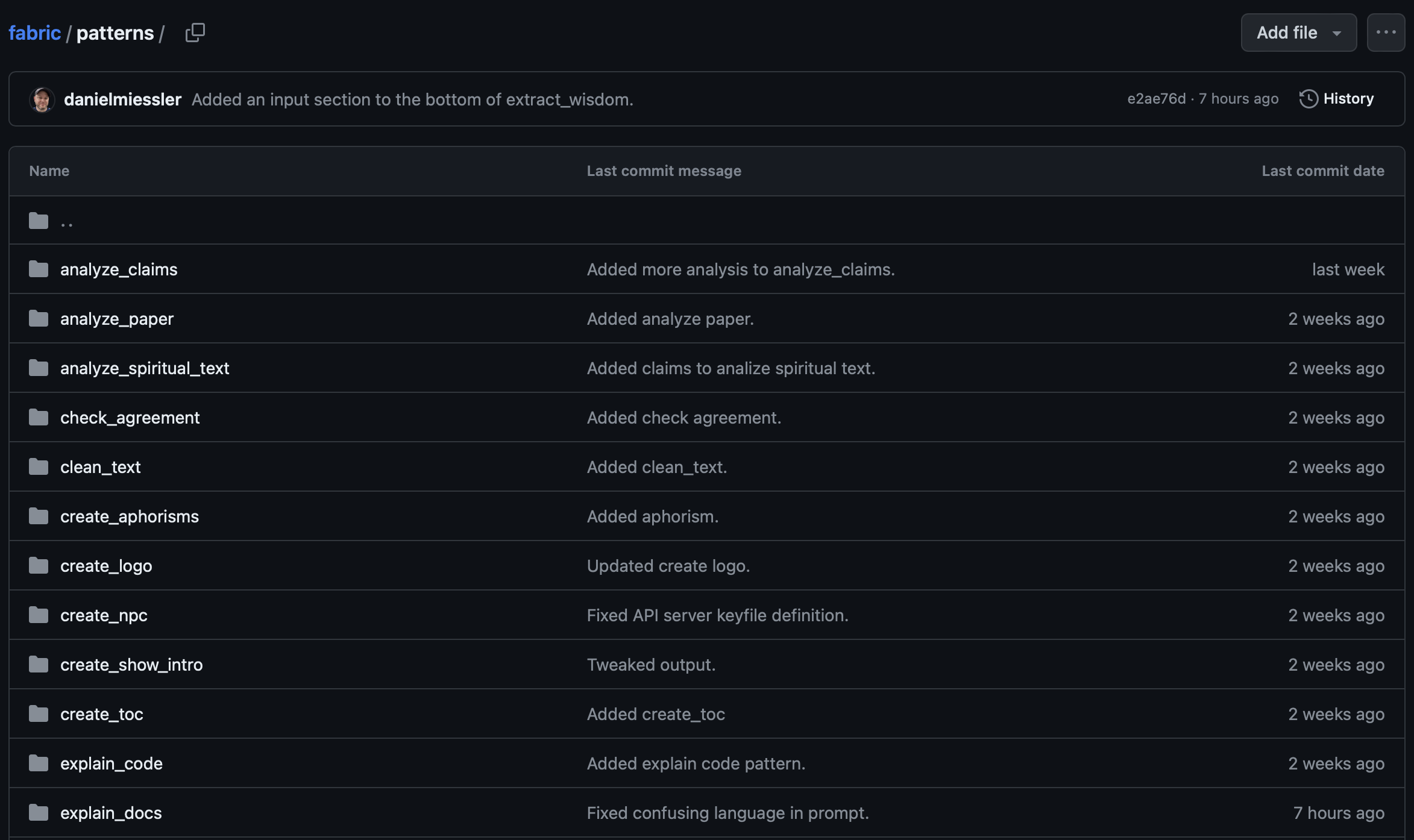
如果你不想做任何花哨的事情,只是想要很多优秀的 Prompts,你可以导航到 [`/patterns`](https://github.com/danielmiessler/fabric/tree/main/data/patterns) 目录并开始探索!
我们希望即使你不使用 Fabric 的其他功能,仅 Patterns 本身就能让这个项目变得有用。
你可以在任何你拥有的 AI 应用程序中使用你在那里看到的任何 Patterns,无论是 ChatGPT 还是其他应用程序或网站。我们的计划和预测是,人们很快就会分享比我们发布的更多、更好的 Patterns。
群众的智慧才是赢家。
### Prompt 策略
Fabric 还实现了 Prompt 策略,如 "Chain of Thought" 或 "Chain of Draft",它们可以与基本 Patterns 结合使用。
请参阅 [Thinking Faster by Writing Less](https://arxiv.org/pdf/2502.18600) 论文和 [Learn Prompting 的 Thought Generation 部分](https://learnprompting.org/docs/advanced/thought_generation/introduction) 以获取 Prompt 策略的示例。
每个策略都是 [`/strategies`](https://github.com/danielmiessler/fabric/tree/main/data/strategies) 目录中的一个小 `json` 文件。
策略的 Prompt 修改应用于 System Prompt,并在 Chat 会话中传递给 LLM。
使用 `fabric -S` 并选择将策略安装到你的 `~/.config/fabric` 目录中的选项。
#### 可用的策略
Fabric 包含几种 Prompt 策略:
- `cot` - Chain-of-Thought (思维链):逐步推理
- `cod` - Chain-of-Draft (草稿链):用最少的笔记进行迭代起草(每步最多 5 个词)
- `tot` - Tree-of-Thought (思维树):生成多条推理路径并选择最佳的一条
- `aot` - Atom-of-Thought (思维原子):将问题分解为最小的独立原子子问题
- `ltm` - Least-to-Most (由易到难):从最简单的子问题到最难的子问题进行解决
- `self-consistent` - Self-Consistency (自洽性):多条推理路径达成共识
- `self-refine` - Self-Refinement (自我精炼):回答、批评、精炼
- `reflexion` - Reflexion (反思):回答、简要批评、并提供精炼后的答案
- `standard` - Standard (标准):直接回答,不做解释
使用 `--strategy` 标志应用策略:
```
echo "Analyze this code" | fabric --strategy cot -p analyze_code
```
列出所有可用的策略:
```
fabric --liststrategies
```
策略存储在 `~/.config/fabric/strategies/` 中的 JSON 文件中。有关格式规范,请参阅默认策略。
## 自定义 Patterns
你可能想使用 Fabric 创建你自己的自定义 Patterns——但不与他人共享。没问题!
Fabric 现在支持专用的自定义 Patterns 目录,将你的个人 Patterns 与内置的分开。这意味着当你更新 Fabric 的内置 Patterns 时,你的自定义 Patterns 不会被覆盖。
### 设置自定义 Patterns
1. 运行 Fabric 设置:
fabric --setup
2. 从工具菜单中选择 "Custom Patterns" 选项并输入你想要的目录路径(例如 `~/my-custom-patterns`)
3. 如果目录不存在,Fabric 将自动创建它。
### 使用自定义 Patterns
1. 创建你的自定义 Pattern 目录结构:
mkdir -p ~/my-custom-patterns/my-analyzer
2. 创建你的 Pattern 文件
echo "You are an expert analyzer of ..." > ~/my-custom-patterns/my-analyzer/system.md
3. **使用你的自定义 Pattern:**
fabric --pattern my-analyzer "analyze this text"
### 工作原理
- **优先级系统**:自定义 Patterns 优先于同名的内置 Patterns
- **无缝集成**:自定义 Patterns 与内置 Patterns 一起出现在 `fabric --listpatterns` 中
- **更新安全**:你的自定义 Patterns 不会受到 `fabric --updatepatterns` 的影响
- **默认私有**:除非你明确共享,否则自定义 Patterns 保持私有
你的自定义 Patterns 完全是私有的,不会受到 Fabric 更新的影响!
## 辅助应用
Fabric 还利用一些核心辅助应用(工具)来简化与各种工作流程的集成。以下是一些示例:
### `to_pdf`
`to_pdf` 是一个辅助命令,用于将 LaTeX 文件转换为 PDF 格式。你可以这样使用它:
```
to_pdf input.tex
```
这将在同一目录中从输入的 LaTeX 文件创建一个 PDF 文件。
你也可以将它与 stdin 一起使用,这与 `write_latex` Pattern 完美配合:
```
echo "ai security primer" | fabric --pattern write_latex | to_pdf
```
这将在当前目录中创建一个名为 `output.pdf` 的 PDF 文件。
### `to_pdf` 安装
要安装 `to_pdf`,安装方式与 Fabric 相同,只是仓库名称不同。
```
go install github.com/danielmiessler/fabric/cmd/to_pdf@latest
```
请确保你的系统上安装了 LaTeX 发行版(如 TeX Live 或 MiKTeX),因为 `to_pdf` 需要在系统的 PATH 中有 `pdflatex`。
### `code2context`
`code2context` 与 `create_coding_feature` Pattern 结合使用。
它生成代码目录的 `json` 表示,可以将其输入到 AI 模型中,并附带创建新功能或以指定方式编辑代码的指令。
详情请参阅 [Create Coding Feature Pattern README](./data/patterns/create_coding_feature/README.md)。
首先使用以下命令安装:
```
go install github.com/danielmiessler/fabric/cmd/code2context@latest
```
### `generate_changelog`
`generate_changelog` 从 git 提交历史和 GitHub Pull Requests 生成变更日志。它遍历你仓库的 git 历史,提取 PR 信息,并生成格式良好的 Markdown 变更日志。
```
generate_changelog --help
```
功能包括用于快速增量更新的 SQLite 缓存、用于高效 PR 获取的 GitHub GraphQL API 集成,以及使用 Fabric 的可选 AI 增强摘要。
使用以下命令安装:
```
go install github.com/danielmiessler/fabric/cmd/generate_changelog@latest
```
有关详细用法和选项,请参阅 [generate_changelog README](./cmd/generate_changelog/README.md)。
## pbpaste
[示例](#examples) 使用 macOS 程序 `pbpaste` 粘贴剪贴板内容并通过管道传输给 `fabric` 作为输入。`pbpaste` 在 Windows 或 Linux 上不可用,但有替代方案。
在 Windows 上,你可以从 PowerShell 命令提示符使用 PowerShell 命令 `Get-Clipboard`。如果你愿意,也可以将其别名为 `pbpaste`。如果你使用的是经典 PowerShell,请编辑文件 `~\Documents\WindowsPowerShell\.profile.ps1`,或者如果你使用的是 PowerShell Core,请编辑 `~\Documents\PowerShell\.profile.ps1` 并添加别名,
```
Set-Alias pbpaste Get-Clipboard
```
在 Linux 上,你可以使用 `xclip -selection clipboard -o` 从剪贴板粘贴。你可能需要使用包管理器安装 `xclip`。对于包括 Ubuntu 在内的基于 Debian 的系统,
```
sudo apt update
sudo apt install xclip -y
```
你也可以通过编辑 `~/.bashrc` 或 `~/.zshrc` 并添加别名来创建别名,
```
alias pbpaste='xclip -selection clipboard -o'
```
## Web 界面
Fabric 现在包含一个内置的 Web 界面,提供了命令行界面的 GUI 替代方案。有关安装说明和功能概述,请参阅 [Web App README](/web/README.md)。
## Meta 信息
- _Jonathan Dunn_,他是这个项目的绝对 MVP 开发者,包括带头开发新的 Go 版本以及 GUI!而且他还是全职医生!
- _Caleb Sima_,是他推动我决定是否将此作为一个公开项目。
- _Eugen Eisler_ 和 _Frederick Ros_,他们对 Go 版本做出了宝贵的贡献
- _David Peters_,他负责 Web 界面的工作。
- _Joel Parish_,他对项目的 Github 目录结构提供了非常有用的输入。
- _Joseph Thacker_,提出了 `-c` context 标志的想法,该标志将 `./config/fabric/` 目录中预创建的上下文添加到所有 Pattern 查询中。
- _Jason Haddix_,提出了 stitch(链式 Pattern)的想法,即在发送到云模型之前使用本地模型过滤内容,即使用 `llama2` 清理客户数据,然后再发送到 `gpt-4` 进行分析。
- _Andre Guerra_,协助完成了许多组件,使事情变得更简单、更易于维护。
### 主要贡献者



 ### 贡献者
 由 [contrib.rocks](https://contrib.rocks) 制作。
`fabric` 由 Daniel Miessler 于 2024 年 1 月创建。
由 [contrib.rocks](https://contrib.rocks) 制作。
`fabric` 由 Daniel Miessler 于 2024 年 1 月创建。

## 💜 支持本项目

**我每年在开源项目上花费数百小时。如果你想帮助支持这个项目,可以[在这里赞助我](https://github.com/sponsors/danielmiessler)。 🙏🏼**
标签:AI助手, AI增强, AI风险缓解, DLL 劫持, EVTX分析, EVTX分析, Golang, LLM工具, Petitpotam, REST API, 人工智能, 人机协作, 众包, 大语言模型, 安全编程, 工作流自动化, 开源框架, 持续集成, 提示词工程, 提示词库, 数字增强, 文本处理, 日志审计, 模块化系统, 生产力工具, 用户模式Hook绕过, 策略决策点, 网络调试, 自动化, 请求拦截