Cosmian/cosmian_vm
GitHub: Cosmian/cosmian_vm
预配置的机密虚拟机镜像,基于 AMD SEV-SNP 和 Intel TDX 提供可远程验证的云端可信执行环境。
Stars: 14 | Forks: 3
# Cosmian VM


_Cosmian VM_ 是预配置的 Linux 系统镜像,可随时用于验证机密虚拟机 的可信度和完整性。
这些镜像基于 Ubuntu 22.04/24.04 或 RHEL 9,可作为常规 Linux 发行版在大多数云服务商(如 Google Cloud Platform (GCP)、Microsoft Azure 和 Amazon Web Services (AWS))上使用。
_Cosmian VM_ 镜像提供以下功能:
- **机密性**:整个环境在具有加密内存的可信执行环境 (TEE) 中运行
- **可验证性**:用户可以随时验证可执行文件的完整性,并与参考快照进行比对
- **通用性**:除 TPM 和 vTPM 外,还兼容 AMD SEV-SNP 和 Intel TDX
- **无需修改代码**:无需第三方库或对应用程序进行任何特定适配
- **简单性**:将手动配置减少到最低限度
-m --agree-tos
sudo cp /etc/letsencrypt/live/my_dns_name/fullchain.pem /var/lib/cosmian_vm/data/cert.pem
sudo cp /etc/letsencrypt/live/my_dns_name/privkey.pem /var/lib/cosmian_vm/data/key.pem
sudo service nginx restart
```
- `cosmian_fstool`:用于简化 LUKS 容器的生成,其密钥存储在 TPM/vTPM 中
我们的客户端 CLI [cosmian_vm](https://github.com/Cosmian/cosmian_vm/tree/main/crate/cli) 可用于与 `cosmian_vm_agent` 交互,并验证以 _Cosmian VM_ 为基础镜像启动的特定实例的可信度。
## 目录
- [Cosmian VM](#cosmian-vm)
- [目录](#table-of-contents)
- [设置流程](#setup-flow)
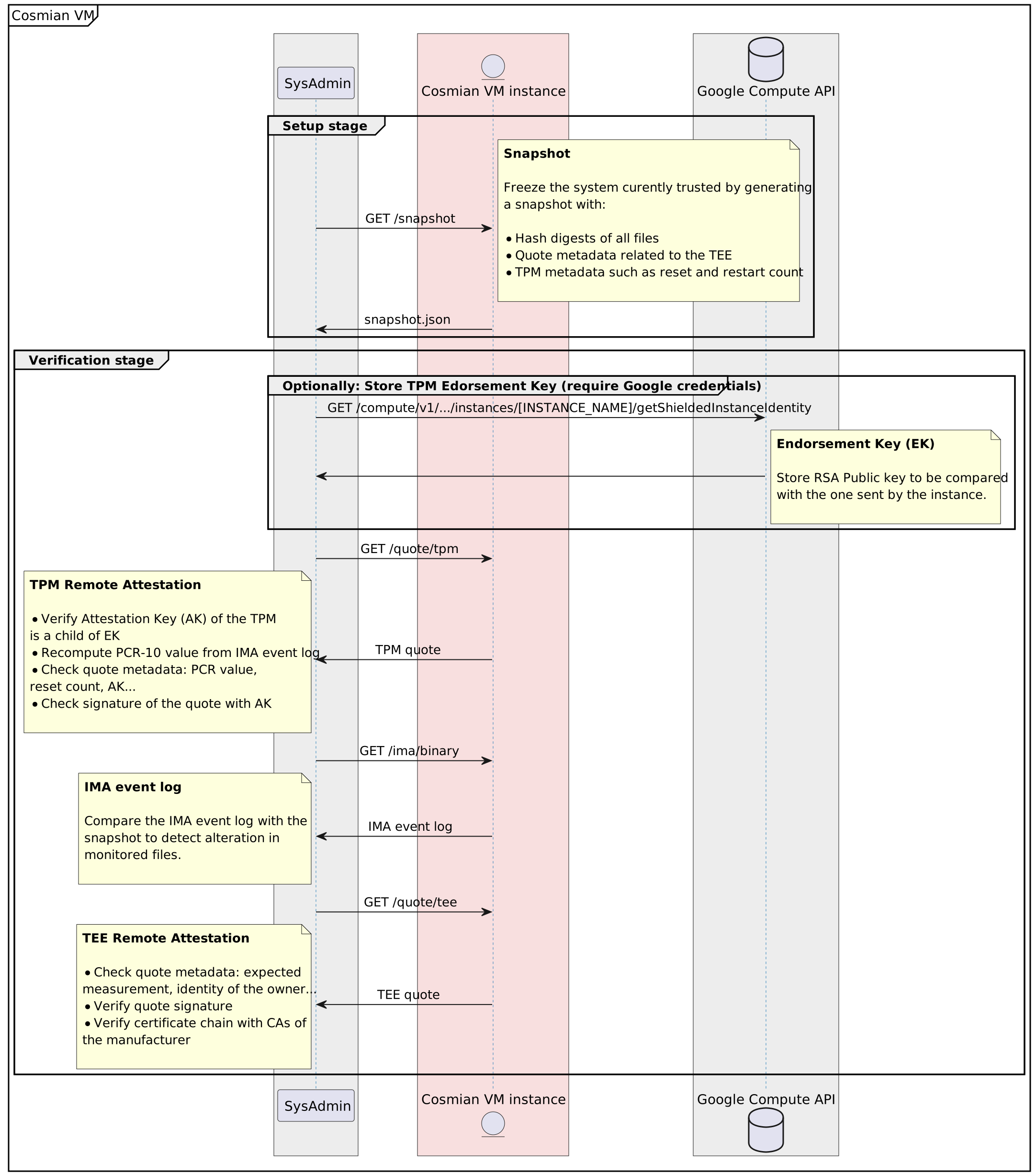
- [系统快照](#snapshot-of-the-system)
- [远程实例验证](#verification-of-the-remote-instance)
- [云服务商支持](#cloud-providers-support)
- [AWS 镜像](#aws-images)
- [Azure 镜像](#azure-images)
- [更新统一内核镜像:UKI](#update-unified-kernel-image-uki)
- [GCP 镜像](#gcp-images)
- [注意](#note)
- [市场镜像内容](#marketplace-image-content)
- [配置文件](#configuration-file)
- [首次启动 Cosmian VM](#first-cosmian-vm-launch)
- [处理 Cosmian VM 状态](#handle-cosmian-vm-status)
- [用法](#usage)
- [在无 SSH 访问权限的情况下提供机密信息](#provide-secrets-without-ssh-access)
- [版本对应关系](#versions-correspondence)
## 设置流程
机密 VM 实例从云服务商平台创建,并包含 Cosmian VM 解决方案。安装所有依赖项后,会对 VM 进行快照,并可以对运行中的应用程序执行完整性检查,以验证运行的代码和基础设施。
-
### GCP 镜像
[基础镜像列表](https://github.com/Cosmian/cosmian_vm/tree/main/documentation/docs/index.md#gcp-images)
```
gcloud compute images list > gcloud_list.json
gcloud compute images list --filter="guestOsFeatures[].type=SEV_SNP_CAPABLE" --format=json > gcloud_images_SEV_SNP_CAPABLE.json
gcloud compute images list --filter="guestOsFeatures[].type=TDX_CAPABLE" --format=json > gcloud_images_TDX.json
```
#### 注意
- 在 GCP 上,`ubuntu-2404-noble-amd64-v20250805` 和 `rhel-9-v20250709` 镜像均支持 SEV 和 TDX。
### 市场镜像内容
在 GCP、Azure 或 AWS 市场上构建的 Cosmian VM 镜像包含四个主要可执行文件:
- `cosmian_vm_agent` 设计用于部署在 Cosmian VM 上。它根据需要提供用于验证 Cosmian VM 可信度的凭证,例如 IMA 文件、TEE quote 或 TPM quote
- `cosmian_certtool` 设计用于生成由 _Let's Encrypt_ 签名的证书或 RATLS 证书
- `cosmian_fstool` 设计用于生成 LUKS 容器并注册 TPM,以便在重启时自动启动
- `cosmian_vm` 是一个 CLI,设计用于在您自己的主机上使用。它查询 `cosmian_vm_agent` 以获取用于验证 Cosmian VM 可信度的凭证
此镜像:
- 包含完全配置好的 IMA
- 包含完全配置好的 SELinux
- 禁用自动更新(以避免在快照后对 Cosmian VM 进行任何修改)
- 包含完全配置好的 `cosmian_vm_agent`
这是更新后的文件树摘要:
```
.
├── etc
│ ├── apt
│ │ └── apt.conf.d
│ │ └── 10periodic
│ ├── cosmian_vm
│ │ └── agent.toml
│ ├── default
│ │ └── grub
│ ├── ima
│ │ └── ima-policy
│ └── systemd
│ └── system
│ ├── cosmian_vm_agent.service
│ └── mount_luks.service
├── root
│ ├── mount_luks.sh
├── usr
│ └── sbin
│ ├── cosmian_certtool
│ ├── cosmian_fstool
│ └── cosmian_vm_agent
└── var
└── lib
└── cosmian_vm
├── container <--- LUKS container
├── tmp
└── data <--- LUKS container mounted
├── cert.pem
└── cert.key
```
### 配置文件
Cosmian VM Agent 依赖于位于 `/etc/cosmian_vm/agent.toml` 的配置文件。请随意编辑它。
最小配置文件为:
```
[agent]
host = "127.0.0.1"
port = 5555
ssl_certificate = "data/cert.pem"
ssl_private_key = "data/key.pem"
tpm_device = "/dev/tpmrm0"
```
您可以通过设置环境变量 `COSMIAN_VM_AGENT_CONF` 来更改配置文件的默认位置。
### 首次启动 Cosmian VM
当 `cosmian_vm_agent` 首次启动时,它会初始化几个组件:
1. 它生成一个自签名证书,并将证书的 `CommonName` 设置为机器主机名的值。
2. 它生成一个 LUKS 容器(`/var/lib/cosmian_vm/container`)并将其挂载到 `/var/lib/cosmian_vm/data`。请注意,
`/var/lib/cosmian_vm/tmp` 是一个 `tmpfs`。它是加密的,但由于每次 VM 重启时都会被擦除,因此它应仅包含易失性数据。此目录中的数据之所以加密,是因为 RAM 是加密的。
3. 它生成 TPM 签名密钥
建议在生产系统中自行配置 1. 和 2.。
证书可以随意更改:
- 编辑您的 DNS 记录以指向该 VM
- 使用您选择的方法(例如 _Let's encrypt_)创建受信任的证书,或使用 `cosmian_certtool`
- 编辑 `cosmian_vm_agent` 配置文件以指向 TLS 证书和私钥的位置。
可以使用 `cosmian_fstool` 重新生成 LUKS 容器,并设置您自己的大小和密码(需自行存储在安全位置)。建议使用额外的备份磁盘来存储容器。
您可以通过在启动 `cosmian_vm_agent` 时设置 `COSMIAN_VM_PREINIT=0` 来跳过所有这些首次启动步骤。
### 处理 Cosmian VM 状态
在 GCP、Azure 或 AWS 上实例化镜像后,`cosmian_vm_agent` 会在 VM 启动时作为 `systemd` 服务自动启动。
您现在可以在 VM 上安装所需的任何软件包或应用程序。
您的 VM 现已设置完毕并准备就绪。
### 用法
然后在您的本地主机上,当您确定 VM 已完全配置好且不应再更改时:
1. 创建快照(一次)
```
cosmian_vm --url https://my_app.dev snapshot
```
您一次只能处理一个快照。
2. 验证机器的当前状态
```
cosmian_vm --url https://my_app.dev verify --snapshot cosmian_vm.snapshot
```
如果您使用依赖于自签名证书的默认 Cosmian VM 设置,则需要添加参数:`--allow-insecure-tls`,如下所示:
```
cosmian_vm --url https://my_app.dev --allow-insecure-tls snapshot
```
在验证 Cosmian VM 时,您还可以检查安装在此 VM 内的服务的 TLS 证书是否与验证期间查询 Cosmian VM Agent 时使用的证书一致。为此,请按如下方式使用 `--application`(可根据需要多次使用):
```
cosmian_vm --url https://my_app.dev verify --snapshot cosmian_vm.snapshot \
--application service1.cosmian.dev:3655 \
--application service2.cosmian.dev
```
### 在无 SSH 访问权限的情况下提供机密信息
没有 SSH 访问权限的用户仍然可以将机密信息安全地发送到 Cosmian VM Agent,这些信息会被写入加密的 Cosmian 挂载点。
作为先决条件,在对 Cosmian VM 进行快照之前,您必须通过 SSH 连接到 Cosmian VM 实例,并在 `agent.toml` 中配置 `app` 部分,如下所示:
```
[agent]
host = "0.0.0.0"
port = 5555
ssl_certificate = "data/my_app.dev/cert.pem"
ssl_private_key = "data/my_app.dev/key.pem"
tpm_device = "/dev/tpmrm0"
[app]
service_type = "systemd"
service_name = "my_app"
app_storage = "data/app"
```
从这里,重启 Cosmian VM Agent:
```
sudo systemctl restart cosmian_vm_agent
```
然后,您可以从本地主机将应用程序配置文件提供给 Cosmian VM Agent,如下所示:
```
cosmian_vm --url https://my_app.dev app init --conf app.json
```
其中 `app.json` 是应用程序预期的配置文件。例如这里是一个 JSON 文件。
它将被发送到 `cosmian_vm_agent` 并存储在 `/var/lib/cosmian_vm/data/app/app.conf` 的 LUKS 容器中。
如果您再次调用 `init`,之前的配置文件将被覆盖。
`restart` 子命令可以重启在 `service_name` 字段中标识的应用程序。
```
cosmian_vm --url https://my_app.dev app restart
```
## 版本对应关系
| 基础镜像 | Cosmian VM | Cosmian KMS | Cosmian AI Runner |
| ---------- | ----------- | ----------- | ----------------- |
| 0.1.15 | 1.3.20 | 5.14.0 | 1.0.1 |
| 0.1.15 | 1.3.19 | 5.11.0 | 1.0.1 |
| 0.1.15 | 1.3.18 | 5.11.0 | 1.0.1 |
| 0.1.15 | 1.3.17 | 5.11.0 | 1.0.1 |
| 0.1.14 | 1.3.16 | 5.9.0 | 1.0.1 |
| 0.1.14 | 1.3.15 | 5.7.1 | 1.0.1 |
| 0.1.14 | 1.3.14 | 5.7.1 | 1.0.1 |
| 0.1.14 | 1.3.13 | 5.7.1 | 1.0.1 |
| 0.1.13 | 1.3.12 | 5.7.1 | 1.0.1 |
| 0.1.13 | 1.3.11 | 5.7.1 | 1.0.1 |
| 0.1.13 | 1.3.10 | 5.6.2 | 1.0.1 |
| 0.1.13 | 1.3.9 | 5.6.2 | 1.0.0 |
| 0.1.12 | 1.3.8 | 5.6.2 | 1.0.0 |
| 0.1.12 | 1.3.7 | 5.0.0 | 1.0.0 |
| 0.1.11 | 1.3.6 | 5.0.0 | 1.00 |
| 0.1.11 | 1.3.5 | 4.24.0 | 1.0.0 |
| 0.1.11 | 1.3.3,1.3.4 | 4.21.2 | 0.3.0 |
| 0.1.10 | 1.3.2 | 4.21.1 | 0.3.0 |
| 0.1.10 | 1.3.1 | 4.19.3 | 0.3.0 |
| 0.1.10 | 1.3.0 | 4.19.1 | 0.3.0 |
| 0.1.9 | 1.2.9 | 4.19.0 | 0.3.0 |
| 0.1.8 | 1.2.8 | 4.18.0 | 0.3.0 |
| 0.1.7 | 1.2.7 | 4.18.0 | 0.3.0 |
| 0.1.6 | 1.2.6 | 4.17.0 | 0.3.0 |
| 0.1.5 | 1.2.5 | 4.17.0 | 0.3.0 |
| 0.1.5 | 1.2.4 | 4.16.0 | 0.3.0 |
| 0.1.5 | 1.2.3 | 4.16.0 | 0.3.0 |
| 0.1.4 | 1.2.2 | 4.16.0 | 0.3.0 |
| 0.1.3 | 1.2.1 | 4.16.0 | 0.3.0 |
| | 1.2.0 | 4.16.0 | - |
| | 1.1.2 | 4.15.0 | - |


标签:DevSecOps, JSONLines, RHEL, TEE, 上游代理, 云计算, 人工智能安全, 内存加密, 可信执行环境, 可视化界面, 合规性, 子域名枚举, 完整性度量, 机密虚拟机, 机密计算, 硬件安全, 系统安全, 网络安全, 虚拟化安全, 规则引擎, 远程证明, 通知系统, 通知系统, 隐私保护, 零信任