reviewdog/reviewdog
GitHub: reviewdog/reviewdog
一个语言无关的自动化代码审查工具,能够聚合任意 linter 的检查结果并发布到各大代码托管平台的 PR/MR 中。
Stars: 9464 | Forks: 489
reviewdog - 一只自动进行代码审查、守护代码库健康的“看门狗”。
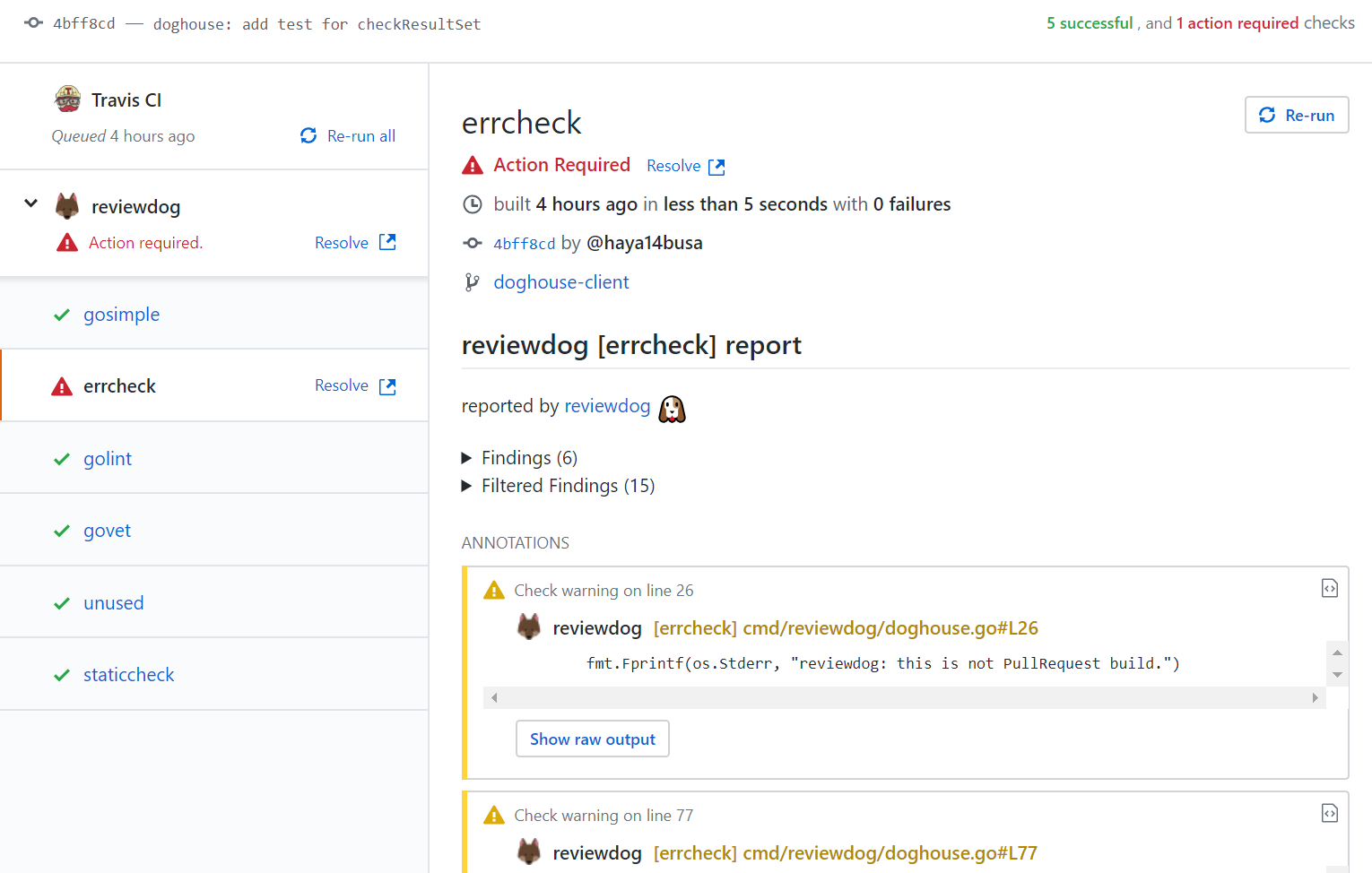
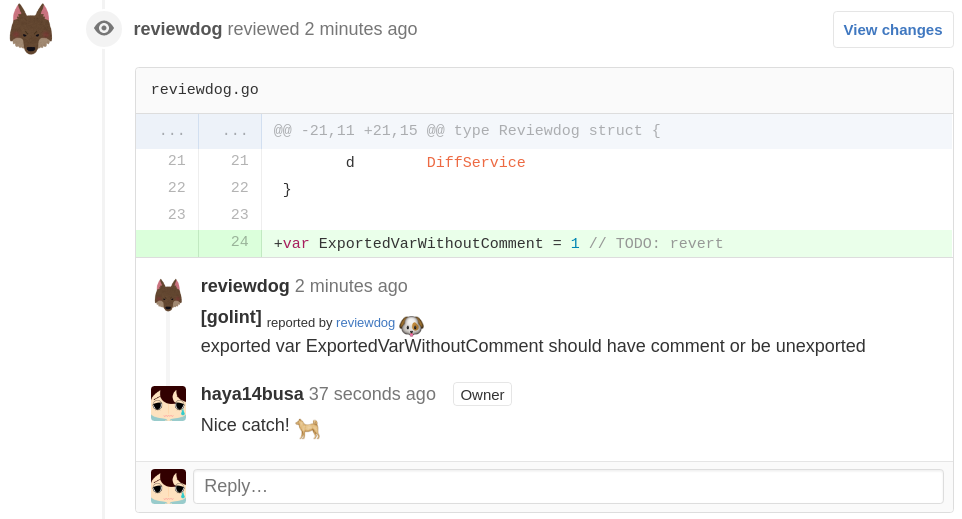
reviewdog 提供了一种可以轻松集成任意 linter 工具,并自动将审查评论发布到代码托管服务(如 GitHub)的方法。
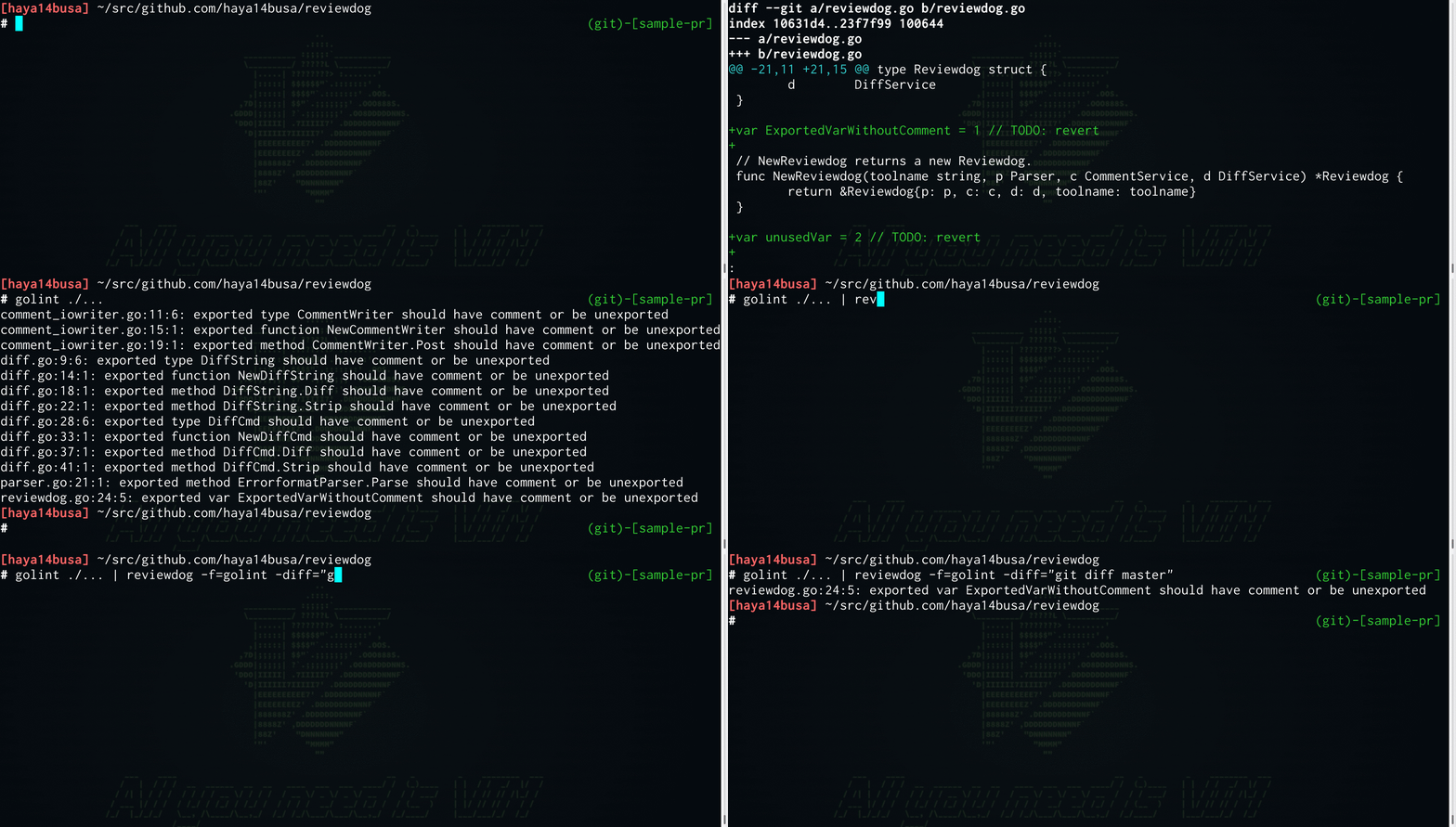
它利用 lint 工具的输出,如果发现的问题位于待审查的 patch 差异中,就会将其作为评论发布。
reviewdog 也支持在本地环境中运行,通过 diff 来过滤 lint 工具的输出。
[设计文档](https://docs.google.com/document/d/1mGOX19SSqRowWGbXieBfGPtLnM0BdTkIc9JelTiu6wA/edit?usp=sharing)
## 目录
- [安装](#installation)
- [输入格式](#input-format)
* ['errorformat'](#errorformat)
* [可用的预定义 'errorformat'](#available-pre-defined-errorformat)
* [Reviewdog 诊断格式 (RDFormat)](#reviewdog-diagnostic-format-rdformat)
* [Diff](#diff)
* [checkstyle 格式](#checkstyle-format)
* [SARIF 格式](#sarif-format)
- [代码建议](#code-suggestions)
- [reviewdog 配置文件](#reviewdog-config-file)
- [报告器 (Reporters)](#reporters)
* [报告器: Local (-reporter=local) [默认]](#reporter-local--reporterlocal-default)
* [报告器: GitHub PR Checks (-reporter=github-pr-check)](#reporter-github-pr-checks--reportergithub-pr-check)
* [报告器: GitHub Checks (-reporter=github-check)](#reporter-github-checks--reportergithub-check)
* [报告器: GitHub PullRequest 审查评论 (-reporter=github-pr-review)](#reporter-github-pullrequest-review-comment--reportergithub-pr-review)
* [报告器: GitHub Annotations (-reporter=github-annotations)](#reporter-github-annotations--reportergithub-annotations)
* [报告器: GitHub PR Annotations (-reporter=github-pr-annotations)](#reporter-github-pr-annotations--reportergithub-pr-annotations)
* [报告器: GitLab MergeRequest discussions (-reporter=gitlab-mr-discussion)](#reporter-gitlab-mergerequest-discussions--reportergitlab-mr-discussion)
* [报告器: GitLab MergeRequest commit (-reporter=gitlab-mr-commit)](#reporter-gitlab-mergerequest-commit--reportergitlab-mr-commit)
* [报告器: Bitbucket Code Insights Reports (-reporter=bitbucket-code-report)](#reporter-bitbucket-code-insights-reports--reporterbitbucket-code-report)
- [支持的 CI 服务](#supported-ci-services)
* [GitHub Actions](#github-actions)
* [Travis CI](#travis-ci)
* [Circle CI](#circle-ci)
* [GitLab CI](#gitlab-ci)
* [Bitbucket Pipelines](#bitbucket-pipelines)
* [通用 (Jenkins, 本地, 等...)](#common-jenkins-local-etc)
+ [带有 GitHub pull request builder 插件的 Jenkins](#jenkins-with-github-pull-request-builder-plugin)
- [退出代码](#exit-codes)
- [过滤模式](#filter-mode)
- [相关文章](#articles)
[](https://github.com/reviewdog/reviewdog/pull/131/checks)
[](https://github.com/reviewdog/reviewdog/pull/24#discussion_r84599728)
## 安装
```
# 安装最新版本。(默认安装到 ./bin/)。
$ curl -sfL https://raw.githubusercontent.com/reviewdog/reviewdog/fd59714416d6d9a1c0692d872e38e7f8448df4fc/install.sh | sh -s
# 指定安装目录 ($(go env GOPATH)/bin/) 和版本。
$ curl -sfL https://raw.githubusercontent.com/reviewdog/reviewdog/fd59714416d6d9a1c0692d872e38e7f8448df4fc/install.sh | sh -s -- -b $(go env GOPATH)/bin [vX.Y.Z]
# 在 alpine linux 中(因为它默认不带 curl)
$ wget -O - -q https://raw.githubusercontent.com/reviewdog/reviewdog/fd59714416d6d9a1c0692d872e38e7f8448df4fc/install.sh | sh -s [vX.Y.Z]
```
### 每日构建版本
你也可以使用 [reviewdog 每日发布版](https://github.com/reviewdog/nightly) 来每天体验 reviewdog 的最新改进!
```
$ curl -sfL https://raw.githubusercontent.com/reviewdog/nightly/30fccfe9f47f7e6fd8b3c38aa0da11a6c9f04de7/install.sh | sh -s -- -b $(go env GOPATH)/bin
```
### GitHub Action: [reviewdog/action-setup](https://github.com/reviewdog/action-setup)
```
steps:
- uses: reviewdog/action-setup@d8edfce3dd5e1ec6978745e801f9c50b5ef80252 # v1.4.0
with:
reviewdog_version: latest # Optional. [latest,nightly,v.X.Y.Z]
```
### homebrew / linuxbrew
你也可以使用 brew 安装 reviewdog:
```
$ brew install reviewdog/tap/reviewdog
$ brew upgrade reviewdog/tap/reviewdog
```
### Windows 上的 [Scoop](https://scoop.sh/)
```
> scoop install reviewdog
```
### 通过 go install 构建
```
$ go install github.com/reviewdog/reviewdog/cmd/reviewdog@latest
```
## 输入格式
### 'errorformat'
reviewdog 接受来自 stdin 的任何编译器或 linter 结果,并使用类似 scan-f 的 [**'errorformat'**](https://github.com/reviewdog/errorformat) 对其进行解析,这是 Vim 的 [errorformat](https://vim-jp.org/vimdoc-en/quickfix.html#error-file-format) 功能的移植版本。
例如,如果结果格式是 `{file}:{line number}:{column number}: {message}`,那么 errorformat 应该是 `%f:%l:%c: %m`,你可以通过 `-efm` 参数传递它。
```
$ golint ./...
comment_iowriter.go:11:6: exported type CommentWriter should have comment or be unexported
$ golint ./... | reviewdog -efm="%f:%l:%c: %m" -diff="git diff FETCH_HEAD"
```
| 名称 | 描述 |
| ---- | ----------- |
| %f | 文件名 |
| %l | 行号 |
| %c | 列号 |
| %m | 错误信息 |
| %% | 单个 '%' 字符 |
| ... | ... |
如果你想处理更复杂的输出,请参阅 [reviewdog/errorformat](https://github.com/reviewdog/errorformat) 和 [:h errorformat](https://vim-jp.org/vimdoc-en/quickfix.html#error-file-format)。'errorformat' 可以处理更复杂的输出,比如多行错误信息。
你也可以在 [Playground](https://reviewdog.github.io/errorformat-playground/) 上尝试 errorformat!
借助此 'errorformat' 功能,reviewdog 可以轻松支持任何工具的输出。
### 可用的预定义 'errorformat'
但是,在许多情况下你不需要编写 'errorformat'。reviewdog 为主流工具支持预定义的 errorformat。
你可以通过 `reviewdog -list` 找到可用的 errorformat 名称,并通过 `-f={name}` 使用它。
```
$ reviewdog -list
golint linter for Go source code - https://github.com/golang/lint
govet Vet examines Go source code and reports suspicious problems - https://golang.org/cmd/vet/
sbt the interactive build tool - http://www.scala-sbt.org/
...
```
```
$ golint ./... | reviewdog -f=golint -diff="git diff FETCH_HEAD"
```
你可以通过向 [reviewdog/errorformat](https://github.com/reviewdog/errorformat) 贡献来添加支持的预定义 'errorformat'。
### Reviewdog 诊断格式
reviewdog 支持 [Reviewdog Diagnostic Format (RDFormat)](./proto/rdf/) 作为通用诊断格式,它同时支持 [rdjson](./proto/rdf/#rdjson) 和 [rdjsonl](./proto/rdf/#rdjsonl) 格式。
此 rdformat 支持丰富的功能,如多行范围注释、严重程度、带 URL 的规则代码以及 [代码建议](#code-suggestions)。
```
$
| | reviewdog -f=rdjson -reporter=github-pr-review
# 或
$ | | reviewdog -f=rdjsonl -reporter=github-pr-review
```
#### 示例:ESLint 配合 RDFormat
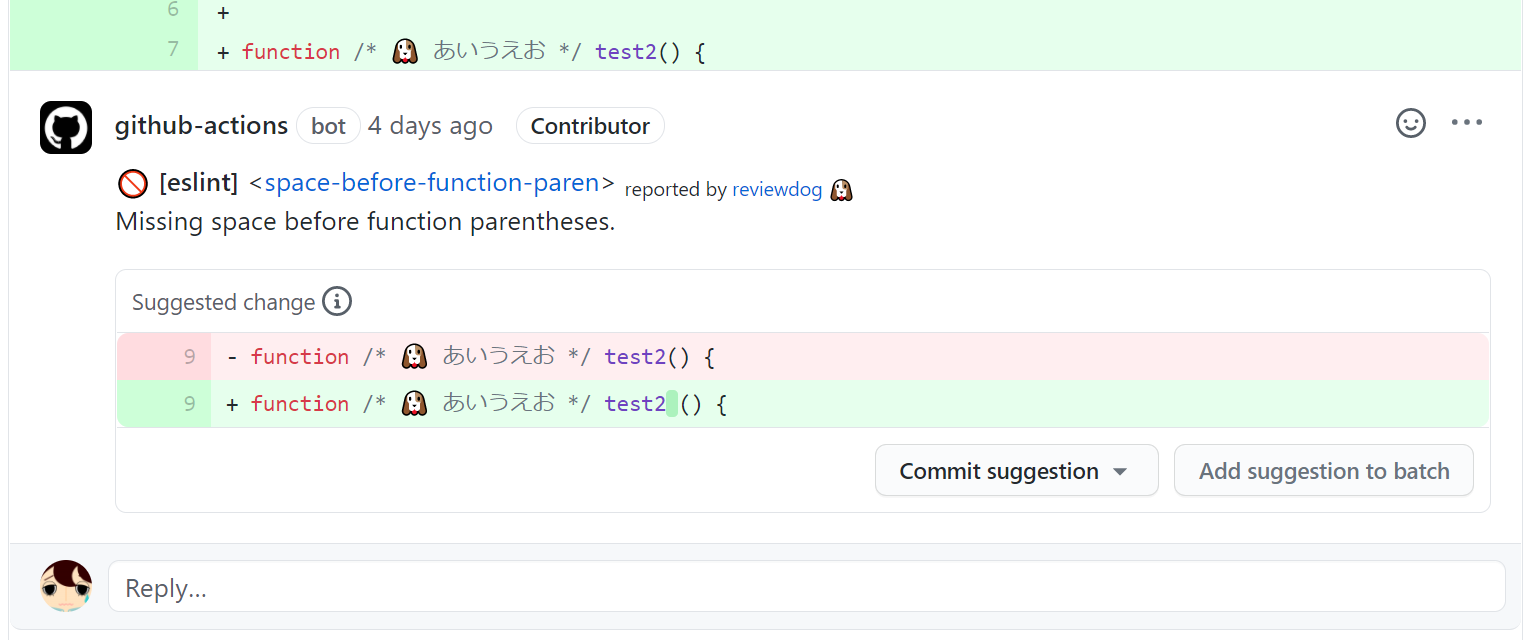
你可以使用 [eslint-formatter-rdjson](https://www.npmjs.com/package/eslint-formatter-rdjson) 以 eslint 输出格式输出 `rdjson`。
```
$ npm install --save-dev eslint-formatter-rdjson
$ eslint -f rdjson . | reviewdog -f=rdjson -reporter=github-pr-review
```
或者你也可以在 GitHub Actions 中使用 [reviewdog/action-eslint](https://github.com/reviewdog/action-eslint)。
### Diff
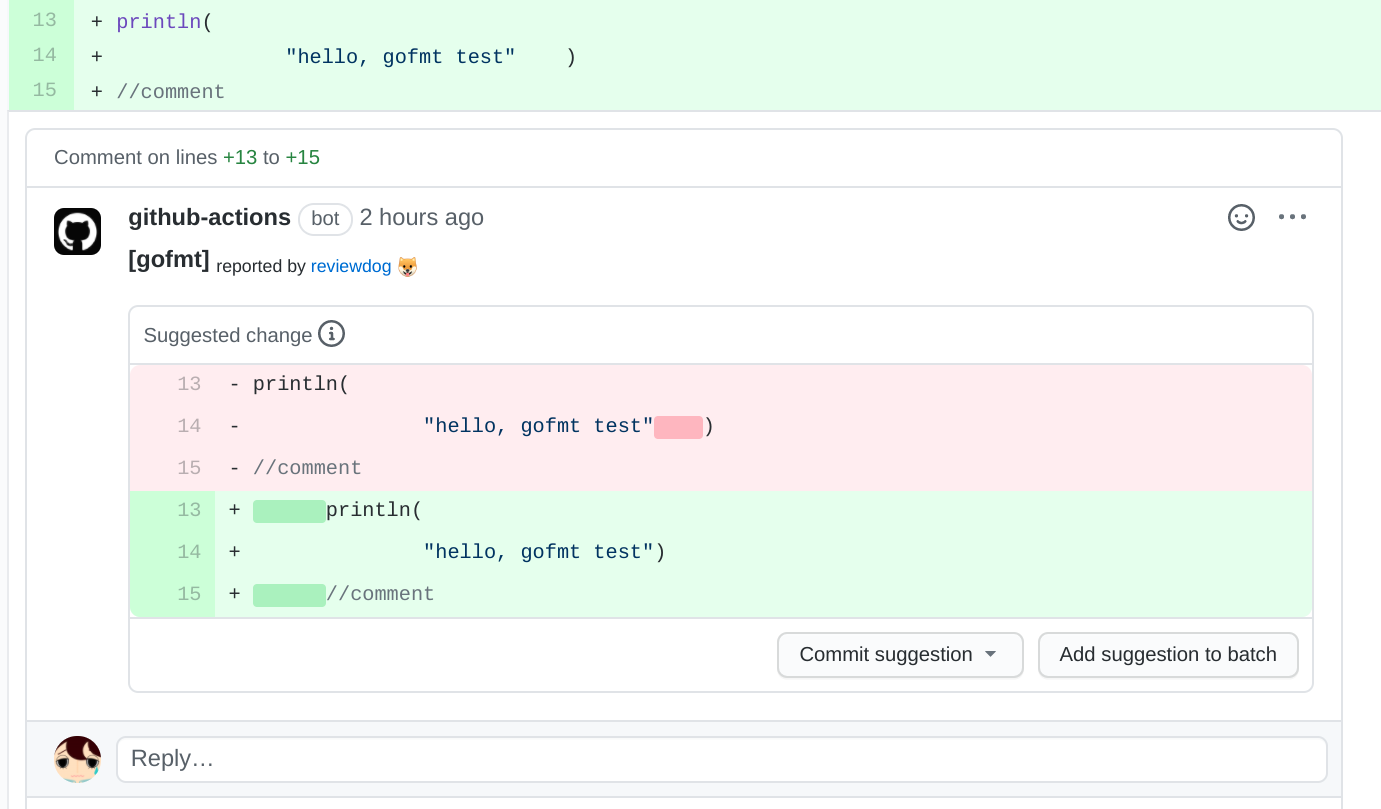
reviewdog 支持 diff(统一格式 unified format)作为输入格式,这对 [代码建议](#code-suggestions) 特别有用。
reviewdog 可以与任何代码建议工具或格式化工具集成以报告建议。
`-f.diff.strip`:`-f=diff` 的选项:从 diff 文件名中剥离前 NUM 个组件(等同于 'patch -p')(对于 git diff,默认为 1)(默认值为 1)。
```
$ # e.g. eslint --fix, gofmt
$ TMPFILE=$(mktemp)
$ git diff >"${TMPFILE}"
$ git stash -u && git stash drop
$ reviewdog -f=diff -f.diff.strip=1 -reporter=github-pr-review < "${TMPFILE}"
```
或者你也可以在 GitHub Actions 中使用 [reviewdog/action-suggester](https://github.com/reviewdog/action-suggester)。
如果诊断工具支持 diff 输出格式,你可以直接通过管道传输 diff。
```
$ gofmt -s -d . | reviewdog -name="gofmt" -f=diff -f.diff.strip=0 -reporter=github-pr-review
$ shellcheck -f diff $(shfmt -f .) | reviewdog -f=diff
```
### checkstyle 格式
reviewdog 也接受 [checkstyle XML 格式](http://checkstyle.sourceforge.net/)。
如果 linter 支持 checkstyle 格式作为报告格式,你可以使用 -f=checkstyle 而不是使用 'errorformat'。
```
# 本地
$ eslint -f checkstyle . | reviewdog -f=checkstyle -diff="git diff"
# CI (通过 -name 参数覆盖 review comment 中显示的工具名称)
$ eslint -f checkstyle . | reviewdog -f=checkstyle -name="eslint" -reporter=github-check
```
此外,如果你想将其他 Json/XML/等... 格式传递给 reviewdog,你可以编写一个转换器。
```
$ | | reviewdog -f=checkstyle -name="" -reporter=github-pr-check
```
### SARIF 格式
reviewdog 支持 [SARIF 2.1.0 JSON 格式](https://sarifweb.azurewebsites.net/)。
你可以使用带有 -f=sarif 选项的 reviewdog。
```
# 本地
$ eslint -f @microsoft/eslint-formatter-sarif . | reviewdog -f=sarif -diff="git diff"
```
## 代码建议


reviewdog 支持 *代码建议* 功能,通过 [rdformat](#reviewdog-diagnostic-format-rdformat) 或 [diff](#diff) 输入。
你也可以在 GitHub Actions 中使用 [reviewdog/action-suggester](https://github.com/reviewdog/action-suggester)。
如果诊断工具支持代码建议数据,reviewdog 可以在提供诊断结果的同时建议代码更改。
你也可以通过 [diff](#diff) 输入将 reviewdog 与任何代码修复工具和任何代码格式化工具集成。
### 代码建议支持表
请注意,并非所有报告器都提供对代码建议的支持。
| `-reporter` | 建议支持 |
| ---------------------------- | ------- |
| **`local`** | NO [1] |
| **`github-check`** | NO [2] |
| **`github-pr-check`** | NO [2] |
| **`github-annotations`** | NO [2] |
| **`github-pr-annotations`** | NO [2] |
| **`github-pr-review`** | OK |
| **`gitlab-mr-discussion`** | OK |
| **`gitlab-mr-commit`** | NO [2] |
| **`gerrit-change-review`** | NO [1] |
| **`bitbucket-code-report`** | NO [2] |
| **`gitea-pr-review`** | NO [2] |
- [1] 报告器服务支持代码建议功能,但 reviewdog 尚不支持。有关状态,请参见 [#678](https://github.com/reviewdog/reviewdog/issues/678)。
- [2] 报告器服务本身不支持代码建议功能。
## reviewdog 配置文件
reviewdog 也可以通过 .reviewdog.yml 配置文件进行控制,而不是使用 "-f" 或 "-efm" 参数。
使用 .reviewdog.yml,你可以轻松地在 CI 服务和本地环境(包括编辑器集成)中运行相同的命令。
#### .reviewdog.yml
```
runner:
:
cmd: # (required)
errorformat: # (optional if you use `format`)
-
format: # (optional if you use `errorformat`. e.g. golint,rdjson,rdjsonl)
name: # (optional. you can overwrite defined by runner key)
level: # (optional. same as -level flag. [info,warning,error])
# examples
golint:
cmd: golint ./...
errorformat:
- "%f:%l:%c: %m"
level: warning
govet:
cmd: go vet -all .
format: govet
your-awesome-linter:
cmd: awesome-linter run
format: rdjson
name: AwesomeLinter
```
```
$ reviewdog -diff="git diff FETCH_HEAD"
project/run_test.go:61:28: [golint] error strings should not end with punctuation
project/run.go:57:18: [errcheck] defer os.Setenv(name, os.Getenv(name))
project/run.go:58:12: [errcheck] os.Setenv(name, "")
# 你可以使用 -runners 仅运行指定的 runners。
$ reviewdog -diff="git diff FETCH_HEAD" -runners=golint,govet
project/run_test.go:61:28: [golint] error strings should not end with punctuation
# 你可以使用 -conf 指定 config file 路径。
$ reviewdog -conf=./.reviewdog.yml -reporter=github-pr-check
```
基于项目配置运行的输出格式为以下格式之一。
- `: [] `
- `:: [] `
- `::: [] `
## 报告器
reviewdog 可以在本地环境和审查服务中作为持续集成报告结果。
### 报告器: Local (-reporter=local) [默认]
reviewdog 可以通过使用 diff 过滤 linter 结果来发现新引入的问题。你可以将 diff 命令作为 `-diff` 参数传递。
```
$ golint ./... | reviewdog -f=golint -diff="git diff FETCH_HEAD"
```
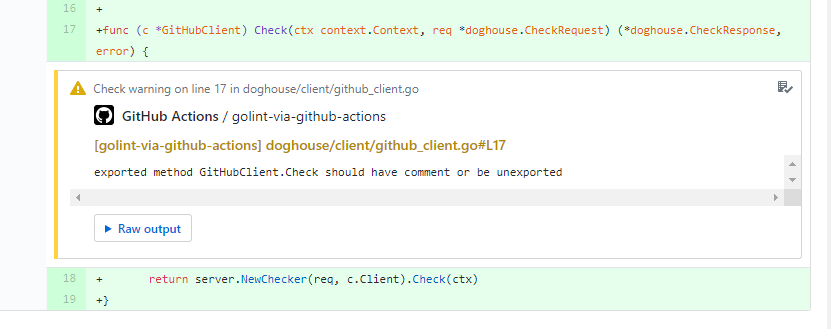
### 报告器: GitHub PR Checks (-reporter=github-pr-check)
[](https://github.com/reviewdog/reviewdog/pull/275/files#annotation_6177941961779419)
[](https://github.com/reviewdog/reviewdog/pull/131/checks)
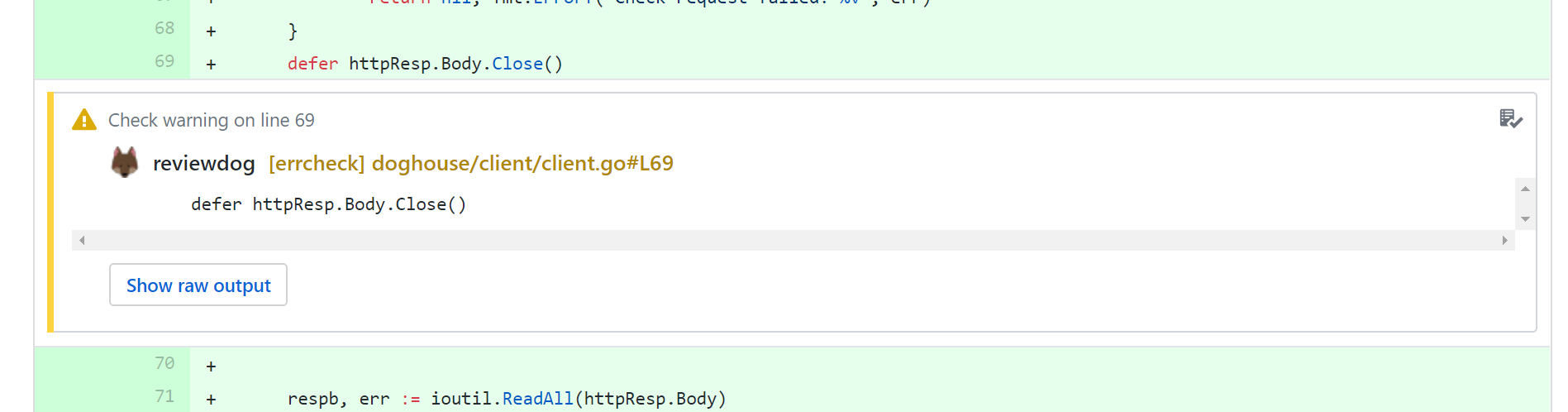
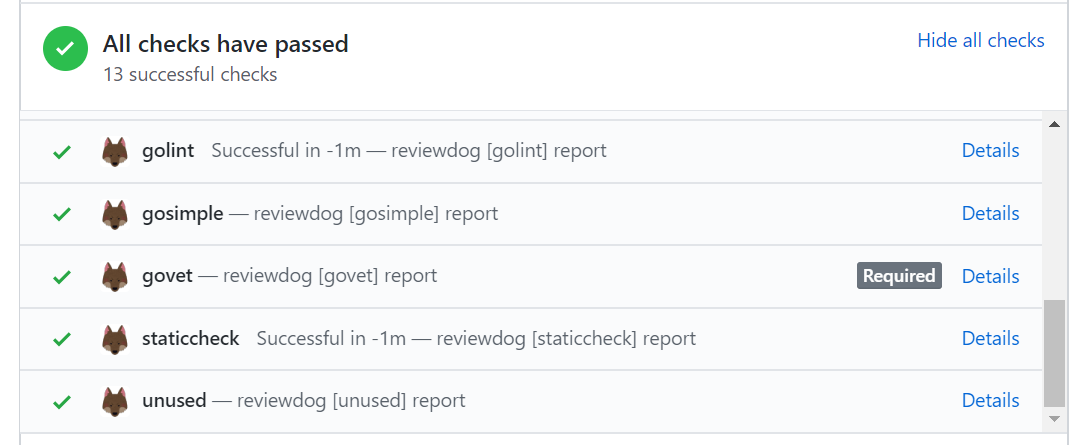
github-pr-check 报告器将结果报告给 [GitHub Checks](https://docs.github.com/en/pull-requests/collaborating-with-pull-requests/collaborating-on-repositories-with-code-quality-features/about-status-checks)。
你可以通过 [配置文件](#reviewdog-config-file) 中的 `level` 字段或 `-level` 标志更改此报告器的报告级别。你可以使用此功能控制 GitHub 状态检查结果。(默认值:error)
| 级别 | GitHub 状态 |
| --------- | ------------- |
| `info` | neutral |
| `warning` | neutral |
| `error` | failure |
使用此报告器有两个选项。
#### 选项 1) 使用 secrets.GITHUB_TOKEN 从 GitHub Actions 运行 reviewdog
示例:[.github/workflows/reviewdog.yml](.github/workflows/reviewdog.yml)
```
- name: Run reviewdog
env:
REVIEWDOG_GITHUB_API_TOKEN: ${{ secrets.GITHUB_TOKEN }}
run: |
golint ./... | reviewdog -f=golint -reporter=github-pr-check
```
另请参见 [GitHub Actions](#github-actions) 部分。你也可以使用公开的 reviewdog GitHub Actions。
#### 选项 2) 安装 reviewdog GitHub Apps
reviewdog CLI 向 reviewdog GitHub App 服务器发送请求,服务器将结果作为 GitHub Checks 发布,因为 Check API 仅 GitHub App 和 GitHub Actions。
1. 安装 reviewdog Apps。https://github.com/apps/reviewdog
2. 设置 `REVIEWDOG_TOKEN` 或在受信任的 CI 提供商中运行 reviewdog CLI。
- 从 `https://reviewdog.app/gh/{owner}/{repo-name}` 获取 token。
```
$ export REVIEWDOG_TOKEN=""
$ reviewdog -reporter=github-pr-check
```
注意:如果你在 Travis 或 AppVeyor 中运行 reviewdog,则不需要 Token。
*注意*
如上所述,带有选项 2 的 github-pr-check 报告器依赖于 reviewdog GitHub App 服务器。
该服务器目前由 haya14busa 自掏腰包维持运行,我可能会破坏某些功能,因此我无法保证服务器能 24 小时 365 天运行。
**更新:** 开始通过 [opencollective](https://opencollective.com/reviewdog) 和 GitHub 赞助获得支持。
请参见 [支持 reviewdog](#supporting-reviewdog)
如果你不想依赖 reviewdog 服务器,可以使用 github-pr-review 报告器或在 GitHub Actions 下运行 reviewdog。
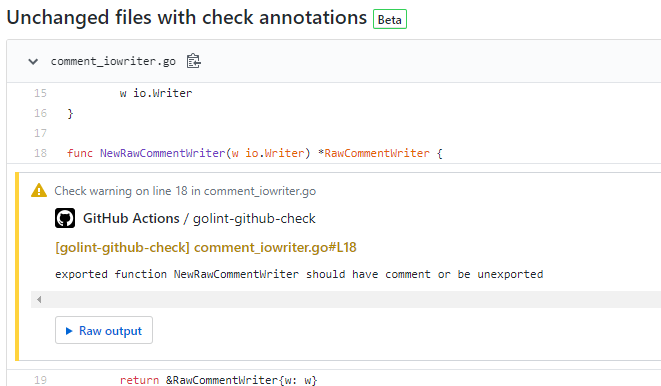
### 报告器: GitHub Checks (-reporter=github-check)
它与 `-reporter=github-pr-check` 基本相同,只是它不仅适用于 Pull Request,也适用于 commit。
[](https://github.com/reviewdog/reviewdog/pull/364/files)
你可以为此报告器创建 [reviewdog 徽章](#reviewdog-badge-)。
### 报告器: GitHub PullRequest review comment (-reporter=github-pr-review)
[](https://github.com/reviewdog/reviewdog/pull/24#discussion_r84599728)
github-pr-review 报告器使用 GitHub Personal API Access Token 将结果报告给 GitHub PullRequest 审查评论。
同时也支持 [GitHub Enterprise](https://github.com/enterprise)。
- 前往 https://github.com/settings/tokens 并生成一个新的 API token。
- 对于私有仓库,请勾选 `repo`;对于公共仓库,请勾选 `public_repo`。
```
$ export REVIEWDOG_GITHUB_API_TOKEN=""
$ reviewdog -reporter=github-pr-review
```
对于 GitHub Enterprise,通过环境变量设置 API endpoint。
```
$ export GITHUB_API="https://example.githubenterprise.com/api/v3/"
$ export REVIEWDOG_INSECURE_SKIP_VERIFY=true # set this as you need to skip verifying SSL
```
如果你可以使用 GitHub Actions,另请参见 [GitHub Actions](#github-actions) 部分。你也可以使用公开的 reviewdog GitHub Actions。
### 报告器: GitHub Annotations (-reporter=github-annotations)
`github-annotations` 使用 GitHub Actions 注释格式将错误和警告输出到 `stdout`,例如:
```
::error line=11,col=41,file=app/index.md::[vale] reported by reviewdog 🐶%0A[demo.Spelling] Did you really mean 'boobarbaz'?%0A%0ARaw Output:%0A{"message": "[demo.Spelling] Did you really mean 'boobarbaz'?", "location": {"path": "app/index.md", "range": {"start": {"line": 11, "column": 41}}}, "severity": "ERROR"}
```
此报告器需要有效的 GitHub API token 来生成 diff,但不会使用该 token 报告错误。
### 报告器: GitHub PR Annotations (-reporter=github-pr-annotations)
与 `github-annotations` 相同,但仅适用于 Pull Requests。
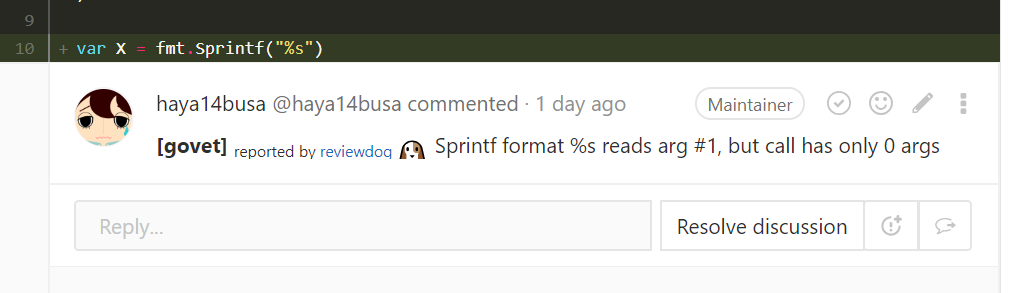
### 报告器: GitLab MergeRequest discussions (-reporter=gitlab-mr-discussion)
[](https://gitlab.com/reviewdog/reviewdog/-/merge_requests/113#note_83411103)
要求的 GitLab 版本:>= v10.8.0
gitlab-mr-discussion 报告器使用 GitLab Personal API Access token 将结果报告给 GitLab MergeRequest discussions。
从 https://gitlab.com/profile/personal_access_tokens 获取具有 `api` 范围的 token。
```
$ export REVIEWDOG_GITLAB_API_TOKEN=""
$ reviewdog -reporter=gitlab-mr-discussion
```
由 Gitlab CI(v11.7 起)自动定义的 `CI_API_V4_URL` 环境变量将被用于查找 Gitlab API URL。
或者,也可以定义 `GITLAB_API`,在这种情况下,它将优先于 `CI_API_V4_URL`。
```
$ export GITLAB_API="https://example.gitlab.com/api/v4"
$ export REVIEWDOG_INSECURE_SKIP_VERIFY=true # set this as you need to skip verifying SSL
```
### 报告器: GitLab MergeRequest commit (-reporter=gitlab-mr-commit)
gitlab-mr-commit 与 [gitlab-mr-discussion](#reporter-gitlab-mergerequest-discussions--reportergitlab-mr-discussion) 报告器类似,但将结果报告给 GitLab MergeRequest 中的每个 commit。
推荐使用 gitlab-mr-discussion,但如果你的 GitLab 版本低于 v10.8.0,则可以使用 gitlab-mr-commit 报告器。
```
$ export REVIEWDOG_GITLAB_API_TOKEN=""
$ reviewdog -reporter=gitlab-mr-commit
```
### 报告器: Gerrit Change review (-reporter=gerrit-change-review)
gerrit-change-review 报告器使用 Gerrit Rest APIs 将结果报告给 Gerrit Change。
该报告器支持基本身份验证和基于 Git-cookie 的身份验证来报告结果。
设置 `GERRIT_USERNAME` 和 `GERRIT_PASSWORD` 环境变量以进行基本身份验证,并设置 `GIT_GITCOOKIE_PATH` 以进行基于 git cookie 的身份验证。
```
$ export GERRIT_CHANGE_ID=changeID
$ export GERRIT_REVISION_ID=revisionID
$ export GERRIT_BRANCH=master
$ export GERRIT_ADDRESS=http://:
$ reviewdog -reporter=gerrit-change-review
```
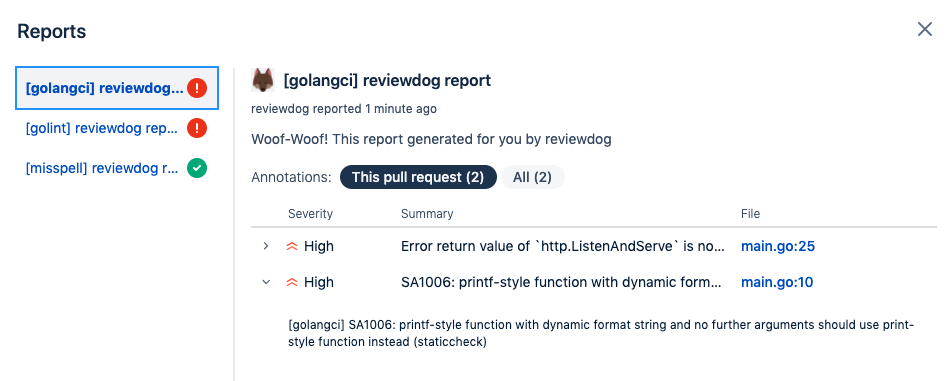
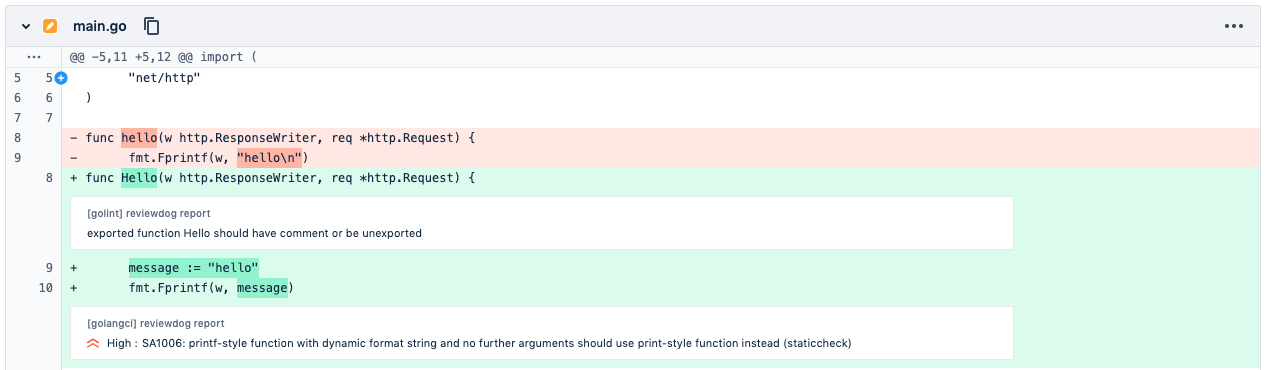
### 报告器: Bitbucket Code Insights Reports (-reporter=bitbucket-code-report)
[](https://bitbucket.org/Trane9991/reviewdog-example/pull-requests/1)
[](https://bitbucket.org/Trane9991/reviewdog-example/pull-requests/1)
bitbucket-code-report 生成带有注释的 [Bitbucket Code Insights](https://support.atlassian.com/bitbucket-cloud/docs/code-insights/) 报告。
目前,仅支持 `no-filter` 模式,因此每次运行都会扫描整个项目。
报告按 commit 存储,可以通过 Bitbucket Pipelines UI 按 commit 查看,也可以在 Pull Request 中查看。在 Pull Request UI 中,受影响的代码行将在 diff 中被注释,你还可以通过 **This pull request** 或 **All** 过滤注释。
如果从 [Bitbucket Pipelines](#bitbucket-pipelines) 运行,则无需额外配置(甚至不需要凭据)。
如果在本地或其他 CI 系统中运行,则需要提供 Bitbucket API 凭据:
- 对于基本身份验证,你需要设置以下环境变量:
`BITBUCKET_USER` 和 `BITBUCKET_PASSWORD`
- 对于 AccessToken 身份验证,你需要设置 `BITBUCKET_ACCESS_TOKEN`
```
$ export BITBUCKET_USER="my_user"
$ export BITBUCKET_PASSWORD="my_password"
$ reviewdog -reporter=bitbucket-code-report
```
要将报告发布到 Bitbucket Server,请使用 `BITBUCKET_SERVER_URL` 变量:
```
$ export BITBUCKET_USER="my_user"
$ export BITBUCKET_PASSWORD="my_password"
$ export BITBUCKET_SERVER_URL="https://bitbucket.my-company.com"
$ reviewdog -reporter=bitbucket-code-report
```
## 支持的 CI 服务
### [GitHub Actions](https://github.com/features/actions)
示例:[.github/workflows/reviewdog.yml](.github/workflows/reviewdog.yml)
```
name: reviewdog
on: [pull_request]
jobs:
reviewdog:
name: reviewdog
runs-on: ubuntu-latest
steps:
# ...
- uses: reviewdog/action-setup@d8edfce3dd5e1ec6978745e801f9c50b5ef80252 # v1.4.0
with:
reviewdog_version: latest # Optional. [latest,nightly,v.X.Y.Z]
- name: Run reviewdog
env:
REVIEWDOG_GITHUB_API_TOKEN: ${{ secrets.GITHUB_TOKEN }}
run: |
reviewdog -reporter=github-pr-check -runners=golint,govet
# or
reviewdog -reporter=github-pr-review -runners=golint,govet
```
示例 (github-check reporter):
[.github/workflows/reviewdog](.github/workflows/reviewdog.yml)
只有 `github-check` 报告器也可以在 push 事件上运行。
```
name: reviewdog (github-check)
on:
push:
branches:
- master
pull_request:
jobs:
reviewdog:
name: reviewdog
runs-on: ubuntu-latest
steps:
# ...
- name: Run reviewdog
env:
REVIEWDOG_GITHUB_API_TOKEN: ${{ secrets.GITHUB_TOKEN }}
run: |
reviewdog -reporter=github-check -runners=golint,govet
```
#### 公共 Reviewdog GitHub Actions
你可以使用公共 GitHub Actions 轻松开始使用 reviewdog! :tada: :arrow_forward: :tada:
- 通用
- [reviewdog/action-misspell](https://github.com/reviewdog/action-misspell) - 运行 [misspell](https://github.com/client9/misspell)。
- [EPMatt/reviewdog-action-prettier](https://github.com/EPMatt/reviewdog-action-prettier) - 运行 [Prettier](https://prettier.io/)。
- 文本
- [reviewdog/action-alex](https://github.com/reviewdog/action-alex) - 运行 [alex](https://github.com/get-alex/alex),用于捕捉不敏感、不体贴的写作(例如 master/slave)。
- [reviewdog/action-languagetool](https://github.com/reviewdog/action-languagetool) - 运行 [languagetool](https://github.com/languagetool-org/languagetool)。
- [tsuyoshicho/action-textlint](https://github.com/tsuyoshicho/action-textlint) - 运行 [textlint](https://github.com/textlint/textlint)
- [tsuyoshicho/action-redpen](https://github.com/tsuyoshicho/action-redpen) - 运行 [redpen](https://github.com/redpen-cc/redpen)
- Markdown
- [reviewdog/action-markdownlint](https://github.com/reviewdog/action-markdownlint) - 运行 [markdownlint](https://github.com/DavidAnson/markdownlint)
- Docker
- [reviewdog/action-hadolint](https://github.com/reviewdog/action-hadolint) - 运行 [hadolint](https://github.com/hadolint/hadolint) 以检查 `Dockerfile`。
- 环境变量
- [dotenv-linter/action-dotenv-linter](https://github.com/dotenv-linter/action-dotenv-linter) - 运行 [dotenv-linter](https://github.com/dotenv-linter/dotenv-linter) 以检查 `.env` 文件。
- Shell 脚本
- [reviewdog/action-shellcheck](https://github.com/reviewdog/action-shellcheck) - 运行 [shellcheck](https://github.com/koalaman/shellcheck)。
- [reviewdog/action-shfmt](https://github.com/reviewdog/action-shfmt) - 运行 [shfmt](https://github.com/mvdan/sh)。
- Go
- [reviewdog/action-staticcheck](https://github.com/reviewdog/action-staticcheck) - 运行 [staticcheck](https://staticcheck.io/)。
- [reviewdog/action-golangci-lint](https://github.com/reviewdog/action-golangci-lint) - 运行 [golangci-lint](https://github.com/golangci/golangci-lint) 以及 golangci-lint 单独支持的 linter。
- JavaScript
- [reviewdog/action-eslint](https://github.com/reviewdog/action-eslint) - 运行 [eslint](https://github.com/eslint/eslint)。
- [mongolyy/reviewdog-action-biome](https://github.com/mongolyy/reviewdog-action-biome) - 运行 [Biome](https://biomejs.dev/)。
- TypeScript
- [EPMatt/reviewdog-action-tsc](https://github.com/EPMatt/reviewdog-action-tsc) - 运行 [tsc](https://www.typescriptlang.org/docs/handbook/compiler-options.html)。
- CSS
- [reviewdog/action-stylelint](https://github.com/reviewdog/action-stylelint) - 运行 [stylelint](https://github.com/stylelint/stylelint)。
- Vim script
- [reviewdog/action-vint](https://github.com/reviewdog/action-vint) - 运行 [vint](https://github.com/Vimjas/vint)。
- [tsuyoshicho/action-vimlint](https://github.com/tsuyoshicho/action-vimlint) - 运行 [vim-vimlint](https://github.com/syngan/vim-vimlint)
- Terraform
- [reviewdog/action-tflint](https://github.com/reviewdog/action-tflint) - 运行 [tflint](https://github.com/terraform-linters/tflint)。
- [reviewdog/action-terraform-validate](https://github.com/reviewdog/action-terraform-validate) - 运行 [terraform validate](https://developer.hashicorp.com/terraform/cli/commands/validate)。
- YAML
- [reviewdog/action-yamllint](https://github.com/reviewdog/action-yamllint) - 运行 [yamllint](https://github.com/adrienverge/yamllint)。
- Ruby
- [reviewdog/action-brakeman](https://github.com/reviewdog/action-brakeman) - 运行 [brakeman](https://github.com/presidentbeef/brakeman)。
- [reviewdog/action-reek](https://github.com/reviewdog/action-reek) - 运行 [reek](https://github.com/troessner/reek)。
- [reviewdog/action-rubocop](https://github.com/reviewdog/action-rubocop) - 运行 [rubocop](https://github.com/rubocop/rubocop)。
- [vk26/action-fasterer](https://github.com/vk26/action-fasterer) - 运行 [fasterer](https://github.com/DamirSvrtan/fasterer)。
- [PrintReleaf/action-standardrb](https://github.com/PrintReleaf/action-standardrb) - 运行 [standardrb](https://github.com/standardrb/standard)。
- [tk0miya/action-erblint](https://github.com/tk0miya/action-erblint) - 运行 [erb-lint](https://github.com/Shopify/erb-lint)
- [tk0miya/action-steep](https://github.com/tk0miya/action-steep) - 运行 [steep](https://github.com/soutaro/steep)
- [blooper05/action-rails_best_practices](https://github.com/blooper05/action-rails_best_practices) - 运行 [rails_best_practices](https://github.com/flyerhzm/rails_best_practices)
- [tomferreira/action-bundler-audit](https://github.com/tomferreira/action-bundler-audit) - 运行 [bundler-audit](https://github.com/rubysec/bundler-audit)
- Python
- [wemake-python-styleguide](https://github.com/wemake-services/wemake-python-styleguide) - 运行 wemake-python-styleguide
- [tsuyoshicho/action-mypy](https://github.com/tsuyoshicho/action-mypy) - 运行 [mypy](https://pypi.org/project/mypy/)
- [jordemort/action-pyright](https://github.com/jordemort/action-pyright) - 运行 [pyright](https://github.com/Microsoft/pyright)
- [dciborow/action-pylint](https://github.com/dciborow/action-pylint) - 运行 [pylint](https://github.com/pylint-dev/pylint)
- [reviewdog/action-black](https://github.com/reviewdog/action-black) - 运行 [black](https://github.com/psf/black)
- [brunohaf/action-bandit](https://github.com/brunohaf/action-bandit) - 运行 [bandit](https://github.com/PyCQA/bandit)
- Kotlin
- [ScaCap/action-ktlint](https://github.com/ScaCap/action-ktlint) - 运行 [ktlint](https://ktlint.github.io/)。
- Android Lint
- [dvdandroid/action-android-lint](https://github.com/DVDAndroid/action-android-lint) - 运行 [Android Lint](https://developer.android.com/studio/write/lint)
- Ansible
- [reviewdog/action-ansiblelint](https://github.com/reviewdog/action-ansiblelint) - 运行 [ansible-lint](https://github.com/ansible/ansible-lint)
- GitHub Actions
- [reviewdog/action-actionlint](https://github.com/reviewdog/action-actionlint) - 运行 [actionlint](https://github.com/rhysd/actionlint)
- Protocol Buffers
- [yoheimuta/action-protolint](https://github.com/yoheimuta/action-protolint) - 运行 [protolint](https://github.com/yoheimuta/protolint)
- Rego
- [reviewdog/action-regal](https://github.com/reviewdog/action-regal) - 运行 [Regal](https://github.com/StyraInc/regal)
... 以及 [GitHub Marketplace](https://github.com/marketplace?utf8=✓&type=actions&query=reviewdog) 上的更多内容。
缺少某些 action?查看 [reviewdog/action-template](https://github.com/reviewdog/action-template) 并创建一个新的 reviewdog action!
请提交 Pull Request 将你创建的 reviewdog action 添加到这里sparkles:。
我也可以将你的仓库放在 reviewdog 组织下并共同维护这些 action。
示例:[action-tflint](https://github.com/reviewdog/reviewdog/issues/322)。
#### 针对来自 fork 仓库的 Pull Requests 的优雅降级
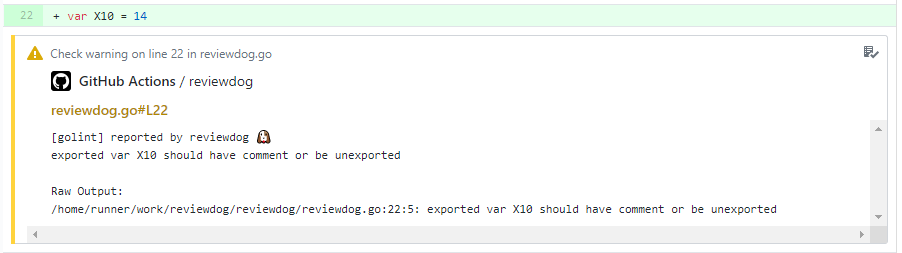
由于 [GitHub Actions 限制](https://docs.github.com/en/actions/security-guides/automatic-token-authentication#permissions-for-the-github_token),来自 fork 仓库的 Pull Requests 的 `GITHUB_TOKEN` 对 Check API 和 Review API 没有写入权限。
相反,reviewdog 使用 [GitHub Actions 的日志记录命令](https://docs.github.com/en/actions/using-workflows/workflow-commands-for-github-actions#set-an-error-message-error)
发布结果作为类似于 `github-pr-check` 报告器的 [annotations](https://docs.github.com/en/rest/checks/runs#annotations-object)。
请注意,日志记录命令创建的注释存在限制,例如 [每次运行的最大注释数](https://github.com/reviewdog/reviewdog/issues/411#issuecomment-570893427)。
在这种情况下,你可以查看 GitHub Actions 日志以查看完整结果。
#### reviewdog 徽章 [](https://github.com/reviewdog/reviewdog/actions?query=workflow%3Areviewdog+event%3Apush+branch%3Amaster)
由于 [`github-check` 报告器](#reporter-github-checks--reportergithub-pr-check) 支持在 commit 上运行,我们可以创建 reviewdog [GitHub Action 徽章](https://docs.github.com/en/actions/using-workflows#adding-a-workflow-status-badge-to-your-repository) 以针对 master commit 检查结果。:tada:
示例:
```
[](https://github.com///actions?query=workflow%3Areviewdog+event%3Apush+branch%3Amaster)
```
### Travis CI
#### Travis CI (-reporter=github-pr-check)
如果你在 Travis CI 中使用 -reporter=github-pr-check,则不需要设置 `REVIEWDOG_TOKEN`。
示例:
```
install:
- mkdir -p ~/bin/ && export PATH="~/bin/:$PATH"
- curl -sfL https://raw.githubusercontent.com/reviewdog/reviewdog/fd59714416d6d9a1c0692d872e38e7f8448df4fc/install.sh| sh -s -- -b ~/bin
script:
- reviewdog -conf=.reviewdog.yml -reporter=github-pr-check
```
#### Travis CI (-reporter=github-pr-review)
通过 [travis encryption keys](https://docs.travis-ci.com/user/encryption-keys/) 存储 GitHub API token。
```
$ gem install travis
$ travis encrypt REVIEWDOG_GITHUB_API_TOKEN= --add env.global
```
示例:
```
env:
global:
- secure:
install:
- mkdir -p ~/bin/ && export PATH="~/bin/:$PATH"
- curl -sfL https://raw.githubusercontent.com/reviewdog/reviewdog/fd59714416d6d9a1c0692d872e38e7f8448df4fc/install.sh| sh -s -- -b ~/bin
script:
- >-
golint ./... | reviewdog -f=golint -reporter=github-pr-review
```
示例
- https://github.com/azu/textlint-reviewdog-example
### Circle CI
在 [Environment variables - CircleCI](https://circleci.com/docs/environment-variables/#setting-environment-variables-for-all-commands-without-adding-them-to-git) 中存储 `REVIEWDOG_GITHUB_API_TOKEN`(或用于 github-pr-check 的 `REVIEWDOG_TOKEN`)。
#### .circleci/config.yml 示例
```
version: 2
jobs:
build:
docker:
- image: golang:latest
steps:
- checkout
- run: curl -sfL https://raw.githubusercontent.com/reviewdog/reviewdog/fd59714416d6d9a1c0692d872e38e7f8448df4fc/install.sh| sh -s -- -b ./bin
- run: go vet ./... 2>&1 | ./bin/reviewdog -f=govet -reporter=github-pr-review
# Deprecated: prefer GitHub Actions to use github-pr-check reporter.
- run: go vet ./... 2>&1 | ./bin/reviewdog -f=govet -reporter=github-pr-check
```
### GitLab CI
在 [GitLab CI variable](https://docs.gitlab.com/ee/ci/variables/#variables) 中存储 `REVIEWDOG_GITLAB_API_TOKEN`。
#### .gitlab-ci.yml 示例
```
reviewdog:
script:
- reviewdog -reporter=gitlab-mr-discussion
# Or
- reviewdog -reporter=gitlab-mr-commit
```
### Bitbucket Pipelines
不需要额外配置。
#### bitbucket-pipelines.yml 示例
```
pipelines:
default:
- step:
name: Reviewdog
image: golangci/golangci-lint:v1.31-alpine
script:
- wget -O - -q https://raw.githubusercontent.com/reviewdog/reviewdog/fd59714416d6d9a1c0692d872e38e7f8448df4fc/install.sh |
sh -s -- -b $(go env GOPATH)/bin
- golangci-lint run --out-format=line-number ./... | reviewdog -f=golangci-lint -reporter=bitbucket-code-report
```
### 通用 (Jenkins, 本地, 等...)
你可以使用以下环境变量从任何地方使用 reviewdog 发布审查评论。
| 名称 | 描述 |
| ---- | ----------- |
| `CI_PULL_REQUEST` | Pull Request 编号 (例如 14) |
| `CI_COMMIT` | 当前构建的 SHA1 |
| `CI_REPO_OWNER` | 仓库所有者 (例如 https://github.com/reviewdog/errorformat 中的 "reviewdog") |
| `CI_REPO_NAME` | 仓库名称 (例如 https://github.com/reviewdog/errorformat 中的 "errorformat") |
| `CI_BRANCH` | [可选] commit 的分支 |
```
$ export CI_PULL_REQUEST=14
$ export CI_REPO_OWNER=haya14busa
$ export CI_REPO_NAME=reviewdog
$ export CI_COMMIT=$(git rev-parse HEAD)
```
并在需要时设置 token。
```
$ REVIEWDOG_TOKEN=""
$ REVIEWDOG_GITHUB_API_TOKEN=""
$ REVIEWDOG_GITLAB_API_TOKEN=""
```
如果 CI 服务没有提供诸如 Pull Request ID 之类的信息,reviewdog 可以通过分支名称和 commit SHA 来猜测它。
只需传递 `guess` 标志:
```
$ reviewdog -conf=.reviewdog.yml -reporter=github-pr-check -guess
```
#### 带有 GitHub pull request builder 插件的 Jenkins
- [GitHub pull request builder plugin - Jenkins - Jenkins Wiki](https://wiki.jenkins-ci.org/display/JENKINS/GitHub+pull+request+builder+plugin)
- [Configuring a GitHub app account - Jenkins - CloudBees](https://docs.cloudbees.com/docs/cloudbees-ci/latest/cloud-admin-guide/github-app-auth) - 在不使用 reviewdog 服务器或 GitHub actions 的情况下使用 github-pr-check formatter 所必需的。
```
$ export CI_PULL_REQUEST=${ghprbPullId}
$ export CI_REPO_OWNER=haya14busa
$ export CI_REPO_NAME=reviewdog
$ export CI_COMMIT=${ghprbActualCommit}
$ export REVIEWDOG_INSECURE_SKIP_VERIFY=true # set this as you need
# 使用 github-pr-check reporter 通过 reviewdog server 提交
$ REVIEWDOG_TOKEN="" reviewdog -reporter=github-pr-check
# 或者,使用 github-pr-review reporter 通过 API 直接提交
$ REVIEWDOG_GITHUB_API_TOKEN="" reviewdog -reporter=github-pr-review
# 或者,使用 github-pr-check reporter 通过 API 直接提交(需要配置 GitHub App Account)
$ REVIEWDOG_SKIP_DOGHOUSE=true REVIEWDOG_GITHUB_API_TOKEN="" reviewdog -reporter=github-pr-check
```
## 退出代码
默认情况下(`-fail-level=none`),即使 reviewdog 发现错误,也会返回 `0` 作为退出代码。
如果使用 `-fail-level=[any,info,warning,error]` 标志发现至少 1 个严重程度大于或等于给定级别的问题,reviewdog 将以代码 1 退出。
当你将其作为 CI pipeline 中的一个步骤,并希望在 linter 发现任何错误时将该步骤标记为失败时,这会很有帮助。
你也可以使用 `-level` 标志配置默认报告级别。
## 过滤模式
reviewdog 根据 diff 过滤结果,你可以通过 `-filter-mode` 标志控制 reviewdog 如何过滤结果。
可用的过滤模式如下。
### `added` (默认)
按添加/修改的行过滤结果。
### `diff_context`
按 diff context 过滤结果。即变更行及其上下文 +-N 行(例如 N=3)。
### `file`
按添加/修改的文件过滤结果。即只要结果位于添加/修改的文件中,reviewdog 就会报告结果,即使结果不在实际的 diff 中。
### `nofilter`
不过滤任何结果。适用于尽可能将结果作为评论发布,同时在控制台中检查其他结果。
`-fail-on-error` 也适用于任何 filter-mode,并且可以在 `nofilter` 模式下捕获来自任何 linter 的所有结果。
示例:
```
$ reviewdog -reporter=github-pr-review -filter-mode=nofilter -fail-on-error
```
### 过滤模式支持表
请注意,由于 API 限制,并非所有报告器都完全支持过滤模式。
例如,`github-pr-review` 报告器使用 [GitHub Review API](https://docs.github.com/en/rest/pulls/reviews),但该 API 不支持在 diff context 之外发布评论,因此 reviewdog 将使用 [Check annotation](https://docs.github.com/en/rest/checks/runs) 作为后备方案来发布这些评论 [1]。
| `-reporter` \ `-filter-mode` | `added` | `diff_context` | `file` | `nofilter` |
| ---------------------------- | ------- | -------------- | ----------------------- | ---------- |
| **`local`** | OK | OK | OK | OK |
| **`github-check`** | OK | OK | OK | OK |
| **`github-pr-check`** | OK | OK | OK | OK |
| **`github-pr-review`** | OK | OK | 部分支持 [1] | 部分支持 [1] |
| **`github-pr-annotations`** | OK | OK | OK | OK |
| **`gitlab-mr-discussion`** | OK | OK | OK | 部分支持 [2] |
| **`gitlab-mr-commit`** | OK | 部分支持 [2] | 部分支持 [2] | 部分支持 [2] |
| **`gerrit-change-review`** | OK | OK? [3] | OK? [3] | 部分支持? [2][3] |
| **`bitbucket-code-report`** | NO [4] | NO [4] | NO [4] | OK |
| **`gitea-pr-review`** | OK | OK | 部分支持 [2] | 部分支持 [2] |
- [1] 如果在 GitHub actions 中运行,则使用 Check annotation 作为后备方案报告 diff 文件之外的结果,而不是 Review API(评论)。所有结果也会报告给控制台。
- [2] 将 diff 文件之外的结果报告给控制台。
- [3] 应该可以工作,但尚未经过验证。
- [4] 目前尚未实现
## 调试
使用 `-tee` 标志显示调试信息。
```
reviewdog -filter-mode=nofilter -tee
```
## 相关文章
- [reviewdog — A code review dog who keeps your codebase healthy ](https://medium.com/@haya14busa/reviewdog-a-code-review-dog-who-keeps-your-codebase-healthy-d957c471938b)
- [reviewdog ♡ GitHub Check — improved automated review experience](https://medium.com/@haya14busa/reviewdog-github-check-improved-automated-review-experience-58f89e0c95f3)
- [Automated Code Review on GitHub Actions with reviewdog for any languages/tools](https://medium.com/@haya14busa/automated-code-review-on-github-actions-with-reviewdog-for-any-languages-tools-20285e04448e)
- [GitHub Actions to guard your workflow](https://evrone.com/blog/github-actions)
## :bird: 作者
haya14busa [](https://github.com/haya14busa)
## 贡献者
[](https://github.com/reviewdog/reviewdog/graphs/contributors)
### 支持 reviewdog
成为 [每位贡献者](https://github.com/reviewdog/reviewdog/graphs/contributors) 的 GitHub Sponsor
或通过 [opencollective](https://opencollective.com/reviewdog) 成为支持者或赞助商。
[](https://opencollective.com/reviewdog#backers)
标签:AI, Apache Flink, EVTX分析, GitHub Actions, GitLab CI, Go语言, Linter集成, LNA, Pull Request自动化, 代码健康度, 代码规范检查, 威胁情报, 开发者工具, 开源框架, 持续集成, 日志审计, 程序破解, 自动化代码审查, 自动笔记, 错误基检测, 静态代码分析