unitreerobotics/unitree_ros2

GitHub: unitreerobotics/unitree_ros2

为 Unitree 机器人提供基于 ROS2 与 CycloneDDS 的通信与控制支持,解决多机器人协同开发中的消息互通与实时控制问题。

Stars: 665 | Forks: 189

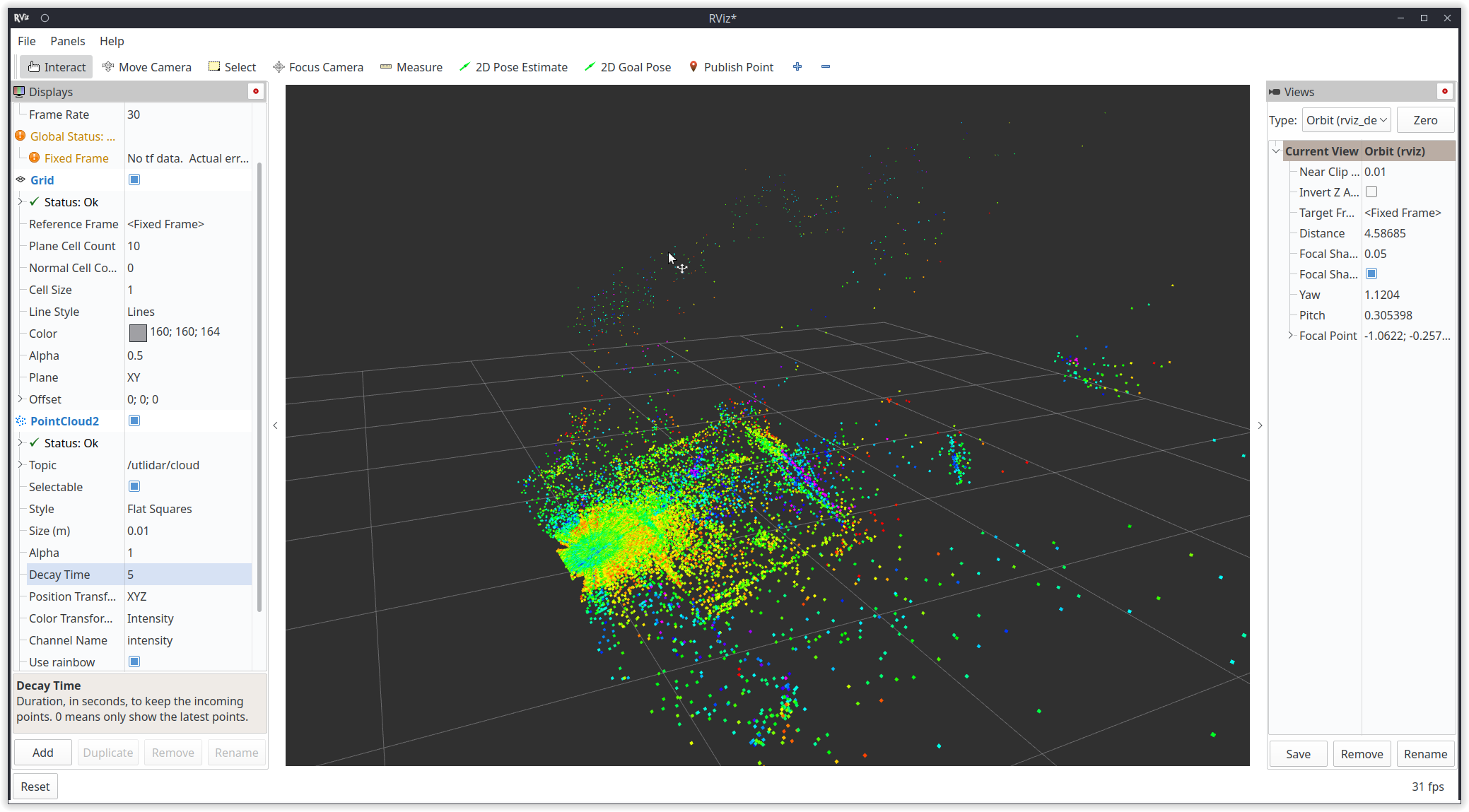
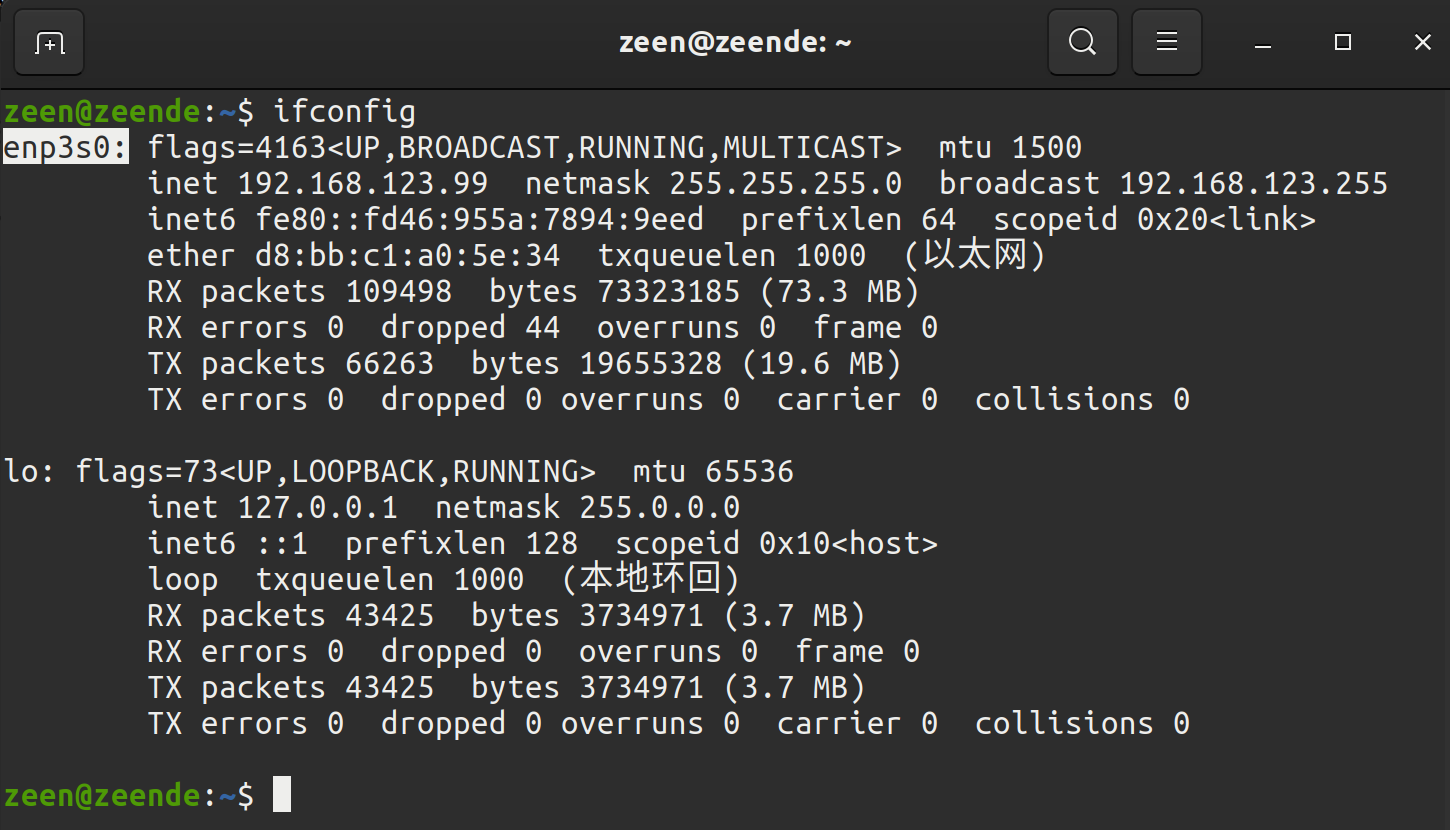
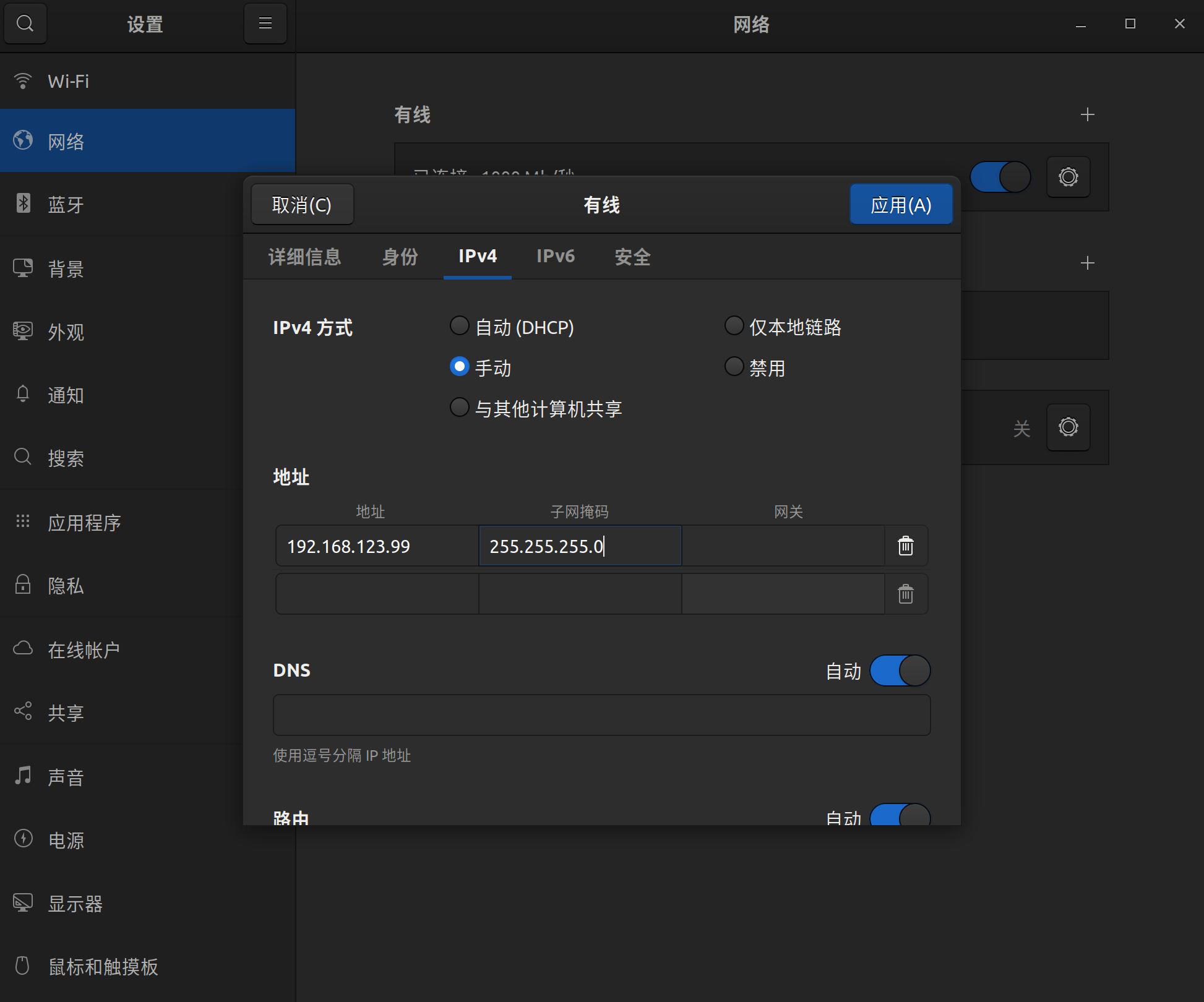
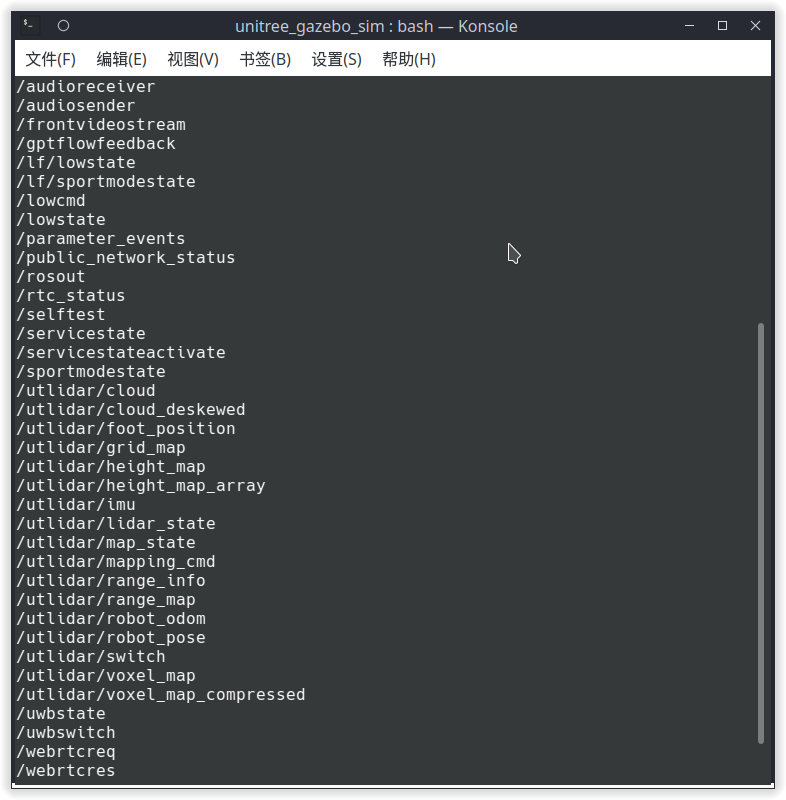
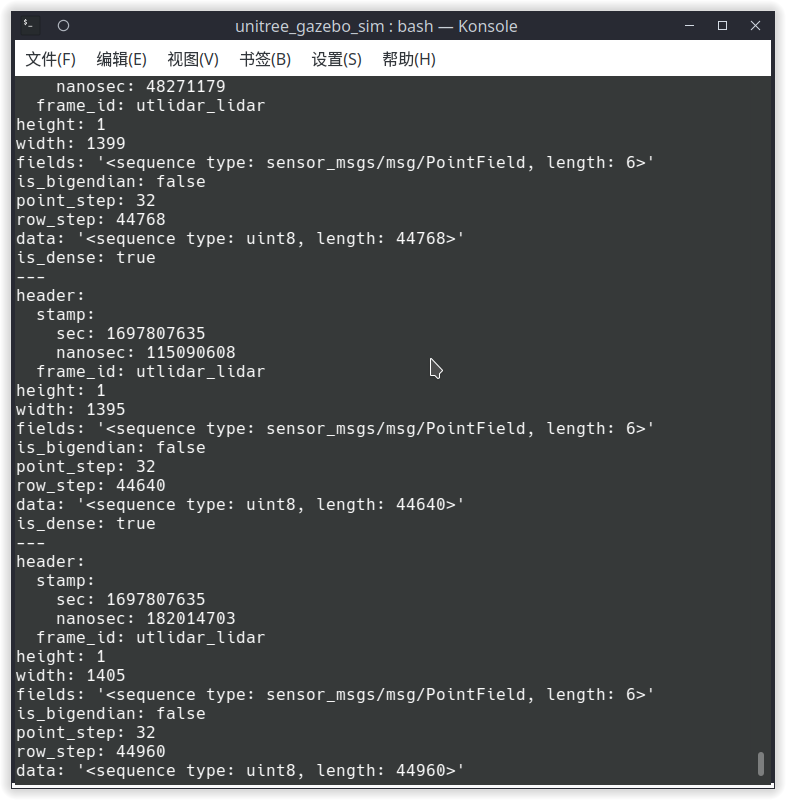
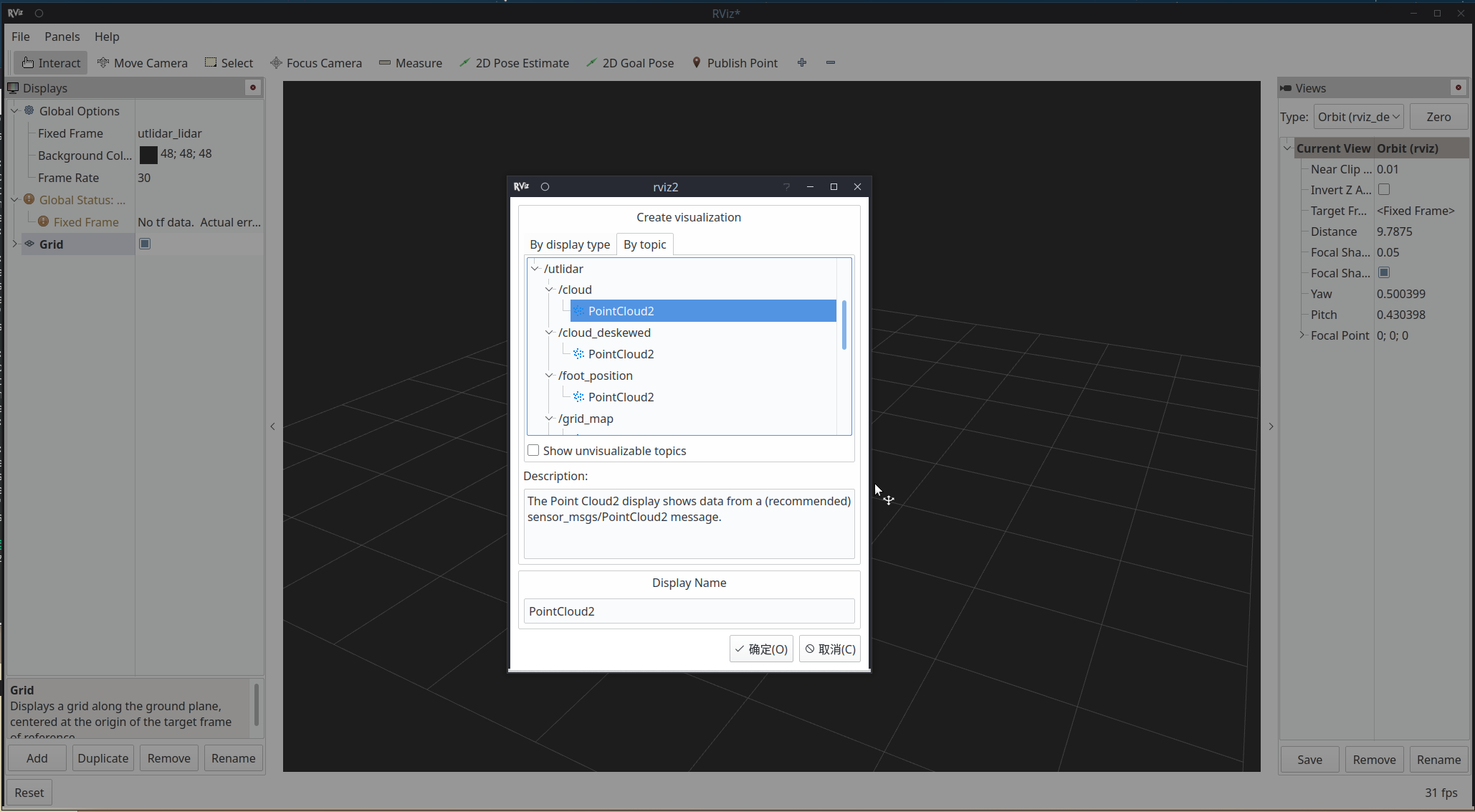
# Unitree 机器人 ROS2 支持 [TOC] # 简介 Unitree SDK2 实现了基于 Cyclonedds 的易用机器人通信机制,使开发者能够实现机器人通信与控制(**支持 Unitree Go2、B2 和 H1**)。参见:[https://github.com/unitreerobotics/unitree_sdk2](https://github.com/unitreerobotics/unitree_sdk2) DDS 也作为通信机制用于 ROS2。因此,Unitree Go2、B2 和 H1 机器人的底层层可以兼容 ROS2。ROS2 msg 可以直接用于与 Unitree 机器人通信和控制,无需封装 SDK 接口。 # 配置 ## 系统要求 已测试的系统与 ROS2 发行版 | 系统 | ROS2 发行版 | |------|-------------| | Ubuntu 20.04 | foxy | | Ubuntu 22.04 | humble(推荐) | 如果你想直接使用 `Docker 开发环境`,可以参考 `.devcontainer` 文件夹中相关的 `Dockerfile` 内容。 你也可以使用 `VSCode 的 Dev Container 功能` 或其他 IDE 创建开发环境,或使用 `Github 的 codespace` 快速创建开发环境。 如果确实遇到编译问题,可以参考 `.github/workflows/` 中的编译脚本或在 `issues` 中提问。 ## 安装 Unitree 机器人 ROS2 功能包 以 ROS2 foxy 为例,如果需要其他版本的 ROS2,请将对应位置处的 "foxy" 替换为当前 ROS2 版本名称: ROS2 foxy 的安装可以参考:[https://docs.ros.org/en/foxy/Installation/Ubuntu-Install-Debians.html](https://docs.ros.org/en/foxy/Installation/Ubuntu-Install-Debians.html) 打开终端(Ctrl+Alt+T),克隆仓库: ``` git clone https://github.com/unitreerobotics/unitree_ros2 ``` 其中: - **cyclonedds_ws**:Unitree ros2 包的工作空间。Unitree 机器人的 msg 位于子文件夹 cyclonedds_ws/unitree/unitree_go 和 cyclonedds_ws/unitree/unitree_api。 - **example**:一些示例的工作空间。 ## 安装 Unitree ROS2 包 ### 1. 依赖项 ``` sudo apt install ros-foxy-rmw-cyclonedds-cpp sudo apt install ros-foxy-rosidl-generator-dds-idl sudo apt install libyaml-cpp-dev ``` ### 2. 编译 cyclone dds(如果使用 Humble,可跳过此步骤) Unitree 机器人的 cyclonedds 版本为 0.10.2。要使用 ROS2 与 Unitree 机器人通信,需要更改 DDS 实现。参见:[https://docs.ros.org/en/foxy/Concepts/About-Different-Middleware-Vendors.html](https://docs.ros.org/en/foxy/Concepts/About-Different-Middleware-Vendors.html) 在编译 cyclonedds 之前,请确保在启动终端时 **未** 加载 ros2 环境。否则,可能会导致编译错误。 如果在安装 ROS2 时已将 "source/opt/ros/foxy/setup.bash" 添加到 ~/.bashrc 文件中,需要将其注释掉: ``` sudo apt install gedit sudo gedit ~/.bashrc ``` ``` # source /opt/ros/foxy/setup.bash ``` 编译 cyclone-dds ``` cd ~/unitree_ros2/cyclonedds_ws/src git clone https://github.com/ros2/rmw_cyclonedds -b foxy git clone https://github.com/eclipse-cyclonedds/cyclonedds -b releases/0.10.x cd .. # 如果构建失败,请先运行:`export LD_LIBRARY_PATH=/opt/ros/foxy/lib` colcon build --packages-select cyclonedds #Compile cyclone-dds package ``` ### 3. 编译 unitree_go 和 unitree_api 包 编译 cyclone-dds 后,unitree_go 和 unitree_api 包的编译需要 ROS2 依赖项。因此,在编译之前需要加载 ROS2 环境。 ``` source /opt/ros/foxy/setup.bash # source ROS2 environment colcon build # Compile all packages in the workspace ``` # 连接 Unitree 机器人 ## 1. 网络配置 使用网线连接 Unitree 机器人和电脑。然后,使用 ifconfig 查看机器人连接的网络接口。例如,下图中的 "enp3s0"。 ![image](https://alidocs.oss-cn-zhangjiakou.aliyuncs.com/res/W4j6OJ2awDgbO3p8/img/5d22c143-5dad-4964-81f3-55864906a9f0.png) 接下来,打开网络设置,找到机器人连接的网络接口。在 IPv4 设置中,将 IPv4 模式改为手动,将地址设置为 192.168.123.99,子网掩码设置为 255.255.255.0。完成后点击应用并等待网络重新连接。 ![image](https://alidocs.oss-cn-zhangjiakou.aliyuncs.com/res/W4j6OJ2awDgbO3p8/img/721e1660-04dc-42b7-8d6e-14799afe2165.png) 打开 setup.sh 文件。 ``` sudo gedit ~/unitree_ros2/setup.sh ``` ``` #!/bin/bash echo "Setup unitree ros2 environment" source /opt/ros/foxy/setup.bash source $HOME/unitree_ros2/cyclonedds_ws/install/setup.bash export RMW_IMPLEMENTATION=rmw_cyclonedds_cpp export CYCLONEDDS_URI=' ' ``` 其中 "enp3s0" 是连接 Unitree 机器人的网络接口名称。根据实际情况修改为对应的网络接口。 加载环境以设置 Unitree 机器人的 ROS2 支持: ``` source ~/unitree_ros2/setup.sh ``` 如果不想每次打开新终端都加载该 bash 脚本,可以将脚本内容写入 ~/.bashrc,但需要注意系统中存在多个 ROS 环境时的冲突问题。 如果电脑未连接机器人但仍想使用 Unitree ROS2 进行仿真等功能,可以使用本地回环 "lo" 作为网络接口。 ``` source ~/unitree_ros2/setup_local.sh # use "lo" as the network interface ``` 或 ``` source ~/unitree_ros2/setup_default.sh # No network network interface specified ``` ### 2. 连接与测试 完成上述配置后,建议重启电脑再进行测试。 确保机器人网络连接正确,打开终端并输入: ``` source ~/unitree_ros2/setup.sh ros2 topic list ``` 可以看到以下主题: ![image](https://alidocs.oss-cn-zhangjiakou.aliyuncs.com/res/W4j6OJ2awDgbO3p8/img/5e45e8ec-9248-47eb-8380-798ed0ef468b.png) 输入 ros2 topic echo /sportmodestate,可以看到该主题的数据如下所示: ![image](https://alidocs.oss-cn-zhangjiakou.aliycom/res/W4j6OJ2awDgbO3p8/img/89214761-6cfb-4b52-bf24-7a5bd9a9806c.png) ### 3. 示例 示例源代码位于 `/example/src/src`。 - common:所有机器人的通用函数。 - g1/lowlevel/g1_low_level_example:G1 的底层控制。 - h1-2/lowlevel/low_level_ctrl_hg:H1-2 的底层控制。 - low_level_ctrl:Go2/B2 的底层控制。 - read_low_state:读取 Go2/B2 的底层状态。 - read_low_state_hg:读取 G1/H1/H1-2 的底层状态。 - read_motion_state:读取 Go2/B2 的运动模式状态。 - read_wireless_controller:读取 G1/Go2/B2 的无线控制器状态。 - record_bag:ROS bag 录制示例。 - go2/go2_sport_client:Go2 的高级控制。 - go2/go2_stand_example:Go2 的站立示例。 - go2/go2_robot_state_client:Go2 的机器人状态示例。 打开终端并输入: ``` source ~/unitree_ros2/setup.sh cd ~/unitree_ros2/example colcon build ``` 编译后,在终端运行: ``` ./install/unitree_ros2_example/bin/read_motion_state ``` 可以看到机器人状态信息从终端输出: ``` [INFO] [1697525196.266174885] [motion_state_suber]: Position -- x: 0.567083; y: 0.213920; z: 0.052338; body height: 0.320000 [INFO] [1697525196.266230044] [motion_state_suber]: Velocity -- vx: -0.008966; vy: -0.001431; vz: -0.019455; yaw: -0.002131 [INFO] [1697525196.266282725] [motion_state_suber]: Foot position and velcity relative to body -- num: 0; x: 0.204149; y: -0.145194; z: -0.067804, vx: 0.002683; vy: 0.003745; vz: -0.010052 [INFO] [1697525196.266339057] [motion_state_suber]: Foot position and velcity relative to body -- num: 1; x: 0.204200; y: 0.145049; z: -0.068205, vx: -0.001954; vy: -0.003442; vz: -0.004828 [INFO] [1697525196.266392028] [motion_state_suber]: Foot position and velcity relative to body -- num: 2; x: -0.183385; y: -0.159294; z: -0.039468, vx: -0.000739; vy: -0.002028; vz: -0.004532 [INFO] [1697525196.266442766] [motion_state_suber]: Foot position and velcity relative to body -- num: 3; x: -0.182412; y: 0.159754; z: -0.039045, vx: -0.002803; vy: -0.001381; vz: -0.004794 [INFO] [1697525196.316189064] [motion_state_suber]: Gait state -- gait type: 1; raise height: 0.090000 ``` # 使用 ## 状态获取 ### 1. 运动模式状态 运动模式状态包括机器人的位置、速度、足部位置等运动状态。运动模式状态的获取可以通过订阅 "lf/sportmodestate" 或 "sportmodestate" 主题实现,其中 "lf" 表示低频。sportmodestate 消息定义如下: ``` TimeSpec stamp // Time stamp uint32 error_code //Error code IMUState imu_state //IMU state uint8 mode //Sport mode /* Sport mode 0. idle, default stand 1. balanceStand 2. pose 3. locomotion 4. reserve 5. lieDown 6. jointLock 7. damping 8. recoveryStand 9. reserve 10. sit 11. frontFlip 12. frontJump 13. frontPounc */ float32 progress //Is the dance action being executed?:0. dance false; 1. dance true uint8 gait_type //Gait type /* Gait type 0.idle 1.trot 2.run 3.climb stair 4.forwardDownStair 9.adjust */ float32 foot_raise_height float32[3] position float32 body_height float32[3] velocity float32 yaw_speed float32[4] range_obstacle int16[4] foot_force float32[12] foot_position_body //foot positions in body frame float32[12] foot_speed_body //foot velcities in body frame ``` 更多细节参见:[https://support.unitree.com/home/en/developer/sports_services](https://support.unitree.com/home/en/developer/sports_services) 完整示例位于 /example/src/read_motion_state.cpp。在终端运行: ``` ./install/unitree_ros2_example/bin/read_motion_state ``` ### 2. 底层状态 底层状态包括电机状态、电源信息等底层状态。底层状态可以通过订阅 "lf/lowstate" 或 "lowstate" 主题获取。lowstate 消息定义如下: ``` uint8[2] head uint8 level_flag uint8 frame_reserve uint32[2] sn uint32[2] version uint16 bandwidth IMUState imu_state //IMU MotorState[20] motor_state //Motor state BmsState bms_state int16[4] foot_force int16[4] foot_force_est uint32 tick uint8[40] wireless_remote uint8 bit_flag float32 adc_reel int8 temperature_ntc1 int8 temperature_ntc2 float32 power_v float32 power_a uint16[4] fan_frequency uint32 reserve uint32 crc ``` 其中 MotorState 定义如下: ``` uint8 mode // Mode, 0x01 for control float32 q // Joint angle float32 dq // Joint velocity float32 ddq // Joint acceleration float32 tau_est // Estimated torque float32 q_raw //raw data of q float32 dq_raw //raw data of dq float32 ddq_raw //raw data of dq int8 temperature uint32 lost uint32[2] reserve ``` 更多细节参见:[https://support.unitree.com/home/en/developer/Basic_services](https://support.unitree.com/home/en//Basic_services) 完整示例位于 example/src/read_low_state.cpp。 ### 3. 无线控制器 无线控制器状态可以通过订阅 "/wirelesscontroller" 主题获取。wirelesscontroller 消息定义如下: ``` float32 lx // left joystick x, range [-1.0~1.0] float32 ly // left joystick y, range [-1.0~1.0] float32 rx // right joystick x, range [-1.0~1.0] float32 ry // right joystick y, range [-1.0~1.0] uint16 keys // key values ``` 更多细节参见:[https://support.unitree.com/home/en/developer/Get_remote_control_status](https://support.unitree.com/home/en/developer/Get_remote_control_status) 完整示例位于 example/src/read_wireless_controller.cpp。 ## 机器人控制 ### 1. 运动模式 运动模式控制通过请求/响应机制实现。运动模式控制可以通过向 "/api/sport/request" 主题发送 unitree_api::msg::Request 消息实现。 不同运动模式接口的 Request 消息可以通过 SportClient (/example/src/common/ros2_sport_client.cpp) 类获取。例如,控制机器人达到期望的姿态: ``` //Create a ros2 pubilsher rclcpp::Publisher::SharedPtr req_puber = this->create_publisher("/api/sport/request", 10); SportClient sport_req; //Sportclient unitree_api::msg::Request req; //Sportmode request msg sport_req.Euler(req,roll,pitch,yaw); //Get Sportmode request msg from Sportclient req_puber->publish(req); // Publish request msg ``` 关于 SportClient 的详细信息:[https://support.unitree.com/home/en/developer/sports_services](https://support.unitree.com/home/en/developer/sports_services) 完整示例位于:example/src/sport_mode_ctrl.cpp。在终端运行 ./install/unitree_ros2_example/bin/sport_mode_ctrl。程序启动 1 秒后,机器人将在 x 方向上前后行走。 ### 2. 电机控制 电机的扭矩、位置和速度控制可以通过订阅 "/lowcmd" 主题并发送 unitree_go::msg::LowCmd 消息实现。LowCmd 消息定义如下: ``` uint8[2] head uint8 level_flag uint8 frame_reserve uint32[2] sn uint32[2] version uint16 bandwidth MotorCmd[20] motor_cmd //motor command BmsCmd bms_cmd uint8[40] wireless_remote uint8[12] led uint8[2] fan uint8 gpio uint32 reserve uint32 crc ``` 其中 motor_cmd 定义如下: ``` uint8 mode; //Mode(Foc mode -> 0x01 ,stop mode -> 0x00) float q; //Target position (rad) float dq; //Target velocity (rad/s) float tau; //Target torque (N.M) float kp; float kd; unsigned long reserve[3]; ``` 关于 low_cmd 的详细信息:[https://support.unitree.com/home/en/developer/Basic_services](https://support.unitree.com/home/en/developer/Basic_services) 完整示例位于:example/src/low_level_ctrl.cpo。在终端运行 ./install/unitree_ros2_example/bin/sport_mode_ctrl。髋部电机和小腿电机将旋转到对应的关节角度。 ## Rviz 我们也可以使用 rviz 来可视化 Unitree 机器人数据。以下是一个可视化机器人激光雷达数据的示例: 首先,列出所有主题: ``` ros2 topic list ``` ![image](https://static.pigsec.cn/wp-content/uploads/repos/2026/04/6b8db6717f190640.png) 我们可以找到激光雷达的主题: ``` utlidar/cloud ``` 然后,打印激光雷达的 frame_id: ``` ros2 topic echo --no-arr /utlidar/cloud ``` 其中 frame_id: utlidar_lidar ![image](https://static.pigsec.cn/wp-content/uploads/repos/2026/04/8240c45499190641.png) 最后,运行 rviz: ``` ros2 run rviz2 rviz2 ``` 在 rviz2 中添加 Pointcloud 主题:utlidar/cloud,并将 Fixed frame 修改为 utlidar_lidar。然后,激光雷达数据将在 rviz2 中显示。 ![image](https://static.pigsec.cn/wp-content/uploads/repos/2026/04/cbd212cb47190642.png) ![image](https://static.pigsec.cn/wp-content/uploads/repos/2026/04/4b8db4b6bc190643.png)
标签:B2, CyclonedDS, DDS, Docker 开发环境, GitHub Codespace, Go2, H1, rmw-cyclonedds-cpp, ROS2, ROS2 安装, Unitree 机器人, VSCode Dev Container, 机器人 SDK, 机器人开发, 机器人控制, 机器人消息接口, 机器人系统需求, 机器人通信, 编译脚本