PJDude/librer
GitHub: PJDude/librer
一款跨平台 GUI 文件编目程序,支持为可移动介质上的文件建立带自定义元数据的可搜索索引,并针对多核并行搜索和数据可移植性进行了优化。
Stars: 66 | Forks: 4
#  LIBRER
一款跨平台的图形界面文件编目程序,提供丰富的自定义选项以满足用户的偏好。针对多核并行搜索速度、数据完整性和存储库可移植性进行了高度优化。
## 功能:
此软件的主要目的是让用户能够对其文件进行编目,尤其是在内存卡和便携式驱动器等可移动介质上的文件。它允许用户添加元数据(在此称为**自定义数据**),随后可根据多种条件搜索所创建的记录。**自定义数据**由通过执行用户选择的命令或脚本获取的文本信息组成。**自定义数据**可以包括任何根据用户需求定制的文本数据,仅受限于可用内存和可用于数据检索的软件。检索到的数据存储在新创建的数据库记录中,可用于搜索或验证目的。**Liber** 允许您使用正则表达式、glob 表达式和**模糊匹配**在文件名和**自定义数据**中搜索文件。创建的数据记录可以导出和导入,以便与他人共享数据或用于备份目的。
💥 新增:导入 "Cathy" .caf 数据库文件
(得益于可用的[源代码](https://github.com/binsento42/Cathy))
💥 新增:导入 "VVV" (Virtual Volumes View) .csv 数据文件
## 截图:
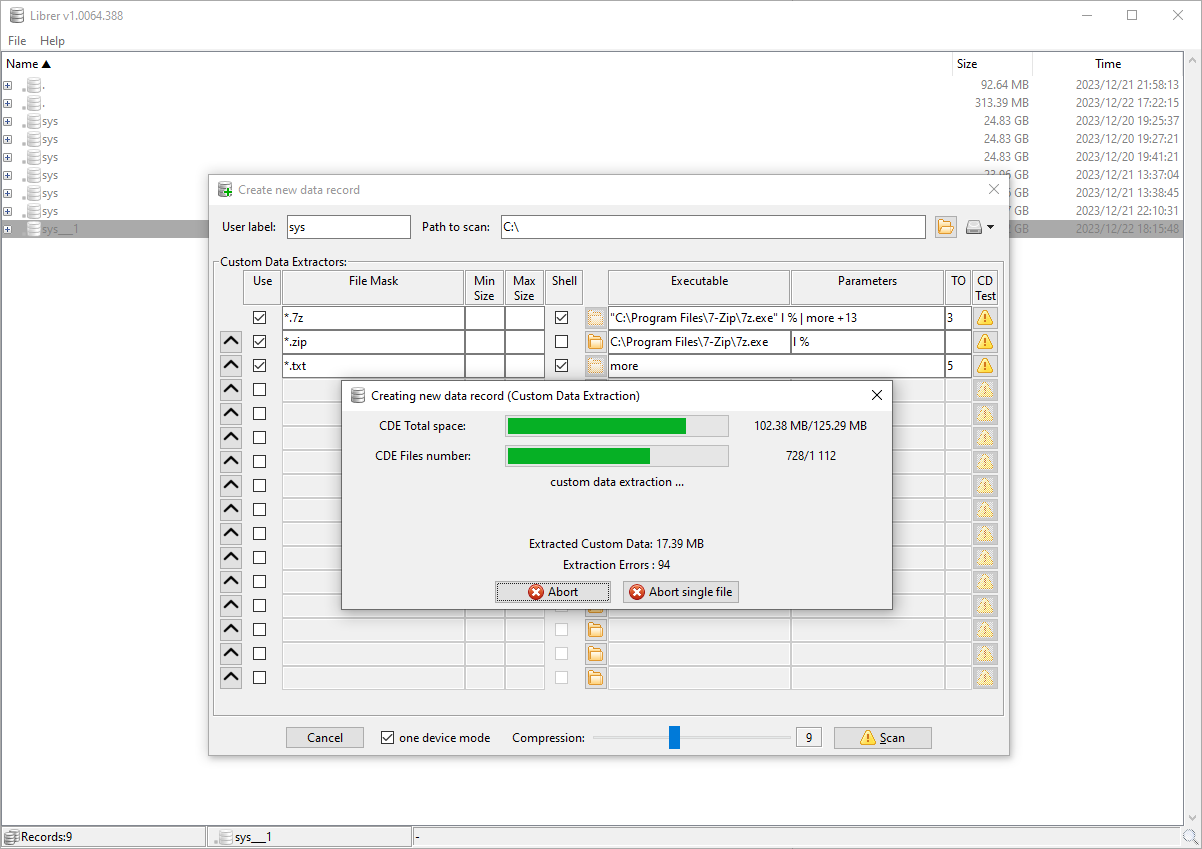
#### 主窗口、新记录创建对话框及正在运行的**自定义数据**提取:
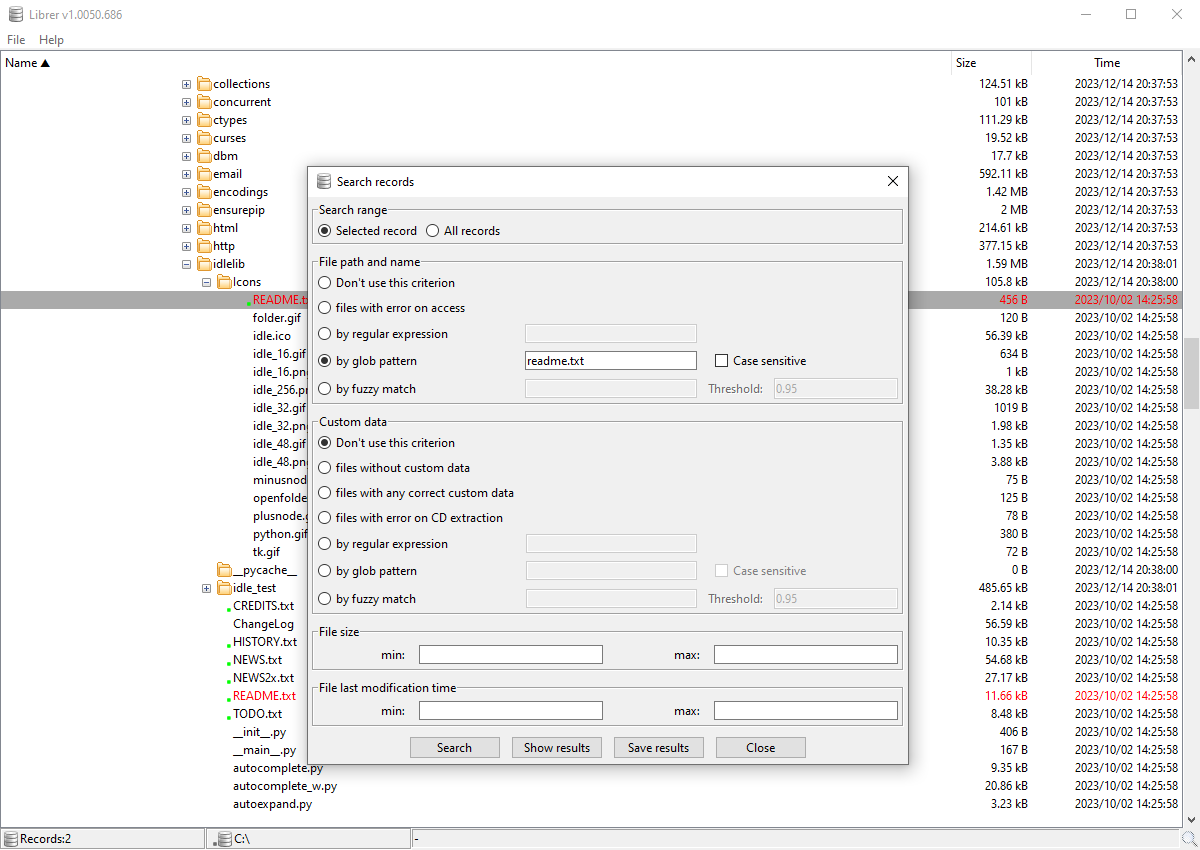
#### 搜索对话框:
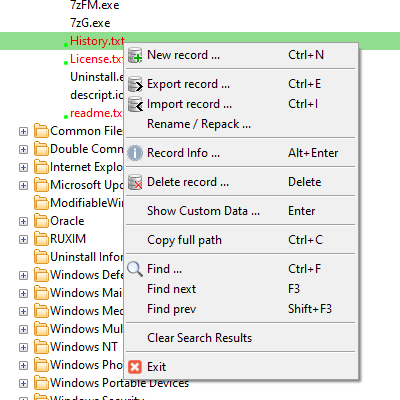
#### 上下文菜单:
## [下载](https://github.com/PJDude/librer/releases)
使用 [PyInstaller](https://pyinstaller.org/en/stable) 为 **Linux** 和 **Windows** 创建的便携式可执行程序包可以从 [Releases](https://github.com/PJDude/librer/releases) 页面下载。同时,也会使用 [Nuitka](https://github.com/Nuitka/Nuitka) 编译器创建独立的构建版本。
## [MAJORGEEKS 上的评测](https://www.majorgeeks.com/files/details/librer.html)
## [SOFTPEDIA 上的评测](https://www.softpedia.com/get/Others/File-CD-DVD-Catalog/Librer.shtml)
## 编写自定义数据提取器指南
自定义数据提取器是一个可以使用单个参数调用的命令——该参数为从中提取数据的特定文件的完整路径。该命令应将预期数据以任何文本格式输出到标准输出 (stdout)。CDE 可以是可执行文件(例如 7z、zip、ffmpeg、md5sum 等)或可执行的 shell 脚本(如 extract.sh、extract.bat 等)。它应满足的条件是执行时间相当短且信息输出量受到合理限制。允许执行特定**自定义数据提取器**的标准包括 glob 表达式(针对文件名)和文件大小范围。
### [自定义数据提取器 - 教程](./info/tutorial.md)
### 适合创建自定义数据提取器的软件示例:
[7-zip](https://www.7-zip.org/) - 列出最常用归档文件的内容等。
[exiftool](https://exiftool.sourceforge.net/) - 从 *.jpg 等图像中获取 exif 数据,获取可执行文件的信息等等。
[ffprobe](https://ffmpeg.org/ffprobe.html),[MediaInfo](https://mediaarea.net/en/MediaInfo) - 两者均能从 mp3、mp4、mkv 等多媒体文件中获取标签和其他元数据。
系统 shell 基本命令,如:[type](https://learn.microsoft.com/en-us/windows-server/administration/windows-commands/type)、[more](https://learn.microsoft.com/en-us/windows-server/administration/windows-commands/more)、[cat](https://linuxize.com/post/linux-cat-command/)
## 使用提示:
- 不要在您的自定义数据提取器脚本中放入任何破坏性操作。
- 尽量将自定义数据保持在最少,以加快扫描和搜索记录的速度,并保持记录文件体积小巧。
- 如果通用且广泛可用的工具产生过多且不需要的文本数据,请编写一个包装脚本(*.sh、*.bat)来执行特定工具并对检索到的数据进行后期处理。
- 如果不需要,您不必使用自定义数据。仅对文件系统进行编目。
## 支持的平台:
- Linux
- Windows (10, 11)
## 可移植性
**librer** 在运行时会写入日志文件、配置和记录文件。这些文件的默认位置是 **librer** 主目录下的 **logs** 和 **data** 子文件夹。
## [从 "Where Is It?" 导入数据](./info/wii_import.md)
## 从 "Cathy" 导入数据
只需使用文件菜单中的操作即可。
## 从 "VVV" (Virtual Volumes View) 导入数据
只需使用文件菜单中的操作即可。请确保从 VVV 导出的 CSV 数据文件使用竖线 (|) 分隔符,并且不包含表头。
## 技术信息
librer 中的记录是单次扫描操作的结果,并显示为主树状窗口中的众多顶层节点之一。它包含一个收集了自定义数据的目录树。它作为一个单独的 .dat 文件存储在 librer 数据库目录中。其内部格式针对安全性、快速初始访问和最大压缩率进行了优化(试试看就知道了:))每个部分都是通过 [pickle](https://docs.python.org/3/library/pickle.html) 序列化的 Python 数据结构,并分别通过 [Zstandard](https://pypi.org/project/zstandard/) 算法进行压缩。记录文件一旦保存,此后便不会再被修改。它只能在请求时被删除或导出。所有记录文件都是相互独立的。模糊匹配是使用 [difflib](https://docs.python.org/3/library/difflib.html) 模块提供的 SequenceMatcher 功能实现的。搜索记录是作为每个记录的独立子进程执行的。并行搜索的数量受 CPU 核心数的限制。
###### 手动构建 (linux):
```
pip install -r requirements.txt
./scripts/icons.convert.sh
./scripts/version.gen.sh
./scripts/pyinstaller.run.sh
```
###### 手动构建 (windows):
```
pip install -r requirements.txt
.\scripts\icons.convert.bat
.\scripts\version.gen.bat
.\scripts\pyinstaller.run.bat
```
###### 手动运行 python 脚本:
```
pip install -r requirements.txt
./scripts/icons.convert.sh
./scripts/version.gen.sh
python3 ./src/librer.py
```
## 未来开发设想
- 收集**自定义数据**(也由用户脚本生成),不仅作为文本,还作为二进制文件,并将它们存储在记录文件中(例如图像缩略图等)。
- 计算扫描文件的 **CRC**,并利用它在不同记录中搜索重复项,通过保存的文件系统映像验证当前数据。
- 将两条记录相互比较。例如,在不同时间对同一文件系统进行的两次扫描。
## 许可证
- **librer** 采用 **[MIT 许可证](./LICENSE)** 授权
## 查看我的[主页](https://github.com/PJDude)了解其他项目。
LIBRER
一款跨平台的图形界面文件编目程序,提供丰富的自定义选项以满足用户的偏好。针对多核并行搜索速度、数据完整性和存储库可移植性进行了高度优化。
## 功能:
此软件的主要目的是让用户能够对其文件进行编目,尤其是在内存卡和便携式驱动器等可移动介质上的文件。它允许用户添加元数据(在此称为**自定义数据**),随后可根据多种条件搜索所创建的记录。**自定义数据**由通过执行用户选择的命令或脚本获取的文本信息组成。**自定义数据**可以包括任何根据用户需求定制的文本数据,仅受限于可用内存和可用于数据检索的软件。检索到的数据存储在新创建的数据库记录中,可用于搜索或验证目的。**Liber** 允许您使用正则表达式、glob 表达式和**模糊匹配**在文件名和**自定义数据**中搜索文件。创建的数据记录可以导出和导入,以便与他人共享数据或用于备份目的。
💥 新增:导入 "Cathy" .caf 数据库文件
(得益于可用的[源代码](https://github.com/binsento42/Cathy))
💥 新增:导入 "VVV" (Virtual Volumes View) .csv 数据文件
## 截图:
#### 主窗口、新记录创建对话框及正在运行的**自定义数据**提取:

#### 搜索对话框:

#### 上下文菜单:

## [下载](https://github.com/PJDude/librer/releases)
使用 [PyInstaller](https://pyinstaller.org/en/stable) 为 **Linux** 和 **Windows** 创建的便携式可执行程序包可以从 [Releases](https://github.com/PJDude/librer/releases) 页面下载。同时,也会使用 [Nuitka](https://github.com/Nuitka/Nuitka) 编译器创建独立的构建版本。
## [MAJORGEEKS 上的评测](https://www.majorgeeks.com/files/details/librer.html)
## [SOFTPEDIA 上的评测](https://www.softpedia.com/get/Others/File-CD-DVD-Catalog/Librer.shtml)
## 编写自定义数据提取器指南
自定义数据提取器是一个可以使用单个参数调用的命令——该参数为从中提取数据的特定文件的完整路径。该命令应将预期数据以任何文本格式输出到标准输出 (stdout)。CDE 可以是可执行文件(例如 7z、zip、ffmpeg、md5sum 等)或可执行的 shell 脚本(如 extract.sh、extract.bat 等)。它应满足的条件是执行时间相当短且信息输出量受到合理限制。允许执行特定**自定义数据提取器**的标准包括 glob 表达式(针对文件名)和文件大小范围。
### [自定义数据提取器 - 教程](./info/tutorial.md)
### 适合创建自定义数据提取器的软件示例:
[7-zip](https://www.7-zip.org/) - 列出最常用归档文件的内容等。
[exiftool](https://exiftool.sourceforge.net/) - 从 *.jpg 等图像中获取 exif 数据,获取可执行文件的信息等等。
[ffprobe](https://ffmpeg.org/ffprobe.html),[MediaInfo](https://mediaarea.net/en/MediaInfo) - 两者均能从 mp3、mp4、mkv 等多媒体文件中获取标签和其他元数据。
系统 shell 基本命令,如:[type](https://learn.microsoft.com/en-us/windows-server/administration/windows-commands/type)、[more](https://learn.microsoft.com/en-us/windows-server/administration/windows-commands/more)、[cat](https://linuxize.com/post/linux-cat-command/)
## 使用提示:
- 不要在您的自定义数据提取器脚本中放入任何破坏性操作。
- 尽量将自定义数据保持在最少,以加快扫描和搜索记录的速度,并保持记录文件体积小巧。
- 如果通用且广泛可用的工具产生过多且不需要的文本数据,请编写一个包装脚本(*.sh、*.bat)来执行特定工具并对检索到的数据进行后期处理。
- 如果不需要,您不必使用自定义数据。仅对文件系统进行编目。
## 支持的平台:
- Linux
- Windows (10, 11)
## 可移植性
**librer** 在运行时会写入日志文件、配置和记录文件。这些文件的默认位置是 **librer** 主目录下的 **logs** 和 **data** 子文件夹。
## [从 "Where Is It?" 导入数据](./info/wii_import.md)
## 从 "Cathy" 导入数据
只需使用文件菜单中的操作即可。
## 从 "VVV" (Virtual Volumes View) 导入数据
只需使用文件菜单中的操作即可。请确保从 VVV 导出的 CSV 数据文件使用竖线 (|) 分隔符,并且不包含表头。
## 技术信息
librer 中的记录是单次扫描操作的结果,并显示为主树状窗口中的众多顶层节点之一。它包含一个收集了自定义数据的目录树。它作为一个单独的 .dat 文件存储在 librer 数据库目录中。其内部格式针对安全性、快速初始访问和最大压缩率进行了优化(试试看就知道了:))每个部分都是通过 [pickle](https://docs.python.org/3/library/pickle.html) 序列化的 Python 数据结构,并分别通过 [Zstandard](https://pypi.org/project/zstandard/) 算法进行压缩。记录文件一旦保存,此后便不会再被修改。它只能在请求时被删除或导出。所有记录文件都是相互独立的。模糊匹配是使用 [difflib](https://docs.python.org/3/library/difflib.html) 模块提供的 SequenceMatcher 功能实现的。搜索记录是作为每个记录的独立子进程执行的。并行搜索的数量受 CPU 核心数的限制。
###### 手动构建 (linux):
```
pip install -r requirements.txt
./scripts/icons.convert.sh
./scripts/version.gen.sh
./scripts/pyinstaller.run.sh
```
###### 手动构建 (windows):
```
pip install -r requirements.txt
.\scripts\icons.convert.bat
.\scripts\version.gen.bat
.\scripts\pyinstaller.run.bat
```
###### 手动运行 python 脚本:
```
pip install -r requirements.txt
./scripts/icons.convert.sh
./scripts/version.gen.sh
python3 ./src/librer.py
```
## 未来开发设想
- 收集**自定义数据**(也由用户脚本生成),不仅作为文本,还作为二进制文件,并将它们存储在记录文件中(例如图像缩略图等)。
- 计算扫描文件的 **CRC**,并利用它在不同记录中搜索重复项,通过保存的文件系统映像验证当前数据。
- 将两条记录相互比较。例如,在不同时间对同一文件系统进行的两次扫描。
## 许可证
- **librer** 采用 **[MIT 许可证](./LICENSE)** 授权
## 查看我的[主页](https://github.com/PJDude)了解其他项目。
LIBRER
一款跨平台的图形界面文件编目程序,提供丰富的自定义选项以满足用户的偏好。针对多核并行搜索速度、数据完整性和存储库可移植性进行了高度优化。
## 功能:
此软件的主要目的是让用户能够对其文件进行编目,尤其是在内存卡和便携式驱动器等可移动介质上的文件。它允许用户添加元数据(在此称为**自定义数据**),随后可根据多种条件搜索所创建的记录。**自定义数据**由通过执行用户选择的命令或脚本获取的文本信息组成。**自定义数据**可以包括任何根据用户需求定制的文本数据,仅受限于可用内存和可用于数据检索的软件。检索到的数据存储在新创建的数据库记录中,可用于搜索或验证目的。**Liber** 允许您使用正则表达式、glob 表达式和**模糊匹配**在文件名和**自定义数据**中搜索文件。创建的数据记录可以导出和导入,以便与他人共享数据或用于备份目的。
💥 新增:导入 "Cathy" .caf 数据库文件
(得益于可用的[源代码](https://github.com/binsento42/Cathy))
💥 新增:导入 "VVV" (Virtual Volumes View) .csv 数据文件
## 截图:
#### 主窗口、新记录创建对话框及正在运行的**自定义数据**提取:

#### 搜索对话框:

#### 上下文菜单:

## [下载](https://github.com/PJDude/librer/releases)
使用 [PyInstaller](https://pyinstaller.org/en/stable) 为 **Linux** 和 **Windows** 创建的便携式可执行程序包可以从 [Releases](https://github.com/PJDude/librer/releases) 页面下载。同时,也会使用 [Nuitka](https://github.com/Nuitka/Nuitka) 编译器创建独立的构建版本。
## [MAJORGEEKS 上的评测](https://www.majorgeeks.com/files/details/librer.html)
## [SOFTPEDIA 上的评测](https://www.softpedia.com/get/Others/File-CD-DVD-Catalog/Librer.shtml)
## 编写自定义数据提取器指南
自定义数据提取器是一个可以使用单个参数调用的命令——该参数为从中提取数据的特定文件的完整路径。该命令应将预期数据以任何文本格式输出到标准输出 (stdout)。CDE 可以是可执行文件(例如 7z、zip、ffmpeg、md5sum 等)或可执行的 shell 脚本(如 extract.sh、extract.bat 等)。它应满足的条件是执行时间相当短且信息输出量受到合理限制。允许执行特定**自定义数据提取器**的标准包括 glob 表达式(针对文件名)和文件大小范围。
### [自定义数据提取器 - 教程](./info/tutorial.md)
### 适合创建自定义数据提取器的软件示例:
[7-zip](https://www.7-zip.org/) - 列出最常用归档文件的内容等。
[exiftool](https://exiftool.sourceforge.net/) - 从 *.jpg 等图像中获取 exif 数据,获取可执行文件的信息等等。
[ffprobe](https://ffmpeg.org/ffprobe.html),[MediaInfo](https://mediaarea.net/en/MediaInfo) - 两者均能从 mp3、mp4、mkv 等多媒体文件中获取标签和其他元数据。
系统 shell 基本命令,如:[type](https://learn.microsoft.com/en-us/windows-server/administration/windows-commands/type)、[more](https://learn.microsoft.com/en-us/windows-server/administration/windows-commands/more)、[cat](https://linuxize.com/post/linux-cat-command/)
## 使用提示:
- 不要在您的自定义数据提取器脚本中放入任何破坏性操作。
- 尽量将自定义数据保持在最少,以加快扫描和搜索记录的速度,并保持记录文件体积小巧。
- 如果通用且广泛可用的工具产生过多且不需要的文本数据,请编写一个包装脚本(*.sh、*.bat)来执行特定工具并对检索到的数据进行后期处理。
- 如果不需要,您不必使用自定义数据。仅对文件系统进行编目。
## 支持的平台:
- Linux
- Windows (10, 11)
## 可移植性
**librer** 在运行时会写入日志文件、配置和记录文件。这些文件的默认位置是 **librer** 主目录下的 **logs** 和 **data** 子文件夹。
## [从 "Where Is It?" 导入数据](./info/wii_import.md)
## 从 "Cathy" 导入数据
只需使用文件菜单中的操作即可。
## 从 "VVV" (Virtual Volumes View) 导入数据
只需使用文件菜单中的操作即可。请确保从 VVV 导出的 CSV 数据文件使用竖线 (|) 分隔符,并且不包含表头。
## 技术信息
librer 中的记录是单次扫描操作的结果,并显示为主树状窗口中的众多顶层节点之一。它包含一个收集了自定义数据的目录树。它作为一个单独的 .dat 文件存储在 librer 数据库目录中。其内部格式针对安全性、快速初始访问和最大压缩率进行了优化(试试看就知道了:))每个部分都是通过 [pickle](https://docs.python.org/3/library/pickle.html) 序列化的 Python 数据结构,并分别通过 [Zstandard](https://pypi.org/project/zstandard/) 算法进行压缩。记录文件一旦保存,此后便不会再被修改。它只能在请求时被删除或导出。所有记录文件都是相互独立的。模糊匹配是使用 [difflib](https://docs.python.org/3/library/difflib.html) 模块提供的 SequenceMatcher 功能实现的。搜索记录是作为每个记录的独立子进程执行的。并行搜索的数量受 CPU 核心数的限制。
###### 手动构建 (linux):
```
pip install -r requirements.txt
./scripts/icons.convert.sh
./scripts/version.gen.sh
./scripts/pyinstaller.run.sh
```
###### 手动构建 (windows):
```
pip install -r requirements.txt
.\scripts\icons.convert.bat
.\scripts\version.gen.bat
.\scripts\pyinstaller.run.bat
```
###### 手动运行 python 脚本:
```
pip install -r requirements.txt
./scripts/icons.convert.sh
./scripts/version.gen.sh
python3 ./src/librer.py
```
## 未来开发设想
- 收集**自定义数据**(也由用户脚本生成),不仅作为文本,还作为二进制文件,并将它们存储在记录文件中(例如图像缩略图等)。
- 计算扫描文件的 **CRC**,并利用它在不同记录中搜索重复项,通过保存的文件系统映像验证当前数据。
- 将两条记录相互比较。例如,在不同时间对同一文件系统进行的两次扫描。
## 许可证
- **librer** 采用 **[MIT 许可证](./LICENSE)** 授权
## 查看我的[主页](https://github.com/PJDude)了解其他项目。标签:Python, 图形界面, 搜索工具, 数据库, 文件管理, 文件编目, 无后门, 漏洞挖掘, 逆向工具