S-RM/wiskess_rust
GitHub: S-RM/wiskess_rust
Wiskess_rust 是用于 Windows 取证事件响应的自动化流水线工具,解决证据处理与报告生成的效率与一致性问题。
Stars: 17 | Forks: 4
# wiskess_rust
Wiskess 自动化处理 Windows 取证事件响应和调查取证。其总体目标是处理逻辑或物理收集形式的证据,例如 velociraptor 收集或磁盘镜像,然后将结果上传到 Azure 或 AWS 存储。
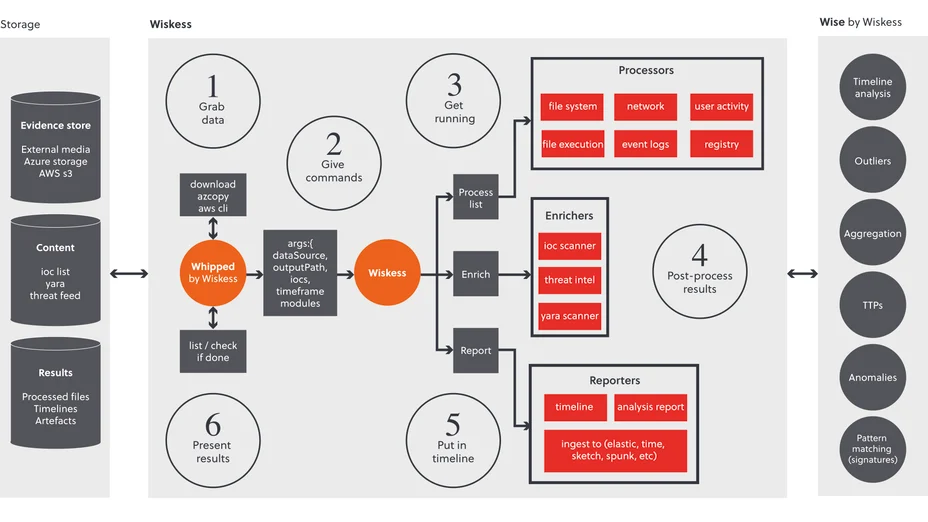
Wiskess 自动化处理来自 Windows 系统的磁盘镜像和临时收集工件。它通过包含六个步骤的流水线实现:
1. 获取数据 – 从云存储(如 AWS S3、Azure 存储)、网络驱动器等传输数据
2. 预处理数据 – 将数据结构化为适合处理的格式
3. 处理数据 – 使用并行处理覆盖 Windows 系统的主要工件
4. 丰富发现 – 使用 IOC 列表、YARA 规则和开源情报扫描数据与发现结果
5. 生成报告 – 以可视化工具(Elastic、Splunk、Timesketch)兼容的格式输出所有处理结果的时间线
6. 存储结果 – 结果可上传至云存储
# Wiskess 方式
# 与 Wiskess 集成的工具
这是 Wiskess 的 Rust 版本,使用并行处理多种工具,并可继续添加。它包含使用 IOC 列表、YARA 规则和开源情报扫描数据源的丰富工具。
结果以 CSV 文件形式组织在文件夹中,可使用文本编辑器打开,并用 grep 等工具进行搜索。该工具会生成系统信息和产生结果文件的报告,存放在 Analysis 文件夹中。
输出生成的时间线报告兼容可视化工具的导入,包括 timesketch、elastic 和 splunk。
设置后使用的工具列表如下:
| 开发者/组织 | 工具 |
|------------------|-----------------------------------------------------------|
| ANSSI-FR | bmc_tools |
| Nir Soft | BrowsingHistoryView |
| Yamato-Security | hayabusa |
| obsidianforensics| hindsight |
| brimorlabs | KStrike |
| Neo23x0 | loki |
| BurntSushi | RipGrep |
| keydet89 | RegRipper |
| williballenthin | shellbags |
| davidpany | CCM_RUA_Finder, PyWMIPersistenceFinder |
| omerbenamram | evtx, mft |
| WithSecureLabs chainsaw | evtx, Shimcache, SRUM (System Resource Usage Monitor) |
| EZTools | AmcacheParser, AppCompatCacheParser, EvtxECmd, JLECmd, LECmd, MFTECmd, PECmd, RBCmd, RecentFileCacheParser, RECmd, SBECmd, SrumECmd, SumECmd |
| S-RM | polars_hostinfo.py, polars_tln.py, Executablelist.ps1 |
| Whipped Tools | AzCopy, 7zip, OSFMount |

# 要求
在具有管理员权限的终端中运行 `wiskess_rust.exe setup -g <你的 github token>`。
GitHub 令牌需要最低权限以访问公共 GitHub 仓库。GitHub 指南如下:https://docs.github.com/en/authentication/keeping-your-account-and-data-secure/managing-your-personal-access-tokens#creating-a-fine-grained-personal-access-token
该 setup 将安装 WISKESS 所需工具到操作系统和 tools 文件夹。安装完成大约需要 5 GB 磁盘空间。
可使用命令 `wiskess_rust.exe setup -c` 检查 setup 是否成功完成。
# Wiskess Web UI `wiskess_rust.exe gui`
此命令将启动 Web 用户界面。这仍处于开发阶段,当前可提交两个命令给 Wiskess:
* 单个数据源 – 使用主 Wiskess 模块
* 多个数据源(本地或云端存储,如 Azure 存储或 AWS S3)– 使用 whipped 模块
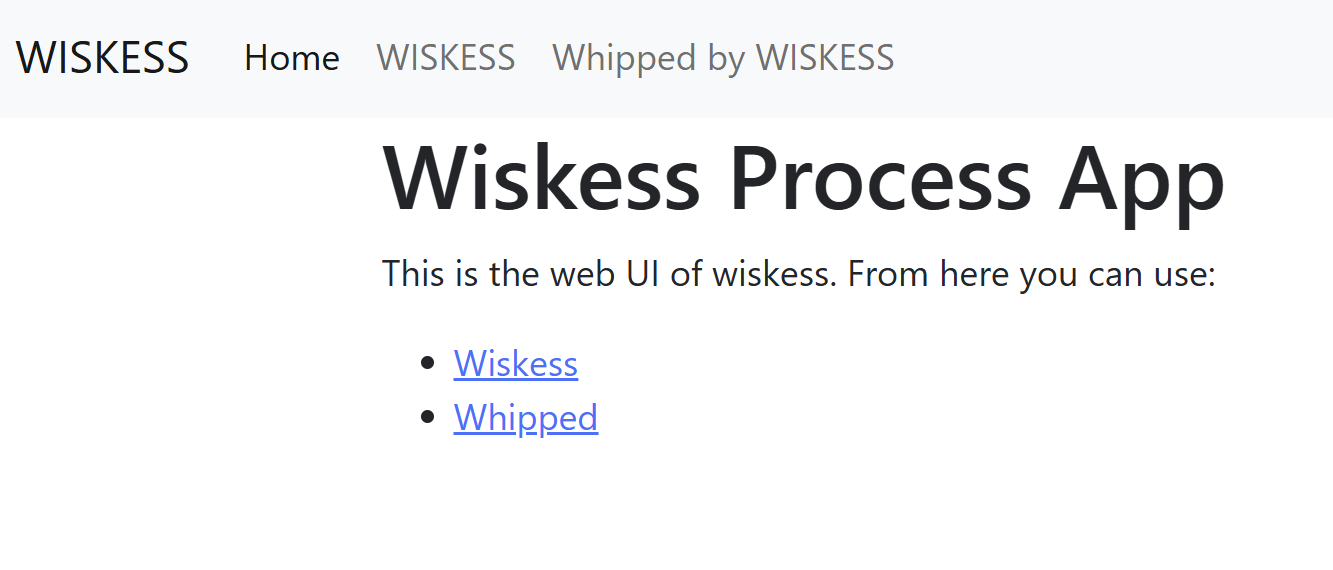
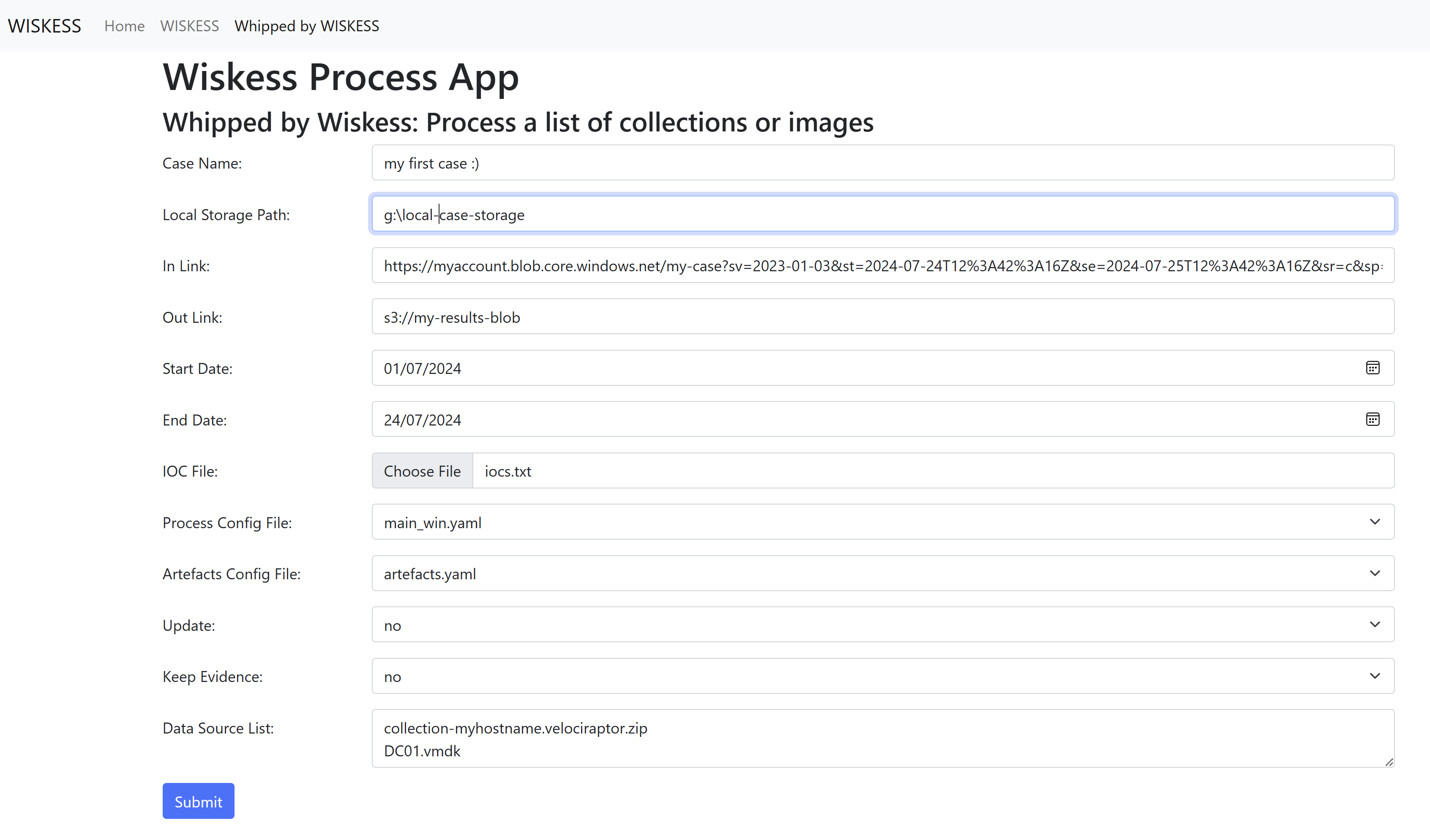
我计划扩展 GUI 的功能,以查看当前进度和处理文件及文件夹视图。在此之前,请在启动 Web UI 的终端中查看进度,并在资源管理器、VSCode 或你选择的工具中查看处理后的数据。
# 处理配置
有多种配置可用于处理数据。默认配置 `config/main_win.yaml` 针对 Windows 操作系统设计,包含 Wiskess 的大多数常用处理工具。如需更完整的调查且不介意稍长的处理时间,可使用 `config/intense_win.yaml`。intense 配置包含以下工具:
* Chainsaw EVTX
* EVTX Dump
* williballenthin Shellbags
* KStrike
* RDP Bitmap
* IOCs over pagefile
* Executablelist
* Loki over the datasource
可通过参数 `--config my_fav_tools.yaml` 在 wiskess 和 whipped 命令中设置处理配置。
# Whipped by Wiskess `wiskess_rust.exe whipped`
此命令将从 AWS 或 Azure 存储拉取数据,用 Wiskess 处理并上传结果到存储。
## 用法
可用于处理存储在 Azure 或 AWS S3 云账户中的 Windows 数据源,也可处理网络共享或本地驱动器上的数据。
### Azure 用法:
* 从 Azure 中数据存储位置生成 SAS 密钥
* 生成用于上传 Wiskess 输出结果的 SAS 密钥
* 复制所有需要处理的数据的文件路径,需与 Azure 中的路径一致
* 设置开始和结束时间,这很可能对应事件时间范围
### AWS 用法:
* 在会话或终端中添加 AWS 凭证,对应存储数据的账户
* 获取数据源 s3:// 链接
* 在 AWS S3 中创建用于存储 Wiskess 输出结果的 bucket 或文件夹,并获取该 s3:// 链接
* 复制所有需要处理的数据的文件路径,需来自获取 s3:// 链接的文件夹或 bucket
* 设置开始和结束时间,这很可能对应事件时间范围
## 示例 – 对 in-link 中的所有证据进行处理并上传到 out-link
```
wiskess_rust.exe whipped `
--local-storage x:\ `
--in-link "https://myaccount.file.core.windows.net/myclient/?sp=rl&st=...VWjgWTY8uc%3D&sr=s" `
--out-link "https://myaccount.file.core.windows.net/internal-cache/myclient/?sp=rcwl&st=2023-04-21T20...2FZWEA%3D&sr=s" `
--start-date 2023-01-01 `
--end-date 2023-02-01
```
## 示例 – 对存储在 X:\my-collections 的集合进行处理并上传结果到 Azure 存储
```
wiskess_rust.exe whipped `
--data-source-list "image.vmdk, folder with collection, surge.zip, velociraptor_collection.7z" `
--local-storage x:\my-collections `
--in-link local `
--out-link "https://myaccount.file.core.windows.net/internal-cache/myclient/?sp=rcwl&st=2023-04-21T20...2FZWEA%3D&sr=s" `
--start-date 2023-01-01 `
--end-date 2023-02-01 `
--update
```
## 参数
Optional. The paths to the configuration file, i.e. ./config/win_all.yml
--data-source-list
Required. The paths to the file, folder of images, collections, etc. Must be separated by comma ',' or new line
--local-storage
Required. The path to where the data is temporarily downloaded to and Wiskess output is stored locally
--in-link
Required. The link that the data is stored on, i.e.
https://myaccount.file.core.windows.net/myclient/?sp=rl&st=...VWjgWTY8uc%3D&sr=s
--out-link
Required. The link where you need the wiskess output uploaded to, i.e.
https://myaccount.file.core.windows.net/results/myclient/?sp=rcwl&st=2023-04-21T20...2FZWEA%3D&sr=s
--ioc-file
--start-date
Required. The start time from when we want to look for interesting information. Normally aligned with the incident timeframe.
Caution: specifying a wide timeframe will cause performance issues.
--end-date
Required. The end time to when we want to look for interesting information. Normally aligned with the incident timeframe.
Caution: specifying a wide timeframe will cause performance issues.
--update
Optional. Set this flag to update the Wiskess results, such as changing the timeframe or after adding new IOCs to the list.
--keep-evidence
Optional. Set this flag to keep the downloaded data on your local storage. Useful if wanting to process the data after Wiskess.
Caution: make sure you have enough disk space for all the data source list.
```
# Wiskess `wiskess_rust.exe wiskess`
这是 Wiskess 的 Rust 版本,使用多处理器并行处理、丰富数据并生成报告。通过命令 `wiskess_rust.exe whipped` 调用,也可独立使用命令 `wiskess_rust.exe wiskess`。
## 用法
* 挂载镜像到驱动器,例如使用 Arsenal Image Mounter。可跳过如果使用工件文件夹。
* 提供工件文件路径,例如挂载的驱动器盘符或解压/下载到的文件夹路径。
* 提供输出路径,用于存储收集的工件和处理结果。
* 添加指标到文件,可命名为 iocs.txt 并与 wiskess.ps1 放在同一文件夹,或使用 -iocFile "路径_to_iocs.txt" 指定位置。
* 脚本预设了一组 Windows 工件位置,用于传递给正确的解析器。若工件不在默认位置,会提示用户输入路径。
## 参数
Optional. The paths to the configuration file. Default: ./config/main_win.yml
--data-source
Required. The drive letter the image is mounted on, or the file path to the extracted collection.
--out-path
Required. Where you want to store the analysis and artefact results.
--ioc-file
Optional. The path to a file containing a list of indicators of compromise. Each indicator is on a separate line.
--start-date
Optional. The start time from when we want to look for interesting information. Normally aligned with the incident timeframe.
Caution: specifying a high number of days will cause performance issues.
--end-date
Optional. The end time to when we want to look for interesting information. Normally aligned with the incident timeframe.
Caution: specifying a high number of days will cause performance issues.
```
## wiskess 示例
## 示例 1
执行收集 E: 盘工件所需的最低参数,对最近 7 天进行快速扫描,并将结果存储到 Z:\Project 文件路径。同时提供包含指标的文件路径。
```
./wiskess_rust.exe wiskess --data-source E: -out-path "Z:\Project" --start-date 2023-01-01 --end-date 2023-02-01 --ioc-file ./iocs.txt
```
# TODO
WISKESS 项目包含若干开发领域,包括错误修复、性能增强和功能改进。以下是已知问题、潜在问题和路线图的简要说明:
## 已知问题
以下为已知问题,正在为下一版本修复:
* 进程无超时。部分 wiskess 进程可能永不停止,导致流水线(whipped)无法继续。需手动查找进程(非 wiskess_rust.exe)并终止,例如在任务管理器或 resmon.exe 中找到 SumECmd 并结束该进程,若其运行超过 30 分钟。
* IOC 汇总 CSV 包含多余行且格式不正确
* Linux 版本的 Wiskess 缺少 prefetch 和 SRUM 的处理器,因为 SrumECmd 在 Linux 下不兼容且 chainsaw srum 不可靠。开发中:实现兼容 Linux 的 srum_dump
## 功能请求
此列表包含对 wiskess 的改进建议:
* 在时间线中添加更多字段,例如注册表配置文件中提取的用户名、跳转列表和 lnk 文件
* 添加 IIS 日志和 AV 日志的时间线输出
* 添加 Microsoft UAL 日志的 DNS 日志时间线输出,用于 IP 到主机名的查找
* 以 XLSX 格式输出 srum-dump.exe 的时间线
## 性能增强
WISKESS 在速度、可用性和互操作性方面有多处改进空间,相关请求如下:
* 自动更新到最新版本
* 在配置文件中存储 GitHub 令牌
* 集成 whipped_imageprocess.ps1 到 Rust whipped
* 并行移动收集或镜像中的文件
## 已完成开发(下一版本)
以下为自上一版本以来已开发并提交到仓库的功能:
* 正式支持处理本地收集或磁盘镜像,可一次性处理多个收集或镜像。无需新命令,当已下载集合/镜像时,提供 `--in-link local` 并指定本地路径 `-l` 及文件列表 `--data-source-list -d`(例如 `--in-link local -l x:\ -d "Collection-DC1.zip, Collection-FTP.zip, Veeam.vmdk"`)。可配合 `--out-link local` 和 `--update` 使用。
* 主机信息时间线文件 – 便于仅导入时间线文件夹到 SIEM
* PowerShell 历史文件时间线 – ConsoleHost_history.txt
* 运行 `setup -c` 的测试以确认 WISKESS 已正确安装并报告缺失包
* 移除部分时间线文件中 message 字段的多余数据(如 shellbags、hayabusa),并重构其他字段以便在 CSV 中更易读
* 修复时间线网络 CSV 中同一事件显示多条记录的问题
* 修复使用 whipped 和 GUI 时 old-whip 部分集合未完全解压的问题
* 磁盘镜像上的工件收集现已并行化
点击以显示 `wiskess_rust.exe whipped` 的参数
``` --config点击以显示 `wiskess_rust.exe wiskess` 的参数
``` --config标签:AWS存储, Azure存储, CSV报告, DNS信息、DNS暴力破解, HTTPS请求, IOC扫描, Rust, SEO: Rust取证, SEO: Windows取证工具, SEO: 自动化IR, Timesketch, Velociraptor, Windows取证, Wiskess, YARA规则, 云端证据收集, 可视化界面, 威胁情报, 安全工具, 并行处理, 开发者工具, 数字取证, 用户态调试, 磁盘镜像, 网络流量审计, 自动化脚本, 自动化证据处理, 通知系统, 逻辑收集