astral-sh/uv
GitHub: astral-sh/uv
一款用 Rust 编写的极速 Python 包和项目管理器,统一替代 pip、poetry、pipx、pyenv 等多种工具。
Stars: 86411 | Forks: 3203
# uv
[](https://github.com/astral-sh/uv)
[](https://pypi.python.org/pypi/uv)
[](https://pypi.python.org/pypi/uv)
[](https://pypi.python.org/pypi/uv)
[](https://github.com/astral-sh/uv/actions)
[](https://discord.gg/astral-sh)
一个极快的 Python 包和项目管理器,使用 Rust 编写。
```
请参阅[脚本文档](https://docs.astral.sh/uv/guides/scripts/)以开始使用。
### 工具
uv 执行和安装由 Python 包提供的命令行工具,类似于 `pipx`。
使用 `uvx`(`uv tool run` 的别名)在临时环境中运行工具:
```
$ uvx pycowsay 'hello world!'
Resolved 1 package in 167ms
Installed 1 package in 9ms
+ pycowsay==0.0.0.2
"""
------------
< hello world! >
------------
\ ^__^
\ (oo)\_______
(__)\ )\/\
||----w |
|| ||
```
使用 `uv tool install` 安装工具:
```
$ uv tool install ruff
Resolved 1 package in 6ms
Installed 1 package in 2ms
+ ruff==0.5.0
Installed 1 executable: ruff
$ ruff --version
ruff 0.5.0
```
请参阅[工具文档](https://docs.astral.sh/uv/guides/tools/)以开始使用。
### Python 版本
uv 安装 Python 并允许在不同版本之间快速切换。
安装多个 Python 版本:
```
$ uv python install 3.12 3.13 3.14
Installed 3 versions in 972ms
+ cpython-3.12.12-macos-aarch64-none (python3.12)
+ cpython-3.13.9-macos-aarch64-none (python3.13)
+ cpython-3.14.0-macos-aarch64-none (python3.14)
```
根据需要下载 Python 版本:
```
$ uv venv --python 3.12.0
Using Python 3.12.0
Creating virtual environment at: .venv
Activate with: source .venv/bin/activate
$ uv run --python pypy@3.8 -- python --version
Python 3.8.16 (a9dbdca6fc3286b0addd2240f11d97d8e8de187a, Dec 29 2022, 11:45:30)
[PyPy 7.3.11 with GCC Apple LLVM 13.1.6 (clang-1316.0.21.2.5)] on darwin
Type "help", "copyright", "credits" or "license" for more information.
>>>>
```
在当前目录中使用特定的 Python 版本:
```
$ uv python pin 3.11
Pinned `.python-version` to `3.11`
```
请参阅 [Python 安装文档](https://docs.astral.sh/uv/guides/install-python/)以开始使用。
### pip 接口
uv 为常见的 `pip`、`pip-tools` 和 `virtualenv` 命令提供了直接替代品。
uv 扩展了它们的接口,增加了高级功能,例如依赖版本覆盖、跨平台解析、可重复解析、替代解析策略等。
使用 `uv pip` 接口迁移到 uv,无需更改现有工作流 —— 并体验 10-100 倍的加速。
将需求编译成跨平台的 requirements 文件:
```
$ uv pip compile requirements.in \
--universal \
--output-file requirements.txt
Resolved 43 packages in 12ms
```
创建虚拟环境:
```
$ uv venv
Using Python 3.12.3
Creating virtual environment at: .venv
Activate with: source .venv/bin/activate
```
安装锁定的依赖:
```
$ uv pip sync requirements.txt
Resolved 43 packages in 11ms
Installed 43 packages in 208ms
+ babel==2.15.0
+ black==24.4.2
+ certifi==2024.7.4
...
```
请参阅 [pip 接口文档](https://docs.astral.sh/uv/pip/index/)以开始使用。
## 常见问题
#### uv 怎么发音?
发音为 "you - vee" ([`/juː viː/`](https://en.wikipedia.org/wiki/Help:IPA/English#Key))
#### uv 的书写风格是什么?
就用 "uv",谢谢。有关详细信息,请参阅[风格指南](./STYLE.md#styling-uv)。
#### uv 支持哪些平台?
请参阅 uv 的[平台支持](https://docs.astral.sh/uv/reference/platforms/)文档。
#### uv 可以用于生产环境吗?
是的,uv 是稳定的,并且已在生产环境中广泛使用。有关详细信息,请参阅 uv 的[版本控制策略](https://docs.astral.sh/uv/reference/versioning/)文档。
## 致谢
uv 的依赖解析器底层使用 [PubGrub](https://github.com/pubgrub-rs/pubgrub)。我们要感谢 PubGrub 的维护者,特别是 [Jacob Finkelman](https://github.com/Eh2406),感谢他们的支持。
uv 的 Git 实现基于 [Cargo](https://github.com/rust-lang/cargo)。
uv 的一些优化灵感来自于我们在 [pnpm](https://pnpm.io/)、[Orogene](https://github.com/orogene/orogene) 和 [Bun](https://github.com/oven-sh/bun) 中看到的出色工作。我们还从 Nathaniel J. Smith 的 [Posy](https://github.com/njsmith/posy) 中学到了很多,并调整了其 [trampoline](https://github.com/njsmith/posy/tree/main/src/trampolines/windows-trampolines/posy-trampoline) 以支持 Windows。
## 许可证
uv 根据以下任一许可证授权:
- Apache License, Version 2.0,([LICENSE-APACHE](LICENSE-APACHE) 或 )
- MIT license ([LICENSE-MIT](LICENSE-MIT) 或 )
由您选择。
除非您明确声明,否则您有意提交以包含在 uv 中的任何贡献(如 Apache-2.0 许可证中所定义)均应按上述方式进行双重许可,无需任何附加条款或条件。

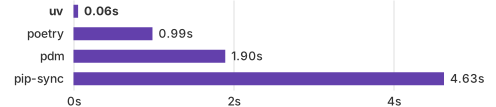
在拥有缓存的情况下安装 Trio 的依赖。
## 亮点 - 一个单一工具,用于替代 `pip`、`pip-tools`、`pipx`、`poetry`、`pyenv`、`twine`、`virtualenv` 以及更多。 - 比 `pip` [快 10-100 倍](https://github.com/astral-sh/uv/blob/main/BENCHMARKS.md)。 - 提供[全面的项目管理](#projects),并包含[通用 lockfile](https://docs.astral.sh/uv/concepts/projects/layout#the-lockfile)。 - [运行脚本](#scripts),支持[内联依赖元数据](https://docs.astral.sh/uv/guides/scripts#declaring-script-dependencies)。 - [安装和管理](#python-versions) Python 版本。 - [运行和安装](#tools) 发布为 Python 包的工具。 - 包含 [pip 兼容接口](#the-pip-interface),在熟悉 CLI 的同时获得性能提升。 - 支持 Cargo 风格的 [workspaces](https://docs.astral.sh/uv/concepts/projects/workspaces),适用于可扩展项目。 - 磁盘空间效率高,通过[全局缓存](https://docs.astral.sh/uv/concepts/cache)实现依赖去重。 - 无需 Rust 或 Python,可通过 `curl` 或 `pip` 安装。 - 支持 macOS、Linux 和 Windows。 uv 由 [Astral](https://astral.sh)([Ruff](https://github.com/astral-sh/ruff) 和 [ty](https://github.com/astral-sh/ty) 的创造者)提供支持。 ## 安装 使用我们的独立安装程序安装 uv: ``` # 在 macOS 和 Linux。 curl -LsSf https://astral.sh/uv/install.sh | sh ``` ``` # 在 Windows。 powershell -ExecutionPolicy ByPass -c "irm https://astral.sh/uv/install.ps1 | iex" ``` 或者,从 [PyPI](https://pypi.org/project/uv/) 安装: ``` # 使用 pip。 pip install uv ``` ``` # 或 pipx。 pipx install uv ``` 如果通过独立安装程序安装,uv 可以自我更新到最新版本: ``` uv self update ``` 有关详细信息和替代安装方法,请参阅[安装文档](https://docs.astral.sh/uv/getting-started/installation/)。 ## 文档 uv 的文档位于 [docs.astral.sh/uv](https://docs.astral.sh/uv)。 此外,可以使用 `uv help` 查看命令行参考文档。 ## 功能 ### 项目 uv 管理项目依赖和环境,支持 lockfile、workspaces 等,类似于 `rye` 或 `poetry`: ``` $ uv init example Initialized project `example` at `/home/user/example` $ cd example $ uv add ruff Creating virtual environment at: .venv Resolved 2 packages in 170ms Built example @ file:///home/user/example Prepared 2 packages in 627ms Installed 2 packages in 1ms + example==0.1.0 (from file:///home/user/example) + ruff==0.5.0 $ uv run ruff check All checks passed! $ uv lock Resolved 2 packages in 0.33ms $ uv sync Resolved 2 packages in 0.70ms Audited 1 package in 0.02ms ``` 请参阅[项目文档](https://docs.astral.sh/uv/guides/projects/)以开始使用。 uv 还支持构建和发布项目,即使它们不是由 uv 管理的。请参阅[发布指南](https://docs.astral.sh/uv/guides/publish/)以了解更多信息。 ### 脚本 uv 管理单文件脚本的依赖和环境。 创建一个新脚本并添加声明其依赖项的内联元数据: ``` $ echo 'import requests; print(requests.get("https://astral.sh"))' > example.py $ uv add --script example.py requests Updated `example.py` ``` 然后,在隔离的虚拟环境中运行脚本: ``` $ uv run example.py Reading inline script metadata from: example.py Installed 5 packages in 12ms
标签:Astral, DNS解析, Linux 内核安全, pip替代, PPID欺骗, PyPI, Python, Python版本管理, Rust, SOC Prime, uv, 依赖解析, 包管理器, 可视化界面, 开发工具, 开源项目, 无后门, 统一API, 缓存, 网络流量审计, 网络调试, 自动化, 虚拟环境, 逆向工具, 通知系统, 项目管理