hacksider/Deep-Live-Cam
GitHub: hacksider/Deep-Live-Cam
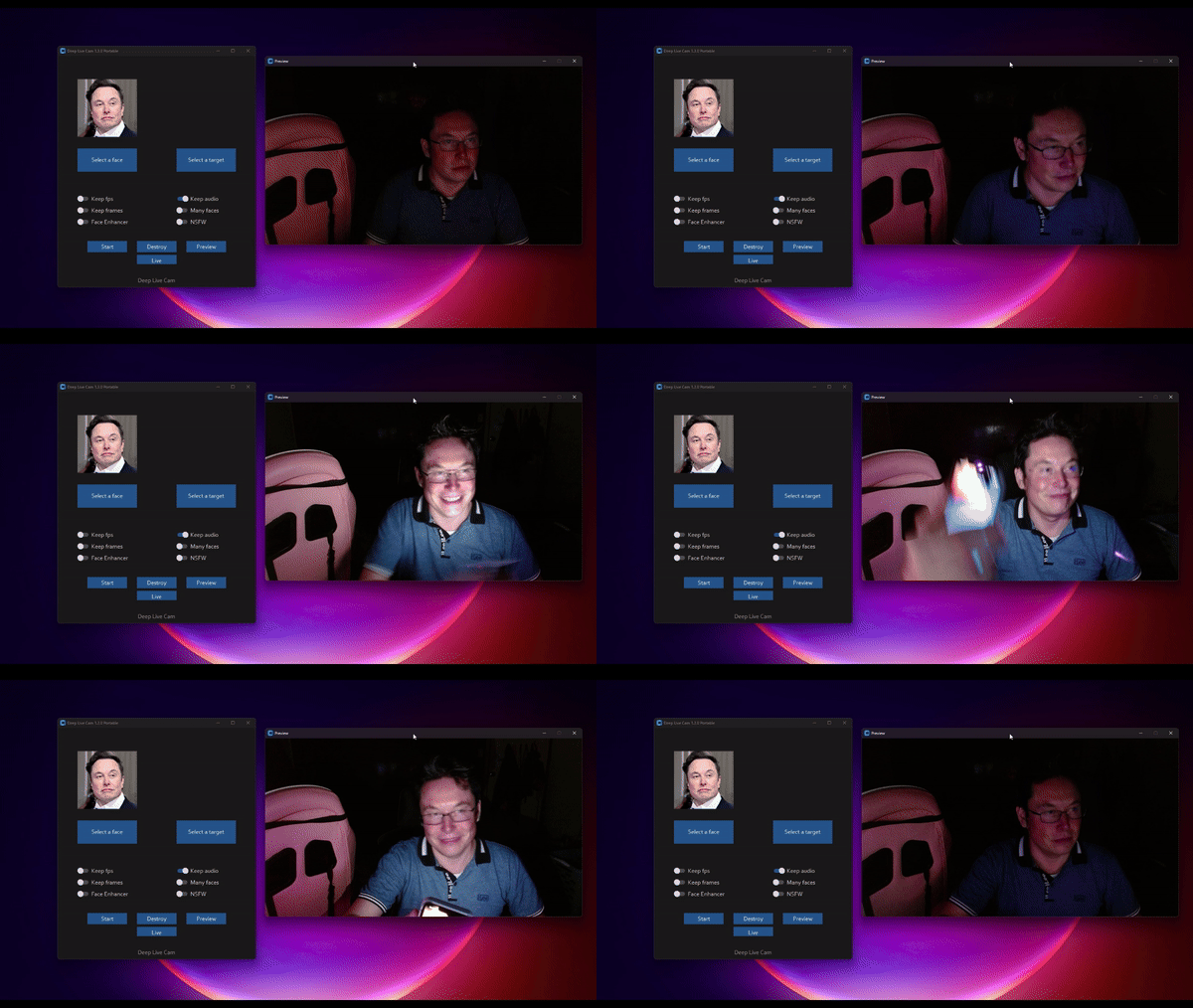
仅用一张照片即可实现实时人脸替换和视频深度伪造的开源工具,支持直播换脸和多人脸映射。
Stars: 94388 | Forks: 13760
Deep-Live-Cam 2.1
一键实时换脸和视频深度伪造,仅需一张图片。

## 免责声明
本深度伪造软件旨在成为 AI 生成媒体行业的高效生产力工具。它可以帮助艺术家制作自定义角色动画、创作引人入胜的内容,甚至用于服装设计的模特展示。
我们意识到其可能被用于不道德的应用,并致力于采取预防措施。内置检查机制可防止程序处理不当媒体(裸露、暴力内容、战争画面等敏感材料)。我们将继续负责任地开发此项目,遵守法律和道德规范。如有法律要求,我们可能会关闭项目或添加水印。
- 道德使用:用户应负责任且合法地使用本软件。如果使用真人的面部,请务必获得其同意,并在网上分享时清晰标注输出内容为深度伪造(deepfake)。
- 内容限制:软件包含内置检查,以防止处理不当媒体,例如裸露、暴力内容或敏感材料。
- 法律合规:我们遵守所有相关法律和道德准则。如有法律要求,我们可能会关闭项目或在输出中添加水印。
- 用户责任:我们不对最终用户的行为负责。用户必须确保其使用方式符合道德标准和法律要求。
使用本软件即表示您同意这些条款,并承诺以尊重他人权利和尊严的方式使用它。
用户应负责任且合法地使用本软件。如果使用真人的面部,请务必获得其同意,并在网上分享时清晰标注输出内容为深度伪造。我们不对最终用户的行为负责。
## 2.7 beta 独家快速入门 - 预构建版 (Windows/Mac Silicon/CPU)
 ##### 如果您拥有独立 NVIDIA 或 AMD GPU、CPU 或 Mac Silicon,这是您能获得的最快版本,并且您将获得特别的优先支持。2.7 beta 是您能拥有的最佳版本,比开源版本多出 30 多项功能。
###### 这些预构建版本非常适合非技术用户,或者那些没有时间或无法手动安装所有依赖项的用户。温馨提示:这是一个开源项目,因此您也可以选择手动安装。
## 太长不看;只需 3 次点击即可实现实时深度伪造
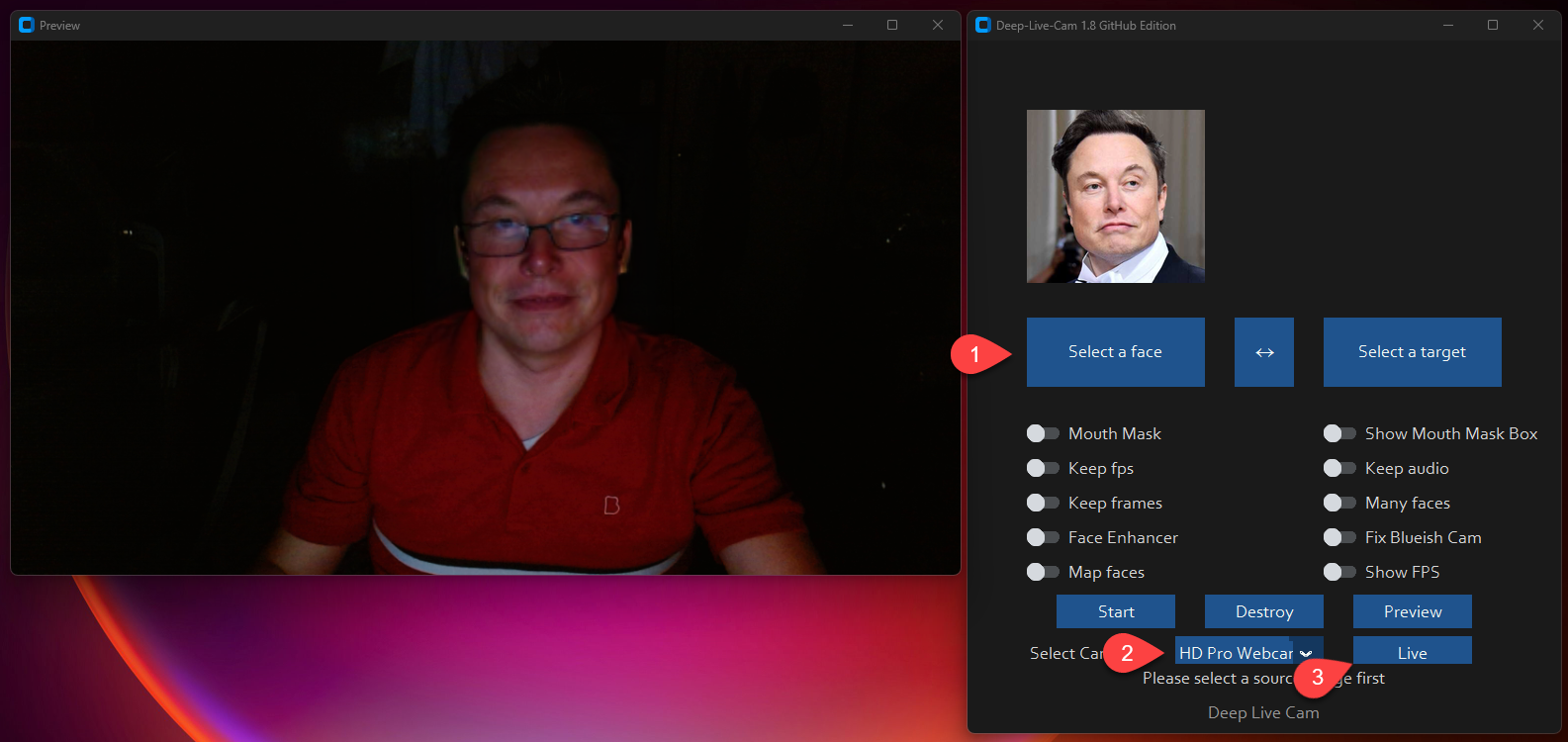
1. 选择一张人脸
2. 选择要使用的摄像头
3. 按下 live(开始)!
## 功能与用途 - 一切均为实时
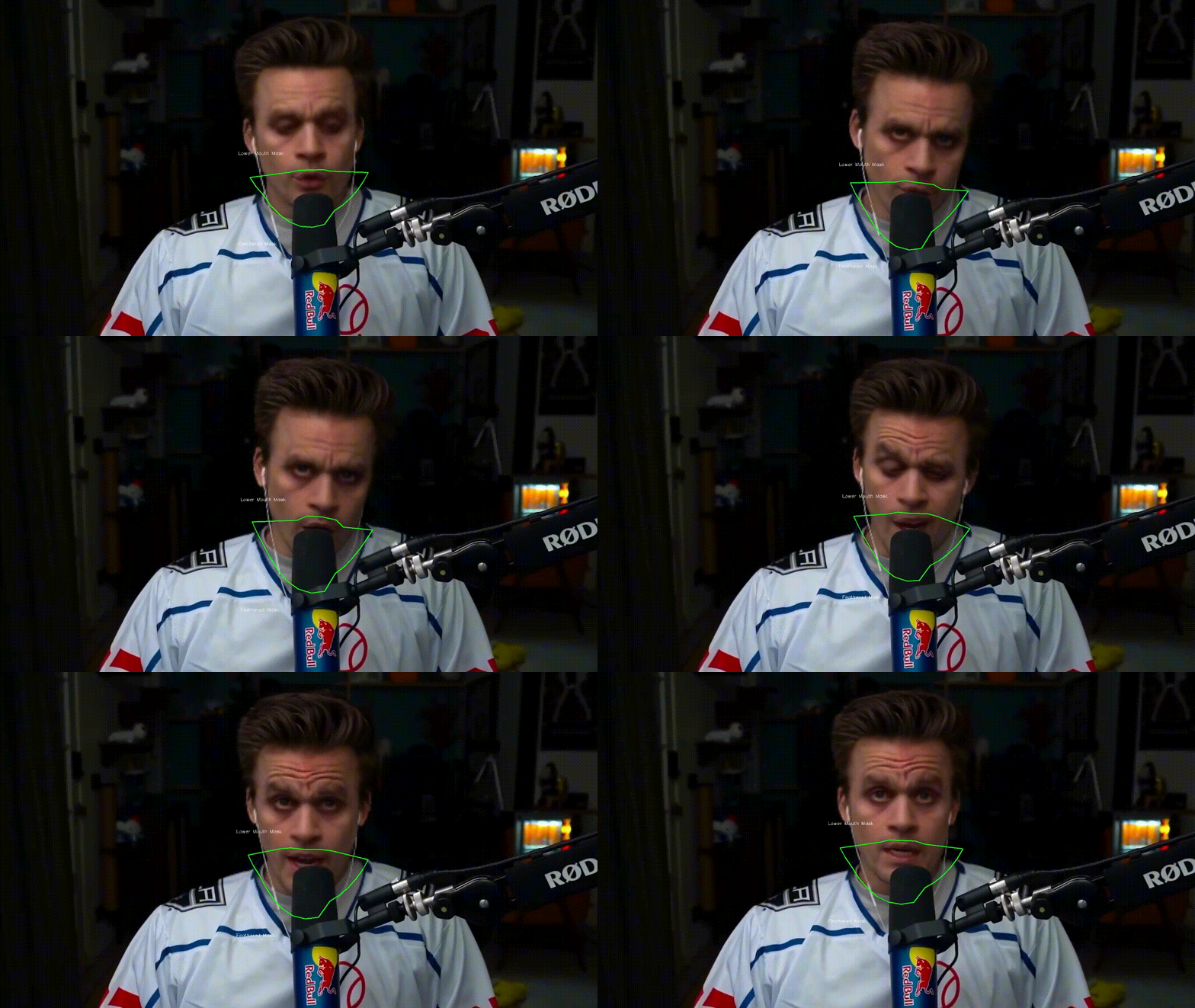
### 嘴部遮罩
**使用嘴部遮罩(Mouth Mask)保留原始嘴部以实现精准动作**
##### 如果您拥有独立 NVIDIA 或 AMD GPU、CPU 或 Mac Silicon,这是您能获得的最快版本,并且您将获得特别的优先支持。2.7 beta 是您能拥有的最佳版本,比开源版本多出 30 多项功能。
###### 这些预构建版本非常适合非技术用户,或者那些没有时间或无法手动安装所有依赖项的用户。温馨提示:这是一个开源项目,因此您也可以选择手动安装。
## 太长不看;只需 3 次点击即可实现实时深度伪造

1. 选择一张人脸
2. 选择要使用的摄像头
3. 按下 live(开始)!
## 功能与用途 - 一切均为实时
### 嘴部遮罩
**使用嘴部遮罩(Mouth Mask)保留原始嘴部以实现精准动作**
### 人脸映射
**同时在多个对象上使用不同的人脸**

### 你的电影,你的脸
**实时观看任意换脸后的电影**

### 直播表演
**进行现场直播和表演**

### 网络迷因
**创作您最具传播力的网络迷因**

Created using Many Faces feature in Deep-Live-Cam
### Omegle
**在 Omegle 上给人惊喜**
## 安装说明(手动)
**请注意,安装过程需要技术技能,不适合初学者。建议下载快速入门版本。**
点击查看流程
### 安装
这种方式在您的电脑上更容易成功运行,但由于使用 CPU,速度会较慢。
**1. 设置平台**
- Python(推荐 3.11)
- pip
- git
- [ffmpeg](https://www.youtube.com/watch?v=OlNWCpFdVMA) - ```iex (irm ffmpeg.tc.ht)```
- [Visual Studio 2022 Runtimes (Windows)](https://visualstudio.microsoft.com/visual-cpp-build-tools/)
**2. 克隆仓库**
```
git clone https://github.com/hacksider/Deep-Live-Cam.git
cd Deep-Live-Cam
```
**3. 下载模型**
1. [GFPGANv1.4](https://huggingface.co/hacksider/deep-live-cam/resolve/main/GFPGANv1.4.onnx)
2. [inswapper\_128\_fp16.onnx](https://huggingface.co/hacksider/deep-live-cam/resolve/main/inswapper_128_fp16.onnx)
将这些文件放在 "**models**" 文件夹中。
**4. 安装依赖**
我们强烈建议使用 `venv` 以避免出现问题。
对于 Windows:
```
python -m venv venv
venv\Scripts\activate
pip install -r requirements.txt
```
对于 Linux:
```
# 确保使用已安装的 Python 3.10
python3 -m venv venv
source venv/bin/activate
pip install -r requirements.txt
```
**对于 macOS:**
Apple Silicon (M1/M2/M3) 需要特定设置:
```
# 安装 Python 3.11(特定版本很重要)
brew install python@3.11
# 安装 tkinter 包(GUI 所需)
brew install python-tk@3.10
# 使用 Python 3.11 创建并激活虚拟环境
python3.11 -m venv venv
source venv/bin/activate
# 安装依赖
pip install -r requirements.txt
```
** 如果出现问题需要重新安装虚拟环境 **
```
# 停用虚拟环境
rm -rf venv
# 重新安装虚拟环境
python -m venv venv
source venv/bin/activate
# 再次安装依赖
pip install -r requirements.txt
# gfpgan 和 basicsrs 问题修复
pip install git+https://github.com/xinntao/BasicSR.git@master
pip uninstall gfpgan -y
pip install git+https://github.com/TencentARC/GFPGAN.git@master
```
**运行:** 如果您没有 GPU,可以使用 `python run.py` 运行 Deep-Live-Cam。请注意,首次执行将下载模型(约 300MB)。
### GPU 加速
**CUDA Execution Provider (Nvidia)**
1. 安装 [CUDA Toolkit 12.8.0](https://developer.nvidia.com/cuda-12-8-0-download-archive)
2. 安装 [cuDNN v8.9.7 for CUDA 12.x](https://developer.nvidia.com/rdp/cudnn-archive)(onnxruntime-gpu 必需):
- 下载 cuDNN v8.9.7 for CUDA 12.x
- 确保 cuDNN bin 目录在您的系统 PATH 中
3. 安装依赖:
```
pip install -U torch torchvision torchaudio --index-url https://download.pytorch.org/whl/cu128
pip uninstall onnxruntime onnxruntime-gpu
pip install onnxruntime-gpu==1.21.0
```
3. 使用:
```
python run.py --execution-provider cuda
```
**CoreML Execution Provider (Apple Silicon)**
Apple Silicon (M1/M2/M3) 特定安装:
1. 确保您已完成上述 macOS 设置(使用 Python 3.10)。
2. 安装依赖:
```
pip uninstall onnxruntime onnxruntime-silicon
pip install onnxruntime-silicon==1.13.1
```
3. 使用(重要:指定 Python 3.10):
```
python3.10 run.py --execution-provider coreml
```
**macOS 重要提示:**
- 您**必须**使用 Python 3.10,而不是 3.11 或 3.13 等较新版本
- 如果安装了多个 Python 版本,请始终使用 `python3.10` 命令,而不仅仅是 `python`
- 如果出现关于 `_tkinter` 缺失的错误,请重新安装 tkinter 包:`brew reinstall python-tk@3.10`
- 如果出现模型加载错误,请检查模型是否位于正确的文件夹中
- 如果与其他 Python 版本发生冲突,请考虑卸载它们:
# 列出所有已安装的 Python 版本
brew list | grep python
# 如需卸载冲突版本
brew uninstall --ignore-dependencies python@3.11 python@3.13
# 仅保留 Python 3.11
brew cleanup
**CoreML Execution Provider (Apple Legacy)**
1. 安装依赖:
```
pip uninstall onnxruntime onnxruntime-coreml
pip install onnxruntime-coreml==1.21.0
```
2. 使用:
```
python run.py --execution-provider coreml
```
**DirectML Execution Provider (Windows)**
1. 安装依赖:
```
pip uninstall onnxruntime onnxruntime-directml
pip install onnxruntime-directml==1.21.0
```
2. 使用:
```
python run.py --execution-provider directml
```
**OpenVINO™ Execution Provider (Intel)**
1. 安装依赖:
```
pip uninstall onnxruntime onnxruntime-openvino
pip install onnxruntime-openvino==1.21.0
```
2. 使用:
```
python run.py --execution-provider openvino
```
## 使用方法
**1. 图像/视频模式**
- 执行 `python run.py`。
- 选择源人脸图像和目标图像/视频。
- 点击 "Start"(开始)。
- 输出将保存在以目标视频命名的目录中。
**2. 摄像头模式**
- 执行 `python run.py`。
- 选择源人脸图像。
- 点击 "Live"。
- 等待预览出现(10-30 秒)。
- 使用 OBS 等屏幕捕获工具进行流媒体传输。
- 要更换人脸,请选择新的源图像。
## 通过此 HuggingFace 链接下载所有模型
- [**在此下载模型**](https://huggingface.co/hacksider/deep-live-cam/tree/main)
## 命令行参数(不再维护)
```
options:
-h, --help show this help message and exit
-s SOURCE_PATH, --source SOURCE_PATH select a source image
-t TARGET_PATH, --target TARGET_PATH select a target image or video
-o OUTPUT_PATH, --output OUTPUT_PATH select output file or directory
--frame-processor FRAME_PROCESSOR [FRAME_PROCESSOR ...] frame processors (choices: face_swapper, face_enhancer, ...)
--keep-fps keep original fps
--keep-audio keep original audio
--keep-frames keep temporary frames
--many-faces process every face
--map-faces map source target faces
--mouth-mask mask the mouth region
--video-encoder {libx264,libx265,libvpx-vp9} adjust output video encoder
--video-quality [0-51] adjust output video quality
--live-mirror the live camera display as you see it in the front-facing camera frame
--live-resizable the live camera frame is resizable
--max-memory MAX_MEMORY maximum amount of RAM in GB
--execution-provider {cpu} [{cpu} ...] available execution provider (choices: cpu, ...)
--execution-threads EXECUTION_THREADS number of execution threads
-v, --version show program's version number and exit
```
寻找 CLI 模式?使用 -s/--source 参数将使程序在 CLI 模式下运行。
## 媒体报道
- [**Ars Technica**](https://arstechnica.com/information-technology/2024/08/new-ai-tool-enables-real-time-face-swapping-on-webcams-raising-fraud-concerns/) - *"Deep-Live-Cam 爆火,让任何人都能成为数字分身"*
- [**Yahoo!**](https://www.yahoo.com/tech/ok-viral-ai-live-stream-080041056.html) - *"好吧,这款爆火的 AI 直播软件真的很吓人"*
- [**CNN Brasil**](https://www.cnnbrasil.com.br/tecnologia/ia-consegue-clonar-rostos-na-webcam-entenda-funcionamento/) - *"AI 可以在摄像头上进行换脸;了解其工作原理"*
- [**Bloomberg Technoz**](https://www.bloombergtechnoz.com/detail-news/71032/kenalan-dengan-teknologi-deep-live-cam-bisa-jadi-alat-menipu) - *"了解 Deep Live Cam 技术,它可能被用作欺骗工具。"*
- [**TrendMicro**](https://www.trendmicro.com/vinfo/gb/security/news/cyber-attacks/ai-vs-ai-deepfakes-and-ekyc) - *"AI 对决 AI:深度伪造(DeepFakes)与电子认知(eKYC)"*
- [**PetaPixel**](https://petapixel.com/2024/08/14/deep-live-cam-deepfake-ai-tool-lets-you-become-anyone-in-a-video-call-with-single-photo-mark-zuckerberg-jd-vance-elon-musk/) - *"深度伪造 AI 工具让你只需一张照片即可在视频通话中变身为任何人"*
- [**SomeOrdinaryGamers**](https://www.youtube.com/watch?time_continue=1074&v=py4Tc-Y8BcY) - *"太疯狂了,天啊。这太诡异了伙计... 太狂野了伙计"*
- [**IShowSpeed**](https://www.youtube.com/live/mFsCe7AIxq8?feature=shared&t=2686) - *"好了看这,现在看聊天室,我们可以变成我们想变成的任何样子"*
- [**TechLinked (Linus Tech Tips)**](https://www.youtube.com/watch?v=wnCghLjqv3s&t=551s) - *"他们在匹配姿势、表情甚至光照方面做得非常好"*
- [**IShowSpeed**](https://youtu.be/JbUPRmXRUtE?t=3964) - *"什么鬼!为什么我看起来像 Vinny Jr?我长得简直和 Vinny Jr 一模一样!?不,这玩意儿太疯狂了!兄弟这真是太疯狂了!"*
## 致谢
- [ffmpeg](https://ffmpeg.org/):让视频相关操作变得简单
- [Henry](https://github.com/henryruhs):本仓库的主要贡献者之一
- [deepinsight](https://github.com/deepinsight):感谢他们的 [insightface](https://github.com/deepinsight/insightface) 项目,提供了制作精良的库和模型。请注意,[该模型仅用于非商业研究目的](https://github.com/deepinsight/insightface?tab=readme-ov-file#license)。
- [havok2-htwo](https://github.com/havok2-htwo):分享网络摄像头代码
- [GosuDRM](https://github.com/GosuDRM):提供 roop 的开源版本
- [pereiraroland26](https://github.com/pereiraroland26):多面孔支持
- [vic4key](https://github.com/vic4key):支持/贡献本项目
- [kier007](https://github.com/kier007):改善用户体验
- [qitianai](https://github.com/qitianai):多语言支持
- [laurigates](https://github.com/laurigates):解耦内容让一切更快!
- 以及本项目所用库背后的[所有开发者](https://github.com/hacksider/Deep-Live-Cam/graphs/contributors)。
- 脚注:请注意代码的原作者是 [s0md3v](https://github.com/s0md3v/roop)
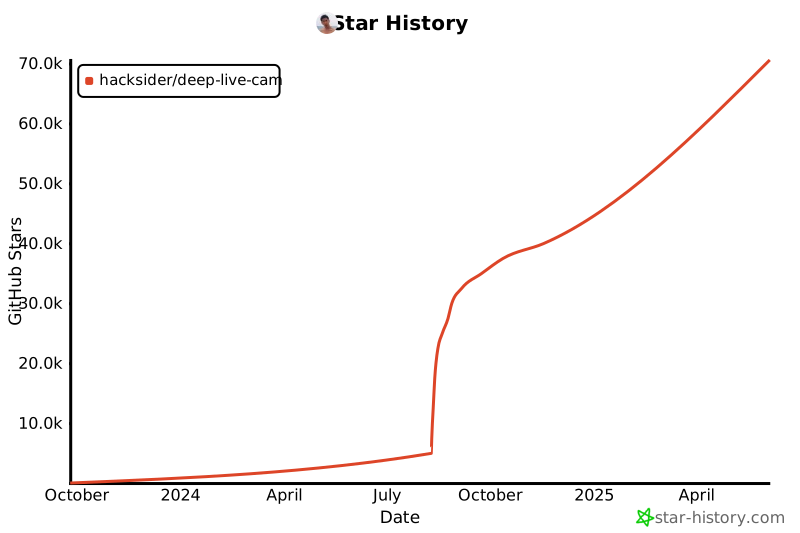
- 所有通过给仓库点 Star 帮助本项目爆火的优秀用户们 ❤️
[](https://github.com/hacksider/Deep-Live-Cam/stargazers)
## 贡献
## 星标飞向月球 🚀
标签:AIGC, AI 视频生成, Deepfake, Deep Learning, Deep-Live-Cam, DNS解析, Vectored Exception Handling, 人工智能, 人脸替换, 人脸识别, 单图换脸, 图像合成, 媒体生成, 实时换脸, 开源项目, 换脸, 数字媒体, 深度伪造, 用户模式Hook绕过, 神经网络, 视频处理, 视频特效, 计算机视觉, 逆向工具