
Medusa:利用多重解码头加速 LLM 生成的简单框架
| 博客 | 报告 | 路线图 |
*新闻* 🔥
- [2024/1] Medusa 技术报告现已在 [arXiv](https://arxiv.org/abs/2401.10774) 上发布。我们添加了多项新功能,包括用于全模型训练的 Medusa-2 配方,用于将 Medusa 添加到任何经过微调的 LLM 的自蒸馏技术等。最新结果显示,在一系列 LLM 上,其速度比原始模型提高了 2.2 到 3.6 倍。
## 引言
Medusa 是一个简单的框架,通过多重解码头普及了 LLM 生成的加速技术。
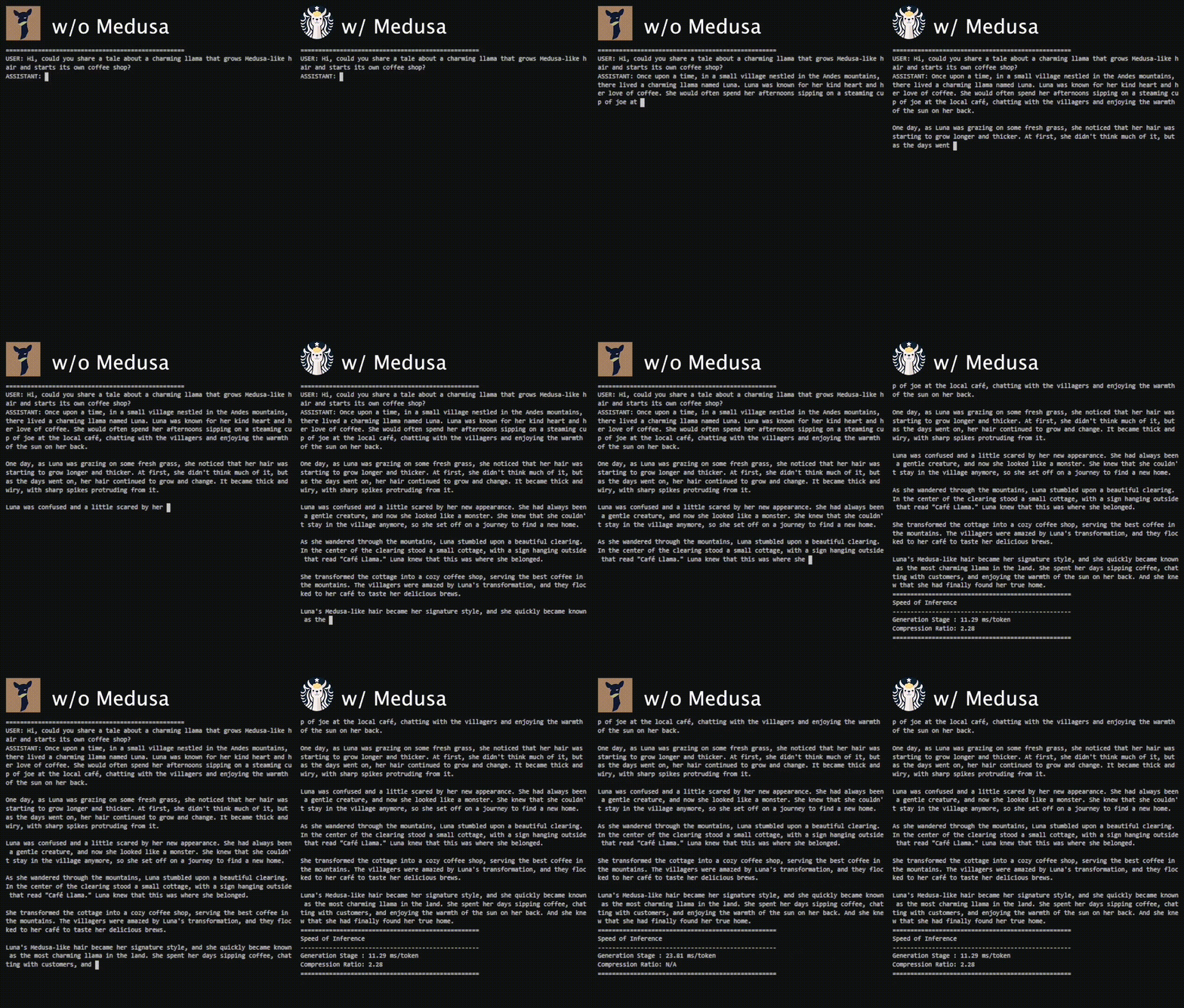
Medusa-1 on Vicuna-7b.
我们旨在解决投机解码等流行加速技术的三个痛点:
- 需要一个优秀的草稿模型。
- 系统复杂性。
- 使用基于采样的生成时效率低下。
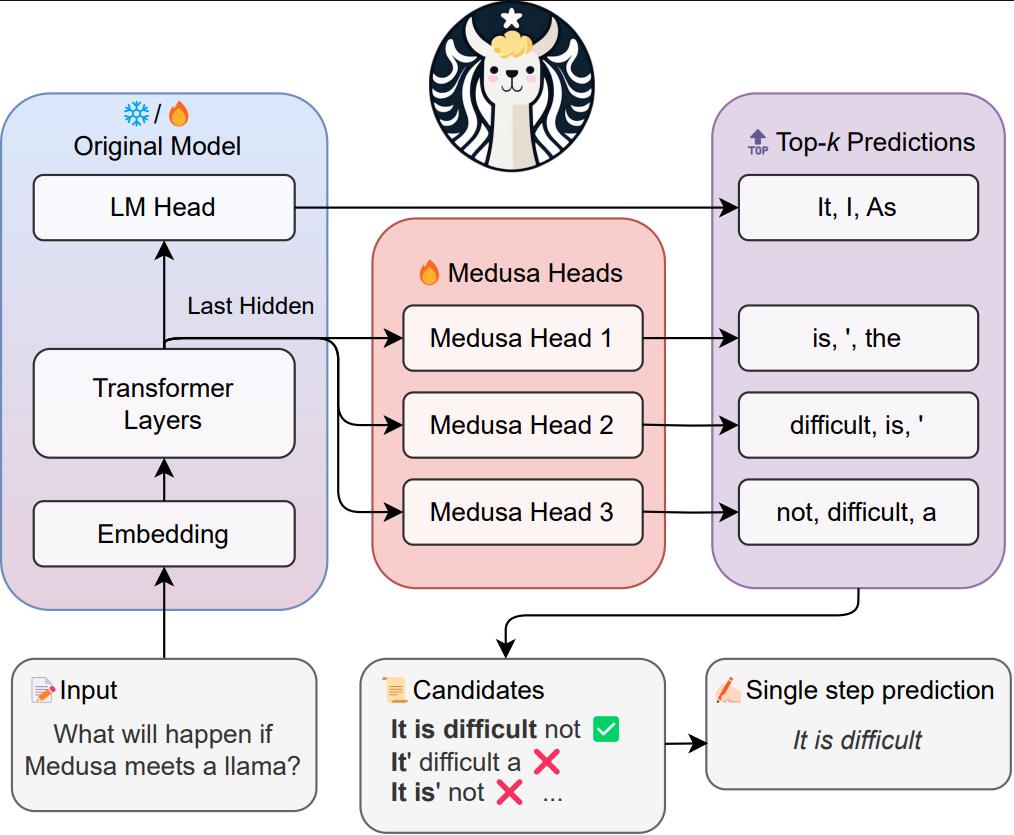
Medusa adds extra "heads" to LLMs to predict multiple future tokens simultaneously. When augmenting a model with Medusa, the original model stays untouched, and only the new heads are fine-tuned during training. During generation, these heads each produce multiple likely words for the corresponding position. These options are then combined and processed using a tree-based attention mechanism. Finally, a typical acceptance scheme is employed to pick the longest plausible prefix from the candidates for further decoding.
我们旨在通过实现以下想法来解决与投机解码相关的挑战:
- 我们不引入新模型,而是在*同一个*模型上训练多个解码头。
- 训练过程是参数高效的,这样即使是“缺乏 GPU”的人也能做到。并且由于没有附加模型,因此无需调整分布式计算设置。
- 放宽匹配原始模型分布的要求,使得非贪婪生成甚至比贪婪解码更快。
在初始版本中,我们的主要重点是针对 batch size 为 1 的设置(一种通常用于本地模型托管的设置)优化 Medusa。在这种配置下,Medusa 在一系列 Vicuna 模型上实现了约 2 倍的速度提升。我们正积极通过将 Medusa 集成到其他推理框架中来扩展其功能,旨在实现更大的性能提升,并将 Medusa 扩展到更广泛的场景中。
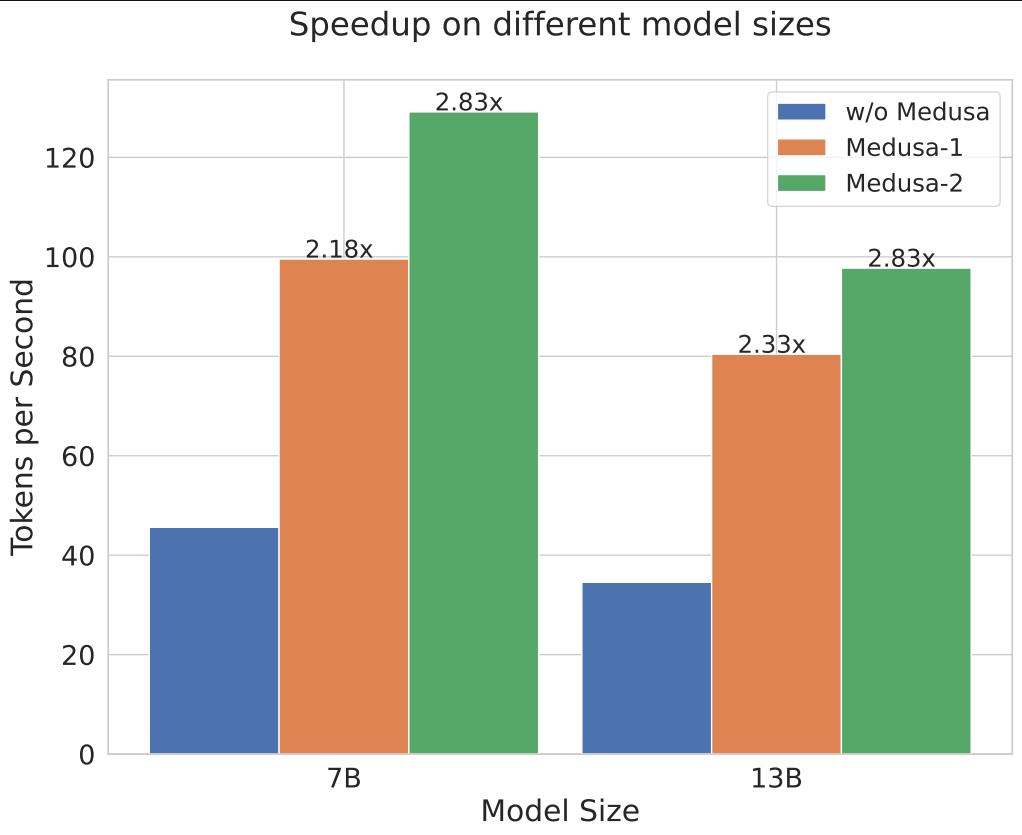
在更新版本中,我们添加了对全模型训练的支持,称为 Medusa-2(相比之下,Medusa-1 仅训练新的 head),这需要一种特殊的配方,在增加投机预测能力的同时保持原始模型的性能。
我们还添加了对自蒸馏的支持,这使我们能够将 Medusa 添加到任何微调过的 LLM 中,而无需原始训练数据的可用性。
## 目录
- [引言](#introduction)
- [目录](#contents)
- [安装](#installation)
- [方法 1:使用 pip(可能不是最新版本)](#method-1-with-pip-may-not-be-the-latest-version)
- [方法 2:从源码安装(推荐)](#method-2-from-the-source-recommended)
- [模型权重](#model-weights)
- [推理](#inference)
- [训练](#training)
- [训练(旧版)](#training-legacy)
- [推送到 Hugging Face Hub](#push-to-hugging-face-hub)
- [引用](#citation)
- [代码库指南](#codebase-guide)
- [社区采用](#community-adoption)
- [贡献](#contributing)
- [致谢](#acknowledgements)
## 安装
### 方法 1:使用 pip(可能不是最新版本)
```
pip install medusa-llm
```
### 方法 2:从源码安装(推荐)
```
git clone https://github.com/FasterDecoding/Medusa.git
cd Medusa
pip install -e .
```
### 模型权重
#### Medusa-1
| 大小 | 聊天命令 | Hugging Face 仓库 |
| ---- | --------------------------------------------- | --------------------------------------------------------------------- |
| 7B | `python -m medusa.inference.cli --model FasterDecoding/medusa-vicuna-7b-v1.3` | [FasterDecoding/medusa-vicuna-7b-v1.3](https://huggingface.co/FasterDecoding/medusa-vicuna-7b-v1.3) |
| 13B | `python -m medusa.inference.cli --model FasterDecoding/medusa-vicuna-13b-v1.3` | [FasterDecoding/medusa-vicuna-13b-v1.3](https://huggingface.co/FasterDecoding/medusa-vicuna-13b-v1.3) |
| 33B | `python -m medusa.inference.cli --model FasterDecoding/medusa-vicuna-33b-v1.3` | [FasterDecoding/medusa-vicuna-33b-v1.3](https://huggingface.co/FasterDecoding/medusa-vicuna-33b-v1.3) |
#### Medusa-2
| 大小 | 聊天命令 | Hugging Face 仓库 |
| ---- | --------------------------------------------- | --------------------------------------------------------------------- |
| Zephyr-7B-Beta | `python -m medusa.inference.cli --model FasterDecoding/medusa-1.0-zephyr-7b-beta` | [FasterDecoding/medusa-1.0-zephyr-7b-beta](https://huggingface.co/FasterDecoding/medusa-1.0-zephyr-7b-beta) |
| Vicuna-7B-v1.5 | `python -m medusa.inference.cli --model FasterDecoding/medusa-1.0-vicuna-7b-v1.5` | [FasterDecoding/medusa-1.0-vicuna-7b-v1.5](https://huggingface.co/FasterDecoding/medusa-1.0-vicuna-7b-v1.5) |
| Vicuna-13B-v1.5 | `python -m medusa.inference.cli --model FasterDecoding/medusa-1.0-vicuna-13b-v1.5` | [FasterDecoding/medusa-1.0-vicuna-13b-v1.5](https://huggingface.co/FasterDecoding/medusa-1.0-vicuna-13b-v1.5) |
| Vicuna-33B-v1.5 | `python -m medusa.inference.cli --model FasterDecoding/medusa-1.0-vicuna-33b-v1.5` | [FasterDecoding/medusa-1.0-vicuna-33b-v1.5](https://huggingface.co/FasterDecoding/medusa-1.0-vicuna-33b-v1.5) |
### 推理
我们目前支持 batch size 为 1 的单 GPU 推理,这是本地模型托管最常见的设置。我们正积极通过将 Medusa 集成到其他推理框架中来扩展其功能;如果您对为这一工作做出贡献感兴趣,请随时与我们联系。
您可以使用以下命令启动 CLI 界面:
```
CUDA_VISIBLE_DEVICES=0 python -m medusa.inference.cli --model [path of medusa model]
```
您也可以传入 `--load-in-8bit` 或 `--load-in-4bit` 以量化格式加载基础模型。如果您在其他地方下载了基础模型,可以使用 `--base-model [基础模型路径]` 覆盖基础模型的名称或路径。
### 训练
在更新版本中,我们使用了出色的 [axolotl](https://github.com/OpenAccess-AI-Collective/axolotl) 库来管理训练过程。请参考我们的 [fork](https://github.com/ctlllll/axolotl) 以获取训练代码。主要的代码修改位于 [`src/axolotl/utils/models.py`](https://github.com/ctlllll/axolotl/blob/main/src/axolotl/utils/models.py) 中。训练配置可以在 [`examples/medusa`](https://github.com/ctlllll/axolotl/tree/main/examples/medusa) 中找到。典型的训练命令如下:
```
accelerate launch -m axolotl.cli.train examples/medusa/your_config.yml
```
用于自蒸馏的数据准备代码可以在当前仓库的 [`data_generation` 文件夹](data_generation)中找到。对于其他数据集,您可以直接从相应的 Hugging Face 数据集仓库下载数据。
### 在各种架构上训练
*以下说明适用于 Medusa 的初始版本,它提供了一个如何训练 Medusa-1 模型的最小示例。对于更新版本,请参考上一节。*
进行训练前,请安装:
```
pip install -e ".[train]"
```
#### 准备数据
我们采用了 ShareGPT 数据集的公开版本,这是 Vicuna 训练数据的一个子集。对于其他模型,您可以使用相应的训练数据集。
```
git clone https://huggingface.co/datasets/Aeala/ShareGPT_Vicuna_unfiltered
```
备注:如果您尚未安装 `git-lfs`,请在克隆之前安装它:
```
git lfs install
```
#### 调整数据以适应您想启用 medusa 的模型。
首先,启动一个您喜欢的、能运行您想要训练的模型的推理服务器。
让我们以 [mistralai/Mistral-7B-Instruct-v0.2](https://huggingface.co/mistralai/Mistral-7B-Instruct-v0.2) 为例。
例如,您可以使用 [text-generation-inference](https://github.com/huggingface/text-generation-inference),在您训练完 medusa head 之后,您同样可以使用它。
```
model=mistralai/Mistral-7B-Instruct-v0.2
volume=$PWD/data # share a volume with the Docker container to avoid downloading weights every run
docker run --gpus all --shm-size 1g -p 8080:80 -v $volume:/data ghcr.io/huggingface/text-generation-inference:latest --model-id $model --input-length 4000 --max-total-tokens 4096 --max-batch-prefill-tokens 4000
```
shareGPT 中的某些序列相对较长,因此请确保您能对它们进行推理。如果您没有足够的显存空间,脚本将直接忽略那些长对话。
这不应该对下游性能产生太大影响,但数据总是越多越好。
您可以使用各种权衡方案来[加速推理](https://huggingface.co/docs/text-generation-inference/index),但在大多数情况下,默认设置应该已经足够好了。
```
python create_data.py --input-filename ShareGPT_Vicuna_unfiltered/ShareGPT_V4.3_unfiltered_cleaned_split.json --output-filename mistral.json
```
#### 训练模型
我们遵循 [FastChat](https://github.com/lm-sys/FastChat#fine-tuning) 的训练设置,但使用了更大的学习率,因为我们冻结了原始模型,仅训练新的 head。以下是在 4 个 GPU 上训练 Vicuna-7b 模型的命令。由于我们仅训练新的 head,训练不需要大量内存,且仅需数据并行。您可以修改脚本以适应您自己的设置。对于更大的模型,我们使用相同的设置。您也可以使用 `--load_in_8bit` 或 `--load_in_4bit` 以量化格式加载基础模型。
```
torchrun --nproc_per_node=4 medusa/train/train_legacy.py --model_name_or_path mistralai/Mistral-7B-Instruct-v0.2 \
--data_path mistral.json \
--bf16 True \
--output_dir test \
--num_train_epochs 2 \
--per_device_train_batch_size 8 \
--per_device_eval_batch_size 8 \
--gradient_accumulation_steps 4 \
--evaluation_strategy "no" \
--save_strategy "no" \
--learning_rate 1e-3 \
--weight_decay 0.0 \
--warmup_ratio 0.1 \
--lr_scheduler_type "cosine" \
--logging_steps 1 \
--tf32 True \
--model_max_length 2048 \
--lazy_preprocess True \
--medusa_num_heads 3 \
--medusa_num_layers 1 \
--deepspeed deepspeed.json
```
### 推送到 Hugging Face Hub
您可以使用以下命令将您的模型推送到 Hugging Face Hub:
```
python -m medusa.hf_utils --folder [path of the model folder] --repo [name of the repo]
```
## 引用
```
@article{cai2024medusa,
title = {Medusa: Simple LLM Inference Acceleration Framework with Multiple Decoding Heads},
author = {Tianle Cai and Yuhong Li and Zhengyang Geng and Hongwu Peng and Jason D. Lee and Deming Chen and Tri Dao},
year = {2024},
journal = {arXiv preprint arXiv: 2401.10774}
}
```
## 代码库指南
`medusa/model/medusa_model.py` 是 Medusa 的关键文件。它包含 `MedusaModel` 类,这是原始模型和新 head 的包装器。此类还实现了流式生成方法。如果您想深入了解 Medusa 的细节,可以从这里开始。
我们还在 `notebooks/` 中提供了一些说明性 notebook,以帮助您了解代码库。
## 社区采用
我们非常高兴地看到 Medusa 已被许多开源项目采用。以下是一个(不完整的)列表:
- [TensorRT-LLM](https://github.com/NVIDIA/TensorRT-LLM/tree/main/examples/medusa)
- [TGI](https://github.com/huggingface/text-generation-inference/blob/main/server/text_generation_server/utils/medusa.py)
- [RTP-LLM](https://github.com/alibaba/rtp-llm/blob/main/docs/SpeculativeDecoding-Tutroial.md#medusa-decoding)
我们非常感谢作者们对社区的贡献,并真诚地希望 Medusa 能帮助加速 LLM 的发展。如果您在项目中使用了 Medusa,请告诉我们,我们会将您的项目添加到列表中。
## 贡献
我们欢迎社区对 Medusa 的贡献。如果您有改进的想法,请开启一个 issue 与我们讨论。提交 pull request 时,请确保您的更改经过充分测试。请将每个主要更改拆分为单独的 pull request。我们还有一个[路线图](ROADMAP.md),总结了我们对 Medusa 的未来计划。如果您对贡献路线图上的任何项目感兴趣,请随时与我们联系。
## 致谢
此代码库受到了 LLM 社区中一些杰出项目的影响,包括 [FastChat](https://github.com/lm-sys/FastChat)、[TinyChat](https://github.com/mit-han-lab/llm-awq/tree/main/)、[vllm](https://github.com/vllm-project/vllm)、[axolotl](https://github.com/OpenAccess-AI-Collective/axolotl)。
本项目由 [Together AI](https://together.ai/)、[MyShell AI](https://myshell.ai/)、[Chai AI](https://www.chai-research.com/) 提供支持。