franckferman/MetaDetective
GitHub: franckferman/MetaDetective
一款轻量级的元数据提取与 Web 抓取工具,直接从目标网站获取文件并深度分析其中嵌入的敏感元数据信息,替代对搜索引擎的依赖。
Stars: 496 | Forks: 58

Powered by Swiftproxy — Fast, reliable proxies with free trial & non-expiring traffic.
Use code PROXY90 for 10% off!

Supported by IPRoyal — Proxy services for OSINT and security research.

MetaDetective
用于 OSINT 和渗透测试的元数据提取与 Web 抓取工具。
## 目录
- [关于](#about)
- [安装](#installation)
- [使用说明](#usage)
- [许可证](#license)
- [联系方式](#contact)
## 关于
MetaDetective 是一个单文件的 Python 3 元数据提取与 Web 抓取工具,专为 OSINT 和渗透测试工作流而构建。
除了 exiftool 之外,它没有其他 Python 依赖项。只需一次 `curl` 即可开始运行。
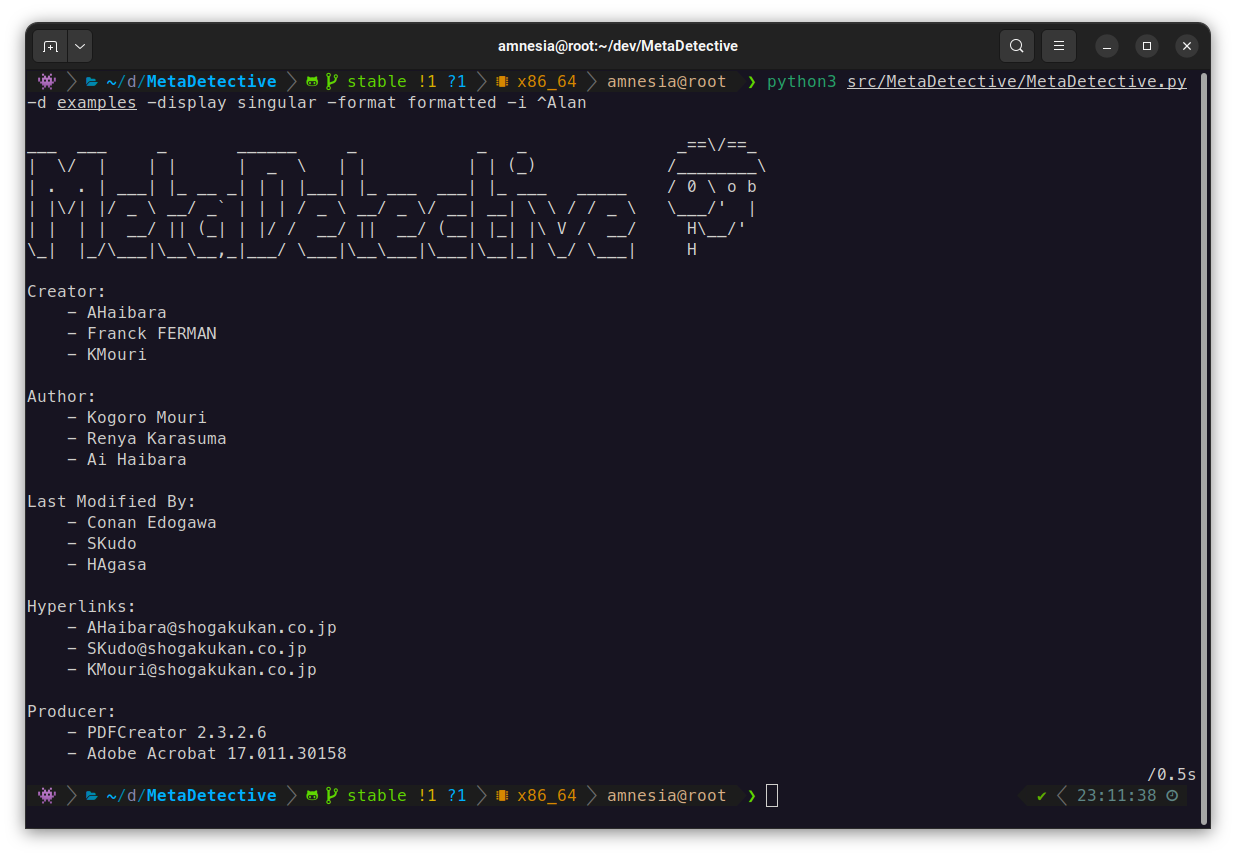
**提取的内容包括:** 作者、软件版本、GPS 坐标、创建/修改日期、内部主机名、序列号、超链接、相机型号 - 覆盖文档、图像和电子邮件文件。
**提取之外的功能:**
- 直接抓取目标网站(不依赖搜索引擎,无 IP 封锁风险)
- 结合 OpenStreetMap 进行 GPS 反向地理编码,并生成地图链接
- 导出为 HTML、TXT 或 JSON 格式
- 使用 `--parse-only` 进行选择性字段提取
- 对多个文件进行去重处理
它的构建旨在替代 Metagoofil,因为后者放弃了原生的元数据分析并依赖于 Google 搜索(存在速率限制、CAPTCHA 验证和代理开销问题)。
## 安装说明
**前提条件:** Python 3,exiftool。
```
# Debian / Ubuntu / Kali
sudo apt install libimage-exiftool-perl
# macOS
brew install exiftool
# Windows
winget install OliverBetz.ExifTool
```
### 直接下载(推荐用于实际现场操作)
```
curl -O https://raw.githubusercontent.com/franckferman/MetaDetective/stable/src/MetaDetective/MetaDetective.py
python3 MetaDetective.py -h
```
### pip
```
pip install MetaDetective
metadetective -h
```
### git clone
```
git clone https://github.com/franckferman/MetaDetective.git
cd MetaDetective
python3 src/MetaDetective/MetaDetective.py -h
```
### Docker
```
docker pull franckferman/metadetective
docker run --rm franckferman/metadetective -h
# 挂载本地目录
docker run --rm -v $(pwd)/loot:/data franckferman/metadetective -d /data
```
## 使用说明
### 文件分析
```
# 分析目录(默认为去重单一视图)
python3 MetaDetective.py -d ./loot/
# 特定文件类型,过滤噪音
python3 MetaDetective.py -d ./loot/ -t pdf docx -i admin anonymous
# 逐文件显示
python3 MetaDetective.py -d ./loot/ --display all
# 格式化输出(单一/默认显示)
python3 MetaDetective.py -d ./loot/ --format formatted
# 单个文件
python3 MetaDetective.py -f report.pdf
# 多个文件
python3 MetaDetective.py -f report.pdf photo.heic
```
### 摘要与时间线
```
# 快速统计:身份信息、电子邮件、GPS 暴露、工具、日期范围
python3 MetaDetective.py -d ./loot/ --summary
# 文档创建/修改的时间顺序视图
python3 MetaDetective.py -d ./loot/ --timeline
# 两者结合
python3 MetaDetective.py -d ./loot/ --summary --timeline
# 脚本化:无 banner,仅摘要
python3 MetaDetective.py -d ./loot/ --summary --no-banner
```
### 选择性解析
`--parse-only` 将提取范围限制在特定字段。有助于减少干扰信息或针对特定数据点进行提取。
```
# 仅提取 Author 和 Creator 字段
python3 MetaDetective.py -d ./loot/ --parse-only Author Creator
# 仅从 iPhone 照片中提取 GPS 数据
python3 MetaDetective.py -d ./photos/ -t heic heif --parse-only 'GPS Position' 'Map Link'
```
### 导出
```
# HTML 报告(默认)
python3 MetaDetective.py -d ./loot/ -e
# TXT
python3 MetaDetective.py -d ./loot/ -e txt
# JSON - 单一(每个字段去重后的值)
python3 MetaDetective.py -d ./loot/ -e json
# JSON - 逐文件
python3 MetaDetective.py -d ./loot/ --display all -e json
# 自定义文件名后缀和输出目录
python3 MetaDetective.py -d ./loot/ -e json -c pentest-corp -o ~/results/
```
JSON 单项输出结构:
```
{
"tool": "MetaDetective",
"generated": "2026-03-21T...",
"unique": {
"Author": ["Alice Martin", "Bob Dupont"],
"Creator Tool": ["Microsoft Word 16.0"]
}
}
```
结合 jq 进行数据透视:
```
jq '.unique.Author' MetaDetective_Export-*.json
```
### Web 抓取
MetaDetective 可以抓取目标网站,发现可下载的文件(PDF、DOCX、XLSX、图像等),并将其下载以供本地元数据分析。
**两种抓取模式:**
- **`--download-dir`** - 将文件下载到本地目录进行分析。这是主要模式。
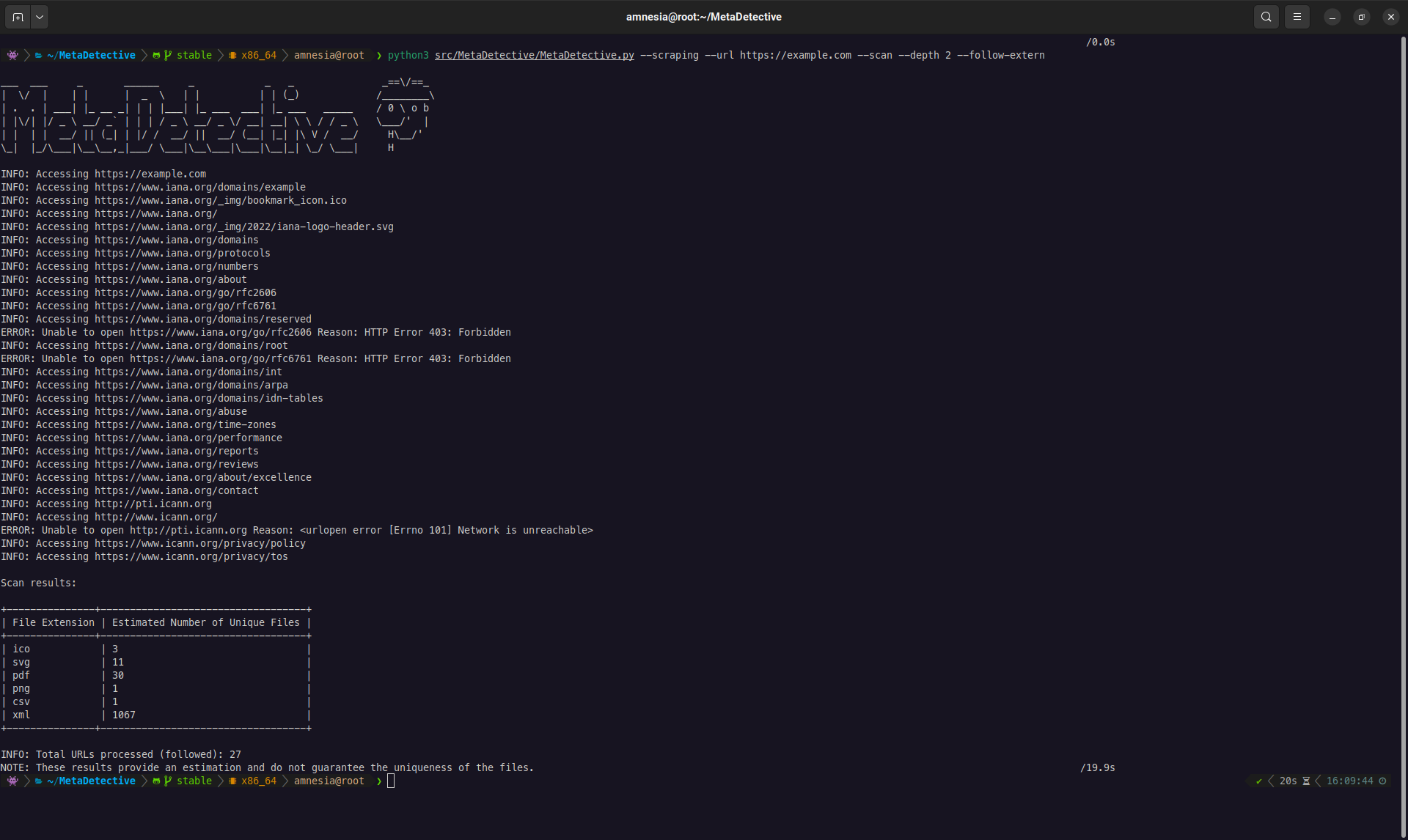
- **`--scan`** - 仅预览:列出发现的文件和统计信息而不进行下载。适用于在完整下载前评估范围。
**`--depth` 标志至关重要。** 默认情况下,深度为 **0**:MetaDetective 仅查看您提供的 URL。大多数有价值的文件(报告、演示文稿、内部文档)链接在子页面而非主页上。**在实际测试中,请务必将 `--depth` 设置为 1 或更高。**
| 深度 | 行为 |
|-------|----------|
| `0` (默认) | 仅目标 URL。查找直接链接在该单页面上的文件。 |
| `1` | 目标 URL + 从中链接的所有页面。覆盖大多数网站结构。 |
| `2+` | 跟踪 N 层深度的链接。覆盖范围更广,请求更多,速度更慢。 |
**下载(主要工作流程):**
```
# 深度为 1 的标准下载(建议的起点)
python3 MetaDetective.py --scraping --url https://target.com/ \
--download-dir ~/loot/ --depth 1
# 针对特定文件类型
python3 MetaDetective.py --scraping --url https://target.com/ \
--download-dir ~/loot/ --depth 2 --extensions pdf docx xlsx pptx
# 并行下载(8 个线程,10 请求/秒)
python3 MetaDetective.py --scraping --url https://target.com/ \
--download-dir ~/loot/ --depth 2 --threads 8 --rate 10
# 跟踪外部链接(CDN、子域、合作伙伴站点)
python3 MetaDetective.py --scraping --url https://target.com/ \
--download-dir ~/loot/ --depth 1 --follow-extern
# 隐蔽模式:逼真的 User-Agent + 低速率
python3 MetaDetective.py --scraping --url https://target.com/ \
--download-dir ~/loot/ --depth 2 --user-agent stealth --rate 2
```
**扫描(预览):**
```
# 快速预览:可访问多少文件?
python3 MetaDetective.py --scraping --scan --url https://target.com/ --depth 1
# 按扩展名筛选预览
python3 MetaDetective.py --scraping --scan --url https://target.com/ \
--depth 2 --extensions pdf docx
```
**完整流程(抓取 + 分析 + 导出):**
```
# 第 1 步:下载文件
python3 MetaDetective.py --scraping --url https://target.com/ \
--download-dir ~/loot/ --depth 2 --extensions pdf docx xlsx
# 第 2 步:分析并导出
python3 MetaDetective.py -d ~/loot/ -e html -o ~/results/
```
| 标志 | 默认值 | 描述 |
|------|---------|-------------|
| `--url` | 必填 | 目标 URL |
| `--download-dir` | - | 下载目标路径(如需要将自动创建) |
| `--scan` | - | 预览模式(不下载) |
| `--depth` | `0` | 跟踪的链接深度。**实际使用时请设置为 1 或更高。** |
| `--extensions` | 所有支持的类型 | 按文件类型过滤 |
| `--threads` | `4` | 并发下载线程数 (1-100) |
| `--rate` | `5` | 每秒最大请求数 (1-1000) |
| `--follow-extern` | 关闭 | 跟踪指向外部域名的链接 |
| `--user-agent` | `MetaDetective/
` | 自定义或预设的 UA 字符串 |
### 显示模式
MetaDetective 提供两种控制结果显示结构的显示模式:
**`--display singular`**(默认)- 聚合每个文件中每个字段的所有唯一值。最适合 OSINT:一眼就能看出“谁接触过这些文档?”。
```
# 默认:去重单一视图
python3 MetaDetective.py -d ./loot/
# 带有格式化的样式(带标记的垂直列表)
python3 MetaDetective.py -d ./loot/ --format formatted
# 带有简洁的样式(以逗号分隔的单行)
python3 MetaDetective.py -d ./loot/ --format concise
```
**`--display all`** - 每个文件一个区块,包含其单独的元数据。最适合取证分析:独立检查每个文档的属性。
```
python3 MetaDetective.py -d ./loot/ --display all
```
**其他视图:**
| 标志 | 描述 |
|------|-------------|
| `--summary` | 统计概览:文件数量、唯一身份、电子邮件、GPS 暴露情况、工具、日期范围 |
| `--timeline` | 按时间顺序查看文档创建和修改事件 |
| `--no-banner` | 隐藏 ASCII 横幅,适用于脚本和流水线使用 |
### 导出格式
提供三种导出格式。所有格式均遵循当前的 `--display` 模式。
```
# 具有深色主题、统计栏和响应式布局的 HTML 报告
python3 MetaDetective.py -d ./loot/ -e html
# HTML 逐文件视图
python3 MetaDetective.py -d ./loot/ --display all -e html
# 纯文本
python3 MetaDetective.py -d ./loot/ -e txt
# JSON(结构化,通过管道传递给 jq)
python3 MetaDetective.py -d ./loot/ -e json
# 自定义输出目录(如果不存在则自动创建)
python3 MetaDetective.py -d ./loot/ -e html -o ~/results/
# 自定义文件名后缀
python3 MetaDetective.py -d ./loot/ -e json -c pentest-corp -o ~/results/
```
HTML 导出包含一个摘要页眉,显示分析的总文件数、提取的元数据字段总数,以及发现的唯一身份(来自 Author、Creator 和 Last Modified By 字段)。
### User-Agent (抓取)
抓取时,MetaDetective 默认将自身标识为 `MetaDetective/`。使用 `--user-agent` 可以更改此设置:
```
# 使用预设
python3 MetaDetective.py --scraping --scan --url https://target.com/ --user-agent stealth
# 可用预设
# stealth, chrome-win, chrome-mac, chrome-linux,
# firefox-win, firefox-mac, firefox-linux,
# safari-mac, edge-win, android, iphone, googlebot
# 自定义字符串
python3 MetaDetective.py --scraping --scan --url https://target.com/ \
--user-agent 'Mozilla/5.0 (compatible; MyScanner/1.0)'
```
### 过滤
| 标志 | 描述 |
|------|-------------|
| `-t pdf docx` | 限制为特定文件类型 |
| `-i admin anonymous` | 忽略匹配模式的值(支持正则表达式) |
| `--parse-only Author Creator` | 仅提取指定字段 |
### 支持的格式
文档:PDF, DOCX, ODT, XLS, XLSX, PPTX, ODP, RTF, CSV, XML
图像:JPEG, PNG, TIFF, BMP, GIF, SVG, PSD, HEIC, HEIF
电子邮件:EML, MSG, PST, OST
视频:MP4, MOV
## 许可证
AGPL-3.0。请参阅 [LICENSE](https://github.com/franckferman/MetaDetective/blob/stable/LICENSE)。
MetaDetective 仅出于教育和授权的安全测试目的提供。您需自行确保遵守适用的法律法规。
## 联系方式
[](mailto:contact@franckferman.fr)
[](https://www.linkedin.com/in/franckferman)
[](https://www.twitter.com/franckferman)
返回顶部
标签:ESC4, ExifTool, GPS定位, meg, Metagoofil替代, OSINT, Python, 信息安全, 元数据提取, 单文件工具, 命令控制, 图像分析, 数字取证, 数据采集, 文档分析, 无后门, 电子邮件分析, 网络抓取, 自动化脚本, 请求拦截, 进程保护, 隐私分析