google/magika

GitHub: google/magika

一款基于深度学习的 AI 文件类型检测工具,以高精度与低延迟识别海量文件格式。

Stars: 14110 | Forks: 739

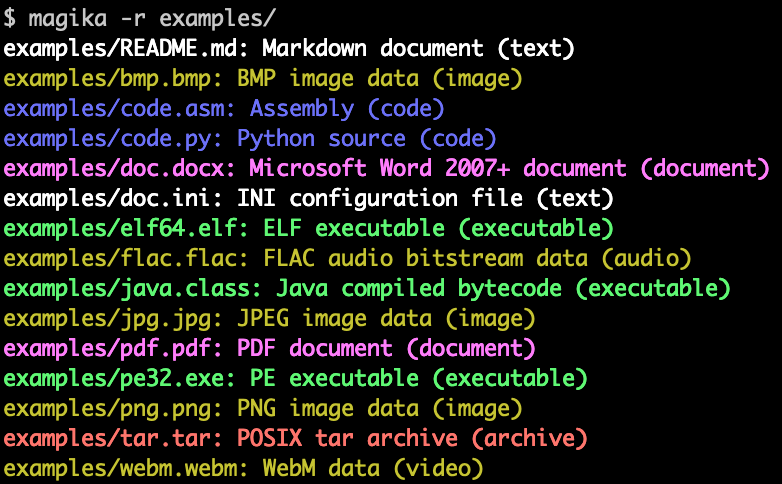
# Magika [![image](https://img.shields.io/pypi/v/magika.svg)](https://pypi.python.org/pypi/magika) [![NPM Version](https://img.shields.io/npm/v/magika)](https://npmjs.com/package/magika) [![image](https://img.shields.io/pypi/l/magika.svg)](https://pypi.python.org/pypi/magika) [![image](https://img.shields.io/pypi/pyversions/magika.svg)](https://pypi.python.org/pypi/magika) [![Go Version](https://img.shields.io/github/v/tag/google/magika?filter=go%2F*&label=go&sort=semver)](https://pkg.go.dev/github.com/google/magika/go) [![OpenSSF Best Practices](https://www.bestpractices.dev/projects/8706/badge)](https://www.bestpractices.dev/en/projects/8706) ![CodeQL](https://static.pigsec.cn/wp-content/uploads/repos/2026/04/783c42336b172344.svg) [![Actions status](https://static.pigsec.cn/wp-content/uploads/repos/2026/04/5a5ab97d2e172345.svg)](https://github.com/google/magika/actions) [![PyPI Monthly Downloads](https://static.pepy.tech/badge/magika/month)](https://pepy.tech/projects/magika) [![PyPI Downloads](https://static.pepy.tech/badge/magika)](https://pepy.tech/projects/magika) Magika 是一款新型的人工智能文件类型检测工具,依赖深度学习的最新进展提供准确的检测。在底层,Magika 采用了一个经过高度优化的模型,重量仅为几 MB,能够在毫秒级实现精确的文件识别,即使仅运行在单个 CPU 上。Magika 已在约 1 亿个样本、涵盖 200 多种内容类型(包括二进制和文本文件格式)的数据集上进行了训练和评估,并在测试集上实现了约 99% 的平均准确率。 以下是 Magika 命令行输出的示例:




Magika 被大规模用于通过将 Gmail、Drive 和安全浏览文件路由到适当的安全和内容策略扫描器来帮助提升 Google 用户的安全性,每周处理数千亿个样本。Magika 也已集成到 [VirusTotal](https://www.virustotal.com/)([示例](./assets/magika-vt.png)) 和 [abuse.ch](https://bazaar.abuse.ch/)([示例](./assets/magika-abusech.png))。 如需更多背景信息,您可以阅读我们在 Google 开放源码博客上的[初始公告文章](https://opensource.googleblog.com/2024/02/magika-ai-powered-fast-and-efficient-file-type-identification.html),也可以查阅 [Magika 的官方网站](https://securityresearch.google/magika/),以及我们在 [IEEE/ACM 国际软件工程会议 (ICSE) 2025](https://securityresearch.google/magika/additional-resources/research-papers-and-citation/) 上发表的研究论文。 您可以通过使用我们的 [Web 演示](https://securityresearch.google/magika/demo/magika-demo/)(在浏览器中本地运行)来无需安装即可体验 Magika! # 重点特性 - 提供 Rust 编写的命令行工具、Python API,以及 Rust、JavaScript/TypeScript(支持实验性 npm 包,该包支持我们的 [Web 演示](https://securityresearch.google/magika/demo/magika-demo/))和 GoLang(开发中)的额外绑定。 - 在约 [200+ 内容类型](./assets/models/standard_v3_3/README.md) 的 [约 1 亿个文件](./assets/models/standard_v3_3/README.md) 数据集上进行训练和评估。 - 在测试集上,Magika 实现了约 99% 的平均精确率和召回率,优于现有方法——尤其是在文本内容类型上。 - 模型加载后(一次性开销),推理时间约为每个文件 5 毫秒,即使仅运行在单个 CPU 上。 - 可以同时调用 Magika 处理数千个文件。也可使用 `-r` 递归扫描目录。 - 推理时间与文件大小几乎无关;Magika 仅使用文件内容的有限子集。 - Magika 采用基于内容类型的阈值系统,用于判断是否“信任”模型的预测,或返回通用标签,例如“通用文本文档”或“未知二进制数据”。 - 可通过 `high-confidence`、`medium-confidence` 和 `best-guess` 等不同预测模式控制对错误的容忍度。 - 客户端和绑定已开源,相关内容即将推出! # 目录 1. [快速入门](#getting-started) 1. [安装](#installation) 2. [快速开始](#quick-start) 2. [文档](#documentation) 3. [安全漏洞](#security-vulnerabilities) 4. [许可证](#license) 5. [免责声明](#disclaimer) # 快速入门 ## 安装 ### 命令行工具 Magika 提供了一个用 Rust 编写的命令行工具,可以通过多种方式安装。 通过 `magika` Python 包: ``` pipx install magika ``` 通过 brew(macOS / Linux) ``` brew install magika ``` 通过安装脚本: ``` curl -LsSf https://securityresearch.google/magika/install.sh | sh ``` 或: ``` powershell -ExecutionPolicy Bypass -c "irm https://securityresearch.google/magika/install.ps1 | iex" ``` 通过 `magika-cli` Rust 包: ``` cargo install --locked magika-cli ``` ### Python 包 ``` pip install magika ``` ### JavaScript 包 ``` npm install magika ``` ## 快速开始 在此可以找到多个快速示例,帮助您入门。 要了解 Magika 的内部工作原理,请参阅 [核心概念](https://securityresearch.google/magika/core-concepts/) 部分。 ### 命令行工具示例 ``` % cd tests_data/basic && magika -r * | head asm/code.asm: Assembly (code) batch/simple.bat: DOS batch file (code) c/code.c: C source (code) css/code.css: CSS source (code) csv/magika_test.csv: CSV document (code) dockerfile/Dockerfile: Dockerfile (code) docx/doc.docx: Microsoft Word 2007+ document (document) docx/magika_test.docx: Microsoft Word 2007+ document (document) eml/sample.eml: RFC 822 mail (text) empty/empty_file: Empty file (inode) ``` ``` % magika ./tests_data/basic/python/code.py --json [ { "path": "./tests_data/basic/python/code.py", "result": { "status": "ok", "value": { "dl": { "description": "Python source", "extensions": [ "py", "pyi" ], "group": "code", "is_text": true, "label": "python", "mime_type": "text/x-python" }, "output": { "description": "Python source", "extensions": [ "py", "pyi" ], "group": "code", "is_text": true, "label": "python", "mime_type": "text/x-python" }, "score": 0.996999979019165 } } } ] ``` ``` % cat tests_data/basic/ini/doc.ini | magika - -: INI configuration file (text) ``` ``` % magika --help Determines file content types using AI Usage: magika [OPTIONS] [PATH]... Arguments: [PATH]... List of paths to the files to analyze. Use a dash (-) to read from standard input (can only be used once). Options: -r, --recursive Identifies files within directories instead of identifying the directory itself --no-dereference Identifies symbolic links as is instead of identifying their content by following them --colors Prints with colors regardless of terminal support --no-colors Prints without colors regardless of terminal support -s, --output-score Prints the prediction score in addition to the content type -i, --mime-type Prints the MIME type instead of the content type description -l, --label Prints a simple label instead of the content type description --json Prints in JSON format --jsonl Prints in JSONL format --format Prints using a custom format (use --help for details). The following placeholders are supported: %p The file path %l The unique label identifying the content type %d The description of the content type %g The group of the content type %m The MIME type of the content type %e Possible file extensions for the content type %s The score of the content type for the file %S The score of the content type for the file in percent %b The model output if overruled (empty otherwise) %% A literal % -h, --help Print help (see a summary with '-h') -V, --version Print version ``` 有关 CLI 的更多示例和文档,请参见 https://crates.io/crates/magika-cli。 ### Python 示例 ``` >>> from magika import Magika >>> m = Magika() >>> res = m.identify_bytes(b'function log(msg) {console.log(msg);}') >>> print(res.output.label) javascript ``` ``` >>> from magika import Magika >>> m = Magika() >>> res = m.identify_path('./tests_data/basic/ini/doc.ini') >>> print(res.output.label) ini ``` ``` >>> from magika import Magika >>> m = Magika() >>> with open('./tests_data/basic/ini/doc.ini', 'rb') as f: >>> res = m.identify_stream(f) >>> print(res.output.label) ini ``` 有关 Python 模块更多示例和文档,请参见 [Python `Magika` 模块](https://securityresearch.google/magika/cli-and-bindings/python/) 部分。 # 文档 请查阅 [Magika 的官方网站](https://securityresearch.google/magika) 以获取关于以下内容的详细文档: - 核心概念 - Magika 的工作原理 - 模型与内容类型 - 预测模式 - 理解输出 - CLI 与绑定(Python 模块、JavaScript 模块、…) - 贡献指南 - 常见问题解答 - … # 安全漏洞 请直接联系我们:magika-dev@google.com。 # 许可证 Apache 2.0;详细信息请参见 [`LICENSE`](LICENSE)。 # 免责声明 本项目不是 Google 的官方项目。 它不受 Google 支持, Google 明确声明不对其质量、 商业适用性或特定用途的适用性提供任何担保。
标签:AI安全工具, AI文件类型检测, Cilium, Go语言, Magika, NPM, PyPI, Python包, 二进制发布, 低延迟文件识别, 单CPU推理, 可视化界面, 多格式支持, 安全文件检测, 实时文件检测, 开源工具, 快速文件识别, 批量文件识别, 数据分类, 数据可视化, 文件MIME类型, 文件内容分析, 文件内容检测, 文件取证, 文件完整性验证, 文件扩展名检测, 文件格式识别, 文件格式验证, 文件签名识别, 文件类型分类, 文件类型识别, 文件类型识别库, 日志审计, 机器学习文件分类, 模型轻量化, 深度学习的文件检测, 程序破解, 自动化文件识别, 跨平台文件检测, 逆向工具, 高精度文件类型


