microsoft/autogen

GitHub: microsoft/autogen

AutoGen 是微软推出的多智能体 AI 应用编程框架,旨在简化能够自主行动或与人协作的智能体系统的创建与编排。

Stars: 59073 | Forks: 8908

AutoGen Logo
# AutoGen [![维护模式](https://img.shields.io/badge/status-maintenance%20mode-orange)](https://github.com/microsoft/agent-framework) **AutoGen** 是一个用于创建多智能体 AI 应用的框架,这些应用可以自主行动或与人类协同工作。 ## 安装 AutoGen 需要 **Python 3.10 或更高版本**。 ``` # 从 Extensions 安装 AgentChat 和 OpenAI client pip install -U "autogen-agentchat" "autogen-ext[openai]" ``` 当前的稳定版本可以在 [releases](https://github.com/microsoft/autogen/releases) 中找到。如果您是从 AutoGen v0.2 升级,请参阅 [迁移指南](https://microsoft.github.io/autogen/stable/user-guide/agentchat-user-guide/migration-guide.html) 获取有关如何更新代码和配置的详细说明。 ``` # 安装 AutoGen Studio 以使用无代码 GUI pip install -U "autogenstudio" ``` ## 快速开始 以下示例调用了 OpenAI API,因此您首先需要创建一个帐户,并通过 `export OPENAI_API_KEY="sk-..."` 导出您的密钥。 ### Hello World 使用 OpenAI 的 GPT-4o 模型创建一个助手智能体。请参阅[其他支持的模型](https://microsoft.github.io/autogen/stable/user-guide/agentchat-user-guide/tutorial/models.html)。 ``` import asyncio from autogen_agentchat.agents import AssistantAgent from autogen_ext.models.openai import OpenAIChatCompletionClient async def main() -> None: model_client = OpenAIChatCompletionClient(model="gpt-4.1") agent = AssistantAgent("assistant", model_client=model_client) print(await agent.run(task="Say 'Hello World!'")) await model_client.close() asyncio.run(main()) ``` ### MCP Server 创建一个使用 Playwright MCP 服务器的网页浏览助手智能体。 ``` # 首先运行 `npm install -g @playwright/mcp@latest` 来安装 MCP server。 import asyncio from autogen_agentchat.agents import AssistantAgent from autogen_agentchat.ui import Console from autogen_ext.models.openai import OpenAIChatCompletionClient from autogen_ext.tools.mcp import McpWorkbench, StdioServerParams async def main() -> None: model_client = OpenAIChatCompletionClient(model="gpt-4.1") server_params = StdioServerParams( command="npx", args=[ "@playwright/mcp@latest", "--headless", ], ) async with McpWorkbench(server_params) as mcp: agent = AssistantAgent( "web_browsing_assistant", model_client=model_client, workbench=mcp, # For multiple MCP servers, put them in a list. model_client_stream=True, max_tool_iterations=10, ) await Console(agent.run_stream(task="Find out how many contributors for the microsoft/autogen repository")) asyncio.run(main()) ``` ### 多智能体编排 您可以使用 `AgentTool` 创建一个基础的多智能体编排设置。 ``` import asyncio from autogen_agentchat.agents import AssistantAgent from autogen_agentchat.tools import AgentTool from autogen_agentchat.ui import Console from autogen_ext.models.openai import OpenAIChatCompletionClient async def main() -> None: model_client = OpenAIChatCompletionClient(model="gpt-4.1") math_agent = AssistantAgent( "math_expert", model_client=model_client, system_message="You are a math expert.", description="A math expert assistant.", model_client_stream=True, ) math_agent_tool = AgentTool(math_agent, return_value_as_last_message=True) chemistry_agent = AssistantAgent( "chemistry_expert", model_client=model_client, system_message="You are a chemistry expert.", description="A chemistry expert assistant.", model_client_stream=True, ) chemistry_agent_tool = AgentTool(chemistry_agent, return_value_as_last_message=True) agent = AssistantAgent( "assistant", system_message="You are a general assistant. Use expert tools when needed.", model_client=model_client, model_client_stream=True, tools=[math_agent_tool, chemistry_agent_tool], max_tool_iterations=10, ) await Console(agent.run_stream(task="What is the integral of x^2?")) await Console(agent.run_stream(task="What is the molecular weight of water?")) asyncio.run(main()) ``` 如需了解更高级的多智能体编排和工作流,请阅读 [AgentChat 文档](https://microsoft.github.io/autogen/stable/user-guide/agentchat-user-guide/index.html)。 ### AutoGen Studio 使用 AutoGen Studio 无需编写代码即可原型化和运行多智能体工作流。 ``` # 在 http://localhost:8080 上运行 AutoGen Studio autogenstudio ui --port 8080 --appdir ./my-app ``` ## 为什么选择 AutoGen?
AutoGen Landing
AutoGen 在 Microsoft Research 中首创,开启了启发社区的实验性多智能体编排模式。虽然 AutoGen 现处于维护模式,但现有用户可以继续使用具有下文所述架构的框架。**对于新项目,我们推荐使用 [Microsoft Agent Framework](https://github.com/microsoft/agent-framework)**,它建立在从 AutoGen 中汲取的经验教训之上,并提供企业级支持。 AutoGen _框架_ 采用了分层和可扩展的设计。各层职责明确,并建立在底层之上。这种设计使您能够从高层 API 到低层组件,在不同的抽象级别上使用该框架。 - [Core API](./python/packages/autogen-core/) 实现了消息传递、事件驱动的智能体以及本地和分布式 runtime,以提供灵活性和强大的功能。它还支持 .NET 和 Python 的跨语言支持。 - [AgentChat API](./python/packages/autogen-agentchat/) 实现了一个更简单但具有特定设计理念的 API,用于快速原型开发。此 API 构建于 Core API 之上,最接近 v0.2 用户所熟悉的体验,并支持常见的多智能体模式,如双智能体聊天或群聊。 - [Extensions API](./python/packages/autogen-ext/) 支持第一方和第三方扩展,持续扩展框架功能。它支持 LLM 客户端(如 OpenAI、AzureOpenAI)的特定实现,以及代码执行等功能。 该生态系统还支持两个重要的 _开发者工具_:
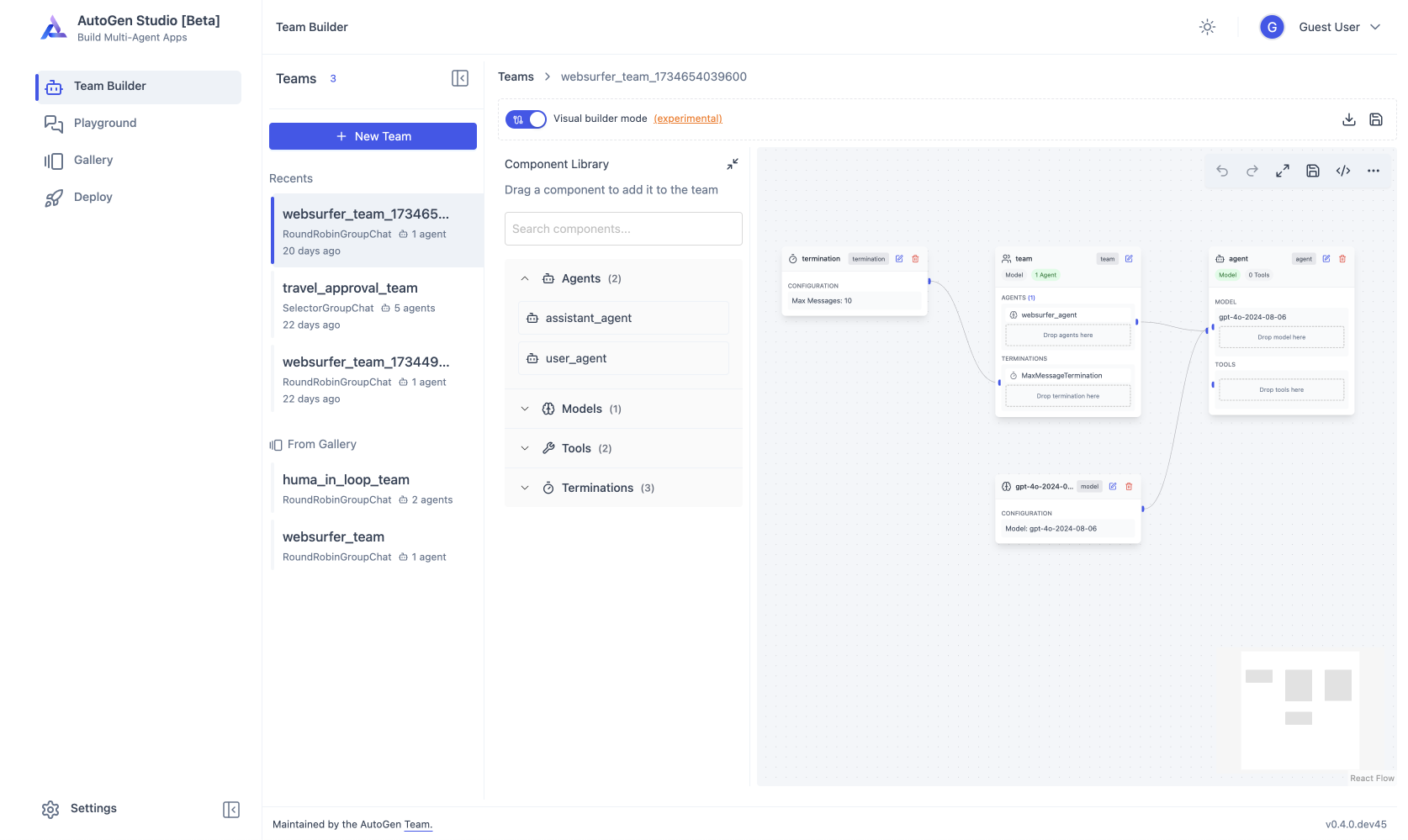
AutoGen Studio Screenshot
- [AutoGen Studio](./python/packages/autogen-studio/) 提供了一个用于构建多智能体应用的无代码 GUI。 - [AutoGen Bench](./python/packages/agbench/) 提供了一个用于评估智能体性能的基准测试套件。 您可以使用 AutoGen 框架和开发者工具为您的领域创建应用程序。例如,[Magentic-One](./python/packages/magentic-one-cli/) 是一个使用 AgentChat API 和 Extensions API 构建的最先进的多智能体团队,它可以处理需要网页浏览、代码执行和文件处理的各种任务。 ## 接下来去哪?
| | [![Python](https://img.shields.io/badge/AutoGen-Python-blue?logo=python&logoColor=white)](./python) | [![.NET](https://img.shields.io/badge/AutoGen-.NET-green?logo=.net&logoColor=white)](./dotnet) | [![Studio](https://img.shields.io/badge/AutoGen-Studio-purple?logo=visual-studio&logoColor=white)](./python/packages/autogen-studio) | | ------------- | ------------------------------------------------------------------------------------------------------------------------------------------------------------------------------------------------------------------------------------------------------------------------------------------------------------------------------------------------------------------------------------------------------------------ | ----------------------------------------------------------------------------------------------------------------------------------------------------------------------------------------------------------------------------------------------------------------------------------------------------------------------------------------------------------------------------------------------------------------------------------------------------------------------------------------------------------------------------------------------------------------- | ----------------------------------------------------------------------------------------------------------------------------------------------------------- | | 安装 | [![安装](https://img.shields.io/badge/Install-blue)](https://microsoft.github.io/autogen/stable/user-guide/agentchat-user-guide/installation.html) | [![安装](https://img.shields.io/badge/Install-green)](https://microsoft.github.io/autogen/dotnet/dev/core/installation.html) | [![安装](https://img.shields.io/badge/Install-purple)](https://microsoft.github.io/autogen/stable/user-guide/autogenstudio-user-guide/installation.html) | | 快速开始 | [![快速开始](https://img.shields.io/badge/Quickstart-blue)](https://microsoft.github.io/autogen/stable/user-guide/agentchat-user-guide/quickstart.html#) | [![快速开始](https://img.shields.io/badge/Quickstart-green)](https://microsoft.github.io/autogen/dotnet/dev/core/index.html) | [![用法](https://img.shields.io/badge/Quickstart-purple)](https://microsoft.github.io/autogen/stable/user-guide/autogenstudio-user-guide/usage.html#) | | 教程 | [![教程](https://img.shields.io/badge/Tutorial-blue)](https://microsoft.github.io/autogen/stable/user-guide/agentchat-user-guide/tutorial/index.html) | [![教程](https://img.shields.io/badge/Tutorial-green)](https://microsoft.github.io/autogen/dotnet/dev/core/tutorial.html) | [![用法](https://img.shields.io/badge/Tutorial-purple)](https://microsoft.github.io/autogen/stable/user-guide/autogenstudio-user-guide/usage.html#) | | API 参考 | [![API](https://img.shields.io/badge/Docs-blue)](https://microsoft.github.io/autogen/stable/reference/index.html#) | [![API](https://img.shields.io/badge/Docs-green)](https://microsoft.github.io/autogen/dotnet/dev/api/Microsoft.AutoGen.Contracts.html) | [![API](https://img.shields.io/badge/Docs-purple)](https://microsoft.github.io/autogen/stable/user-guide/autogenstudio-user-guide/usage.html) | | 包 | [![PyPi autogen-core](https://img.shields.io/badge/PyPi-autogen--core-blue?logo=pypi)](https://pypi.org/project/autogen-core/)

[![PyPi autogen-agentchat](https://img.shields.io/badge/PyPi-autogen--agentchat-blue?logo=pypi)](https://pypi.org/project/autogen-agentchat/)

[![PyPi autogen-ext](https://img.shields.io/badge/PyPi-autogen--ext-blue?logo=pypi)](https://pypi.org/project/autogen-ext/) | [![NuGet Contracts](https://img.shields.io/badge/NuGet-Contracts-green?logo=nuget)](https://www.nuget.org/packages/Microsoft.AutoGen.Contracts/)


[![NuGet Core](https://img.shields.io/badge/NuGet-Core-green?logo=nuget)](https://www.nuget.org/packages/Microsoft.AutoGen.Core/)
[![NuGet Core.Grpc](https://img.shields.io/badge/NuGet-Core.Grpc-green?logo=nuget)](https://www.nuget.org/packages/Microsoft.AutoGen.Core.Grpc/)

[![NuGet RuntimeGateway.Grpc](https://img.shields.io/badge/NuGet-RuntimeGateway.Grpc-green?logo=nuget)](https://www.nuget.org/packages/Microsoft.AutoGen.RuntimeGateway.Grpc/) | [![PyPi autogenstudio](https://img.shields.io/badge/PyPi-autogenstudio-purple?logo=pypi)](https://pypi.org/project/autogenstudio/) |


有疑问?请查看我们的[常见问题解答 (FAQ)](./FAQ.md) 以获取常见查询的答案。社区支持可通过 [GitHub Discussions](https://github.com/microsoft/autogen/discussions) 和 [Discord 服务器](https://aka.ms/autogen-discord) 获得,不过由于 AutoGen 现在由社区管理,响应时间可能会有所不同。如需获得积极支持的工具,请参阅 [Microsoft Agent Framework](https://github.com/microsoft/agent-framework)。 ## 法律声明 Microsoft 及任何贡献者根据 [Creative Commons Attribution 4.0 International Public License](https://creativecommons.org/licenses/by/4.0/legalcode) 授予您对本仓库中 Microsoft 文档和其他内容的许可,请参见 [LICENSE](LICENSE) 文件,并根据 [MIT License](https://opensource.org/licenses/MIT) 授予您对本仓库中任何代码的许可,请参见 [LICENSE-CODE](LICENSE-CODE) 文件。 文档中引用的 Microsoft、Windows、Microsoft Azure 和/或其他 Microsoft 产品和服务可能是 Microsoft 在美国和/或其他国家/地区的商标或注册商标。 本项目的许可未授予您使用任何 Microsoft 名称、徽标或商标的权利。 Microsoft 的一般商标指南可以在 找到。 隐私信息可以在 找到。 Microsoft 及任何贡献者保留所有其他权利,无论是基于其各自的版权、专利还是商标,无论是通过暗示、禁止反言还是其他方式。

↑ 返回顶部 ↑

标签:AI, DLL 劫持, Petitpotam, Python, 多人体追踪, 多智能体, 大语言模型, 开发框架, 无后门, 特征检测, 网络调试, 自动化, 自动化代码审查, 计算机取证, 逆向工具