r0binak/MTKPI
GitHub: r0binak/MTKPI
打包十多款K8s渗透工具的Docker镜像,通过Web终端在受限环境中开展集群安全测试。
Stars: 260 | Forks: 22
# MTKPI
[](https://github.com/r0binak/MTKPI/blob/master/LICENSE)
[](https://github.com/r0binak/MTKPI/stargazers)
[](https://github.com/r0binak/MTKPI/pulls)
[](https://hub.docker.com/r/r0binak/mtkpi)

**MTKPI** – Multi Tool Kubernetes Pentest Image。此 Docker 镜像包含了 Kubernetes 渗透测试所需的所有最流行且必要的工具。你所需的一切都触手可及。
*图像由 [Kandinsky 2.2](https://www.sberbank.com/promo/kandinsky/) 生成*
## 免责声明
## 动机
当你对 Kubernetes 集群进行渗透测试时,你肯定会使用自动化工具来执行检查。但是,如果你的集群受到网络限制,无法在 Pod 内下载所需的工具怎么办?或者是只读的容器文件系统?在这种情况下,唯一的解决方案是使用一个现成的镜像,其中包含你需要的所有工具。此镜像包含了用于 Kubernetes 集群渗透测试的所有可能的流行工具,包括那些具有自动检查功能的工具。
## Kubernetes 威胁矩阵
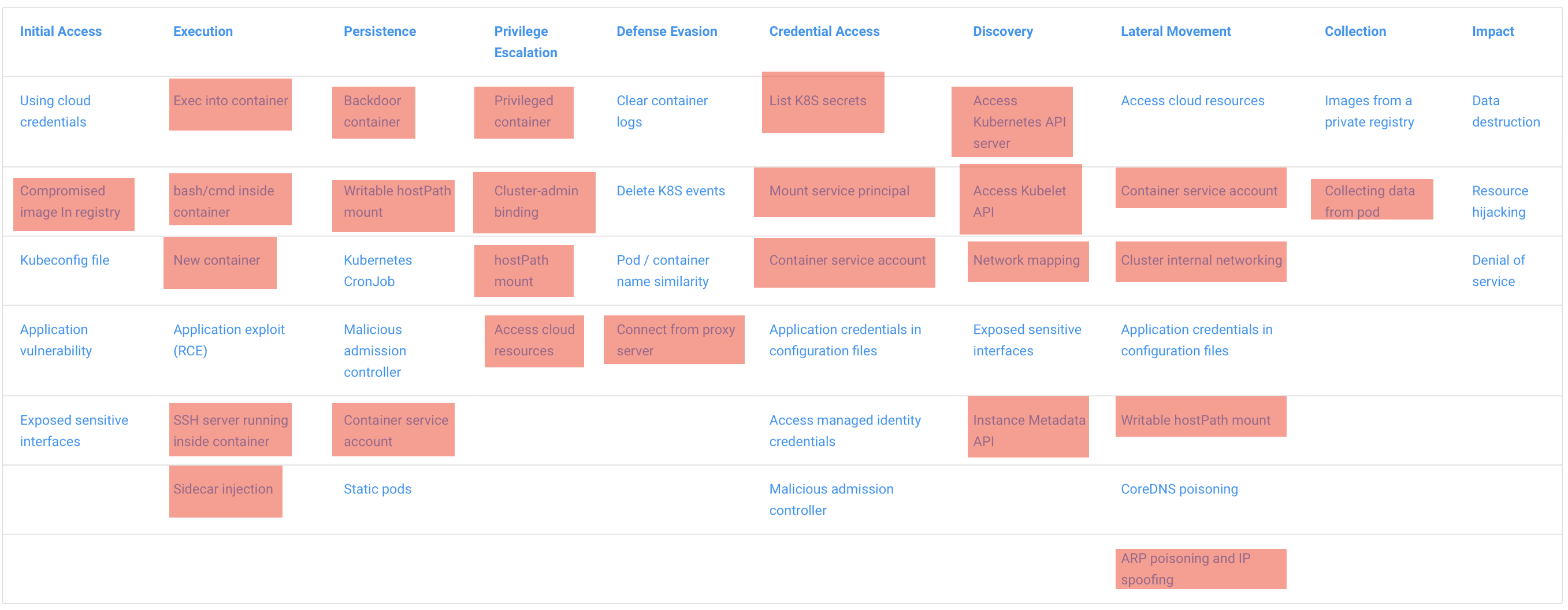
MTKPI 覆盖了 Microsoft Kubernetes 威胁矩阵中描述的大多数技术。这反过来提供了广泛的渗透测试可能性。如有必要,你可以向镜像中添加所需的工具并增加对矩阵的覆盖范围。
## 内容包含什么?
### 通过 Web 访问 Shell
通常,在对 Kubernetes 集群进行渗透测试时,你会拥有一个权限有限的开发者 Service Account。换句话说,你没有足够的权限运行 `pods/exec`,这意味着你无法进入容器内部。然而,开发者通常拥有创建 `port-forward` 的权限。这就是为什么我使用 [ttyd](https://github.com/tsl0922/ttyd) 作为基础镜像的原因 —— 它是一个简单的命令行工具,用于通过 Web 共享终端。
### 工具
为了方便起见,我还整理了一份在渗透测试 Kubernetes 时可能有用的所有工具列表,并将其打包到一个镜像中:
- [botb](https://github.com/brompwnie/botb)
- [kubeletctl](https://github.com/cyberark/kubeletctl)
- [kubesploit agent](https://github.com/cyberark/kubesploit)
- [CDK](https://github.com/cdk-team/CDK)
- [peirates](https://github.com/inguardians/peirates)
- [traitor](https://github.com/liamg/traitor)
- [ctrsploit](https://github.com/ctrsploit/ctrsploit)
- [kdigger](https://github.com/quarkslab/kdigger)
- [kubectl](https://kubernetes.io/docs/tasks/tools/install-kubectl-linux/)
- [linuxprivchecker](https://github.com/sleventyeleven/linuxprivchecker)
- [deepce](https://github.com/stealthcopter/deepce)
- [helm](https://helm.sh)
- [kube-hunter](https://github.com/aquasecurity/kube-hunter)
- [kube-bench](https://github.com/aquasecurity/kube-bench)
- [DDexec](https://github.com/carlospolop/DDexec)
- [kubetcd](https://github.com/nccgroup/kubetcd)
### 绕过签名引擎
有时,在 Kubernetes 集群中会发现基于签名方法工作的运行时安全工具。像 Falco 和 Tracee 这样的安全工具很容易绕过,因为它们的行为由规则和签名预定义。有很多方法可以做到这一点,最简单的方法之一是重命名可执行文件。这就是 MTKPI 中使用的方法。
例如:
- `kubectl` → `k`
- `python3` → `pton3`
- `curl` → `kurl`
- `wget` → `vget`
你可以在 [这里](https://github.com/blackberry/Falco-bypasses) 阅读更多关于绕过 Falco 的方法。
## 使用方法
要进行快速部署,请运行以下命令:
```
kubectl apply -f https://raw.githubusercontent.com/r0binak/MTKPI/main/deploy/mtkpi.yaml
```
Pod:
```
apiVersion: v1
kind: Pod
metadata:
name: mtkpi-pod
labels:
app: mtkpi
spec:
containers:
- name: mtkpi-pod
image: r0binak/mtkpi:v1
ports:
- containerPort: 7681
securityContext:
readOnlyRootFilesystem: true
```
Service:
```
apiVersion: v1
kind: Service
metadata:
name: mtkpi-svc
labels:
app: mtkpi
spec:
type: ClusterIP
ports:
- port: 7681
protocol: TCP
selector:
app: mtkpi
```
要访问容器,只需运行命令:
```
kubectl port-forward mtkpi-pod 7681:7681
```
在你的浏览器中打开:
```
localhost:7681
```

## 贡献
如果你喜欢这个项目,我很感激你的 PR 🙂
## 参考资料
* https://github.com/madhuakula/hacker-container
* https://github.com/antitree/cmd_and_kubectl_demos/tree/master/images/botty
* https://github.com/raesene/alpine-containertools
标签:AD攻击面, Cutter, CyberSec, DevSecOps, Docker 镜像, Web截图, 上游代理, 协议分析, 反取证, 威胁矩阵, 子域名突变, 安全工具集, 安全测试, 安全评估, 容器安全, 攻击性安全, 数据处理, 数据展示, 日志审计, 权限提升, 渗透测试框架, 红队, 网络信息收集, 请求拦截, 逆向工具, 防御