PhonePe/mantis
GitHub: PhonePe/mantis
Mantis 是一个自动化安全框架,将资产发现、侦察和漏洞扫描整合为完整的命令行工作流,帮助企业安全团队高效管理攻击面。
Stars: 1033 | Forks: 134
功能 • 模块 • 安装 • 命令行选项 • 文档 • 贡献者 • 加入 Discord
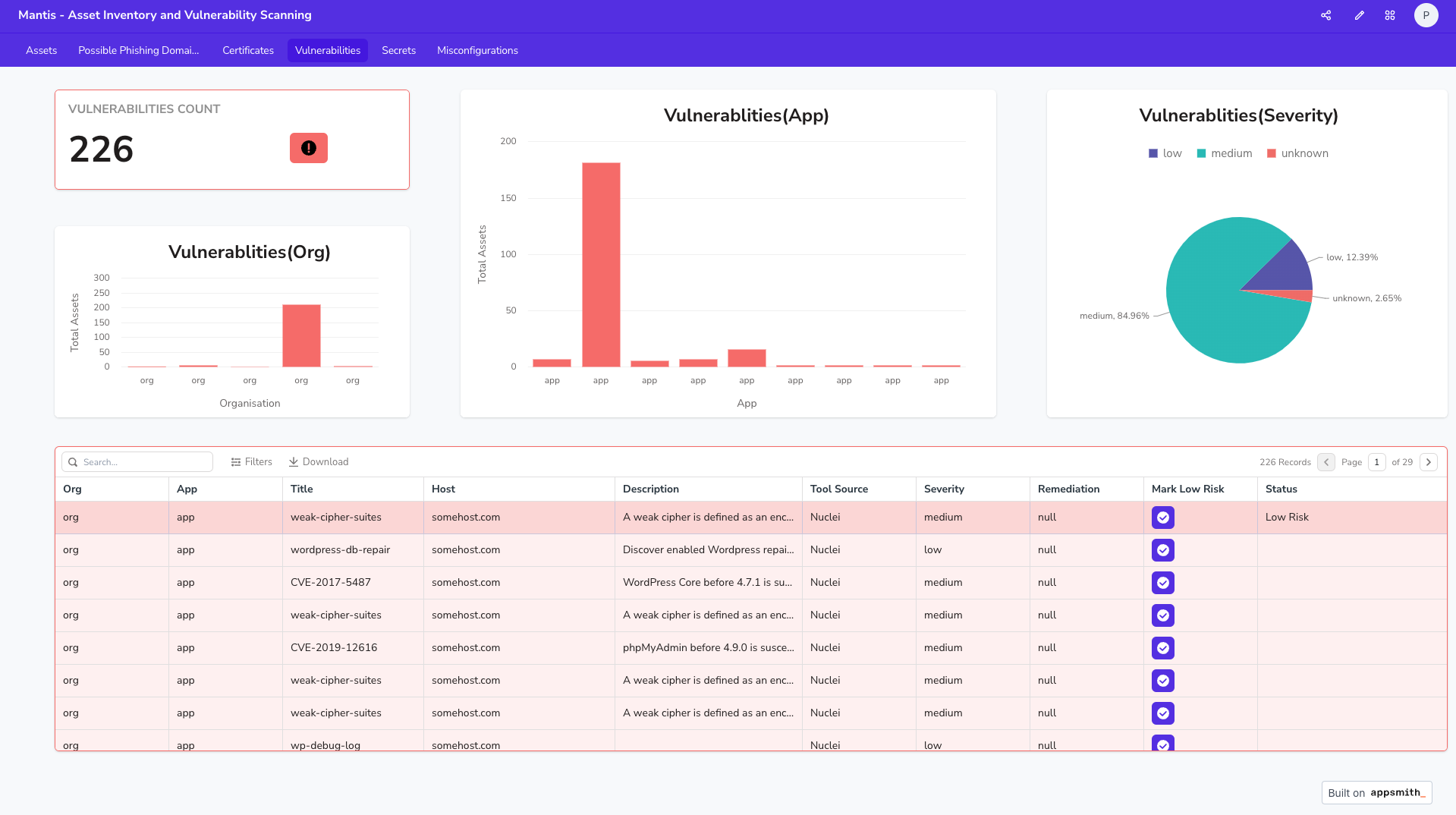
## 概述 Mantis 是一个命令行框架,旨在自动化资产发现、侦察和扫描的工作流程。它以顶级域作为输入,随后无缝推进至发现相应的资产,包括子域和证书。该工具对活动资产执行侦察,并最终进行全面的扫描,以查找漏洞、机密信息、错误配置和钓鱼域名——所有这些都由开源工具和自定义工具混合驱动。 ## 功能 :rocket: - 自动化发现、侦察和扫描 - 分布式扫描(将单次扫描拆分到多台机器上) - 极其简单的扫描自定义 - 支持 Dashboard - 漏洞管理 - 高级告警 - DNS 服务集成 - 几分钟内集成新工具(现有工具和自定义工具) [点击这里](https://phonepe.github.io/mantis/features/features.html) 了解有关功能的更多详细信息。 ## 模块 🧰 - 发现 - 子域名 - 证书 - 侦察 - 开放端口 - 技术 - CDN - WAF - Web Server - IP - ASN 信息 - 位置 - 扫描 - 域名级别的漏洞和错误配置 - 机密信息扫描 - 钓鱼域名 ## 安装 ⚙️ Mantis 支持多种安装方式。通过 Docker 安装 Mantis 是一个很好的起点,有助于您熟悉该框架。 考虑到 Mantis 还包含 MongoDB 和 AppSmith,我们提供了一个用于安装所有组件的 shell 脚本。 ### 最低系统要求(单机扫描) 🖥️ - 支持的操作系统:Ubuntu, macOS - RAM - 4GB - 核心数 - 2 - 存储空间 - 16GB ### Docker 安装视频 - [点击这里](https://www.youtube.com/watch?v=3PCRIJEOTWo) 克隆 Mantis 仓库 ``` git clone https://github.com/PhonePe/mantis.git ``` 进入 Mantis 目录 ``` cd mantis/setup/docker ``` 根据您的操作系统运行相应的 docker 安装文件 ``` ./docker-setup-macos.sh ./docker-setup-ubuntu.sh ``` 要卸载 Mantis(删除安装创建的所有资源),请在同一目录下运行以下命令 ``` docker compose down ``` ## Dashboard 设置 📊 Docker 安装完成后,请运行一次扫描并按照以下说明设置 Dashboard。 ``` mantis onboard -o org_name -t example.in ``` - Dashboard 将可通过 http://mantis.dashboard:1337 访问 - 访问此 Dashboard URL 后,系统会提示您创建一个 AppSmith 账户。 - 请记住/收藏此基础 [url](http://mantis.dashboard:1337),因为 AppSmith 使用以“我的第一个应用程序”为默认值的多应用程序构造。我们将在以下步骤中导入相应的应用程序和页面。 - 通过左上角带有 "a_" 图标的位置或使用包含的链接导航到 [应用程序](http://localhost:1337/applications)。 - 在应用程序页面的右上角,有一个橙色的“创建新应用”按钮以及 3 个点,点击橙色的“创建新应用”按钮以展开下拉菜单。 - 下拉菜单包含 3 个项目:“应用程序”、“模板”和“导入”... 点击选择“导入”。 - 从那里,导入模板 JSON 文件。它位于克隆的仓库中:在 dashboard_templates 文件夹下。 (`mantis\dashboard_templates\Mantis Dashboard.json`) - 系统将要求您为包含的已创建 MongoDB 输入数据库信息。请输入以下内容: - 主机 - mantis.db - 端口 - 27017 - 默认数据库 - mantis - 默认情况下,这会将您置于应用程序布局的“编辑模式”中。要查看应用程序和您之前扫描的结果,请点击屏幕右上角的“部署”按钮。它旁边有一个小火箭图标。这将会启动一个新的标签页/窗口,您可以在其中浏览您的扫描结果。 ### 资产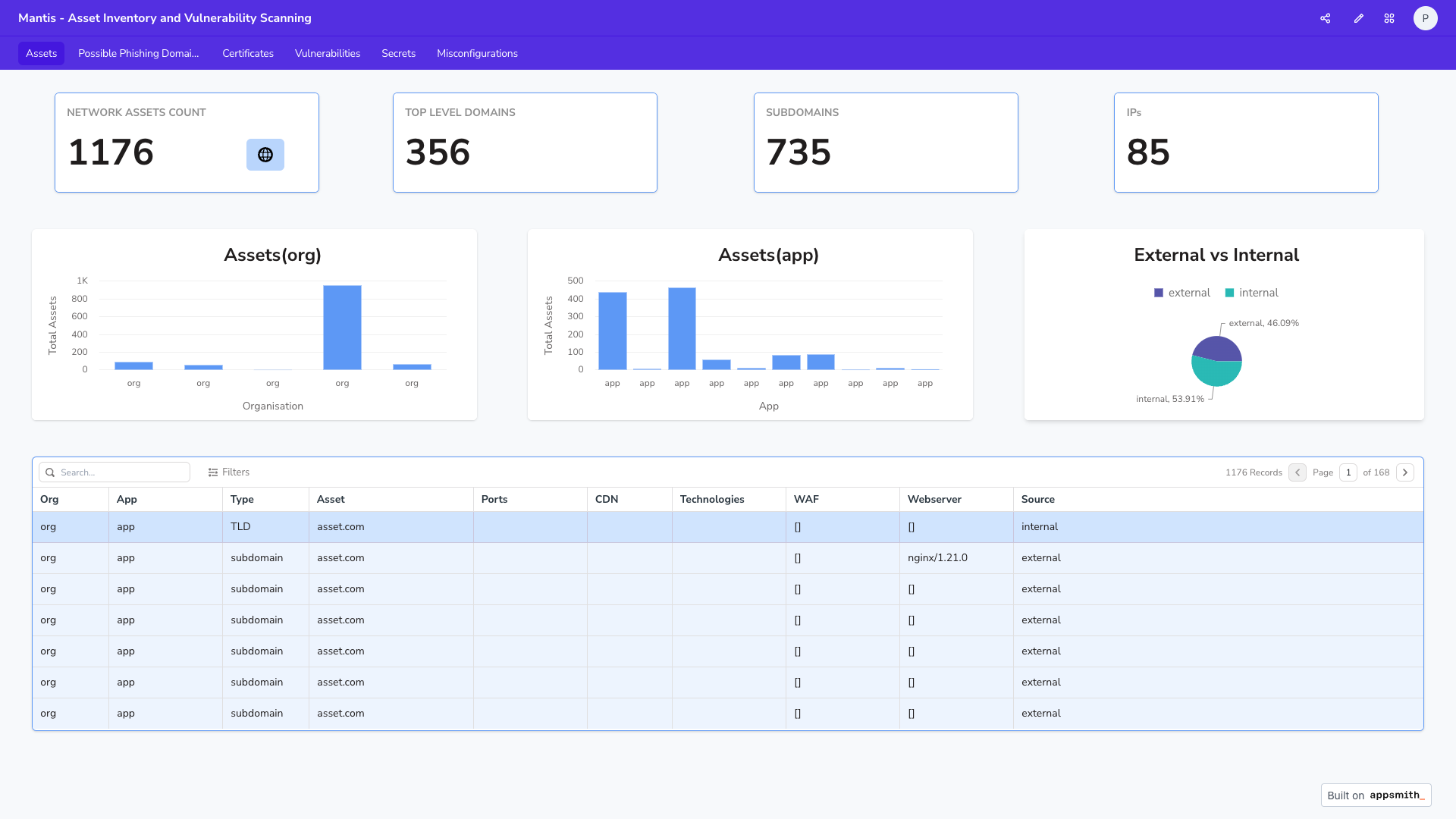 ### 漏洞
 ## 命令行选项 🖥️
```
usage:
ONBOARD: (First time scan, Run this !!)
mantis onboard -o example_org -t example.org
mantis onboard -o example_org -f file.txt
SCAN:
mantis scan -o example_org
mantis scan -o example_org -a example_app
options:
-h, --help list command line options
subparser:
{onboard,scan}
onboard Onboard a target
scan Scan an org
```
```
usage:
ONBOARD: (First time scan, Run this !!)
mantis onboard -o example_org -t example.tld
mantis onboard -o example_org -f file.txt
options:
-h, --help show this help message and exit
-t HOST, --host HOST top level domain to scan
-f FILE_NAME, --file_input FILE_NAME
path to file containing any combination of TLD, subdomain, IP-range, IP-CIDR
-w WORKFLOW, --workflow WORKFLOW
workflow to be executed as specified in config file
-o ORG, --org ORG name of the organisation
-a APP, --app APP scan only subdomains that belong to an app
-p, --passive run passive port scan
-s, --stale mark domains as stale (domains purchased but not in use)
-i, --ignore_stale ignore stale domains during scan
-tc THREAD_COUNT, --thread_count THREAD_COUNT
thread count, default 10
-r, --use_ray use ray framework for distributed scans
-n NUM_ACTORS, --num_actors NUM_ACTORS
number of ray actors, default 10
-d, --delete_logs delete logs of previous scans
-v, --verbose print debug logs
-aws AWS_PROFILES, --aws_profiles AWS_PROFILES
List of comma separated aws profiles for Route53
--sub Subdomain to onboard and scan
```
## 运行扫描 🔍
如果您想首次使用其 TLD/IP/IP-CIDR/IP 范围注册一个组织,请使用 onboard 模式。这将在默认工作流上运行扫描。
#### TLD
```
mantis onboard -o org_name -t example.in
```
#### IP
```
mantis onboard -o org_name -t 10.123.123.12
```
#### IP-Range
```
mantis onboard -o org_name -t 203.0.113.0-10
```
#### IP-CIDR
```
mantis onboard -o org_name -t 203.0.113.0/24
```
### 注册已知资产并扫描
```
mantis onboard -o org_name -f input.txt
```
### 向现有组织添加新子域名
```
mantis onboard -o org_name -t subdomain.example.in --sub
```
### 扫描属于某个组织的所有资产
现在您已经完成了注册,只需对组织运行计划扫描,您可以直接使用 scan 模式
```
mantis scan -o org_name
```
### 扫描属于某个组织和应用的所有资产
```
mantis scan -o org_name -a app_name
```
### 扫描某个组织的现有子域名
```
mantis scan -o org_name --sub subdomain.example.in
```
## 需要帮助? 🙋♂️
* 查看我们的[文档](https://phonepe.github.io/mantis/)
* 请使用 [Mantis Discussions](https://github.com/PhonePe/mantis/discussions) 论坛提出您的所有疑问
* 请加入我们的 [discord 频道](https://discord.gg/uJV8Y3uSGu)
## 贡献者
## 命令行选项 🖥️
```
usage:
ONBOARD: (First time scan, Run this !!)
mantis onboard -o example_org -t example.org
mantis onboard -o example_org -f file.txt
SCAN:
mantis scan -o example_org
mantis scan -o example_org -a example_app
options:
-h, --help list command line options
subparser:
{onboard,scan}
onboard Onboard a target
scan Scan an org
```
```
usage:
ONBOARD: (First time scan, Run this !!)
mantis onboard -o example_org -t example.tld
mantis onboard -o example_org -f file.txt
options:
-h, --help show this help message and exit
-t HOST, --host HOST top level domain to scan
-f FILE_NAME, --file_input FILE_NAME
path to file containing any combination of TLD, subdomain, IP-range, IP-CIDR
-w WORKFLOW, --workflow WORKFLOW
workflow to be executed as specified in config file
-o ORG, --org ORG name of the organisation
-a APP, --app APP scan only subdomains that belong to an app
-p, --passive run passive port scan
-s, --stale mark domains as stale (domains purchased but not in use)
-i, --ignore_stale ignore stale domains during scan
-tc THREAD_COUNT, --thread_count THREAD_COUNT
thread count, default 10
-r, --use_ray use ray framework for distributed scans
-n NUM_ACTORS, --num_actors NUM_ACTORS
number of ray actors, default 10
-d, --delete_logs delete logs of previous scans
-v, --verbose print debug logs
-aws AWS_PROFILES, --aws_profiles AWS_PROFILES
List of comma separated aws profiles for Route53
--sub Subdomain to onboard and scan
```
## 运行扫描 🔍
如果您想首次使用其 TLD/IP/IP-CIDR/IP 范围注册一个组织,请使用 onboard 模式。这将在默认工作流上运行扫描。
#### TLD
```
mantis onboard -o org_name -t example.in
```
#### IP
```
mantis onboard -o org_name -t 10.123.123.12
```
#### IP-Range
```
mantis onboard -o org_name -t 203.0.113.0-10
```
#### IP-CIDR
```
mantis onboard -o org_name -t 203.0.113.0/24
```
### 注册已知资产并扫描
```
mantis onboard -o org_name -f input.txt
```
### 向现有组织添加新子域名
```
mantis onboard -o org_name -t subdomain.example.in --sub
```
### 扫描属于某个组织的所有资产
现在您已经完成了注册,只需对组织运行计划扫描,您可以直接使用 scan 模式
```
mantis scan -o org_name
```
### 扫描属于某个组织和应用的所有资产
```
mantis scan -o org_name -a app_name
```
### 扫描某个组织的现有子域名
```
mantis scan -o org_name --sub subdomain.example.in
```
## 需要帮助? 🙋♂️
* 查看我们的[文档](https://phonepe.github.io/mantis/)
* 请使用 [Mantis Discussions](https://github.com/PhonePe/mantis/discussions) 论坛提出您的所有疑问
* 请加入我们的 [discord 频道](https://discord.gg/uJV8Y3uSGu)
## 贡献者
标签:Docker, GitHub, 子域名枚举, 安全防御评估, 实时处理, 系统安全, 请求拦截, 逆向工具