confident-ai/deepeval
GitHub: confident-ai/deepeval
一个开源的 LLM 应用评估框架,提供丰富的内置指标和 Pytest 风格的测试体验,帮助开发者系统性地评估和保障大模型应用的输出质量。
Stars: 16947 | Forks: 1678

LLM 评估框架
文档 | 指标与功能 | 入门指南 | 集成 | Confident AI




Deutsch | Español | français | 日本語 | 한국어 | Português | Русский | 中文
**DeepEval** 是一个简单易用的开源 LLM 评估框架,用于评估大型语言模型系统。它类似于 Pytest,但专门用于对 LLM 应用进行单元测试。DeepEval 结合了最新的研究成果,通过 G-Eval、任务完成度、答案相关性、幻觉等指标运行评估,这些指标使用了 LLM-as-a-judge 以及其他在**本地机器上**运行的 NLP 模型。 无论您是在构建 AI agents、RAG pipelines 还是聊天机器人,无论通过 LangChain 还是 OpenAI 实现,DeepEval 都能满足您的需求。借助它,您可以轻松确定最优的模型、prompt 和架构,以提高您的 AI 质量,防止 prompt 漂移,甚至自信地从 OpenAI 过渡到 Claude。# 🔥 指标与功能 - 📐 提供大量开箱即用的 LLM 评估指标(均附带解释),由您选择的**任何** LLM、统计方法或在**本地机器上**运行的 NLP 模型提供支持,覆盖所有用例: - **自定义通用指标:** - [G-Eval](https://deepeval.com/docs/metrics-llm-evals) — 一种有研究支撑的 LLM-as-a-judge 指标,能够以接近人类的准确度评估任何自定义标准 - [DAG](https://deepeval.com/docs/metrics-dag) — DeepEval 基于图的确定性 LLM-as-a-judge 指标构建器 -
Agentic 指标
- [Task Completion](https://deepeval.com/docs/metrics-task-completion) — 评估 agent 是否完成了其目标 - [Tool Correctness](https://deepeval.com/docs/metrics-tool-correctness) — 检查是否使用了正确的参数调用了正确的工具 - [Goal Accuracy](https://deepeval.com/docs/metrics-goal-accuracy) — 衡量 agent 实现预期目标的准确程度 - [Step Efficiency](https://deepeval.com/docs/metrics-step-efficiency) — 评估 agent 是否执行了不必要的步骤 - [Plan Adherence](https://deepeval.com/docs/metrics-plan-adherence) — 检查 agent 是否遵循了预期计划 - [Plan Quality](https://deepeval.com/docs/metrics-plan-quality) — 评估 agent 计划的质量 - [Tool Use](https://deepeval.com/docs/metrics-tool-use) — 衡量工具使用的质量 - [Argument Correctness](https://deepeval.com/docs/metrics-argument-correctness) — 验证工具调用的参数RAG 指标
- [Answer Relevancy](https://deepeval.com/docs/metrics-answer-relevancy) — 衡量 RAG pipeline 的输出与输入的相关程度 - [Faithfulness](https://deepeval.com/docs/metrics-faithfulness) — 评估 RAG pipeline 的输出是否在事实上与检索上下文保持一致 - [Contextual Recall](https://deepeval.com/docs/metrics-contextual-recall) — 衡量 RAG pipeline 的检索上下文与预期输出的匹配程度 - [Contextual Precision](https://deepeval.com/docs/metrics-contextual-precision) — 评估 RAG pipeline 的检索上下文中的相关节点是否排名更高 - [Contextual Relevancy](https://deepeval.com/docs/metrics-contextual-relevancy) — 衡量 RAG pipeline 的检索上下文与输入的整体相关性 - [RAGAS](https://deepeval.com/docs/metrics-ragas) — 答案相关性、忠实度、上下文精确度和上下文召回率的平均值多轮指标
- [Knowledge Retention](https://deepeval.com/docs/metrics-knowledge-retention) — 评估聊天机器人是否在整个对话过程中保留了事实信息 - [Conversation Completeness](https://deepeval.com/docs/metrics-conversation-completeness) — 衡量聊天机器人是否在整个对话过程中满足了用户的需求 - [Turn Relevancy](https://deepeval.com/docs/metrics-turn-relevancy) — 评估聊天机器人是否在整个对话过程中生成了一致相关的回复 - [Turn Faithfulness](https://deepeval.com/docs/metrics-turn-faithfulness) — 检查聊天机器人的回复在多轮对话中是否以检索上下文为事实依据 - [Role Adherence](https://deepeval.com/docs/metrics-role-adherence) — 评估聊天机器人是否在整个对话过程中遵循了其分配的角色MCP 指标
- [MCP Task Completion](https://deepeval.com/docs/metrics-mcp-task-completion) — 评估基于 MCP 的 agent 完成任务的有效程度 - [MCP Use](https://deepeval.com/docs/metrics-mcp-use) — 衡量 agent 使用其可用 MCP 服务器的有效程度 - [Multi-Turn MCP Use](https://deepeval.com/docs/metrics-multi-turn-mcp-use) — 评估跨对话轮次的 MCP 服务器使用情况多模态指标
- [Text to Image](https://deepeval.com/docs/multimodal-metrics-text-to-image) — 基于语义一致性和感知质量评估图像生成质量 - [Image Editing](https://deepeval.com/docs/multimodal-metrics-image-editing) — 基于语义一致性和感知质量评估图像编辑质量 - [Image Coherence](https://deepeval.com/docs/multimodal-metrics-image-coherence) — 衡量图像与其附带文本的匹配程度 - [Image Helpfulness](https://deepeval.com/docs/multimodal-metrics-image-helpfulness) — 评估图像在多大程度上有效帮助用户理解文本 - [Image Reference](https://deepeval.com/docs/multimodal-metrics-image-reference) — 评估图像被附带文本引用或解释的准确程度其他指标
- [Hallucination](https://deepeval.com/docs/metrics-hallucination) — 根据 provided 上下文检查 LLM 生成信息的真实性 - [Summarization](https://deepeval.com/docs/metrics-summarization) — 评估摘要是否在事实上正确并包含必要的细节 - [Bias](https://deepeval.com/docs/metrics-bias) — 检测 LLM 输出中的性别、种族或政治偏见 - [Toxicity](https://deepeval.com/docs/metrics-toxicity) — 评估 LLM 输出中的毒性 - [JSON Correctness](https://deepeval.com/docs/metrics-json-correctness) — 检查输出是否匹配预期的 JSON schema - [Prompt Alignment](https://deepeval.com/docs/metrics-prompt-alignment) — 衡量输出是否符合 prompt 模板中的指令# 🔌 集成 DeepEval 可插入任何 LLM 框架——OpenAI Agents、LangChain、CrewAI 等。为了在您的团队中扩展评估,或者让任何人不编写代码就能运行它们,**Confident AI** 为您提供了原生平台集成。 ## 框架 - [OpenAI](https://www.deepeval.com/integrations/frameworks/openai?utm_source=GitHub) — 通过 client wrapper 评估和追踪 OpenAI 应用程序 - [OpenAI Agents](https://www.deepeval.com/integrations/frameworks/openai-agents?utm_source=GitHub) — 在一分钟内端到端评估 OpenAI Agents - [LangChain](https://www.deepeval.com/integrations/frameworks/langchain?utm_source=GitHub) — 使用回调处理程序评估 LangChain 应用程序 - [LangGraph](https://www.deepeval.com/integrations/frameworks/langgraph?utm_source=GitHub) — 使用回调处理程序评估 LangGraph agents - [Pydantic AI](https://www.deepeval.com/integrations/frameworks/pydanticai?utm_source=GitHub) — 使用类型安全验证评估 Pydantic AI agents - [CrewAI](https://www.deepeval.com/integrations/frameworks/crewai?utm_source=GitHub) — 评估 CrewAI 多智能体系统 - [Anthropic](https://www.deepeval.com/integrations/frameworks/anthropic?utm_source=GitHub) — 通过 client wrapper 评估和追踪 Claude 应用程序 - [AWS AgentCore](https://www.deepeval.com/integrations/frameworks/agentcore?utm_source=GitHub) — 评估部署在 Amazon AgentCore 上的 agents - [LlamaIndex](https://www.deepeval.com/integrations/frameworks/llamaindex?utm_source=GitHub) — 评估使用 LlamaIndex 构建的 RAG 应用程序 ## ☁️ 平台 + 生态系统 [Confident AI](https://www.confident-ai.com?utm_source=deepeval&utm_medium=github&utm_content=platform_section) 是一个与 DeepEval 原生集成的多合一平台。 - 管理数据集、追踪 LLM 应用程序、运行评估以及监控生产环境中的响应——一切尽在一个平台。 - 不需要 UI?Confident AI 也可以作为您的数据持久层——直接从 claude code、cursor 运行评估、提取数据集并检查 traces,这一切都可以通过 Confident AI 的 [MCP server](https://github.com/confident-ai/confident-mcp-server) 实现。
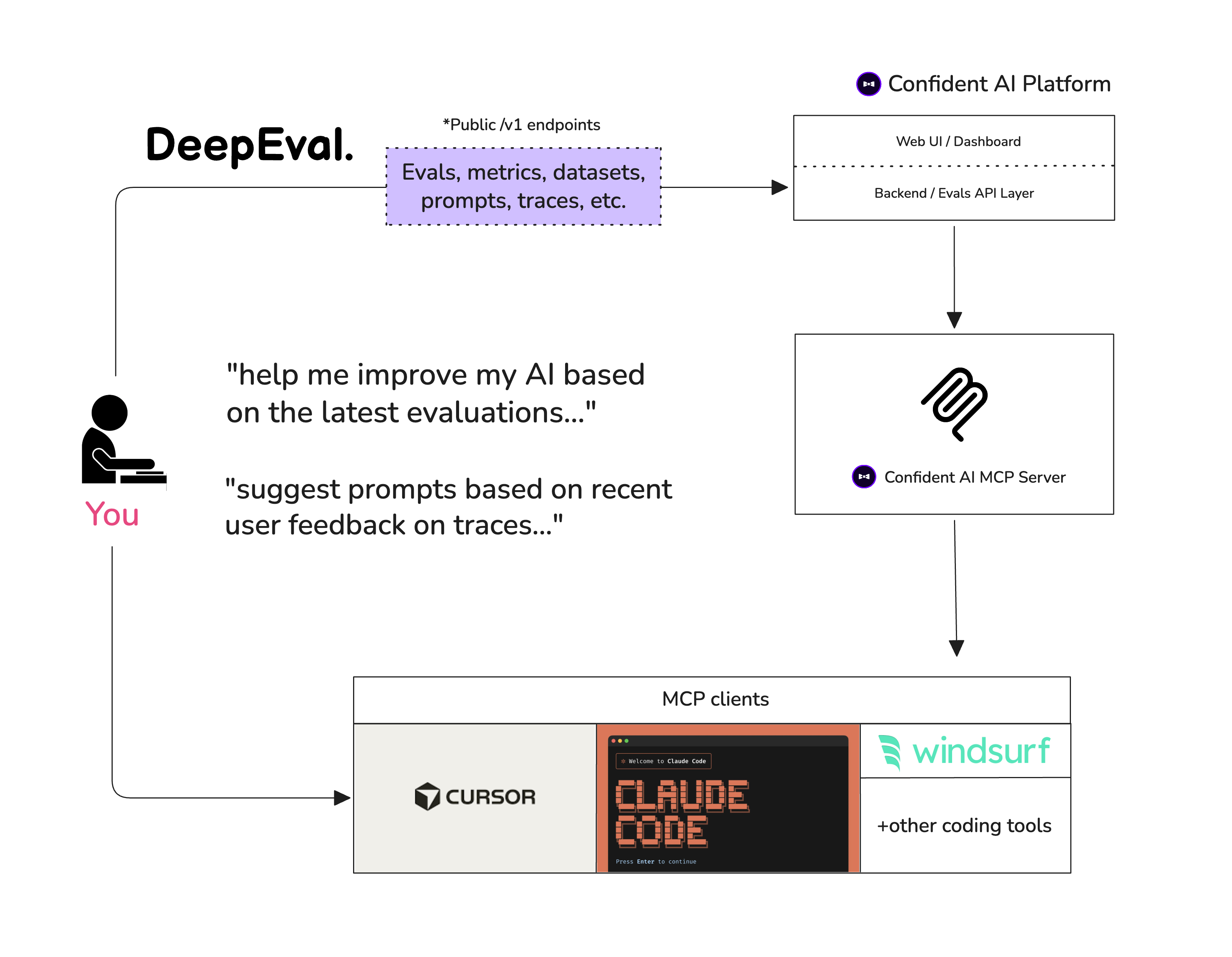
# 🤖 Vibe-Coder 快速入门 希望您的编程 agent 为您添加评估并修复失败吗?安装 DeepEval 技能,将其指向您的 agent、RAG pipeline 或聊天机器人,并要求它生成数据集、编写评估套件、运行 `deepeval test run`,并对失败的指标进行迭代。 [从 5 分钟 vibe-coder 指南开始](https://deepeval.com/docs/vibe-coder-quickstart?utm_source=GitHub)。
# 🚀 人类快速入门 假设您的 LLM 应用是一个基于 RAG 的客户支持聊天机器人;以下是 DeepEval 如何帮助您测试您所构建内容的示例。 ## 安装 Deepeval 支持 **Python>=3.9+**。 ``` pip install -U deepeval ``` ## 创建账号(强烈推荐) 使用 `deepeval` 平台将允许您在云端生成可共享的测试报告。它是免费的,不需要额外的代码来设置,我们强烈建议您试一试。 要登录,请运行: ``` deepeval login ``` 按照 CLI 中的说明创建账号,复制您的 API key,并将其粘贴到 CLI 中。所有测试用例将自动记录(在[此处](https://deepeval.com/docs/data-privacy?utm_source=GitHub)查找有关数据隐私的更多信息)。 ## 编写您的第一个测试用例 创建一个测试文件: ``` touch test_chatbot.py ``` 打开 `test_chatbot.py` 并编写您的第一个测试用例,使用 DeepEval 运行**端到端**评估,它将您的 LLM 应用程序视为一个黑盒: ``` import pytest from deepeval import assert_test from deepeval.metrics import GEval from deepeval.test_case import LLMTestCase, SingleTurnParams def test_case(): correctness_metric = GEval( name="Correctness", criteria="Determine if the 'actual output' is correct based on the 'expected output'.", evaluation_params=[SingleTurnParams.ACTUAL_OUTPUT, SingleTurnParams.EXPECTED_OUTPUT], threshold=0.5 ) test_case = LLMTestCase( input="What if these shoes don't fit?", # Replace this with the actual output from your LLM application actual_output="You have 30 days to get a full refund at no extra cost.", expected_output="We offer a 30-day full refund at no extra costs.", retrieval_context=["All customers are eligible for a 30 day full refund at no extra costs."] ) assert_test(test_case, [correctness_metric]) ``` 将您的 `OPENAI_API_KEY` 设置为环境变量(您也可以使用您自己的自定义模型进行评估,有关更多详细信息,请访问[我们文档的这一部分](https://deepeval.com/docs/metrics-introduction#using-a-custom-llm?utm_source=GitHub)): ``` export OPENAI_API_KEY="..." ``` 最后,在 CLI 中运行 `test_chatbot.py`: ``` deepeval test run test_chatbot.py ``` **恭喜!您的测试用例应该已经通过了 ✅** 让我们来拆解一下发生了什么。 - 变量 `input` 模拟用户输入,而 `actual_output` 是您的应用程序基于此输入应该输出的内容的占位符。 - 变量 `expected_output` 表示给定 `input` 的理想答案,[`GEval`](https://deepeval.com/docs/metrics-llm-evals) 是 `deepeval` 提供的一个有研究支撑的指标,供您以类似人类的准确度评估 LLM 输出的任何自定义标准。 - 在此示例中,指标 `criteria` 是基于提供的 `expected_output` 的 `actual_output` 的正确性。 - 所有指标分数范围从 0 - 1,`threshold=0.5` 阈值最终决定您的测试是否通过。 [阅读我们的文档](https://deepeval.com/docs/getting-started?utm_source=GitHub)以获取更多信息!
## 具有完全可追溯性的评估 使用 `evals_iterator()` 通过您的应用程序运行相同的数据集,无论您是手动检测它还是通过 DeepEval 的框架集成之一进行检测。 这是手动检测的示例: ``` from deepeval.tracing import observe, update_current_span from deepeval.test_case import LLMTestCase from deepeval.metrics import TaskCompletionMetric @observe() def inner_component(input: str): output = "result" update_current_span(test_case=LLMTestCase(input=input, actual_output=output)) return output @observe() def app(input: str): return inner_component(input) # 此指标将在您的 trace 上端到端运行。 for golden in dataset.evals_iterator(metrics=[TaskCompletionMetric()]): app(golden.input) ```
OpenAI
OpenAI Agents
``` from agents import Runner from deepeval.metrics import TaskCompletionMetric # 此指标将在您的 trace 上端到端运行。 for golden in dataset.evals_iterator(metrics=[TaskCompletionMetric()]): Runner.run_sync(agent, golden.input) ```Anthropic
``` from deepeval.anthropic import Anthropic from deepeval.tracing import trace from deepeval.metrics import TaskCompletionMetric client = Anthropic() # 此指标将在您的 trace 上端到端运行。 for golden in dataset.evals_iterator(): with trace(metrics=[TaskCompletionMetric()]): client.messages.create( model="claude-sonnet-4-5", max_tokens=1024, messages=[{"role": "user", "content": golden.input}], ) ```LangChain
``` from deepeval.integrations.langchain import CallbackHandler from deepeval.metrics import TaskCompletionMetric # 此指标将在您的 trace 上端到端运行。 for golden in dataset.evals_iterator(): llm.invoke( golden.input, config={"callbacks": [CallbackHandler(metrics=[TaskCompletionMetric()])]}, ) ```LangGraph
``` from deepeval.integrations.langchain import CallbackHandler from deepeval.metrics import TaskCompletionMetric # 此指标将在您的 trace 上端到端运行。 for golden in dataset.evals_iterator(): agent.invoke( {"messages": [{"role": "user", "content": golden.input}]}, config={"callbacks": [CallbackHandler(metrics=[TaskCompletionMetric()])]}, ) ```Pydantic AI
``` from deepeval.metrics import TaskCompletionMetric # 此指标将在您的 trace 上端到端运行。 for golden in dataset.evals_iterator(metrics=[TaskCompletionMetric()]): agent.run_sync(golden.input) ```CrewAI
``` from deepeval.integrations.crewai import instrument_crewai from deepeval.metrics import TaskCompletionMetric instrument_crewai() # 此指标将在您的 trace 上端到端运行。 for golden in dataset.evals_iterator(metrics=[TaskCompletionMetric()]): crew.kickoff({"input": golden.input}) ```AWS AgentCore
``` from deepeval.integrations.agentcore import instrument_agentcore from deepeval.metrics import TaskCompletionMetric instrument_agentcore() # 此指标将在您的 trace 上端到端运行。 for golden in dataset.evals_iterator(metrics=[TaskCompletionMetric()]): invoke({"prompt": golden.input}) ```LlamaIndex
``` import asyncio from deepeval.evaluate.configs import AsyncConfig from deepeval.metrics import TaskCompletionMetric # 此指标将在您的 trace 上端到端运行。 for golden in dataset.evals_iterator( async_config=AsyncConfig(run_async=True), metrics=[TaskCompletionMetric()], ): task = asyncio.create_task(agent.run(golden.input)) dataset.evaluate(task) ```Google ADK
``` import asyncio from deepeval.evaluate.configs import AsyncConfig from deepeval.integrations.google_adk import instrument_google_adk from deepeval.metrics import TaskCompletionMetric instrument_google_adk() # 此指标将在您的 trace 上端到端运行。 for golden in dataset.evals_iterator( async_config=AsyncConfig(run_async=True), metrics=[TaskCompletionMetric()], ): task = asyncio.create_task(run_agent(golden.input)) dataset.evaluate(task) ```Strands
``` from deepeval.integrations.strands import instrument_strands from deepeval.metrics import TaskCompletionMetric instrument_strands() # 此指标将在您的 trace 上端到端运行。 for golden in dataset.evals_iterator(metrics=[TaskCompletionMetric()]): agent(golden.input) ```## 无需 Pytest 集成进行评估 或者,您可以在不使用 Pytest 的情况下进行评估,这更适合 notebook 环境。 ``` from deepeval import evaluate from deepeval.metrics import AnswerRelevancyMetric from deepeval.test_case import LLMTestCase answer_relevancy_metric = AnswerRelevancyMetric(threshold=0.7) test_case = LLMTestCase( input="What if these shoes don't fit?", # Replace this with the actual output from your LLM application actual_output="We offer a 30-day full refund at no extra costs.", retrieval_context=["All customers are eligible for a 30 day full refund at no extra costs."] ) evaluate([test_case], [answer_relevancy_metric]) ``` ## 使用独立指标 DeepEval 是高度模块化的,任何人都可以轻松使用我们的任何指标。继续上一个示例: ``` from deepeval.metrics import AnswerRelevancyMetric from deepeval.test_case import LLMTestCase answer_relevancy_metric = AnswerRelevancyMetric(threshold=0.7) test_case = LLMTestCase( input="What if these shoes don't fit?", # Replace this with the actual output from your LLM application actual_output="We offer a 30-day full refund at no extra costs.", retrieval_context=["All customers are eligible for a 30 day full refund at no extra costs."] ) answer_relevancy_metric.measure(test_case) print(answer_relevancy_metric.score) # 所有指标也提供解释说明 print(answer_relevancy_metric.reason) ``` 请注意,某些指标适用于 RAG pipelines,而其他指标适用于 fine-tuning。请务必使用我们的文档为您的用例选择合适的指标。 ## 关于环境变量 (.env / .env.local) 的说明 DeepEval 会在**导入时**自动从当前工作目录加载 `.env.local`,然后加载 `.env`。 **优先级:** 进程环境变量 -> `.env.local` -> `.env`。 使用 `DEEPEVAL_DISABLE_DOTENV=1` 退出。 ``` cp .env.example .env.local # 然后编辑 .env.local(被 git 忽略) ``` # 使用 Confident AI 的 DeepEval [Confident AI](https://www.confident-ai.com?utm_source=deepeval&utm_medium=github&utm_content=cli_login_section) 是一个用于管理数据集、追踪 LLM 应用程序以及在生产环境中运行评估的多合一平台。从 CLI 登录以开始使用: ``` deepeval login ``` 然后像往常一样运行您的测试——结果会自动同步到平台: ``` deepeval test run test_chatbot.py ``` 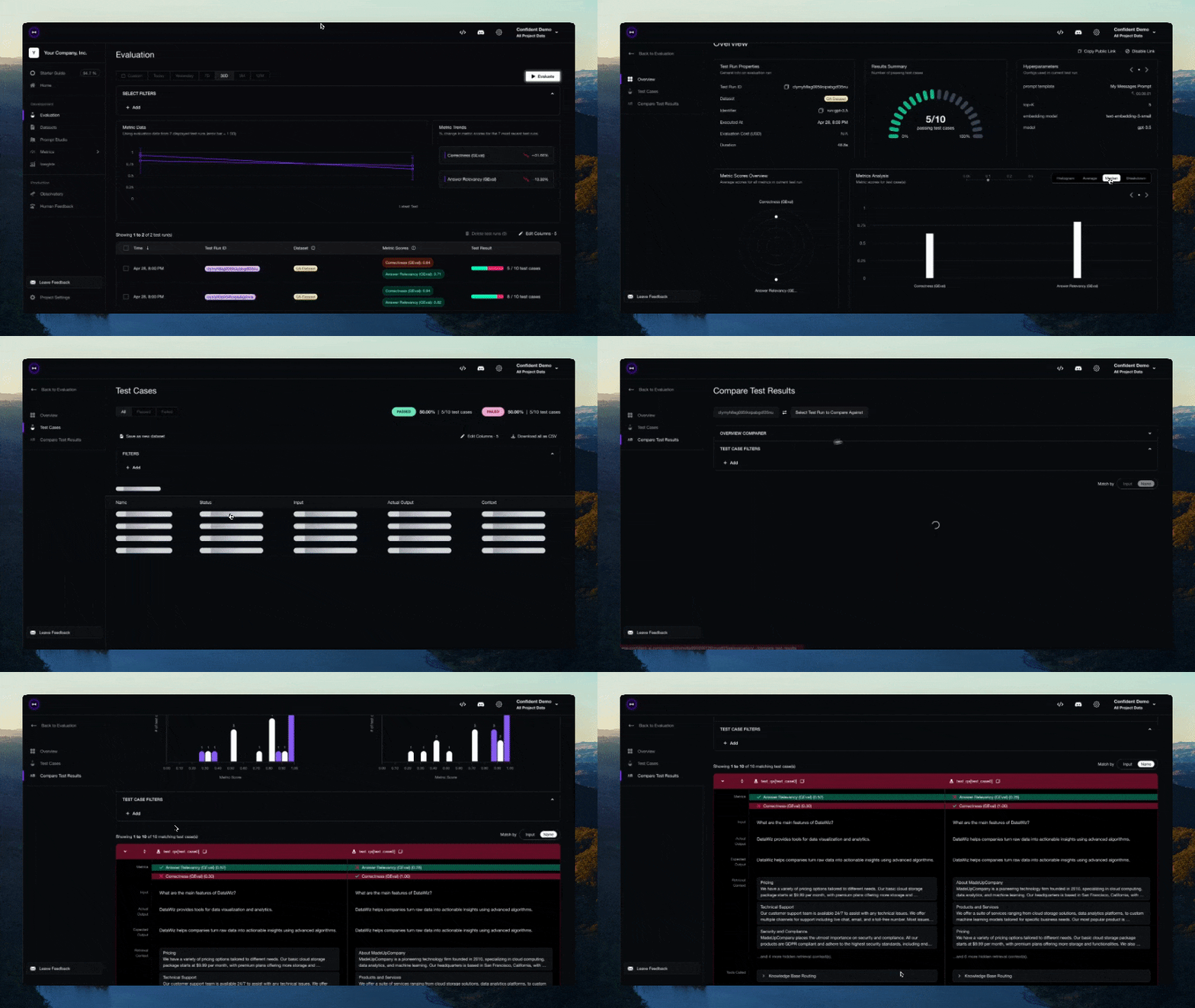 希望留在您的 IDE 中?通过 [Confident AI 的 MCP server](https://github.com/confident-ai/confident-mcp-server) 将 DeepEval 用作持久层,以运行评估、提取数据集并检查 traces,而无需离开您的编辑器。
# 贡献 请阅读 [CONTRIBUTING.md](https://github.com/confident-ai/deepeval/blob/main/CONTRIBUTING.md) 以了解我们的行为准则以及向我们提交 pull requests 的流程的详细信息。
# 路线图 功能: - [x] 与 Confident AI 集成 - [x] 实现 G-Eval - [x] 实现 RAG 指标 - [x] 实现对话指标 - [x] 创建评估数据集 - [x] Red-Teaming - [ ] DAG 自定义指标 - [ ] Guardrails
# 作者 由 Confident AI 的创始人构建。如有任何疑问,请联系 jeffreyip@confident-ai.com。
# 许可证 DeepEval 根据 Apache 2.0 获得许可 - 有关详细信息,请参阅 [LICENSE.md](https://github.com/confident-ai/deepeval/blob/main/LICENSE.md) 文件。
标签:AI安全, AI模型测试, AI测试, Apex, Chat Copilot, Clair, DeepEval, DLL 劫持, DNS解析, LLM基准测试, LLM开发工具, LLM指标, LLM评估, LNA, NLP, Ollama, Petitpotam, Python, RAG评估, 人工智能, 大模型评测, 大语言模型, 开源项目, 提示词工程, 无后门, 机器学习, 模型性能, 模型评估, 用户模式Hook绕过, 策略决策点, 评估框架, 质量保证, 逆向工具