koalaman/shellcheck
GitHub: koalaman/shellcheck
ShellCheck 是一款用 Haskell 编写的 shell 脚本静态分析工具,能够自动检测 bash/sh 脚本中的语法错误、语义陷阱和代码风格问题并给出修复建议。
Stars: 39787 | Forks: 1938
[](https://github.com/koalaman/shellcheck/actions/workflows/build.yml)
# ShellCheck - 一个 shell 脚本静态分析工具
ShellCheck 是一个 GPLv3 工具,可以为 bash/sh shell 脚本提供警告和建议:
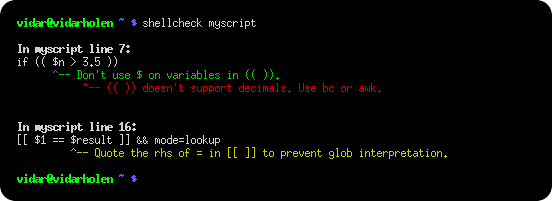
ShellCheck 的目标是
* 指出并解释导致 shell 给出晦涩错误信息的典型初学者语法问题。
* 指出并解释导致 shell 行为奇怪且违反直觉的典型中级语义问题。
* 指出微妙的注意事项、边缘情况和陷阱,这些问题可能会导致高级用户原本正常运行的脚本在未来的环境中失败。
请参阅[糟糕代码示例集](README.md#user-content-gallery-of-bad-code),了解 ShellCheck 能帮你识别出哪些问题的例子!
## 目录
* [如何使用](#how-to-use)
* [在网页上](#on-the-web)
* [在你的终端中](#from-your-terminal)
* [在你的编辑器中](#in-your-editor)
* [在你的构建或测试套件中](#in-your-build-or-test-suites)
* [安装](#installing)
* [从源码编译](#compiling-from-source)
* [安装 Cabal](#installing-cabal)
* [编译 ShellCheck](#compiling-shellcheck)
* [运行测试](#running-tests)
* [糟糕代码示例集](#gallery-of-bad-code)
* [引号使用](#quoting)
* [条件判断](#conditionals)
* [经常被误用的命令](#frequently-misused-commands)
* [常见的初学者错误](#common-beginners-mistakes)
* [代码风格](#style)
* [数据和类型错误](#data-and-typing-errors)
* [健壮性](#robustness)
* [可移植性](#portability)
* [其他杂项](#miscellaneous)
* [用户评价](#testimonials)
* [忽略问题](#ignoring-issues)
* [报告 Bug](#reporting-bugs)
* [贡献](#contributing)
* [版权](#copyright)
* [其他资源](#other-resources)
## 如何使用
有多种方式可以使用 ShellCheck!
### 在网页上
将 shell 脚本粘贴到 即可获得即时反馈。
[ShellCheck.net](https://www.shellcheck.net) 始终同步到最新的 git commit,这是体验 ShellCheck 最简单的方式。快告诉你的朋友们吧!
### 在你的终端中
在你的终端中运行 `shellcheck yourscript` 即可获得如上所示的即时输出。
### 在你的编辑器中
你可以直接在多种编辑器中查看 ShellCheck 的建议。
* Vim,通过 [ALE](https://github.com/w0rp/ale)、[Neomake](https://github.com/neomake/neomake) 或 [Syntastic](https://github.com/scrooloose/syntastic):
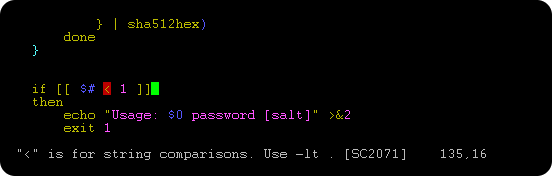。
* Emacs,通过 [Flycheck](https://github.com/flycheck/flycheck) 或 [Flymake](https://github.com/federicotdn/flymake-shellcheck):
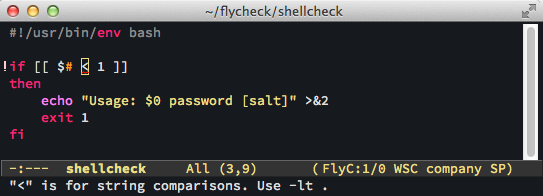。
* Sublime,通过 [SublimeLinter](https://github.com/SublimeLinter/SublimeLinter-shellcheck)。
* Pulsar Edit(原 Atom),通过 [linter-shellcheck-pulsar](https://github.com/pulsar-cooperative/linter-shellcheck-pulsar)。
* VSCode,通过 [vscode-shellcheck](https://github.com/timonwong/vscode-shellcheck)。
* 大多数其他编辑器,通过 [GCC error 兼容](shellcheck.1.md#user-content-formats)。
### 在你的构建或测试套件中
虽然 ShellCheck 主要用于交互式操作,但它也可以轻松添加到构建或测试套件中。
它规范地使用了退出代码,因此你只需将该 `shellcheck` 命令作为流程的一部分添加进去即可。
例如,在一个 Makefile 中:
```
check-scripts:
# Fail if any of these files have warnings
shellcheck myscripts/*.sh
```
或者在 Travis CI 的 `.travis.yml` 文件中:
```
script:
# Fail if any of these files have warnings
- shellcheck myscripts/*.sh
```
已预装并可直接使用 ShellCheck 的服务和平台:
* [Travis CI](https://travis-ci.org/)
* [Codacy](https://www.codacy.com/)
* [Code Climate](https://codeclimate.com/)
* [Code Factor](https://www.codefactor.io/)
* [Codety](https://www.codety.io/) 通过 [Codety Scanner](https://github.com/codetyio/codety-scanner)
* [CircleCI](https://circleci.com) 通过 [ShellCheck Orb](https://circleci.com/orbs/registry/orb/circleci/shellcheck)
* [Github](https://github.com/features/actions)(仅限 Linux)
* [Trunk Code Quality](https://trunk.io/code-quality)(通用 linter;[允许你显式指定 shellcheck 的安装版本](https://github.com/trunk-io/plugins/blob/bcbb361dcdbe4619af51ea7db474d7fb87540d20/.trunk/trunk.yaml#L32))通过 [shellcheck plugin](https://github.com/trunk-io/plugins/blob/main/linters/shellcheck/plugin.yaml)
* [CodeRabbit](https://coderabbit.ai/)
大多数其他服务,包括 [GitLab](https://about.gitlab.com/),都允许你自行安装
ShellCheck,你可以通过系统的包管理器(见[安装](#installing)),
或者通过下载并解压[二进制发布版](#installing-a-pre-compiled-binary)来进行安装。
无论如何,手动安装特定版本的 ShellCheck 是个好主意。这样可以
避免在发布了带有新警告的新版本时出现导致构建意外中断的情况。
对于自定义的过滤或报告,ShellCheck 可以输出简单的 JSON、兼容 CheckStyle 的 XML、
兼容 GCC 的警告,以及人类可读的文本(带或不带 ANSI 颜色)。请参阅
[Integration](https://github.com/koalaman/shellcheck/wiki/Integration) wiki 页面以获取更多文档。
## 安装
在本地安装 ShellCheck 最简单的方法是通过你的包管理器。
在带有 Cabal 的系统上(安装到 `~/.cabal/bin`):
```
cabal update
cabal install ShellCheck
```
在带有 Stack 的系统上(安装到 `~/.local/bin`):
```
stack update
stack install ShellCheck
```
在基于 Debian 的发行版上:
```
sudo apt install shellcheck
```
在基于 Arch Linux 的发行版上:
```
pacman -S shellcheck
```
或者从 AUR 获取无依赖的 [shellcheck-bin](https://aur.archlinux.org/packages/shellcheck-bin/)。
在基于 Gentoo 的发行版上:
```
emerge --ask shellcheck
```
在基于 EPEL 的发行版上:
```
sudo yum -y install epel-release
sudo yum install ShellCheck
```
在基于 Fedora 的发行版上:
```
dnf install ShellCheck
```
在 FreeBSD 上:
```
pkg install hs-ShellCheck
```
在带有 Homebrew 的 macOS (OS X) 上:
```
brew install shellcheck
```
或者使用 MacPorts:
```
sudo port install shellcheck
```
在 OpenBSD 上:
```
pkg_add shellcheck
```
在 openSUSE 上
```
zypper in ShellCheck
```
或者使用 OneClickInstall -
在 Solus 上:
```
eopkg install shellcheck
```
在 Windows 上(通过 [chocolatey](https://chocolatey.org/packages/shellcheck)):
```
C:\> choco install shellcheck
```
或者 Windows(通过 [winget](https://github.com/microsoft/winget-pkgs)):
```
C:\> winget install --id koalaman.shellcheck
```
或者 Windows(通过 [scoop](http://scoop.sh)):
```
C:\> scoop install shellcheck
```
从 [conda-forge](https://anaconda.org/conda-forge/shellcheck) 获取:
```
conda install -c conda-forge shellcheck
```
从 Snap Store 获取:
```
snap install --channel=edge shellcheck
```
从 Docker Hub 获取:
```
docker run --rm -v "$PWD:/mnt" koalaman/shellcheck:stable myscript
# 或 :v0.4.7 用于该版本,或 :latest 用于每日构建
```
或者,如果你想要一个基于 Alpine Linux 的更大镜像以便进行扩展,可以使用 `koalaman/shellcheck-alpine`。它的用法与普通的 Alpine 镜像完全一样,但预装了 shellcheck。
使用 [nix 包管理器](https://nixos.org/nix):
```
nix-env -iA nixpkgs.shellcheck
```
使用 [Flox 包管理器](https://flox.dev/)
```
flox install shellcheck
```
此外,你可以在这里下载最新版本的预编译二进制文件:
* [Linux, x86_64](https://github.com/koalaman/shellcheck/releases/download/stable/shellcheck-stable.linux.x86_64.tar.xz)(静态链接)
* [Linux, armv6hf](https://github.com/koalaman/shellcheck/releases/download/stable/shellcheck-stable.linux.armv6hf.tar.xz),即 Raspberry Pi(静态链接)
* [Linux, aarch64](https://github.com/koalaman/shellcheck/releases/download/stable/shellcheck-stable.linux.aarch64.tar.xz) aka ARM64(静态链接)
* [macOS, aarch64](https://github.com/koalaman/shellcheck/releases/download/stable/shellcheck-stable.darwin.aarch64.tar.xz)
* [macOS, x86_64](https://github.com/koalaman/shellcheck/releases/download/stable/shellcheck-stable.darwin.x86_64.tar.xz)
* [Windows, x86](https://github.com/koalaman/shellcheck/releases/download/stable/shellcheck-stable.zip)
或查看 [GitHub Releases](https://github.com/koalaman/shellcheck/releases) 获取其他版本
(包括用于每日 git 构建的[最新](https://github.com/koalaman/shellcheck/releases/tag/latest)元版本发布)。
目前没有针对 Apple Silicon 的官方二进制文件,但可以通过
[ShellCheck for Visual Studio Code](https://github.com/vscode-shellcheck/shellcheck-binaries/releases) 获取第三方构建版本。
发行版软件包已经自带了 `man` 手册页。如果你是从源码构建的,可以使用以下命令安装:
```
pandoc -s -f markdown-smart -t man shellcheck.1.md -o shellcheck.1
sudo mv shellcheck.1 /usr/share/man/man1
```
### pre-commit
要通过 [pre-commit](https://pre-commit.com/) 运行 ShellCheck,请将此 hook 添加到你的 `.pre-commit-config.yaml` 中:
```
repos:
- repo: https://github.com/koalaman/shellcheck-precommit
rev: v0.11.0
hooks:
- id: shellcheck
# args: ["--severity=warning"] # 可选地仅显示错误和警告
```
### Travis CI
Travis CI 现在已经默认集成了 ShellCheck,因此你无需手动安装。
如果你仍然想这样做,以便在闲暇时进行升级或确保使用的是最新版本,请按照以下步骤安装二进制版本。
### 安装预编译的二进制文件
预编译的二进制文件打包在 `tar.xz` 文件中。要解压它们,请确保
已安装 `xz`。
在 Debian/Ubuntu/Mint 上,你可以执行 `apt install xz-utils`。
在 Redhat/Fedora/CentOS 上,执行 `yum -y install xz`。
一个简单的安装程序可能会执行如下操作:
```
scversion="stable" # or "v0.4.7", or "latest"
wget -qO- "https://github.com/koalaman/shellcheck/releases/download/${scversion?}/shellcheck-${scversion?}.linux.x86_64.tar.xz" | tar -xJv
cp "shellcheck-${scversion}/shellcheck" /usr/bin/
shellcheck --version
```
## 从源码编译
本节介绍如何从源码目录构建 ShellCheck。ShellCheck 是用 Haskell 编写的,编译时需要 2GB 的内存。
### 安装 Cabal
ShellCheck 是使用 Cabal 构建和打包的。请从你系统的包管理器中安装 `cabal-install` 包(例如使用 `apt-get`、`brew`、`emerge`、`yum` 或 `zypper`)。
在 macOS (OS X) 上,你可以使用 brew 快速安装 Cabal,只需几分钟时间,而如果你尝试从源码编译,可能需要花费超过 30 分钟。
```
$ brew install cabal-install
```
在 MacPorts 上,该包名为 `hs-cabal-install`,而原生 Windows 用户应该从
## 报告 Bug
对于任何 bug 或功能建议,请使用 GitHub issue 跟踪系统:
## 贡献
请将代码或文档的补丁作为 GitHub pull request 提交!请查看
ShellCheck Wiki 上的 [DevGuide](https://github.com/koalaman/shellcheck/wiki/DevGuide)。
贡献必须基于 GNU GPLv3 获得许可。
贡献者保留版权。
## 版权
ShellCheck GNU General Public License, v3 获得许可。该许可证的副本包含在 [LICENSE](LICENSE) 文件中。
版权所有 2012-2019,[Vidar 'koala_man' Holen](https://github.com/koalaman/) 及贡献者。
祝你 ShellChecking 愉快!
## 其他资源
* wiki 上有针对每个警告的[详细描述](https://github.com/koalaman/shellcheck/wiki/Checks),例如 [SC2221](https://github.com/koalaman/shellcheck/wiki/SC2221)。
* ShellCheck 不会尝试强制执行任何格式化或缩进风格,因此也请了解一下 [shfmt](https://github.com/mvdan/sh)!
标签:Bash, LNA, Shell, SOC Prime, 云安全监控, 开发工具, 静态分析