





# Excelize
## 简介
Excelize 是一个使用纯 Go 编写的库,提供了一组函数,用于读写 XLAM / XLSM / XLSX / XLTM / XLTX 文件。支持读写由 Microsoft Excel™ 2007 及更高版本生成的电子表格文档。通过高兼容性支持复杂组件,并提供流式 API 以处理包含大量数据的工作表进行数据生成或读取。该库需要 Go 1.25.0 或更高版本。完整的文档可以通过 Go 内置的文档工具查看,或在线访问 [go.dev](https://pkg.go.dev/github.com/xuri/excelize/v2) 和 [docs reference](https://xuri.me/excelize/)。
## 基本用法
### 安装
```
go get github.com/xuri/excelize
```
- 如果你的包使用 [Go Modules](https://go.dev/blog/using-go-modules) 管理,请使用以下命令安装。
```
go get github.com/xuri/excelize/v2
```
### 创建电子表格
以下是一个最小示例,用于创建电子表格文件。
```
package main
import (
"fmt"
"github.com/xuri/excelize/v2"
)
func main() {
f := excelize.NewFile()
defer func() {
if err := f.Close(); err != nil {
fmt.Println(err)
}
}()
// Create a new sheet.
index, err := f.NewSheet("Sheet2")
if err != nil {
fmt.Println(err)
return
}
// Set value of a cell.
f.SetCellValue("Sheet2", "A2", "Hello world.")
f.SetCellValue("Sheet1", "B2", 100)
// Set active sheet of the workbook.
f.SetActiveSheet(index)
// Save spreadsheet by the given path.
if err := f.SaveAs("Book1.xlsx"); err != nil {
fmt.Println(err)
}
}
```
### 读取电子表格
以下内容是读取电子表格文档的最基本方式。
```
package main
import (
"fmt"
"github.com/xuri/excelize/v2"
)
func main() {
f, err := excelize.OpenFile("Book1.xlsx")
if err != nil {
fmt.Println(err)
return
}
defer func() {
// Close the spreadsheet.
if err := f.Close(); err != nil {
fmt.Println(err)
}
}()
// Get value from cell by given worksheet name and cell reference.
cell, err := f.GetCellValue("Sheet1", "B2")
if err != nil {
fmt.Println(err)
return
}
fmt.Println(cell)
// Get all the rows in the Sheet1.
rows, err := f.GetRows("Sheet1")
if err != nil {
fmt.Println(err)
return
}
for _, row := range rows {
for _, colCell := range row {
fmt.Print(colCell, "\t")
}
fmt.Println()
}
}
```
### 向电子表格添加图表
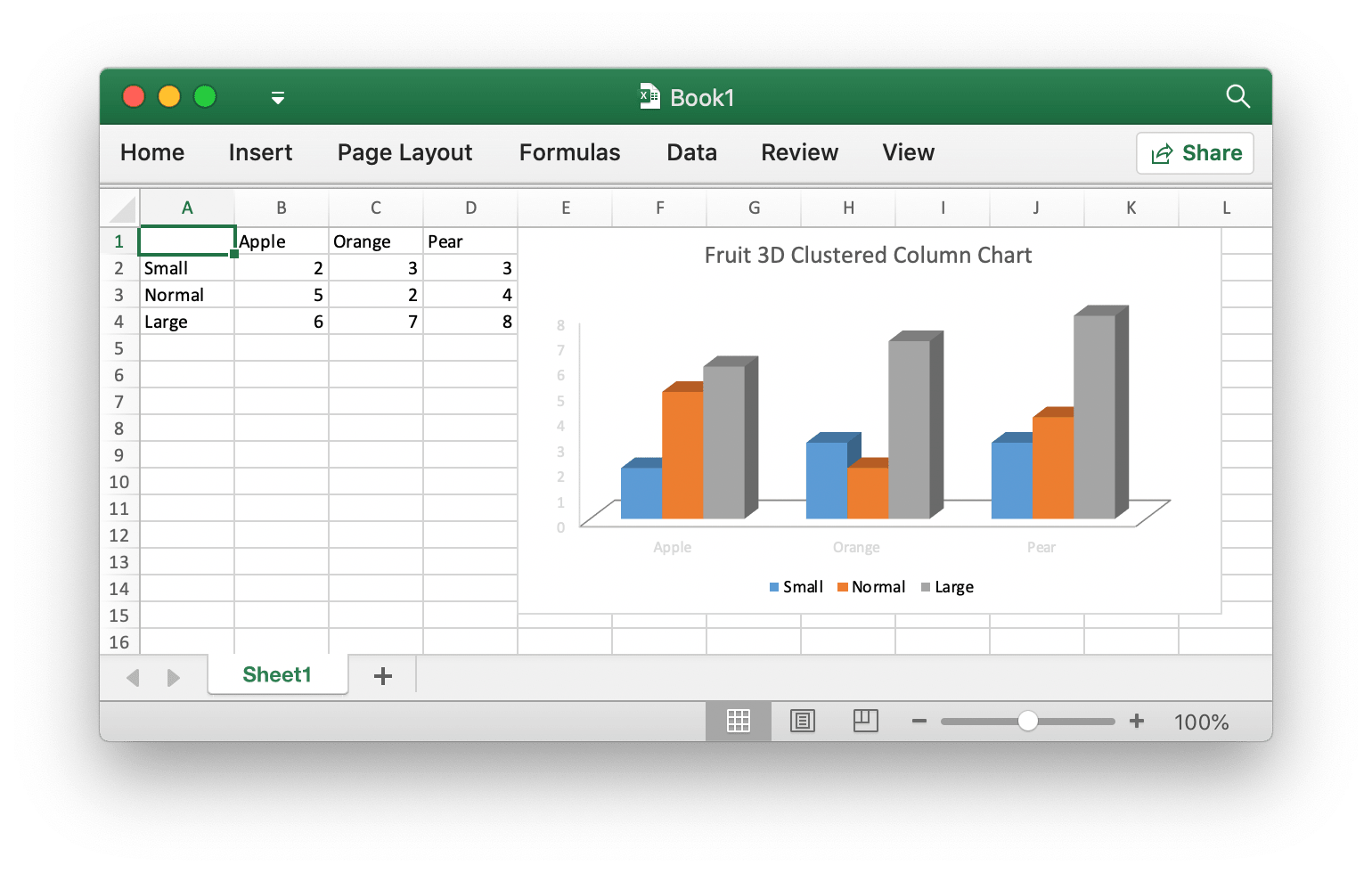
使用 Excelize 生成和管理图表就像几行代码一样简单。你可以根据工作表中的数据构建图表,也可以在没有任何数据的工作表中生成图表。
```
package main
import (
"fmt"
"github.com/xuri/excelize/v2"
)
func main() {
f := excelize.NewFile()
defer func() {
if err := f.Close(); err != nil {
fmt.Println(err)
}
}()
for idx, row := range [][]interface{}{
{nil, "Apple", "Orange", "Pear"}, {"Small", 2, 3, 3},
{"Normal", 5, 2, 4}, {"Large", 6, 7, 8},
} {
cell, err := excelize.CoordinatesToCellName(1, idx+1)
if err != nil {
fmt.Println(err)
return
}
f.SetSheetRow("Sheet1", cell, &row)
}
if err := f.AddChart("Sheet1", "E1", &excelize.Chart{
Type: excelize.Col3DClustered,
Series: []excelize.ChartSeries{
{
Name: "Sheet1!$A$2",
Categories: "Sheet1!$B$1:$D$1",
Values: "Sheet1!$B$2:$D$2",
},
{
Name: "Sheet1!$A$3",
Categories: "Sheet1!$B$1:$D$1",
Values: "Sheet1!$B$3:$D$3",
},
{
Name: "Sheet1!$A$4",
Categories: "Sheet1!$B$1:$D$1",
Values: "Sheet1!$B$4:$D$4",
}},
Title: excelize.ChartTitle{
Paragraph: []excelize.RichTextRun{
{
Text: "Fruit 3D Clustered Column Chart",
},
},
},
}); err != nil {
fmt.Println(err)
return
}
// Save spreadsheet by the given path.
if err := f.SaveAs("Book1.xlsx"); err != nil {
fmt.Println(err)
}
}
```
### 向电子表格添加图片
```
package main
import (
"fmt"
_ "image/gif"
_ "image/jpeg"
_ "image/png"
"github.com/xuri/excelize/v2"
)
func main() {
f, err := excelize.OpenFile("Book1.xlsx")
if err != nil {
fmt.Println(err)
return
}
defer func() {
// Close the spreadsheet.
if err := f.Close(); err != nil {
fmt.Println(err)
}
}()
// Insert a picture.
if err := f.AddPicture("Sheet1", "A2", "image.png", nil); err != nil {
fmt.Println(err)
}
// Insert a picture to worksheet with scaling.
if err := f.AddPicture("Sheet1", "D2", "image.jpg",
&excelize.GraphicOptions{ScaleX: 0.5, ScaleY: 0.5}); err != nil {
fmt.Println(err)
}
// Insert a picture offset in the cell with printing support.
enable, disable := true, false
if err := f.AddPicture("Sheet1", "H2", "image.gif",
&excelize.GraphicOptions{
PrintObject: &enable,
LockAspectRatio: false,
OffsetX: 15,
OffsetY: 10,
Locked: &disable,
}); err != nil {
fmt.Println(err)
}
// Save the spreadsheet with the origin path.
if err = f.Save(); err != nil {
fmt.Println(err)
}
}
```
## 许可证
本程序遵循 BSD 3-Clause License 条款。参见 [https://opensource.org/licenses/BSD-3-Clause](https://opensource.org/licenses/BSD-3-Clause)。
Excel 标志是 [Microsoft Corporation](https://aka.ms/trademarks-usage) 的商标。此作品为改编版本。
Go gopher 由 [Renee French](https://go.dev/doc/gopher/README) 创建,采用 [Creative Commons 4.0 Attributions license](http://creativecommons.org/licenses/by/4.0/)。
## 黄金赞助商
