huggingface/candle
GitHub: huggingface/candle
HuggingFace 出品的极简 Rust ML 框架,用纯 Rust 实现高性能机器学习推理与训练,告别 Python 依赖,支持 GPU 加速和浏览器端 WASM 推理。
Stars: 20688 | Forks: 1659
# candle
[](https://discord.gg/hugging-face-879548962464493619)
[](https://crates.io/crates/candle-core)
[](https://docs.rs/candle-core)
[](https://github.com/huggingface/candle/blob/main/LICENSE-MIT)
[](https://github.com/huggingface/candle/blob/main/LICENSE-APACHE)
Candle 是一个极简的 Rust ML 框架,专注于性能(包括 GPU 支持)
和易用性。试试我们的在线演示:
[whisper](https://huggingface.co/spaces/lmz/candle-whisper)、
[LLaMA2](https://huggingface.co/spaces/lmz/candle-llama2)、
[T5](https://huggingface.co/spaces/radames/Candle-T5-Generation-Wasm)、
[yolo](https://huggingface.co/spaces/lmz/candle-yolo)、
[Segment
Anything](https://huggingface.co/spaces/radames/candle-segment-anything-wasm)。
## 入门指南
确保已按照 [**安装说明**](https://huggingface.github.io/candle/guide/installation.html) 中的描述正确安装了 [`candle-core`](https://github.com/huggingface/candle/tree/main/candle-core)。
让我们看看如何运行一个简单的矩阵乘法。
将以下内容写入你的 `myapp/src/main.rs` 文件:
```
use candle_core::{Device, Tensor};
fn main() -> Result<(), Box> {
let device = Device::Cpu;
let a = Tensor::randn(0f32, 1., (2, 3), &device)?;
let b = Tensor::randn(0f32, 1., (3, 4), &device)?;
let c = a.matmul(&b)?;
println!("{c}");
Ok(())
}
```
`cargo run` 应该会显示一个形状为 `Tensor[[2, 4], f32]` 的 tensor。
在安装了支持 CUDA 的 `candle` 后,只需将 `device` 定义为 GPU:
```
- let device = Device::Cpu;
+ let device = Device::new_cuda(0)?;
```
有关更高级的示例,请查看以下部分。
## 查看我们的示例
这些在线演示完全在你的浏览器中运行:
- [yolo](https://huggingface.co/spaces/lmz/candle-yolo):姿态估计和
目标识别。
- [whisper](https://huggingface.co/spaces/lmz/candle-whisper):语音识别。
- [LLaMA2](https://huggingface.co/spaces/lmz/candle-llama2):文本生成。
- [T5](https://huggingface.co/spaces/radames/Candle-T5-Generation-Wasm):文本生成。
- [Phi-1.5 和 Phi-2](https://huggingface.co/spaces/radames/Candle-Phi-1.5-Wasm):文本生成。
- [Segment Anything Model](https://huggingface.co/spaces/radames/candle-segment-anything-wasm):图像分割。
- [BLIP](https://huggingface.co/spaces/radames/Candle-BLIP-Image-Captioning):图像描述。
我们还提供了一些使用最先进模型的命令行示例:
- [LLaMA v1、v2 和 v3](./candle-examples/examples/llama/):通用 LLM,包含
SOLAR-10.7B 变体。
- [Falcon](./candle-examples/examples/falcon/):通用 LLM。
- [Codegeex4](./candle-examples/examples/codegeex4-9b/):代码补全、代码解释器、网页搜索、函数调用、仓库级别
- [GLM4](./candle-examples/examples/glm4/):THUDM 的开放式多语言多模态对话 LLM
- [Gemma v1 和 v2](./candle-examples/examples/gemma/):来自 Google Deepmind 的 2b 和 7b+/9b 通用 LLM。
- [RecurrentGemma](./candle-examples/examples/recurrent-gemma/):来自 Google 的 2b 和 7b
基于 Griffin 的模型,混合了注意力机制和类似 RNN 的状态。
- [Phi-1、Phi-1.5、Phi-2 和 Phi-3](./candle-examples/examples/phi/):1.3b、
2.7b 和 3.8b 通用 LLM,性能与 7b 模型相当。
- [StableLM-3B-4E1T](./candle-examples/examples/stable-lm/):一个 3b 的通用 LLM
在 1T tokens 的英语和代码数据集上预训练。还支持
StableLM-2,这是一个在 2T tokens 上训练的 1.6b LLM,以及其代码变体。
- [Mamba](./candle-examples/examples/mamba/):仅推理的
Mamba 状态空间模型实现。
- [Mistral7b-v0.1](./candle-examples/examples/mistral/):一个 7b 通用 LLM,
截至 2023-09-28,性能优于所有公开可用的 13b 模型。
- [Mixtral8x7b-v0.1](./candle-examples/examples/mixtral/):一个稀疏的
混合专家 8x7b 通用 LLM,性能优于 Llama 2 70B 模型,且
推理速度更快。
- [StarCoder](./candle-examples/examples/bigcode/) 和
[StarCoder2](./candle-examples/examples/starcoder2/):专门用于代码生成的 LLM。
- [Qwen1.5](./candle-examples/examples/qwen/):双语(英语/中文)LLM。
- [RWKV v5 和 v6](./candle-examples/examples/rwkv/):一个具有 Transformer 级别 LLM
性能的 RNN。
- [Replit-code-v1.5](./candle-examples/examples/replit-code/):专门用于代码补全的 3.3b LLM。
- [Yi-6B / Yi-34B](./candle-examples/examples/yi/):两个 6b 和 34b 参数的
双语(英语/中文)通用 LLM。
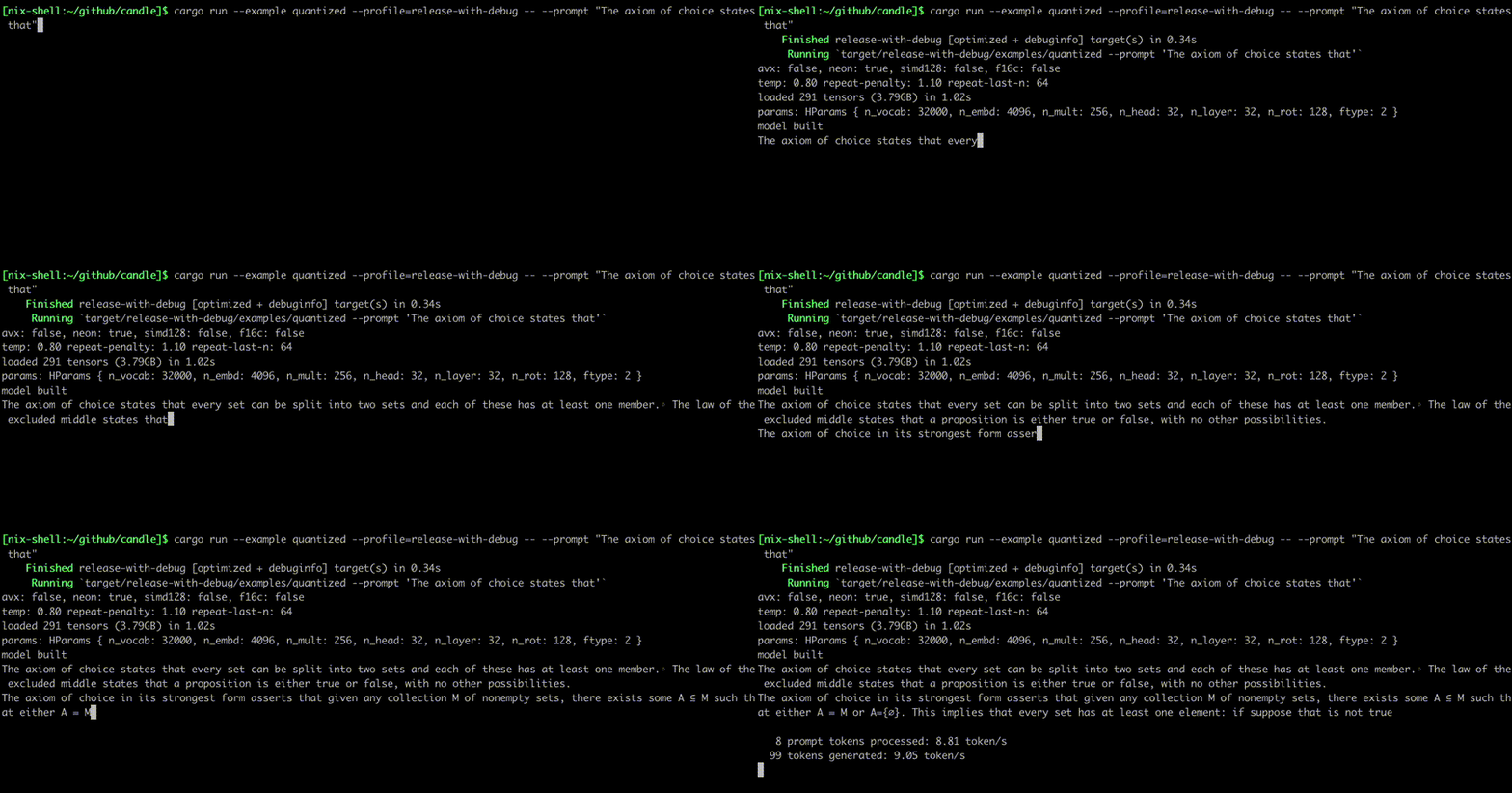
- [量化 LLaMA](./candle-examples/examples/quantized/):使用与
[llama.cpp](https://github.com/ggerganov/llama.cpp) 相同的量化技术的
LLaMA 模型量化版本。
- [量化 Qwen3 MoE](./candle-examples/examples/quantized-qwen3-moe/):支持 Qwen3 MoE 模型的 gguf 量化模型。
 - [Stable Diffusion](./candle-examples/examples/stable-diffusion/):文本到
图像生成模型,支持 1.5、2.1、SDXL 1.0 和 Turbo 版本。
- [Stable Diffusion](./candle-examples/examples/stable-diffusion/):文本到
图像生成模型,支持 1.5、2.1、SDXL 1.0 和 Turbo 版本。
 - [Wuerstchen](./candle-examples/examples/wuerstchen/):另一个文本到
图像生成模型。
- [Wuerstchen](./candle-examples/examples/wuerstchen/):另一个文本到
图像生成模型。
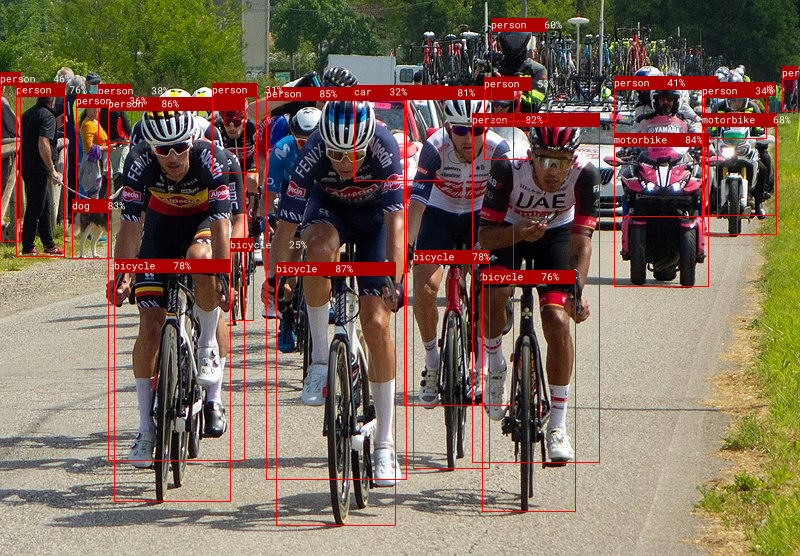
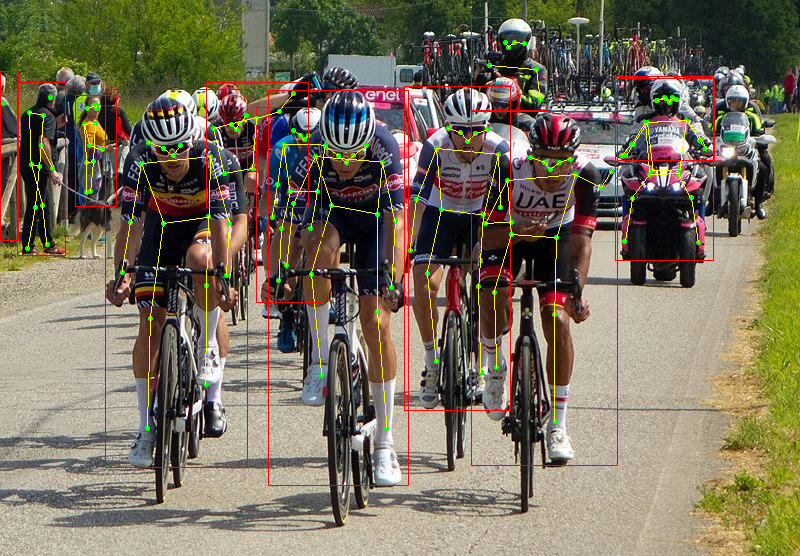
 - [yolo-v3](./candle-examples/examples/yolo-v3/) 和
[yolo-v8](./candle-examples/examples/yolo-v8/):目标检测和姿态
估计模型。
- [yolo-v3](./candle-examples/examples/yolo-v3/) 和
[yolo-v8](./candle-examples/examples/yolo-v8/):目标检测和姿态
估计模型。
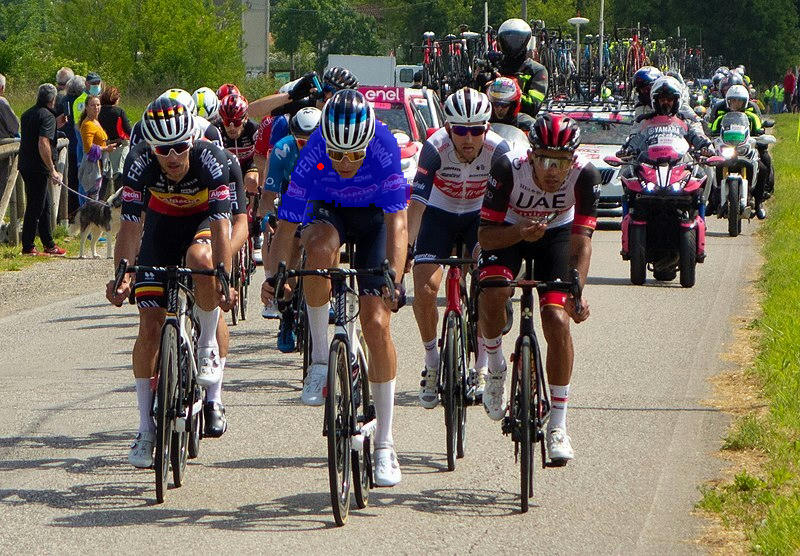
 - [segment-anything](./candle-examples/examples/segment-anything/):带有提示的
图像分割模型。
- [segment-anything](./candle-examples/examples/segment-anything/):带有提示的
图像分割模型。
 - [SegFormer](./candle-examples/examples/segformer/):基于 Transformer 的语义分割模型。
- [Whisper](./candle-examples/examples/whisper/):语音识别模型。
- [EnCodec](./candle-examples/examples/encodec/):使用残差向量量化的高质量音频压缩
模型。
- [MetaVoice](./candle-examples/examples/metavoice/):文本到语音的
基础模型。
- [Parler-TTS](./candle-examples/examples/parler-tts/):大型文本到语音
模型。
- [T5](./candle-examples/examples/t5)、[Bert](./candle-examples/examples/bert/)、
[JinaBert](./candle-examples/examples/jina-bert/):可用于句子嵌入。
- [DINOv2](./candle-examples/examples/dinov2/):使用自监督训练的
计算机视觉模型(可用于 imagenet 分类、深度
评估、分割)。
- [VGG](./candle-examples/examples/vgg/)、
[RepVGG](./candle-examples/examples/repvgg):计算机视觉模型。
- [BLIP](./candle-examples/examples/blip/):图像到文本模型,可用于
为图像生成描述。
- [CLIP](./candle-examples/examples/clip/):多模态视觉和语言
模型。
- [TrOCR](./candle-examples/examples/trocr/):一个 Transformer OCR 模型,
包含用于手写和印刷识别的专用子模型。
- [Marian-MT](./candle-examples/examples/marian-mt/):神经机器翻译
模型,根据输入文本生成翻译后的文本。
- [Moondream](./candle-examples/examples/moondream/):微型计算机视觉模型
可以回答有关图像的真实世界问题。
使用如下命令运行它们:
```
cargo run --example quantized --release
```
为了使用 **CUDA**,请在示例命令行中添加 `--features cuda`。如果
你安装了 cuDNN,请使用 `--features cudnn` 以获得更快的加速。
还有一些用于 whisper 和
[llama2.c](https://github.com/karpathy/llama2.c) 的 WASM 示例。你可以使用
`trunk` 构建它们,或者在线尝试:
[whisper](https://huggingface.co/spaces/lmz/candle-whisper)、
[llama2](https://huggingface.co/spaces/lmz/candle-llama2)、
[T5](https://huggingface.co/spaces/radames/Candle-T5-Generation-Wasm)、
[Phi-1.5 和 Phi-2](https://huggingface.co/spaces/radames/Candle-Phi-1.5-Wasm)、
[Segment Anything Model](https://huggingface.co/spaces/radames/candle-segment-anything-wasm)。
对于 LLaMA2,运行以下命令来检索权重文件并启动一个
测试服务器:
```
# 安装目标平台 'wasm32-unknown-unknown'
rustup target add wasm32-unknown-unknown
cd candle-wasm-examples/llama2-c
wget https://huggingface.co/spaces/lmz/candle-llama2/resolve/main/model.bin
wget https://huggingface.co/spaces/lmz/candle-llama2/resolve/main/tokenizer.json
trunk serve --release --port 8081
```
然后访问
[http://localhost:8081/](http://localhost:8081/)。
## 有用的外部资源
- [`candle-tutorial`](https://github.com/ToluClassics/candle-tutorial):一个非常详细的教程,展示了如何将 PyTorch 模型转换为 Candle。
- [`candle-lora`](https://github.com/EricLBuehler/candle-lora):高效且
易用的 Candle LoRA 实现。`candle-lora` 为 Candle 中的许多模型提供了开箱即用的 LoRA 支持,可以在
[此处](https://github.com/EricLBuehler/candle-lora/tree/master/candle-lora-transformers/examples)找到。
- [`candle-video`](https://github.com/FerrisMind/candle-video):用于文本生成视频(LTX-Video 及相关模型)的 Rust 库,基于 Candle 构建,专注于快速的、无需 Python 的推理。
- [`optimisers`](https://github.com/KGrewal1/optimisers):优化器集合,
包括带 momentum 的 SGD、AdaGrad、AdaDelta、AdaMax、NAdam、RAdam 和 RMSprop。
- [`candle-vllm`](https://github.com/EricLBuehler/candle-vllm):用于推理和服务
本地 LLM 的高效平台,包括一个兼容 OpenAI 的 API 服务器。
- [`candle-ext`](https://github.com/mokeyish/candle-ext):Candle 的扩展库,提供 Candle 中目前尚不可用的 PyTorch 函数。
- [`candle-coursera-ml`](https://github.com/vishpat/candle-coursera-ml):Coursera [Machine Learning Specialization](https://www.coursera.org/specializations/machine-learning-introduction) 课程中 ML 算法的实现。
- [`kalosm`](https://github.com/floneum/floneum/tree/master/interfaces/kalosm):一个 Rust 中的多模态元框架,用于与本地预训练模型进行交互,支持受控生成、自定义采样器、内存向量数据库、音频转录等。
- [`candle-sampling`](https://github.com/EricLBuehler/candle-sampling):Candle 的采样技术。
- [`gpt-from-scratch-rs`](https://github.com/jeroenvlek/gpt-from-scratch-rs):YouTube 上 Andrej Karpathy 的 _Let's build GPT_ 教程的移植版,在一个小问题上展示了 Candle API。
- [`candle-einops`](https://github.com/tomsanbear/candle-einops):Python [einops](https://github.com/arogozhnikov/einops) 库的纯 Rust 实现。
- [`atoma-infer`](https://github.com/atoma-network/atoma-infer):一个用于大规模快速推理的 Rust 库,利用 FlashAttention2 进行高效的注意力计算,利用 PagedAttention 进行高效的 KV-cache 内存管理,并支持多 GPU。它兼容 OpenAI API。
- [`llms-from-scratch-rs`](https://github.com/nerdai/llms-from-scratch-rs):Sebastian Raschka 的《Build an LLM from Scratch》一书中代码的全面 Rust 翻译版。
- [`vllm.rs`](https://github.com/guoqingbao/vllm.rs):一个基于 Candle 的 Rust 极简 vLLM 实现。
如果你想在此列表中添加内容,请提交 pull request。
## 特性
- 语法简单,外观和感觉类似于 PyTorch。
- 模型训练。
- 嵌入用户自定义的 ops/kernels,例如 [flash-attention v2](https://github.com/huggingface/candle/blob/89ba005962495f2bfbda286e185e9c3c7f5300a3/candle-flash-attn/src/lib.rs#L152)。
- 后端。
- 优化的 CPU 后端,x86 可选支持 MKL,Mac 可选支持 Accelerate。
- 用于在 GPU 上高效运行的 CUDA 后端,通过 NCCL 支持多 GPU 分布。
- WASM 支持,在浏览器中运行你的模型。
- 包含的模型。
- 语言模型。
- LLaMA v1、v2 和 v3,包含 SOLAR-10.7B 等变体。
- Falcon。
- StarCoder、StarCoder2。
- Phi 1、1.5、2 和 3。
- Mamba、Minimal Mamba
- Gemma v1 2b 和 7b+,v2 2b 和 9b。
- Mistral 7b v0.1。
- Mixtral 8x7b v0.1。
- StableLM-3B-4E1T、StableLM-2-1.6B、Stable-Code-3B。
- Replit-code-v1.5-3B。
- Bert。
- Yi-6B 和 Yi-34B。
- Qwen1.5、Qwen1.5 MoE、Qwen3 MoE。
- RWKV v5 和 v6。
- 量化 LLM。
- Llama 7b、13b、70b,以及 chat 和代码变体。
- Mistral 7b 和 7b instruct。
- Mixtral 8x7。
- Zephyr 7b a 和 b(基于 Mistral-7b)。
- OpenChat 3.5(基于 Mistral-7b)。
- Qwen3 MoE (16B-A3B, 32B-A3B)
- 文本到文本。
- T5 及其变体:FlanT5、UL2、MADLAD400(翻译)、CoEdit(语法纠正)。
- Marian MT(机器翻译)。
- 文本到图像。
- Stable Diffusion v1.5、v2.1、XL v1.0。
- Wurstchen v2。
- 图像到文本。
- BLIP。
- TrOCR。
- 音频。
- Whisper,多语言语音转文本。
- EnCodec,音频压缩模型。
- MetaVoice-1B,文本转语音模型。
- Parler-TTS,文本转语音模型。
- 计算机视觉模型。
- DINOv2、ConvMixer、EfficientNet、ResNet、ViT、VGG、RepVGG、ConvNeXT、
ConvNeXTv2、MobileOne、EfficientVit (MSRA)、MobileNetv4、Hiera、FastViT。
- yolo-v3、yolo-v8。
- Segment-Anything Model (SAM)。
- SegFormer。
- 文件格式:从 safetensors、npz、ggml 或 PyTorch 文件加载模型。
- 无服务器(在 CPU 上),小型且快速的部署。
- 使用 llama.cpp 量化类型的量化支持。
## 如何使用
速查表:
| | 使用 PyTorch | 使用 Candle |
|------------|------------------------------------------|------------------------------------------------------------------|
| 创建 | `torch.Tensor([[1, 2], [3, 4]])` | `Tensor::new(&[[1f32, 2.], [3., 4.]], &Device::Cpu)?` |
| 创建 | `torch.zeros((2, 2))` | `Tensor::zeros((2, 2), DType::F32, &Device::Cpu)?` |
| 索引 | `tensor[:, :4]` | `tensor.i((.., ..4))?` |
| 操作 | `tensor.view((2, 2))` | `tensor.reshape((2, 2))?` |
| 操作 | `a.matmul(b)` | `a.matmul(&b)?` |
| 算术运算 | `a + b` | `&a + &b` |
| 设备 | `tensor.to(device="cuda")` | `tensor.to_device(&Device::new_cuda(0)?)?` |
| 数据类型 | `tensor.to(dtype=torch.float16)` | `tensor.to_dtype(&DType::F16)?` |
| 保存 | `torch.save({"A": A}, "model.bin")` | `candle::safetensors::save(&HashMap::from([("A", A)]), "model.safetensors")?` |
| 加载 | `weights = torch.load("model.bin")` | `candle::safetensors::load("model.safetensors", &device)` |
## 结构
- [candle-core](./candle-core):核心 ops、设备和 `Tensor` 结构体定义
- [candle-nn](./candle-nn/):用于构建真实模型的工具
- [candle-examples](./candle-examples/):在真实环境中使用该库的示例
- [candle-kernels](./candle-kernels/):CUDA 自定义内核
- [candle-datasets](./candle-datasets/):数据集和数据加载器。
- [candle-transformers](./candle-transformers):与 transformers 相关的实用程序。
- [candle-flash-attn](./candle-flash-attn):Flash attention v2 层。
- [candle-onnx](./candle-onnx/):ONNX 模型评估。
## 常见问题
### 为什么要使用 Candle?
Candle 的核心目标是*使无服务器推理成为可能*。像 PyTorch 这样完整的机器学习框架
非常庞大,这使得在集群上创建实例变得缓慢。Candle 允许部署轻量级
二进制文件。
其次,Candle 让你可以*从生产工作负载中移除 Python*。Python 的开销会严重损害性能,
而且 [GIL](https://www.backblaze.com/blog/the-python-gil-past-present-and-future/) 是一个令人头疼的臭名昭著的问题源头。
最后,Rust 很酷!HF 生态系统中已经有很多 Rust crate,比如 [safetensors](https://github.com/huggingface/safetensors) 和 [tokenizers](https://github.com/huggingface/tokenizers)。
### 其他 ML 框架
- [dfdx](https://github.com/coreylowman/dfdx) 是一个强大的 crate,其类型中包含了形状。
这让编译器能在一开始就抱怨形状不匹配,从而避免了许多令人头疼的问题。
然而,我们发现某些功能仍然需要 nightly Rust,并且对于非 Rust 专家来说,编写代码可能有点令人生畏。
我们正在利用并为其他核心运行时 crate 做贡献,希望两个 crate 能互相受益。
- [burn](https://github.com/burn-rs/burn) 是一个通用 crate,可以利用多个后端,这样你就可以为你的工作负载选择最佳的
引擎。
- [tch-rs](https://github.com/LaurentMazare/tch-rs.git) Rust 中对 torch 库的绑定。极其通用,但它们
会将整个 torch 库带入运行时。`tch-rs` 的主要贡献者也参与了
`candle` 的开发。
### 常见错误
#### 使用 mkl feature 编译时缺少符号。
如果在使用 mkl 或 accelerate feature 编译二进制文件/测试时遇到一些缺少符号的错误,
例如对于 mkl 你会得到:
```
= note: /usr/bin/ld: (....o): in function `blas::sgemm':
.../blas-0.22.0/src/lib.rs:1944: undefined reference to `sgemm_' collect2: error: ld returned 1 exit status
= note: some `extern` functions couldn't be found; some native libraries may need to be installed or have their path specified
= note: use the `-l` flag to specify native libraries to link
= note: use the `cargo:rustc-link-lib` directive to specify the native libraries to link with Cargo
```
或者对于 accelerate:
```
Undefined symbols for architecture arm64:
"_dgemm_", referenced from:
candle_core::accelerate::dgemm::h1b71a038552bcabe in libcandle_core...
"_sgemm_", referenced from:
candle_core::accelerate::sgemm::h2cf21c592cba3c47 in libcandle_core...
ld: symbol(s) not found for architecture arm64
```
这可能是由于缺少启用 mkl 库所需的链接器标志。你
可以尝试在二进制文件的顶部为 mkl 添加以下内容:
```
extern crate intel_mkl_src;
```
或者对于 accelerate:
```
extern crate accelerate_src;
```
#### 无法运行 LLaMA 示例:访问源需要登录凭据
```
Error: request error: https://huggingface.co/meta-llama/Llama-2-7b-hf/resolve/main/tokenizer.json: status code 401
```
这可能是因为你没有 LLaMA-v2 模型的权限。要解决
此问题,你必须在 huggingface-hub 上注册,接受 [LLaMA-v2 模型
条件](https://huggingface.co/meta-llama/Llama-2-7b-hf),并设置你的
身份验证 token。有关更多详细信息,请参阅 issue
[#350](https://github.com/huggingface/candle/issues/350)。
#### Docker 构建
在 Dockerfile 中构建 CUDA 内核时,无法使用 nvidia-smi 来自动检测计算能力。
你必须显式设置 CUDA_COMPUTE_CAP,例如:
```
FROM nvidia/cuda:12.9.0-devel-ubuntu22.04
# 安装 git 和 curl
RUN set -eux; \
apt-get update; \
apt-get install -y curl git ca-certificates;
# 安装 Rust
RUN curl --proto '=https' --tlsv1.2 -sSf https://sh.rustup.rs | sh -s -- -y
# 克隆 candle 仓库
RUN git clone https://github.com/huggingface/candle.git
# 为构建设置计算能力
ARG CUDA_COMPUTE_CAP=90
ENV CUDA_COMPUTE_CAP=${CUDA_COMPUTE_CAP}
# 使用显式计算能力进行构建
WORKDIR /app
COPY . .
RUN cargo build --release features cuda
```
#### 编译 flash-attention 失败
```
/usr/include/c++/11/bits/std_function.h:530:146: error: parameter packs not expanded with ‘...’:
```
这是由 Cuda 编译器触发的 gcc-11 中的一个 bug。要解决此问题,请安装另一个受支持的 gcc 版本 - 例如 gcc-10,并在 NVCC_CCBIN 环境变量中指定编译器的路径。
```
env NVCC_CCBIN=/usr/lib/gcc/x86_64-linux-gnu/10 cargo ...
```
#### 在 Windows 上运行 rustdoc 或 mdbook 测试时出现链接错误
```
Couldn't compile the test.
---- .\candle-book\src\inference\hub.md - Using_the_hub::Using_in_a_real_model_ (line 50) stdout ----
error: linking with `link.exe` failed: exit code: 1181
//very long chain of linking
= note: LINK : fatal error LNK1181: cannot open input file 'windows.0.48.5.lib'
```
确保你链接了所有可能位于项目目标之外的原生库,例如,要运行 mdbook 测试,你应该运行:
```
mdbook test candle-book -L .\target\debug\deps\ `
-L native=$env:USERPROFILE\.cargo\registry\src\index.crates.io-6f17d22bba15001f\windows_x86_64_msvc-0.42.2\lib `
-L native=$env:USERPROFILE\.cargo\registry\src\index.crates.io-6f17d22bba15001f\windows_x86_64_msvc-0.48.5\lib
```
#### 在 WSL 中模型加载时间极慢
这可能是由于模型是从 `/mnt/c` 加载造成的,更多详细信息请参见
[stackoverflow](https://stackoverflow.com/questions/68972448/why-is-wsl-extremely-slow-when-compared-with-native-windows-npm-yarn-processing)。
#### 追踪错误
当生成 candle 错误时,你可以设置 `RUST_BACKTRACE=1` 以获取回溯信息。
#### CudaRC 错误
如果你在 Windows 上遇到类似这样的错误 `called `Result::unwrap()` on an `Err` value: LoadLibraryExW { source: Os { code: 126, kind: Uncategorized, message: "The specified module could not be found." } }`。要解决此问题,请复制并重命名以下 3 个文件(确保它们在系统路径中)。路径取决于你的 CUDA 版本。
`c:\Windows\System32\nvcuda.dll` -> `cuda.dll`
`c:\Program Files\NVIDIA GPU Computing Toolkit\CUDA\v12.4\bin\cublas64_12.dll` -> `cublas.dll`
`c:\Program Files\NVIDIA GPU Computing Toolkit\CUDA\v12.4\bin\curand64_10.dll` -> `curand.dll`
- [SegFormer](./candle-examples/examples/segformer/):基于 Transformer 的语义分割模型。
- [Whisper](./candle-examples/examples/whisper/):语音识别模型。
- [EnCodec](./candle-examples/examples/encodec/):使用残差向量量化的高质量音频压缩
模型。
- [MetaVoice](./candle-examples/examples/metavoice/):文本到语音的
基础模型。
- [Parler-TTS](./candle-examples/examples/parler-tts/):大型文本到语音
模型。
- [T5](./candle-examples/examples/t5)、[Bert](./candle-examples/examples/bert/)、
[JinaBert](./candle-examples/examples/jina-bert/):可用于句子嵌入。
- [DINOv2](./candle-examples/examples/dinov2/):使用自监督训练的
计算机视觉模型(可用于 imagenet 分类、深度
评估、分割)。
- [VGG](./candle-examples/examples/vgg/)、
[RepVGG](./candle-examples/examples/repvgg):计算机视觉模型。
- [BLIP](./candle-examples/examples/blip/):图像到文本模型,可用于
为图像生成描述。
- [CLIP](./candle-examples/examples/clip/):多模态视觉和语言
模型。
- [TrOCR](./candle-examples/examples/trocr/):一个 Transformer OCR 模型,
包含用于手写和印刷识别的专用子模型。
- [Marian-MT](./candle-examples/examples/marian-mt/):神经机器翻译
模型,根据输入文本生成翻译后的文本。
- [Moondream](./candle-examples/examples/moondream/):微型计算机视觉模型
可以回答有关图像的真实世界问题。
使用如下命令运行它们:
```
cargo run --example quantized --release
```
为了使用 **CUDA**,请在示例命令行中添加 `--features cuda`。如果
你安装了 cuDNN,请使用 `--features cudnn` 以获得更快的加速。
还有一些用于 whisper 和
[llama2.c](https://github.com/karpathy/llama2.c) 的 WASM 示例。你可以使用
`trunk` 构建它们,或者在线尝试:
[whisper](https://huggingface.co/spaces/lmz/candle-whisper)、
[llama2](https://huggingface.co/spaces/lmz/candle-llama2)、
[T5](https://huggingface.co/spaces/radames/Candle-T5-Generation-Wasm)、
[Phi-1.5 和 Phi-2](https://huggingface.co/spaces/radames/Candle-Phi-1.5-Wasm)、
[Segment Anything Model](https://huggingface.co/spaces/radames/candle-segment-anything-wasm)。
对于 LLaMA2,运行以下命令来检索权重文件并启动一个
测试服务器:
```
# 安装目标平台 'wasm32-unknown-unknown'
rustup target add wasm32-unknown-unknown
cd candle-wasm-examples/llama2-c
wget https://huggingface.co/spaces/lmz/candle-llama2/resolve/main/model.bin
wget https://huggingface.co/spaces/lmz/candle-llama2/resolve/main/tokenizer.json
trunk serve --release --port 8081
```
然后访问
[http://localhost:8081/](http://localhost:8081/)。
## 有用的外部资源
- [`candle-tutorial`](https://github.com/ToluClassics/candle-tutorial):一个非常详细的教程,展示了如何将 PyTorch 模型转换为 Candle。
- [`candle-lora`](https://github.com/EricLBuehler/candle-lora):高效且
易用的 Candle LoRA 实现。`candle-lora` 为 Candle 中的许多模型提供了开箱即用的 LoRA 支持,可以在
[此处](https://github.com/EricLBuehler/candle-lora/tree/master/candle-lora-transformers/examples)找到。
- [`candle-video`](https://github.com/FerrisMind/candle-video):用于文本生成视频(LTX-Video 及相关模型)的 Rust 库,基于 Candle 构建,专注于快速的、无需 Python 的推理。
- [`optimisers`](https://github.com/KGrewal1/optimisers):优化器集合,
包括带 momentum 的 SGD、AdaGrad、AdaDelta、AdaMax、NAdam、RAdam 和 RMSprop。
- [`candle-vllm`](https://github.com/EricLBuehler/candle-vllm):用于推理和服务
本地 LLM 的高效平台,包括一个兼容 OpenAI 的 API 服务器。
- [`candle-ext`](https://github.com/mokeyish/candle-ext):Candle 的扩展库,提供 Candle 中目前尚不可用的 PyTorch 函数。
- [`candle-coursera-ml`](https://github.com/vishpat/candle-coursera-ml):Coursera [Machine Learning Specialization](https://www.coursera.org/specializations/machine-learning-introduction) 课程中 ML 算法的实现。
- [`kalosm`](https://github.com/floneum/floneum/tree/master/interfaces/kalosm):一个 Rust 中的多模态元框架,用于与本地预训练模型进行交互,支持受控生成、自定义采样器、内存向量数据库、音频转录等。
- [`candle-sampling`](https://github.com/EricLBuehler/candle-sampling):Candle 的采样技术。
- [`gpt-from-scratch-rs`](https://github.com/jeroenvlek/gpt-from-scratch-rs):YouTube 上 Andrej Karpathy 的 _Let's build GPT_ 教程的移植版,在一个小问题上展示了 Candle API。
- [`candle-einops`](https://github.com/tomsanbear/candle-einops):Python [einops](https://github.com/arogozhnikov/einops) 库的纯 Rust 实现。
- [`atoma-infer`](https://github.com/atoma-network/atoma-infer):一个用于大规模快速推理的 Rust 库,利用 FlashAttention2 进行高效的注意力计算,利用 PagedAttention 进行高效的 KV-cache 内存管理,并支持多 GPU。它兼容 OpenAI API。
- [`llms-from-scratch-rs`](https://github.com/nerdai/llms-from-scratch-rs):Sebastian Raschka 的《Build an LLM from Scratch》一书中代码的全面 Rust 翻译版。
- [`vllm.rs`](https://github.com/guoqingbao/vllm.rs):一个基于 Candle 的 Rust 极简 vLLM 实现。
如果你想在此列表中添加内容,请提交 pull request。
## 特性
- 语法简单,外观和感觉类似于 PyTorch。
- 模型训练。
- 嵌入用户自定义的 ops/kernels,例如 [flash-attention v2](https://github.com/huggingface/candle/blob/89ba005962495f2bfbda286e185e9c3c7f5300a3/candle-flash-attn/src/lib.rs#L152)。
- 后端。
- 优化的 CPU 后端,x86 可选支持 MKL,Mac 可选支持 Accelerate。
- 用于在 GPU 上高效运行的 CUDA 后端,通过 NCCL 支持多 GPU 分布。
- WASM 支持,在浏览器中运行你的模型。
- 包含的模型。
- 语言模型。
- LLaMA v1、v2 和 v3,包含 SOLAR-10.7B 等变体。
- Falcon。
- StarCoder、StarCoder2。
- Phi 1、1.5、2 和 3。
- Mamba、Minimal Mamba
- Gemma v1 2b 和 7b+,v2 2b 和 9b。
- Mistral 7b v0.1。
- Mixtral 8x7b v0.1。
- StableLM-3B-4E1T、StableLM-2-1.6B、Stable-Code-3B。
- Replit-code-v1.5-3B。
- Bert。
- Yi-6B 和 Yi-34B。
- Qwen1.5、Qwen1.5 MoE、Qwen3 MoE。
- RWKV v5 和 v6。
- 量化 LLM。
- Llama 7b、13b、70b,以及 chat 和代码变体。
- Mistral 7b 和 7b instruct。
- Mixtral 8x7。
- Zephyr 7b a 和 b(基于 Mistral-7b)。
- OpenChat 3.5(基于 Mistral-7b)。
- Qwen3 MoE (16B-A3B, 32B-A3B)
- 文本到文本。
- T5 及其变体:FlanT5、UL2、MADLAD400(翻译)、CoEdit(语法纠正)。
- Marian MT(机器翻译)。
- 文本到图像。
- Stable Diffusion v1.5、v2.1、XL v1.0。
- Wurstchen v2。
- 图像到文本。
- BLIP。
- TrOCR。
- 音频。
- Whisper,多语言语音转文本。
- EnCodec,音频压缩模型。
- MetaVoice-1B,文本转语音模型。
- Parler-TTS,文本转语音模型。
- 计算机视觉模型。
- DINOv2、ConvMixer、EfficientNet、ResNet、ViT、VGG、RepVGG、ConvNeXT、
ConvNeXTv2、MobileOne、EfficientVit (MSRA)、MobileNetv4、Hiera、FastViT。
- yolo-v3、yolo-v8。
- Segment-Anything Model (SAM)。
- SegFormer。
- 文件格式:从 safetensors、npz、ggml 或 PyTorch 文件加载模型。
- 无服务器(在 CPU 上),小型且快速的部署。
- 使用 llama.cpp 量化类型的量化支持。
## 如何使用
速查表:
| | 使用 PyTorch | 使用 Candle |
|------------|------------------------------------------|------------------------------------------------------------------|
| 创建 | `torch.Tensor([[1, 2], [3, 4]])` | `Tensor::new(&[[1f32, 2.], [3., 4.]], &Device::Cpu)?` |
| 创建 | `torch.zeros((2, 2))` | `Tensor::zeros((2, 2), DType::F32, &Device::Cpu)?` |
| 索引 | `tensor[:, :4]` | `tensor.i((.., ..4))?` |
| 操作 | `tensor.view((2, 2))` | `tensor.reshape((2, 2))?` |
| 操作 | `a.matmul(b)` | `a.matmul(&b)?` |
| 算术运算 | `a + b` | `&a + &b` |
| 设备 | `tensor.to(device="cuda")` | `tensor.to_device(&Device::new_cuda(0)?)?` |
| 数据类型 | `tensor.to(dtype=torch.float16)` | `tensor.to_dtype(&DType::F16)?` |
| 保存 | `torch.save({"A": A}, "model.bin")` | `candle::safetensors::save(&HashMap::from([("A", A)]), "model.safetensors")?` |
| 加载 | `weights = torch.load("model.bin")` | `candle::safetensors::load("model.safetensors", &device)` |
## 结构
- [candle-core](./candle-core):核心 ops、设备和 `Tensor` 结构体定义
- [candle-nn](./candle-nn/):用于构建真实模型的工具
- [candle-examples](./candle-examples/):在真实环境中使用该库的示例
- [candle-kernels](./candle-kernels/):CUDA 自定义内核
- [candle-datasets](./candle-datasets/):数据集和数据加载器。
- [candle-transformers](./candle-transformers):与 transformers 相关的实用程序。
- [candle-flash-attn](./candle-flash-attn):Flash attention v2 层。
- [candle-onnx](./candle-onnx/):ONNX 模型评估。
## 常见问题
### 为什么要使用 Candle?
Candle 的核心目标是*使无服务器推理成为可能*。像 PyTorch 这样完整的机器学习框架
非常庞大,这使得在集群上创建实例变得缓慢。Candle 允许部署轻量级
二进制文件。
其次,Candle 让你可以*从生产工作负载中移除 Python*。Python 的开销会严重损害性能,
而且 [GIL](https://www.backblaze.com/blog/the-python-gil-past-present-and-future/) 是一个令人头疼的臭名昭著的问题源头。
最后,Rust 很酷!HF 生态系统中已经有很多 Rust crate,比如 [safetensors](https://github.com/huggingface/safetensors) 和 [tokenizers](https://github.com/huggingface/tokenizers)。
### 其他 ML 框架
- [dfdx](https://github.com/coreylowman/dfdx) 是一个强大的 crate,其类型中包含了形状。
这让编译器能在一开始就抱怨形状不匹配,从而避免了许多令人头疼的问题。
然而,我们发现某些功能仍然需要 nightly Rust,并且对于非 Rust 专家来说,编写代码可能有点令人生畏。
我们正在利用并为其他核心运行时 crate 做贡献,希望两个 crate 能互相受益。
- [burn](https://github.com/burn-rs/burn) 是一个通用 crate,可以利用多个后端,这样你就可以为你的工作负载选择最佳的
引擎。
- [tch-rs](https://github.com/LaurentMazare/tch-rs.git) Rust 中对 torch 库的绑定。极其通用,但它们
会将整个 torch 库带入运行时。`tch-rs` 的主要贡献者也参与了
`candle` 的开发。
### 常见错误
#### 使用 mkl feature 编译时缺少符号。
如果在使用 mkl 或 accelerate feature 编译二进制文件/测试时遇到一些缺少符号的错误,
例如对于 mkl 你会得到:
```
= note: /usr/bin/ld: (....o): in function `blas::sgemm':
.../blas-0.22.0/src/lib.rs:1944: undefined reference to `sgemm_' collect2: error: ld returned 1 exit status
= note: some `extern` functions couldn't be found; some native libraries may need to be installed or have their path specified
= note: use the `-l` flag to specify native libraries to link
= note: use the `cargo:rustc-link-lib` directive to specify the native libraries to link with Cargo
```
或者对于 accelerate:
```
Undefined symbols for architecture arm64:
"_dgemm_", referenced from:
candle_core::accelerate::dgemm::h1b71a038552bcabe in libcandle_core...
"_sgemm_", referenced from:
candle_core::accelerate::sgemm::h2cf21c592cba3c47 in libcandle_core...
ld: symbol(s) not found for architecture arm64
```
这可能是由于缺少启用 mkl 库所需的链接器标志。你
可以尝试在二进制文件的顶部为 mkl 添加以下内容:
```
extern crate intel_mkl_src;
```
或者对于 accelerate:
```
extern crate accelerate_src;
```
#### 无法运行 LLaMA 示例:访问源需要登录凭据
```
Error: request error: https://huggingface.co/meta-llama/Llama-2-7b-hf/resolve/main/tokenizer.json: status code 401
```
这可能是因为你没有 LLaMA-v2 模型的权限。要解决
此问题,你必须在 huggingface-hub 上注册,接受 [LLaMA-v2 模型
条件](https://huggingface.co/meta-llama/Llama-2-7b-hf),并设置你的
身份验证 token。有关更多详细信息,请参阅 issue
[#350](https://github.com/huggingface/candle/issues/350)。
#### Docker 构建
在 Dockerfile 中构建 CUDA 内核时,无法使用 nvidia-smi 来自动检测计算能力。
你必须显式设置 CUDA_COMPUTE_CAP,例如:
```
FROM nvidia/cuda:12.9.0-devel-ubuntu22.04
# 安装 git 和 curl
RUN set -eux; \
apt-get update; \
apt-get install -y curl git ca-certificates;
# 安装 Rust
RUN curl --proto '=https' --tlsv1.2 -sSf https://sh.rustup.rs | sh -s -- -y
# 克隆 candle 仓库
RUN git clone https://github.com/huggingface/candle.git
# 为构建设置计算能力
ARG CUDA_COMPUTE_CAP=90
ENV CUDA_COMPUTE_CAP=${CUDA_COMPUTE_CAP}
# 使用显式计算能力进行构建
WORKDIR /app
COPY . .
RUN cargo build --release features cuda
```
#### 编译 flash-attention 失败
```
/usr/include/c++/11/bits/std_function.h:530:146: error: parameter packs not expanded with ‘...’:
```
这是由 Cuda 编译器触发的 gcc-11 中的一个 bug。要解决此问题,请安装另一个受支持的 gcc 版本 - 例如 gcc-10,并在 NVCC_CCBIN 环境变量中指定编译器的路径。
```
env NVCC_CCBIN=/usr/lib/gcc/x86_64-linux-gnu/10 cargo ...
```
#### 在 Windows 上运行 rustdoc 或 mdbook 测试时出现链接错误
```
Couldn't compile the test.
---- .\candle-book\src\inference\hub.md - Using_the_hub::Using_in_a_real_model_ (line 50) stdout ----
error: linking with `link.exe` failed: exit code: 1181
//very long chain of linking
= note: LINK : fatal error LNK1181: cannot open input file 'windows.0.48.5.lib'
```
确保你链接了所有可能位于项目目标之外的原生库,例如,要运行 mdbook 测试,你应该运行:
```
mdbook test candle-book -L .\target\debug\deps\ `
-L native=$env:USERPROFILE\.cargo\registry\src\index.crates.io-6f17d22bba15001f\windows_x86_64_msvc-0.42.2\lib `
-L native=$env:USERPROFILE\.cargo\registry\src\index.crates.io-6f17d22bba15001f\windows_x86_64_msvc-0.48.5\lib
```
#### 在 WSL 中模型加载时间极慢
这可能是由于模型是从 `/mnt/c` 加载造成的,更多详细信息请参见
[stackoverflow](https://stackoverflow.com/questions/68972448/why-is-wsl-extremely-slow-when-compared-with-native-windows-npm-yarn-processing)。
#### 追踪错误
当生成 candle 错误时,你可以设置 `RUST_BACKTRACE=1` 以获取回溯信息。
#### CudaRC 错误
如果你在 Windows 上遇到类似这样的错误 `called `Result::unwrap()` on an `Err` value: LoadLibraryExW { source: Os { code: 126, kind: Uncategorized, message: "The specified module could not be found." } }`。要解决此问题,请复制并重命名以下 3 个文件(确保它们在系统路径中)。路径取决于你的 CUDA 版本。
`c:\Windows\System32\nvcuda.dll` -> `cuda.dll`
`c:\Program Files\NVIDIA GPU Computing Toolkit\CUDA\v12.4\bin\cublas64_12.dll` -> `cublas.dll`
`c:\Program Files\NVIDIA GPU Computing Toolkit\CUDA\v12.4\bin\curand64_10.dll` -> `curand.dll`
- [Stable Diffusion](./candle-examples/examples/stable-diffusion/):文本到
图像生成模型,支持 1.5、2.1、SDXL 1.0 和 Turbo 版本。
- [Wuerstchen](./candle-examples/examples/wuerstchen/):另一个文本到
图像生成模型。
- [yolo-v3](./candle-examples/examples/yolo-v3/) 和
[yolo-v8](./candle-examples/examples/yolo-v8/):目标检测和姿态
估计模型。
- [segment-anything](./candle-examples/examples/segment-anything/):带有提示的
图像分割模型。
- [SegFormer](./candle-examples/examples/segformer/):基于 Transformer 的语义分割模型。
- [Whisper](./candle-examples/examples/whisper/):语音识别模型。
- [EnCodec](./candle-examples/examples/encodec/):使用残差向量量化的高质量音频压缩
模型。
- [MetaVoice](./candle-examples/examples/metavoice/):文本到语音的
基础模型。
- [Parler-TTS](./candle-examples/examples/parler-tts/):大型文本到语音
模型。
- [T5](./candle-examples/examples/t5)、[Bert](./candle-examples/examples/bert/)、
[JinaBert](./candle-examples/examples/jina-bert/):可用于句子嵌入。
- [DINOv2](./candle-examples/examples/dinov2/):使用自监督训练的
计算机视觉模型(可用于 imagenet 分类、深度
评估、分割)。
- [VGG](./candle-examples/examples/vgg/)、
[RepVGG](./candle-examples/examples/repvgg):计算机视觉模型。
- [BLIP](./candle-examples/examples/blip/):图像到文本模型,可用于
为图像生成描述。
- [CLIP](./candle-examples/examples/clip/):多模态视觉和语言
模型。
- [TrOCR](./candle-examples/examples/trocr/):一个 Transformer OCR 模型,
包含用于手写和印刷识别的专用子模型。
- [Marian-MT](./candle-examples/examples/marian-mt/):神经机器翻译
模型,根据输入文本生成翻译后的文本。
- [Moondream](./candle-examples/examples/moondream/):微型计算机视觉模型
可以回答有关图像的真实世界问题。
使用如下命令运行它们:
```
cargo run --example quantized --release
```
为了使用 **CUDA**,请在示例命令行中添加 `--features cuda`。如果
你安装了 cuDNN,请使用 `--features cudnn` 以获得更快的加速。
还有一些用于 whisper 和
[llama2.c](https://github.com/karpathy/llama2.c) 的 WASM 示例。你可以使用
`trunk` 构建它们,或者在线尝试:
[whisper](https://huggingface.co/spaces/lmz/candle-whisper)、
[llama2](https://huggingface.co/spaces/lmz/candle-llama2)、
[T5](https://huggingface.co/spaces/radames/Candle-T5-Generation-Wasm)、
[Phi-1.5 和 Phi-2](https://huggingface.co/spaces/radames/Candle-Phi-1.5-Wasm)、
[Segment Anything Model](https://huggingface.co/spaces/radames/candle-segment-anything-wasm)。
对于 LLaMA2,运行以下命令来检索权重文件并启动一个
测试服务器:
```
# 安装目标平台 'wasm32-unknown-unknown'
rustup target add wasm32-unknown-unknown
cd candle-wasm-examples/llama2-c
wget https://huggingface.co/spaces/lmz/candle-llama2/resolve/main/model.bin
wget https://huggingface.co/spaces/lmz/candle-llama2/resolve/main/tokenizer.json
trunk serve --release --port 8081
```
然后访问
[http://localhost:8081/](http://localhost:8081/)。
## 有用的外部资源
- [`candle-tutorial`](https://github.com/ToluClassics/candle-tutorial):一个非常详细的教程,展示了如何将 PyTorch 模型转换为 Candle。
- [`candle-lora`](https://github.com/EricLBuehler/candle-lora):高效且
易用的 Candle LoRA 实现。`candle-lora` 为 Candle 中的许多模型提供了开箱即用的 LoRA 支持,可以在
[此处](https://github.com/EricLBuehler/candle-lora/tree/master/candle-lora-transformers/examples)找到。
- [`candle-video`](https://github.com/FerrisMind/candle-video):用于文本生成视频(LTX-Video 及相关模型)的 Rust 库,基于 Candle 构建,专注于快速的、无需 Python 的推理。
- [`optimisers`](https://github.com/KGrewal1/optimisers):优化器集合,
包括带 momentum 的 SGD、AdaGrad、AdaDelta、AdaMax、NAdam、RAdam 和 RMSprop。
- [`candle-vllm`](https://github.com/EricLBuehler/candle-vllm):用于推理和服务
本地 LLM 的高效平台,包括一个兼容 OpenAI 的 API 服务器。
- [`candle-ext`](https://github.com/mokeyish/candle-ext):Candle 的扩展库,提供 Candle 中目前尚不可用的 PyTorch 函数。
- [`candle-coursera-ml`](https://github.com/vishpat/candle-coursera-ml):Coursera [Machine Learning Specialization](https://www.coursera.org/specializations/machine-learning-introduction) 课程中 ML 算法的实现。
- [`kalosm`](https://github.com/floneum/floneum/tree/master/interfaces/kalosm):一个 Rust 中的多模态元框架,用于与本地预训练模型进行交互,支持受控生成、自定义采样器、内存向量数据库、音频转录等。
- [`candle-sampling`](https://github.com/EricLBuehler/candle-sampling):Candle 的采样技术。
- [`gpt-from-scratch-rs`](https://github.com/jeroenvlek/gpt-from-scratch-rs):YouTube 上 Andrej Karpathy 的 _Let's build GPT_ 教程的移植版,在一个小问题上展示了 Candle API。
- [`candle-einops`](https://github.com/tomsanbear/candle-einops):Python [einops](https://github.com/arogozhnikov/einops) 库的纯 Rust 实现。
- [`atoma-infer`](https://github.com/atoma-network/atoma-infer):一个用于大规模快速推理的 Rust 库,利用 FlashAttention2 进行高效的注意力计算,利用 PagedAttention 进行高效的 KV-cache 内存管理,并支持多 GPU。它兼容 OpenAI API。
- [`llms-from-scratch-rs`](https://github.com/nerdai/llms-from-scratch-rs):Sebastian Raschka 的《Build an LLM from Scratch》一书中代码的全面 Rust 翻译版。
- [`vllm.rs`](https://github.com/guoqingbao/vllm.rs):一个基于 Candle 的 Rust 极简 vLLM 实现。
如果你想在此列表中添加内容,请提交 pull request。
## 特性
- 语法简单,外观和感觉类似于 PyTorch。
- 模型训练。
- 嵌入用户自定义的 ops/kernels,例如 [flash-attention v2](https://github.com/huggingface/candle/blob/89ba005962495f2bfbda286e185e9c3c7f5300a3/candle-flash-attn/src/lib.rs#L152)。
- 后端。
- 优化的 CPU 后端,x86 可选支持 MKL,Mac 可选支持 Accelerate。
- 用于在 GPU 上高效运行的 CUDA 后端,通过 NCCL 支持多 GPU 分布。
- WASM 支持,在浏览器中运行你的模型。
- 包含的模型。
- 语言模型。
- LLaMA v1、v2 和 v3,包含 SOLAR-10.7B 等变体。
- Falcon。
- StarCoder、StarCoder2。
- Phi 1、1.5、2 和 3。
- Mamba、Minimal Mamba
- Gemma v1 2b 和 7b+,v2 2b 和 9b。
- Mistral 7b v0.1。
- Mixtral 8x7b v0.1。
- StableLM-3B-4E1T、StableLM-2-1.6B、Stable-Code-3B。
- Replit-code-v1.5-3B。
- Bert。
- Yi-6B 和 Yi-34B。
- Qwen1.5、Qwen1.5 MoE、Qwen3 MoE。
- RWKV v5 和 v6。
- 量化 LLM。
- Llama 7b、13b、70b,以及 chat 和代码变体。
- Mistral 7b 和 7b instruct。
- Mixtral 8x7。
- Zephyr 7b a 和 b(基于 Mistral-7b)。
- OpenChat 3.5(基于 Mistral-7b)。
- Qwen3 MoE (16B-A3B, 32B-A3B)
- 文本到文本。
- T5 及其变体:FlanT5、UL2、MADLAD400(翻译)、CoEdit(语法纠正)。
- Marian MT(机器翻译)。
- 文本到图像。
- Stable Diffusion v1.5、v2.1、XL v1.0。
- Wurstchen v2。
- 图像到文本。
- BLIP。
- TrOCR。
- 音频。
- Whisper,多语言语音转文本。
- EnCodec,音频压缩模型。
- MetaVoice-1B,文本转语音模型。
- Parler-TTS,文本转语音模型。
- 计算机视觉模型。
- DINOv2、ConvMixer、EfficientNet、ResNet、ViT、VGG、RepVGG、ConvNeXT、
ConvNeXTv2、MobileOne、EfficientVit (MSRA)、MobileNetv4、Hiera、FastViT。
- yolo-v3、yolo-v8。
- Segment-Anything Model (SAM)。
- SegFormer。
- 文件格式:从 safetensors、npz、ggml 或 PyTorch 文件加载模型。
- 无服务器(在 CPU 上),小型且快速的部署。
- 使用 llama.cpp 量化类型的量化支持。
## 如何使用
速查表:
| | 使用 PyTorch | 使用 Candle |
|------------|------------------------------------------|------------------------------------------------------------------|
| 创建 | `torch.Tensor([[1, 2], [3, 4]])` | `Tensor::new(&[[1f32, 2.], [3., 4.]], &Device::Cpu)?` |
| 创建 | `torch.zeros((2, 2))` | `Tensor::zeros((2, 2), DType::F32, &Device::Cpu)?` |
| 索引 | `tensor[:, :4]` | `tensor.i((.., ..4))?` |
| 操作 | `tensor.view((2, 2))` | `tensor.reshape((2, 2))?` |
| 操作 | `a.matmul(b)` | `a.matmul(&b)?` |
| 算术运算 | `a + b` | `&a + &b` |
| 设备 | `tensor.to(device="cuda")` | `tensor.to_device(&Device::new_cuda(0)?)?` |
| 数据类型 | `tensor.to(dtype=torch.float16)` | `tensor.to_dtype(&DType::F16)?` |
| 保存 | `torch.save({"A": A}, "model.bin")` | `candle::safetensors::save(&HashMap::from([("A", A)]), "model.safetensors")?` |
| 加载 | `weights = torch.load("model.bin")` | `candle::safetensors::load("model.safetensors", &device)` |
## 结构
- [candle-core](./candle-core):核心 ops、设备和 `Tensor` 结构体定义
- [candle-nn](./candle-nn/):用于构建真实模型的工具
- [candle-examples](./candle-examples/):在真实环境中使用该库的示例
- [candle-kernels](./candle-kernels/):CUDA 自定义内核
- [candle-datasets](./candle-datasets/):数据集和数据加载器。
- [candle-transformers](./candle-transformers):与 transformers 相关的实用程序。
- [candle-flash-attn](./candle-flash-attn):Flash attention v2 层。
- [candle-onnx](./candle-onnx/):ONNX 模型评估。
## 常见问题
### 为什么要使用 Candle?
Candle 的核心目标是*使无服务器推理成为可能*。像 PyTorch 这样完整的机器学习框架
非常庞大,这使得在集群上创建实例变得缓慢。Candle 允许部署轻量级
二进制文件。
其次,Candle 让你可以*从生产工作负载中移除 Python*。Python 的开销会严重损害性能,
而且 [GIL](https://www.backblaze.com/blog/the-python-gil-past-present-and-future/) 是一个令人头疼的臭名昭著的问题源头。
最后,Rust 很酷!HF 生态系统中已经有很多 Rust crate,比如 [safetensors](https://github.com/huggingface/safetensors) 和 [tokenizers](https://github.com/huggingface/tokenizers)。
### 其他 ML 框架
- [dfdx](https://github.com/coreylowman/dfdx) 是一个强大的 crate,其类型中包含了形状。
这让编译器能在一开始就抱怨形状不匹配,从而避免了许多令人头疼的问题。
然而,我们发现某些功能仍然需要 nightly Rust,并且对于非 Rust 专家来说,编写代码可能有点令人生畏。
我们正在利用并为其他核心运行时 crate 做贡献,希望两个 crate 能互相受益。
- [burn](https://github.com/burn-rs/burn) 是一个通用 crate,可以利用多个后端,这样你就可以为你的工作负载选择最佳的
引擎。
- [tch-rs](https://github.com/LaurentMazare/tch-rs.git) Rust 中对 torch 库的绑定。极其通用,但它们
会将整个 torch 库带入运行时。`tch-rs` 的主要贡献者也参与了
`candle` 的开发。
### 常见错误
#### 使用 mkl feature 编译时缺少符号。
如果在使用 mkl 或 accelerate feature 编译二进制文件/测试时遇到一些缺少符号的错误,
例如对于 mkl 你会得到:
```
= note: /usr/bin/ld: (....o): in function `blas::sgemm':
.../blas-0.22.0/src/lib.rs:1944: undefined reference to `sgemm_' collect2: error: ld returned 1 exit status
= note: some `extern` functions couldn't be found; some native libraries may need to be installed or have their path specified
= note: use the `-l` flag to specify native libraries to link
= note: use the `cargo:rustc-link-lib` directive to specify the native libraries to link with Cargo
```
或者对于 accelerate:
```
Undefined symbols for architecture arm64:
"_dgemm_", referenced from:
candle_core::accelerate::dgemm::h1b71a038552bcabe in libcandle_core...
"_sgemm_", referenced from:
candle_core::accelerate::sgemm::h2cf21c592cba3c47 in libcandle_core...
ld: symbol(s) not found for architecture arm64
```
这可能是由于缺少启用 mkl 库所需的链接器标志。你
可以尝试在二进制文件的顶部为 mkl 添加以下内容:
```
extern crate intel_mkl_src;
```
或者对于 accelerate:
```
extern crate accelerate_src;
```
#### 无法运行 LLaMA 示例:访问源需要登录凭据
```
Error: request error: https://huggingface.co/meta-llama/Llama-2-7b-hf/resolve/main/tokenizer.json: status code 401
```
这可能是因为你没有 LLaMA-v2 模型的权限。要解决
此问题,你必须在 huggingface-hub 上注册,接受 [LLaMA-v2 模型
条件](https://huggingface.co/meta-llama/Llama-2-7b-hf),并设置你的
身份验证 token。有关更多详细信息,请参阅 issue
[#350](https://github.com/huggingface/candle/issues/350)。
#### Docker 构建
在 Dockerfile 中构建 CUDA 内核时,无法使用 nvidia-smi 来自动检测计算能力。
你必须显式设置 CUDA_COMPUTE_CAP,例如:
```
FROM nvidia/cuda:12.9.0-devel-ubuntu22.04
# 安装 git 和 curl
RUN set -eux; \
apt-get update; \
apt-get install -y curl git ca-certificates;
# 安装 Rust
RUN curl --proto '=https' --tlsv1.2 -sSf https://sh.rustup.rs | sh -s -- -y
# 克隆 candle 仓库
RUN git clone https://github.com/huggingface/candle.git
# 为构建设置计算能力
ARG CUDA_COMPUTE_CAP=90
ENV CUDA_COMPUTE_CAP=${CUDA_COMPUTE_CAP}
# 使用显式计算能力进行构建
WORKDIR /app
COPY . .
RUN cargo build --release features cuda
```
#### 编译 flash-attention 失败
```
/usr/include/c++/11/bits/std_function.h:530:146: error: parameter packs not expanded with ‘...’:
```
这是由 Cuda 编译器触发的 gcc-11 中的一个 bug。要解决此问题,请安装另一个受支持的 gcc 版本 - 例如 gcc-10,并在 NVCC_CCBIN 环境变量中指定编译器的路径。
```
env NVCC_CCBIN=/usr/lib/gcc/x86_64-linux-gnu/10 cargo ...
```
#### 在 Windows 上运行 rustdoc 或 mdbook 测试时出现链接错误
```
Couldn't compile the test.
---- .\candle-book\src\inference\hub.md - Using_the_hub::Using_in_a_real_model_ (line 50) stdout ----
error: linking with `link.exe` failed: exit code: 1181
//very long chain of linking
= note: LINK : fatal error LNK1181: cannot open input file 'windows.0.48.5.lib'
```
确保你链接了所有可能位于项目目标之外的原生库,例如,要运行 mdbook 测试,你应该运行:
```
mdbook test candle-book -L .\target\debug\deps\ `
-L native=$env:USERPROFILE\.cargo\registry\src\index.crates.io-6f17d22bba15001f\windows_x86_64_msvc-0.42.2\lib `
-L native=$env:USERPROFILE\.cargo\registry\src\index.crates.io-6f17d22bba15001f\windows_x86_64_msvc-0.48.5\lib
```
#### 在 WSL 中模型加载时间极慢
这可能是由于模型是从 `/mnt/c` 加载造成的,更多详细信息请参见
[stackoverflow](https://stackoverflow.com/questions/68972448/why-is-wsl-extremely-slow-when-compared-with-native-windows-npm-yarn-processing)。
#### 追踪错误
当生成 candle 错误时,你可以设置 `RUST_BACKTRACE=1` 以获取回溯信息。
#### CudaRC 错误
如果你在 Windows 上遇到类似这样的错误 `called `Result::unwrap()` on an `Err` value: LoadLibraryExW { source: Os { code: 126, kind: Uncategorized, message: "The specified module could not be found." } }`。要解决此问题,请复制并重命名以下 3 个文件(确保它们在系统路径中)。路径取决于你的 CUDA 版本。
`c:\Windows\System32\nvcuda.dll` -> `cuda.dll`
`c:\Program Files\NVIDIA GPU Computing Toolkit\CUDA\v12.4\bin\cublas64_12.dll` -> `cublas.dll`
`c:\Program Files\NVIDIA GPU Computing Toolkit\CUDA\v12.4\bin\curand64_10.dll` -> `curand.dll`标签:AI开发框架, Apex, candle, CNCF毕业项目, CUDA, Hugging Face, ML框架, Rust, Vectored Exception Handling, WASM, 可视化界面, 开源框架, 张量计算, 持续集成, 机器学习, 极简主义, 模型推理, 深度学习, 矩阵乘法, 网络流量审计, 通知系统, 高性能计算