CarlosUlisesOchoa/Bookmarks-to-Notion
GitHub: CarlosUlisesOchoa/Bookmarks-to-Notion
Stars: 13 | Forks: 6
# Bookmarks2Notion

Bookmarks2Notion is a script designed to import your browser bookmarks into Notion. Using a combination of web scraping and OpenAI API, it creates a new page in your Notion database for each bookmarked URL, allowing you to easily organize and access your bookmarks in one central location.
## Table of Contents - [Screenshots](#screenshots) - [Prerequisites](#prerequisites) - [How to run](#how-to-run) - [Environment variables](#environment-variables) - [How to get required API key values](#how-to-get-required-api-key-values) - [License](#license) - [About developer](#about-developer)
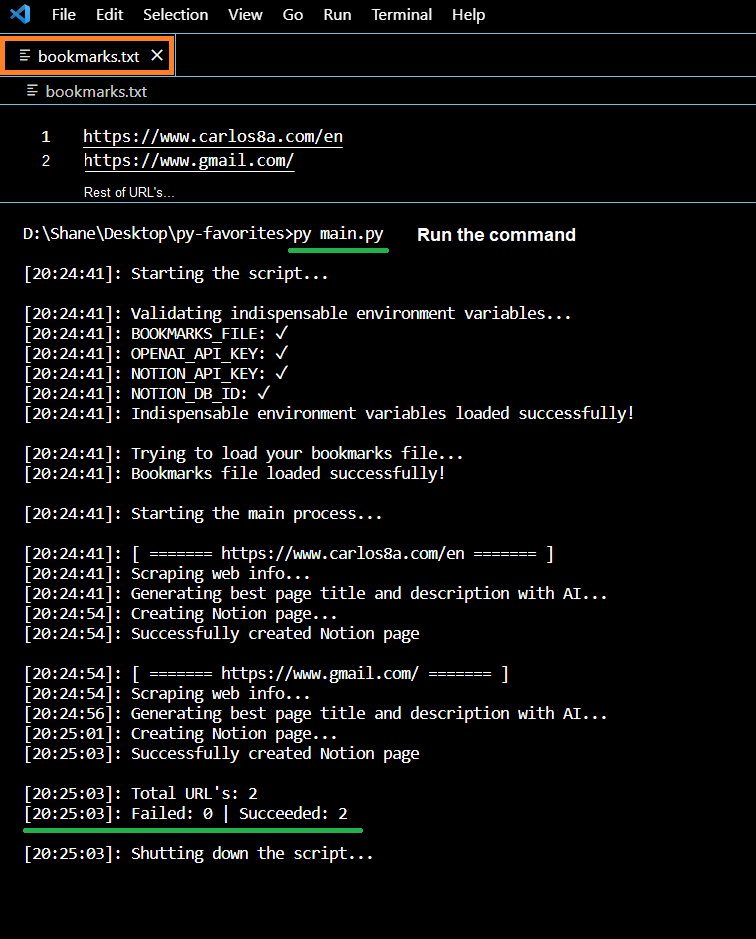
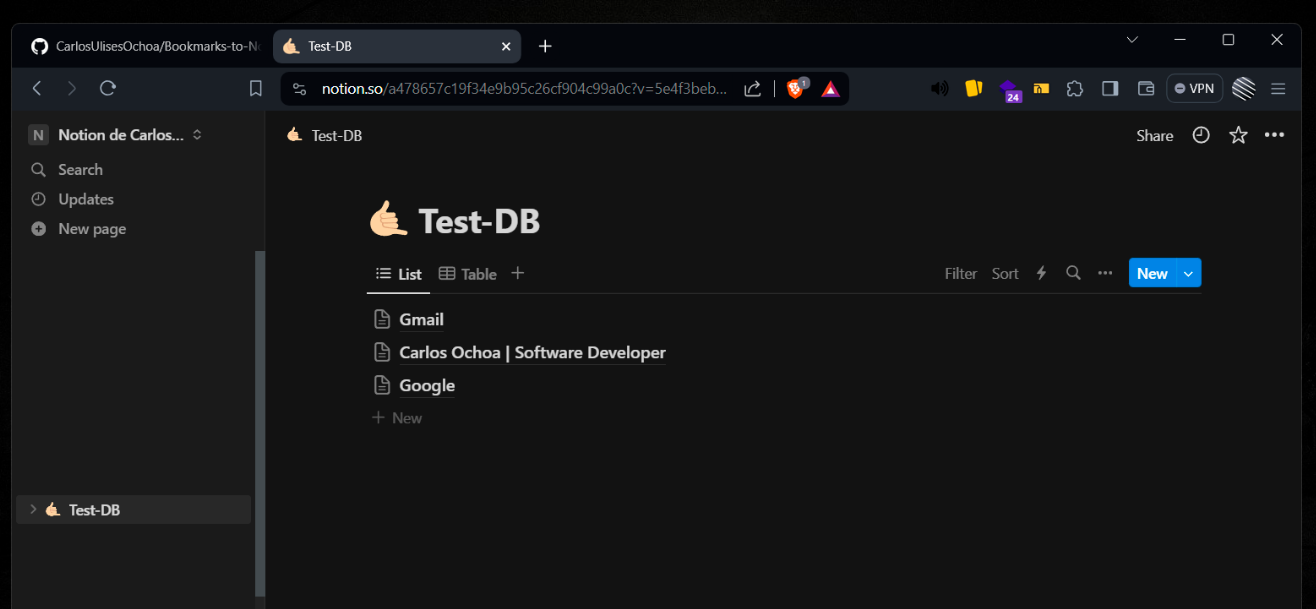
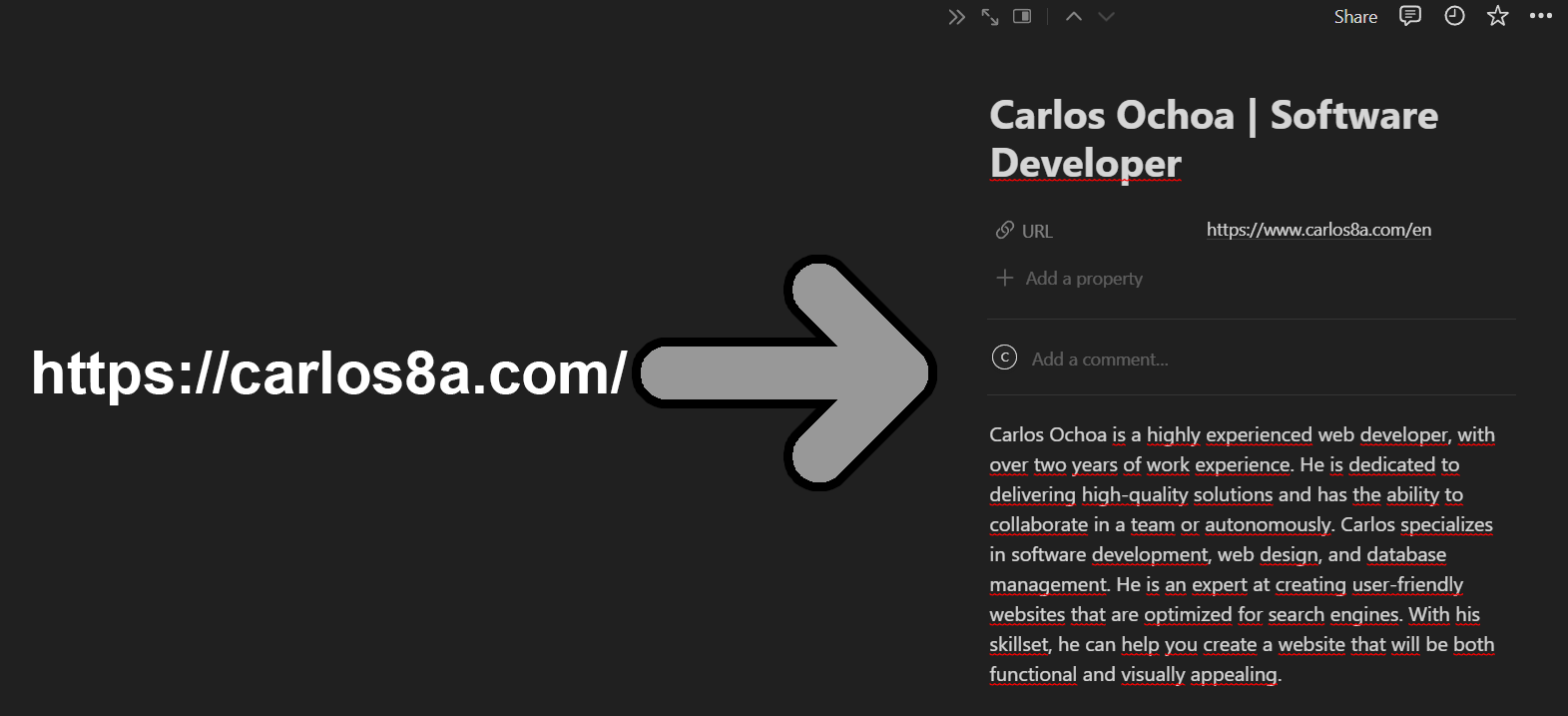
## Screenshots Script running:  Pages created in the Notion DB  Generated page content (includes direct link, title, and description enriched with AI) 
## Prerequisites In order to run this script, you will need: - Python 3.8 or higher - A Notion account - An OpenAI account - The bookmarks file you want to import into Notion (compatible with any text format: *.txt, *.html, etc)
## How to run 1. Rename `.env.template` to `.env` 2. Inside `.env` set the value to environment variables ([How to do that?](#environment-variables)) 3. Add your URL's inside the file you specified. (default is bookmarks.txt) 4. Install the required Python packages using pip. pip install -r requirements.txt 5. Run the script: py main.py The script will read the URLs from the bookmarks file, scrape each web page, process the scraped information, and create a new page in your Notion DB.
## Environment variables - `BOOKMARKS_FILE`: Relative path to your bookmarks file. (Required) - `OPENAI_API_KEY`: Your OpenAI's API. (Required) - `NOTION_API_KEY`: Your Notion's API. (Required) - `NOTION_DB_ID`: The ID of the Notion database where the pages will be created. (Required) - `USER_AGENT`: The User-Agent header value to be used when making HTTP requests. (Optional) - `LANGUAGE`: The language to be used when processing the scraped information with OpenAI's language model. (Optional) Note: Instructions on how to get the API key values and database ID can be found in the [How to get required API key values](#how-to-get-required-api-key-values) section.
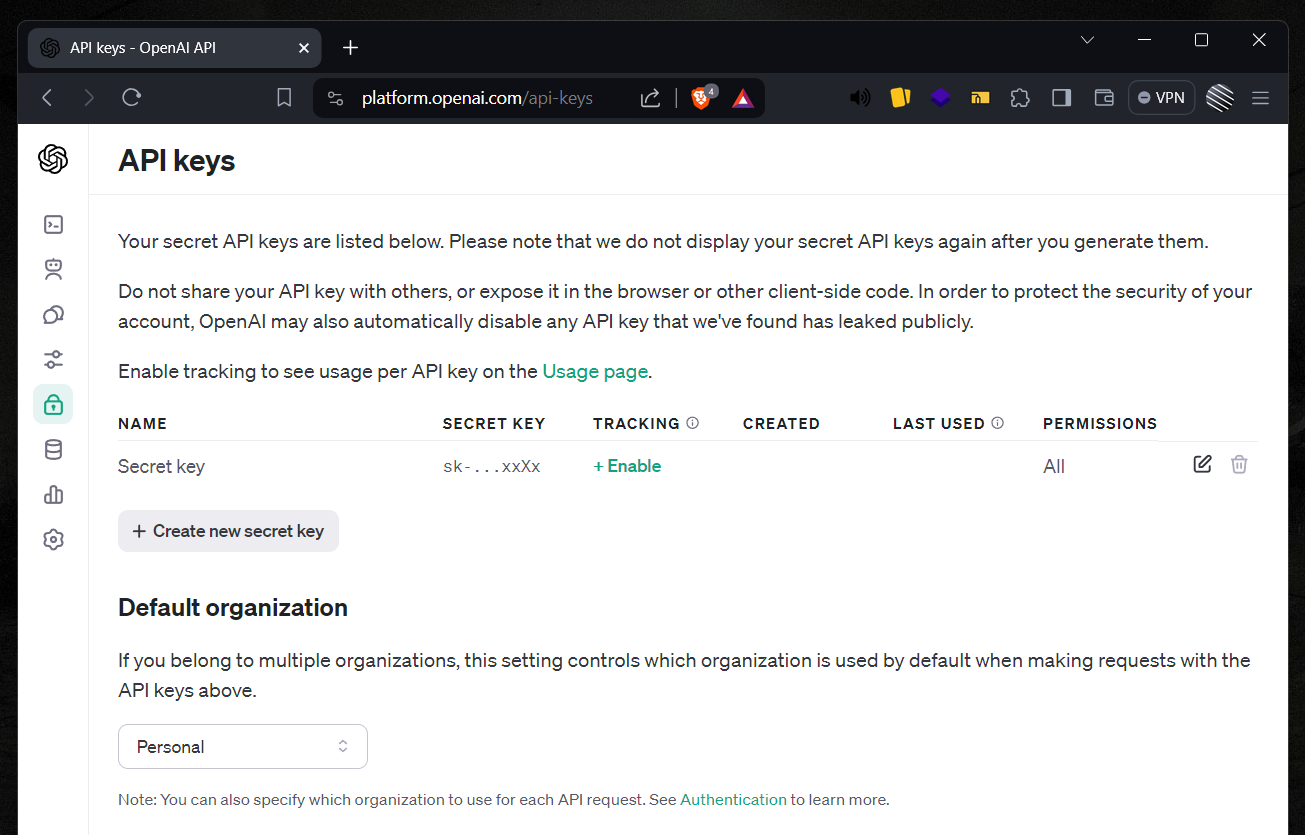
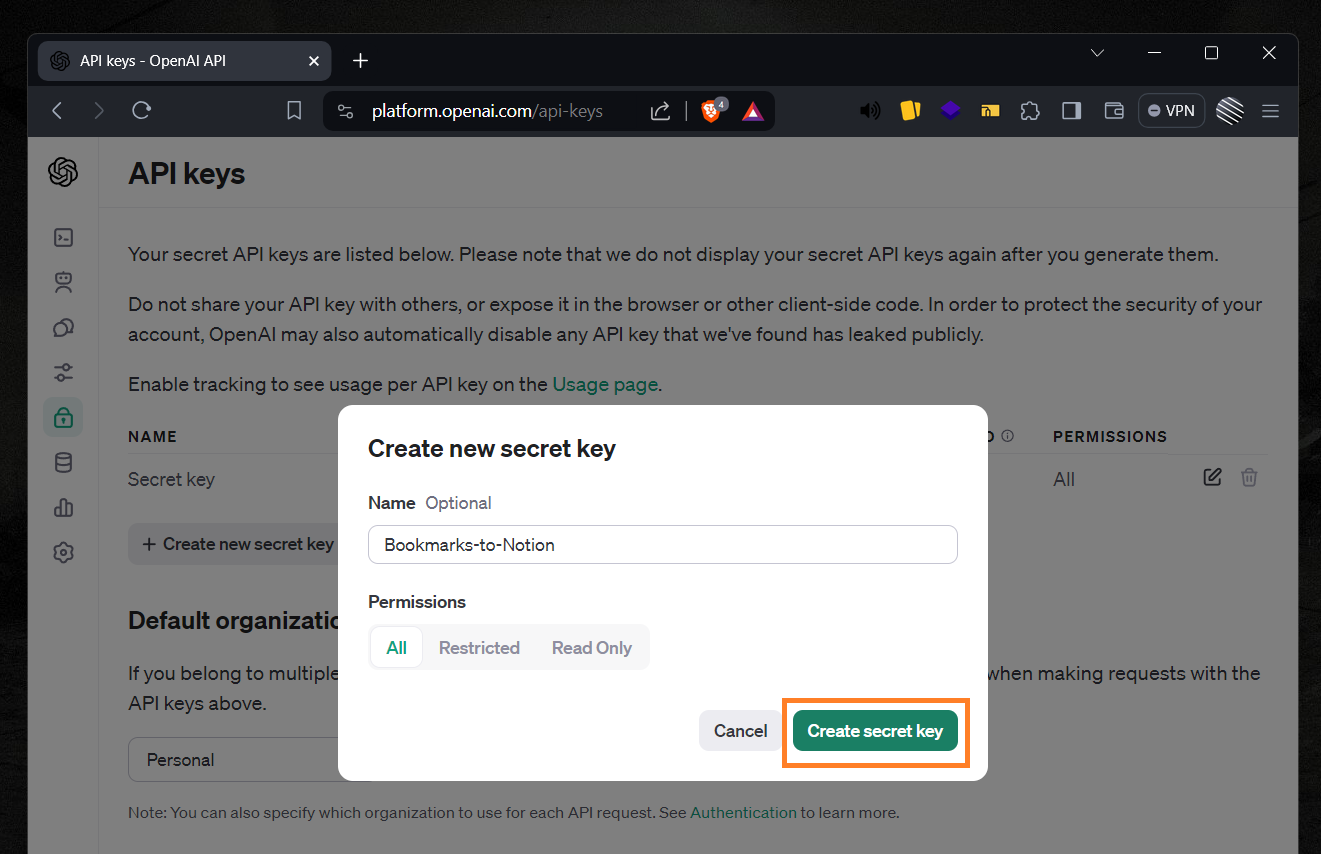
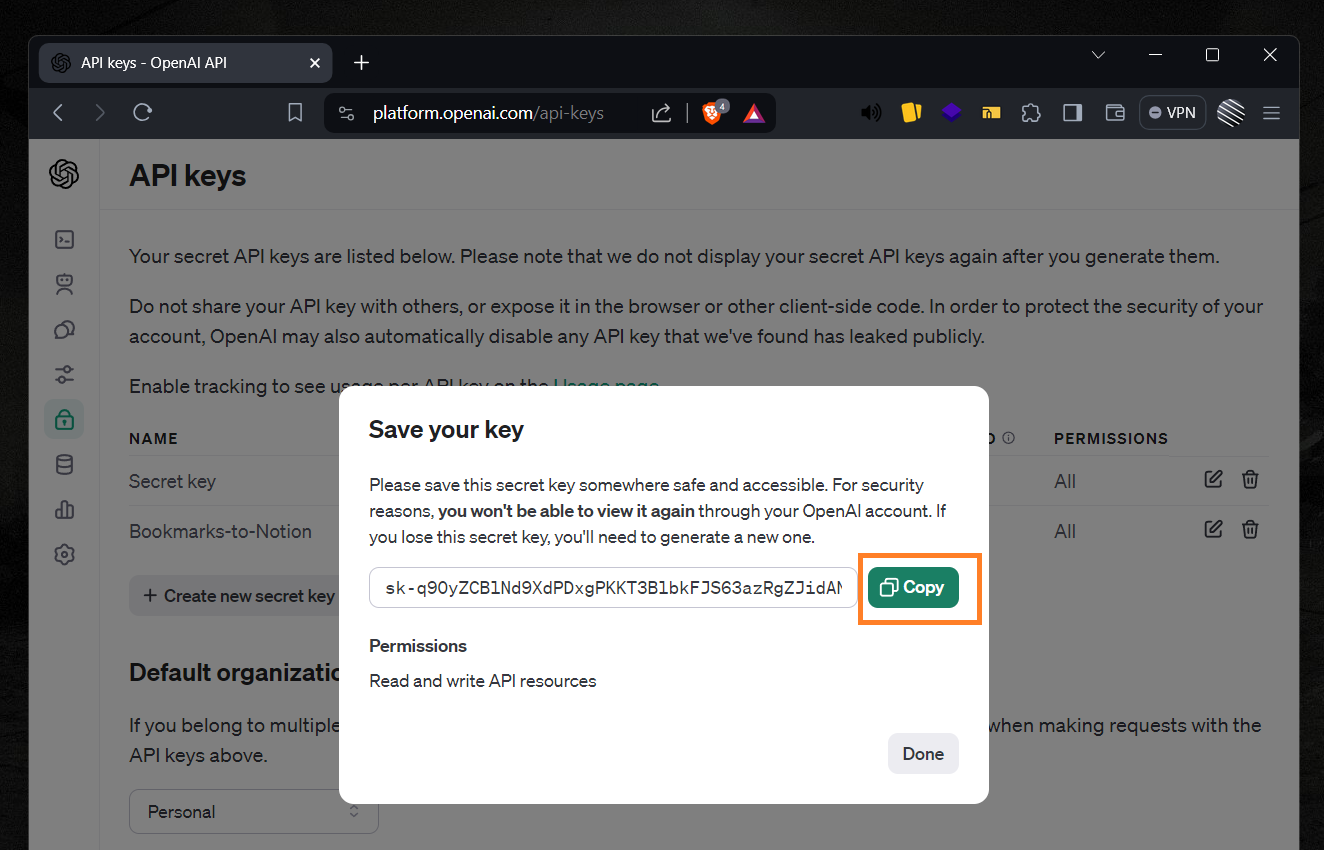
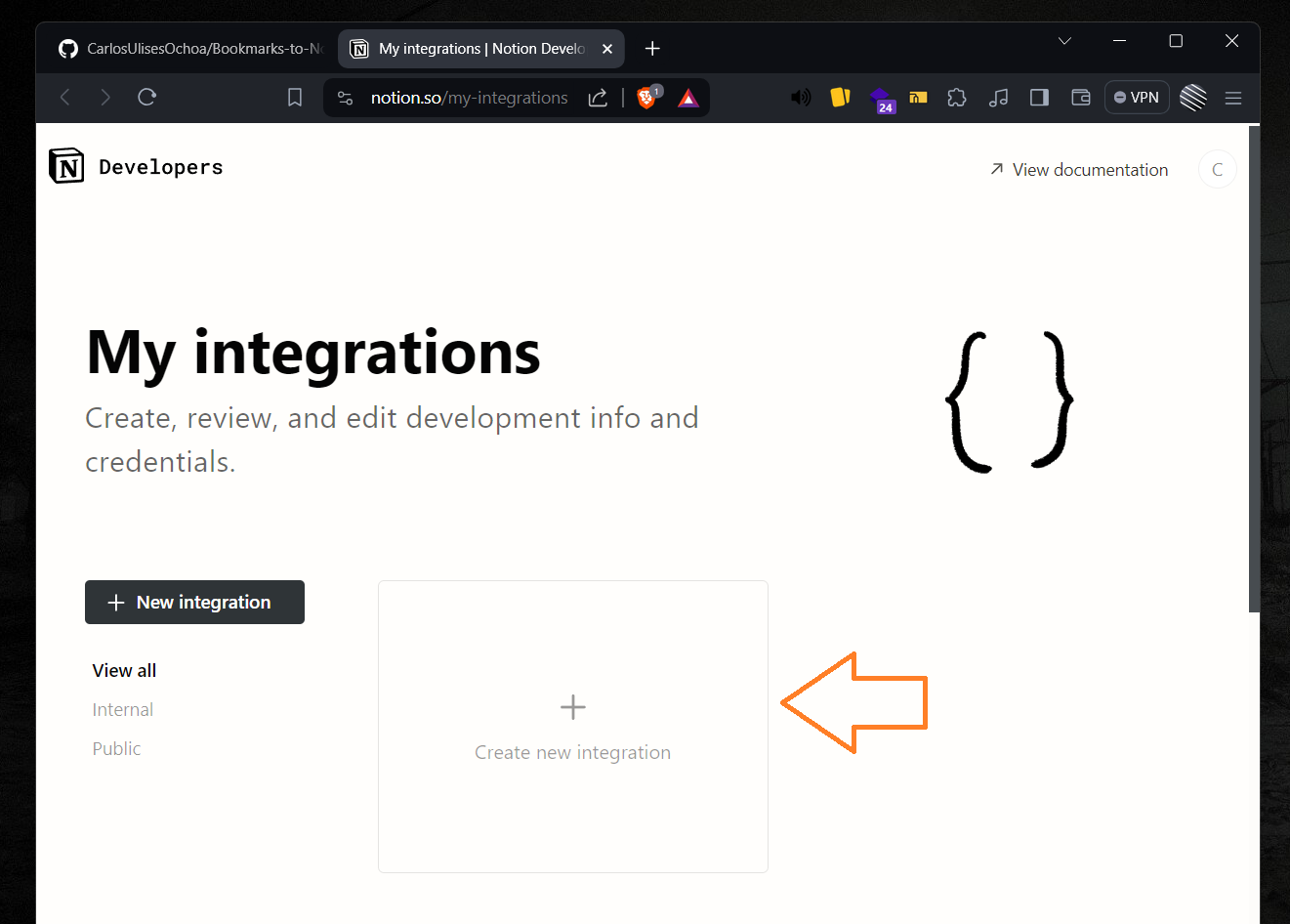
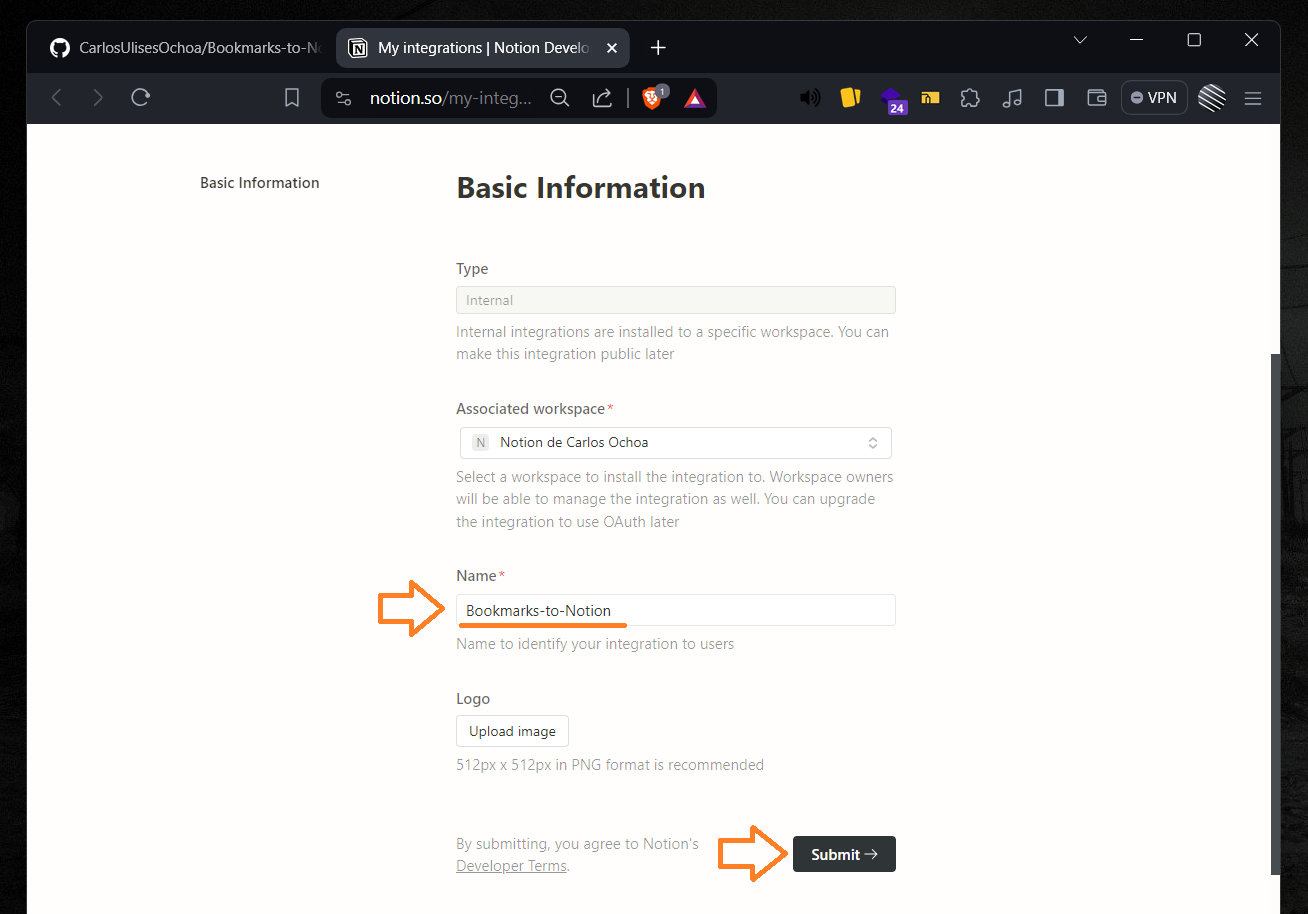
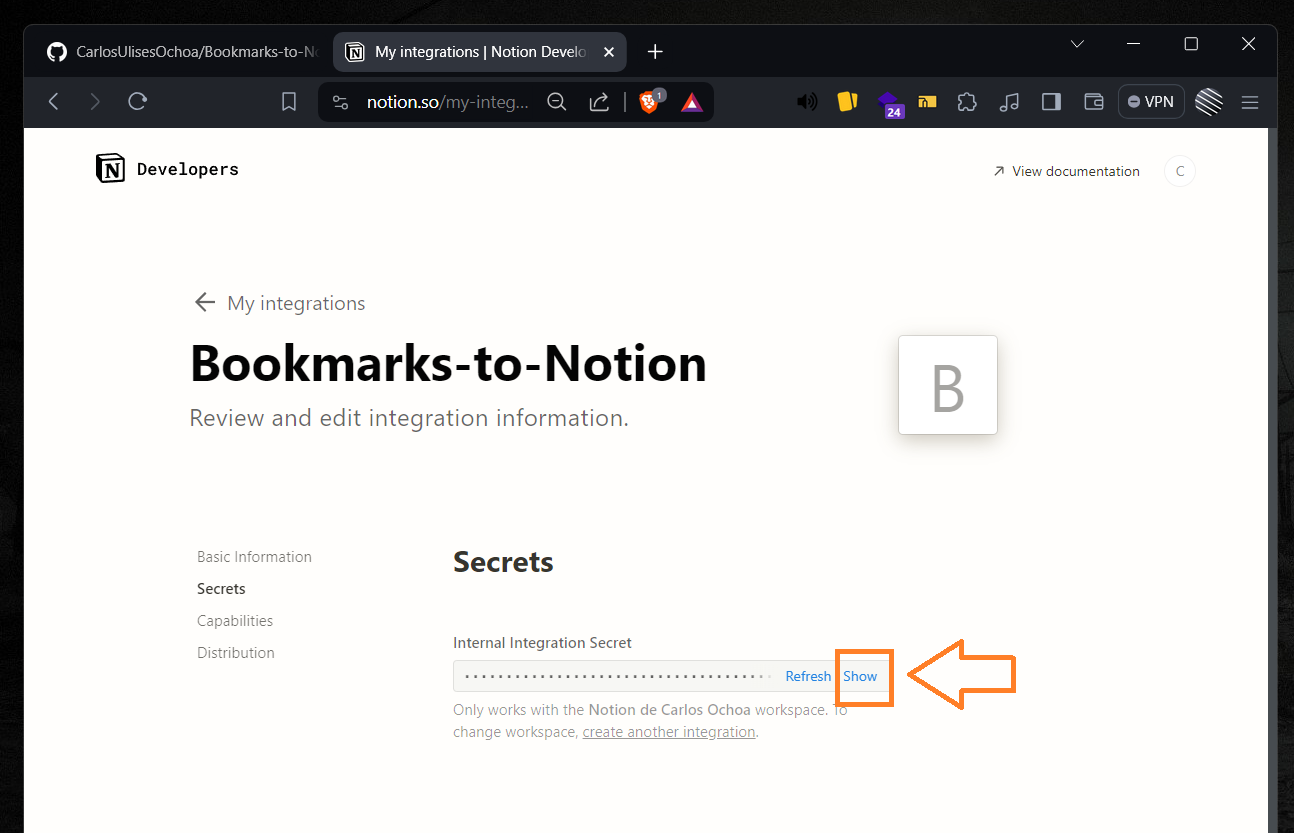
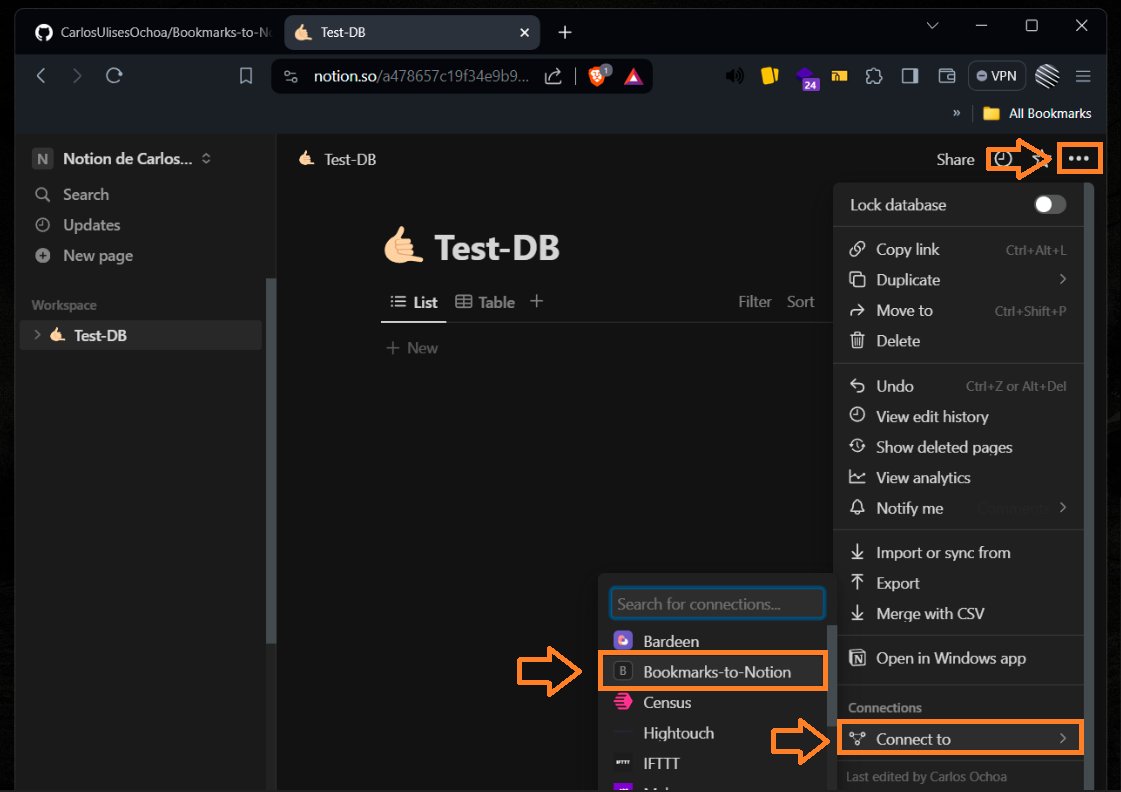
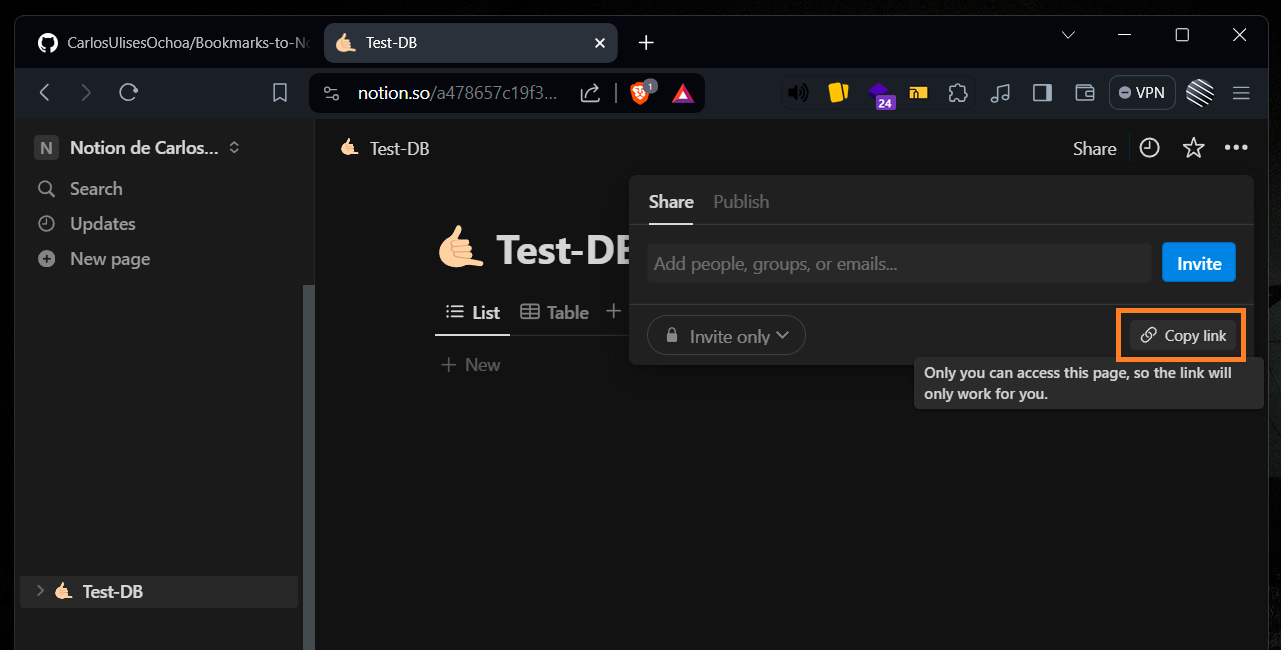
## How to get required API key values Instructions to get required API key values: ### How to get OPENAI_API_KEY 1. Go directly to OpenAI API keys section: https://platform.openai.com/api-keys) (You must be logged in) 2. Click on "Create new secret key"  3. Now you can choose a name, after that click on "Create secret key"  4. That's it, now you got the value for OPENAI_API_KEY  Note: You may need to provide additional information or complete additional steps to verify your identity or payment information before you can generate an API key. ### How to get NOTION_API_KEY 1. Go to my integrations page: https://www.notion.com/my-integrations (You must be logged in) 2. Click on 'Create new integration'  3. Fill this form and click 'Submit'  4. Now here is your Notion API key, click on 'Show' and copy it!  5. Congrats, now you got the value for NOTION_API_KEY. ### How to get NOTION_DB_ID 1. Go to the Notion website (https://www.notion.com/). 2. Log in to your account. 3. Create a new database 4. Give access to Bookmarks-to-Notion integration. Just click three dots icon -> Connect to -> Bookmarks-to-Notion  5. Click on 'Share' and click on 'Copy link' button.  6. Paste the link into a text editor or a web browser. 7. Look for the string of characters between the last two slashes in the URL. This is the database ID.  8. Copy the database ID and you got the value for NOTION_DB_ID.
## License This project is released under the [MIT License](LICENSE).
## About developer Visit my web [Carlos Ochoa](https://carlos8a.com)
**Note:** If you encounter any issues with the script, please report them [here](https://github.com/CarlosUlisesOchoa/Bookmarks-to-Notion/issues). Contributions are welcome!
Bookmarks2Notion is a script designed to import your browser bookmarks into Notion. Using a combination of web scraping and OpenAI API, it creates a new page in your Notion database for each bookmarked URL, allowing you to easily organize and access your bookmarks in one central location.
## Table of Contents - [Screenshots](#screenshots) - [Prerequisites](#prerequisites) - [How to run](#how-to-run) - [Environment variables](#environment-variables) - [How to get required API key values](#how-to-get-required-api-key-values) - [License](#license) - [About developer](#about-developer)
## Screenshots Script running:  Pages created in the Notion DB  Generated page content (includes direct link, title, and description enriched with AI) 
## Prerequisites In order to run this script, you will need: - Python 3.8 or higher - A Notion account - An OpenAI account - The bookmarks file you want to import into Notion (compatible with any text format: *.txt, *.html, etc)
## How to run 1. Rename `.env.template` to `.env` 2. Inside `.env` set the value to environment variables ([How to do that?](#environment-variables)) 3. Add your URL's inside the file you specified. (default is bookmarks.txt) 4. Install the required Python packages using pip. pip install -r requirements.txt 5. Run the script: py main.py The script will read the URLs from the bookmarks file, scrape each web page, process the scraped information, and create a new page in your Notion DB.
## Environment variables - `BOOKMARKS_FILE`: Relative path to your bookmarks file. (Required) - `OPENAI_API_KEY`: Your OpenAI's API. (Required) - `NOTION_API_KEY`: Your Notion's API. (Required) - `NOTION_DB_ID`: The ID of the Notion database where the pages will be created. (Required) - `USER_AGENT`: The User-Agent header value to be used when making HTTP requests. (Optional) - `LANGUAGE`: The language to be used when processing the scraped information with OpenAI's language model. (Optional) Note: Instructions on how to get the API key values and database ID can be found in the [How to get required API key values](#how-to-get-required-api-key-values) section.
## How to get required API key values Instructions to get required API key values: ### How to get OPENAI_API_KEY 1. Go directly to OpenAI API keys section: https://platform.openai.com/api-keys) (You must be logged in) 2. Click on "Create new secret key"  3. Now you can choose a name, after that click on "Create secret key"  4. That's it, now you got the value for OPENAI_API_KEY  Note: You may need to provide additional information or complete additional steps to verify your identity or payment information before you can generate an API key. ### How to get NOTION_API_KEY 1. Go to my integrations page: https://www.notion.com/my-integrations (You must be logged in) 2. Click on 'Create new integration'  3. Fill this form and click 'Submit'  4. Now here is your Notion API key, click on 'Show' and copy it!  5. Congrats, now you got the value for NOTION_API_KEY. ### How to get NOTION_DB_ID 1. Go to the Notion website (https://www.notion.com/). 2. Log in to your account. 3. Create a new database 4. Give access to Bookmarks-to-Notion integration. Just click three dots icon -> Connect to -> Bookmarks-to-Notion  5. Click on 'Share' and click on 'Copy link' button.  6. Paste the link into a text editor or a web browser. 7. Look for the string of characters between the last two slashes in the URL. This is the database ID.  8. Copy the database ID and you got the value for NOTION_DB_ID.
## License This project is released under the [MIT License](LICENSE).
## About developer Visit my web [Carlos Ochoa](https://carlos8a.com)
**Note:** If you encounter any issues with the script, please report them [here](https://github.com/CarlosUlisesOchoa/Bookmarks-to-Notion/issues). Contributions are welcome!