ufrisk/pcileech
GitHub: ufrisk/pcileech
PCILeech是一款利用PCIe硬件设备通过DMA方式读写目标系统内存的攻击与取证工具,支持硬件和软件两种内存获取模式,可执行内核代码注入、密码绕过、文件系统挂载等多种红队和取证任务。
Stars: 7762 | Forks: 1005
# PCILeech 概述:
PCILeech 使用 PCIe 硬件设备来读取和写入目标系统的内存。这是通过 PCIe 上的 DMA 实现的。目标系统上不需要安装任何驱动程序。
PCILeech 也可以在没有硬件的情况下工作,它结合了 LeechCore 库支持的各种软件内存获取方法——包括使用 DumpIt 或 WinPmem 捕获远程实时内存。PCILeech 还支持本地内存捕获以及多种内存转储文件格式。
PCILeech 支持多种内存获取设备,包括基于硬件和基于软件的设备。基于 USB3380 的硬件原生只能读取 4GB 内存,但如果首先将内核模块 (KMD) 插入到目标系统内核中,则能够读取所有内存。基于 FPGA 的硬件和基于软件的方法能够读取所有内存。
PCILeech 能够将各种内核植入物插入到目标内核中——允许通过“挂载的驱动器”轻松访问实时内存和文件系统。它还可以移除登录密码要求、加载未签名驱动程序、执行代码以及生成系统 shell。PCILeech 可在 Windows 和 Linux 上运行。目前支持的目标系统为以下系统的 x64 版本:UEFI、Linux、FreeBSD 和 Windows。这需要对内存的写入权限(USB3380 硬件、FPGA 硬件、LiveCloudKd 或 CVE-2018-1038 "Total Meltdown")。
若要开始使用,请克隆仓库中的源码或下载最新的[二进制文件、模块和配置文件](https://github.com/ufrisk/pcileech/releases/latest)。
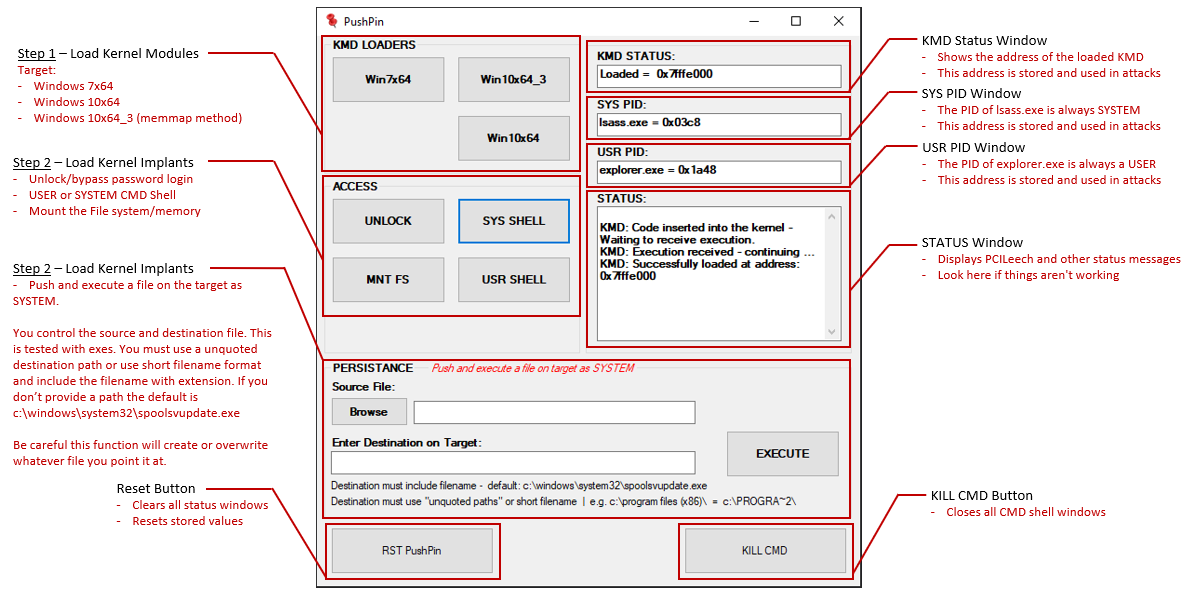
用于 PCILeech 的 [PushPin GUI 前端](https://github.com/LuckyPi/PushPin) 使常见的红队任务变得超级简单。请注意,PushPin 不是官方 PCILeech 发行版的一部分。


 # 功能特性:
* 以 >150MB/s 的速度从目标系统获取内存。
* 从远程 LeechService 获取远程内存。
* 将数据写入目标系统内存。
* 在原生 DMA 模式下可访问 4GB 内存(USB3380 硬件)。
* 在原生 DMA 模式下可访问所有内存(FPGA 硬件)。
* 如果加载了内核模块 (KMD),则可访问所有内存。
* 原生 PCIe TLP 访问(FPGA 硬件)。
* 将实时 RAM 挂载为文件 [Linux、Windows、macOS Sierra*]。
* 将文件系统挂载为驱动器 [Linux、Windows、macOS Sierra*]。
* 在目标系统上执行内核代码。
* 生成系统 shell 和其他可执行文件 [Windows]。
* 拉取和推送文件 [Linux、FreeBSD、Windows、macOS Sierra*]。
* 补丁 / 解锁(移除密码要求)[Windows、macOS Sierra*]。
* 轻松创建自定义内核 shellcode 和/或自定义签名。
* 通过网络连接到远程 LeechAgent 以远程执行以下操作:
* 通过网络转储物理内存。
* 在远程主机上执行 Python 内存分析脚本。
* 此处未列出的更多功能...
\*) 不支持 macOS High Sierra 及更高版本。
# 内存获取方法:
PCILeech 支持基于硬件和基于软件的内存获取方法。所有的内存获取均由 [LeechCore](https://github.com/ufrisk/LeechCore) 库处理。
### 基于硬件的内存获取方法:
请在下方查找支持的基于硬件的内存获取方法摘要。所有基于硬件的内存获取方法均支持 Windows 和 Linux。但是,基于 FPGA 的方法在 Linux 上会有轻微的性能下降,最大速度约为:90MB/s,而在 Windows 上为 150MB/s。
| 设备 | 类型 | 接口 | 速度 | 64位内存访问 | PCIe TLP 访问 | 项目
# 功能特性:
* 以 >150MB/s 的速度从目标系统获取内存。
* 从远程 LeechService 获取远程内存。
* 将数据写入目标系统内存。
* 在原生 DMA 模式下可访问 4GB 内存(USB3380 硬件)。
* 在原生 DMA 模式下可访问所有内存(FPGA 硬件)。
* 如果加载了内核模块 (KMD),则可访问所有内存。
* 原生 PCIe TLP 访问(FPGA 硬件)。
* 将实时 RAM 挂载为文件 [Linux、Windows、macOS Sierra*]。
* 将文件系统挂载为驱动器 [Linux、Windows、macOS Sierra*]。
* 在目标系统上执行内核代码。
* 生成系统 shell 和其他可执行文件 [Windows]。
* 拉取和推送文件 [Linux、FreeBSD、Windows、macOS Sierra*]。
* 补丁 / 解锁(移除密码要求)[Windows、macOS Sierra*]。
* 轻松创建自定义内核 shellcode 和/或自定义签名。
* 通过网络连接到远程 LeechAgent 以远程执行以下操作:
* 通过网络转储物理内存。
* 在远程主机上执行 Python 内存分析脚本。
* 此处未列出的更多功能...
\*) 不支持 macOS High Sierra 及更高版本。
# 内存获取方法:
PCILeech 支持基于硬件和基于软件的内存获取方法。所有的内存获取均由 [LeechCore](https://github.com/ufrisk/LeechCore) 库处理。
### 基于硬件的内存获取方法:
请在下方查找支持的基于硬件的内存获取方法摘要。所有基于硬件的内存获取方法均支持 Windows 和 Linux。但是,基于 FPGA 的方法在 Linux 上会有轻微的性能下降,最大速度约为:90MB/s,而在 Windows 上为 150MB/s。
| 设备 | 类型 | 接口 | 速度 | 64位内存访问 | PCIe TLP 访问 | 项目
赞助者 | | -------------------------------------------------------------------------------------------| ---- | --------- | ----- | -------------------- | --------------- | ------------------ | | [ZDMA](https://github.com/ufrisk/pcileech-fpga-dev/blob/master/ZDMA) | [FPGA](https://github.com/ufrisk/LeechCore/wiki/Device_FPGA) | Thunderbolt3 | 1000MB/s | 是 | 是 | 💖 | | [GBOX](https://github.com/ufrisk/pcileech-fpga-dev/blob/master/GBOX) | [FPGA](https://github.com/ufrisk/LeechCore/wiki/Device_FPGA) | OCuLink | 400MB/s | 是 | 是 | 💖 | | [LeetDMA](https://github.com/ufrisk/pcileech-fpga) | [FPGA](https://github.com/ufrisk/LeechCore/wiki/Device_FPGA) | USB-C | 190MB/s | 是 | 是 | 💖 | | [CaptainDMA M2](https://github.com/ufrisk/pcileech-fpga) | [FPGA](https://github.com/ufrisk/LeechCore/wiki/Device_FPGA) | USB-C | 190MB/s | 是 | 是 | 💖 | | [CaptainDMA M2 100T](https://github.com/ufrisk/pcileech-fpga) | [FPGA](https://github.com/ufrisk/LeechCore/wiki/Device_FPGA) | USB-C | 220MB/s | 是 | 是 | 💖 | | [CaptainDMA 4.1th](https://github.com/ufrisk/pcileech-fpga) | [FPGA](https://github.com/ufrisk/LeechCore/wiki/Device_FPGA) | USB-C | 190MB/s | 是 | 是 | 💖 | | [CaptainDMA 75T](https://github.com/ufrisk/pcileech-fpga) | [FPGA](https://github.com/ufrisk/LeechCore/wiki/Device_FPGA) | USB-C | 200MB/s | 是 | 是 | 💖 | | [CaptainDMA 100T](https://github.com/ufrisk/pcileech-fpga) | [FPGA](https://github.com/ufrisk/LeechCore/wiki/Device_FPGA) | USB-C | 220MB/s | 是 | 是 | 💖 | | [AC701/FT601](https://github.com/ufrisk/pcileech-fpga/tree/master/ac701_ft601) | [FPGA](https://github.com/ufrisk/LeechCore/wiki/Device_FPGA) | USB3 | 190MB/s | 是 | 是 | | | USB3380-EVB | [USB3380](https://github.com/ufrisk/LeechCore/wiki/Device_USB3380) | USB3 | 150MB/s | 否 | 否 | | | DMA patched HP iLO | [BMC](https://github.com/ufrisk/LeechCore/wiki/Device_RawTCP) | TCP | 1MB/s | 是 | 否 | | ### 基于软件的内存获取方法: 请在下方查找支持的基于软件的内存获取方法摘要。请注意,LeechService 仅提供与远程 LeechCore 库的网络连接。一旦连接,即可使用基于硬件和软件的内存获取方法。 | 设备 | 类型 | 易失性 | 写入 | Linux 支持 | 插件 | | -------------------------- | ---------------- | -------- | ----- | ------------- | ------ | | [RAW 物理内存转储](https://github.com/ufrisk/LeechCore/wiki/Device_File) | 文件 | 否 | 否 | 是 | 否 | | [完整 Microsoft 崩溃转储](https://github.com/ufrisk/LeechCore/wiki/Device_File) | 文件 | 否 | 否 | 是 | 否 | | [完整 ELF Core 转储](https://github.com/ufrisk/LeechCore/wiki/Device_File) | 文件 | 否 | 否 | 是 | 否 | | [VMware](https://github.com/ufrisk/LeechCore/wiki/Device_VMWare) | 实时 内存 | 是 | 是 | 否 | 否 | | [VMware 内存保存文件](https://github.com/ufrisk/LeechCore/wiki/Device_File) | 文件 | 否 | 否 | 是 | 否 | | [TotalMeltdown](https://github.com/ufrisk/LeechCore/wiki/Device_Totalmeltdown) | CVE-2018-1038 | 是 | 是 | 否 | 否 | | [DumpIt /LIVEKD](https://github.com/ufrisk/LeechCore/wiki/Device_DumpIt) | 实时 内存 | 是 | 否 | 否 | 否 | | [WinPMEM](https://github.com/ufrisk/LeechCore/wiki/Device_WinPMEM) | 实时 内存 | 是 | 否 | 否 | 否 | | [LiveKd](https://github.com/ufrisk/LeechCore/wiki/Device_LiveKd) | 实时 内存 | 是 | 否 | 否 | 否 | | [LiveCloudKd](https://github.com/ufrisk/LeechCore/wiki/Device_LiveCloudKd) | 实时 内存 | 是 | 是 | 否 | 是 | | [Hyper-V 保存的状态](https://github.com/ufrisk/LeechCore/wiki/Device_HyperV_SavedState) | 文件 | 否 | 否 | 否 | 是 | | [LeechAgent*](https://github.com/ufrisk/LeechCore/wiki/Device_Remote) | 远程 | | | 否 | 否 | # 安装 PCILeech: 请访问 PCILeech 的 GitHub 仓库,以确保您拥有最新版本的 PCILeech:https://github.com/ufrisk/pcileech 从最新版本中获取最新的[二进制文件、模块和配置文件](https://github.com/ufrisk/pcileech/releases/latest)。 或者克隆仓库并从源代码编译。 #### Windows: 有关在 Windows 上运行 PCILeech 的信息,请参阅 [Windows 上的 PCILeech](https://github.com/ufrisk/pcileech/wiki/PCILeech-on-Windows) 指南。 如果使用 USB3380 硬件,则必须安装 Google Android USB 驱动程序。请从以下地址下载 Google Android USB 驱动程序:http://developer.android.com/sdk/win-usb.html#download 并解压该驱动程序。
如果 FPGA 与 FT601 USB3 扩展卡或 PCIeScreamer 配合使用,则必须安装 FTDI 驱动程序。从 FTDI 下载 64 位版本的 [`FTD3XX.dll`](https://ftdichip.com/wp-content/uploads/2023/11/FTD3XXLibrary_v1.3.0.8.zip) 并将其放置在 `pcileech.exe` 同目录下。
要在 Windows 中将实时 RAM 和目标文件系统挂载为驱动器,必须安装 Dokany2 文件系统库。请在以下地址下载并安装最新稳定版本的 Dokany2:https://github.com/dokan-dev/dokany/releases/latest #### Linux: 有关在 Linux 上运行 PCILeech 的信息,请参阅 [Linux 上的 PCILeech](https://github.com/ufrisk/pcileech/wiki/PCILeech-on-Linux) 指南。 # 示例: 请查阅[项目 Wiki 页面](https://github.com/ufrisk/pcileech/wiki/)以获取更多示例。Wiki 目前仍处于构建阶段,部分信息可能暂缺。 挂载目标系统的实时 RAM 和文件系统,需要已加载 KMD。在此示例中使用了 `0x11abc000`。 * ` pcileech.exe mount -kmd 0x11abc000 ` 显示特定内核植入物的帮助信息,在本例中为 lx64_filepull 内核植入物。 * ` pcileech.exe lx64_filepull -help ` 显示 dump 命令的帮助信息。 * ` pcileech.exe dump -help ` 假设内核模块已加载至地址:`0x7fffe000`,转储目标系统的所有内存。 * ` pcileech.exe dump -kmd 0x7fffe000 ` 强制转储包括可访问内存映射设备在内的 4GB 以下内存,在 USB3380 上使用更稳定的 USB2 方式。 * ` pcileech.exe dump -force -device usb3380://usb=2 ` 接收 PCIe TLP(事务层协议包)并在屏幕上打印出来(需要正确配置的 FPGA 开发板)。 * ` pcileech.exe tlp -vv -wait 1000 ` 探测/枚举目标系统的内存,以查找可读内存页和最大内存。(仅限 FPGA 硬件)。 * ` pcileech.exe probe ` 转储最小和最大地址之间的内存,遇到失败页面不停止。对 64 位内存的原生访问仅在 FPGA 硬件上受支持。 * ` pcileech.exe dump -min 0x0 -max 0x21e5fffff -force ` 转储所有内存,尝试从目标系统注册表定位内存映射,以避免转储可能导致目标系统死机的潜在无效内存。 * ` pcileech.exe dump -memmap auto ` 强制使用特定设备(而不是默认的自动检测)。`pmem` 设备不会被自动检测。 * ` pcileech.exe pagedisplay -min 0x1000 -device pmem ` 通过由 Kerberos 加密且双向认证的连接,从远程 LeechAgent 转储远程内存。 * ` pcileech.exe dump -device pmem -remote rpc://computer$@ad.contoso.com ` 使用 LeechAgent 嵌入的 Python 环境,在远程计算机上执行 Python 分析脚本 `find-rwx.py`。 * ` pcileech.exe agent-execpy -in find-rwx.py -device pmem -remote rpc://computer$@ad.contoso.com ` 修补 pid 为 432 的虚拟进程内存(在此示例中为 lsass.exe)。 * ` pcileech.exe patch -pid 432 -sig unlock_win10x64.sig ` # 限制/已知问题: * 如果操作系统使用 IOMMU/VT-d,则无法工作。这是 macOS 的默认设置(除非在恢复模式下禁用)。启用了基于虚拟化的安全功能的 Windows 10/11 无法完全正常工作。 * 最近的 Windows 和 Linux 版本默认阻止 DMA。 # PCILeech 和 MemProcFS 社区: 觉得这些有点眼花缭乱?还是只想问个简单的问题?快加入 Discord 上的 PCILeech 和 MemProcFS DMA 社区服务器吧! # 构建:
可以在此仓库的[发布版块](https://github.com/ufrisk/pcileech/releases/latest)中找到二进制文件。如果用户希望构建自己的版本,这也是可行的。有关构建 PCILeech 的更多信息,请参阅 [Windows 上的 PCILeech](https://github.com/ufrisk/pcileech/wiki/PCILeech-on-Windows) 或 [Linux 上的 PCILeech](https://github.com/ufrisk/pcileech/wiki/PCILeech-on-Linux)。PCILeech 还依赖于 LeechCore,以及(可选,用于某些额外功能)The Memory Process File System,它们都必须单独编译。
# 链接:
* Twitter: [](https://twitter.com/intent/follow?screen_name=UlfFrisk)
* Discord: [](https://pcileech.com/discord)
* PCILeech: https://github.com/ufrisk/pcileech
* PCILeech FPGA: https://github.com/ufrisk/pcileech-fpga
* LeechCore: https://github.com/ufrisk/LeechCore
* MemProcFS: https://github.com/ufrisk/MemProcFS
* 博客: http://blog.frizk.net
* PushPin: PCILeech 的 GUI: https://github.com/LuckyPi/PushPin
# 更新日志:
[v4.10](https://github.com/ufrisk/pcileech/releases/tag/v4.10)
* 在 Linux 上支持 Windows 10 内置签名(依赖于 MemProcFS v4.0)。
* 针对 Windows 和 Linux 的独立发布版。
* 常规清理。
[v4.11](https://github.com/ufrisk/pcileech/releases/tag/v4.11)
* 支持 VMWare Workstation/Player 实时 VM 内存。
* 支持通过 LeechAgent `agent-forensic` 命令进行远程内存分析。
* 远程运行 MemProcFS 取证模式。
* 获取与 ElasticSearch 兼容的 JSON 数据。
[v4.12](https://github.com/ufrisk/pcileech/releases/tag/v4.12)
* 32 位支持 (pcileech 二进制文件)。
[v4.13](https://github.com/ufrisk/pcileech/releases/tag/v4.13)
* 错误修复。
* 挂载改进:
- Windows 主机文件系统支持:升级至 [Dokany2](https://github.com/dokan-dev/dokany/releases)(注意!必须安装 Dokany2!)。
- Linux 主机文件系统支持:添加 FUSE 支持。
# 构建:
可以在此仓库的[发布版块](https://github.com/ufrisk/pcileech/releases/latest)中找到二进制文件。如果用户希望构建自己的版本,这也是可行的。有关构建 PCILeech 的更多信息,请参阅 [Windows 上的 PCILeech](https://github.com/ufrisk/pcileech/wiki/PCILeech-on-Windows) 或 [Linux 上的 PCILeech](https://github.com/ufrisk/pcileech/wiki/PCILeech-on-Linux)。PCILeech 还依赖于 LeechCore,以及(可选,用于某些额外功能)The Memory Process File System,它们都必须单独编译。
# 链接:
* Twitter: [](https://twitter.com/intent/follow?screen_name=UlfFrisk)
* Discord: [](https://pcileech.com/discord)
* PCILeech: https://github.com/ufrisk/pcileech
* PCILeech FPGA: https://github.com/ufrisk/pcileech-fpga
* LeechCore: https://github.com/ufrisk/LeechCore
* MemProcFS: https://github.com/ufrisk/MemProcFS
* 博客: http://blog.frizk.net
* PushPin: PCILeech 的 GUI: https://github.com/LuckyPi/PushPin
# 更新日志:
[v4.10](https://github.com/ufrisk/pcileech/releases/tag/v4.10)
* 在 Linux 上支持 Windows 10 内置签名(依赖于 MemProcFS v4.0)。
* 针对 Windows 和 Linux 的独立发布版。
* 常规清理。
[v4.11](https://github.com/ufrisk/pcileech/releases/tag/v4.11)
* 支持 VMWare Workstation/Player 实时 VM 内存。
* 支持通过 LeechAgent `agent-forensic` 命令进行远程内存分析。
* 远程运行 MemProcFS 取证模式。
* 获取与 ElasticSearch 兼容的 JSON 数据。
[v4.12](https://github.com/ufrisk/pcileech/releases/tag/v4.12)
* 32 位支持 (pcileech 二进制文件)。
[v4.13](https://github.com/ufrisk/pcileech/releases/tag/v4.13)
* 错误修复。
* 挂载改进:
- Windows 主机文件系统支持:升级至 [Dokany2](https://github.com/dokan-dev/dokany/releases)(注意!必须安装 Dokany2!)。
- Linux 主机文件系统支持:添加 FUSE 支持。
示例:`./pcileech mount /home/user/fusemnt/leechfs -kmd`
- 现在可以访问 Windows 目标上除 C: 盘以外的其他本地驱动器。
* Visual Studio 2022 支持。
[v4.14](https://github.com/ufrisk/pcileech/releases/tag/v4.14)
* 进程虚拟内存支持(仅限 Windows)。
- 命令:search、patch、write、display、pagedisplay
- 示例:pcileech patch -pid 732 -sig unlock_win10x64.sig
[v4.15](https://github.com/ufrisk/pcileech/releases/tag/v4.15)
* 支持 MemProcFS v5.0
[v4.16](https://github.com/ufrisk/pcileech/releases/tag/v4.16)
* FPGA 性能改进。
* 添加 `none` 命令。
* 添加 `-bar-ro` 和 `-bar-rw` 选项。
[v4.17](https://github.com/ufrisk/pcileech/releases/tag/v4.17)
* I/O BAR 支持。
* Linux 改进:
- 更新 KMD 签名 (LINUX_X64_48) 以支持最新的 Ubuntu 内核。
- 更新内核模块以支持最新内核。
- 新增 KMD 签名 - LINUX_X64_MAP - 在 `-in` 选项中指定目标系统内核的 System.map。
- 新增内核模块:lx64_exec_root。
* Linux PCIe FPGA 性能改进。
[v4.18](https://github.com/ufrisk/pcileech/releases/tag/v4.18)
* 添加基准测试命令。
* 更新解锁签名。
* 添加 `-psname` 选项。
[v4.19](https://github.com/ufrisk/pcileech/releases/tag/v4.19)
* Linux 稳定性改进及内核模块加载增强。
* Linux clang 编译支持。
* macOS 支持。
最新:
* 错误修复。
* 使用 gRPC 的 Linux LeechAgent 支持 (LeechCore v2.21)。
* 新增:`-no-kmd-mem` 选项,可在加载 KMD 时选择性地禁用 KMD 内存访问(在某些情况下可能有助于提高稳定性)。
* 新增:`-kmd WIN11_X64` - Windows 11 KMD 签名(WIN10_X64_3 的别名)。
# 功能特性:
* 以 >150MB/s 的速度从目标系统获取内存。
* 从远程 LeechService 获取远程内存。
* 将数据写入目标系统内存。
* 在原生 DMA 模式下可访问 4GB 内存(USB3380 硬件)。
* 在原生 DMA 模式下可访问所有内存(FPGA 硬件)。
* 如果加载了内核模块 (KMD),则可访问所有内存。
* 原生 PCIe TLP 访问(FPGA 硬件)。
* 将实时 RAM 挂载为文件 [Linux、Windows、macOS Sierra*]。
* 将文件系统挂载为驱动器 [Linux、Windows、macOS Sierra*]。
* 在目标系统上执行内核代码。
* 生成系统 shell 和其他可执行文件 [Windows]。
* 拉取和推送文件 [Linux、FreeBSD、Windows、macOS Sierra*]。
* 补丁 / 解锁(移除密码要求)[Windows、macOS Sierra*]。
* 轻松创建自定义内核 shellcode 和/或自定义签名。
* 通过网络连接到远程 LeechAgent 以远程执行以下操作:
* 通过网络转储物理内存。
* 在远程主机上执行 Python 内存分析脚本。
* 此处未列出的更多功能...
\*) 不支持 macOS High Sierra 及更高版本。
# 内存获取方法:
PCILeech 支持基于硬件和基于软件的内存获取方法。所有的内存获取均由 [LeechCore](https://github.com/ufrisk/LeechCore) 库处理。
### 基于硬件的内存获取方法:
请在下方查找支持的基于硬件的内存获取方法摘要。所有基于硬件的内存获取方法均支持 Windows 和 Linux。但是,基于 FPGA 的方法在 Linux 上会有轻微的性能下降,最大速度约为:90MB/s,而在 Windows 上为 150MB/s。
| 设备 | 类型 | 接口 | 速度 | 64位内存访问 | PCIe TLP 访问 | 项目赞助者 | | -------------------------------------------------------------------------------------------| ---- | --------- | ----- | -------------------- | --------------- | ------------------ | | [ZDMA](https://github.com/ufrisk/pcileech-fpga-dev/blob/master/ZDMA) | [FPGA](https://github.com/ufrisk/LeechCore/wiki/Device_FPGA) | Thunderbolt3 | 1000MB/s | 是 | 是 | 💖 | | [GBOX](https://github.com/ufrisk/pcileech-fpga-dev/blob/master/GBOX) | [FPGA](https://github.com/ufrisk/LeechCore/wiki/Device_FPGA) | OCuLink | 400MB/s | 是 | 是 | 💖 | | [LeetDMA](https://github.com/ufrisk/pcileech-fpga) | [FPGA](https://github.com/ufrisk/LeechCore/wiki/Device_FPGA) | USB-C | 190MB/s | 是 | 是 | 💖 | | [CaptainDMA M2](https://github.com/ufrisk/pcileech-fpga) | [FPGA](https://github.com/ufrisk/LeechCore/wiki/Device_FPGA) | USB-C | 190MB/s | 是 | 是 | 💖 | | [CaptainDMA M2 100T](https://github.com/ufrisk/pcileech-fpga) | [FPGA](https://github.com/ufrisk/LeechCore/wiki/Device_FPGA) | USB-C | 220MB/s | 是 | 是 | 💖 | | [CaptainDMA 4.1th](https://github.com/ufrisk/pcileech-fpga) | [FPGA](https://github.com/ufrisk/LeechCore/wiki/Device_FPGA) | USB-C | 190MB/s | 是 | 是 | 💖 | | [CaptainDMA 75T](https://github.com/ufrisk/pcileech-fpga) | [FPGA](https://github.com/ufrisk/LeechCore/wiki/Device_FPGA) | USB-C | 200MB/s | 是 | 是 | 💖 | | [CaptainDMA 100T](https://github.com/ufrisk/pcileech-fpga) | [FPGA](https://github.com/ufrisk/LeechCore/wiki/Device_FPGA) | USB-C | 220MB/s | 是 | 是 | 💖 | | [AC701/FT601](https://github.com/ufrisk/pcileech-fpga/tree/master/ac701_ft601) | [FPGA](https://github.com/ufrisk/LeechCore/wiki/Device_FPGA) | USB3 | 190MB/s | 是 | 是 | | | USB3380-EVB | [USB3380](https://github.com/ufrisk/LeechCore/wiki/Device_USB3380) | USB3 | 150MB/s | 否 | 否 | | | DMA patched HP iLO | [BMC](https://github.com/ufrisk/LeechCore/wiki/Device_RawTCP) | TCP | 1MB/s | 是 | 否 | | ### 基于软件的内存获取方法: 请在下方查找支持的基于软件的内存获取方法摘要。请注意,LeechService 仅提供与远程 LeechCore 库的网络连接。一旦连接,即可使用基于硬件和软件的内存获取方法。 | 设备 | 类型 | 易失性 | 写入 | Linux 支持 | 插件 | | -------------------------- | ---------------- | -------- | ----- | ------------- | ------ | | [RAW 物理内存转储](https://github.com/ufrisk/LeechCore/wiki/Device_File) | 文件 | 否 | 否 | 是 | 否 | | [完整 Microsoft 崩溃转储](https://github.com/ufrisk/LeechCore/wiki/Device_File) | 文件 | 否 | 否 | 是 | 否 | | [完整 ELF Core 转储](https://github.com/ufrisk/LeechCore/wiki/Device_File) | 文件 | 否 | 否 | 是 | 否 | | [VMware](https://github.com/ufrisk/LeechCore/wiki/Device_VMWare) | 实时 内存 | 是 | 是 | 否 | 否 | | [VMware 内存保存文件](https://github.com/ufrisk/LeechCore/wiki/Device_File) | 文件 | 否 | 否 | 是 | 否 | | [TotalMeltdown](https://github.com/ufrisk/LeechCore/wiki/Device_Totalmeltdown) | CVE-2018-1038 | 是 | 是 | 否 | 否 | | [DumpIt /LIVEKD](https://github.com/ufrisk/LeechCore/wiki/Device_DumpIt) | 实时 内存 | 是 | 否 | 否 | 否 | | [WinPMEM](https://github.com/ufrisk/LeechCore/wiki/Device_WinPMEM) | 实时 内存 | 是 | 否 | 否 | 否 | | [LiveKd](https://github.com/ufrisk/LeechCore/wiki/Device_LiveKd) | 实时 内存 | 是 | 否 | 否 | 否 | | [LiveCloudKd](https://github.com/ufrisk/LeechCore/wiki/Device_LiveCloudKd) | 实时 内存 | 是 | 是 | 否 | 是 | | [Hyper-V 保存的状态](https://github.com/ufrisk/LeechCore/wiki/Device_HyperV_SavedState) | 文件 | 否 | 否 | 否 | 是 | | [LeechAgent*](https://github.com/ufrisk/LeechCore/wiki/Device_Remote) | 远程 | | | 否 | 否 | # 安装 PCILeech: 请访问 PCILeech 的 GitHub 仓库,以确保您拥有最新版本的 PCILeech:https://github.com/ufrisk/pcileech 从最新版本中获取最新的[二进制文件、模块和配置文件](https://github.com/ufrisk/pcileech/releases/latest)。 或者克隆仓库并从源代码编译。 #### Windows: 有关在 Windows 上运行 PCILeech 的信息,请参阅 [Windows 上的 PCILeech](https://github.com/ufrisk/pcileech/wiki/PCILeech-on-Windows) 指南。 如果使用 USB3380 硬件,则必须安装 Google Android USB 驱动程序。请从以下地址下载 Google Android USB 驱动程序:http://developer.android.com/sdk/win-usb.html#download 并解压该驱动程序。
如果 FPGA 与 FT601 USB3 扩展卡或 PCIeScreamer 配合使用,则必须安装 FTDI 驱动程序。从 FTDI 下载 64 位版本的 [`FTD3XX.dll`](https://ftdichip.com/wp-content/uploads/2023/11/FTD3XXLibrary_v1.3.0.8.zip) 并将其放置在 `pcileech.exe` 同目录下。
要在 Windows 中将实时 RAM 和目标文件系统挂载为驱动器,必须安装 Dokany2 文件系统库。请在以下地址下载并安装最新稳定版本的 Dokany2:https://github.com/dokan-dev/dokany/releases/latest #### Linux: 有关在 Linux 上运行 PCILeech 的信息,请参阅 [Linux 上的 PCILeech](https://github.com/ufrisk/pcileech/wiki/PCILeech-on-Linux) 指南。 # 示例: 请查阅[项目 Wiki 页面](https://github.com/ufrisk/pcileech/wiki/)以获取更多示例。Wiki 目前仍处于构建阶段,部分信息可能暂缺。 挂载目标系统的实时 RAM 和文件系统,需要已加载 KMD。在此示例中使用了 `0x11abc000`。 * ` pcileech.exe mount -kmd 0x11abc000 ` 显示特定内核植入物的帮助信息,在本例中为 lx64_filepull 内核植入物。 * ` pcileech.exe lx64_filepull -help ` 显示 dump 命令的帮助信息。 * ` pcileech.exe dump -help ` 假设内核模块已加载至地址:`0x7fffe000`,转储目标系统的所有内存。 * ` pcileech.exe dump -kmd 0x7fffe000 ` 强制转储包括可访问内存映射设备在内的 4GB 以下内存,在 USB3380 上使用更稳定的 USB2 方式。 * ` pcileech.exe dump -force -device usb3380://usb=2 ` 接收 PCIe TLP(事务层协议包)并在屏幕上打印出来(需要正确配置的 FPGA 开发板)。 * ` pcileech.exe tlp -vv -wait 1000 ` 探测/枚举目标系统的内存,以查找可读内存页和最大内存。(仅限 FPGA 硬件)。 * ` pcileech.exe probe ` 转储最小和最大地址之间的内存,遇到失败页面不停止。对 64 位内存的原生访问仅在 FPGA 硬件上受支持。 * ` pcileech.exe dump -min 0x0 -max 0x21e5fffff -force ` 转储所有内存,尝试从目标系统注册表定位内存映射,以避免转储可能导致目标系统死机的潜在无效内存。 * ` pcileech.exe dump -memmap auto ` 强制使用特定设备(而不是默认的自动检测)。`pmem` 设备不会被自动检测。 * ` pcileech.exe pagedisplay -min 0x1000 -device pmem ` 通过由 Kerberos 加密且双向认证的连接,从远程 LeechAgent 转储远程内存。 * ` pcileech.exe dump -device pmem -remote rpc://computer$@ad.contoso.com ` 使用 LeechAgent 嵌入的 Python 环境,在远程计算机上执行 Python 分析脚本 `find-rwx.py`。 * ` pcileech.exe agent-execpy -in find-rwx.py -device pmem -remote rpc://computer$@ad.contoso.com ` 修补 pid 为 432 的虚拟进程内存(在此示例中为 lsass.exe)。 * ` pcileech.exe patch -pid 432 -sig unlock_win10x64.sig ` # 限制/已知问题: * 如果操作系统使用 IOMMU/VT-d,则无法工作。这是 macOS 的默认设置(除非在恢复模式下禁用)。启用了基于虚拟化的安全功能的 Windows 10/11 无法完全正常工作。 * 最近的 Windows 和 Linux 版本默认阻止 DMA。 # PCILeech 和 MemProcFS 社区: 觉得这些有点眼花缭乱?还是只想问个简单的问题?快加入 Discord 上的 PCILeech 和 MemProcFS DMA 社区服务器吧!
# 构建:
可以在此仓库的[发布版块](https://github.com/ufrisk/pcileech/releases/latest)中找到二进制文件。如果用户希望构建自己的版本,这也是可行的。有关构建 PCILeech 的更多信息,请参阅 [Windows 上的 PCILeech](https://github.com/ufrisk/pcileech/wiki/PCILeech-on-Windows) 或 [Linux 上的 PCILeech](https://github.com/ufrisk/pcileech/wiki/PCILeech-on-Linux)。PCILeech 还依赖于 LeechCore,以及(可选,用于某些额外功能)The Memory Process File System,它们都必须单独编译。
# 链接:
* Twitter: [](https://twitter.com/intent/follow?screen_name=UlfFrisk)
* Discord: [](https://pcileech.com/discord)
* PCILeech: https://github.com/ufrisk/pcileech
* PCILeech FPGA: https://github.com/ufrisk/pcileech-fpga
* LeechCore: https://github.com/ufrisk/LeechCore
* MemProcFS: https://github.com/ufrisk/MemProcFS
* 博客: http://blog.frizk.net
* PushPin: PCILeech 的 GUI: https://github.com/LuckyPi/PushPin
# 更新日志:
以前的版本(点击展开):
v1.0-v3.6 * 初始版本及各种更新。请查看各个版本以获取更多信息。 v4.0 * 大规模清理和内部重构。 * FPGA 最大内存自动检测及更稳定的转储策略。 * 在非基于虚拟化的安全系统上,使用 FPGA 硬件实现全新稳定的 Windows 10 内核注入。 * 用户模式注入(实验性)。 * 移除内置设备支持 —— 现在改用 [LeechCore](https://github.com/ufrisk/LeechCore) `leechcore.dll`/`leechcore.so` 库。新设备包括: * 内存转储文件(RAW 线性转储文件和 Microsoft 崩溃转储文件)。 * Hyper-V 保存文件。 * 通过 DumpIt / WinPmem 获取的实时内存。 * 通过 `-remote` 设置的远程设备。 * 移除 API 和内置的 _Memory Process File System_ —— 请改用 [LeechCore](https://github.com/ufrisk/LeechCore) 和 [Memory Process File System](https://github.com/ufrisk/MemProcFS) 中更强大的 API。 * 多项其他更改和语法更新。 v4.1 * LeechAgent 支持 —— 远程内存获取和分析。 [v4.2](https://github.com/ufrisk/pcileech/releases/tag/v4.2) * 签名更新: * Linux 内核模块 - LINUX_X64_48(最新版本) * Win10 1903 内核模块 - WIN10_X64_2(需要 Windows 版本的 PCILeech) [v4.3](https://github.com/ufrisk/pcileech/releases/tag/v4.3) * 错误修复。 * 通过 LeechCore 库支持新设备(NeTV2 / RawUDP)。 [v4.4](https://github.com/ufrisk/pcileech/releases/tag/v4.4) * 错误修复和稳定性改进。 * 支持 MemProcFS v3 库。 * 二进制文件代码签名。 * "tlploop" 命令。 [v4.5](https://github.com/ufrisk/pcileech/releases/tag/v4.5) * 错误修复。 * 支持 LeechCore 内存获取库的 v2 版本。 * 在 Windows 上运行时的 MemProcFS 集成。 * 支持用户自定义物理内存映射(-memmap 选项)。 [v4.6](https://github.com/ufrisk/pcileech/releases/tag/v4.6) * 支持 [LiveCloudKd](https://github.com/ufrisk/LeechCore/wiki/Device_LiveCloudKd)。 [v4.7](https://github.com/ufrisk/pcileech/releases/tag/v4.7) * 错误修复。 * WIN10_X64_3 全新稳定的 Windows 10 内核签名 —— 包括 Win10 2004 版本。 * 解锁签名更新 —— Win10/Linux(注意!Linux 上最新的内核尚未支持)。 [v4.8](https://github.com/ufrisk/pcileech/releases/tag/v4.8) * 错误修复。 * 更好地支持最新的 x64 Linux 内核。 [v4.9](https://github.com/ufrisk/pcileech/releases/tag/v4.9) * 错误修复。 * 签名更新。 * 更好地支持最新的 x64 Linux 内核 (Ubuntu 21.04)。 * 按下 CTRL+C 时卸载已挂载的驱动器。示例:`./pcileech mount /home/user/fusemnt/leechfs -kmd
标签:CVE-2018-1038, DMA攻击, DumpIt, FPGA, FreeBSD, Google搜索, KMD, LeechCore, LiveCloudKd, PCIe硬件, PCILeech, Python工具, SecList, Total Meltdown, UEFI, USB3380, Web报告查看器, WinPmem, 中高交互蜜罐, 云资产清单, 内存写入, 内存取证, 内存读取, 内存采集, 内核植入, 内核模块, 安全资源, 客户端加密, 恶意软件开发, 提权, 文件系统挂载, 无驱动攻击, 未签名驱动加载, 物理攻击, 直接内存访问, 绕过登录密码, 逆向工程