adam-317/Beatrix
GitHub: adam-317/Beatrix
一个集成 29 个扫描模块和 13 个外部工具的漏洞赏金狩猎框架,覆盖 OWASP Top 10,支持 AI 辅助分析和 Kill Chain 方法论。
Stars: 3 | Forks: 0
# ⚔️ BEATRIX CLI — The Black Mamba
一个命令行漏洞赏金狩猎框架。包含 29 个扫描模块、13 个外部工具集成、完整覆盖 OWASP Top 10、7 阶段 Kill Chain 方法论、AI 辅助分析以及 HackerOne 集成 —— 尽在你的终端之中。
可在任何 Linux 系统上全局安装。随时随地调用。
 ## 📖 使用手册
Beatrix 附带了一份交互式、综合性的 HTML 手册,涵盖了每一条命令、每一个模块、所有标志、预设以及真实世界的工作流:
```
beatrix manual
```
这将在你的默认浏览器中打开完整手册 —— 无需联网。你也可以直接在 [`docs/manual/index.html`](docs/manual/index.html) 打开它。
## 安装(一条命令)
```
git clone https://github.com/SudoPacman-Syuu/Beatrix.git && cd Beatrix && ./install.sh
```
就这样。安装程序会自动检测你的 Python,选择最佳的安装方法,将 `beatrix` 放入你的 PATH,并**自动安装所有 21 个外部安全工具**(nuclei、nmap、sqlmap、subfinder、ffuf 等)。
### 安装方法优先级
安装程序按以下顺序自动选择最佳方法:
1. **uv**(最快,推荐)—— 如果缺失则自动安装
2. **venv** —— 位于 `~/.beatrix` 的 Python 内置虚拟环境
3. **pipx** —— 隔离的应用安装
4. **pip --user** —— 用户级回退方案
```
# 使用 make
git clone https://github.com/SudoPacman-Syuu/Beatrix.git && cd Beatrix
make install
# 直接使用 uv
uv tool install .
# 使用 pipx
pipx install .
# 专用 venv + 软链接到 /usr/local/bin
make install-venv
# 用于开发
make install-dev
```
自定义 venv 位置:`BEATRIX_VENV=~/my-venv ./install.sh`
### 卸载
```
./uninstall.sh # or: make uninstall
```
## 快速入门
```
beatrix # show all commands
beatrix hunt example.com # scan a target
beatrix hunt -f targets.txt # hunt all URLs from a file
beatrix strike api.com -m cors # single module attack
beatrix help hunt # detailed command help
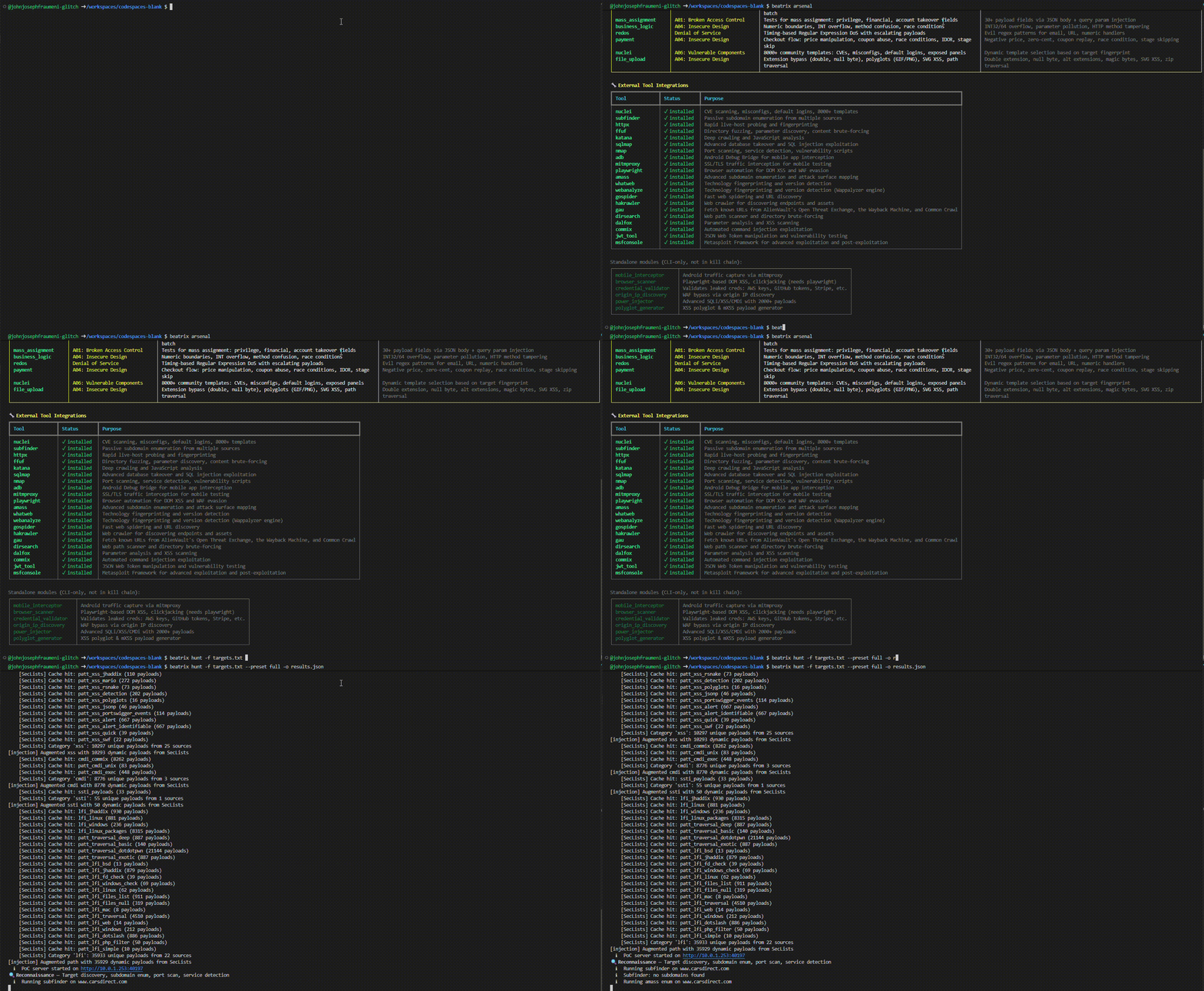
beatrix arsenal # full module reference
```
## 死亡名单 —— 命令参考
| 命令 | 描述 | 示例 |
|---------|-------------|---------|
| `hunt TARGET` | 完整漏洞扫描 | `beatrix hunt example.com` |
| `hunt -f FILE` | 从文件狩猎目标 | `beatrix hunt -f targets.txt` |
| `strike TARGET -m MOD` | 单模块攻击 | `beatrix strike api.com -m cors` |
| `probe TARGET` | 快速存活检查 | `beatrix probe example.com` |
| `recon DOMAIN` | 侦察 | `beatrix recon example.com --deep` |
| `batch FILE -m MOD` | 批量扫描 | `beatrix batch targets.txt -m cors` |
| `bounty-hunt TARGET` | OWASP Top 10 管道 | `beatrix bounty-hunt https://api.com` |
| `rapid` | 多目标快速扫描 | `beatrix rapid -d shopify.com` |
| `haiku-hunt TARGET` | AI 辅助狩猎 | `beatrix haiku-hunt example.com` |
| `ghost TARGET` | AI 自主渗透测试器 | `beatrix ghost https://api.com` |
| `github-recon ORG` | GitHub 密钥扫描器 | `beatrix github-recon acme-corp` |
| `validate FILE` | 验证发现 | `beatrix validate report.json` |
| `h1 [sub]` | HackerOne 操作 | `beatrix h1 programs` |
| `mobile [sub]` | 移动端流量拦截 | `beatrix mobile intercept` |
| `browser [sub]` | Playwright 浏览器扫描 | `beatrix browser scan https://app.com` |
| `creds [sub]` | 凭证验证 | `beatrix creds validate jwt_secret TOKEN` |
| `origin-ip DOMAIN` | CDN 背后的源站 IP | `beatrix origin-ip example.com` |
| `inject TARGET` | 深度参数注入 | `beatrix inject https://api.com --deep` |
| `polyglot [sub]` | XSS 多语言载荷生成 | `beatrix polyglot generate` |
| `auth [sub]` | 认证与自动登录 | `beatrix auth login example.com` |
| `auth browser TARGET` | 手动浏览器登录 | `beatrix auth browser example.com` |
| `auth sessions` | 管理已保存的会话 | `beatrix auth sessions --clear example.com` |
| `config` | 配置 | `beatrix config --show` |
| `list` | 列出模块/预设 | `beatrix list --modules` |
| `arsenal` | 完整模块参考 | `beatrix arsenal` |
| `help CMD` | 详细命令帮助 | `beatrix help hunt` |
| `manual` | 在浏览器中打开 HTML 手册 | `beatrix manual` |
| `setup` | 安装所有外部工具 | `beatrix setup` |
## 系统要求
- **Python 3.11+**(安装程序会为你检查)
- **Linux**(Debian、Ubuntu、Fedora、Arch 等)
- 21 个外部工具会由 `./install.sh` 和 `beatrix setup` **自动安装**
所有外部工具都会在设置期间自动安装。如需稍后重新安装或更新它们:
```
beatrix setup # install all missing tools
beatrix setup --check # just show what's installed
```
### 验证安装
```
beatrix --version
beatrix list --modules
```
## 核心概念
### Kill Chain
每一次 `hunt` 都遵循网络 Kill Chain 方法论:
1. 🛡️ **CDN Bypass** — 通过 IP 范围 + 标头指纹识别检测 Cloudflare/Akamai/Fastly/CloudFront。通过 6 种以上技术发现源站 IP(DNS 历史、crt.sh SSL 证书、MX 记录、子域名关联、配置错误检查、WHOIS)。如果找到源站 IP,所有网络扫描都将针对真实服务器而非 CDN 边缘节点。通过环境变量配置可选的 API 密钥(SecurityTrails、Censys、Shodan)。
2. 🔍 **Reconnaissance(侦察)** — 子域名枚举(`subfinder`、`amass`)、爬取(`katana`、`gospider`、`hakrawler`、`gau`)、在源站 IP 可用时针对其进行**完整 65535 端口 TCP 扫描**(`nmap -sS -p-`)、服务指纹识别、NSE 漏洞/发现/认证脚本、UDP top-50 扫描、**防火墙指纹识别 + 绕过测试**(`scapy`)、**SSH 深度审计**(`paramiko`)、JS 分析、端点探测、技术指纹识别(`whatweb`、`webanalyze`)、**nuclei recon**(快速技术/面板/WAF 检测)、**nuclei network**(非 HTTP 服务上的协议检查)
3. ⚔️ **Weaponization(武器化)** — 子域名接管、错误泄露、缓存投毒、原型污染
4. 📦 **Delivery(投递)** — CORS、开放重定向、OAuth 重定向、HTTP 走私、WebSocket 测试
5. 💥 **Exploitation(利用)** — 注入(SQLi/XSS/CMDi)配合 response_analyzer 行为检测和 WAF 绕过回退、SSRF、IDOR、BAC、认证绕过、SSTI、XXE、反序列化、GraphQL、批量赋值、业务逻辑、ReDoS、支付、**nuclei exploit scan**(CVE、工作流、已认证、interactsh OOB)、**nuclei headless**(DOM XSS、原型污染)。SmartFuzzer 在参数化 URL 上运行经 ffuf 验证的模糊测试。确认的发现将升级为深度利用工具(`sqlmap`、`dalfox`、`commix`、`jwt_tool`)
6. 🔧 **Installation(安装)** — 文件上传绕过、多语言文件上传、路径遍历
7. 📡 **Command & Control(命令与控制)** — 通过内置 `PoCServer`(纯 asyncio HTTP 服务器,自动绑定空闲端口)或外部 `interact.sh` 进行 OOB 回调关联。来自第 4 阶段注册的回调的盲 SSRF/XXE/RCE 确认。`LocalPoCClient` 提供基于偏移量的去重轮询。
8. 🎯 **Objectives(目标)** — VRT 分类(Bugcrowd VRT + CVSS 3.1)、通过 PoCChainEngine 生成利用链(关联 ≥2 个发现)、发现聚合、去重、影响评估
### 预设
| 预设 | 描述 | 时间 |
|--------|-------------|------|
| `quick` | 表面扫描,仅侦察 | ~5 分钟 |
| `standard` | 平衡扫描(**默认**) | ~15 分钟 |
| `full` | 完整 Kill Chain + 完整网络侦察 | ~45–60 分钟 |
| `stealth` | 低噪音被动侦察 | ~10 分钟 |
| `injection` | 注入专项测试 | ~20 分钟 |
| `api` | API 安全测试 | ~15 分钟 |
```
beatrix hunt example.com --preset full
beatrix hunt example.com --preset injection
```
### 扫描模块(Arsenal)
运行 `beatrix arsenal` 查看完整表格。跨 5 个 Kill Chain 阶段的 29 个注册模块:
**第 1 阶段 — Reconnaissance(侦察):**
| 模块 | 功能 |
|--------|-------------|
| `origin_ip` | CDN 检测+ 通过 DNS 历史、SSL 证书、MX 记录、子域名关联、配置错误检查发现源站 IP |
| `crawl` | 深度限制爬虫,具备 soft-404 检测、表单/参数提取功能 |
| `endpoint_prober` | 探测 200+ 个常见 API/管理/调试路径 |
| `js_analysis` | 从 JS 包中提取 API 路由、密钥、source map |
| `headers` | CSP、HSTS、X-Frame-Options、安全头分析 |
| `github_recon` | GitHub 组织密钥扫描、git 历史分析 |
| `nmap_nse` | 完整 TCP 65535 端口扫描、服务识别、NSE 漏洞/发现/认证脚本、UDP top-50 |
| `ssh_auditor` | SSH 服务器指纹、弱 KEX/cipher/MAC、默认凭证暴力破解 |
| `packet_crafter` | 防火墙指纹、源端口绕过、IP 分片绕过、TTL 映射 |
**第 2 阶段 — Weaponization(武器化):**
| 模块 | 功能 |
|--------|-------------|
| `takeover` | 针对 30+ 云服务的悬空 CNAME 检测 |
| `error_disclosure` | 堆栈跟踪、SQL 错误、框架调试信息泄露 |
| `cache_poisoning` | 未键入标头注入、fat GET、参数伪装 |
| `prototype_pollution` | 服务端 + 客户端 JS 原型污染 |
**第 3 阶段 — Delivery(投递):**
| 模块 | 功能 |
|--------|-------------|
| `cors` | 6 种绕过技术、凭证泄露检测 |
| `redirect` | 开放重定向检测 |
| `oauth_redirect` | OAuth 重定向 URI 操纵 |
| `http_smuggling` | CL.TE / TE.CL / TE.TE 反同步 |
| `websocket` | WebSocket origin、CSWSH、消息注入 |
**第 4 阶段 — Exploitation(利用):**
| 模块 | 功能 |
|--------|-------------|
| `injection` | SQLi、XSS、CMDi、LFI、SSTI —— 通过 SecLists + PayloadsAllTheThings 提供 57K+ 载荷、response_analyzer 行为检测、WAF 绕过回退 |
| `ssrf` | 44+ 载荷、云元数据、内部服务访问 |
| `idor` | 顺序/UUID/负 ID 操纵 |
| `bac` | 方法覆盖、强制浏览、权限提升 |
| `auth` | JWT 攻击、2FA 绕过、会话管理 |
| `ssti` | 服务端模板注入(Jinja2、Twig 等) |
| `xxe` | XML 外部实体注入 |
| `deserialization` | 不安全的反序列化 |
| `graphql` | 内省、批处理、注入 |
| `mass_assignment` | 隐藏字段绑定利用 |
| `business_logic` | 竞争条件、边界测试 |
| `redos` | 正则表达式拒绝服务 |
| `payment` | 结算流程操纵、价格篡改 |
| `nuclei` | 智能多阶段扫描器 —— recon、exploit、network、headless |
**第 5 阶段 — Installation(安装):**
| 模块 | 功能 |
|--------|-------------|
| `file_upload` | 扩展名绕过、多语言文件上传、路径遍历 |
### 外部工具集成(13 个 Runner)
Beatrix 通过带有超时和结构化输出解析的异步子进程 Runner 封装了 13 个外部安全工具。这些工具被 Kill Chain 的各个阶段用于增强内部扫描器:
| 工具 | 用于 | 用途 |
|------|---------|---------|
| `subfinder` | Recon | 被动子域名枚举 |
| `amass` | Recon | 主动/被动子域名枚举 |
| `map` | Recon | 完整 TCP/UDP 端口扫描、服务检测、NSE 脚本 |
| `katana` | Recon | 深度爬取、JS 渲染 |
| `gospider` | Recon | 快速爬取、表单/JS 提取 |
| `hakrawler` | Recon | URL 发现 |
| `gau` | Recon | 历史 URL 收集 |
| `whatweb` | Recon | 技术指纹识别 |
| `webanalyze` | Recon | 基于 Wappalyzer 的技术检测 |
| `dirsearch` | Recon | 目录暴力破解(自适应扩展名) |
| `sqlmap` | Exploitation | 深度 SQLi 利用、DB 接管 |
| `dalfox` | Exploitation | XSS 验证、WAF 绕过 |
| `commix` | Exploitation | OS 命令注入利用 |
| `jwt_tool` | Exploitation | JWT 漏洞分析、角色提升 |
| `metasploit` | PoC Chain | 漏洞利用搜索、模块建议 |
使用 `strike` 运行特定模块:
```
beatrix strike https://api.example.com -m cors
beatrix strike https://example.com/login -m injection
```
或者在 `hunt` 期间组合模块:
```
beatrix hunt example.com -m cors -m idor -m ssrf
```
## 网络测试(Full 预设)
`--preset full` 狩猎在 Reconnaissance 阶段运行一个 4 阶段的自适应网络管道。每个阶段的输出驱动下一阶段。
### 第 0 阶段:CDN BYPASS(origin_ip_discovery)
在端口扫描之前自动运行。检测 CDN/WAF 并发现源站 IP。
| 技术 | 来源 | 需要 API Key? | 置信度 |
|-----------|--------|----------|------------|
| DNS 历史 | ViewDNS, DNSDumpster | 否 | 0.5–0.6 |
| SSL 证书搜索 | crt.sh | 否 | 0.7 |
| MX 记录分析 | dig MX records | 否 | 0.8 |
| 子域名关联 | 40+ 绕过子域名 | 否 | 0.7 |
| 配置错误检查 | 标头泄露、/server-status | 否 | 0.9 |
| 历史 WHOIS | whois | 否 | 0.4 |
| SecurityTrails 历史 | SecurityTrails API | `SECURITYTRAILS_API_KEY` | 0.85 |
| Censys 证书搜索 | Censys API | `CENSYS_API_ID` + `CENSYS_API_SECRET` | 0.8 |
| Shodan 主机搜索 | Shodan API | `SHODAN_API_KEY` | 0.75 |
发现的源站 IP 会被验证(带 Host 标头的 HTTP/HTTPS),经验证的最高置信度 IP 将替换 CDN 边缘 IP 用于所有后续网络扫描。
### 第 1 阶段:DISCOVER(nmap)
| 步骤 | 内容 | 超时 |
|------|------|---------|
| 1a | `nmap -sS -p- --min-rate 3000 -T4` —— 所有 65535 个 TCP 端口 | 600s |
| 1b | 仅对开放端口进行服务/版本指纹识别 | 300s |
| 1c | NSE `vuln and safe` 脚本 —— CVE、配置错误 | 600s |
| 1d | NSE `discovery and safe` 脚本 —— http-enum、ssl-cert、banners | 600s |
| 1e | NSE `auth and safe` 脚本 —— 默认凭证、匿名访问 | 600s |
| 1f | UDP top 50 —— DNS、SNMP、NTP、SSDP | 120s |
### 第 2 阶段:ANALYZE(scapy)
仅在当第 1 阶段发现被过滤的端口时运行。
| 步骤 | 内容 |
|------|------|
| 2a | 防火墙指纹 —— SYN/FIN/NULL/XMAS/ACK/Window 探测 |
| 2b | 源端口绕过 —— 来自端口 53/80/443/88/20 的 SYN |
| 2c | IP 分片绕过 —— 分割 TCP 标头 |
| 2d | TTL 映射 —— 定位防火墙跳数位置 |
每次成功的绕过都会生成一个 HIGH/CRITICAL 级别的发现。
### 第 3 阶段:AUDIT(paramiko + NSE)
基于第 1 阶段发现的服务特定深度审计。
| 服务 | 工具 | 检查项 |
|---------|------|--------|
| SSH | paramiko | Banner、KEX/cipher/MAC 弱点、密钥强度、20+ 默认凭证 |
| FTP | NSE | 匿名访问、跳转攻击、vsftpd 后门 |
| SMTP | NSE | 开放转发、用户枚举、NTLM 信息 |
| MySQL/Postgres | NSE | 空密码、暴力破解、版本 |
| Redis/MongoDB | NSE | 未认证访问(CRITICAL) |
| TLS | NSE | ssl-enum-ciphers、Heartbleed、POODLE、CCS 注入 |
### 上下文流
网络结果存储在 `context["network"]` 中,并被下游阶段消耗:
- **第 0 阶段 → 第 1 阶段** —— 源站 IP 替换 CDN 边缘用于所有 nmap 扫描
- **Delivery(第 3 阶段)** —— 在所有发现的 HTTP 端口 + 直接针对源站 IP 测试 HTTP 走私
- **Exploitation(第 4 阶段)** —— 在所有 HTTP 端口 + 源站 IP(CDN 绕过)上进行 Injection/SSRF/XSS
- **C2(第 6 阶段)** —— 防火墙配置文件为数据泄露通道评估提供信息
### CDN Bypass API 密钥(可选)
设置这些环境变量以启用额外的源站 IP 发现技术:
```
export SECURITYTRAILS_API_KEY=your_key_here # SecurityTrails DNS history
export CENSYS_API_ID=your_id_here # Censys certificate search
export CENSYS_API_SECRET=your_secret_here # Censys API secret
export SHODAN_API_KEY=your_key_here # Shodan host search
```
如果没有 API 密钥,Beatrix 使用 6 种免费技术,适用于大多数目标。
## 使用示例
### 基础狩猎
```
# 快速表面扫描
beatrix hunt example.com --preset quick
# 全面攻击
beatrix hunt example.com --preset full
# AI 辅助
beatrix hunt example.com --preset full --ai
# 扫描 .txt 文件中的所有目标(每行一个 URL)
beatrix hunt -f targets.txt
# 基于文件的扫描,使用完整预设和报告
beatrix hunt -f targets.txt --preset full -o ./reports
```
### 定点打击
```
# 测试单个 endpoint 的 CORS
beatrix strike https://api.example.com/v1/users -m cors
# 检查 SSRF
beatrix strike https://example.com/fetch?url=test -m ssrf
# 分析 JavaScript bundles
beatrix strike https://app.example.com -m js_analysis
```
### 侦察
```
# 基础侦查
beatrix recon example.com
# 深度扫描(探测所有发现的 subdomains)
beatrix recon example.com --deep
# 将结果保存为 JSON
beatrix recon example.com --deep -j -o recon.json
```
### 批量扫描
```
# 创建目标文件(每行一个 URL,# 用于注释)
echo "https://api.target1.com
https://api.target2.com
https://api.target3.com" > targets.txt
# 通过完整 kill chain 扫描所有目标
beatrix hunt -f targets.txt
# 使用指定 preset 和 output 进行扫描
beatrix hunt -f targets.txt --preset full --ai -o ./reports
# 单模块批量扫描(仅 CORS)
beatrix batch targets.txt -m cors -o ./reports
```
### GHOST —— 自主 AI 渗透测试器
```
# 基础调查
beatrix ghost https://api.example.com/users?id=1
# 带有特定目标
beatrix ghost https://api.example.com -X POST -d '{"user":"admin"}' -o "Test for SQL injection"
# 使用 auth
beatrix ghost https://example.com -H "Authorization: Bearer TOKEN" --max-turns 50
```
### 已认证扫描
Beatrix 支持通过配置文件、CLI 标志、环境变量以及 **Burp Suite 式自动登录**进行已认证扫描。认证流自动传递给所有扫描器 —— nuclei 获取 `-H` 标志,IDOR 获取用户会话,爬虫获取 cookies。
#### 自动登录(Burp Suite 风格)
存储你的用户名/邮箱和密码,Beatrix 将在扫描前自动登录 —— 就像 Burp Suite 的登录宏一样。它探测常见的 API 和表单登录端点,尝试多种字段名组合,并在成功时捕获会话 token/cookie。
```
# 交互式登录向导(保存至 ~/.beatrix/auth.yaml)
beatrix auth login example.com
# 或通过 CLI flags 传入凭证
beatrix hunt target.com --login-user user@example.com --login-pass 'P@ssw0rd'
beatrix hunt target.com --login-user user@example.com --login-pass 'P@ssw0rd' --login-url https://target.com/api/auth/login
# 或通过环境变量
export BEATRIX_LOGIN_USER="user@example.com"
export BEATRIX_LOGIN_PASS="P@ssw0rd"
export BEATRIX_LOGIN_URL="https://target.com/api/auth/login" # optional
beatrix hunt target.com
```
`auth login` 向导会提示输入目标、用户名/邮箱、密码(掩码输入)和可选的登录 URL。凭证保存到 `~/.beatrix/auth.yaml` 并在后续扫描中自动加载。
**工作原理:**
1. 从目标主页收集 cookies(CSRF token 等)
2. 使用 JSON 载荷探测 24 个常见的 API 登录端点(`/api/auth/login`、`/api/v1/session`、`/oauth/token` 等)
3. 尝试 12 个传统的表单登录端点(`/login`、`/signin`、`/wp-login.php` 等)
4. 每个端点使用 10 种字段名组合(`email`/`password`、`username`/`passwd`、`login`/`pass` 等)
5. 快速跳过 404,遇到 401/403 停止(端点找到,凭证错误)
6. **检测 OTP/2FA 挑战** —— 如果服务器响应要求验证码(邮箱 OTP、短信验证码、TOTP),Beatrix 会提示你交互式输入验证码
7. 成功后,捕获的会话 cookies 和认证 token 会传递给所有扫描器
8. **会话被保存** 到 `~/.beatrix/sessions/` 并可重用 24 小时(重复扫描时跳过重新认证)
#### OTP / 2FA 处理
许多网站每次登录都需要 OTP 验证。Beatrix 通过扫描 JSON 响应中的 2FA 关键词(`requires_2fa`、`verification_required`、`otp` 等)自动检测 OTP 挑战,并提示你输入发送到邮箱/手机的验证码。
如果自动登录无法完成(WAF 拦截、CAPTCHA、复杂 2FA),请使用**手动浏览器登录**:
```
# 打开浏览器,手动登录,Beatrix 捕获你的 session
beatrix auth browser example.com
# 在 headless 环境(例如 codespaces)中,改为从 DevTools 粘贴 cookies
beatrix auth browser example.com # falls back to cookie-paste prompt
# 或直接从浏览器 DevTools 传入 cookies
beatrix hunt example.com --cookie "session=abc123" --cookie "XSRF-TOKEN=xyz"
```
#### 会话持久化
一旦通过认证(通过自动登录、手动浏览器或 OTP 流程),会话将保存到 `~/.beatrix/sessions/
## 📖 使用手册
Beatrix 附带了一份交互式、综合性的 HTML 手册,涵盖了每一条命令、每一个模块、所有标志、预设以及真实世界的工作流:
```
beatrix manual
```
这将在你的默认浏览器中打开完整手册 —— 无需联网。你也可以直接在 [`docs/manual/index.html`](docs/manual/index.html) 打开它。
## 安装(一条命令)
```
git clone https://github.com/SudoPacman-Syuu/Beatrix.git && cd Beatrix && ./install.sh
```
就这样。安装程序会自动检测你的 Python,选择最佳的安装方法,将 `beatrix` 放入你的 PATH,并**自动安装所有 21 个外部安全工具**(nuclei、nmap、sqlmap、subfinder、ffuf 等)。
### 安装方法优先级
安装程序按以下顺序自动选择最佳方法:
1. **uv**(最快,推荐)—— 如果缺失则自动安装
2. **venv** —— 位于 `~/.beatrix` 的 Python 内置虚拟环境
3. **pipx** —— 隔离的应用安装
4. **pip --user** —— 用户级回退方案
```
# 使用 make
git clone https://github.com/SudoPacman-Syuu/Beatrix.git && cd Beatrix
make install
# 直接使用 uv
uv tool install .
# 使用 pipx
pipx install .
# 专用 venv + 软链接到 /usr/local/bin
make install-venv
# 用于开发
make install-dev
```
自定义 venv 位置:`BEATRIX_VENV=~/my-venv ./install.sh`
### 卸载
```
./uninstall.sh # or: make uninstall
```
## 快速入门
```
beatrix # show all commands
beatrix hunt example.com # scan a target
beatrix hunt -f targets.txt # hunt all URLs from a file
beatrix strike api.com -m cors # single module attack
beatrix help hunt # detailed command help
beatrix arsenal # full module reference
```
## 死亡名单 —— 命令参考
| 命令 | 描述 | 示例 |
|---------|-------------|---------|
| `hunt TARGET` | 完整漏洞扫描 | `beatrix hunt example.com` |
| `hunt -f FILE` | 从文件狩猎目标 | `beatrix hunt -f targets.txt` |
| `strike TARGET -m MOD` | 单模块攻击 | `beatrix strike api.com -m cors` |
| `probe TARGET` | 快速存活检查 | `beatrix probe example.com` |
| `recon DOMAIN` | 侦察 | `beatrix recon example.com --deep` |
| `batch FILE -m MOD` | 批量扫描 | `beatrix batch targets.txt -m cors` |
| `bounty-hunt TARGET` | OWASP Top 10 管道 | `beatrix bounty-hunt https://api.com` |
| `rapid` | 多目标快速扫描 | `beatrix rapid -d shopify.com` |
| `haiku-hunt TARGET` | AI 辅助狩猎 | `beatrix haiku-hunt example.com` |
| `ghost TARGET` | AI 自主渗透测试器 | `beatrix ghost https://api.com` |
| `github-recon ORG` | GitHub 密钥扫描器 | `beatrix github-recon acme-corp` |
| `validate FILE` | 验证发现 | `beatrix validate report.json` |
| `h1 [sub]` | HackerOne 操作 | `beatrix h1 programs` |
| `mobile [sub]` | 移动端流量拦截 | `beatrix mobile intercept` |
| `browser [sub]` | Playwright 浏览器扫描 | `beatrix browser scan https://app.com` |
| `creds [sub]` | 凭证验证 | `beatrix creds validate jwt_secret TOKEN` |
| `origin-ip DOMAIN` | CDN 背后的源站 IP | `beatrix origin-ip example.com` |
| `inject TARGET` | 深度参数注入 | `beatrix inject https://api.com --deep` |
| `polyglot [sub]` | XSS 多语言载荷生成 | `beatrix polyglot generate` |
| `auth [sub]` | 认证与自动登录 | `beatrix auth login example.com` |
| `auth browser TARGET` | 手动浏览器登录 | `beatrix auth browser example.com` |
| `auth sessions` | 管理已保存的会话 | `beatrix auth sessions --clear example.com` |
| `config` | 配置 | `beatrix config --show` |
| `list` | 列出模块/预设 | `beatrix list --modules` |
| `arsenal` | 完整模块参考 | `beatrix arsenal` |
| `help CMD` | 详细命令帮助 | `beatrix help hunt` |
| `manual` | 在浏览器中打开 HTML 手册 | `beatrix manual` |
| `setup` | 安装所有外部工具 | `beatrix setup` |
## 系统要求
- **Python 3.11+**(安装程序会为你检查)
- **Linux**(Debian、Ubuntu、Fedora、Arch 等)
- 21 个外部工具会由 `./install.sh` 和 `beatrix setup` **自动安装**
所有外部工具都会在设置期间自动安装。如需稍后重新安装或更新它们:
```
beatrix setup # install all missing tools
beatrix setup --check # just show what's installed
```
### 验证安装
```
beatrix --version
beatrix list --modules
```
## 核心概念
### Kill Chain
每一次 `hunt` 都遵循网络 Kill Chain 方法论:
1. 🛡️ **CDN Bypass** — 通过 IP 范围 + 标头指纹识别检测 Cloudflare/Akamai/Fastly/CloudFront。通过 6 种以上技术发现源站 IP(DNS 历史、crt.sh SSL 证书、MX 记录、子域名关联、配置错误检查、WHOIS)。如果找到源站 IP,所有网络扫描都将针对真实服务器而非 CDN 边缘节点。通过环境变量配置可选的 API 密钥(SecurityTrails、Censys、Shodan)。
2. 🔍 **Reconnaissance(侦察)** — 子域名枚举(`subfinder`、`amass`)、爬取(`katana`、`gospider`、`hakrawler`、`gau`)、在源站 IP 可用时针对其进行**完整 65535 端口 TCP 扫描**(`nmap -sS -p-`)、服务指纹识别、NSE 漏洞/发现/认证脚本、UDP top-50 扫描、**防火墙指纹识别 + 绕过测试**(`scapy`)、**SSH 深度审计**(`paramiko`)、JS 分析、端点探测、技术指纹识别(`whatweb`、`webanalyze`)、**nuclei recon**(快速技术/面板/WAF 检测)、**nuclei network**(非 HTTP 服务上的协议检查)
3. ⚔️ **Weaponization(武器化)** — 子域名接管、错误泄露、缓存投毒、原型污染
4. 📦 **Delivery(投递)** — CORS、开放重定向、OAuth 重定向、HTTP 走私、WebSocket 测试
5. 💥 **Exploitation(利用)** — 注入(SQLi/XSS/CMDi)配合 response_analyzer 行为检测和 WAF 绕过回退、SSRF、IDOR、BAC、认证绕过、SSTI、XXE、反序列化、GraphQL、批量赋值、业务逻辑、ReDoS、支付、**nuclei exploit scan**(CVE、工作流、已认证、interactsh OOB)、**nuclei headless**(DOM XSS、原型污染)。SmartFuzzer 在参数化 URL 上运行经 ffuf 验证的模糊测试。确认的发现将升级为深度利用工具(`sqlmap`、`dalfox`、`commix`、`jwt_tool`)
6. 🔧 **Installation(安装)** — 文件上传绕过、多语言文件上传、路径遍历
7. 📡 **Command & Control(命令与控制)** — 通过内置 `PoCServer`(纯 asyncio HTTP 服务器,自动绑定空闲端口)或外部 `interact.sh` 进行 OOB 回调关联。来自第 4 阶段注册的回调的盲 SSRF/XXE/RCE 确认。`LocalPoCClient` 提供基于偏移量的去重轮询。
8. 🎯 **Objectives(目标)** — VRT 分类(Bugcrowd VRT + CVSS 3.1)、通过 PoCChainEngine 生成利用链(关联 ≥2 个发现)、发现聚合、去重、影响评估
### 预设
| 预设 | 描述 | 时间 |
|--------|-------------|------|
| `quick` | 表面扫描,仅侦察 | ~5 分钟 |
| `standard` | 平衡扫描(**默认**) | ~15 分钟 |
| `full` | 完整 Kill Chain + 完整网络侦察 | ~45–60 分钟 |
| `stealth` | 低噪音被动侦察 | ~10 分钟 |
| `injection` | 注入专项测试 | ~20 分钟 |
| `api` | API 安全测试 | ~15 分钟 |
```
beatrix hunt example.com --preset full
beatrix hunt example.com --preset injection
```
### 扫描模块(Arsenal)
运行 `beatrix arsenal` 查看完整表格。跨 5 个 Kill Chain 阶段的 29 个注册模块:
**第 1 阶段 — Reconnaissance(侦察):**
| 模块 | 功能 |
|--------|-------------|
| `origin_ip` | CDN 检测+ 通过 DNS 历史、SSL 证书、MX 记录、子域名关联、配置错误检查发现源站 IP |
| `crawl` | 深度限制爬虫,具备 soft-404 检测、表单/参数提取功能 |
| `endpoint_prober` | 探测 200+ 个常见 API/管理/调试路径 |
| `js_analysis` | 从 JS 包中提取 API 路由、密钥、source map |
| `headers` | CSP、HSTS、X-Frame-Options、安全头分析 |
| `github_recon` | GitHub 组织密钥扫描、git 历史分析 |
| `nmap_nse` | 完整 TCP 65535 端口扫描、服务识别、NSE 漏洞/发现/认证脚本、UDP top-50 |
| `ssh_auditor` | SSH 服务器指纹、弱 KEX/cipher/MAC、默认凭证暴力破解 |
| `packet_crafter` | 防火墙指纹、源端口绕过、IP 分片绕过、TTL 映射 |
**第 2 阶段 — Weaponization(武器化):**
| 模块 | 功能 |
|--------|-------------|
| `takeover` | 针对 30+ 云服务的悬空 CNAME 检测 |
| `error_disclosure` | 堆栈跟踪、SQL 错误、框架调试信息泄露 |
| `cache_poisoning` | 未键入标头注入、fat GET、参数伪装 |
| `prototype_pollution` | 服务端 + 客户端 JS 原型污染 |
**第 3 阶段 — Delivery(投递):**
| 模块 | 功能 |
|--------|-------------|
| `cors` | 6 种绕过技术、凭证泄露检测 |
| `redirect` | 开放重定向检测 |
| `oauth_redirect` | OAuth 重定向 URI 操纵 |
| `http_smuggling` | CL.TE / TE.CL / TE.TE 反同步 |
| `websocket` | WebSocket origin、CSWSH、消息注入 |
**第 4 阶段 — Exploitation(利用):**
| 模块 | 功能 |
|--------|-------------|
| `injection` | SQLi、XSS、CMDi、LFI、SSTI —— 通过 SecLists + PayloadsAllTheThings 提供 57K+ 载荷、response_analyzer 行为检测、WAF 绕过回退 |
| `ssrf` | 44+ 载荷、云元数据、内部服务访问 |
| `idor` | 顺序/UUID/负 ID 操纵 |
| `bac` | 方法覆盖、强制浏览、权限提升 |
| `auth` | JWT 攻击、2FA 绕过、会话管理 |
| `ssti` | 服务端模板注入(Jinja2、Twig 等) |
| `xxe` | XML 外部实体注入 |
| `deserialization` | 不安全的反序列化 |
| `graphql` | 内省、批处理、注入 |
| `mass_assignment` | 隐藏字段绑定利用 |
| `business_logic` | 竞争条件、边界测试 |
| `redos` | 正则表达式拒绝服务 |
| `payment` | 结算流程操纵、价格篡改 |
| `nuclei` | 智能多阶段扫描器 —— recon、exploit、network、headless |
**第 5 阶段 — Installation(安装):**
| 模块 | 功能 |
|--------|-------------|
| `file_upload` | 扩展名绕过、多语言文件上传、路径遍历 |
### 外部工具集成(13 个 Runner)
Beatrix 通过带有超时和结构化输出解析的异步子进程 Runner 封装了 13 个外部安全工具。这些工具被 Kill Chain 的各个阶段用于增强内部扫描器:
| 工具 | 用于 | 用途 |
|------|---------|---------|
| `subfinder` | Recon | 被动子域名枚举 |
| `amass` | Recon | 主动/被动子域名枚举 |
| `map` | Recon | 完整 TCP/UDP 端口扫描、服务检测、NSE 脚本 |
| `katana` | Recon | 深度爬取、JS 渲染 |
| `gospider` | Recon | 快速爬取、表单/JS 提取 |
| `hakrawler` | Recon | URL 发现 |
| `gau` | Recon | 历史 URL 收集 |
| `whatweb` | Recon | 技术指纹识别 |
| `webanalyze` | Recon | 基于 Wappalyzer 的技术检测 |
| `dirsearch` | Recon | 目录暴力破解(自适应扩展名) |
| `sqlmap` | Exploitation | 深度 SQLi 利用、DB 接管 |
| `dalfox` | Exploitation | XSS 验证、WAF 绕过 |
| `commix` | Exploitation | OS 命令注入利用 |
| `jwt_tool` | Exploitation | JWT 漏洞分析、角色提升 |
| `metasploit` | PoC Chain | 漏洞利用搜索、模块建议 |
使用 `strike` 运行特定模块:
```
beatrix strike https://api.example.com -m cors
beatrix strike https://example.com/login -m injection
```
或者在 `hunt` 期间组合模块:
```
beatrix hunt example.com -m cors -m idor -m ssrf
```
## 网络测试(Full 预设)
`--preset full` 狩猎在 Reconnaissance 阶段运行一个 4 阶段的自适应网络管道。每个阶段的输出驱动下一阶段。
### 第 0 阶段:CDN BYPASS(origin_ip_discovery)
在端口扫描之前自动运行。检测 CDN/WAF 并发现源站 IP。
| 技术 | 来源 | 需要 API Key? | 置信度 |
|-----------|--------|----------|------------|
| DNS 历史 | ViewDNS, DNSDumpster | 否 | 0.5–0.6 |
| SSL 证书搜索 | crt.sh | 否 | 0.7 |
| MX 记录分析 | dig MX records | 否 | 0.8 |
| 子域名关联 | 40+ 绕过子域名 | 否 | 0.7 |
| 配置错误检查 | 标头泄露、/server-status | 否 | 0.9 |
| 历史 WHOIS | whois | 否 | 0.4 |
| SecurityTrails 历史 | SecurityTrails API | `SECURITYTRAILS_API_KEY` | 0.85 |
| Censys 证书搜索 | Censys API | `CENSYS_API_ID` + `CENSYS_API_SECRET` | 0.8 |
| Shodan 主机搜索 | Shodan API | `SHODAN_API_KEY` | 0.75 |
发现的源站 IP 会被验证(带 Host 标头的 HTTP/HTTPS),经验证的最高置信度 IP 将替换 CDN 边缘 IP 用于所有后续网络扫描。
### 第 1 阶段:DISCOVER(nmap)
| 步骤 | 内容 | 超时 |
|------|------|---------|
| 1a | `nmap -sS -p- --min-rate 3000 -T4` —— 所有 65535 个 TCP 端口 | 600s |
| 1b | 仅对开放端口进行服务/版本指纹识别 | 300s |
| 1c | NSE `vuln and safe` 脚本 —— CVE、配置错误 | 600s |
| 1d | NSE `discovery and safe` 脚本 —— http-enum、ssl-cert、banners | 600s |
| 1e | NSE `auth and safe` 脚本 —— 默认凭证、匿名访问 | 600s |
| 1f | UDP top 50 —— DNS、SNMP、NTP、SSDP | 120s |
### 第 2 阶段:ANALYZE(scapy)
仅在当第 1 阶段发现被过滤的端口时运行。
| 步骤 | 内容 |
|------|------|
| 2a | 防火墙指纹 —— SYN/FIN/NULL/XMAS/ACK/Window 探测 |
| 2b | 源端口绕过 —— 来自端口 53/80/443/88/20 的 SYN |
| 2c | IP 分片绕过 —— 分割 TCP 标头 |
| 2d | TTL 映射 —— 定位防火墙跳数位置 |
每次成功的绕过都会生成一个 HIGH/CRITICAL 级别的发现。
### 第 3 阶段:AUDIT(paramiko + NSE)
基于第 1 阶段发现的服务特定深度审计。
| 服务 | 工具 | 检查项 |
|---------|------|--------|
| SSH | paramiko | Banner、KEX/cipher/MAC 弱点、密钥强度、20+ 默认凭证 |
| FTP | NSE | 匿名访问、跳转攻击、vsftpd 后门 |
| SMTP | NSE | 开放转发、用户枚举、NTLM 信息 |
| MySQL/Postgres | NSE | 空密码、暴力破解、版本 |
| Redis/MongoDB | NSE | 未认证访问(CRITICAL) |
| TLS | NSE | ssl-enum-ciphers、Heartbleed、POODLE、CCS 注入 |
### 上下文流
网络结果存储在 `context["network"]` 中,并被下游阶段消耗:
- **第 0 阶段 → 第 1 阶段** —— 源站 IP 替换 CDN 边缘用于所有 nmap 扫描
- **Delivery(第 3 阶段)** —— 在所有发现的 HTTP 端口 + 直接针对源站 IP 测试 HTTP 走私
- **Exploitation(第 4 阶段)** —— 在所有 HTTP 端口 + 源站 IP(CDN 绕过)上进行 Injection/SSRF/XSS
- **C2(第 6 阶段)** —— 防火墙配置文件为数据泄露通道评估提供信息
### CDN Bypass API 密钥(可选)
设置这些环境变量以启用额外的源站 IP 发现技术:
```
export SECURITYTRAILS_API_KEY=your_key_here # SecurityTrails DNS history
export CENSYS_API_ID=your_id_here # Censys certificate search
export CENSYS_API_SECRET=your_secret_here # Censys API secret
export SHODAN_API_KEY=your_key_here # Shodan host search
```
如果没有 API 密钥,Beatrix 使用 6 种免费技术,适用于大多数目标。
## 使用示例
### 基础狩猎
```
# 快速表面扫描
beatrix hunt example.com --preset quick
# 全面攻击
beatrix hunt example.com --preset full
# AI 辅助
beatrix hunt example.com --preset full --ai
# 扫描 .txt 文件中的所有目标(每行一个 URL)
beatrix hunt -f targets.txt
# 基于文件的扫描,使用完整预设和报告
beatrix hunt -f targets.txt --preset full -o ./reports
```
### 定点打击
```
# 测试单个 endpoint 的 CORS
beatrix strike https://api.example.com/v1/users -m cors
# 检查 SSRF
beatrix strike https://example.com/fetch?url=test -m ssrf
# 分析 JavaScript bundles
beatrix strike https://app.example.com -m js_analysis
```
### 侦察
```
# 基础侦查
beatrix recon example.com
# 深度扫描(探测所有发现的 subdomains)
beatrix recon example.com --deep
# 将结果保存为 JSON
beatrix recon example.com --deep -j -o recon.json
```
### 批量扫描
```
# 创建目标文件(每行一个 URL,# 用于注释)
echo "https://api.target1.com
https://api.target2.com
https://api.target3.com" > targets.txt
# 通过完整 kill chain 扫描所有目标
beatrix hunt -f targets.txt
# 使用指定 preset 和 output 进行扫描
beatrix hunt -f targets.txt --preset full --ai -o ./reports
# 单模块批量扫描(仅 CORS)
beatrix batch targets.txt -m cors -o ./reports
```
### GHOST —— 自主 AI 渗透测试器
```
# 基础调查
beatrix ghost https://api.example.com/users?id=1
# 带有特定目标
beatrix ghost https://api.example.com -X POST -d '{"user":"admin"}' -o "Test for SQL injection"
# 使用 auth
beatrix ghost https://example.com -H "Authorization: Bearer TOKEN" --max-turns 50
```
### 已认证扫描
Beatrix 支持通过配置文件、CLI 标志、环境变量以及 **Burp Suite 式自动登录**进行已认证扫描。认证流自动传递给所有扫描器 —— nuclei 获取 `-H` 标志,IDOR 获取用户会话,爬虫获取 cookies。
#### 自动登录(Burp Suite 风格)
存储你的用户名/邮箱和密码,Beatrix 将在扫描前自动登录 —— 就像 Burp Suite 的登录宏一样。它探测常见的 API 和表单登录端点,尝试多种字段名组合,并在成功时捕获会话 token/cookie。
```
# 交互式登录向导(保存至 ~/.beatrix/auth.yaml)
beatrix auth login example.com
# 或通过 CLI flags 传入凭证
beatrix hunt target.com --login-user user@example.com --login-pass 'P@ssw0rd'
beatrix hunt target.com --login-user user@example.com --login-pass 'P@ssw0rd' --login-url https://target.com/api/auth/login
# 或通过环境变量
export BEATRIX_LOGIN_USER="user@example.com"
export BEATRIX_LOGIN_PASS="P@ssw0rd"
export BEATRIX_LOGIN_URL="https://target.com/api/auth/login" # optional
beatrix hunt target.com
```
`auth login` 向导会提示输入目标、用户名/邮箱、密码(掩码输入)和可选的登录 URL。凭证保存到 `~/.beatrix/auth.yaml` 并在后续扫描中自动加载。
**工作原理:**
1. 从目标主页收集 cookies(CSRF token 等)
2. 使用 JSON 载荷探测 24 个常见的 API 登录端点(`/api/auth/login`、`/api/v1/session`、`/oauth/token` 等)
3. 尝试 12 个传统的表单登录端点(`/login`、`/signin`、`/wp-login.php` 等)
4. 每个端点使用 10 种字段名组合(`email`/`password`、`username`/`passwd`、`login`/`pass` 等)
5. 快速跳过 404,遇到 401/403 停止(端点找到,凭证错误)
6. **检测 OTP/2FA 挑战** —— 如果服务器响应要求验证码(邮箱 OTP、短信验证码、TOTP),Beatrix 会提示你交互式输入验证码
7. 成功后,捕获的会话 cookies 和认证 token 会传递给所有扫描器
8. **会话被保存** 到 `~/.beatrix/sessions/` 并可重用 24 小时(重复扫描时跳过重新认证)
#### OTP / 2FA 处理
许多网站每次登录都需要 OTP 验证。Beatrix 通过扫描 JSON 响应中的 2FA 关键词(`requires_2fa`、`verification_required`、`otp` 等)自动检测 OTP 挑战,并提示你输入发送到邮箱/手机的验证码。
如果自动登录无法完成(WAF 拦截、CAPTCHA、复杂 2FA),请使用**手动浏览器登录**:
```
# 打开浏览器,手动登录,Beatrix 捕获你的 session
beatrix auth browser example.com
# 在 headless 环境(例如 codespaces)中,改为从 DevTools 粘贴 cookies
beatrix auth browser example.com # falls back to cookie-paste prompt
# 或直接从浏览器 DevTools 传入 cookies
beatrix hunt example.com --cookie "session=abc123" --cookie "XSRF-TOKEN=xyz"
```
#### 会话持久化
一旦通过认证(通过自动登录、手动浏览器或 OTP 流程),会话将保存到 `~/.beatrix/sessions/.json` 并自动重用 24 小时。
```
# 列出所有已保存的 sessions
beatrix auth sessions
# 清除特定 session
beatrix auth sessions --clear example.com
# 清除所有 sessions
beatrix auth sessions --clear-all
# 强制重新登录(忽略已保存的 session)
beatrix hunt example.com --fresh-login
# 为此扫描使用手动浏览器登录
beatrix hunt example.com --manual-login
```
#### 静态凭证(手动)
```
# 生成示例 config 文件
beatrix auth init
# 使用你的凭证编辑 ~/.beatrix/auth.yaml,然后扫描 — auth 会自动加载
beatrix hunt target.com
# 或直接使用 CLI flags
beatrix hunt target.com --token "Bearer eyJ..."
beatrix hunt target.com --cookie "session=abc123" --cookie "csrf=xyz"
beatrix hunt target.com --header "X-API-Key: key123"
beatrix hunt target.com --auth-user admin --auth-pass password
# 查看当前 auth 状态
beatrix auth show
beatrix auth show -t example.com
# 在默认编辑器中编辑 auth config
beatrix auth config
```
认证配置支持每个目标的凭证和 IDOR 双会话测试(参见 `~/.beatrix/auth.yaml`)。
### HackerOne 集成
```
# 列出 programs
beatrix h1 programs
# 搜索 program
beatrix h1 programs -s "shopify"
# 提交前检查重复项
beatrix h1 dupecheck shopify cors misconfiguration
# 提交报告
beatrix h1 submit shopify -t "CORS Misconfiguration" -f report.md -i "Account takeover" -s high
# Dry run
beatrix h1 submit shopify -t "CORS" -f report.md -i "ATO" -s high --dry-run
```
### GitHub 密钥扫描
```
# 完整 org 扫描
beatrix github-recon acme-corp
# 快速扫描(跳过 git history)
beatrix github-recon acme-corp --quick
# 特定 repo 及报告
beatrix github-recon acme-corp --repo acme-corp/api-server -o report.md
```
### 验证
```
# 提交前验证 findings
beatrix validate beatrix_report.json
# 使用详细输出验证
beatrix validate scan_results.json -v
```
同时接受信封格式(`{"findings": [...], "metadata": {...}}`)和裸列表(`[...]`)。
### JSON 输出格式
所有 `-o` / `--output` JSON 导出使用标准化信封:
```
{
"findings": [
{
"title": "CORS Misconfiguration",
"severity": "high",
"confidence": "confirmed",
"url": "https://example.com/api",
"scanner_module": "cors",
"description": "...",
"evidence": "...",
"remediation": "..."
}
],
"metadata": {
"tool": "beatrix",
"version": "1.0.0",
"target": "example.com",
"total_findings": 1,
"generated_at": "2026-02-23T12:00:00Z"
}
}
```
## 配置
配置文件:`~/.beatrix/config.yaml`
```
# 显示当前 config
beatrix config --show
# 设置值
beatrix config --set scanning.rate_limit 50
beatrix config --set ai.enabled true
beatrix config --set output.dir ./my_results
```
### 可用配置键
| 键 | 默认值 | 描述 |
|-----|---------|-------------|
| `scanning.threads` | 50 | 并发线程数 |
| `scanning.rate_limit` | 100 | 每秒请求数 |
| `scanning.timeout` | 10 | HTTP 超时(秒) |
| `ai.enabled` | false | 启用 AI 功能 |
| `ai.provider` | bedrock | AI 提供商 |
| `ai.model` | claude-haiku | 模型名称 |
| `output.dir` | . | 默认输出目录 |
| `output.verbose` | false | 详细日志 |
### 环境变量
| 变量 | 用途 |
|----------|---------|
| `ANTHROPIC_API_KEY` | Anthropic API 密钥(用于 GHOST) |
| `AWS_REGION` | AWS 区域(用于 Bedrock) |
| `GITHUB_TOKEN` | GitHub token(用于侦察) |
| `H1_USERNAME` | HackerOne 用户名 |
| `H1_API_TOKEN` | HackerOne API token |
| `SECURITYTRAILS_API_KEY` | SecurityTrails DNS 历史(CDN bypass) |
| `CENSYS_API_ID` | Censys 证书搜索(CDN bypass) |
| `CENSYS_API_SECRET` | Censys API 密钥(CDN bypass) |
| `SHODAN_API_KEY` | Shodan 主机搜索(CDN bypass) |
## 获取帮助
```
# 打开完整的交互式 HTML 手册(推荐)
beatrix manual
# 快速参考表
beatrix
# 任何命令的详细帮助
beatrix help hunt
beatrix help strike
beatrix help ghost
beatrix help bounty-hunt
# 完整模块参考
beatrix arsenal
# 列出可用资源
beatrix list --modules
beatrix list --presets
```
## 架构
```
beatrix/
├── cli/main.py # CLI entry point — 25 commands via Click + Rich
├── core/
│ ├── engine.py # BeatrixEngine — orchestrates everything, 29 modules
│ ├── kill_chain.py # 7-phase kill chain executor + 3-phase network pipeline
│ ├── nmap_scanner.py # Full TCP/UDP scanning, NSE vuln/discovery/auth scripts
│ ├── packet_crafter.py # Scapy firewall fingerprint, source-port/fragment bypass, TTL map
│ ├── ssh_auditor.py # SSH fingerprint, weak crypto, default credential brute-force
│ ├── external_tools.py # 13 async subprocess tool runners
│ ├── types.py # Finding, Severity, Confidence, ScanContext
│ ├── seclists_manager.py # Dynamic wordlist engine (SecLists + PayloadsAllTheThings)
│ ├── oob_detector.py # OOB callback manager (LocalPoCClient + interact.sh)
│ ├── poc_server.py # Built-in PoC validation server (890 LOC, pure asyncio)
│ ├── correlation_engine.py # MITRE ATT&CK correlation
│ ├── findings_db.py # SQLite findings storage (WAL mode)
│ ├── issue_consolidator.py # Finding deduplication
│ └── poc_chain_engine.py # PoC generation + Metasploit integration
├── scanners/
│ ├── base.py # BaseScanner ABC — rate limiting, httpx client
│ ├── crawler.py # Target spider — foundation for all scanning
│ ├── origin_ip_discovery.py # CDN bypass — Cloudflare/Akamai/Fastly origin IP discovery (916 LOC)
│ ├── injection.py # SQLi, XSS, CMDi, LFI, SSTI (57K+ dynamic payloads, response_analyzer + WAF bypass)
│ ├── ssrf.py # 44-payload SSRF scanner
│ ├── cors.py # 6-technique CORS bypass scanner
│ ├── auth.py # JWT, OAuth, 2FA, session attacks
│ ├── idor.py # IDOR + BAC scanners
│ ├── nuclei.py # Nuclei v3 — multi-phase, authenticated, intelligent templates
│ └── ... # 30 scanner modules total
├── validators/ # ImpactValidator + ReadinessGate
├── reporters/ # Markdown, JSON, HTML chain reports
├── recon/ # ReconRunner — subfinder/amass/nmap integration
├── ai/ # GHOST agent, Haiku integration
├── integrations/ # HackerOne API client
└── utils/ # WAF bypass, VRT classifier, helpers, response_analyzer
```
## 法律免责声明
本工具专为**授权安全测试**设计。仅在你拥有明确测试许可的目标上使用 Beatrix。未经授权访问计算机系统是违法的。
本工具的操作者有责任确保遵守所有适用法律和法规。
*"你我之间还有未了结的恩怨。"*
## 📖 使用手册
Beatrix 附带了一份交互式、综合性的 HTML 手册,涵盖了每一条命令、每一个模块、所有标志、预设以及真实世界的工作流:
```
beatrix manual
```
这将在你的默认浏览器中打开完整手册 —— 无需联网。你也可以直接在 [`docs/manual/index.html`](docs/manual/index.html) 打开它。
## 安装(一条命令)
```
git clone https://github.com/SudoPacman-Syuu/Beatrix.git && cd Beatrix && ./install.sh
```
就这样。安装程序会自动检测你的 Python,选择最佳的安装方法,将 `beatrix` 放入你的 PATH,并**自动安装所有 21 个外部安全工具**(nuclei、nmap、sqlmap、subfinder、ffuf 等)。
### 安装方法优先级
安装程序按以下顺序自动选择最佳方法:
1. **uv**(最快,推荐)—— 如果缺失则自动安装
2. **venv** —— 位于 `~/.beatrix` 的 Python 内置虚拟环境
3. **pipx** —— 隔离的应用安装
4. **pip --user** —— 用户级回退方案
```
# 使用 make
git clone https://github.com/SudoPacman-Syuu/Beatrix.git && cd Beatrix
make install
# 直接使用 uv
uv tool install .
# 使用 pipx
pipx install .
# 专用 venv + 软链接到 /usr/local/bin
make install-venv
# 用于开发
make install-dev
```
自定义 venv 位置:`BEATRIX_VENV=~/my-venv ./install.sh`
### 卸载
```
./uninstall.sh # or: make uninstall
```
## 快速入门
```
beatrix # show all commands
beatrix hunt example.com # scan a target
beatrix hunt -f targets.txt # hunt all URLs from a file
beatrix strike api.com -m cors # single module attack
beatrix help hunt # detailed command help
beatrix arsenal # full module reference
```
## 死亡名单 —— 命令参考
| 命令 | 描述 | 示例 |
|---------|-------------|---------|
| `hunt TARGET` | 完整漏洞扫描 | `beatrix hunt example.com` |
| `hunt -f FILE` | 从文件狩猎目标 | `beatrix hunt -f targets.txt` |
| `strike TARGET -m MOD` | 单模块攻击 | `beatrix strike api.com -m cors` |
| `probe TARGET` | 快速存活检查 | `beatrix probe example.com` |
| `recon DOMAIN` | 侦察 | `beatrix recon example.com --deep` |
| `batch FILE -m MOD` | 批量扫描 | `beatrix batch targets.txt -m cors` |
| `bounty-hunt TARGET` | OWASP Top 10 管道 | `beatrix bounty-hunt https://api.com` |
| `rapid` | 多目标快速扫描 | `beatrix rapid -d shopify.com` |
| `haiku-hunt TARGET` | AI 辅助狩猎 | `beatrix haiku-hunt example.com` |
| `ghost TARGET` | AI 自主渗透测试器 | `beatrix ghost https://api.com` |
| `github-recon ORG` | GitHub 密钥扫描器 | `beatrix github-recon acme-corp` |
| `validate FILE` | 验证发现 | `beatrix validate report.json` |
| `h1 [sub]` | HackerOne 操作 | `beatrix h1 programs` |
| `mobile [sub]` | 移动端流量拦截 | `beatrix mobile intercept` |
| `browser [sub]` | Playwright 浏览器扫描 | `beatrix browser scan https://app.com` |
| `creds [sub]` | 凭证验证 | `beatrix creds validate jwt_secret TOKEN` |
| `origin-ip DOMAIN` | CDN 背后的源站 IP | `beatrix origin-ip example.com` |
| `inject TARGET` | 深度参数注入 | `beatrix inject https://api.com --deep` |
| `polyglot [sub]` | XSS 多语言载荷生成 | `beatrix polyglot generate` |
| `auth [sub]` | 认证与自动登录 | `beatrix auth login example.com` |
| `auth browser TARGET` | 手动浏览器登录 | `beatrix auth browser example.com` |
| `auth sessions` | 管理已保存的会话 | `beatrix auth sessions --clear example.com` |
| `config` | 配置 | `beatrix config --show` |
| `list` | 列出模块/预设 | `beatrix list --modules` |
| `arsenal` | 完整模块参考 | `beatrix arsenal` |
| `help CMD` | 详细命令帮助 | `beatrix help hunt` |
| `manual` | 在浏览器中打开 HTML 手册 | `beatrix manual` |
| `setup` | 安装所有外部工具 | `beatrix setup` |
## 系统要求
- **Python 3.11+**(安装程序会为你检查)
- **Linux**(Debian、Ubuntu、Fedora、Arch 等)
- 21 个外部工具会由 `./install.sh` 和 `beatrix setup` **自动安装**
所有外部工具都会在设置期间自动安装。如需稍后重新安装或更新它们:
```
beatrix setup # install all missing tools
beatrix setup --check # just show what's installed
```
### 验证安装
```
beatrix --version
beatrix list --modules
```
## 核心概念
### Kill Chain
每一次 `hunt` 都遵循网络 Kill Chain 方法论:
1. 🛡️ **CDN Bypass** — 通过 IP 范围 + 标头指纹识别检测 Cloudflare/Akamai/Fastly/CloudFront。通过 6 种以上技术发现源站 IP(DNS 历史、crt.sh SSL 证书、MX 记录、子域名关联、配置错误检查、WHOIS)。如果找到源站 IP,所有网络扫描都将针对真实服务器而非 CDN 边缘节点。通过环境变量配置可选的 API 密钥(SecurityTrails、Censys、Shodan)。
2. 🔍 **Reconnaissance(侦察)** — 子域名枚举(`subfinder`、`amass`)、爬取(`katana`、`gospider`、`hakrawler`、`gau`)、在源站 IP 可用时针对其进行**完整 65535 端口 TCP 扫描**(`nmap -sS -p-`)、服务指纹识别、NSE 漏洞/发现/认证脚本、UDP top-50 扫描、**防火墙指纹识别 + 绕过测试**(`scapy`)、**SSH 深度审计**(`paramiko`)、JS 分析、端点探测、技术指纹识别(`whatweb`、`webanalyze`)、**nuclei recon**(快速技术/面板/WAF 检测)、**nuclei network**(非 HTTP 服务上的协议检查)
3. ⚔️ **Weaponization(武器化)** — 子域名接管、错误泄露、缓存投毒、原型污染
4. 📦 **Delivery(投递)** — CORS、开放重定向、OAuth 重定向、HTTP 走私、WebSocket 测试
5. 💥 **Exploitation(利用)** — 注入(SQLi/XSS/CMDi)配合 response_analyzer 行为检测和 WAF 绕过回退、SSRF、IDOR、BAC、认证绕过、SSTI、XXE、反序列化、GraphQL、批量赋值、业务逻辑、ReDoS、支付、**nuclei exploit scan**(CVE、工作流、已认证、interactsh OOB)、**nuclei headless**(DOM XSS、原型污染)。SmartFuzzer 在参数化 URL 上运行经 ffuf 验证的模糊测试。确认的发现将升级为深度利用工具(`sqlmap`、`dalfox`、`commix`、`jwt_tool`)
6. 🔧 **Installation(安装)** — 文件上传绕过、多语言文件上传、路径遍历
7. 📡 **Command & Control(命令与控制)** — 通过内置 `PoCServer`(纯 asyncio HTTP 服务器,自动绑定空闲端口)或外部 `interact.sh` 进行 OOB 回调关联。来自第 4 阶段注册的回调的盲 SSRF/XXE/RCE 确认。`LocalPoCClient` 提供基于偏移量的去重轮询。
8. 🎯 **Objectives(目标)** — VRT 分类(Bugcrowd VRT + CVSS 3.1)、通过 PoCChainEngine 生成利用链(关联 ≥2 个发现)、发现聚合、去重、影响评估
### 预设
| 预设 | 描述 | 时间 |
|--------|-------------|------|
| `quick` | 表面扫描,仅侦察 | ~5 分钟 |
| `standard` | 平衡扫描(**默认**) | ~15 分钟 |
| `full` | 完整 Kill Chain + 完整网络侦察 | ~45–60 分钟 |
| `stealth` | 低噪音被动侦察 | ~10 分钟 |
| `injection` | 注入专项测试 | ~20 分钟 |
| `api` | API 安全测试 | ~15 分钟 |
```
beatrix hunt example.com --preset full
beatrix hunt example.com --preset injection
```
### 扫描模块(Arsenal)
运行 `beatrix arsenal` 查看完整表格。跨 5 个 Kill Chain 阶段的 29 个注册模块:
**第 1 阶段 — Reconnaissance(侦察):**
| 模块 | 功能 |
|--------|-------------|
| `origin_ip` | CDN 检测+ 通过 DNS 历史、SSL 证书、MX 记录、子域名关联、配置错误检查发现源站 IP |
| `crawl` | 深度限制爬虫,具备 soft-404 检测、表单/参数提取功能 |
| `endpoint_prober` | 探测 200+ 个常见 API/管理/调试路径 |
| `js_analysis` | 从 JS 包中提取 API 路由、密钥、source map |
| `headers` | CSP、HSTS、X-Frame-Options、安全头分析 |
| `github_recon` | GitHub 组织密钥扫描、git 历史分析 |
| `nmap_nse` | 完整 TCP 65535 端口扫描、服务识别、NSE 漏洞/发现/认证脚本、UDP top-50 |
| `ssh_auditor` | SSH 服务器指纹、弱 KEX/cipher/MAC、默认凭证暴力破解 |
| `packet_crafter` | 防火墙指纹、源端口绕过、IP 分片绕过、TTL 映射 |
**第 2 阶段 — Weaponization(武器化):**
| 模块 | 功能 |
|--------|-------------|
| `takeover` | 针对 30+ 云服务的悬空 CNAME 检测 |
| `error_disclosure` | 堆栈跟踪、SQL 错误、框架调试信息泄露 |
| `cache_poisoning` | 未键入标头注入、fat GET、参数伪装 |
| `prototype_pollution` | 服务端 + 客户端 JS 原型污染 |
**第 3 阶段 — Delivery(投递):**
| 模块 | 功能 |
|--------|-------------|
| `cors` | 6 种绕过技术、凭证泄露检测 |
| `redirect` | 开放重定向检测 |
| `oauth_redirect` | OAuth 重定向 URI 操纵 |
| `http_smuggling` | CL.TE / TE.CL / TE.TE 反同步 |
| `websocket` | WebSocket origin、CSWSH、消息注入 |
**第 4 阶段 — Exploitation(利用):**
| 模块 | 功能 |
|--------|-------------|
| `injection` | SQLi、XSS、CMDi、LFI、SSTI —— 通过 SecLists + PayloadsAllTheThings 提供 57K+ 载荷、response_analyzer 行为检测、WAF 绕过回退 |
| `ssrf` | 44+ 载荷、云元数据、内部服务访问 |
| `idor` | 顺序/UUID/负 ID 操纵 |
| `bac` | 方法覆盖、强制浏览、权限提升 |
| `auth` | JWT 攻击、2FA 绕过、会话管理 |
| `ssti` | 服务端模板注入(Jinja2、Twig 等) |
| `xxe` | XML 外部实体注入 |
| `deserialization` | 不安全的反序列化 |
| `graphql` | 内省、批处理、注入 |
| `mass_assignment` | 隐藏字段绑定利用 |
| `business_logic` | 竞争条件、边界测试 |
| `redos` | 正则表达式拒绝服务 |
| `payment` | 结算流程操纵、价格篡改 |
| `nuclei` | 智能多阶段扫描器 —— recon、exploit、network、headless |
**第 5 阶段 — Installation(安装):**
| 模块 | 功能 |
|--------|-------------|
| `file_upload` | 扩展名绕过、多语言文件上传、路径遍历 |
### 外部工具集成(13 个 Runner)
Beatrix 通过带有超时和结构化输出解析的异步子进程 Runner 封装了 13 个外部安全工具。这些工具被 Kill Chain 的各个阶段用于增强内部扫描器:
| 工具 | 用于 | 用途 |
|------|---------|---------|
| `subfinder` | Recon | 被动子域名枚举 |
| `amass` | Recon | 主动/被动子域名枚举 |
| `map` | Recon | 完整 TCP/UDP 端口扫描、服务检测、NSE 脚本 |
| `katana` | Recon | 深度爬取、JS 渲染 |
| `gospider` | Recon | 快速爬取、表单/JS 提取 |
| `hakrawler` | Recon | URL 发现 |
| `gau` | Recon | 历史 URL 收集 |
| `whatweb` | Recon | 技术指纹识别 |
| `webanalyze` | Recon | 基于 Wappalyzer 的技术检测 |
| `dirsearch` | Recon | 目录暴力破解(自适应扩展名) |
| `sqlmap` | Exploitation | 深度 SQLi 利用、DB 接管 |
| `dalfox` | Exploitation | XSS 验证、WAF 绕过 |
| `commix` | Exploitation | OS 命令注入利用 |
| `jwt_tool` | Exploitation | JWT 漏洞分析、角色提升 |
| `metasploit` | PoC Chain | 漏洞利用搜索、模块建议 |
使用 `strike` 运行特定模块:
```
beatrix strike https://api.example.com -m cors
beatrix strike https://example.com/login -m injection
```
或者在 `hunt` 期间组合模块:
```
beatrix hunt example.com -m cors -m idor -m ssrf
```
## 网络测试(Full 预设)
`--preset full` 狩猎在 Reconnaissance 阶段运行一个 4 阶段的自适应网络管道。每个阶段的输出驱动下一阶段。
### 第 0 阶段:CDN BYPASS(origin_ip_discovery)
在端口扫描之前自动运行。检测 CDN/WAF 并发现源站 IP。
| 技术 | 来源 | 需要 API Key? | 置信度 |
|-----------|--------|----------|------------|
| DNS 历史 | ViewDNS, DNSDumpster | 否 | 0.5–0.6 |
| SSL 证书搜索 | crt.sh | 否 | 0.7 |
| MX 记录分析 | dig MX records | 否 | 0.8 |
| 子域名关联 | 40+ 绕过子域名 | 否 | 0.7 |
| 配置错误检查 | 标头泄露、/server-status | 否 | 0.9 |
| 历史 WHOIS | whois | 否 | 0.4 |
| SecurityTrails 历史 | SecurityTrails API | `SECURITYTRAILS_API_KEY` | 0.85 |
| Censys 证书搜索 | Censys API | `CENSYS_API_ID` + `CENSYS_API_SECRET` | 0.8 |
| Shodan 主机搜索 | Shodan API | `SHODAN_API_KEY` | 0.75 |
发现的源站 IP 会被验证(带 Host 标头的 HTTP/HTTPS),经验证的最高置信度 IP 将替换 CDN 边缘 IP 用于所有后续网络扫描。
### 第 1 阶段:DISCOVER(nmap)
| 步骤 | 内容 | 超时 |
|------|------|---------|
| 1a | `nmap -sS -p- --min-rate 3000 -T4` —— 所有 65535 个 TCP 端口 | 600s |
| 1b | 仅对开放端口进行服务/版本指纹识别 | 300s |
| 1c | NSE `vuln and safe` 脚本 —— CVE、配置错误 | 600s |
| 1d | NSE `discovery and safe` 脚本 —— http-enum、ssl-cert、banners | 600s |
| 1e | NSE `auth and safe` 脚本 —— 默认凭证、匿名访问 | 600s |
| 1f | UDP top 50 —— DNS、SNMP、NTP、SSDP | 120s |
### 第 2 阶段:ANALYZE(scapy)
仅在当第 1 阶段发现被过滤的端口时运行。
| 步骤 | 内容 |
|------|------|
| 2a | 防火墙指纹 —— SYN/FIN/NULL/XMAS/ACK/Window 探测 |
| 2b | 源端口绕过 —— 来自端口 53/80/443/88/20 的 SYN |
| 2c | IP 分片绕过 —— 分割 TCP 标头 |
| 2d | TTL 映射 —— 定位防火墙跳数位置 |
每次成功的绕过都会生成一个 HIGH/CRITICAL 级别的发现。
### 第 3 阶段:AUDIT(paramiko + NSE)
基于第 1 阶段发现的服务特定深度审计。
| 服务 | 工具 | 检查项 |
|---------|------|--------|
| SSH | paramiko | Banner、KEX/cipher/MAC 弱点、密钥强度、20+ 默认凭证 |
| FTP | NSE | 匿名访问、跳转攻击、vsftpd 后门 |
| SMTP | NSE | 开放转发、用户枚举、NTLM 信息 |
| MySQL/Postgres | NSE | 空密码、暴力破解、版本 |
| Redis/MongoDB | NSE | 未认证访问(CRITICAL) |
| TLS | NSE | ssl-enum-ciphers、Heartbleed、POODLE、CCS 注入 |
### 上下文流
网络结果存储在 `context["network"]` 中,并被下游阶段消耗:
- **第 0 阶段 → 第 1 阶段** —— 源站 IP 替换 CDN 边缘用于所有 nmap 扫描
- **Delivery(第 3 阶段)** —— 在所有发现的 HTTP 端口 + 直接针对源站 IP 测试 HTTP 走私
- **Exploitation(第 4 阶段)** —— 在所有 HTTP 端口 + 源站 IP(CDN 绕过)上进行 Injection/SSRF/XSS
- **C2(第 6 阶段)** —— 防火墙配置文件为数据泄露通道评估提供信息
### CDN Bypass API 密钥(可选)
设置这些环境变量以启用额外的源站 IP 发现技术:
```
export SECURITYTRAILS_API_KEY=your_key_here # SecurityTrails DNS history
export CENSYS_API_ID=your_id_here # Censys certificate search
export CENSYS_API_SECRET=your_secret_here # Censys API secret
export SHODAN_API_KEY=your_key_here # Shodan host search
```
如果没有 API 密钥,Beatrix 使用 6 种免费技术,适用于大多数目标。
## 使用示例
### 基础狩猎
```
# 快速表面扫描
beatrix hunt example.com --preset quick
# 全面攻击
beatrix hunt example.com --preset full
# AI 辅助
beatrix hunt example.com --preset full --ai
# 扫描 .txt 文件中的所有目标(每行一个 URL)
beatrix hunt -f targets.txt
# 基于文件的扫描,使用完整预设和报告
beatrix hunt -f targets.txt --preset full -o ./reports
```
### 定点打击
```
# 测试单个 endpoint 的 CORS
beatrix strike https://api.example.com/v1/users -m cors
# 检查 SSRF
beatrix strike https://example.com/fetch?url=test -m ssrf
# 分析 JavaScript bundles
beatrix strike https://app.example.com -m js_analysis
```
### 侦察
```
# 基础侦查
beatrix recon example.com
# 深度扫描(探测所有发现的 subdomains)
beatrix recon example.com --deep
# 将结果保存为 JSON
beatrix recon example.com --deep -j -o recon.json
```
### 批量扫描
```
# 创建目标文件(每行一个 URL,# 用于注释)
echo "https://api.target1.com
https://api.target2.com
https://api.target3.com" > targets.txt
# 通过完整 kill chain 扫描所有目标
beatrix hunt -f targets.txt
# 使用指定 preset 和 output 进行扫描
beatrix hunt -f targets.txt --preset full --ai -o ./reports
# 单模块批量扫描(仅 CORS)
beatrix batch targets.txt -m cors -o ./reports
```
### GHOST —— 自主 AI 渗透测试器
```
# 基础调查
beatrix ghost https://api.example.com/users?id=1
# 带有特定目标
beatrix ghost https://api.example.com -X POST -d '{"user":"admin"}' -o "Test for SQL injection"
# 使用 auth
beatrix ghost https://example.com -H "Authorization: Bearer TOKEN" --max-turns 50
```
### 已认证扫描
Beatrix 支持通过配置文件、CLI 标志、环境变量以及 **Burp Suite 式自动登录**进行已认证扫描。认证流自动传递给所有扫描器 —— nuclei 获取 `-H` 标志,IDOR 获取用户会话,爬虫获取 cookies。
#### 自动登录(Burp Suite 风格)
存储你的用户名/邮箱和密码,Beatrix 将在扫描前自动登录 —— 就像 Burp Suite 的登录宏一样。它探测常见的 API 和表单登录端点,尝试多种字段名组合,并在成功时捕获会话 token/cookie。
```
# 交互式登录向导(保存至 ~/.beatrix/auth.yaml)
beatrix auth login example.com
# 或通过 CLI flags 传入凭证
beatrix hunt target.com --login-user user@example.com --login-pass 'P@ssw0rd'
beatrix hunt target.com --login-user user@example.com --login-pass 'P@ssw0rd' --login-url https://target.com/api/auth/login
# 或通过环境变量
export BEATRIX_LOGIN_USER="user@example.com"
export BEATRIX_LOGIN_PASS="P@ssw0rd"
export BEATRIX_LOGIN_URL="https://target.com/api/auth/login" # optional
beatrix hunt target.com
```
`auth login` 向导会提示输入目标、用户名/邮箱、密码(掩码输入)和可选的登录 URL。凭证保存到 `~/.beatrix/auth.yaml` 并在后续扫描中自动加载。
**工作原理:**
1. 从目标主页收集 cookies(CSRF token 等)
2. 使用 JSON 载荷探测 24 个常见的 API 登录端点(`/api/auth/login`、`/api/v1/session`、`/oauth/token` 等)
3. 尝试 12 个传统的表单登录端点(`/login`、`/signin`、`/wp-login.php` 等)
4. 每个端点使用 10 种字段名组合(`email`/`password`、`username`/`passwd`、`login`/`pass` 等)
5. 快速跳过 404,遇到 401/403 停止(端点找到,凭证错误)
6. **检测 OTP/2FA 挑战** —— 如果服务器响应要求验证码(邮箱 OTP、短信验证码、TOTP),Beatrix 会提示你交互式输入验证码
7. 成功后,捕获的会话 cookies 和认证 token 会传递给所有扫描器
8. **会话被保存** 到 `~/.beatrix/sessions/` 并可重用 24 小时(重复扫描时跳过重新认证)
#### OTP / 2FA 处理
许多网站每次登录都需要 OTP 验证。Beatrix 通过扫描 JSON 响应中的 2FA 关键词(`requires_2fa`、`verification_required`、`otp` 等)自动检测 OTP 挑战,并提示你输入发送到邮箱/手机的验证码。
如果自动登录无法完成(WAF 拦截、CAPTCHA、复杂 2FA),请使用**手动浏览器登录**:
```
# 打开浏览器,手动登录,Beatrix 捕获你的 session
beatrix auth browser example.com
# 在 headless 环境(例如 codespaces)中,改为从 DevTools 粘贴 cookies
beatrix auth browser example.com # falls back to cookie-paste prompt
# 或直接从浏览器 DevTools 传入 cookies
beatrix hunt example.com --cookie "session=abc123" --cookie "XSRF-TOKEN=xyz"
```
#### 会话持久化
一旦通过认证(通过自动登录、手动浏览器或 OTP 流程),会话将保存到 `~/.beatrix/sessions/标签:CISA项目, GitHub, HackerOne, Linux安全工具, OWASP Top 10, SQL注入检测, Web安全, XXE攻击, 人工智能安全, 加密, 反取证, 合规性, 子域名挖掘, 安全评估, 密码管理, 开源安全工具, 插件系统, 攻击链, 数据统计, 渗透测试框架, 漏洞扫描器, 特征检测, 端口扫描, 结构化查询, 网络安全, 网络安全工具包, 自动化安全, 蓝队分析, 计算机取证, 足迹分析, 运行时操纵, 逆向工具, 逆向工程平台, 防御, 隐私保护, 集成开发环境